




Abstract
The guidance system proposed in this paper aims to complement the white cane by monitoring road conditions in a medium range for blind pedestrians in real time. The system prototype employs only one webcam fixed at the waist of user. One of the main difficulties of using a single camera in outdoor obstacle detection is the discrimination of obstacles from a complex background. To solve this problem, this paper re-formulates top-view mapping as an inhomogeneous re-sampling process, so that background edges are sub-sampled while obstacle edges are oversampled in the top-view domain. Morphology filters are then used to enhance obstacle edges as edge-blobs, which are further represented using a directional ellipse as a new model for obstacle classification. Based on the identified obstacles, safe walking area is estimated by tracking a polar edge-blob histogram. To transfer the information obtained from image domain to language domain, this paper proposes a verbal message generation scheme based on fuzzy logic. The efficiency of the system is confirmed by testing the system with visually impaired people on outdoor pedestrian paths.
Keywords
Introduction
Autonomous mobility is of extreme importance for visually impaired people, and white canes are their primary tools when travelling independently. However, white canes are very limited in sensing the environment. Therefore, considerable efforts have been made over the last 20 years to complement the white cane with various types of electronic guidance systems able to detect obstacles at a greater range.
Related work
These guidance systems can be categorized according to how the information is gathered from the environment and delivered to the blind user [2]. In general, information can be gathered with ultrasonic sensors [3], laser scanners [4], or cameras, and users can be informed via auditory [5] or tactile sense [6, 7]. In recent years, camera-based systems have won much attention due to advantages like large sensing area, rich sensing data and low cost. Most existing vision-based guidance systems use stereo-vision methods. In these systems, stereo cameras are used to create a depth map of the surrounding environment, and then this depth map is transformed into stereo sound or tactile vibration. For instance, Mora [5] developed a navigation device to transform a depth map into a stereo sound space. Meanwhile, the TVS [6] and Tyflos [7, 8] navigator systems convert a depth map into vibration sensing on a 2-D vibration array attached to the user's abdomen. The ENVS system [9] transforms a depth map into electrical pulses that stimulate the nerves in the hand's skin.
In addition to stereo-vision systems, systems using only a single camera have also been proposed. The single camera system is more compact and easier to maintain. Some of these mono-vision systems focus on identification of object pixels among background pixels. For example, in the NAVI system proposed by Sainarayanan et al. [10], a fuzzy learning vector quantization (LVQ) neural network is trained for the classification of object pixels and background pixels. Then, the object pixels are enhanced and the background pixels are suppressed. Although the classification rate in an indoor environment is promising, the LVQ classifier is trained assuming that backgrounds are of lighter colour than obstacles, which may not always hold in outdoor environment applications.
Outline of the proposed method
As we have seen, many blind guidance systems, using stereo or monocular vision systems, have been successfully tested in indoor environments [2]. However, very few have been reported to be equally highly effective in outdoor scenarios with complex backgrounds. The main contribution of this paper is a monocular edge-feature-based approach for obstacle detection and avoidance in complex outdoor environments.
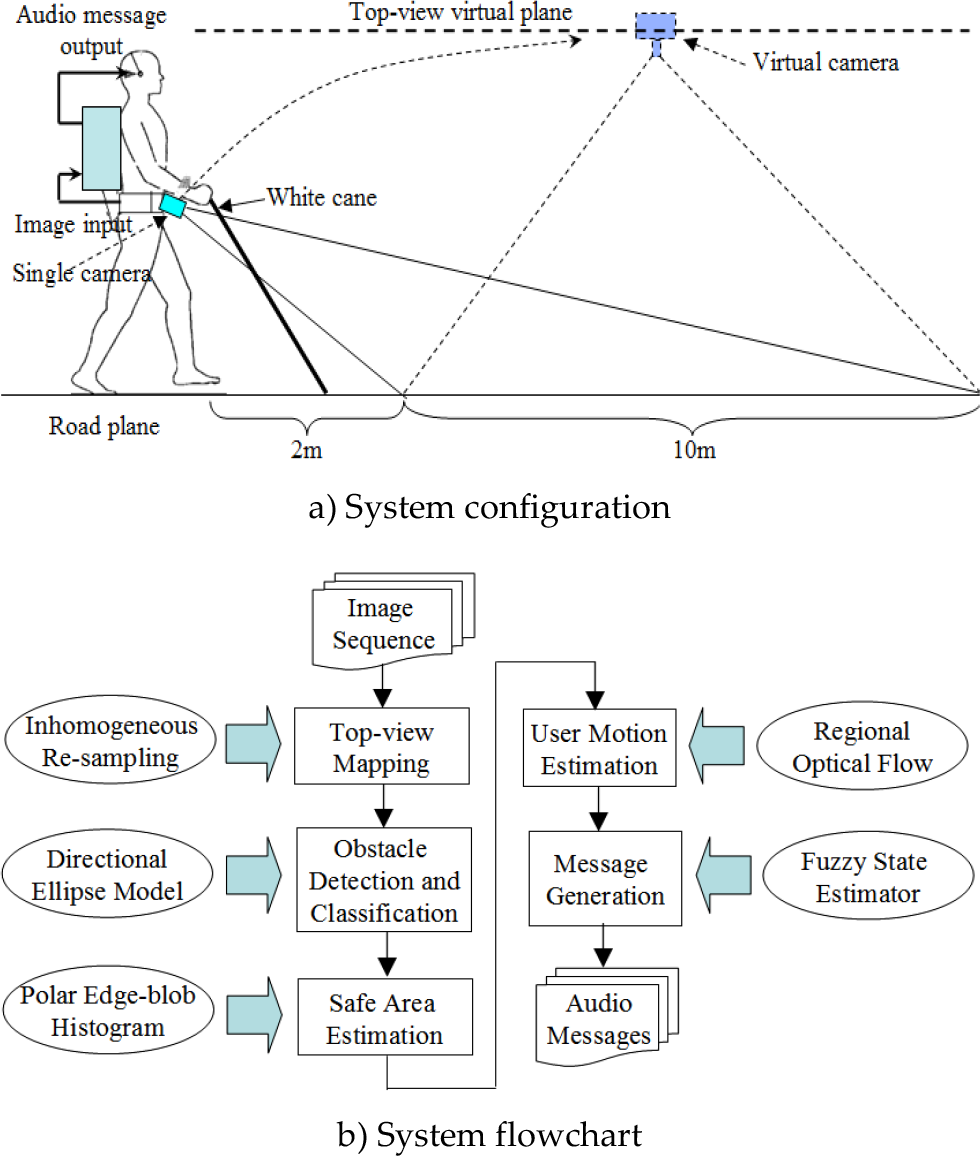
An overview of the system is illustrated in Figure 1. In the proposed system, a camera is attached to the blind user's waist and angled slightly downward towards the road in front. As shown in Figure 1a, the white cane still acts as a reliable tool covering a close range of up to 2 metres in front of the user, with the downward-looking camera acting as a complementary sensor covering a medium range of about 10 metres. With this configuration, the white cane can be used to detect ground-level obstacles and holes in the near field, while the camera looking a further distance ahead can provide useful information like safe walking direction and obstacle locations and numbers.
System overview
In contrast to Sainarayanan's method, which uses pixel-wise features, edge-based features are explored to discriminate obstacles from a complex road pavement background. By re-sampling the original image inhomogeneously and mapping it onto a top-view virtual plane, pavement edges in the near field are sub-sampled, while obstacle edges in the far field are over-sampled. Morphology filters are then used to enhance this inhomogeneous re-sampling effect on connectivity and scale of edges, so that enhanced obstacle edge-blobs can be distinguished. To further classify obstacles, a directional ellipse model is built for edge-blobs on the top-view plane. Finally, information regarding obstacles, safe area and user motion is converged at the message generation engine, where a fuzzy state estimator is designed to determine what types of messages should be generated and when to deliver them to the user.
Inhomogeneous Top-view Re-sampling and Mapping
Top-view mapping is an inhomogeneous re-sampling process that has been widely used in applications like lane detection, mainly for the purpose of road geometry recovery. Some researchers have also attempted obstacle detection on top-view images. The basic idea is to generate a difference image by associating two top-view images either spatially [11] with a stereo camera or temporally via a single camera [12]. On this difference image, planar patterns like road textures are removed, while high objects like vehicles are retained in the form of large clusters of non-zero pixels with a specific shape. While this approach is effective to detect vertical obstacles like vehicles on a highway, problems emerge when it comes to blind navigation in an urban environment. First, ground-level obstacles are removed on the difference image, which could be dangerous for the blind pedestrian. Second, due to the low-speed, forward-rolling motion of pedestrians, an obstacle's blob patterns may not be prominent enough to identify them against noise on a temporal correlated difference image. In this paper, rather than using a difference image, the effects of top-view re-sampling and mapping on obstacle edges are studied, and several useful properties are modelled for the identification of obstacle edges in background clutters. In this section, this re-sampling process is re-formulated in horizontal and vertical directions, and its effect on the scale and connectivity of edges is discussed.
The model of vertical direction re-sampling is illustrated in Figure 2a. In Figure 2a, Cr is the real camera centre with Sr as its image plane, while Cv is the virtual top-view camera centre with Sv as the virtual top-view plane. To figure out the re-sampling relationship between the Sr and Sv planes, the only parameters that are required are ϕ and θ. According to the geometrical description in Figure 2a, for each point Pv on the virtual top-view plane Sv, the corresponding sampling point Pr on the real image plane Sr can be calculated based on the common projection point Pg on the ground plane. As (1) shows, for each point i on the top-view plane, the corresponding sampling point h on the real image plane can be obtained:

Top-view re-sampling model

The model of horizontal re-sampling is illustrated in Figure 2b: the length of each row Wk in C r 's field of view on the ground plane can be calculated according to the triangular similarity; also, by comparing Wk with C v 's field of view on the ground plane the sampling ratio can be computed, as in (2):

Figure 3 shows the re-sampling graph in the vertical and horizontal directions. These graphs are obtained by applying (1) to an image with size 320×240, with the origin sets at the lower-left corner of the image plane. Figure 3a shows the re-sampling rate in the vertical direction. This indicates how many rows of the original image are encoded by each row of the top-view image: more than 1 means sub-sampling, while smaller than 1 means over-sampling. Figure 3b shows the horizontal re-sampling rate for each row of the top-view image, which represents how many pixels need to be jumped over to sample one pixel in each row of the original image. It turns out that the re-sampling rate decreases from the bottom to the top row.

Top-view re-sampling graph
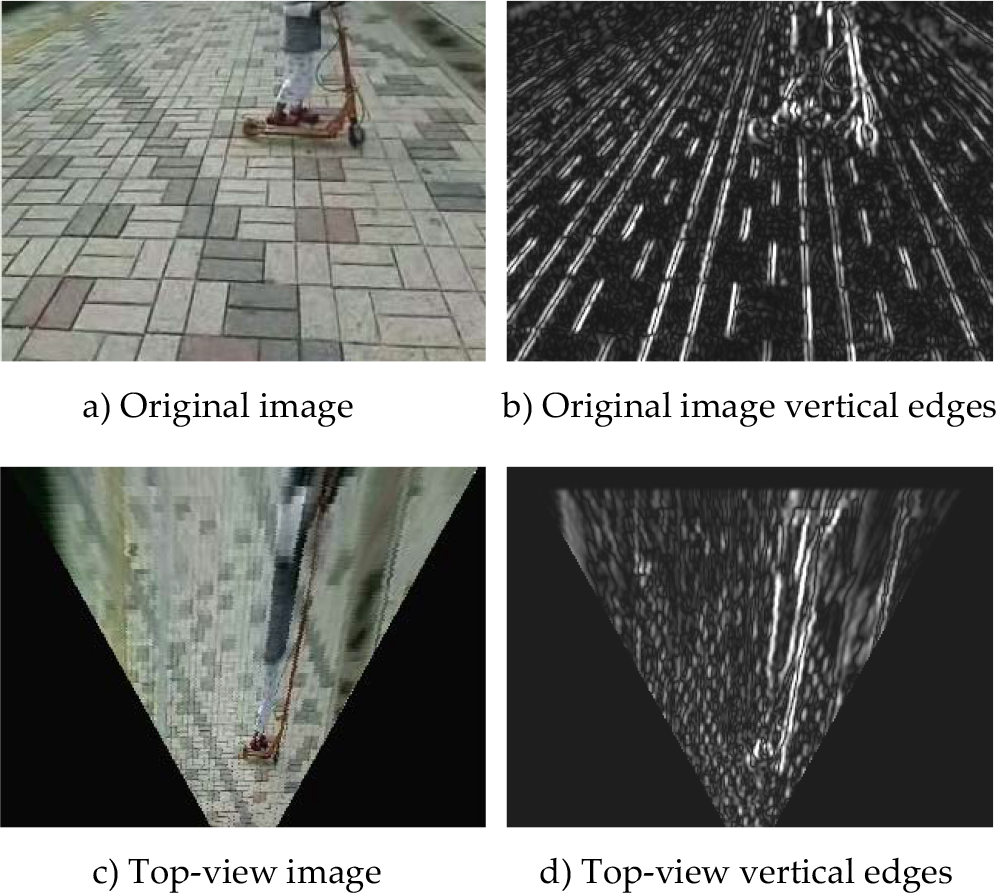
Figure 4 shows a comparison between the vertical edge map on an original image and a top-view image. On the original image edge map, it is very difficult to discriminate the obstacle edges because of the pavement edges. However, on the top-view edge map, the obstacle edges are enhanced by oversampling while the pavement edges are suppressed by sub-sampling.
Top-view re-sampling effect on vertical edges
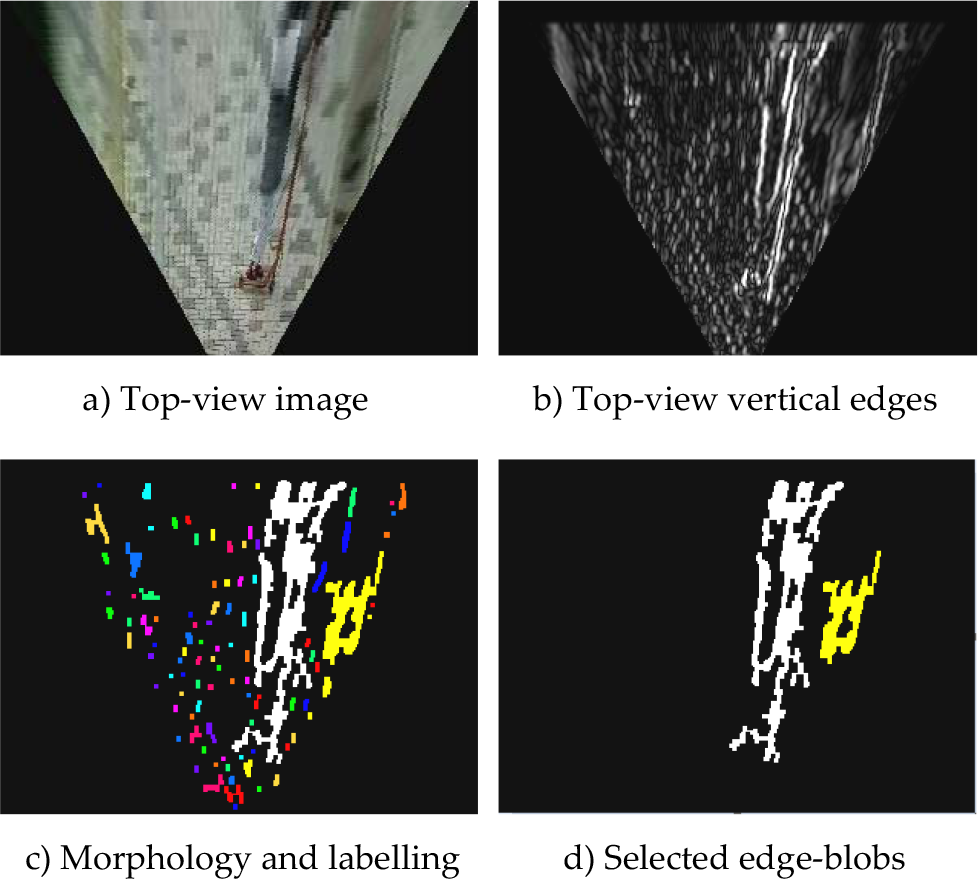
After top-view re-sampling has enhanced the obstacle edges in scale and connectivity, a combination of morphology operations and connected component analysis is used to extract edge-blobs with large size. These edge-blobs are regarded as candidate obstacle representations. On the top-view image, road texture is re-constructed so that sub-sampled pavement edges appear as small vertical segments with similar size. This makes it easy to remove those small edge segments using fixed-size morphological filters. Here, a 3×3 rectangular structure element is used to remove pavement edge segments with an opening operation, followed by a closing operation to fill the gaps. A connected component-labelling operation is then applied to group the connected foreground pixels into blobs. Blobs with size smaller than a pre-defined threshold are discarded. As shown in Figure 5c, many small edge-blobs from the pavement are eliminated. Finally, as shown in Figure 5d, only two major edge-blobs are selected, which correspond to possible obstacle regions. As mentioned in section 2.1, since top-view re-sampling sub-samples the original image in the horizontal direction, obstacle width will shrink in the top-view domain. This property makes it easier for edge-blobs to fill up the whole obstacle region in the top-view domain. Therefore, these edge-blobs can be used as a kind of obstacle representation on the top-view plane.
Edge-blob extraction
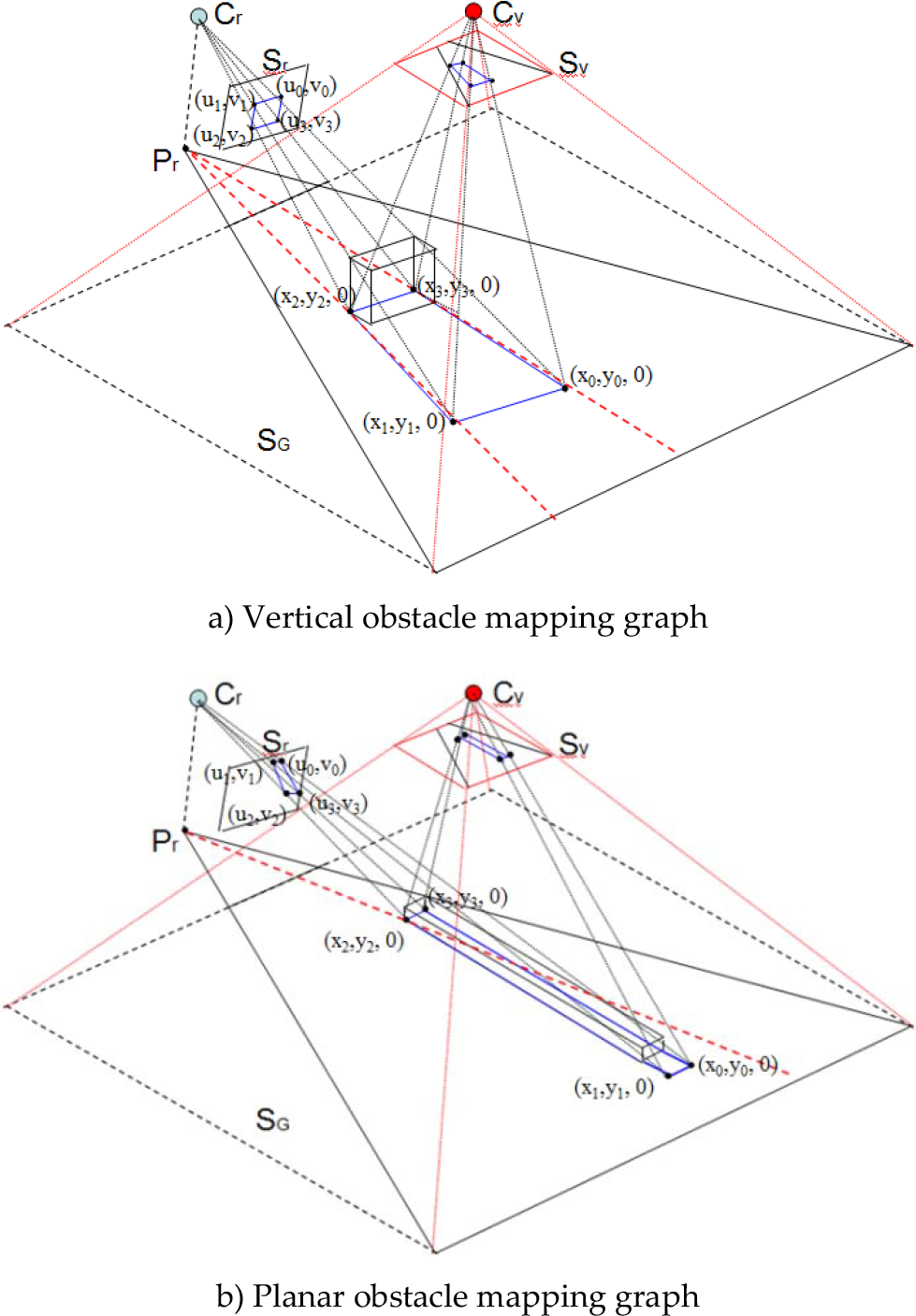
This paper proposes a directional ellipse model for discrimination of vertical and planar type obstacles, and the properties of the edge-blob feature on the top-view domain are further explored in this section. Vertical obstacles are defined here as obstacles that rise significantly above the road plane, like trees, poles, and other pedestrians. These vertical obstacles usually have vertical edges in the original-view domain. Planar obstacles are those lower obstacles that are close to the road plane, like road-side curbs and stairs; these obstacles usually have significant edges along the road direction in the original view. In the top-view domain, obstacles can also be characterized by their distinct edge orientations, although the edge orientation feature is different to that in the original view domain. This is illustrated in Figure 6: Cr is the real camera's optical centre and Sr is the real camera's image plane, while Cv is the top-view virtual camera's optical centre and Sv is the top-view virtual plane.
Mapping of obstacle to the top-view plane
In Figure 6a, a vertical obstacle is mapped to the Sr plane through central projection, with the vertical edges still appearing vertical. During the top-view mapping process, the obstacle's image on the Sr plane is mapped to the Sv plane, which is parallel to the ground plane SG. As a result, on the Sv plane, the horizontal edges of the obstacle still appear horizontal, but the vertical edges are stretched toward point Pr, which is the perpendicular projection of Cr on the ground. It can be observed that, through top-view mapping, vertical lines in the original image are mapped to lines passing through the same point in the top-view domain. This vertical line distortion can be partly explained by the inhomogeneous re-sampling process discussed in section 2.1; it can also be derived from an IPM (inverse perspective mapping) formula [11].
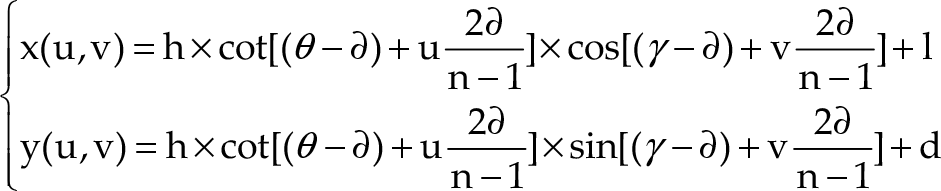
In (3), the point on the real image plane Sr is represented by (u, v), and the point on the ground plane SG is represented by (x, y, 0). Vertical lines on the image plane Sr can be represented by v = k, where k is a constant value; substituting this into (3), we can get (4), where c1 and c2 are constant terms. Finally, we can obtain (5), where (l. d) represents the camera centre's projection point Pr on the ground plane.


In Figure 6b, the shape of the planar obstacle will appear in a perspective effect on the original image plane Sr. However, when mapping to the top-view plane Sv, its original shape is retained. It can be observed that edges from planar obstacles lie along a different direction with respect to Pr's radial direction, which is represented by the red dash line on the SG plane. This distinct edge distribution feature can be used to discriminate vertical obstacles from planar ones in the top-view domain. Therefore, it is important to model obstacle edge orientation in a robust way. Here, an ellipse model is used to model edge-blobs that are extracted in the top-view domain.
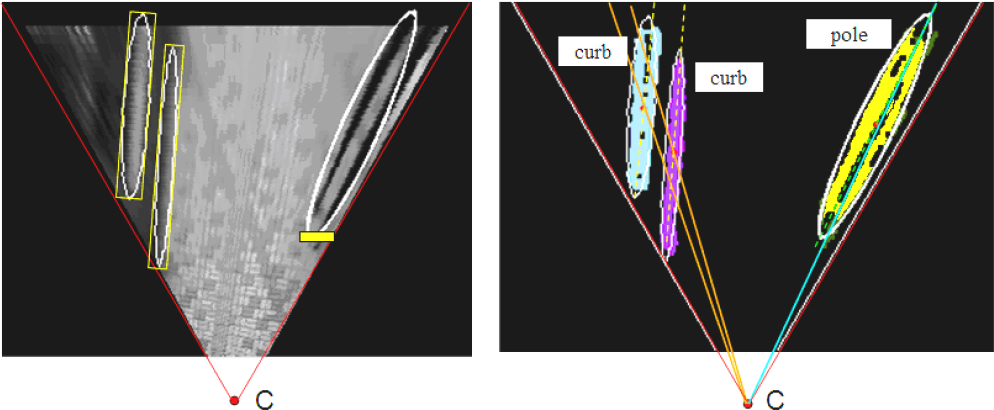
As Figure 7 shows, an ellipse is calculated to bound the points contained in each edge-blob. The ellipse can be specified by a set of geometric parameters –: <(x0, y0), Ra, Rb, θ > – which can be used to describe the spatial distribution of the blob points. The major axis orientation θ is calculated using central moment

Directional ellipse model definition

The directional ellipse model provides new region features for obstacle type classification. One of the most important features is defined as Deviation from Radial Orientations (DRO). In section 2.3, it has already been proved that, in the top-view domain, the vertical obstacle's edges should lie along the radial directions with respect to point Pr, while the planar obstacle's edges should deviate from this radial direction. In other words, the deviation of a fitted directional ellipse from the corresponding radial direction can be used to evaluate the likelihood of its becoming a vertical obstacle.

As illustrated in Figure 8, the radial direction of a given directional ellipse is defined as the direction of the line passing through the convergence point C and the centre point of this ellipse, while the direction of the ellipse itself is described by the direction of its major axis. The difference between an ellipse's radial direction and its major axis direction is defined as Deviation from Radial Orientations DRO. DRO measurement is calculated as in (7), where (x0i, y0i) is the centre point of ellipse i, (xc, yc) is the convergence point, and θi is ellipse i's major axis direction angle. To train a classifier based on this DRO feature, thousands of sample images are collected from different pedestrian path scenes. In the top-view domain, the directional ellipse fitting based on edge-blobs simplifies the labelling and learning process. The manual interaction is only required for the labelling of the directional ellipse as positive (vertical obstacles) or negative (planar obstacles). Here. vertical obstacle means any high obstacle with quasi-vertical edges, like trees, poles, and pedestrians, while planar obstacle means any ground-level obstacle with edges along the road, like road curbs, fence curbs, and stairs. The DRO values obtained from the training data are shown in Figure 9.
Deviation from radial orientations

DRO training set
It can be observed from Figure 9 that the DRO values of the two classes overlap due to noise data introduced at the ellipse-fitting stage. Therefore, a soft-margin SVM classifier is trained to deal with the noise. The classification function is expressed in (8): given a training data set D={(xi, yi), i=1…N}, where xi ∊R, yi∊{−1, 1}, a soft-margin decision plane can be calculated by minimizing the evaluation function in (9), where C is a cost parameter which tunes the trade-off between the size of the margin and the size of the error measured by


After the DRO values have been examined to classify obstacles into vertical and planar types, shape properties of the ellipse like anisometry, a = Ra/Rb, and bulkiness, b = πRaRb/S, are employed to further classify obstacles into four types, as shown in Figure 10.

Obstacle types classification
Poles and curbs are obstacles with a long and thin shape, with high anisometry and low bulkiness. Blocks and piles are obstacles with bulky shape, low anisometry and high bulkiness. Poles are thin vertical obstacles including pedestrians. Curbs are thin planar obstacles including road-side curbs and stairs. Blocks are large vertical obstacles like buildings or other large objects on the road, while piles correspond to bulky planar obstacles like bushes, big stones or holes. Another SVM classifier is trained to carry out this shape classification.
Polar Edge-blob Histogram
Based on the detected obstacles, a polar edge-blob histogram is constructed on the top-view image for the estimation of the safe walking area.
As shown in Figure 11c, on the edge-blob image, from the right boundary to the left boundary, radial directions (marked red dashes) are sampled with respect to the convergence point C. For each sampled radial direction, the number of edge-blob pixels that lie along this direction is counted. By accumulating all the sampled radial directions, a polar edge-blob histogram can be constructed as shown in Figure 11d. In the polar edge-blob histogram, the horizontal axis represents sampled radial directions in angles, and the vertical axis is the number of edge-blob pixels that lie along each sampled direction angle. The bins with high values indicate the directions where obstacles appear, while bins with zero values correspond to the directions where no obstacles exist. Therefore, the safe area should be estimated by the bins with zero values.
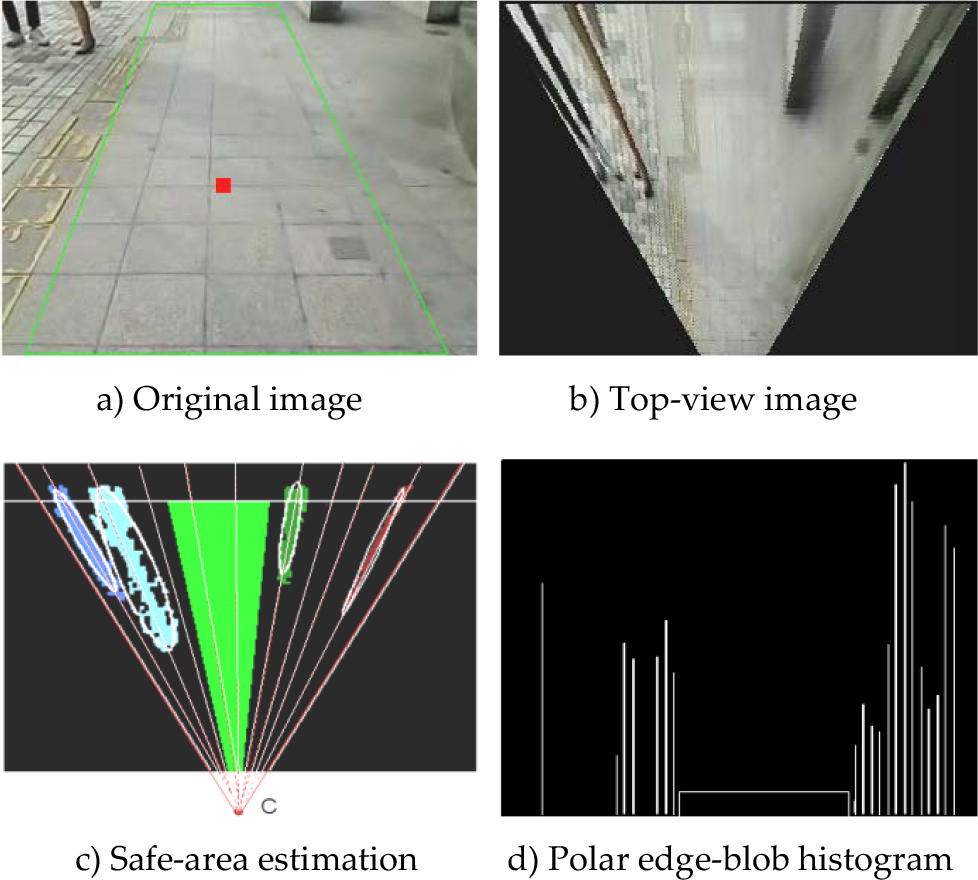
Safe-area estimation using polar edge-blob histogram
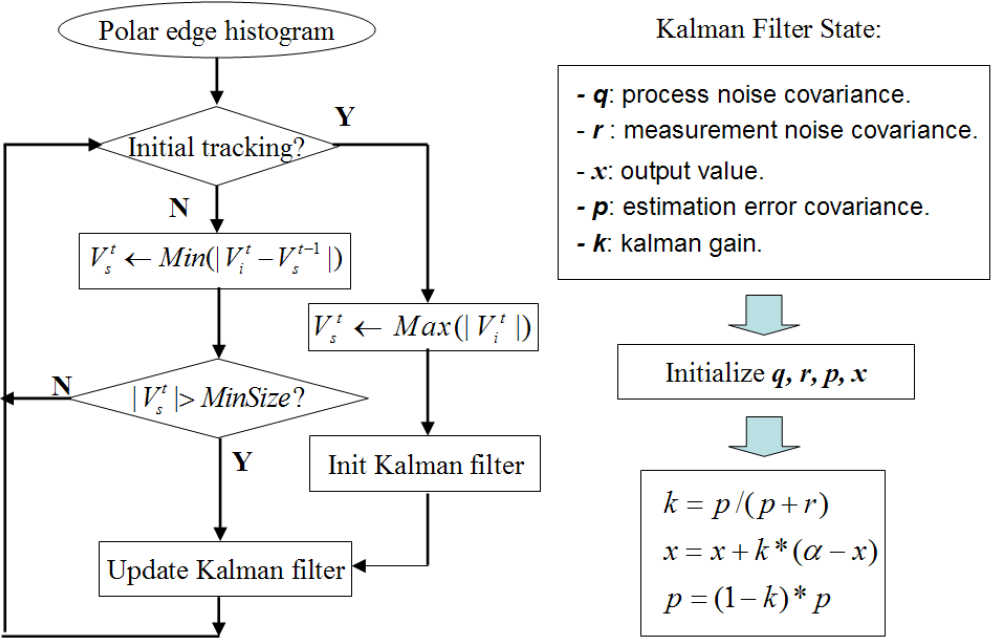
Since the camera is attached to the user's waist, the camera will show some swing motions due to the gait of the human body. These swing motions will appear as noise added to the safe area positions. To estimate the safe area more steadily, the largest valley position on the polar histogram should be tracked.
A flowchart of polar edge-blob histogram tracking is shown on the left side of Figure 12. For tracking initialization, consecutive zero-value bins in frame
Flowchart of polar histogram tracking
In addition to tracking on the polar edge-blob histogram, the polar angles of the safe-area boundaries in the top-view domain are also tracked by means of a Kalman filter. The tracking group Vts can be represented by two bounding direction angles: < αtl, αtr >, where αtl is the left bounding direction angle and αtr is the right bounding direction angle.
The blue curve in Figure 13 shows the measured value of αtr; this noisy value pattern is mainly caused by the camera's shaking motion with the user's rolling gait. The noise involved in this pattern can be approximated by Gaussian noise. Therefore, one-dimensional Kalman filters are used to find the stable estimation of < αtl, αtr >. The Kalman filter state variables are shown on the right of Figure 12. After initializing these state variables, the value of error covariance p and output value x are updated using the equations in Figure 12. The filtered output value of αtr is shown by the red curve in Figure 13.

Kalman filtering result
Since the camera is mounted on the waist of user, the camera's motion can be used as an approximation for the user's walking motion. In top-view image sequences, the movement of ground pixels can be regarded as an approximation of the user's walking motion projected on the top-view plane. As the ground pavement structure is reconstructed by top-view mapping, it would be very convenient to calculate the movement of ground pixels in the top-view domain. To calculate ground pixel movements, a KLT (Kanade-Lucas-Tomasi) tracker is used to track ground pixels through top-view image frames. As is shown in Figure 14, after obstacle edge-blobs are extracted, their corresponding directional-ellipse region can be cropped from the top-view image domain, so that only ground areas remains.

Ground pixel tracking
The KLT tracker is then applied to the ground area to select ground feature points and track them through image frames. The user's walking motion projected on the top-view plane can be decoupled into translational motion and rotational motion. Define

where

Guidance States Estimation
The message generation module works as a kind of human-machine interface between the guidance system and the blind user. The task of this module is to transform the information obtained from the image domain to the language domain, and deliver the right messages to the user at the right time. For the user feedback scheme, stereo sound and tactile arrays are also widely used. However, extensive training is required to enable the user to perceive the sound and vibration pattern. Verbal message feedback can provide semantic information in a more user-friendly way. Here, a message generation scheme using a fuzzy logic approach is proposed.
As shown in Figure 15c, the key idea of this message generation scheme is guidance states estimation. Here the guidance state is defined as a fuzzy variable,

Fuzzy instruction generation scheme
As Figure 15c shows, the guidance modes are determined by the combination of the state variables. However, the relationship between the state variables and guidance modes is rather vague. To deal with this vagueness, a fuzzy logic model is proposed here. Membership functions of fuzzy subsets are introduced to model the state variables. A bell-shape membership function is used, as defined in (12). The membership function
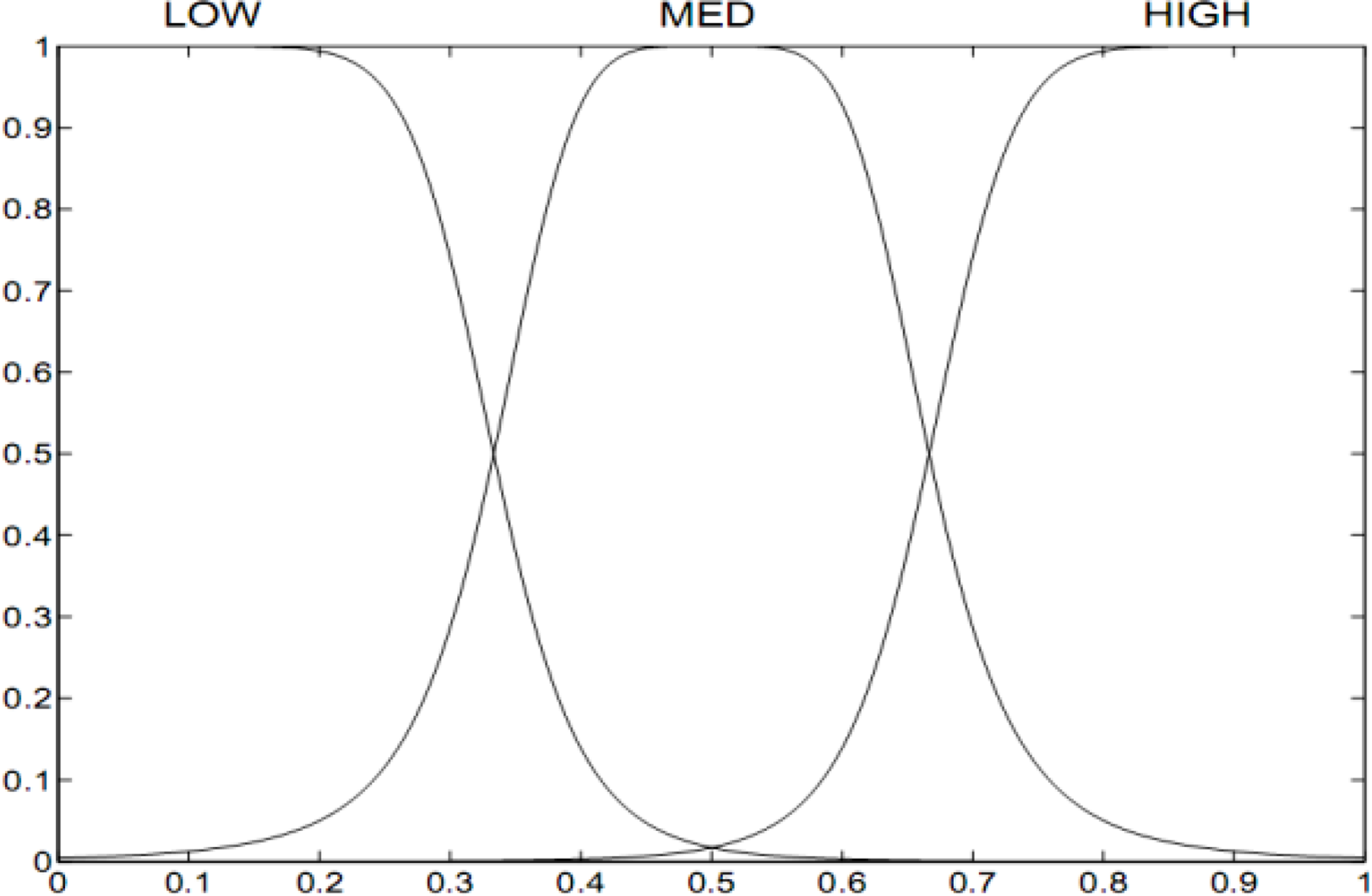
Membership functions of state variable

Multimodal information transformation


After introducing the membership functions of fuzzy subsets, linguistic variable terms can be used to describe the guidance process as follows: LOW is “low”, MED is “medium”, HIGH is “high”, S is “safe”, N is “normal” and D is “danger”. Then, a set of rules are defined as fuzzy conditional statements, for example: “If
Some fuzzy rules derived and used by the system

By applying the above monocular vision algorithms to the top-view image, three types of necessary information for guidance can be obtained: safe walking direction, obstacle positions, and user's walking motion. The next important step is to transform the information obtained from the image domain to the language domain, and deliver the verbal messages to the user in an appropriate manner.
The message generator works with the fuzzy state estimator discussed in the previous section. It determines the message sets that are most suitable to be delivered to the user in the current state, and filters out other less necessary messages. The filtering rules are defined as shown in Table 2. In the “Danger” state, a safe walking direction message must be acquired instantly, while in the other states it is more necessary to report obstacle positions in the surrounding environment in order for users to be able to maintain a safe walking direction by themselves.
Guidance Message Generation Rules

Guidance Message Generation Rules
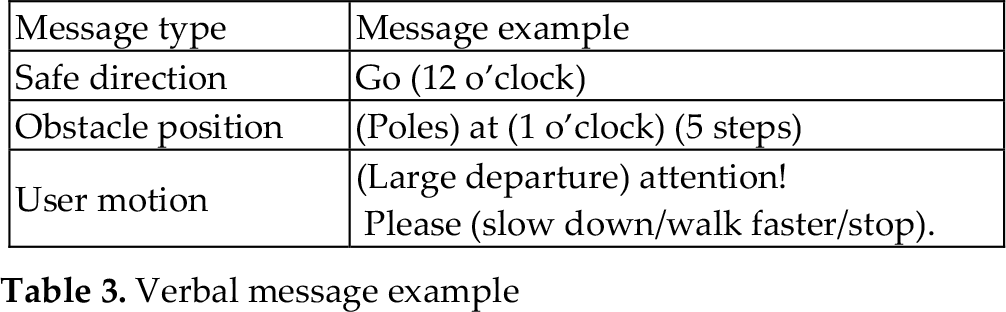
A message set example is shown in Table 3. The words in brackets are template words which can be changed according to the detection result. Object types are classified into vertical types (including poles and blocks) and planar types (including curbs and piles), as discussed in section 2.4. Rather than using metres to report distance, the number of average steps is used to enable more intuitive cognition. In the user motion set, the message “Large departure attention” is given when the user deviates too far from the safe direction. If user speed is too fast in danger mode, “Please slow down” will be prompted. On the other hand, if the user moves too slowly in safe mode, the system can also suggest that the user walks faster. If there are too many obstacles ahead, and insufficient safe space can be detected, the “stop” message may be delivered.
Verbal message example
As Figure 18 shows, clock-face directions are used to give direction messages. Clock-face directions are broadly accepted as a common way to indicate directions for blind people. The estimated free path is mapped from the top-view domain (Figure 16a) to the original-view domain (Figure 16b), which is divided by projecting the top-half clock-face area (10 o'clock ∼ 2 o'clock) onto the centre horizontal line in the original image space. The centre of the mapped free path on the centre line is defined as the safe direction indicator. The clock-face section into which it falls determines the safe direction to be suggested to the user. Detected obstacle directions are also delivered in this way after mapping to the original image.

Clock-face directions
Another important factor that affects guidance performance is the timing of guidance instructions. Here, guidance instructions are divided into “hard-timing” and “soft-timing” instructions, as shown in Table 4.
Instruction set timing property

Hard-timing instructions have high priority over soft-timing instructions, and must be delivered instantly whenever the safe direction changes. A soft-timer is defined as: T0 +τ·s, where T0 is an average interval between two delivered message sets. T0 is usually set to 5 seconds in the experiment. τis a weight concerning guidance states. Safe state will be assigned a large weight, while danger state has a small weight. Normal state will have a medium weight. s is user's walking speed. The termτ·s defines a flexible interval between delivered message sets.
The whole algorithm is implemented using C++ on a Windows platform. To test the performance of the algorithm, we attached a camera to a belt and fixed it to the user's waist, angled slightly downwards towards the road ahead of the user.
The camera captures images of the road, which are then processed by the system software, which runs on a laptop computer carried in the user's backpack. The generated messages are turned into a synthetic voice and delivered to the user via a loudspeaker. The prototype system is shown in Figure 19, and configuration of experimental platform is listed in Table 5.
Experimental platform configuration

Experimental platform configuration

Prototype system
The algorithm is tested on several outdoor pedestrian path scenes, with various obstacles and cluttered road surface. To evaluate obstacle detection performance, the test scenes are divided into three sets, as is shown in Figure 20 and Table 6. In each test set, 1000 frames are randomly sampled, with all the critical obstacle positions and types labelled manually as ground truth data. A true positive (TP) detection is defined to be such that the detection corresponds with an actual obstacle, and the deviation should not exceed 20% of the obstacle's size, otherwise it is considered as a false positive (FP), obstacle that is not detected is false negative (FN). Table 7 shows the detection results on three test sets.

Sample images from test scenes.
Test sets configurations

For a guidance system, it is very critical to control the false negative rate for sake of safety. Therefore, during testing, the algorithm parameters are tuned to achieve an acceptable TP rate while keeping FN rate as small as possible. Since the proposed algorithm relies on geometric distribution of edges on top-view domain, when strong background edges appear in similar radial patterns with that of obstacles on top-view, they may give rise to FP cases. For example, lane-mark paintings on the road may be falsely detected as curbs. Moreover, small planar obstacles in the near field may be sub-sampled heavily on top-view, which makes it difficult to discriminate with ground clutters. Therefore, small holes or stones on cluttered road surface may not be properly detected, which give rise to FN cases. In the test, open space set achieves a high TP rate of 94.6%, as this set involves mainly vertical obstacles like pedestrians, and less cluttered road surface. While in urban set, only 86% TP rate is achieved, due to highly cluttered road surface as well as many planar obstacles in small size.
Figure 21 shows the ROC curve for obstacle detection. For comparison, the method described in [13] using edge-blobs on the original view is implemented and tested on the urban test set. The ROC curves are generated by varying the obstacle edge-blob extraction threshold in both algorithms. It can be observed that the proposed method shows much better performance on a top-view image with complex background.

ROC curve of top-view and original-view methods
To further evaluate the proposed SVM classifiers for obstacle type classification, DRO and shape feature-based SVM classifiers are first trained using a training set containing 850 labelled obstacle types, and then applied to the test sets containing all the TP samples from Table 7. The results are shown in Table 8.
Detection results on different test sets

Average obstacle type confusion matrix
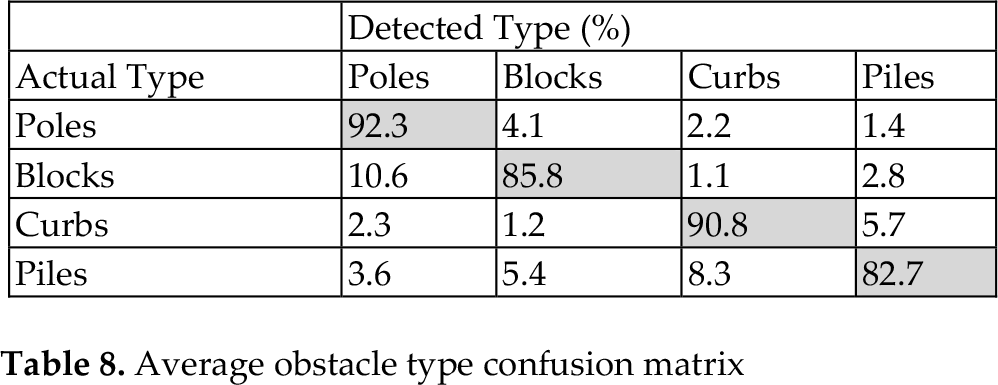
The confusion matrix shows that the major problem is how to distinguish bulky obstacles from thin ones. For example, “blocks” can be wrongly identified as “poles” (10.6%), and “piles” are incorrectly identified as “curbs” (8.3%). This is because, in urban scenes, one bulky obstacle may contain several isolated edges, resulting in several independent edge-blobs so that the bulky obstacle is split into several thin obstacles. The situation is similar when identifying thin obstacles from bulky ones. For example, when several pedestrians are very close to each other, their edge-blobs tend to merge into a single bulky one, which may result in an incorrect “block” identification. Despite the splitting and merging problems on edge-blobs, the distinguishing of vertical and planar types based on DRO features is more stable. For instance, “poles” are wrongly identified as “curbs” in only 2.2% of the cases, which shows the effect of the proposed DRO features in the top-view domain.
To test the verbal message generation scheme, a user walking trajectory is generated using the estimated safe direction and user's walking speed. This walking trajectory is then mapped to a top-view occupancy map generated using the obstacle detection algorithm. A segment of this synthesized map is shown in Figure 22, which is obtained from walking on an urban pedestrian pavement. The map is divided into 16 time slots: each slot corresponds to 5 seconds, which is the average time interval between delivered message sets. User's walking speed at each time slot is shown above the synthesized map, with estimated guidance state GS shown in the middle. The circles on the user's trajectory indicate the points where guidance messages are delivered. These points are indexed as 1 to 12 from left to right, and their corresponding message sets are listed in Table 9. It can be observed that hard-timing messages like safe directions are properly delivered at each transition point on the user trajectory. The fuzzy state estimator keeps track of the guidance state through each time slot. When the user enters a danger state with a high speed of 1.1 m/s, the system prompts “Please slow down” at point 1. When the user leaves the danger state and enters a normal state with a low speed of 0.8 m/s, the system prompts “You may walk faster” at point 4. These user motion messages are shown to be effective in adapting the user's walking speed according to different states.
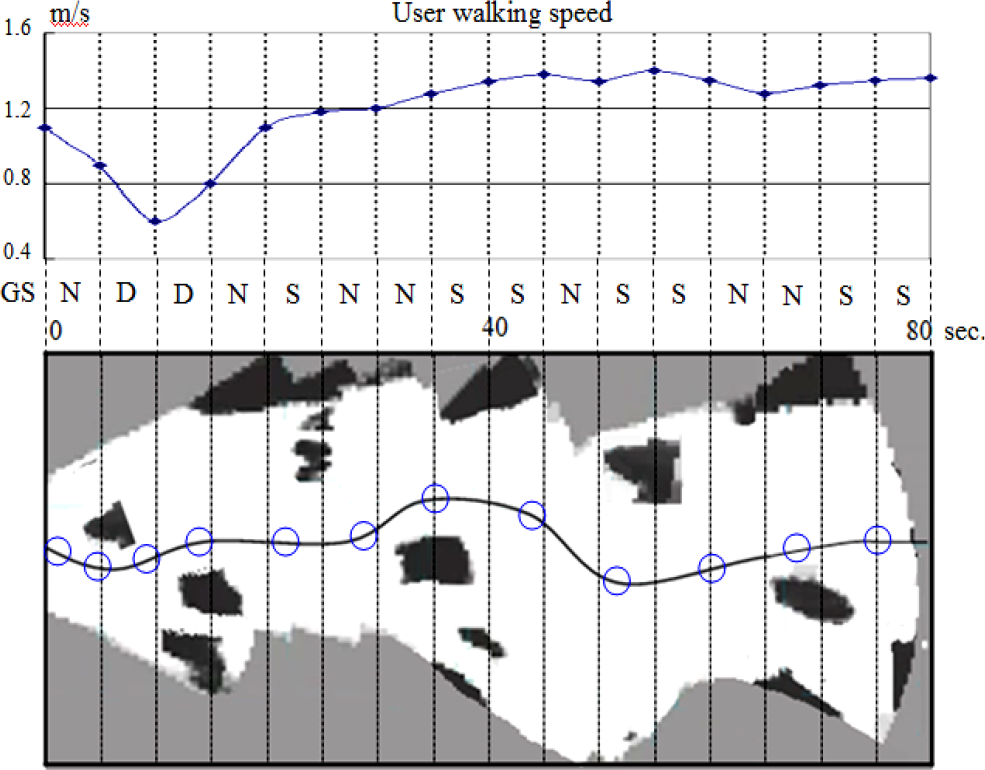
Simulation of user guidance
Delivered message sets.
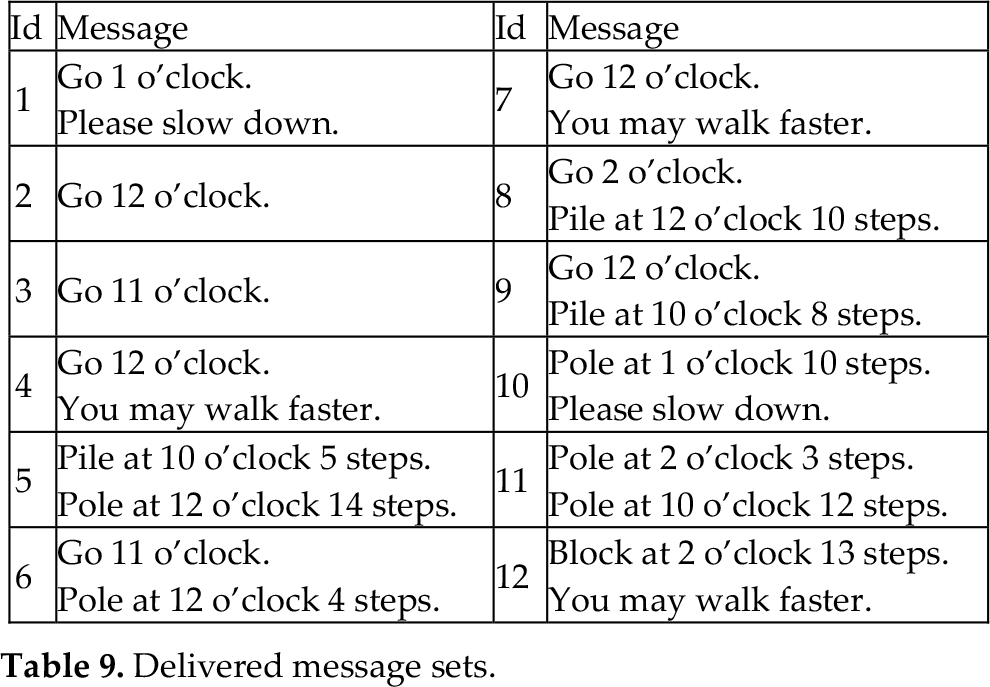
Soft-timing messages like those reporting obstacle positions follow the soft-timer, which is defined as: T0 +τ·s. It can be observed that the message points are not evenly distributed between each five-second time slot. In a danger state when user speed is low, the message points are prompted densely, while in a safe state when user speed is high, the message points are prompted sparsely.
Under the experimental platform configuration shown in Table 5, the average runtime performance values of the major functions are listed in Table 10. If the system runs in full function mode, it can achieve an average frame rate of 12 fps on our experimental platform.
Runtime performance

In our experiment, a blind pedestrian walks at a speed of around 0.5 m/s∼1.8 m/s on average, a little bit slower than a normal pedestrian. At this walking speed, three to five seconds would be an appropriate time interval for message delivery, while a 2 fps image processing speed would be enough to meet the runtime requirement. Therefore, the proposed algorithm can fully satisfy the real-time requirements for a general outdoor guidance task.
To evaluate the system's real guidance performance, field tests with four visually impaired people are conducted. The characteristics of the four test subjects are listed in Table 11. All of the subjects use white canes as their usual mobility aids; the purpose of this field test is to evaluate whether the use of the proposed system will reduce the time required for the user to negotiate an unfamiliar pedestrian pavement.
Participants' characteristics for field test

The field test areas are the same as the three test scenes shown in Figure 20 and Table 6. For each test scene, a test path 200 metres long is selected. The field test is carried out on the same day in the morning. The four test subjects are not familiar with the test paths selected. Before the real test starts, 30 minutes training is given to show the subjects how to use the system together with the white cane, and to explain the rules of the field test. In the field test, each subject is required to do two test runs on each path. For the first run, test subjects use both the guidance system and the white cane; for the second, they use only the white cane. In each test run, the time they take to pass along the 200-metre path is recorded. The data are presented in Figure 23.

Walking time for each subject in field test
As shown in Figure 23a, on the open-space path, the average time for the first run is 154 seconds, and for second run 185 seconds. The guidance system therefore improves the user's travelling speed by 17%. On the urban path, with narrower space and more obstacles, the use of the guidance system in the first run brings an even bigger improvement of 28.5% in the user's average travelling speed. The results show that our system leads to a reduction of almost 30% in the time taken to negotiate obstacles after only a few minutes training with the system.
On the urban test path, some low piles built to prevent illegal parking represented a very high threat for blind pedestrians using only the white cane. These situations are shown in Figure 24. In the second run on the urban path, the subjects equipped only with the white cane did spot the danger presented by these low piles. However, in the first run with the guidance system, these low piles could be detected much further ahead of the user, and verbal feedback given to help keep them away from those potential collision threats.

Low piles on urban path
After the field test, the test subjects all agreed that the system was capable of detecting and identifying obstacles effectively within a medium range, providing intuitive verbal feedback at appropriate times that was easy to interpret and act upon. A few limitations of the proposed system were also observed. The first limitation is the assumption of a flat road plane. The second is that the camera is required to be fixed on the user's body at a certain downward viewing angle, and camera parameters are required for top-view mapping.
This paper has presented a mono-vision-based guidance system for blind people in an outdoor environment. Its first contribution is in presenting an effective way to discriminate obstacles from a cluttered background by means of inhomogeneous top-view re-sampling. It has also presented the directional ellipse model and DRO feature in the top-view domain for obstacle type classification. For guidance, polar histogram tracking can make safe-area estimation more reliable; meanwhile, a fuzzy state estimator can provide valuable state information for message delivery. Our real field tests show that the described techniques allow the system to be usefully applied in real-time obstacle detection and guidance on complex-scene pedestrian pathways.
Footnotes
7. Acknowledgements
This research was supported by the Next-Generation Information Computing Development Programme through the National Research Foundation of Korea (NRF), funded by the Ministry of Education, Science and Technology (No. 2012M3C4A7032182).
This research was also supported by the Ministry of Science, ICT & Future Planning (MSIP), Korea, under the Information Technology Research Center (ITRC) support programme (NIPA-2013-H0301-13-2006), supervised by the National IT Industry Promotion Agency (NIPA).