




Abstract
In this work a pointing interface based on human gestures using a mobile phone accelerometer for interaction with robots is proposed. Through this interface the user can sketch stroke gestures on a computer screen using the cell phone accelerometer to make a selection and instruct a robot to perform a task. Selection, cancelation and movement, as well as some additional commands such as stop, pause and resume are supported. All the projected gestures are processed using known image analysis algorithms providing instantaneous position and path information. The proposed interface is experimentally evaluated and the results show that it is efficient, natural, robust and easy to use. It also provides asynchronous robot control with minimum operator effort and engagement.
1. Introduction
Robots are artificial objects capable of perceiving and acting in the physical world. Nowadays, due to technological advances, robots have become more powerful, intelligent and available. With the price of robots dropping they are being introduced into numerous and various areas and applications, ranging from common domains to highly complex and uncertain environments and from relatively safe to highly dangerous environments.
In many cases the robots make up a team with other robots and/or humans and need to interact with each other. In these application scenarios the robots very often necessitate the human operator's expertise and intelligence which are communicated to them in different forms.
Therefore, contemporary robotics demands interface devices that are accurate, natural and easy to use, ubiquitous and inexpensive. As robotics becomes more sophisticated, the users of the apparatus are likely to become less skilled, thus imposing additional importance on the easiness of use of the interface device.
Various forms of human-robot interface have been proposed so far. Common solutions for interacting with robots use a Graphical User Interface (GUI) where the user views commands and often introduces commands through touch screen, joystick, mouse and/or keyboards of different kinds [1, 2]. Frequently these devices are local and wired to the robot. Moreover, with these kinds of interface the operator is constantly giving direct low-level commands, which is limiting in applications where more abstract instructions and greater robot autonomy are required.
To make robot control as-autonomous-as possible, other high-level control approaches, which include hand gestures [3], speech commands [4] and also Wiimote (Wii remote)[5, 6] have been proposed.
In [7] smart brain-computer interfaces are proposed for effective human-exoskeleton interaction in stroke rehabilitation tasks. A natural interface based on body language movements processed via a 3D camera is described in [8].
However, all these high-level interfaces are equivocal in many cases and lack robustness for practical use. Therefore, we have considered pointing devices as a powerful option for high-level robot control.
In [9] a human-robot interface based on a laser pointer attached to the head is presented. A mobile robot then follows the laser spot projected on the floor. In [10] and [11] a laser pointer interface applied in an indoor environment has been proposed. Here it was used to point to an object that should be picked up by the mobile robot or to point to a button that should be pushed by the robot.
In [12] a sketching interface on a tablet PC which is projected on the floor with a top-down camera is proposed. A vision based system composed of ceiling mounted cameras proposed in [13], was used to track a laser pointer as well as to recognize gestures corresponding to high level commands for a vacuum robot.
In our work we are proposing a pointing interface based on human gestures using a mobile phone accelerometer for interaction with robots. This idea is also motivated by current technological trends. Namely, according to ITU (International Telecommunication Union) statistics [14], cell phone use has increased to over forty-five hundred million users worldwide and the popularity rate of mobile phones has exceeded more than 90 percent in developed countries. The ratio of converged mobile phones in the worldwide mobile phone market has risen to 16 percent and is estimated to reach 37 percent in 2014 [15]. Consequently, mobile services have become more and more important. Moreover, the current generations of mobile phones are being developed in the same manner as personal computers. With integrated cameras, fast processors, full colour displays, possibilities for wireless communication and embedded accelerometers, mobile phones have been transformed into ideal interfaces and command devices.
Through this interface a user can sketch stroke gestures on a computer screen using the cell phone accelerometer to make a selection and instruct a robot to perform a task. Selection, cancelation, movement as well as some additional commands such as stop, pause and resume are all supported. All the projected gestures are processed using known image analysis algorithms, providing instantaneous position and path information. The proposed interface is experimentally evaluated and the results show that it is efficient, natural, robust and easy to use. It also provides asynchronous robot control with minimum operator effort and engagement.
2. Cell phone pointing interface description
The main idea behind the proposed cell phone pointing interface is to use a cell phone to point to a certain point and to draw arbitrary forms on a computer monitor which will be simultaneously projected into the environment via a projector connected to it, in order to point and mark objects placed on the floor. Most of the current solutions require using finger drag and drop actions over the cell phone's screen to draw on the computer screen. Instead of this, we are proposing the use of natural hand gestures with the cell phone placed horizontally in the hand to perform the pointing and drawing tasks.
The interface is composed of two Java-based applications: a server – working on the computer that reads the mobile device's movements over a common WiFi network and translates them into real-time drawings. These movements are transmitted by a client application working on the cell phone.
The phase of gesture processing is composed of three main steps:
After the analysis of multiple data sets it was determined that 100 samples per second was a satisfactory sampling rate. Moreover, this is half of the standard mouse delay. To determine the value at the desired sample time a linear interpolation between two neighbouring (one before and one after) samples obtained by the device was used. Here nL is the number of points used “to the left” of a data point i, i.e., earlier than it, while nR is the number used to the right, i.e., later. To integrate the measured acceleration into a change in position along each of the axes the following equation was used:
where the constant Kx is a normalization constant related to the desired interface resolution. Using Verlet integration, we would approximate the integral of the acceleration to the second degree. The above equation will be applied just in the case when the acceleration signal is larger than a predefined threshold value TH. TH is the minimum absolute signal value to be recognised as a valid movement along each of the axes. The obtained planar data are finally send to the projector and projected to the environment. The sequence diagram of the proposed interface is presented in Figure 1.


Sequence diagram describing the cell phone pointing interface.
3. Evaluation of the proposed cell phone pointing interface
3.1 Evaluation methodology
To evaluate the efficiency of the proposed interface in pointing and trajectory based tasks two kinds of experiments were conducted. The first one was dedicated to the “target pointing” task and aimed to derive a quantitative model for predicting its difficulty. The second experiment, a “tunnel steering” task aimed to describe the dependency between movement time and continuous constraint in a task of steering along a given trajectory. In the first case Fitts' law [16] and in the latter the Accot-Zhai [17] steering law were applied.
The experiment included two sessions for each task: a practice session and a measurement session. The practice session lasted until participants reached a satisfactory level of experience in working with the interface.
Overall 10 subjects, 5 male and 5 female were involved in the experiments. All of them performed both tasks. The participants ranged in age from 19 to 24. All participants were students at the Faculty of Computer Science, University Goce Delcev – Stip. Each of the participants used his/her preferred hand.
In the first experiment we used the experimental setup shown in Figure 2 to calculate the time necessary to move the pointer (MT) and select a target of width (W) which is placed at a distance (A) according to Fitts' law using the modification proposed by MacKenzie [18] and expressed by Equation (3).
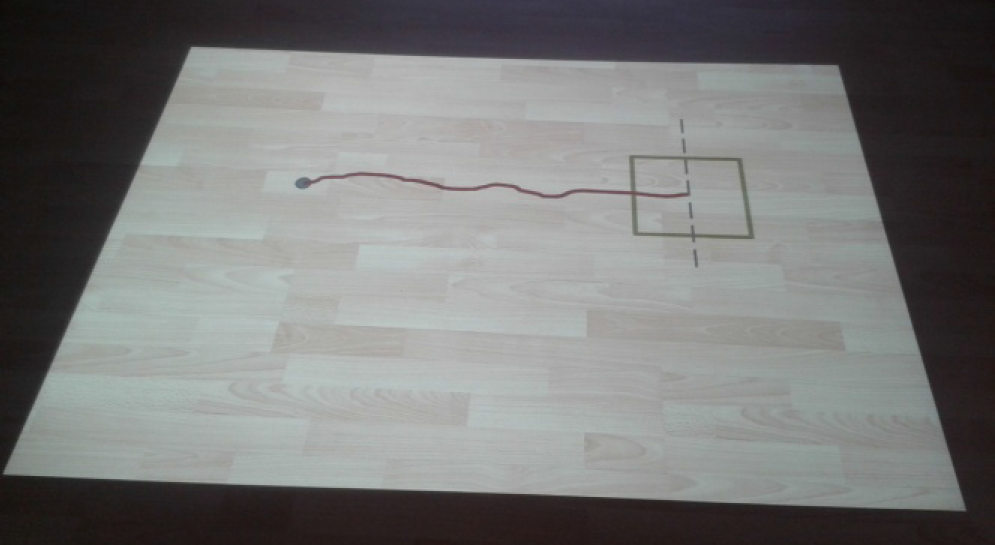
Measurement setup to test the pointing capabilities

Where MT is the movement time; A – the distance to move; W – the width of the target region within which the move terminates; a and b are empirically determined regression coefficients (a, represents the intercept and b, the slope of the line – the inherent speed of the device). The factor log2(A/W + 1), called the index of difficulty (ID), describes the difficulty to achieve the task: the greater the ID, the more difficult the task.
In the second experiment, the participants were asked to steer the pointer using the mobile phone inside a two-dimensional straight tunnel with constraints only at the ends. The movement was performed, as illustrated in Figure 3.
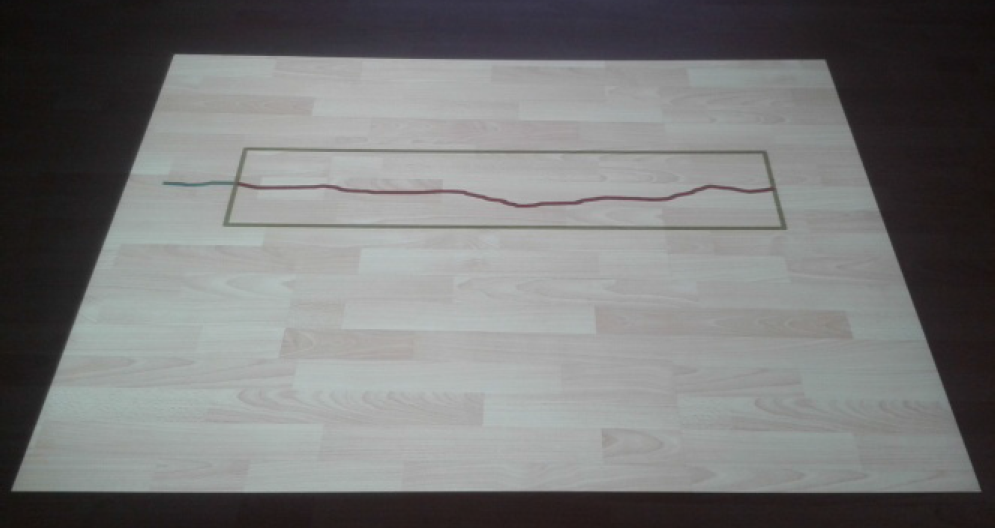
Measurement setup to test the steering capabilities
They were asked to pass the left end of the tunnel and then to reach the right one as quickly as possible.
At the beginning of each trial, a rectangle with a green line was presented on the floor. After issuing a command for steering, the subject began to draw a blue line on the screen, showing the pointer trajectory. When the pointer crossed the left end of the tunnel, the line turned red and the time started to be recorded. When the pointer crossed the right end of the tunnel the time measurement was stopped. If the tunnel side lines were crossed by the pointer a sound signal was emitted and the trial was classified as erroneous. Participants were asked to minimize errors.
The movement time between the two tunnel ends was recorded and analysed. In this case the Accot-Zhai steering law was applied as a predictive model for human movement (Equation 4):

where MT is the average time to navigate the path, C is the path parameterized by s, W(s) is the width of the path at s and a and b are experimentally obtained constants. In the case of a straight tunnel the formula is simplified:

In this case the index of difficulty is expressed as ID=A/W.
3.2 Results
Regression was used to generate the Fitts' Law coefficients a and b for the pointing interface. For this purpose two independent variables were considered: the distance from the target (A = 580, 650 and 725 mm) and the objects' width (W = 70, 145, 220, 290, 360, 435, 510 and 580 mm). For each pair of values each of the participants performed 5 tests and the results were recorded and aggregated. The data and the line obtained with linear regression are presented in Figure 4.

Scatter-plot of the MT-ID relationship for pointing task
In the second experiment two independent variables were considered: the tunnel length (A = 185, 370, 740 and 1480 mm) and path width (W = 25, 50 and 100 mm). The twelve conditions were presented in a random order and for each pair of values each of the participants performed 5 tests. For each of the twelve conditions, the results were recorded and aggregated. The data are plotted on a scatterplot and a linear regression was performed (Figure 5).
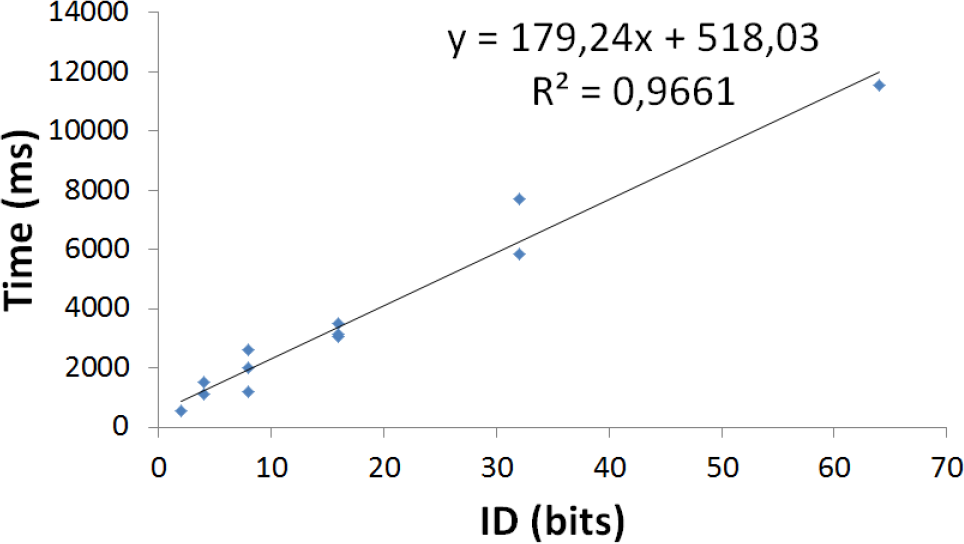
Scatter-plot of the MT-ID relationship
As it can be observed the hypothesized model can be successfully applied in describing the difficulty of the task. Considering successfully completed trials only, the regression analyses, gave:

The average error rate is 17% and it increases as the task become more difficult.
An extremely strong correlation was found to exist between movement time and the index of difficulty in both tasks. The R2 values were 0.861 and 0.9661 in both cases respectively. Therefore, these findings indicate that Fitts' Law and the Accot-Zhai steering law are highly accurate predictors of movement time for both interfaces.
On the other hand, when performing a task based on practice trials, people's speed improved. Learning usually follows a power function, which means that people learn at a higher rate in the beginning while the curve flattens out over time [19].

where T1 stands for the time necessary to complete the task in the first trial, TN the time necessary to complete the task in the Nth trial, N is the trial number and α is an empirically determined coefficient.
To verify user skill acquisition using the proposed cell phone interface in pointing tasks, five random participants without previous experience with the proposed interface were chosen. They were asked to point inside a target object with the width of 45mm starting from a point which is 580mm distant from the object. The pointing task was performed 20times by each of the participants and the averaged results for each trial are shown in Figure 6.

Power law of practice for pointing task
The results show an almost perfect fit with the power law of practice formula, with α=0.4. One can easily observe that the largest improvements in speed are made during the very first trials. Therefore, we should be careful with generalizing timing results from first-time users. The results are also useful to reach a conclusion regarding the number of trials after which there is no more significant learning. In our case for the given task it was determined that it corresponds to trial number 13.
4. Laboratory environment description
4.1 Experimental setup
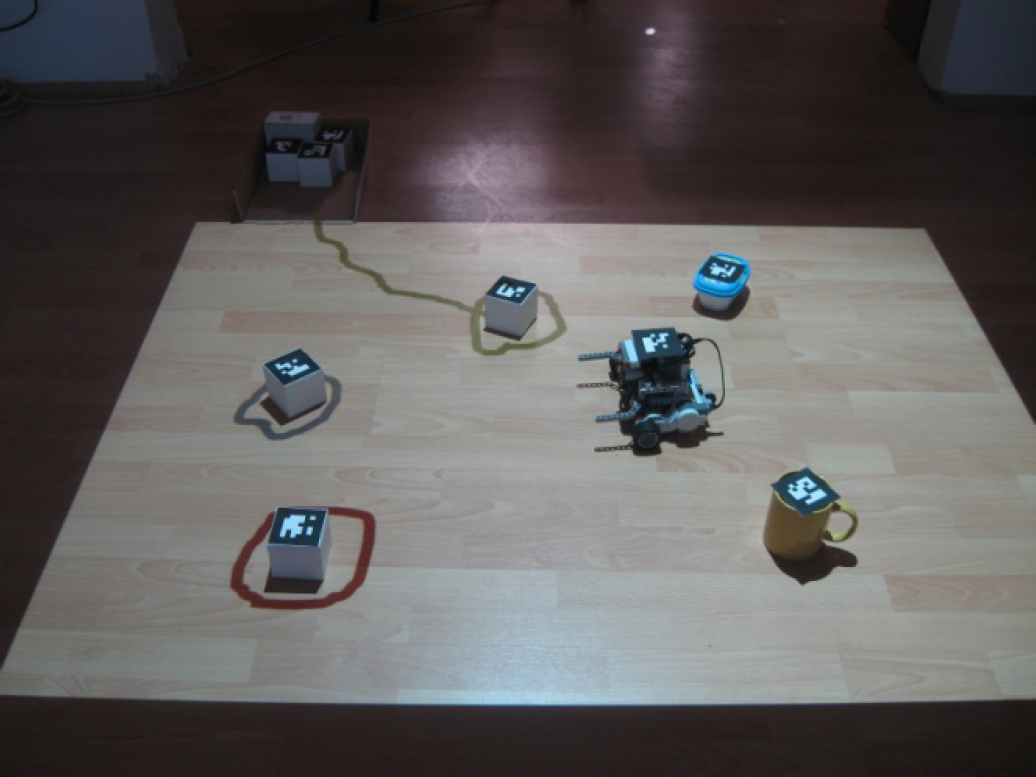
For experimental verification of the proposed interface a simple laboratory experimental setup was created. It is composed of two ceiling mounted 2.4GHz colour cameras, speakers, a MX613ST Benq Projector and one server computer. The cameras are fixed in such a way as to capture entirely the 2.5m x 1.8m test bed area. The speakers are used to provide audio feedback for the user. The projector is used to project the user gestures on the floor. Two computers connected to each other via WI-FI router are also used in the proposed setup. The first one is a robot server aimed for robot control, object tracking, command recognition and to generate audio-visual feedback for the user. The second computer is the command server used to transform the mobile phone stroke gesture actions into sketches and project them into the environment. The robot is connected to the robot server via Bluetooth.
A schematic representation of the experimental setup is presented in Figure 7 and a photo of the experimental working environment is shown in Figure 8.
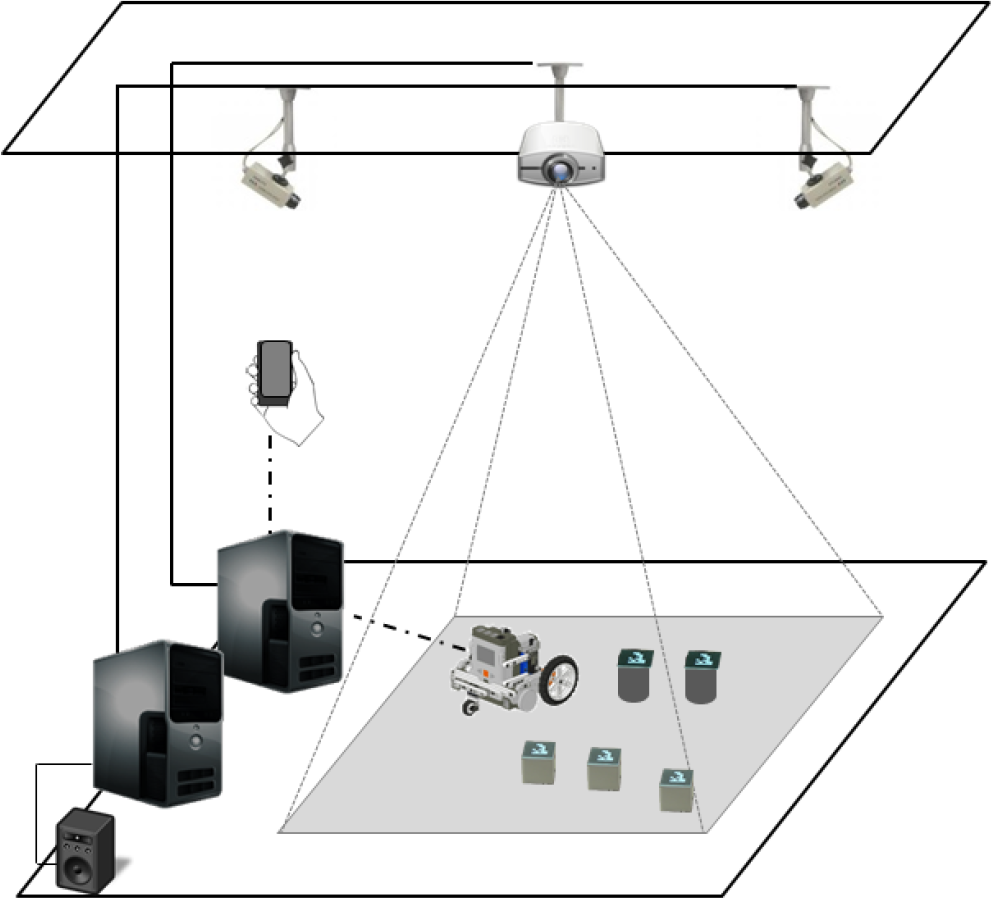
Experimental hardware setup

Experimental working environment
An LG P500 Optimus mobile phone with 600MHz CPU, 2GB RAM and Android OS (Froyo) is used as a pointing device. A Lego Mindstorms NTX 2.0 kit is used to construct a simple wheeled differential drive test robot. It has two powered wheels and one caster wheel for balance. It is mechanically simple with the ability to turn on the spot. It is equipped with colour and ultrasound sensors to enable environment sensing as well as special add-ons for pushing objects (Figure 9).

Constructed robot
This experimental laboratory setup supports various robot tasks performed by pushing objects. All the tasks regardless of whether they mean delivering, collecting or trashing movable objects could be described by the following common phases: object selection using the cell phone pointing interface, high-level command issuing by the operator, command execution (moving the objects) by the robot.
4.2 Gesture commands
To make the robot perform its basic tasks using the cell phone pointing interface, a library of three types of shapes (gestures) was defined. They are explained in the following:
Selection and movement gestures
When the interface is in selection mode it can be used to select a single or multiple objects by surrounding them with a closed shape. After completing a task all the shapes related to it are automatically cancelled. Cancelation actions can automatically stop the robot's current tasks and movements.

Pre-defined interface commands
5. Robot control architecture
The proposed control architecture of the robot is presented in Figure 12 and it is composed of several modules.

Control architecture
Considering the limited processing capacity of the Lego Brick microcontroller, it has been chosen to deploy some of the modules responsible for executing the control tasks that require greater processing performance on the robot server and other modules on the robot microcontroller.
To establish communication between the robot server and the robot as well as data exchange a Bluetooth wireless communication channel was used.
This kind of architecture, compiling and the deployment of new versions of control modules to the robot can also be accomplished using the robot server. The robot server can also start and stop different control programs previously stored in the robot microcontroller.
Since we are concerned about a 2D robot and object motion tracking on the floor, vision-based tag identification (using 2D markers) for robot and object tracking was used.
Using the two ceiling mounted cameras the ID's and positions of the robot and the objects as well as their orientation is captured. Moreover the gesture commands issued by the cell phone pointer interface and projected on the floor are captured and recognized by the same vision system. The algorithms presented in [20] and [21] were adopted for gestures recognition. Upon command recognition an audio notification to the user is generated via the notification module. Different audio patterns are associated with different commands.
The role of cognitive-level controller is to support the robot's goal-oriented behaviour. This is accomplished by setting task specific parameters. The map and path planning module is responsible for permanent environment map construction and global robot behaviour planning. The reactive-level controller is responsible for low-level behaviour of the robot as well as for environment perception. Based on the current sensor readings and the robot's state information this module computes the target values of the robot's actuators. Therefore a wide range of activities can be performed, e.g. obstacle and collision avoidance, pre-defined movements and object pushing. To accomplish the object pushing operation, the mapping and path planning module creates a path, determines the approaching orientation of the robot to the object and sends low-level control commands to drive it to the target location. The lowest level of control is performed through the robot hardware module. It is responsible for reading the sensor data and driving the actuators.
6. Evaluation of the human – robot interaction using the proposed interface
To evaluate the human-robot interaction using the proposed cell phone pointing interface the experimental environment described above was used and 30 novice participants were invited (11 females, 19 male; age range: 21 to 32 years old, mean: 25, none of them disabled).
The following describes the methodology of the experimental evaluation study:
The experimenter explains the aims of this study and user tasks to the participant. They are also given brief instructions on how the cell phone pointing interface works and basic robot characteristics.
Each participant receives a user's manual.
After the participants have read the user's manual, the experimenter starts a trial session. To get familiar with the interface device they are given the chance to perform 13 trials and to draw a line inside a tunnel projected on the floor using the cell phone.
After the trial session the experimenter conducts interviews with the participants.
Two important questions are raised:
Five of the participants complained that the cell phone pointer is too sensitive. Upon agreement with the whole experimental group we have diminish its sensitivity by adjusting the constant K in the Equation 2.
Three participants suggested using the XY plane of the cell phone accelerometer to draw the line, because they find it more natural. This suggestion was taken into consideration and the client application (running on the cell phone) was modified in such a way that the participant can choose the phone orientation for pointing and drawing tasks.
At the end of this experimental study each participant is given the following task to accomplish using the given interface and the described experimental environment: Using the given cell phone pointing interface, mark four of the carton boxes placed in the working environment and instruct the robot to move them into a given collecting box, avoiding the obstacles. The task should be completed in the shortest possible time. Since it was a controlled experiment, the same environment was reproduced for each of the participants.
In all cases the following metrics [22] were calculated:
Task Effectiveness (TE) – this metric is a measure of how well a task is being accomplished by the human-robot team. For this purpose we have measured the time from the initiation of the task until the last cube is placed in the box.
Neglect tolerance – this is a metric for measuring the autonomy of a robot. The amount of time that a human can ignore a robot. In our case this is equivalent to placing the robot, giving the instructions and measuring the time before the robot stops.
Robot Attention Demand (RAD) – this metric is a measure of how much time or what fraction of the total task time the user must spend interacting with the robot. It is calculated according to the following equation:

where IE, denoting the interaction effort, is a key component in our attempts to improve human-robot interaction.
Free Time (FT) – this metric represents the amount of free time during which the user is not interacting with the robot. It is calculated according to the following equation:

The results of the experiment have shown that the task was performed successfully by all the participants. All the metrics were applied to the tasks performed by each of the users and then the results were averaged. The averaged results are presented in the table below.
HRI metrics

Moreover, at the end of the experiment all users were asked to fill in a questionnaire with 5 questions regarding their experience with the proposed cell phone pointing interface for robot control tasks. The opinions of users were rated using a 5-point Likert scale (5 for strongly agree; 1 for strongly disagree) for evaluation. The results are presented in the table below.
User opinions regarding the proposed interface for robot control tasks

7. Conclusion and future work
In this work a pointing interface based on human gestures using a mobile phone accelerometer has been proposed. First its performance in pointing and drawing tasks was experimentally evaluated. The results have revealed its accuracy, low error rate and ease of use. It was then experimentally tested in robot control tasks. The results of the evaluation have confirmed the low robot attention demand i.e. its effectiveness and low interaction effort required by the user.
During the evaluation a few suggestions from the users emerged. They have been implemented and the interface has been made more modular.
The proposed interface has been highly accepted even by non-robotic-expert users for interaction and they also found it very natural and useful in everyday robot applications.
We also believe that this interface could be useful for other robotic and non-robotic applications.
In the future we plan to develop a methodology based on the proposed interface for multiple robot control by a single user and multi-user control of a single robot, as well as to include markerless object and robot recognition and tracking.