




Abstract
This paper presents Casual Learn, an application that proposes ubiquitous learning tasks about Cultural Heritage. Casual Learn exploits a dataset of 10,000 contextualized learning tasks that were semiautomatically generated out of open data from the Web. Casual Learn offers these tasks to learners according to their physical location. For example, it may suggest describing the characteristics of the Gothic style when passing by a Gothic Cathedral. Additionally, Casual Learn has an interactive mode where learners can geo-search the tasks available. Casual Learn has been successfully used to support three pilot studies in two secondary-school institutions. It has also been awarded by the regional government and an international research conference. This made Casual Learn to appear in several regional newspapers, radios, and TV channels.
Introduction
During the last 15 years, an increasing amount of Cultural Heritage data is available on the Web [14]. Data publishers range from public administrations to foundations, NGOs, or companies. They offer geospatial data about monuments and historical sites, thus relating them with their physical locations [19]. Part of this data has been exploited by third parties for supporting the discovery of information [8], data visualization, or serendipitously offering new knowledge to their users [14].
A few learning applications exploit geolocated Cultural Heritage data for learning purposes [9,17,25]. They are typically mobile applications that offer information retrieved from the Web of Data according to the learner’s geoposition. This is the ubiquitous learning approach [12,16], in which learners obtain guidance or meaningful materials based on their real-life context. However, the pedagogical support offered by these applications is restricted, as they limit their functionality to offering textual information. Furthermore, this support is not related to the learners’ formal education. We envision going beyond these limitations by offering learners a set of higher-order thinking tasks related to their learning curricula and to Cultural Heritage sites. This type of tasks is needed, as meaningful ubiquitous learning processes require learners an active role when perceiving, exploring, solving problems, or interacting with the environment [16].
Following this aim, in our previous work [24] we created contextualized learning tasks from Cultural Heritage Linked Open Data. Very briefly, we gathered Open Data about Cultural Heritage repositories in the Semantic Web and we applied a set of templates with pedagogically meaningful rules to create more than 10,000 tasks contextualized in the Spanish region of Castile and Leon. For example, we applied a template that filtered all the Romanesque churches that have modillions, and for each of them, created a task (georeferenced in the same location of the church) that proposes the learner to take a photo of a modillion and describe the ornaments that appear on it. The pedagogical interest that these tasks have for secondary school students was validated by teachers of History of Art.
The task dataset is currently published as Linked Open Data and accessible from a SPARQL endpoint.1
With the aim of addressing this challenge, this paper presents Casual Learn, an application that proposes ubiquitous learning tasks about Cultural Heritage. Casual Learn recommends learners to approach a historical monument close to their current position and then suggests them some tasks according to their interests. Then, learners can report the tasks done by sharing them in social networks or including them in a portfolio [4]. This way, Casual Learn coherently offers publicly-available Linked Data (the tasks description) with personal data (the learner’s task realization) to bridge formal and informal learning. Note that formal learning refers to a highly institutionalized, chronologically graded and hierarchically structured ‘education system’ [26], while informal learning refers to natural opportunities for learning that occur in everyday life [10]. Casual Learn is currently available in Google Play. It has been employed to support authentic learning scenarios related to Cultural Heritage in three pilots involving 4 teachers and 59 students.
The rest of the paper is organized as follows. Section 2 describes the open dataset exploited by Casual Learn. Next, Section 3 introduces the requirements of Casual Learn. Section 4 then delves into the details of how Casual Learn was designed and implemented. Section 6 presents some related work. The paper ends with a discussion and future research lines in Section 7.
In our previous work [24] we created a dataset of learning tasks about Cultural Heritage by following a semi-automatic process. Specifically, we crawled the Web of Data to retrieve and integrate more than 2,000 descriptions of Cultural Heritage sites from DBpedia,3

Partial descriptions of three contexts in Casual Learn SPARQL endpoint. Texts are translated into English
We created an instance of
Prefixes used in the present work and their corresponding namespaces
We created tasks related to these contexts by applying a set of templates [24] to this same data. Each template includes a filter, to select a subset of Cultural Heritage sites descriptions; and a constructor, to generate a task out of each description selected. The task constructor relates each instance of
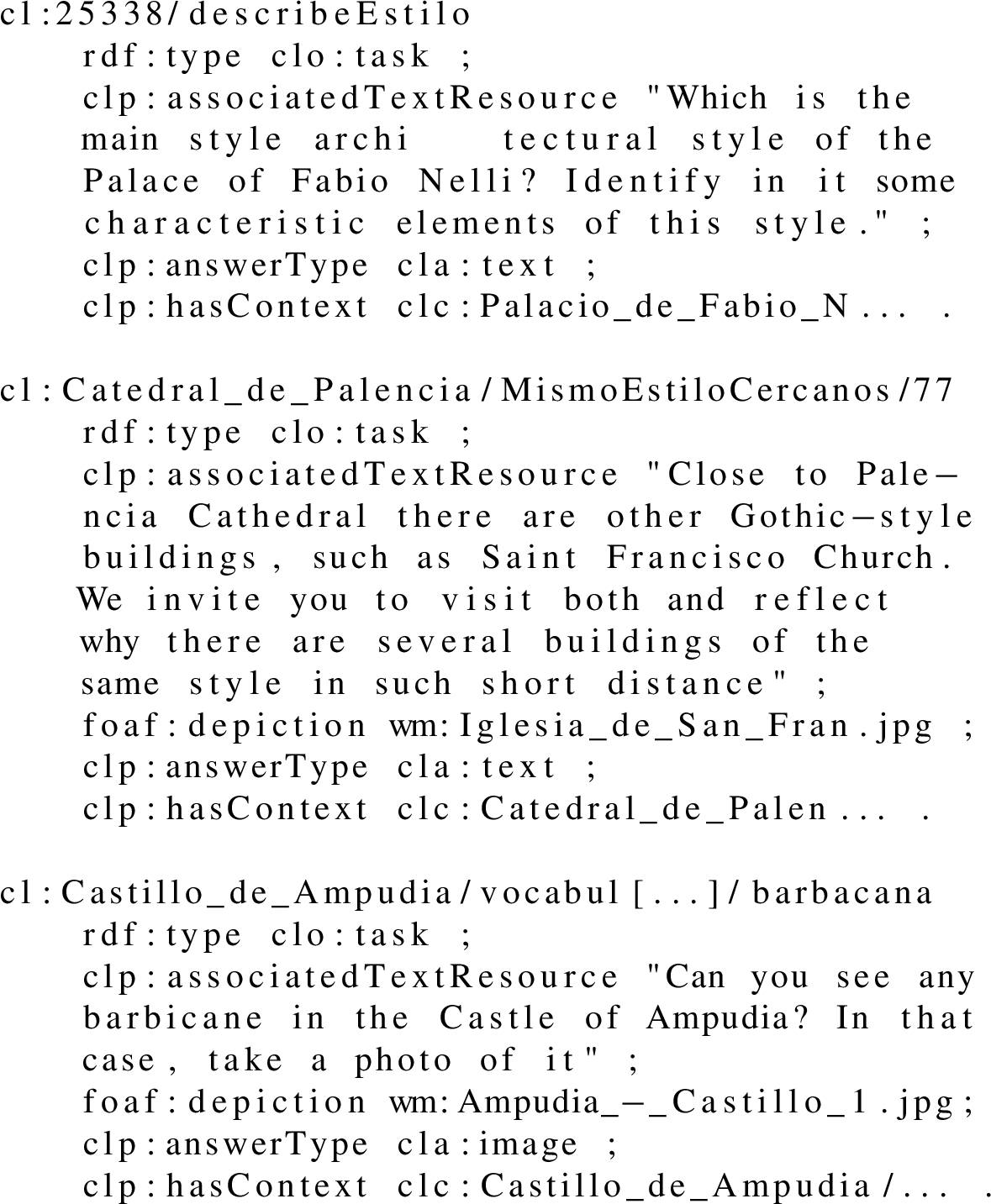
Partial descriptions of three tasks in Casual Learn SPARQL endpoint. Texts are translated into English
As an example of the process to create tasks, a template filtered each pair of Gothic temples closer than 1 km. from each other, and created a task to ask learners to compare them both. Then, out of the description of Palencia Cathedral and San Francisco Church,11
Casual Learn is an application that lets learners access and carry out the tasks included in the dataset described above. Casual Learn requirements were defined by an iterative design process that involved 13 teachers from five secondary schools of Castile and Leon. All of them teach either History or History of Art, and are highly knowledgeable about local Cultural Heritage Sites. The following requirements emerged out of this iterative process:
Note that R2 and R3 determine two different modes to find a task. In one of them, the user actively browses a map and selects the tasks she wants to carry out. In the other, the application is running in the background and recommends the user to approach a site where she can carry out some tasks.
Casual Learn design and implementation
This section presents Casual Learn, an application that satisfies the requirements identified in Section 3. Figure 1 depicts the software architecture of Casual Learn. SPARQL queries, data retrieval, and user data management are performed by the Casual Learn server (Section 4.1), while the Casual Learn client deals with data visualization and user interactions (Section 4.2). This client-server architecture allows simple front-end clients – which are desirable for mobile applications (R1) – at the same time that Casual Learn offers complex functionality.
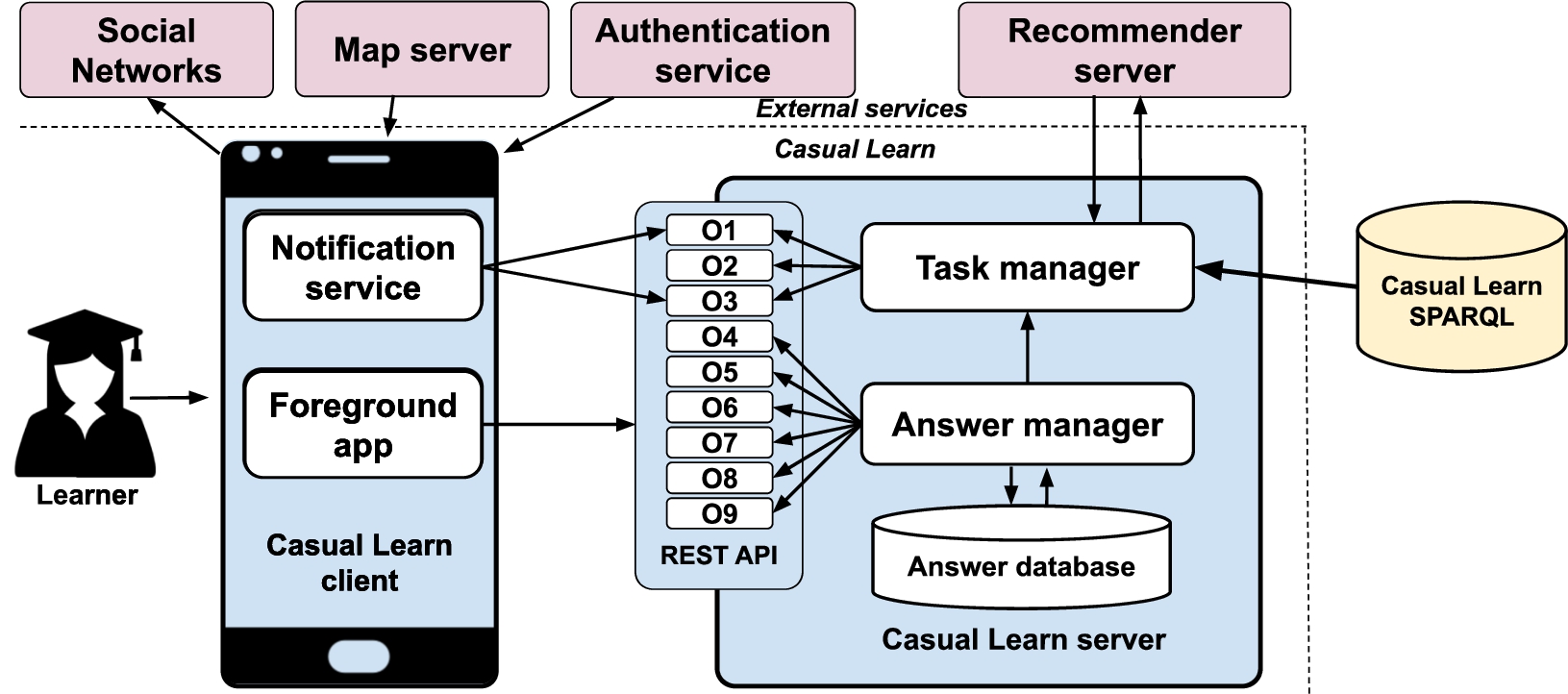
Casual Learn architecture. Elements with blue background belong to Casual Learn application; elements with purple background are external services; elements with yellow background are SPARQL endpoints that publish learning tasks following the SLEek ontology.
Restful API of Casual Learn server
Restful API of Casual Learn server
The back-end server manages the data created by Casual Learn users, provides a data gateway to coherently access Casual Learn SPARQL (R2, R8), obtains tasks recommendations (R3), and user-generated data (R6). These data are recovered using semantic technologies. Note that users are identified with token IDs, but such IDs are not related to any data about users or their devices. Thus, the server does not store any personal data, nor it could be derived from the information available.
The functionality of the Restful application server has been divided into two modules (see Fig. 1): Task manager, which offers tasks and contexts from Casual Learn SPARQL or any other compatible endpoint; and Answer manager, which deals with the user-generated data stored in the Answer database. This modularity facilitates the integration of SPARQL endpoints and third-party services (e.g., recommender services). It also facilitates Casual Learn maintenance in case service providers need to be changed or new services need to be added (R8).
The back-end server manages four types of resources, all of them defined by SLEek Ontology [22]:

Parameterized SPARQL query to retrieve the contexts available in a given bounding box

Snapshots of the user interface of Casual Learn. (a) View of the city of Valladolid with pins showing the position of Cultural Heritage sites (numbers inside pins represent the number of available tasks related to the corresponding site). (b) View of the city center of Valladolid with pins showing the position of Cultural Heritage sites (numbers inside pins represent the number of available tasks related to the corresponding site). (c) Description of the context of the Palace of Fabio Nelli (Palacio de Fabio Nelli). The view includes a map of the surroundings of the Palace of Fabio Nelli (upper part); a textual description of the palace (middle part); and the list of tasks related to this context (lower part). (d) Description of the Cultural Heritage Site of Palencia Cathedral (Catedral de Palencia). The view includes a map of the surroundings of the Palencia Cathedral (upper part); a textual description of the cathedral (middle part); and the list of tasks related to this context (lower part). (e) Description of a task related to the Castle of Ampudia. The view includes the task textual description in its upper part (“Can you see a barbican in the Castle of Ampudia? If you can, take a photo in which the barbican is depicted.”); then it provides access to the camera, so the learner can take a photo. (f) View of the learner portfolio where three answers are listed.
Note that O1 does not retrieve the tasks associated to the contexts to avoid data overload. As an example, a learner who browses the tasks available in a historical city may obtain tens of contexts related to hundreds of tasks (see Fig. 2a for a view of the city center of Valladolid). For this reason, we separated the step of obtaining contexts (O1), and obtaining tasks related to a context (O2). Thus, we improve the scalability of the system.

Parameterized SPARQL query to obtain the tasks related to a given context
In the current version of Casual Learn, the Recommender server employs collaborative filtering techniques [15] to estimate the ratings that users are expected to give to tasks they have not completed yet. Estimates of unknown user-task ratings are based not only on the known ratings of that user for other tasks, but also on users with similar preferences, as expressed by their similar ratings to the same tasks.
Textual answers are stored in the Answer database, but this is not the case with image and video answers. The reason is that Casual Learn is expected to be used by minors and both images and videos can potentially contain personal data (e.g., if the learner takes a selfie). Hence, we opted for only storing image and video IDs, while the images and videos themselves are stored locally on the users’ devices.
If the learner rates the task, the Answer manager calls the Task manager for it to submit the rating to the Recommender server. Thus, the Recommender server can use this information to improve its future recommendations.
Casual Learn client is designed as a mobile application (R1). It should hide the underneath data complexity (R7) while allowing learners to explore (R2), get recommendations (R3), visualize (R4), and carry out (R5) the tasks available in Casual Learn SPARQL or any other compatible endpoint, as well as reporting their answers (R6).
Learners can access the tasks available in Casual Learn SPARQL by exploration (R2) or by recommendation (R3). To let the learner explore the dataset, Casual Learn client presents an interactive map as its main component, which is loaded from the Map server. This map is displayed on full screen, and panning and zooming are supported. It also includes a textbox for searching for municipalities (loaded in Casual Learn client from the open data portal of Castile and Leon13
When the learner zooms in the map and visualizes an area whose diagonal is smaller than 5 km., the contexts available in that area are represented. For this purpose, Casual Learn client divides the space in bounding boxes of 0.0254 degrees14
In the latitude of Castile and Leon 0.0254 degrees correspond to 4 kilometers, using the approximation given by the Cosine-Harversine formula [21].
Examples of invocations of Casual Learn
As an example, invocation I1 in Table 3 is used to query the contexts available in an area located in the city center of Valladolid. Casual Learn client represents the map in Fig. 2b out of the data retrieved. The map includes an icon with the number of tasks available for each context. If the user zooms out the map and visualizes a wider area of the city of Valladolid, several invocations will be submitted and Casual Learn client will represent the map in Fig. 2a. The bounding boxes of these several invocations are obtained by adding 0.0254 to a central point. As queries are prone to repeat, Casual Learn can greatly exploit the cache of Casual Learn SPARQL.
When the learner selects a context, Casual Learn client invokes O2 to obtain the descriptions of the tasks related to such context. Some examples are invocations I2, I3, and I4 in Table 3. Then, the learner gets access to the list of tasks available, together with their images and an icon that represents their task type. For example, Fig. 2c and Fig. 2d depict the graphical representation after invocation I2 and I3, respectively. Note that Fig. 2d represents images for each task, but this is not the case in Fig. 2c (it represents generic icons instead). The reason is that, during the creation of the tasks out of the Web of Data, we did not gather an image for the tasks and the context related to the Palace of Fabio Nelli, as explained in Section 2.
If a task is selected, Casual Learn client provides a full description of the task. It also checks the learner’s geolocation and compares it with the geolocation of the context associated to that task. If the learner is closer to 0.001 degrees (150 meters), then Casual Learn enables the learner to realize it (R5). Otherwise, Casual Learn client notifies that the task will be available when the learner is closer to the context. Casual Learn client provides access to the mobile camera if the task requires taking any photograph or video. An example is represented in Fig. 2e. When the learner completes the task represented in Fig. 2e, Casual Learn client invokes I5 posting a JSON file. Such file contains the ID of the task, the ID of the user, the learner’s answer, and the rating she gave to the task (if she did).
Learners can also access tasks by recommendations triggered by proximity (R3). When running in the background, Casual Learn client suggests the learner to get closer to a context every configurable period of time (three hours by default). For this recommendation, Casual Learn client invokes operation O1, such as in invocation I6, defining a square bounding box with a side of 0.00325 degrees (725 meters). Again, this bounding box is defined by adding 0.00325 to a central point. If there is any context close to the learner, the client shows a notification suggesting the learner to get close to such context. If the learner accepts the notification, Casual Learn client invokes O3, such as in invocation I7, and retrieves a ranked list of tasks related to the context. Then, Casual Learn client represents the context information together with the ordered list of tasks, in a similar way as in Figs 2c and 2d.
Once a learner has completed her first task, she can create a portfolio in her configuration menu (R7). In that case, Casual Learn client invokes operation O6. After that, the learner can visualize the list of tasks she answered (see Fig. 2f). Then, Casual Learn client invokes O7, such as in I8 to obtain the user portfolio. It can also invoke O8, such as in I9, if the learner aims to look at a specific answer for a task, and O5 if they want to edit it. Finally, the learner can also share any task carried out in a social network (R6). In that case, Casual Learn client invokes the API of that social network and submits the required information.
Casual Learn client is developed as an Android application. It is compatible with Android 4.4 or higher. So in February 2021, it is compatible with 98.1% Android devices, according to Android Developer Platform.15
Casual Learn server is coded in Java 8, using the Restlet 2.4.3 library.22
The source code of Casual Learn is available as open source in GitHub.25
We calculated the latency of Casual Learn server out of its logs. For each operation, we analyzed all the entries of February 2021 (8,500 entries). When Casual Learn server offers contexts (operation O1 in Table 3), the average response time is 27.51 ms with a standard deviation of 15.69 ms. When it offers tasks related to a context (O2), its average response time is 25.82 ms with a standard deviation of 8.08 ms. Finally, when it offers an ordered list of tasks related to a context (O3), its average response time is 616.04 ms with a standard deviation of 102.49 ms. Note that the response time in operation O3 is higher because Casual Learn server not only retrieves data from the task repository (as in O1 and O2) but also uses Recombee to rank them. In any case, the latencies reported are low and acceptable for an interactive application.
We released a preliminary version of Casual Learn in August 2020. Soon, the scientific community and the Spanish Open Data community showed their interest in it. Indeed, Casual Learn was awarded in September 2020 as the best demo in the 2020 European Conferences on Technology Enhanced Learning [23]. The jury underlined that Casual Learn is an innovative application that is ready to be used both for formal and informal learning. Further, they mentioned that Casual Learn can support ubiquitous learning by replacing traditional school trips, which were not allowed during the pandemic. In November 2020 it was also awarded as the best didactic resource in the IV Open Data Competition organized by the Regional Government of Castile and Leon.27
The awards obtained attracted the attention of the local media. The communication board of Universidad de Valladolid prepared a press release about Casual Learn for each of the awards obtained. Then, four regional newspapers, two radios, and one TV channel covered the news. These news were also shared on social media by at least five educational institutions, including the Provincial Department of Education of Valladolid, the one from Palencia, and the official Twitter account of the educational department of the Regional Government of Castile and Leon.
We also carried out three pilot studies between November 2020 and January 2021 in two secondary-school institutions from Palencia and Valladolid (both are cities in Castile and Leon). Four History of Art teachers (one of them participated in the task-creation process [24]) and 59 students (aged 16-18) participated in the pilots. We had three meetings with teachers. During these meetings, they learned to use Casual Learn and designed a ubiquitous learning activity for their students. All the teachers designed learning activities for their students to know their local Cultural Heritage and relate them to the topics covered in the classroom. For example, a teacher who covered the Industrial Revolution suggested several tasks for his students to visit and reflect on the XIX Century factories that still remain in the city of Valladolid. Another teacher who covered Gothic art proposed his students a set of tasks contextualized in the Gothic churches of Palencia, so they identified several architectural elements and reflected on the social aspects related to these buildings. These new tasks by teachers for their pilots were added to the already-existing ones stored in Casual Learn SPARQL.
After the experience we held semi-structured interviews with each of the teachers. We aimed at further understanding their experience on co-designing, enacting, and assessing ubiquitous learning situations with Casual Learn. According to the teachers, their students had successfully carried out the recommended tasks, as well as some others of their own choice. Teachers had also assessed the results of the experience in different ways: in one pilot, the teacher asked the students to present what they have learned during the activity to the rest of the class; in the other two pilots, the students sent the answers of the accomplished tasks to teachers through the integration with Microsoft Teams. According to the teachers, Casual Learn not only suggests learners Cultural Heritage Sites to visit and offers information about them but also lets students carry out higher-level thinking tasks and report them to the teacher. The students answered an open question requesting their overall opinion about Casual Learn. Many of them found Casual Learn an interesting and funny application, useful to learn about the Cultural Heritage of their own city. Surprisingly, many of them encouraged us to exploit it for touristic purposes.
We also carried out a usability study of the first version of Casual Learn with 59 users (students and teachers), using the System Usability Scale (SUS) [3]. The SUS score obtained was 60.6. The feedback provided by users led us to several improvements. First, we removed tasks that asked them to visit historical buildings close to the user’s position as they found such tasks confusing. Moreover, we decided to provide users with context information (i.e. information about the historical building they are visiting) as an introduction to the learning tasks they can carry out. Furthermore, we refined some aspects of the user interface in the Android App. After these improvements, the usability of the app was again evaluated by 76 users, yielding a SUS score of 68.0, which can be considered an “OK” result according to [1].
We used Google Analytics to assess the uptake of Casual Learn. In the period from September 2020 to September 2021, the app had been installed by 558 users that had completed 936 tasks and received 502 context notifications. Sessions took an average of 4 minutes and 30 seconds and users completed an average of 0.27 tasks per session. It should be noted that users are not required to carry out any number of tasks; they can just use the application to get information about a historical building, but not complete any task at all. These numbers should be understood taking into account that, up to now, Casual Learn is an application with only a regional scope and conceived for a specific group of potential users.
Since the advent of the Web of Data, one major challenge has been providing non-technical users with graphical representations and adequate abstractions that let them explore RDF data [6]. Some Cultural Heritage data has been offered through data portals (e.g., the Prado Museum [27]) that allow their users to easily obtain information. In other cases, Cultural Heritage data is browsed or searched using mobile applications that support geo-search (e.g., [17,18,25,28]). These applications typically present a map that marks some sites and offers information about them when the marks are clicked. Other Cultural Heritage applications, such as [17,18,25], offer recommendations to their users. These recommendations typically take into account the user’s location and her preferences. A good example is SmartMuseum [25], which offers outdoors (e.g., Cultural Heritage sites) and indoor (e.g., elements inside a museum) recommendations according to the user profile. Interestingly, the authors found more evident value when using Linked Data for outdoor recommendations than for indoor recommendations. But all these examples just reproduce information available on the Web of Data for the users to read it.
Urbanopoly [5] is an application that goes beyond this limitation. It is a location-based game with a purpose that allows its users to curate geospatial data. Urbanopoly lets users perform some tasks to acquire or validate the data. For example, it may ask whether a photograph corresponds to a building next to them, or whether smoking is allowed in a certain restaurant. As seen, Urbanopoly tasks are limited to the collection and validation of data. These tasks are simple, have a limited pedagogical value, and no explicit connection to Cultural Heritage sites.
Other mobile applications exploit data from the Web to offer services for touristic and informal learning purposes. We can cite Smart Tourism [9], where data from DBpedia, Flickr, and the Regional Government of Castile and Leon is combined to provide information about cultural sites. Smart Tourism shows that the combination of these data sources is useful to support informal and collaborative learning processes. However, Smart Tourism functionality is again limited to offering information. Moreover, Smart Tourism does not support bridging between formal learning in the classroom and informal learning outdoors.
Other learning applications do support this connection. For example, [13] proposes a ubiquitous-learning game to learn about local culture. However, this game – as many other ubiquitous learning applications – is not based on Semantic Web technologies, and is thus tied to its own dataset. As a consequence, it suffers from data maintainability problems. This also limits its scalability and its potential support to informal learning processes [24].
Conclusions
This paper has presented Casual Learn, a learning application that proposes ubiquitous learning tasks about Cultural Heritage sites obtained from the Web of Data. With it, learners can browse or geo-search these tasks without the need to know SPARQL language or understanding the semantic technologies underneath. Furthermore, Casual Learn lets learners perform the tasks, as well as manage and report their answers. Since Casual Learn is based on the SLEek ontology [22], its data model captures the elements of ubiquitous learning environments [16]: the social human element, represented by the relations between participants; the virtual space artifacts, which are the tasks that are semi-automatically generated; and the real world objects, here the Cultural Heritage sites in which the tasks are contextualized.
The pilot studies carried out show that Casual Learn is a usable application that supports ubiquitous learning processes to bridge formal and informal learning contexts. The tool is not without limitations, though. The main one, from the instructors point of view, is that they cannot generate new contexts or tasks for their students in Casual Learn. Hence, if a site does not exist in the data sources mentioned in Section 2, it is impossible to create tasks associated with it. Further, even if a context exists, but a teacher wanted to propose a task that does not conform to the templates used for automatic generation of tasks, this cannot be done. Note that addressing this issue would not only allow instructors to customize and enrich their learning experience, it would also enlarge the dataset available for others, as these new contexts and tasks could also be exposed in the SPARQL endpoint. When supporting the educational experiences mentioned in this paper, the instructors sent us their demands and we created new entities that were incorporated to the Casual Learn dataset. In the near future, we will develop an interface and a procedure so that teachers can edit new contexts and tasks autonomously [11].
Another limitation comes from the technology selected to implement the client app. As it is not available for iOS devices, some could not install it and had to do the tasks with partners who owned an Android device. This will be addressed in the future by refactoring the client to be a web application. Finally, it is also worth mentioning that for implementing the recommender system we chose Recombee, a proprietary external service. This choice facilitated a quick implementation, though it increments the response time when retrieving tasks (by about 0.5 s). This can be addressed in the future by exploring open source alternatives or developing an ad hoc recommender system.
So far, Casual Learn attracted the attention of learners and educational institutions in the Spanish region of Castile and Leon. In the future, we plan to take advantage of the modular architecture of Casual Learn to scale it up. More specifically, we plan to integrate other task datasets related to other Spanish regions; as its code is published with an open license, we hope that Casual Learn can also be applied to other countries and latitudes. Casual Learn adoption will also be fostered by the plans to make it available to iOS devices, and its maintenance facilitated by a web interface letting the teachers define new contexts and tasks, so that a community of teachers develops around Casual Learn dataset [11]. It should be noted that the SLEek ontology defines a wider range of values for clp:answerType than supported in the Casual Learn client, e.g.
Concerning the semantic elements of our application, we project to further exploit the data collected from the Web that is currently available in the Casual Learn SPARQL endpoint. Specifically, we envision the use of Wikipedia categories for this purpose, since tasks are already annotated with the Wikipedia categories obtained from DBpedia. Thus, learners can select their interests through the app Casual Learn, e.g.
Footnotes
Acknowledgements
This work has been partially funded by the European Regional Development Fund and the Regional Government of Castile and Leon under project grant VA257P18, and by the European Regional Development Fund and the Spanish National Research Agency under project grants SmartLET (TIN2017-85179-C3-2-R) and H2O (PID2020-112584RB-C32).