




Abstract
We describe the process where a stroke survivor, his wife, and a speech language pathologist participated together to design and implement a new piece of software to help patients with brain injury recover skills needed to manage their finances. Each person provided a different perspective that led to a successful collaboration. The stroke survivor, a computer scientist, has experience with aphasia apps that he used in therapy. His wife, also a computer scientist, has experience with participatory design techniques and agile software development methodologies. The SLP understands the requirements needed for software to be useful for patients in a clinical setting. Together the team created an app that is currently being used in two rehab centers.
Introduction
The participation of people with aphasia in the research and design of new technologies has been the focus of some attention. (Wilson et al., 2015; Roper et al., 2018; Kearns et al., 2020). This paper describes a somewhat unusual example of this phenomenon, in which a stroke survivor and his wife worked together with a speech language pathologist (who they met in rehab) to create a mobile app to help people recovering from brain injuries.
The background behind this is as follows. The first author, Mark, suffered a left-hemisphere ischemic stroke in November 2019. Fortunately, the second author, Carolyn, was with him, and was able to quickly call for an ambulance. As a result of the stroke, Mark completely lost the ability to talk. His initial diagnosis was severe expressive aphasia and apraxia. He met the third author, Lisa, (CCC-SLP), in inpatient rehabilitation, one week after his stroke. Mark had many speech therapy sessions with Lisa during his week of inpatient rehab, and Carolyn attended most of them. Following this, he had six months of outpatient speech therapy. He maintained contact with Lisa, during which time she mentioned the need for an app that would enable a speech language pathologist to help a patient practice online banking. After he was discharged from therapy at the end of May 2020, he, Carolyn, and Lisa started developing a mobile app to simulate an online banking website.
Purpose
During discussions with Lisa about possible uses of computer technology in rehab, she mentioned that therapists often help patients with brain injuries recover the skills needed to manage their finances. To do this they use bills, coins and paper checks, but in recent years more people have moved to online banking, and there is no easy way for a therapist to help a patient relearn and practice these skills (Fong et al., 2010). Sometime later in Mark’s outpatient therapy, another speech language pathologist independently mentioned the same idea. So, we decided to do it!
In June 2020 the three of us started working to develop an iPad app that simulates an online banking website. When developing any new application, it is important to understand who is likely to use the technology, the goals they are trying to achieve, and their range of skills and level of comfort both with the task and with technology in general. In the case of a banking simulator app, there are two types of users working together, speech language pathologists and individuals recovering from stroke or brain injury. We wanted the app to simulate the most-commonly-used features of an online banking website - logging in, checking transaction history, scheduling payments, adding new payees, scheduling transfers. We wanted it to be sophisticated enough so that the patient would learn valuable skills, but simple enough that they could navigate through it with the help of a speech language pathologist.
It is important to emphasize that the app only simulates the experience of online banking. No actual transactions take place, and nothing is stored during a session. Of course, the user should be aware of good security practice, and should not enter their real banking details, like username and password. It is possible that this app could be used to help people with aphasia learn about banking scams, but we have not investigated this.
Methods
First, we had to decide on a technology platform as well as a programming language. Given that the rehab centers where Lisa works use iPads, this became our choice of platform. This in turn determined the choice of software, XCode for Macintosh, as well as the programming language Swift.
We used participatory design techniques (Holtzblatt & Beyer, 1997). We had Zoom calls with Lisa every few weeks, getting her feedback and suggestions as we designed and programmed the app. One common method of discussing design decisions with members of user groups is to create a “wireframe” prototype of the system (Whiteton & Gibbon, 2018). The idea is to very quickly generate views of what the finished product will look like. These can be discussed and updated easily and give the developers and the “customer” or “client” a shared understanding of the deliverable. Wireframe prototypes have a wide range of fidelity. They can be anything from hand drawings of each screen to a simple working version of the technology. For this project, we created a mid-level prototype using Microsoft PowerPoint. An example of one of the wireframe screens is shown in the top part of Fig. 1. The version of that screen in the final app is shown in the bottom part of Fig. 1.
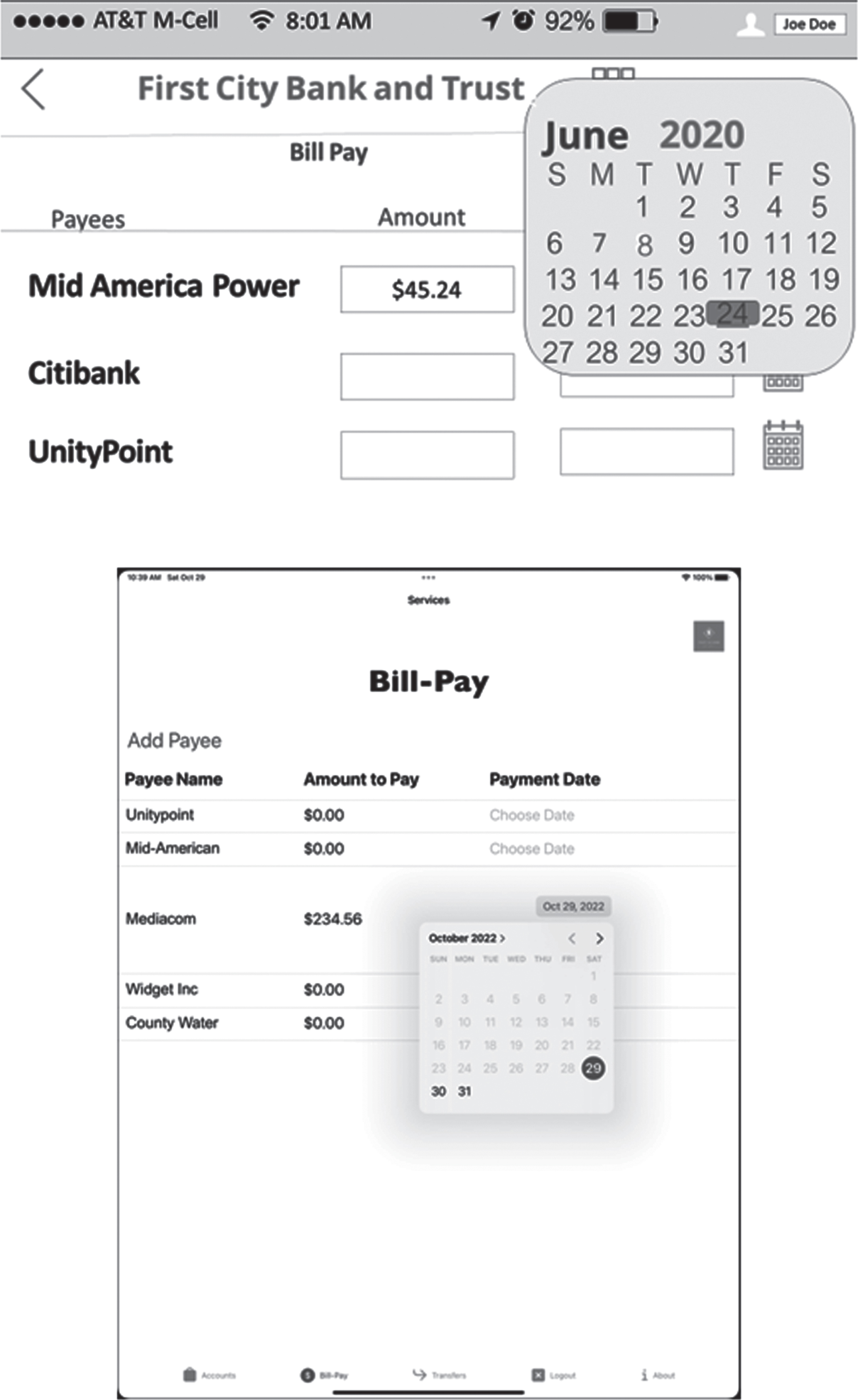
On top, the PowerPoint Wireframe of the Pay Bill Screen with a Calendar. On bottom, the actual view of the Pay Bill Functionality with a Calendar in the final version of the app.
Lisa served as domain expert, guiding the design as the team decided on the requirements and functionality. We used the wireframe to decide on which features to implement first. Then Carolyn and Mark began the coding process, creating a sequence of increasingly functional prototypes. In each Zoom session Lisa provided feedback on the current prototype and the team discussed the next steps. This is a typical software development methodology, called agile development or rapid prototyping (Suleri et al., 2019). We discussed alternative methods to implement each feature of the app, comparing our developing software to online banking apps and websites. Lisa judged what would be appropriate for patients in rehab.
This development process preceded from June to December 2020, meeting over Zoom every few weeks. We met approximately ten times during that period. All three participants were using their time after working hours, so only a few hours of actual development took place between meetings.
The final version of the app has the following features: The user is presented with a login screen where they enter their username and password. They can enter anything, because the app doesn’t store their information. If their username or password is too short, they get an error message, requiring them to re-enter the information. This simulates the behavior of an online bank without the user having to enter any real personal information. After logging in, the user sees a screen with a tab interface, with five tabs at the bottom. The first tab is the Accounts tab, and the Account Screen is shown. The Account Screen shows two accounts, a Checking account and a Savings account. The user can check the balance in each account. For each account, they can also click a slider that opens a scrollable list of recent transactions. This is shown in the top image in Fig. 3. These are not real transactions that the user has made - they are hypothetical, simulated, transactions. The speech language pathologist can ask the patient questions about the transactions and assess their ability to deal with these questions. The second tab is the Bill-Pay tab, with a pre-populated list of payees. For each payee, the user can enter an amount to pay and use an interactive calendar to schedule the date for the payment. Only future dates are allowed. Of course the app does not actually send any payments - it just allows the user to simulate the action of scheduling a payment. They can also simulate adding new payees. The Add Payee button leads to a screen where they enter the details of a new payee. The Save Payee button returns them to Bill-Pay, with the new payee added to the payee list, and payments can be scheduled for them. This is shown inFig. 2. The third tab is the Transfer tab. The user can enter an amount and schedule a date, in order to make a transfer from either the Checking account into the Savings account, or vice versa. See the bottom image in Fig. 3. The fourth tab is the About tab. This provides the names and affiliations of the three creators of the app. This screen is not shown in this paper. The fifth and final tab allows the user to logout. This screen is not shown in this paper.
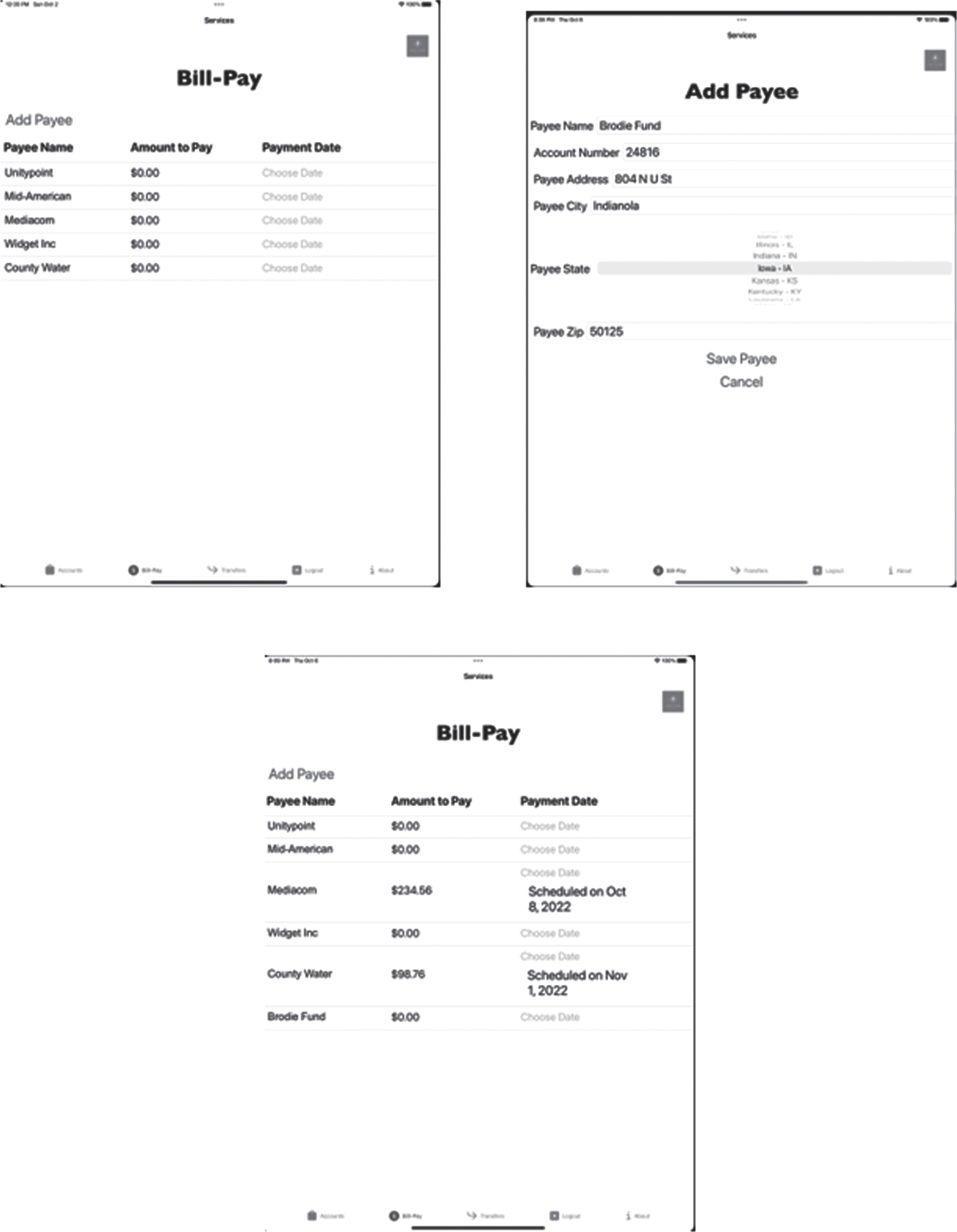
Top-left: Bill Pay View at the Beginning of the Session. Top-right: User Adds a New Payee. Bottom: The Modified Bill Pay View, after adding the New Payee. Two scheduled payments to other payees are also shown.
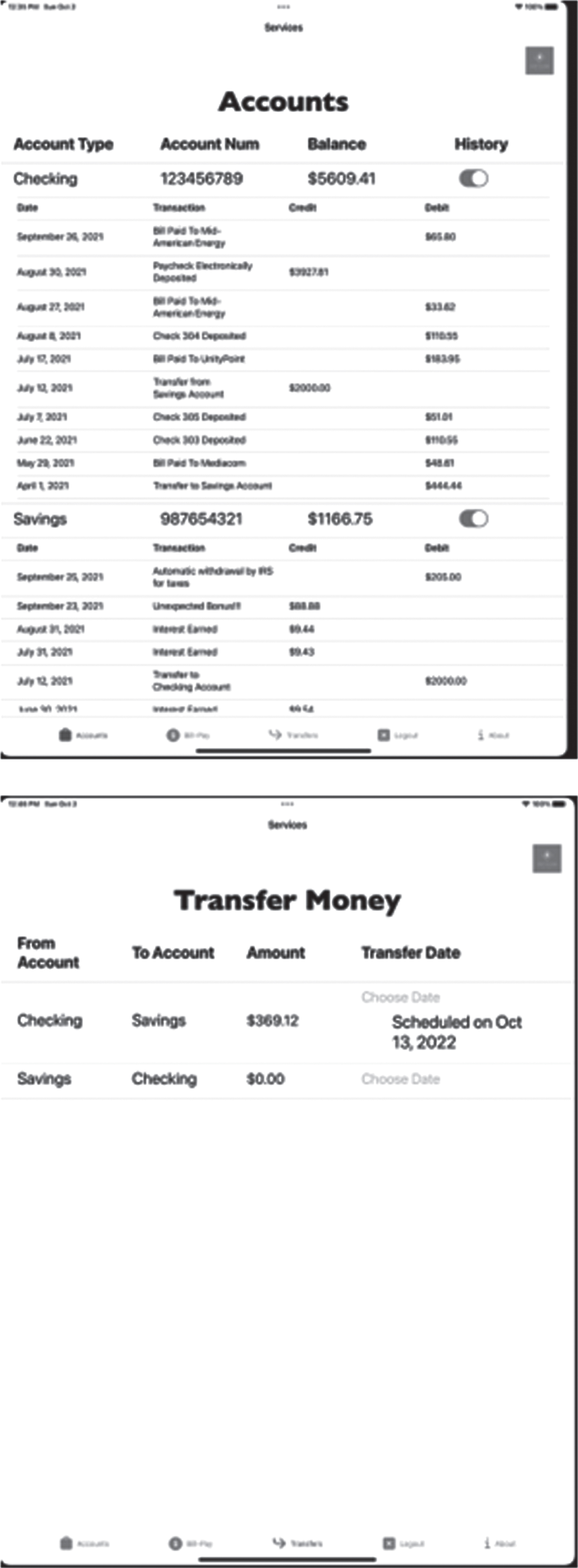
Top: Account Screen, showing the Checking and Savings accounts, with their list of transactions. Bottom: Transfer Screen, showing a scheduled transfer from the Checking to Savings account.
The app protects the patient’s privacy by storing no information about each session. For example, if a patient adds a new payee, once they log out from the app the added payee is forgotten - it will not be visible to another patient, or to the same patient if they interact with the app in a later session.
In mid-February 2021 Lisa began to use the app with real patients in a rehabilitation center in Des Moines, Iowa, USA. The app worked successfully without needing any further modifications. In June 2021 we installed it on a second iPad belonging to another rehab center where she works. The app has been used in both rehab centers since then.
Our goal is to make the app more widely available. As academics, we are not ideally situated to support and modify an app with a wide customer base in the long-term. Also, the app still needs some work to enable it to function effectively on different size devices and to allow payee addresses outside the United States. We would also like to make the look and feel of the app more customizable by the therapist, so that it can better simulate a range of banking scenarios. We are currently consulting with companies that develop therapy apps on how to transfer the app to them so that they can make these changes and support it in the future.
We believe that the codesign strategy used here might be applicable to designing other technologies to assist stroke survivors and people with aphasia. There are many stroke survivors and people with aphasia who are interested in assisting people in a similar situation, and many are willing to volunteer their time. The main limitation to this approach is probably finding speech language pathologists who can provide their expertise over a long period oftime.
Conclusion
This work was motivated by the desire of a stroke survivor with aphasia who happened to be a computer scientist to help other stroke survivors and people with aphasia. A speech language pathologist in clinical practice mentioned the need for a mobile app to simulate online banking to help patients regain financial management skills. Using a codesign strategy, the stroke survivor and his wife worked with the SLP to create this tool. Using participatory design techniques and an agile software development methodology, the team collaborated closely over several months using Zoom and were able to create a successful app that is being used by speech language pathologists and their patients in a clinical setting. We believe that this approach might be successful to developing other helpful technologies.
Footnotes
Acknowledgments
The authors have no acknowledgments.
Conflict of interest
The authors have no conflict of interest to report.