




Abstract
Introduction
Traditionally, augmentative and alternative communication (AAC) user interface development has been a time-intensive process requiring expertise in software development, often excluding people who use AAC. This paper demonstrates the involvement of an end user in the design and testing of prototype AAC user interfaces (UIs) developed using a platform called the Open Source Design and Programmer Interface (OS-DPI).
Methods
Micro-analysis of in-person conversation involving an adult with intellectual and developmental disabilities who uses AAC revealed several problems related to accessing his aided AAC device. The OS-DPI was used to co-design, develop, and test UIs aimed at addressing these observed problems.
Results
Researcher efforts to independently design and develop novel UIs that addressed the problems identified in research were ineffective. Inclusive design practices led to a shared determination of required functionality and co-design of UIs with reported improvements for access and communication.
Conclusions
This paper demonstrates the potential of the OS-DPI for the co-design and development of AAC UIs to address unique needs.
Keywords
Introduction
An estimated seven million people in the Unites States have some form of intellectual and developmental disability (IDD) 1 and approximately one-third are likely to have complex communication needs and could benefit from using augmentative and alternative communication systems (AAC). 2 AAC is generally classified as unaided and aided. Unaided AAC refers to any method of communication that does not include an external tool, such as gestures, facial expressions, and body movements. Conversely, aided AAC requires the use of external tools such as high-tech speech generating devices (SGDs) with synthesized voice output or picture communication books, alphabet boards, and writing tools. This paper focuses on aided AAC with specific attention to SGDs and adults with IDD.
People with IDD often have a variety of medical diagnoses, including autism spectrum disorder, Down syndrome, Angelman syndrome, and a variety of other low-incidence disabilities. This heterogenous group uses various forms of communication including natural speech, vocalizations, gestures, body movements, facial expressions, and aided AAC. 3 Approximately 75% of people with IDD are reported to use some natural speech that is augmented by gestures, eye gaze, and other nonverbal forms of expression. 4 Regardless of the presence or absence of natural speech, communication breakdowns are common for adults with IDD. 5 For example, adults with IDD report difficulty communicating with professionals and unfamiliar communication partners. 6 Details about when and how communication breakdowns occur, especially when they involve AAC, are not well understood or documented in the current literature for individuals with IDD.
Problems in AAC mediated interactions
Despite steady technical advances of AAC apps and SGDs over the past several decades, in-person interactions mediated by aided AAC systems continue to be characterized by frequent and significant communication delays, regular breakdowns, and miscommunications.5,7 Unfortunately, efforts to identify, describe, and categorize problems that occur during AAC-mediated interactions have largely excluded adults with IDD. Specifically, the work that has been done has focused either on adults with acquired disabilities5,8 or children with developmental disabilities.9,10 Given the lack of representation, it should not be assumed that adults with IDD experience the same or similar problems with AAC mediated in-person interactions as those currently documented in the literature. Likewise, it should not be assumed that they will benefit from existing user interface (UI) designs aimed at the adults who are predominately represented in published reports, for example, those with amyotrophic lateral sclerosis, aphasia, or cerebral palsy without an intellectual disability. 11 Thus, there is a need to investigate AAC mediated in-person interactions with adults with IDD to understand how well existing aided AAC designs promote their effective communication and uncover trouble sources and problems that can be addressed through improved UI designs.
AAC-mediated interaction problems are experienced in real-time and involve both the individual using AAC and their communication partners. Integrating microanalytic data and analyses into the UI design and testing processes has been recommended as a complementary methodology to task-based usability testing because it supports a focus on real-time observations that capture the full-range of problems that might occur.12,13
Usability testing
Usability refers to the extent that a product can be used to achieve specified goals, with effectiveness, efficiency, and satisfaction. 14 Usability is about more than whether users can perform specific tasks. Rather, the goal is to interpret the degree to which software generally, and UIs specifically, meet the needs of the user for the intended purpose; in this case, effective in-person communication with one or more conversational partners.
The Technology Acceptance Model (TAM) 15 can inform usability testing. The model is used to explain the potential user and their intention to use a novel technology. It suggests that adoption depends less on specific features, and more on the user experience. Specifically, the model states that perceptions of usefulness and ease of use have the most influence on adoption rates. A meta-analysis of TAM found it to be a widely used approach as well as a valid and highly reliable way to assess usability in a variety of contexts. 16 Importantly, the meta-analysis demonstrated that perceived usefulness has a uniquely profound impact on future uptake and use of new technologies. Given the practical need for adults with communication disabilities, with or without IDD, to use aided AAC to effectively interact with others with relative ease, the model is an appropriate fit for usability testing and assessing the potential to adopt novel aided AAC UIs.
Involving end-users in iterative design and testing
Inclusive design practices consider the full range of human diversity with respect to ability, language, culture, gender, age, and other forms of human difference13,17 and aim to make a product or service accessible to, and usable by, the broadest range of people possible. 18 Inclusive design starts by recognizing who is currently being excluded from the design and testing process. 17 Regardless of disability profile, when individuals who use aided AAC are included their role is usually limited to that of an informant. 11 Similarly, researchers seeking to manipulate aided AAC variables aimed at solving problems for individuals or small groups of individuals are also largely excluded from the aided AAC design process. 19 This study reports on the involvement of an end-user who is an adult with IDD in the testing and iterative development of specific AAC UIs and is part of a larger effort that encourages use of an open-source set of flexible and adaptable design tools for varied research and design purposes. The Open-Source Designer and Programmer Interface (OS-DPI) is intended to support a large range of stakeholders in exploring, developing, and testing unique, device agnostic aided AAC UIs. Though the platform is not designed to be a long-term solution for individual users, the resulting prototype UIs could potentially have a broader beneficial impact on the larger AAC community by informing the development of commercially available products. 12
Open-source designer and Programmer Interface
The OS-DPI is an accessible, open-source platform that provides flexible and adaptable tools for simulating aided AAC UIs. 12 The OS-DPI was developed using Google’s Chrome progressive web application which allows it to operate across a variety of other commercial web browsers and a full range of computers and mobile technologies. The OS-DPI provides the underlying functionality common across aided AAC apps and SGDs, with a designer interface aimed at supporting the creation of novel demonstration UIs for testing purposes. Importantly, the OS-DPI uses declarative programming and as such does not require expertise in conventional programming languages. See Benson-Goldberg et al. for a comprehensive description of the software. 12
Purpose
The purpose of the current work was two-fold. First, to identify and describe problems in AAC-mediated in-person interactions for an adult with IDD through recorded observations of his interactions mediated with a UI design made available on a commercial SGD. Second, to describe the subsequent process of iteratively designing a novel UI in collaboration with the end-user to initiate field testing to evaluate the extent to which the solution might improve his in-person interactions and address observed and reported usability issues.
Method
The data presented here come from a larger study aimed at understanding how adult AAC users navigate in-person interactions. Specifically, the project is focused on instances when existing aided AAC systems and UIs introduce problems and the ways partners navigate these problems. This study reports initial findings of problems during AAC-mediated interactions for one AAC user with IDD and a familiar communication partner. Microanalytic techniques were used to analyze videos of these interactions and identify problems that occurred. The problems then informed the development of novel aided AAC UIs. Field testing was then used to assess the usability of the research-informed design. The study was approved by the Institutional Review Board of the University where the authors are employed. Both the participant who used AAC and their speaking communication partner provided written consent prior to participating in the study.
Participants
The participants were recruited through the personal networks of the research team. The participants in this case study were one young adult AAC user with IDD and his personal care aide (Chris and Grant, pseudonyms). The inclusion criteria for Chris included: (a) be aged 18 or older; (b) have an intellectual and developmental disability; and (c) use aided AAC to support in-person interactions. There were no other requirements regarding expressive communication modalities. Grant met the only inclusion criterion for the speaking communication partner: he had an existing relationship with Chris that involved regular in-person conversation during everyday interactions. At the time of the study, Grant had been employed as Chris’ personal care aid for about 2 years. Grant had no formal aided AAC training.
Chris was a 24-year-old man with cerebral palsy that resulted in significant motor impairments. Chris did not have any hearing impairments, but he experienced visual convergence insufficiency (i.e., his eyes do not move together, especially when focusing on a target). At the time of the study, Chris was living at home with his family where he relied on paid personal care attendants and family members to support him in completing all activities of daily living. During the study, Chris was in a wheelchair propelled by a partner.
Chris reported using a variety of aided AAC devices beginning when he was 3 years old. These included: a Dynavox 3100, a Vantage Lite, and an Accent 1400. At the time of the study, Chris was using an Accent 1400 with a 60-location symbol-based layout. Chris’ device was mounted to his wheelchair, and he used a head mouse to access it. His head mouse consisted of an infrared optical sensor that picked up on a reflective dot positioned on his forehead between his eyebrows; a purple feedback dot moved across the screen in response to his head movements. Chris selected cells by holding the feedback dot on a cell for a predetermined length of time (i.e., dwelling). During the recorded interactions, Chris chose to use his device without the synthesized speech output. Grant sat next to Chris and watched his device as he composed messages.
Microanalysis
The study began by using microanalysis to analyze in-person interactions between Chris and Grant. This was done to identify problems in the interaction created by the aided AAC.
Data collection
All interactions were recorded in a private room in the suite of offices where the authors are employed. Two cameras were used to record the session. One was placed approximately six feet in front of the participants and the other was clamped to the back of Chris’ wheelchair to capture the display of his aided AAC device (see Figure 1 for configuration). The first author was present to set up recording equipment and to provide Chris and Grant with directions. Chris and grant.
Chris and Grant were instructed to work together to complete a survey that included a variety of multiple choice and open-ended questions about (a) the ways Chris communicates; (b) his communication preferences; (c) who he communicates with; and (d) who he likes and dislikes communicating with and why. After Chris and Grant confirmed that they understood the task, the researcher left the room. Chris and Grant completed the survey in 47 minutes and 33 seconds.
Data preparation
The data were analyzed following microanalytic procedures outlined by Higginbotham and Engelke for studying talk-in-interaction in AAC-mediated interactions. 20 As a first step, the videos from both angles were combined into a single video with a single audio track (i.e., the video with the view of the aided AAC screen was superimposed, picture-in-picture, on the video of the dyad).
Microanalysis and transcription
The first author and a trained research assistant watched the videos numerous times to examine the interactions for instances of problems. The generic word “problems” was used to define this activity. Emerging categories were constructed with key episodes selected to represent each. Subsequently, key segments were viewed and discussed with Chris. This allowed the research team to better understand his experiences and perceptions of the interactions.
The identified key episodes were transcribed by the first author in EUDICO Linguistic Annotation software (ELAN; https://archive.mpi.nl/tla/elan). These efforts resulted in a sequentially aligned, timestamped gloss of both participants’ contributions to the conversation.
Microanalytic findings
Chris experienced significant difficulties navigating his device. Through careful microanalysis, it became clear that Chris had problems selecting intended vocabulary as well as editing messages and indicating the beginning of each contribution because of difficulties dwelling on targets.
Exemplar interaction: problems navigating
Excerpt 1: Opening interaction.


Note:
Excerpt 2: Navigating the groups page.


Note:
The excerpt comes from an interaction (207.5 seconds) during which Chris was answering the question, “what are some things you like to talk about?” At the end of the interaction, the pair determined that Chris likes to talk about traveling to New York. Close microanalysis of the video revealed that Chris was persistent in trying to open pages of vocabulary that might help him provide this answer (i.e., places, world, and geography). However, this intentionality was obscured by challenges holding the dwell on the intended target, resulting in the unintended selection of adjacent cells. The impact of navigation challenges is depicted in the transcripts as detailed below.
The excerpt begins in Table 1 when Grant rephrased the initial question from the survey (i.e., What are some things you like to talk about?) and asked, “So what are some of the things you really like?” As Grant asked this question, Chris’ SGD was on the Home page. The cursor was in the upper right-hand corner of the screen and the word REALLY was activated. When Grant finished speaking, Chris moved, which made the cursor move over cells for the Groups and More words pages before moving down the screen towards the delete last words button. Along the way, Chris activated the word REALLY again. The cursor moved on and off delete last word, activating the adjacent cell YOUR. Nearly four seconds later Chris activated the delete last word cell, removing the word YOUR from the message window.
Chris then moved the cursor back to the upper right-hand corner of the screen, highlighting the cells near and around the cell for the Groups page. In the process, the cell below, labeled More Words, was selected opening a new page of words. This page still provided access to the Groups cell. Chris briefly moved the cursor away from the corner before resuming efforts to activate the Groups cell. After five seconds, and twice activating the cell labeled VERY, which appears just below the Groups cell, Chris activated the Groups cell, opening a new page.
The excerpt continues in Table 2. Chris’ aided AAC device was now open to the Groups page, with cells labeled with nouns representing pages of vocabulary. While on this page, Chris moved the cursor on and around the Geography and Places cells, before ultimately activating a blank cell and returning the device to the Home page. Chris quickly re-opened the Groups page, where again, he moved the cursor around cells representing vocabulary that might be useful for talking about traveling and New York (i.e., Places and World). However, he activated a cell adjacent to World labeled School, which opened a new page of vocabulary related to school.
The rest of the interaction proceeded in much the same fashion, with Chris unintentionally activating cells adjacent to his intended selection. Over the course of the interaction, Chris attempted to open relevant pages of vocabulary (i.e., Groups, Places, World, and Geography) 18 times. Additionally, he spent 160 seconds (69.3% of the interaction) trying to (a) open those relevant pages of vocabulary, (b) delete words, and (c) leave unwanted pages. Chris did not open the page (Geography) that contained the target word (New York) until 163.6 seconds passed, which was 78.8% of the way through the interaction.
This interaction exemplified Chris’ use of his aided AAC device across the video data. Unintended selections extended the length of the interaction, introduced confusion, and obscured his intentions. At the end, his partner had to use background knowledge to ascertain that Chris was trying to communicate that he likes to talk about New York. An unfamiliar partner would be unlikely to come to this realization. Based on these findings we believed that Chris might benefit from a new approach to accessing and navigating his device.
Inclusive design and usability testing
When the microanalysis was completed, the project shifted towards inclusive design and usability testing. The first author sketched several potential UI solutions to share with Chris, who determined which solution to pursue. The first author and a graduate research assistant met with Chris in his home six times over the course of 2 months. During these visits, Chris trialed solutions programmed in the OS-DPI and provided feedback regarding his perceptions of use and ease. Adjustments were then made to each UI in real time or between visits, depending on the complexity of the solution. All sessions were video recorded, and the research assistant took additional notes. Figure 2 depicts Chris trialing a UI developed in the OS-DPI via his Accent 1400 as the first author sits by his side. Usability testing Configuration.
Initial design
In our experience, solutions that address difficulties sustaining dwell time include reducing the length of the dwell time or increasing the size of the buttons. However, these solutions introduce their own problems. e.g., shortening the dwell time may have the unintended consequence of increasing the number of unintended selections as users visually search the layout for the intended target. Making cells bigger introduces problems because it reduces the number of icons, or words, available to the user. Therefore, decreasing dwell time and increasing cell size are imperfect solutions for Chris and others with similar access needs.
The solution that Chris and the first author ultimately pursued sought to improve Chris’ accuracy without increasing unintended selections or limiting items. Since Chris demonstrated he knew the location of targeted items, we created a two-step solution. First, Chris would select the quadrant containing the target cell. Then the screen would fill with only the cells from that quadrant – increasing their size by 400%. Second, Chris would directly select the now enlarged intended icon. Theoretically dwelling first on an entire quadrant and then on significantly larger target cells would be easier, improving speed and decreasing inadvertent selections without reducing the total number of items, in turn supporting more efficient and effective communication.
Though this prototype may have been simulated on some existing SGDs by repurposing available commercial features (i.e., combining visual scene displays and grids), this would be a burdensome process to create by hand for a robust layout. Our proposed solution relies on using declarative programming to change the access method to identify areas of the screen (i.e., quadrants) and then direct selection of individual cells. This solution would allow aided AAC users to quickly augment their access method and retain access to robust vocabularies.
Programming in the OS-DPI
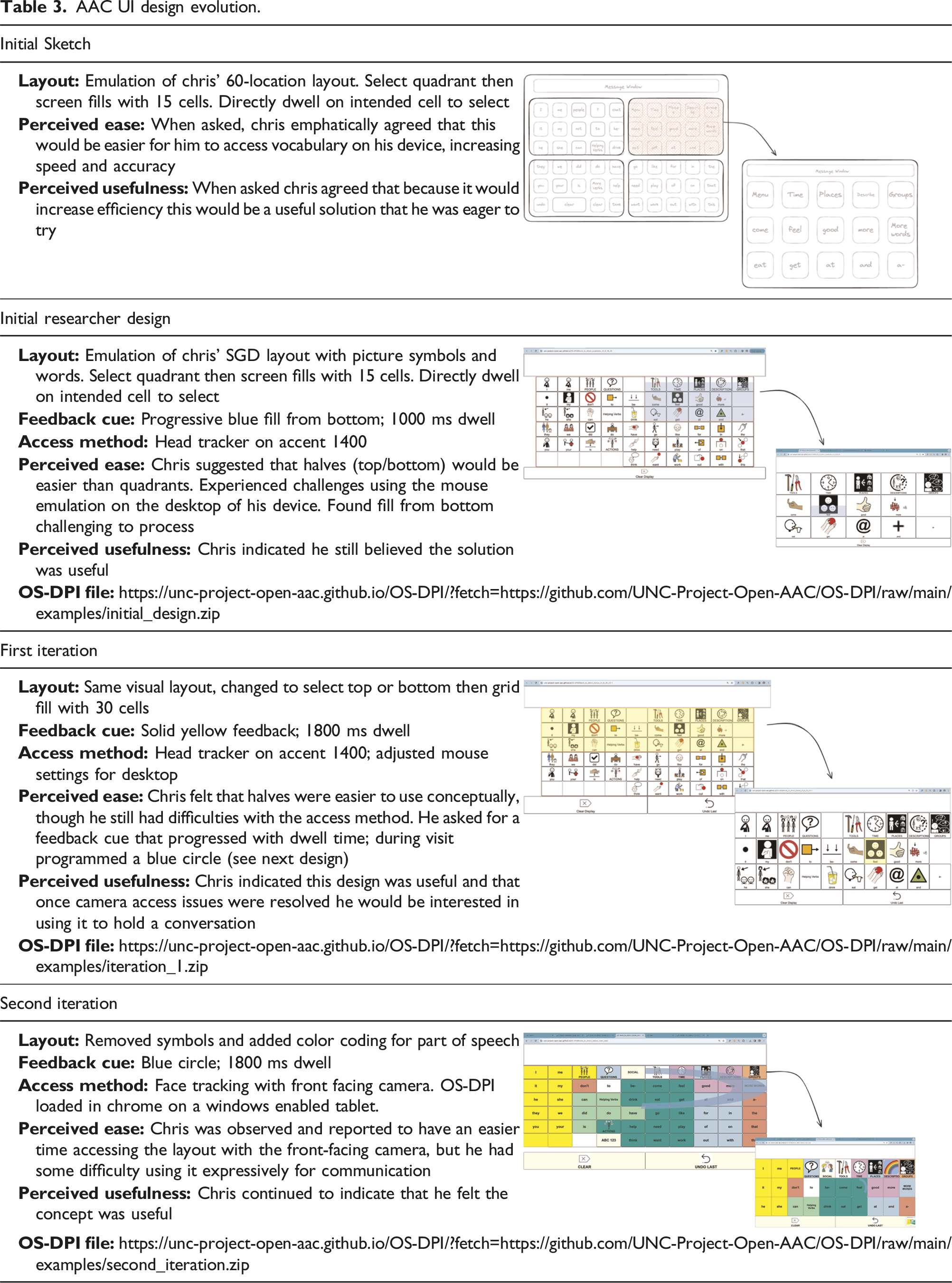
AAC UI design evolution.
Usability testing
All usability testing sessions were conducted in Chris’ home. Because the OS-DPI is housed within Google chrome, the interface could be loaded directly onto Chris’ SGD for him to test using head tracking, his typical access method. The intention was for Chris’ to focus on the potential of the novel UI without having to manage new equipment or changes to his access method. Actively using the UI allowed researchers to invite input, observe use, and elicit feedback about how using the novel UI compared to communicating with his current system. During each session, the TAM model was used to assess Chris’ perception of the ease and usefulness of the new design(s). Specifically, semi-structured interviews and task performance procedures were used throughout the sessions to gather information from Chris. The research team used a combination of open-ended and yes/no questions to elicit information from Chris about his perceptions of the UI designs. Though some questions were crafted in advance, most questions arose in the moment in response to how Chris was observed to interact with the UIs. When Chris was actively using a UI, he did not have access to his personal aided AAC system to communicate. The research team tuned in to his embodied forms of expression and asked questions that could be effectively answered in unaided ways. For example, once Chris grunted and grimaced when using a UI and so the first author probed about why he was reacting that way, offering a series of ideas of what he might be thinking until he indicated which was accurate. As she listed these ideas, she invited him to indicate through any expressive mode if the idea represented how he was experiencing the design. At the end of each session the research team left Chris with open-ended questions to ponder and consider answering by spending time composing messages to in-between sessions. In attempts to avoid social desirability, Chris was repeatedly reminded that the research team wanted his honest, critical feedback and wanted to know about things he did not like or thought needed to be changed.
In the first visit, the first author described the purpose of the visits. She shared that the research team had watched the videos of Chris interacting with Grant and had found what they perceived to be problems that might be due to his SGD. She then explained that they had a few ideas for new solutions to solve those problems. Subsequently, they watched several videos together, including the excerpt detailed above. Chris agreed that accessing specific cells was a problem he found frustrating. When presented with several potential solutions, Chris was most enthusiastic about trying out the two-step solution. He indicated that he felt this would be an easy and useful solution that would improve his speed and accuracy. Therefore, this solution became the focus of these initial visits.
After the first visit, a series of protocols were established for the following visits. Specific prototype UIs were identified to trial for each visit, along with a series of questions related to ease of use. These questions were based on those traditionally used in the TAM model to assess work productivity but adjusted to ask about ease and usefulness in the context of in-person communication. Examples included asking (a) if the UI would make it easy to use to communicate with another person, and (b) if the UI would be useful for communicating across a variety of topics. Adjustments to the UI were programmed in real time based on Chris’ feedback, as well as between sessions.
Co-design and testing results
We were able to successfully iteratively co-design a prototype solution to improve Chris’ access to a UI that emulated his SGD. The flexibility of the OS-DPI allowed for real-time programming and development based on Chris’ feedback and his perceptions of ease and usefulness of each iteration of the design. The scope and sequence of development, as well as barriers and challenges are described below.
Evolution of designs and OS-DPI
Including Chris in an iterative co-design and testing process early in development led to rapid changes; both to the initial UI and to the OS-DPI platform. Changes to the UI included shifting from the original design concept of presenting quadrants, initial favored by the researcher, to presenting halves, strongly favored by Chris, along with important changes in visual feedback provided by the UI. Changes to the OS-DPI included expanding the underlying software to support exploration of innovative access method configurations. The evolution of the UI is presented in Table 3.
Shifting from quadrants to halves
The first major iteration involved changing the access pattern from selecting quadrants to selecting halves (i.e., top or bottom) before selecting individual cells. We will refer to this as the “halves” concept. This change to halves resulted from feedback from Chris after he used the UI based on quadrants. He reported that the quadrants were challenging, especially when it came to making decisions about which quadrant to select for cells in the center of the screen. He felt that looking at either the top or the bottom half would be easier while still promoting accuracy.
Developing a task to test the concept
Testing concept: Comparing halves to static 60.

The two prototype UIs were compared to each other in a single session using a PC tablet and the integrated front facing camera. Chris was asked to select the target cells. In the halves condition, Chris was successful in completing the two steps when the target appeared in the bottom half of the screen (i.e., he selected the bottom half and then selected the target item from a full-screen array of 30 items). He was unsuccessful with the halves condition when the target appeared in the top half of the screen, and he was unsuccessful selecting items with the 60-cell condition. When asked Chris indicated the halves condition was easier, despite the challenges he faced selecting items that appeared in the top half of the display. He was not asked about the usefulness of the UI given that it had no ability to support him in in-person communication.
Problems designing without end-user involvement
In the initial quadrants design, the researcher added a progressive fill from the bottom up that correlated with the length of the dwell time. This differed from Chris’ SGD where cells were highlighted fully with purple and was intended to be a design enhancement. The intention was to provide feedback about the length of time required to dwell on an icon. The first author found this cue to be helpful when she tested it on her own, but it was immediately clear upon introducing it to Chris that it was the wrong approach. In fact, Chris reported that it was neither helpful nor easy. Additionally, he reported that it was distracting and made him feel rushed. Sitting side-by-side with Chris, the first author worked in real time to program a variety of feedback cues based off Chris’ input. In the first iteration, the feedback cue was changed to a static yellow fill, like the purple fill on Chris’ SGD. In the second iteration, a different progressive cue representing the length of the dwell, a circle that filled clockwise around the target, was implemented. Chris reported that this was a better solution than the fill from the bottom; however, he did not indicate a preference for either the progressively filled circle or the static fill.
Changes to OS-DPI
Changes to the OS-DPI were required when the initial plan to upload the prototype UIs in Chris’ SGD failed. Though the UI worked in the browser software loaded on Chris’ SGD, it did not work with his access method. The primary problem was that control of the cursor was different on the desktop and in the browser than in the aided AAC software. The manufacturer of the SGD provided helpful information, but ultimately, we were unsuccessful in using the SGD.
To overcome this barrier, the research team expanded the capabilities of the OS-DPI to enable the use of the front facing camera i.e. available on most computers and tablets. This allowed us to use a Windows-enabled tablet for usability testing. This expansion of the software supported using the tablet camera to track Chris’s head movements. . Having an integrated head tracker allowed Chris to interact directly with the prototype UIs and increased the flexibility and power of the OS-DPI as a tool for developing and testing novel UIs for others. Adding this major component was an unexpected result of this inclusive design work and is an example of the ways that designing for a “universe of one”23 can lead to a development that has the potential to impact many.
Discussion
Many adults with IDD use aided AAC to support their in-person interactions; however, little is known about the problems they face in interactions. Without research designed to identify problems that are specific to this population, efforts to ameliorate their communication challenges are often based on findings from research involving other populations. 21 Chris, an adult with IDD who has used aided AAC from the time he was a very young child, provides an example of the ways this work can feature inclusive design practices.
Though previous work consistently points to time as a primary challenge during in-person interactions that are mediated by AAC,5,8 this was not true for Chris, as his partner patiently waited for response. Rather, Chris’ primary challenge was accessing desired items on his SGD. Typical approaches to addressing this challenge (i.e., changing the dwell time and increasing cell size by reducing the total number of cells) present new challenges for Chris and others. Chris and the research team iteratively co-designed and developed a series of prototype UIs aimed at improving his ease of use and accuracy accessing the full range of words available on his SGD to communicate.
The OS-DPI was a critical support for this iterative co-design process. It allowed the research team to start with a UI design idea that featured an access method not readily available on his or other commercial SGDs. Additionally, the flexible, open-source development environment allowed for testing across several computer-based platforms and access methods, increasing opportunities for field testing. Furthermore, the OS-DPI facilitated truly inclusive design by allowing Chris and the research team to develop, iterate, and test designs in-person. This allowed for rapid co-design and development in response to Chris’ real-time feedback, giving Chris’ preferences greater influence over the end result than the researcher’s perspective.
Chris’ involvement in the iterative co-design process was also critical. Using an approach consistent with TAM, researchers were able to iteratively engage Chris in determining the potential of various UIs and UI features. Though the prototype UIs created in the OS-DPI are not intended to offer end-user, long-term solutions, they help define features for commercial products that may be helpful to users with similar access methods. Without the experience of sitting side-by-side with Chris the design would not have evolved as it did. Furthermore, being able to respond to Chris’ reactions and ideas in real time sped up the design process and allowed for immediate testing and feedback. This first exploration of inclusive design with the OS-DPI offers insights into how the design and programming environment can be used with this population and others going forward. It demonstrates how researchers and end-users can collaborate to co-design in real time to speed up the development process.
Implications
Though preliminary, the results of this study suggest that the OS-DPI supports the immediate and ongoing translation of research to UI solutions designing for a “universe of one.” 19 Additionally, it demonstrates the benefits of co-design with end users and the limitations of relying solely on so-called experts. It suggests that when researchers design in isolation their solutions might not meet the needs of the end user. The results offer further support that early, inclusive design, can identify and address these discrepancies.
The OS-DPI was developed to support a variety of stakeholders in developing and testing novel aided AAC UIs. We are encouraged that we were able to use the OS-DPI to develop access features not currently available commercially. This holds great promise for future research and development. We hope that the platform will support rapid development and testing of device agnostic, novel UI prototypes and facilitate inclusive design approaches early and often during the development process. We do not know what solutions may be next, but we are excited about the idea of others developing solutions tomorrow that we could not dream of today.
Including Chris early and often in the design process was critical to this study and the resulting AAC functionality and UIs. The TAM model was helpful in both assessing usability and actively engaging Chris as a co-designer. Future work should continue to explore how to leverage the OS-DPI to promote collaboration between those with design and programming expertise and those with lived experiences using AAC to rapidly iterate on designs with improved usability for communication.
Limitations
This study was narrowly defined to pursue co-design and development with one aided AAC user to address a single problem through a prototype UI design. The iterative design, development, and testing of the UI was completed over a short period of time. The designs were created by a researcher who participated in the development of the OS-DPI and had previous experience with the declarative programming required to create the prototype UIs. Those unfamiliar with the OS-DPI would likely need support in learning how to use declarative programing to have similar success in developing, testing, and iterating on UIs. Approaches to facilitate development and user-input should continue to be explored.
Conclusion
Adults with IDD who use aided AAC face myriad problems navigating in-person interactions. Designing UIs to resolve these problems has largely been done by commercial manufacturers. The results of this study offer an alternative path where, from the beginning, the voices, preferences, and experiences of end-users might be used to design novel UIs. Our hope is that this preliminary work is just the beginning of a more inclusive approach to development, and we invite you to join us in imagining what could be for all aided AAC users.
Footnotes
Acknowledgements
We would like to thank Chris (pseudonym) for his invaluable participation and feedback.
Author contributions
SBG, LG, and KE researched the literature and conceived the study. SBG, LG, and KE were involved in protocol development, gaining ethical approval, and participant recruitment. SBG was responsible for data analysis. SBG wrote the first draft of the manuscript. All authors reviewed and edited the manuscript and approved the final version of the manuscript.
Declaration of conflicting interests
The author(s) declared the following potential conflicts of interest with respect to the research, authorship, and/or publication of this article: SBG, LG, and KE are employees of the University of North Carolina at Chapel Hill, and their salaries are paid in part by a grant from the National Institute on Disability, Independent Living and Rehabilitation research (NIDILRR grant number 90DPCP0007).
Funding
The author(s) disclosed receipt of the following financial support for the research, authorship, and/or publication of this article: This work was supported by the National Institute on Disability, Independent Living, and Rehabilitation Research (NIDILRR grant number 90DPCP0007).
Guarantor
Dr Lori Geist.
