



Abstract
Virtual reality (VR) simulators can help train manual wheelchair skills. Transfer of skills from the virtual to the real world may depend on the sense of presence, or of being “in” the virtual environment.
Objectives
To compare 1) the usability (in terms of performance, overall experience, and satisfaction), as well as 2) the sense of presence, in a wheelchair simulator with two display conditions: a head-mounted display (HMD) or a computer monitor.
Methods
Sixteen healthy adults practiced in the wheelchair simulator, first with a computer monitor display and then with an HMD. Task performance, cybersickness, presence, and overall experience in VR were assessed.
Results
Four of the participants were unable to complete all tasks in the HMD condition. When comparing the two display conditions, performance was the same, except for one task (bathroom) which took longer with the computer monitor. The HMD condition was rated as significantly higher in terms of sense of presence and VR experience but provoked more intense symptoms of cybersickness.
Discussion
Use of an HMD increased symptoms of cybersickness, with small gains in wheelchair performance. Thus, the use of an HMD may be warranted for the training of wheelchair skills, if tolerated by participants.
Keywords
Introduction
Approximately 290,000 Canadians 1,2 require a wheelchair (WC) for mobility, work, 3 leisure, and daily living activities.4,5 Training is recognized as a means to improve both WC safety and performance; it should focus on various WC-related skills, namely: basic maneuvering, avoiding and crossing obstacles, slopes and cross-slopes, transfers from or to the WC, balance to avoid tips and falls, and propulsion technique.6,7 Appropriate training reduces the number of tips and falls, which is the leading cause of injury amongst WC users.8,9 Training of an efficient propulsion technique can reduce chronic shoulder pain, 10 which often results from long-term WC use. Improved WC skills have been significantly correlated with functional and participation outcomes.11,12 WCs are generally delivered in rehabilitation centers, where time is spent for custom fitting of the mobility device to the user (e.g., seat, size, etc.,) leaving too little time for training.13,14 Thus, there may be a gap between training services presently offered and the needs of WC users. For example, research involving 4.5 h of direct, one-on-one training 15 or 9 h of peer-led training 16 resulted in a significant improvement in WC skills. By contrast, in a study with 68 clinician training data, 43% of clinicians (physical and occupational therapists) reported providing between 1–4 h of training, while 18% provided no training. 17
A virtual reality (VR) simulator represents an alternative approach for WC users to spend more time practicing their skills, in addition to regular training provided in a clinical or community setting. VR can also provide a safe means of practicing complex and risky activities, such as street crossing and navigating through a crowd. 18 One key question is if skills learned in a VR simulator can transfer to real life activities. As reviewed by Holden (2005), several studies have indicated that skills learned from simulators do transfer to the real world. 19 One of the key criteria that can lead to better skill transfer is the feeling of presence, 20 in other words the temporary suspension of disbelief such that users feel as if they were “in” the VR environment. 21 Accordingly, presence is thought to make tasks in the VR environment feel more natural and relevant to the user and therefore could enhance task training and transfer of task performance to the real world (RW) environment. Presence can be enhanced through visual immersion in the virtual world via head mounted displays (HMD). 22 On the other hand, an HMD may be heavy and cumbersome, which is a concern to WC users, many of whom may have decreased trunk and neck strength. Use of an HMD can also lead to simulator sickness such as headaches and feelings of nausea that can hinder the experience. 19 Thus, one question we wished to address is if the use of an HMD in a WC simulator, compared to a regular computer monitor, increases the sense of presence, without decreasing performance, comfort, and usability. For this initial study, we targeted naïve healthy adults to provide input into the simulator design, as a first step toward building a prototype more adapted to WC users.
This study focused on two main objectives: (1) to compare, in naïve healthy adults, the usability of a manual WC simulator, (in terms of performance, overall VR experience, and satisfaction) in two different display conditions, either an HMD or a Computer Monitor (CM); and (2) to also compare the sense of presence, in the same conditions. We hypothesized that since the HMD is more immersive as it provides stereo (3D) vision, it would yield the best results in terms of presence. However, we also speculated that the potential discomfort caused by an HMD may also decrease its usability.
Methods and materials
Population and sample size
This study targeted healthy adults aged 18–65 years with no prior WC experience. Sample size calculations were based on data from the igroup presence questionnaire database (effect size of 0.73 when comparing presence measured in virtual environments involving either HMD or CM). 23 For a power of 0.80, a minimum number of 14 participants were required. We recruited 16 participants from Montreal and Laval (Quebec, Canada) using posters and word of mouth. Inclusion criteria consist of the following : able to understand either French or English and having normal or corrected vision. Participants were excluded if they presented with past medical conditions such as seizures co-occurring with viewing 3-D images or animated media, or if they had upper extremity conditions or pain affecting WC propulsion.
Ethics and consent
This study was approved by the Institutional review board of the Center for Interdisciplinary Research in Rehabilitation (CRIR-1142-0316). All participants provided their informed consent.
Setup and equipment
The WC simulator has two components, the software and the hardware, both specifically adapted for this study. The software is a computer-generated program emulating a WC user in various scenarios and providing a first-person perspective (Figure 1). The simulator provides the user with feedback about the performance, specifically the number and location of collisions, and the elapsed time as a scenario is completed. Various scenarios have been implemented, each representing everyday activities, such as entering/exiting an elevator, street crossing, and navigating in a crowded mall. Upon completion of each scenario, the simulator presents the values of the best performance achieved by the participant. The software requires a computer monitor or HMD (Occulus Rift, USA), mouse, keyboard, and a computer that can adequately support the simulator. Virtual environments in the wheelchair simulator: elevator, street crossing, shopping mall, and bathroom.
The companion to the simulator software is the manual WC interface, the hardware (Figure 2). This involves a regular manual WC mounted on a height-adjustable wooden frame with two pairs of rollers fitted with angular speed sensors, which translate the user’s movements of the wheels of the WC into the simulation. The rollers are not motorized and do not provide any force feedback. A height-adjustable stand supports the WC, to decrease the pressure of the wheels against the rollers. The simulator hardware.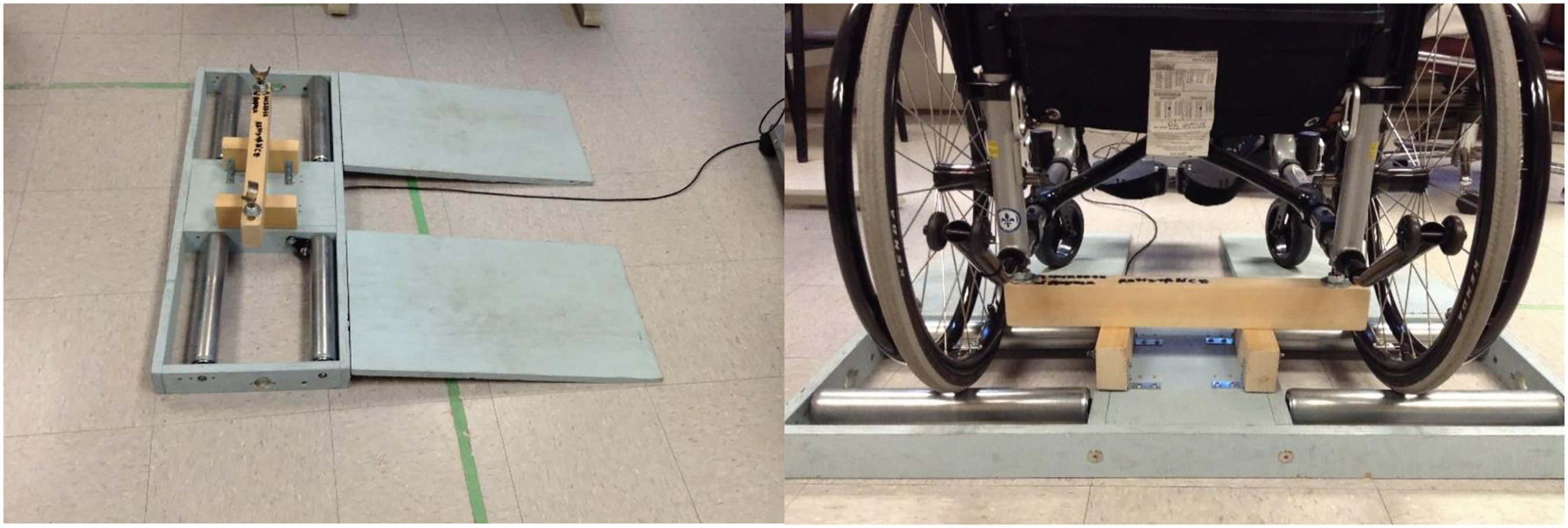
Procedures
The participants were asked to perform the 4 following tasks. 1)
All participants performed two consecutive trials of the 4 tasks by viewing the virtual environment using a computer monitor (CM condition); and then once again while using the head mounted display (HMD condition). The sequence in display conditions was fixed, as viewing through an HMD can induce symptoms of cybersickness that can last up to 5 h, depending on the task and duration of exposure.24,25 Since one objective was to measure cybersickness symptoms after each display condition, we wanted to avoid any carryover effect of the HMD to the CM condition. While VR viewed through a CM has also been reported to induce cybersickness, reported symptoms are very low and their duration is unknown.26, 27 Thus, in order to limit potential carryover of cybersickness symptoms from the CM to the HMD condition, there was a 10–15 min pause between the two display conditions, during which the participant completed questionnaires. We then made sure that they had no persisting signs of cybersickness via verbal confirmation. However, the sequence of tasks was randomized between each participant and was different in each viewing condition. Prior to beginning each display condition, participants received one practice session (5 min) to familiarize themselves with the environment and condition. During the HMD condition, participants were given a 3-minute breaks after each trial (with the HMD removed).
Measurements
General demographic characteristics (age, gender, handedness, and videogame usage) were recorded before the start of the experiment.
The simulator software provides performance data, specifically the number of collision and the time of completion for each trial. The simulator also records the virtual WC position at each time point, which was used to calculate the distance to objects in each task. This distance to object refers to the proximity to which the participant maneuvered their WC to a key object or feature in each task. In the Bathroom and Elevator tasks, the reference point was the doorway center. In the Mall task, the position of the vending machine was used as a reference. Finally, in the street crossing task, the point of reference was the position of a car that was partially blocking the street crossing path. Calculations of distance to objects were done using custom MATLAB scripts (The MathWords, USA).
Each performance variable (number of collisions, task completion time, and distance to objects) was analyzed by observing the average of the second trial performed in each task and display condition.
The Simulator sickness questionnaire (SSQ) 28 measures discomfort in a virtual environment by assessing 16 symptoms (such as Fatigue, Headache, and Eyestrain) that are indicative of simulator sickness. The symptoms are graded on a 4-point scale, ranging from “Never” (0) to “Severe” (3). Individual symptom scores are then combined and weighted to produce three subscales (nausea, oculomotor, and disorientation), and a total score which is the summation of the 3 subscales. This assessment is reported to have good internal consistency and moderate test–retest reliability. 29 The SSQ was administered 3 times: at baseline, after the CM condition, and after the HMD condition.
The igroup presence questionnaire (IPQ) 30 measures the level of spatial presence, immersivity, experienced realism, and sense of being there of a virtual reality activity. The IPQ poses 14 questions, such as “How real did the virtual world seem to you?”, which are graded on a 7-point Likert scale ranging from “fully disagree” (−3), to “neutral” (0) to “fully agree” (3). The answers to individual questions are then weighted and combined to yield scores on the three subscales. The IPQ has good internal consistency and reliability 30 ; it was administered after each display condition.
The Short-Feedback Questionnaire (SFQ) 31 was used to assess the participant’s perception of the simulator in each display condition. The SFQ asks questions related to an activity in a virtual environment, on constructs including enjoyment, feeling of immersion, performance, and so forth. For questions 1–9, they are ranked on a 5-point scale ranging from 1 (representing “Not at all” or “Very easy”) to 5 (representing “A lot” or “Very difficult”). Question 10 was an open-ended question to specify any discomfort that the participant might have experienced. The SFQ has good internal consistency and concurrent validity 32 and was administered after completing all tasks in each of the two display conditions.
The Questionnaire on the Display Conditions is a straightforward questionnaire composed of a Likert scale component measuring the participants’ display condition preference based on 5 categories. These categories include “Ease of Use,” “Comfortability,” “WC easier to maneuver,” Easier to avoid obstacles,” and “More appropriate for teaching WC skills.” Each category was scored on a 5-point Likert scale with the following answers ranging from −2 (CM is a lot better) to +2 (HMD is a lot better), with 0 representing no preference.
Data analysis
Paired t-tests were used to compare display conditions, for MWC performance, presence (PQ), and perception of VR activity (SFQ). For discomfort (SSQ), we used a repeated measures ANOVA to compare the results of display condition (baseline, post-CM, or post-HMD) on the SSQ. Significance for the t-tests and ANOVA was set at 0.05. The answers to the display preference questionnaire were analyzed through descriptive statistics only (distributions).
Results
Demographics
Demographic data of the participants (n = 16).

Performance variables
Thirteen of the 16 participants completed all tasks in both display conditions; thus, only their results were retained in the data analysis of the WC performance variables. The remaining 3 participants experienced too much nausea during the HMD condition and were unable to complete the task. Thus, their WC performance data were omitted. All participants’ data were included in the analysis of the questionnaires.
The WC performance data for each display condition are shown in Figure 3. As illustrated in Figure 3(a), there were no significant differences between the number of collisions due to the display condition. Figure 3(b) shows that, on average, participants in the CM display condition took significantly longer to complete the bathroom task, than with the HMD (paired t-test; p = 0.0013). However, no significant differences were observed in the other tasks. Similarly, Figure 3(c) shows that, on average, participants in the HMD condition approached the object closer than in the CM condition during the street crossing task (paired t-test; p = 0.0036). However, there were no significant differences between the two display conditions for the other three tasks. Difference between performance variables (average number of collisions (A), time to completion (B), and average distance to object (C)) in trial 2 of each task for the CM and HMD conditions. **indicates a significant difference (p < 0.05).
Questionnaires
The results from the four different questionnaires were analyzed separately providing us with unique information. For this analysis, the results from all 16 participants were included, including those who were unable to complete some of the tasks in the HMD condition.
Figure 4 presents the average total score of the SSQ. The analysis indicated that the HMD condition produced significantly higher overall discomfort compared to both CM and baseline values (ANOVA, F = 15.1, p < 0.001). However, there were no differences between CM and baseline. When the SSQ sub-scores were analyzed, the same results were obtained. Thus, it can be said that HMD generated symptoms of simulator sickness as compared to baseline; meanwhile CM did not produce any symptoms. Average total score for Simulator Sickness Questionnaire at Baseline and after trials in the CM and HMD conditions. ** indicates a significant difference (p < 0.05).
Two-tailed paired t-test for the IPQ between the two display conditions (CM and HMD).

Note: sp = spatial presence, inv = involvement/immersivity, real = experienced realism, g1 = sense of being there. * indicates a significant difference between the two display conditions (p < 0.05).
The result for the SFQ indicated a significant difference between CM and HMD in two of the nine questions: 1. Did you feel as if you were inside the activities/environments? 2. Did you feel any discomfort during the experience? For both of these questions, the HMD was rated as higher than CM (4.19 vs 3.5 and 3.0 vs 1.38, respectively). There were no significant differences in any of the other questions of the SFQ.
Lastly, the results of the preference questionnaire are presented in Figure 5 Result from the questionnaire on display condition preference, for each of the 5 criteria, tabulated into a box and whisker plot. In this analysis, we considered the median value for each box plot: if the median lies at or below −1, CM is favored; if it is at 0, neutral/no difference in preference; if it is at or above 1, HMD is favored. The central line inside of the box represents the median values, and the x represents the mean values.
Discussion
The results allow us to extrapolate information on how participants appreciated the WC simulator. The data indicated only limited differences in the performance variables between the HMD and CM display conditions. Specifically, during the bathroom task, the HMD display condition yielded a faster time to completion than the CM display condition. This could be because the bathroom task had narrow spaces, thus requiring a finer control of movement and a greater need to be aware of the surrounding, which the HMD display condition provides with a wider field of vision than CM and affording the ability to easily look around. There were, however, no differences between the CM and HMD conditions in terms of number of collisions or in distance to the door’s center, for the bathroom task. The other difference in performance was observed for the street crossing task: a larger distance to the reference object (car partly impeding the crosswalk) was also observed. This indicates that in the CM condition, participants moved further away from that car than in the HMD condition. It is possible that this task relied more on assessing the distance of an object located laterally, which is easier to do with the HMD as one can simply turn the head to look at the object in question; whereas the CM condition offers more limited peripheral vision. However, in all other cases, performance variables were not significantly affected by display condition. Thus, the HMD may increase the awareness of the surrounding virtual environment as it allows a more realistic exploration of the environment, as compared to the CM display condition.
Results from the questionnaire on the display condition showed that participants generally preferred the HMD compared to the CM. Of course, this analysis only included participants who were able to complete the experiment using both display conditions. Those participants found that with the HMD, the virtual WC was perceived as easier to use and easier to maneuver. The HMD made it easier to avoid obstacles and was seen as more appropriate for the teaching of WC skills. However, it should be noted that in terms of comfort, the CM was preferred over the HMD. This was confirmed by analysis of the SSQ: there were no differences (p>0.05) between baseline discomfort and that experienced after the CM condition. However, there was a large increase in discomfort after the HMD condition.
In terms of the IPQ, the results show that the HMD display condition yielded a better sense of presence than the CM display condition. This is because for all the categories of the IPQ (spatial presence, involvement, realism, and the sense of “being there”), scores in the HMD condition were all significantly higher when compared to the CM condition. Additionally, results from the SFQ showed that the HMD was perceived as more immersive than the CM. Clearly, the HMD is the better instrument in terms of providing a greater sense of presence.
Cybersickness is often reported in VR studies involving the use of an HMD.24, 33 While cybersickness symptoms are similar to those of motion sickness experienced in transportation vehicles, their causes are likely different. It should be noted that symptoms of motion sickness can be triggered by vestibular stimulation alone. Cybersickness, on the other hand, is possibly due to a mismatch between the movement expected by the visual system as compared to what is actually experienced by the vestibular system. 24 This is likely the case in our simulator application, as participants visually perceive self-movements following WC propulsion, which do not match vestibular and proprioceptive information, as participants do not physically move. Some of our scenarios, such as entering/exiting an elevator, involve circumventing obstacles which may force users to quickly look sideways and down in the HMD condition, while they are propelling forward, to make sure that the WC clears the doorframe. Research has shown that quick rotations along multiple axis worsen cybersickness symptoms. 24
In our study, presence was rated as higher in the HMD than in the CM condition, despite the worsening of the cybersickness symptoms. This is interesting in that research agrees that cybersickness is overall negatively correlated with presence. 34 Moreover, cybersickness is not the only predictor of presence. The fact that the HMD provides greater visual immersion, through stereoscopic 3D display and blocking out of the real environment, probably contributes greatly to the increased sense of presence. This also means that the sense of presence could be further increased if we could decrease the symptoms of cybersickness. One way to decrease cybersickness is simply habituation through short, repeated exposure. 35 Using an HMD with a greater field of view, 24 as well as decreasing the field of view during head turns, 36 could also help reduce symptoms of cybersickness. Finally, it could be possible to provide some illusion of self-movement during WC propulsion and turns, through the use of vibrational actuators or other haptic devices. 37 The WC simulator could also be set up on a motion platform, but this would greatly complicate its design and increase costs.
To summarize, while the HMD provided a greater sense of presence and was preferred by participants in terms of making the VR tasks easier, it also greatly increased discomfort with a gain in performance in only some of the tasks. While presence may be a positive factor for the learning of new skills, discomfort is certainly detrimental. Some of our participants were even unable to complete the tasks in the HMD condition. As it is easy to use our WC simulator with either an HMD or a CM, our recommendation would be for users to first try the HMD, while taking frequent breaks. If that is too uncomfortable, then they can switch to the CM, as the difference in terms of WC performance is relatively minor.
Limitations
A limitation of our study is that it involved healthy adult participants. The study should be opened to expert clinicians (such as health care works with complete knowledge on wheelchair use and training) and WC users with experience to provide more accurate and appropriate input. In future iterations of this study, the inclusion of new participants who require wheelchair training could be valuable in assessing the effectiveness usability of our simulator. Another limitation was that the tasks may have been too easy for our users, as performance differences in completion time between the two display conditions were only seen for the activity requiring tighter maneuvering, (e.g., the bathroom scenario). The influence of task difficulty on performance in the two display conditions should also be further examined. Finally, as the order of the display conditions was fixed (CM, then HMD), it is possible that participants improved their performance due to learning, which could explain some of the differences displayed in Figure 3. However, participants also indicated that it was easier to avoid obstacles in the HMD condition (Figure 5). Thus, we feel confident that use of an HMD does provide an advantage in terms of performance, as compared with a regular computer display.
Conclusion
Our objectives were to validate the usability of the manual WC simulator and to see which display condition, CM or HMD, produced a greater sense of presence. We hypothesized that the HMD would be a better option as it is designed to provide an immersive 3D environment. Our results indeed showed that participants viewed the HMD as more appropriate for wheelchair training purposes; this was confirmed by a gain in performance when participants used the HMD in the more complex tasks, as compared to the CM display. However, symptoms of cybersickness were more severe with the HMD than with the CM. Thus, as either of the two displays may be appropriate for training wheelchair skills, users of the simulator should start with the HMD and can then switch to a CM, if needed to avoid discomfort.
Footnotes
Author Contributions
PSA conceived the study and obtained ethics approval. All authors were involved in protocol development and in data analysis. MAAG and YLE were responsible for patient recruitment and data collection. MAAG wrote the first draft of the manuscript. All authors reviewed and edited the manuscript and approved its final version.
Declaration of conflicting interests
The author(s) declared no potential conflicts of interest with respect to the research, authorship, and/or publication of this article.
Funding
The author(s) disclosed receipt of the following financial support for the research, authorship, and/or publication of this article: This study was supported by the Natural Sciences and Engineering Research Council of Canada. MAAG was supported by a bursary from the McGill Faculty of Medicine (342305).
Guarantor
PSA
