




Abstract
We present PictureSensation, a mobile application for the hapto-acoustic exploration of images. It is designed to allow for the visually impaired to gain direct perceptual access to images via an acoustic signal. PictureSensation introduces a swipe-gesture based, speech-guided, barrier free user interface to guarantee autonomous usage by a blind user. It implements a recently proposed exploration and audification principle, which harnesses exploration methods that the visually impaired are used to from everyday life. In brief, a user explores an image actively on a touch screen and receives auditory feedback about its content at his current finger position. PictureSensation provides an extensive tutorial and training mode, to allow for a blind user to become familiar with the use of the application itself as well as the principles of image content to sound transformations, without any assistance from a normal-sighted person. We show our application’s potential to help visually impaired individuals explore, interpret and understand entire scenes, even on small smartphone screens. Providing more than just verbal scene descriptions, PictureSensation presents a valuable mobile tool to grant the blind access to the visual world through exploration, anywhere.
Introduction
Recent studies on the blind and visually impaired community1-4 indicate a significant interest in photography and being able to organize one’s own pictures. As a result of these studies, Adams et al. 4 developed a mobile application to help blind people take and organize pictures using non-visual cues. This includes a barrier free picture gallery with voice annotations.
As a further step, Adams et al. 4 anticipate utilizing the principles proposed in our previous work on visual substitution systems5,6 to allow blind people to interpret the content of an image by interacting with it.
The defining aspect of our work is what we call an ‘explorative paradigm’, that is, users are enabled to explore an image actively on a touch screen and receive auditory feedback about the image content at their current finger position. This paradigm is inspired by how blind people explore a bas-relief image or Braille texts. In addition, we presented a colour and feature sonification scheme to translate the extracted image information into sounds, a process known as image sonification.
Our work5,6 focuses on image sonification in contrast to existing sonification frameworks designed to assist visually impaired, for example, navigating through environments37,8 or recognizing objects. 9 Other work on the sonification of images for the visually impaired either focuses on single elementary features, such as colour7,10 or edges, 11 and/or follows non-explorative paradigms, such as the sequential sonification of lightness in images per pixel from left to right. 12
During our studies on this type of visual substitution system5,6 we developed and evaluated several research prototypes in close corporation with congenital blind users and a residential school for the visually impaired. An incremental and iterative type of development process was chosen, to obtain constant feedback by putative users about the usability of the explorative interface design, audible colour representation schemes as well as the image features and sonification provided.
As a result, we derived what we call an ‘audible colour space’ representation that proved to be intuitive enough to be understood and applied even by congenital blind people of different backgrounds. 6 In addition, we observed that a careful use of sophisticated Computer Vision and Machine Learning techniques to derive and sonify image information on many levels, ranging from low-level colour information to high-level object recognition, helps to overcome the limitations of manual object recognition based on low-level features, such as edges and colours, alone.5,13 Due to the integration of the extracted multi-level image information and our explorative paradigm, the task of analysing and understanding images remains with the user, in order to allow for a spatial understanding of a scene. Therefore, we termed this integrative approach ‘auditory image understanding’. 6
However, the C++ based desktop system used in our previous studies 13 has been merely a research prototype that needs to be operated and explained by a normal-sighted person. Given the ubiquity of mobile phones within the visually impaired community 2 it is reasonable to harness these powerful devices as personal visual substitution devices. Therefore, the application presented in this paper, called PictureSensation, is an extended implementation of our concepts for mobile devices, complemented by an elaborate user interface and tutorial modes designed for the needs of the visually impaired. As opposed to our research prototype 6 using an external touch screen setup, our mobile application is designed to allow for autonomous usage by any visually impaired user. As such, a blind person’s smartphone becomes his own visual substitution device, available any time, anywhere.
PictureSensation shares important aspects with our research prototypes, such as:
An audible representation of colour space, suitable to convey the concept of colours to blind, especially congenital blind, including the sonification of colour-mixtures based on combinations of acoustical entities; A Computer Vision and Machine Learning based multi-level image analysis approach, combining low-, mid- and high-level feature extraction; An explorative paradigm for the sonification of image information.
Main complementary features include:
An Android based mobile application, granting a blind person perceptual access to the visual world anywhere at any time; A swipe-gesture based, speech-assisted user interface, designed for the visually impaired, to guarantee autonomous usage; A extensive tutorial to allow a blind user to become familiar with the application; A training mode to autonomously learn and recall the principles of the image content to sound transformations; A feature extraction pipeline that incorporates multi-core technology to speed up image pre-processing; A live sonification mode that allows for a user to explore a colour video stream, turning the software into a colour recognition assistant, for example, for clothes selection; Incorporation of smartphone specific features to convey image content; A gallery to store, organize and load taken pictures.
Finally, although our application is primarily designed as an aid for the blind to make images explorable and, therefore, accessible, recent research reveals that visual substitution systems could be also harnessed in research on the effects of blindness to the brain as well as in rehabilitation programmes.14,15
Implementation
A barrier free user interface
To allow for autonomous usage by a blind user we complement PictureSensation with a barrier free user interface. Therefore, we refrain from using any on-screen menus or buttons. Instead, our application employs two-finger swipe gestures that can be performed anywhere on the screen and allow for the user to navigate between different modes in a fixed order, as illustrated in Figure 1. The application has four modes in total:
Camera mode. A user can load a picture by pressing the screen for about one second. To avoid blurry images, the camera is set to a permanent autofocus. Successful loading and finished feature extraction is announced and the application automatically changes into exploration mode. To use the entire screen, the user is verbally informed about the optimal orientation of the phone, that is, whether the phone should be rotated 90° before beginning with the exploration. Gallery mode. Another way to acquire an image is via the gallery mode. Stored images can be selected and loaded for exploration. At this stage, the gallery mode is meant to be used in cooperation with a normal-sighted person. However, we anticipate incorporating ideas formulated by Adams et al.,
4
including voice annotations of images, to allow for an autonomous use. Exploration mode. The user can explore a loaded and pre-processed image using his finger. Colours and features of the image are transformed into sound in real-time according to the user’s finger position. Figure 2(a) gives an example of the system in exploration mode. Training mode. As with the other modes, the training mode can be accessed at any time. It is designed to learn or recall the associations between colours as well as all other image features and their acoustical representations, and to become familiar with the exploration paradigm. Figure 2(b) illustrates the use of colour training. Colour names are announced, while the corresponding sound elements are played.
An illustration of our barrier free user interface design principle. Two-finger swipe gestures are used to navigate through the different modes of the application. (a) The PictureSensation application in exploration and (b) colour training mode in comparison with (c) the original desktop based research protoype.
6


Along with the swipe gesture based user interface, information about the current status of the application is constantly communicated verbally. In addition to these automatic notifications, at any time, the user can request further information about the current status of the application and available gestures by double-tapping the screen. PictureSensation is multi-lingual. The appropriate language is automatically selected based on system preferences and does not have to be configured by the user. Further, to help a blind user becoming familiar with the use of the software and the user interface itself, an extensive voice-guided tutorial has been developed. This tutorial is loaded along with any start of the application and can be interrupted by a simple swipe down gesture.
These specific design principles of our user interface based on gestures and audio feedback were chosen based on recent usability studies16,17 that highlight the benefits of a few simple touch gestures, performable anywhere on the screen along with acoustic feedback.
An intuitive sonification scheme of colours, structures and objects
For the sonification of colours, the HSL colour model is used, where each colour value is described by lightness (L), saturation (S) and hue (H) rather than, for example, the red, green, blue system. Based on our experiments,
5
the HSL system can be understood much easier by a congenitally blind person. Subsequently, each colour value in the HSL model is represented as a mixture of fundamental sound elements, which is inspired by Hering’s theory of opponent colours.
18
So-called opponent colour pairs red–green and blue–yellow are associated with complementary sound elements, as illustrated in Figure 3(b). Colour mixtures are represented using a combination of adjacent sound elements. Pairs of opponent colours do not mix, therefore, no mixture of a pair of complementary sound elements in the sonification model exists either. Musical scales represent luminance ranges from white to black. As discussed in Banf and Blanz,
6
these colour to sound element associations have been chosen based on results within the field of colour theory about the different perceptions of colours. The main idea is to match the specific visual perceptions of colours with suited acoustical representations.

Colour sound synthesis starts with a sine wave for grey, changing in pitch according to luminance. To represent the perceived vibrancy of red, a tremolo is formed overlaying a second sine wave, just a few hertz apart. A beat of two very close frequencies creates a tremolo effect. An opponent sound element to this vibrant red, associated with calm green, is created as a calm motion of sound in time using additional sine waves, close to the fundamental sine, but far enough apart to not create the vibrant tremolo effect but a smooth pattern of beats. To simulate the visual perception of warmth with yellow, we create a warm bass using deep sine frequencies. The perceived coldness of blue is based on a pre-sampled wind-like flute sound.
Using such fundamental sound characteristics has several benefits over common MIDI instruments such as those used in our first prototype 5 (Figure 3(a)). First, instruments in general do not give a decent representation of a colour’s visually perceived characteristic. Instruments would be associated rather with certain objects, for example, a choir with a cathedral. In contrast, our fundamental sound characteristics might allow the user to perceive acoustically what corresponds to the visual perception of a seeing person. Second, such instruments inherit complex frequency spectra and, therefore, the risk of unwanted interferences when mixed. Third, using high quality MIDI instruments requires usage of an external MIDI Synthesizer and additional linkage software as well as a certain level of expertise. This contradicts our vision to minimize the software so that a blind user is able to operate it on his mobile phone.
Further, all participants of our second study 6 reported that the advanced colour sonification approach, which is employed within PictureSensation, was more comfortable, intuitive and discriminable, especially in combination with the other sonifications. Our experiments 6 give hope that the proposed colour sonification approach is intuitive enough to be understood and applied even by congenitally blind people of different backgrounds.
Detection and sonification of objects and artificial structures
After an image has been loaded by the camera or from the gallery, objects as well as man made structures are detected. Feature extraction and classification as well as object recognition algorithms are implemented as proposed in our previous work on object recognition for the visually impaired. 13 PictureSensation harnesses multi-core processing to speed up classification tasks. Therefore, the entire image pre-processing takes about 20 s on a Samsung Galaxy S6.
Detected man made structures, as illustrated in Figure 4(a), are acoustically represented using drum sounds, which do not interfere with colour sonification. Orientation of edges within man made structures, visualized using colour-coding in Figure 4(b), are emphasized altering the speed of these drum rhythms. This way, a participant in one previous study
6
was able to distinguish between different types of building.
(a) Predicted man made structures (white squares). (b) Colour-coding of sonified orientation of edges.
The sonification of natural, rough, regions is based on brown noise as an acoustical representation of roughness. In addition, the occurrence of a face within a certain part of an image is conveyed using vibration, available specifically within smartphones. Detected objects are sonified using familiar auditory icons, such as the meow produced by a cat or the barking of a dog, so no abstract memorization is required. The icon is played whenever the user moves over a pixel region referring to a specific object, as illustrated in Figure 5. Object detection is facilitated as described in Banf and Blanz
13
based on the C/C++ OpenCV library via JNI (Java native interface). We are currently working on a separate object recognition mode, which allows the user to select the type of object, via swipe gesture with audio feedback, to search for within a camera input stream.
Object regions, audified using auditory icons.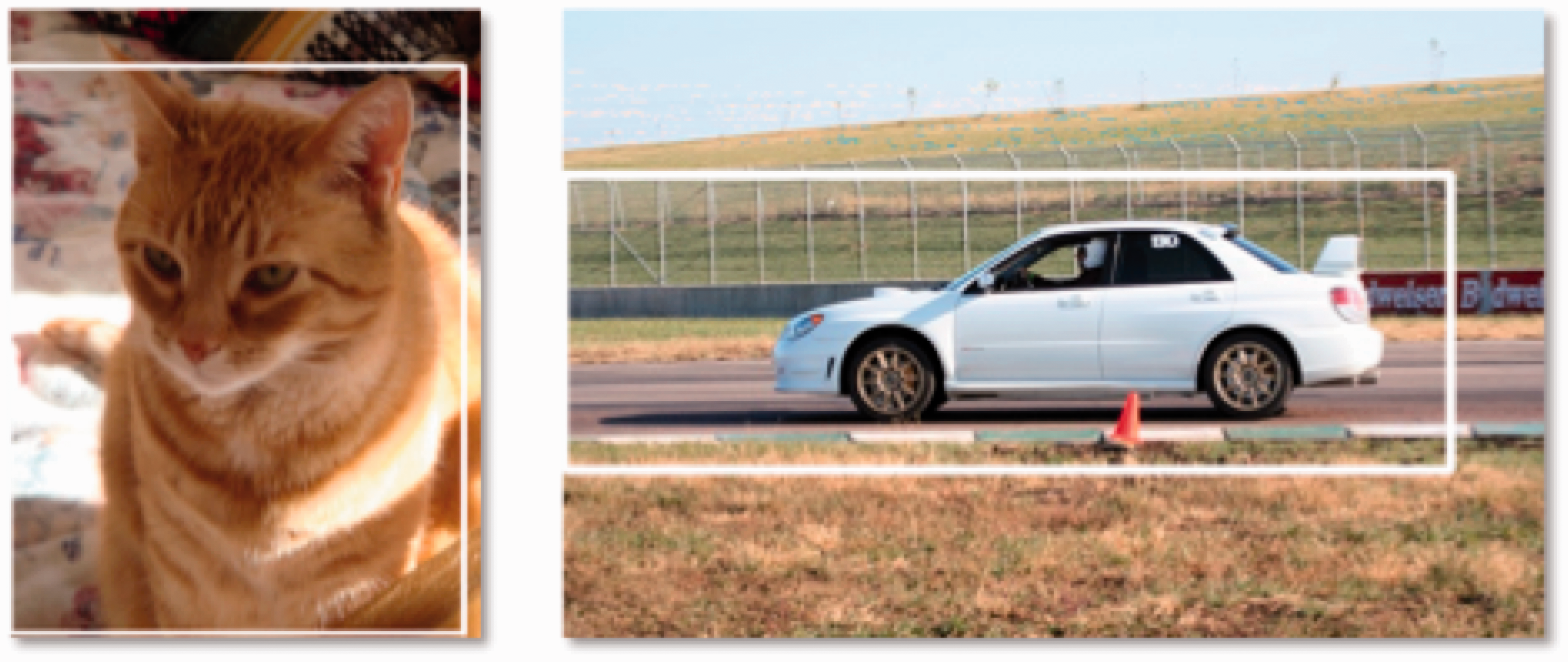
A bas-relief inspired exploration paradigm
Much of the visual information in human vision is transmitted from different parts of the perceptive field in parallel, which indicates a parallel processing on higher levels. As a consequence, it is difficult to map an entire image to a single auditory signal, which comes in the form of a sequential data stream. Therefore, PictureSensation harnesses our exploration paradigm 5 of multi-level image information, which is inspired by how blind people explore a bas-relief image or Braille texts haptically with the tip of their finger.
For colour and structure sonification, the C++ research prototype employed a specific data type, called audible pixel, that is, data structure that stores all pre-computed image information along with also pre-computed sound elements for later sonification, via pixel-wise exploration, in advance. Since the Android system assigns a very limited amount of dynamic memory to each individual application, we refrain from using this concept in our mobile application. Instead, we developed an approach using the current finger position as an index map to the original colour image as well as the extracted features. As the user explores the image, appropriate sound elements are then computed and synthesized in real-time.
The sound synthesis is based on the Audiotrack library within the Android SDK, replacing the Sound Synthesis Toolkit library in the C++ desktop version. As PictureSensation is designed based on principles of real-time sonification, we implement the concept of a sonification-queue, that is, an audio buffer that stores and sequentially plays finger positions during exploration. Therefore, we guarantee that no pixels are skipped, especially for fast motions, which would also result in nasty cracking sounds. In addition we implement volume fading to avoid cracking sounds in case of rapid volume changes, as might be the case when the user starts or stops the exploration.
Results and discussion
During our previous work, we performed extensive user studies among congenitally blind participants with regard to usability of the explorative approach, the colour and feature sonification concepts5,6 on a desktop research prototype. Throughout these studies, all participants appreciated the concepts to be very intuitive, easy to understand and quick to learn, and they enjoyed using the system. These results indicate that our design principles could be very useful in giving visually impaired individuals access to image content: within a reasonable span of time, they were able to get an overview of what is where in the image, and to identify objects, given some context information about the scene. 6
Here we performed two additional user studies on ‘auditory image understanding’, as discussed in Banf and Blanz, 6 in order to evaluate: (i) whether similar results can be achieved using the mobile application with smaller screen size; and (ii) whether the tutorial and training modes, along with the novel user interface, can facilitate autonomous usage.
A study on auditory image understanding with mobile phones by a congenitally blind subject
For the first study, we approached a congenitally blind, 55 year old academic. As he had worked with the desktop research prototype about 1.5 years ago, he was an appropriate candidate to evaluate, first, the specifically designed user interface, and the autonomous tutorial and training of PictureSensation and, second, whether auditory scene understanding on a smartphone touchscreen is feasible. The participant was given 10 min to become familiar with the application solely based on the tutorial and the training modes. Subsequently, he was given 3–4 min per image to explore each of five test images (stimuli (a)–(e) in Figure 6). These images were taken from the original large scale study in Banf and Blanz
6
to make the experiment comparable. Per image, he was asked to report on specific findings and to give an interpretation of the scene. A qualitative evaluation for each stimulus can be found in Table 1.
Image set used for evaluation. Results are given in Table 1. Verbal descriptions of image sceneries by congenitally blind participant after 3–4 min of exploration.

The congenitally blind participant was able to provide plausible scene interpretations for all five images. The experiment, although with only one participant, gives hope that PictureSensation allows for similar results to the desktop system, but, in contrast, after only minutes of autonomous training. Due to the specifically designed user interface as well as the extensive tutorial and training modes, within reasonable time, our participant was able to learn how to use the application and how to take and interpret pictures, autonomously, without any assistance from a normal-sighted person.
A study on perceptual differences with respect to screen size and feature sonification
Given that the usability of the same system may differ depending on the type of device, we performed an extended, qualitative usability study to elucidate user experiences with respect to the smaller screen size and the feature sonification. In lieu of visually impaired participants, we blindfolded five normal-sighted people before exposing them to our system. This way, we were able to report on their experiences with the tutorial and using the system.
Each participant was given a 5-min period to familiarize himself with the app using the autonomous tutorial, followed by another 5 min of autonomous colour training. Subsequently, each participant was given a 5-min period to explore a representative training image. Subsequently, all participants were given 3–4 min to explore each of the five stimuli (Figure 6). During testing, participants were not allowed to switch back into tutorial or colour-training mode, in order to evaluate whether the sonification principles could be memorized within the preceding 5–10 min of training.
In general, we observed three out of the five provided interpretations per image to be plausible explanations of the given scene. Here the congenitally blind participant outperformed all our participants, as he was able to provide plausible interpretations for all five images. It could be observed that he paid much more attention to the smaller details in each scene. Nevertheless, it is astonishing that even a normal-sighted person, after only 10 min of introductory training and 3–3.5 min of image exploration, was able to interpret a scene based on touch and sound alone.
For instance, one participant described Figure 6(a) as: There is blue at the top of the scene, mixed with white areas. This seems to be a cloudy sky. The bottom area is dark, and in the middle is a man made structure with fast changes in colour, bright stripes on a brown background. This could be a house with bricks, maybe brighter layers of concrete between the brown areas. There is blue around the top. I recognize multiple man made structures in the middle, more than a single house, a city. Below the city there is again a lot of blue, with brighter and darker areas. There are also green and yellow areas, relatively constantly distributed. Sky and houses. Below the structures might be a lake, with a different colour than the sky. Above the lake there might be some shores, given the green and yellow colour nuances.
Another example is Figure 6(d): The top of the image is blue that seems to be sky. The blue region seems to form a sheered triangle. There is a house on the right side, definitely one single house. Below, a green area that might be a meadow.
In general, we noticed that prior information about a given scene, such as its upright orientation, can provide key references during the spatial exploration process to, for example, distinguish sky from water. Therefore, we are currently working on the incorporation of appropriate techniques to assist visually impaired people in taking photos suitable for exploration.19,20
With respect to screen size, all but one participant reported that they did not experience any screen size related difficulties in identifying scene specific elements. However, only our congenitally blind participant had first hand experience with both the desktop and the mobile system. Although he did not report any screen related challenges either, we anticipate designing a large scale comparative study in the future that allows for a more quantitative comparison between devices.
With respect to the sonification of features, we observed different experiences regarding our colour sonification. One participant reported difficulties in distinguishing magenta and cyan. Another noted that the perception of green requires a minimum waiting period until the beats scheme is established. In contrast, colours such as yellow and blue were easily distinguished. This highlights the need for a more personalized sonification scheme, such as a simple way to adjust the volumes for each colour. Further, an open issue remains the problem of colour distortions caused by variations in illumination, for example, due to shadowing effects or different light sources. A first approach will be the incorporation of image pre-processing techniques such as white balancing in order to remove unrealistic colour casts.
Conclusion
We have presented PictureSensation, a mobile application that implements a recently proposed image exploration and audification principle, which harnesses exploration methods that the visually impaired are used to in everyday live. It is designed to allow for the visually impaired to gain direct perceptual access to images via an acoustic signal. PictureSensation is complemented with a swipe-gesture based, speech-guided user interface to allow for autonomous usage by a blind user. Given the mobility of a smartphone, PictureSensation provides a high degree of mobility and, therefore, new possibilities for everyday usage.
In the future, we anticipate harnessing recent advances in Computer Vision based on deep learning approaches for more precise scene labelling and feature extraction. In general, the emergence of deep learning methods has led to several initiatives for automatic scene description for the visual impaired.21-24 A combination of our explorative paradigm with these powerful image analysis methods could lead to a more profound user experience beyond abstract verbal scene descriptions.
Finally, recent research reveals that visual substitution systems also could be harnessed in research on the effects of blindness to the brain as well as in rehabilitation programmes.14,15 In traditional neuroscience, the common view, known as the ‘Sensory Division-of-Labour Principle’, 25 is that the human brain is divided into separate sections, such as the visual cortex or the auditory cortex according to each sensory modality which arouses it. From these uni-modal cortices the brain then integrates information in higher order multi-sensory areas. However, various studies suggest this view to be not fully correct.15,26,27 In the blind, it is well-known that the visual cortex has been plastically recruited to process other modalities, and even language and memory tasks. 28 Lots of those changes commence within days following the onset of blindness 28 and, therefore, affect other than congenitally blind individuals, although probably to a different extent. Evidence demonstrates that, in both sighted and blind individuals, the occipital visual cortex is not purely visual and its functional specialization could be proven to be independent of visual input. 15 This leads to the assumption that the brain is task-oriented and sensory modality-independent.29,30 Reich et al. 14 infer that if the hypothesis of the highly flexible task-oriented and sensory-independent brain applies, the absence of visual experience should not limit proper task specialization of the visual system, despite its recruitment for various functions in the blind, and the visual cortex of the blind may still retain its functional properties using other sensory modalities. This is very encouraging with regard to the potential of visual rehabilitation and, accordingly, Reich et al. 14 and Striem-Amit et al. 15 propose visual substitution systems in particular potentially to be used: (i) as a research tool for assessing the brain’s functional organization, (ii) as an aid for the blind in daily visual tasks, (iii) to visually train the brain prior to invasive procedures, by taking advantage of the visual cortex’s flexibility and task specialization even in the absence of vision and (iv) to augment post-surgery functional vision.
It would, therefore, be fascinating if PictureSensation could also be harnessed as such a research tool. In this context, the direct perceptual access becomes most valuable to help the congenitally blind train shape or orientation recognition of basic objects as well as develop spatial understanding of spatial relations of objects within whole scenes. The general user feedback that we received for our design principles during all of our recent and previous studies encourages further exploration of these possibilities, indicating that visually impaired people appreciate the fact that they obtain more than an abstract verbal description and that images cease to be meaningless entities to them.
Expressed in the words of our adult congenitally blind participant: ‘What amazes me is that I start to develop some sort of a spatial imagination of the scene within my mind which really corresponds with what is shown in the image.’
Footnotes
Acknowledgements
We thank the residential school for the visually impaired in Dueren, Germany (Internat des Rheinischen Blindenfuersorgeverein 1886 Dueren), especially Mrs Gut and our five participants, for interest and participation in the project. We thank Rainer for his highly appreciated advisory support.
Declaration of conflicting interests
The author(s) declared no potential conflicts of interest with respect to the research, authorship, and/or publication of this article.
Funding
The author(s) received no financial support for the research, authorship, and/or publication of this article.