



Abstract
Objective
To develop and optimise an app (iMPAKT) for improving implementation and measurement of person-centred practice in healthcare settings.
Methods
Two iterative rounds of testing were carried out based on cognitive task analysis and qualitative interview methods. The System Usability Scale (SUS) was also used to evaluate the app. Quantitative data on task completion and SUS scores were evaluated descriptively, with thematic analysis performed on qualitative data. The MoSCoW prioritisation system was used to identify key modifications to improve the app.
Results
Twelve participants took part (eight health professionals and four patient and public involvement representatives). Views on design and structure of the app were positive. The majority of the 16 tasks undertaken during the cognitive task analysis were easy to complete. Mean SUS scores were 73.5/100 (SD: 7.9; range = 60–92.5), suggesting good overall usability. For one section of the app that transcribes patients speaking about their experience of care, a non-intuitive user interface and lack of transcription accuracy were identified as key issues influencing usability and acceptability.
Conclusions
Findings from the evaluation were used to inform iterative modifications to further develop and optimise the iMPAKT App. These included improved navigational flow, and implementation of an updated artificial intelligence (AI) based Speech-To-Text software; allowing for more accurate, real-time transcription. Use of such AI-based software represents an interesting area that requires further evaluation. This is particularly apparent in relation to potential for large-scale collection of data on person-centred measures using the iMPAKT App, and for assessing initiatives designed to improve patient experience.
Introduction
Person-centred practice is integral to safe and effective health care delivery. 1 It is characterised as providing care that is responsive to peoples’ preferences, needs and values, and which promotes the active role of the individual in their care.1–3 It is recognised that large-scale collection of data on person-centred care can also contribute to addressing challenges within current healthcare systems occurring as a result of the changing age profile of the population, and increases in the numbers of people living with long-term, multiple-health conditions.4–6 Digital health technologies using health information, electronic health (eHealth) or mobile health (mHealth) systems may represent the most realistic option for the collection of large-scale data pertaining to these person-centred measures. 7 However, prior to developing and evaluating its implementation, it is critical that the usability of any digital intervention is tested, and real-world usability testing is a particularly important component in app design.8,9 Usability is defined as the degree to which an intervention may be used efficiently, effectively and satisfactorily to achieve goals in a specific context. 10 Usability testing is intended to evaluate ease of use and identify key issues which can be addressed to improve user acceptability and engagement.
The iMPAKT App (Implementing and Measuring Person-centredness using an App for Knowledge Transfer) is undergoing development and testing as part of a wider project intended to co-develop an evidence-informed strategy for implementing and measuring person-centeredness. A prototype version of the iMPAKT App (Version 1.0) was previously built using cross platform development, with the app able to be deployed by downloading the application and installing it locally onto an iOS or Android device. The core content and structure of the iMPAKT App is based on work that produced a set of eight, person-centred, key performance indicators (KPIs) for Nursing and Midwifery (see Table 1).11–17 These KPIs were developed using the MRC guidelines for the development, evaluation and implementation of complex interventions 18 and are underpinned by the Person-centred Nursing Framework. 1 A framework, that included four methods to collect data for measuring the KPIs was also developed (see Table 2). Data are collected using this framework over a recommended period, or ‘Cycle’, of six weeks.
Key performance indicators.

The measurement framework for the iMPAKT App.

The iMPAKT App can be accessed as a ‘community’ version where only the ‘Activity Review’ section is viewed, or can be accessed as a ’Acute/Inpatient care’ version, where the 30 min ‘Observation’ section is viewed.
The app includes sections that relate to the four measurement tools used for assessing each of the person-centred KPIs patients (see Table 2 and Figure 1). These sections are:
Surveys. These include Likert response questions for patients, carers or partners. Patient Stories. This involves an audio-recording feature to capture patients’ experience of care. Document Reviews. This assesses the consistency between the views of patients and Nursing staff compared to what is recorded in the patients’ clinical documentation. Observations/Activity Reviews. This section captures data on time spent with patients.

Wireframe showing main sections of iMPAKT App.
In addition to the four main sections of the app, a ‘Cycles’ section, where new, six-week data collection periods can be started is included. Within each measurement cycle, a minimum data set is required that consists of 20 Surveys, 3 Patient Stories, 10 Document Reviews and 3 Assessments of time spent with patients. A ‘Reports’ section is also included in the app for users to access data produced during the data collection cycles, allowing for comparisons to be made between different cycles. An ‘About the app’ page provides information on the purpose and background of the app (see Figure 2 for selected screen shots).

Selected screen shots showing pages from: (A) the ‘Patient Stories’, (B) the ‘Document Reviews’, and (C) the ‘Activity Reviews’ sections of the app.
Objectives
The objective of the present study was to optimise the iMPAKT App based on user perspectives gathered during a usability and acceptability evaluation study.
Methods
Study design
The usability and acceptability of the iMPAKT App was tested based on a multi-methods approach using cognitive task analysis and qualitative interview methods. Task analysis involves gathering information on participants’ reasoning while completing specific tasks.19,20 This testing was based on two iterative rounds of ‘think aloud’ testing and semi-structured interviews (see Figure 3). This was done to allow for any significant usability issues to be identified and for any necessary changes to be made to the app before round 2 of testing. During the task analysis, participants were asked to verbalise or ‘think-aloud’. This was allowed for ‘real-time’ data collection on people's thoughts and actions during the tasks, as well as for collection of quantitative data on task completion rate, and time taken to complete a task. Qualitative data was also gathered during the interviews to examine participants’ experience of using the app and to identify and explore specific issues or concerns that users had. In this manner, the evaluation was completed in a way that allowed for iterative, person-based testing and optimisation of the iMPAKT App, taking into account critical issues, as well as providing an in-depth analysis of participant experience related to its actual use. The 32-item Consolidated Criteria for Reporting Qualitative Research (COREQ) checklist 21 was followed for the Qualitative component of the study (see Appendix 1).

Stages in the usability and acceptability evaluation study.
Detailed usability and acceptability evaluation provides sufficient information to inform intervention development using relatively small sample sizes, with 95% of key issues able to be identified with a minimum of nine participants. 22 Purposive sampling was used to recruit at least 10–12 participants from a sample of Nurses working in different areas of practice, Healthcare Researchers, and patient and public involvement representatives. To be included in the study, the following inclusion criteria were applied at screening: Adults (aged 18 or over); regular smartphone/tablet usage (defined as use on more than one occasion per week); able to speak and read English fluently; no current injury or condition (based on self-report) limiting ability to carry out test procedures.
Procedures
Before any testing, participants were asked to provide written informed consent. Following this, participants completed a short demographic questionnaire including information on age group, and internet usage (to determine if people are regular or irregular smartphone/tablet users). Testing took place in a quiet teaching room on a University Campus. Test apparatus consisted of a laptop computer (Dell Latitude 5500) connected to a tablet computer (Apple Corporation, iPad 6th Gen), which had the iMPAKT App already installed. Screen capture software (AirServer for Microsoft Windows) was used to record user interactions with the app during the task analysis. Procedures were audio recorded (using a Redmi Note 11 Pro and Sony ICD-PX240 MP3 Digital Voice Recorder) to ensure no loss of data and allow for transcription of interactions during the task analysis and interviews. Prior to testing, all participants were shown a short (1 minute) video, on how to ‘think aloud’ during the evaluation. During the task analysis the researcher directed the participant to the app, then worked from a standard script and directed the participants to carry out a series of tasks within the app (See Table 3).
Tasks completed during the cognitive task analysis.

Participants were also given a printed copy of the script to refer to as they completed each task. Order of testing was varied, and no time limit was set for tasks to be completed. In addition to the screen recorded observations, the researcher took field notes on any difficulties encountered during testing. Immediately following the completion of each task participants were asked to rate their response to the following statement: ‘The task was easy to complete’. This was assessed using a 5-point Likert-type scale (1 = strongly disagree, 5 = strongly agree) which has been shown to have good reliability and performance in comparison to other more time-intensive scales. 23 Following the completion of the task analysis, overall satisfaction with the iMPAKT App was assessed using the System Usability Survey (SUS).24,25
Participant's responses (likes and dislikes) to the content and app interface were explored through the semi-structured interviews that were carried immediately after the task analysis. Interviews followed a set of standardised questions to assess specific app components and the overall impression of the app (see Appendix 2 for interview schedule).
Outcome measures
Outcomes were task completion rate (effectiveness), task completion time (efficiency) and number of errors (defined as the number of incorrect page visits, or deviations from the optimal pathways). User satisfaction and views on acceptability of the app were assessed using the single-item ease of use scores (/5), and the SUS scores (/100) that was used to capture overall impressions of the app, and the thematic analysis of qualitative findings from the semi-structured interviews.
Analysis
Audio and screen capture recordings of each participant's task analysis and semi-structured interviews were transcribed using automated software, and along with the researcher field notes, these were systematically scanned to identify critical points in the task analysis; including any misunderstandings or difficulties the participant may have experienced while using the app. Descriptive statistics (mean, SD, range and/or percentages) were used to summarise the task completion rates (success/failure), time taken (recorded in seconds), error count data (number of errors based on researcher notes/observations) and single item ease of use scores (scored/5). The SUS was scored/100 using an online excel form (www.measuringux.com/SUS_Calculation.xls). Transcripts and field notes were collated and coded using thematic analysis based on a deductive and inductive approach. NVivo version 14.0 was used to manage data and facilitate the analysis process, which in summary included the following stages: (i) independent transcription, (ii) data familiarisation, (iii) independent coding, (iv) development of an analytical framework, (v) indexing, (vi) charting and (vii) interpreting data.
Following each round of testing, members of the project team (DB, TMcC, SOC) met to identify the key usability and acceptability issues. Field notes and issues identified during testing were collated by extracting all relevant text portions into a Microsoft Excel file. Similar issues were categorised and grouped together. The severity of each issue was rated as ‘Low’, ‘Moderate’ or ‘Severe’. Issues were annotated with specific references to the interface and other notes giving additional detail on the problem and participants’ reactions. These issues were discussed by all members of the research team and ranked using the MoSCoW (M - Must have, S - Should have, C - Could have, W - Won't have) prioritisation system 26 (Appendix 3 provides an example of this decision-making process).
Results
Twenty individuals were invited to take part in the evaluation. Of this number, eight people did not respond to an invitation or were unable to attend a testing appointment. Twelve participants agreed to take part, and subsequently completed the evaluation. All testing took place between July and August 2023. Tests lasted approximately 1.4 hours (Mean: SD: 0.3). Most participants were female (n = 11: 92%) and were in an age category of between 55 and 64 years of age (n = 5: 42%). Eight participants were health professionals (67%) and four (33%) were patient and public involvement representatives. Three participants had previous experience with using the app prior to the testing. The majority of participants reported using a smartphone or tablet device on at least a weekly basis. Participant characteristics are shown in Table 4.
Participant characteristics.

PPI: Patient and public involvement.
Cognitive task analysis
Participants found the majority of the 16 tasks easy to complete effectively and without errors. Time taken to complete the majority of the tasks was relatively low, with complex tasks, such as being completed efficiently in around one or two minutes. This included tasks with multiple steps such as completing the patient survey questions and the reviews of patient records (see Table 5). However, other complex tasks did show lower completion rates, as well as a greater number of errors during testing. This included the audio-recording of patient stories, and the ‘tagging’ of transcribed sections of text, using the ‘copy/paste’ function to highlight information related to any of the KPIs. Both activities were also associated with marginally lower, single item, ease of use scores, with some participants ‘strongly disagreeing’ that these tasks were easy to complete. Accessing the data reports and locating specific information within the report was also associated with some usability issues. However, other, relatively complex tasks, such as viewing reports generated from the KPI data collected during each ‘cycle’ of measurement, and recording activities to do with capturing details of staff activity (the ‘activity review’ and ‘observations’ section) were found to have good ease of use scores.
Results from cognitive task analysis.
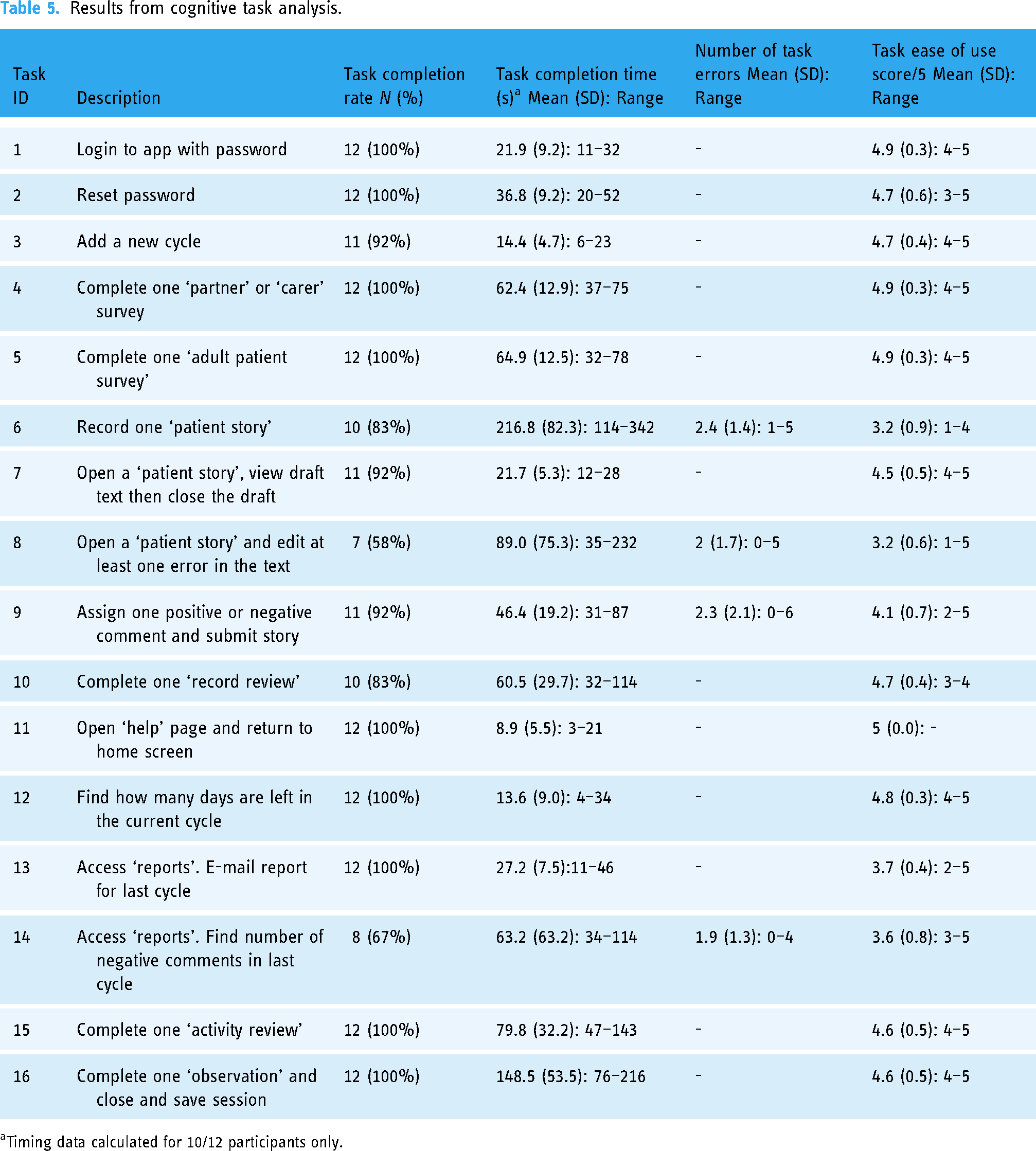
Timing data calculated for 10/12 participants only.
The mean overall score for the SUS was 73.5/100 (SD: 7.9; range = 60–92.5), suggesting that the iMPAKT App has higher usability score than the reported average of 68 27 (see Table 6). Usability scores indicated that while participants agreed most strongly with the statement that the app features were well integrated (Question 5), the lowest scores were found for participant ratings of how frequently they would like to use the app (Question 1).
Participants system usability scale scores for iMPAKT app completed after cognitive task analysis.

System Usability Scale Score/100.
Each item rated on a five point Likert scale from 1 to 5 [1 = Strongly disagree. 5 = Strongly agree].
Qualitative findings
Thematic content analysis based on the semi-structured interviews identified three key themes. These were: (1) app design and features. (2) app usability and (3) implementing the app in practice. The frequency of participant responses for the key issues under each theme are summarised in Table 7. Key illustrative quotes are provided in the section below.
Overall themes and frequency of key usability issues.

% calculated based on number of mentions/279 (total number of usability issues mentioned).
Themes
Theme 1. App design and features
Issues related to app design and the features included in it were frequent factors discussed by participants. A common design issue was that the font size varied in places within the app, making some text too small to read easily. This was seen as a particular issue for more acute settings, when users might have limited time using the app. Some text that participants thought was important information was also not highlighted sufficiently. ….in places the different font is a bit of a distraction, it makes you read some parts more, but I’m not sure if that's deliberate, because some of the bigger text seems like it's not even the most important information. (Nurse, Female, 45–54 years old)
Another common issue was the use of icons which were included at different places in the app to highlight important text. The icons included an ‘alarm bell’ which some users found to be distracting. Others found the meaning of the icon to be unclear, and highlighted how they were also not used consistently throughout the app. If the bell is supposed to be about giving you information you really need to know, should it be in other places as well then? You also really need something to say what it means, otherwise it could just be a bit confusing to people. (Patient Representative, Female, 45–54 years old)
The overall layout of the app was seen as clear, coherent and simply designed. Two users suggested that scroll bars could be added to ensure text was not missed. Most participants identified that some sections included complex information. An example of this was the data table included at the beginning of the survey section of the app. This table summarised results from previously collected surveys but was seen as difficult to interpret. Participants felt since it might be important information, they spent time attempting to interpret what the data meant, and this could slow the process of completing data collection when using the app. …this table (a data summary table) just seems like it is probably quite meaningful, buts it's not at all clear how it should be used at this stage, it feels like something else is missing here. (Nurse, Female, 35–44 years old) …that's my biggest concern really, it's that time is off the essence. It needs to be slick, otherwise people won’t use it. (Nurse, Female, 45–54 years old)
Theme 2. App usability
Participants generally found the app to be easy to use, completing tasks with minimal practice, even without having any previous familiarity with the app. There were, however, issues reported by participants, particularly with the ‘Patient Stories’ section (audio-recording, and transcription of patients speaking about their experience of care). During testing, it was not always clear to participants that recording was underway. The recording was also found to stop without warning. Some participants reported how they had needed to look at the screen frequently to check it was actively recording, and others observed how this could limit good communication in practice settings. … it might be difficult if the Nurse was having to play around with (the tablet device), but it's also about being recorded, I can see that they might have a bit of worry, speaking in front of other people, it can already feel a bit strange talking into it, sorry, you know what I mean though… (Patient Representative, Male, 45–54 years old) … I mean, you can see what it's trying to do (the Patient Story section) and it's such an idea, to actually see it. You know, fix that and it can record peoples experience of being in hospital in a totally different way, because you are not just getting views of people who might send in a letter about it all…. (Patient Representative, Male, 55–64 years old)
Part of the ‘Patient Stories’ section requires users to review the text once it has been transcribed from the audio recording, and then assign text that relates to any KPI as a ‘Positive’ or ‘Negative’ experience. This procedure was seen as intricate, with participants stating that further instructions were needed to guide them through the process of selecting and highlighting portions of text. …it does take a bit of time, there's a lot there on the page too, I think. But it was OK once you gave me the demo so I suppose if I had some training or even a manual, it would be all fine. (Nurse, Female, 45–54 years old)
Another consistently raised issue was that navigational ‘flow’ through some sections of the app was unintuitive. Participants highlighted how it was possible to ‘skip’ through points where data needed to be entered. For example, in the ‘Document Reviews’ section, it was necessary to note if information on care priorities in patients’ notes was consistent with the care priorities described by a member of staff responsible for the patients’ care. However, this section could be passed without entering a response. Other comments centred on free text boxes where information could be entered. In the same section as discussed above, text could be added to briefly note what had been as described by a member of staff responsible for the patients’ care. However, there was no clear indication of how this could be done, or what the purpose of adding a note was. … that bit really did take some time, most people would really need some familiarisation sessions for it, but saying that, there is a lot of similarity between the different parts of the app, not just how they look, but also how they work. (Nurse, Female, 35–44 years old) I suddenly knew I had made a mistake there, but you can’t just go back. It took a good bit of time and then I ended up just clicking on “exit”, even though I was thinking that might mean it goes right back to the start, at least the whole section is short enough, but it might put people off if that happens a lot…. (Nurse, Female, 55–64 years old)
Issues with the device used during testing emerged. Two participants were unfamiliar with the device itself (a touch screen tablet with a 10-inch screen). A more common issue was that one task required using the ‘copy/paste’ function for ‘tagging’ or highlighting text (related to KPIs). Participants suggested that further instructions or prompts would need to be provided to facilitate this process. … it might be difficult to use in work, tablets and things like that in general often get forgotten about, and I don’t know if we would use an iPad, a ThinkPad, yes, all the time. It might be an issue with the tablet, not the actual program… (Nurse, Female, 35–44 years old)
Theme 3. Implementing the app in practice
Several factors that could influence acceptability and implementation of the app were identified. Most participants thought that time would be an important consideration, and highlighted how any unresolved usability issues could limit uptake and continued use of the app.
Two participants raised concerns that care would need to be taken to ensure the app was not seen as a measure of performance. Others highlighted the importance of the app being seen as part of routine practice. Participants valued the usefulness of the data reports that the app produces after completing a full cycle of data collection and stated that this would be seen as a suitable tool for Nursing teams seeking to improve practice. …feedback is great, would this be kind of, there to see right away? I would like to see that, immediate feedback on when things are going right, that could be a good motivation, especially for newer staff (Nurse, Female, 45–54 years old) it really should to be seen as part of everyday experience (when you are in hospital), something that's there all the time… (PPI representative, Female, 65+ years old) … and reporting part was good, and its appealing, you can see immediately how it would be useful (Nurse, Female, 55–64 years old)
A number of participants also highlighted the value of the ‘Patient Stories’, which were seen as a novel and valid way of measuring patient experience. It was also widely reported that training and ongoing support for using the app would be an important part of successful implementation.
Key modifications made to the app following user testing
No modifications were made following round 1 of testing, as no ‘severe’ usability issues requiring modifications to be made to the app were identified. However, based on the findings from the iterative evaluation, a number of necessary revisions were subsequently made to the app to improve its overall usability. The following section highlights the key changes that were made to optimise user acceptability. Decisions were made by all members of the research team after identifying the most important changes to make to the app based on the MoSCoW prioritisation system. 26 Using this system, possible changes were rated as M - Must have, S - Should have, C - Could have, W - Won't have) (see Appendix 2 for an example of the decision-making process). A key change involved updating the Application Programming Interface (API) for automatic speech recognition that allowed for speech-to-text transcription of the audio recorded ‘Patient Stories’. The initial iteration of the app had used freely available software for transcription, however the limitations of this version seemed to contribute to a number of the usability issues identified during testing. A more advanced speech recognition system was applied to improve accuracy of the transcription, and increase the length of time that the app could record audio for. This modification was necessary to ensure that important information provided by patients would not be lost due to technical issues with the app. In addition, a more apparent visual cue for audio recording was provided by adding a symbol showing that recording was active; and this text was also highlighted in red to make it clearer and more obvious (see Figure 4).

Screen shot from the page of the ‘patient stories’ section of the app where patients can be recorded speaking about their experience of care. The box highlights the red text which indicates to users that audio recording is active.
Another change was to provide a function where the actual audio recording (the file used to transcribe speech-to-text) was made available for users to review the audio-file if needed. This change made it possible for users to play the recording and check that the transcription is accurate during the process of ‘tagging’ or assigning KPIs (see Figure 5).
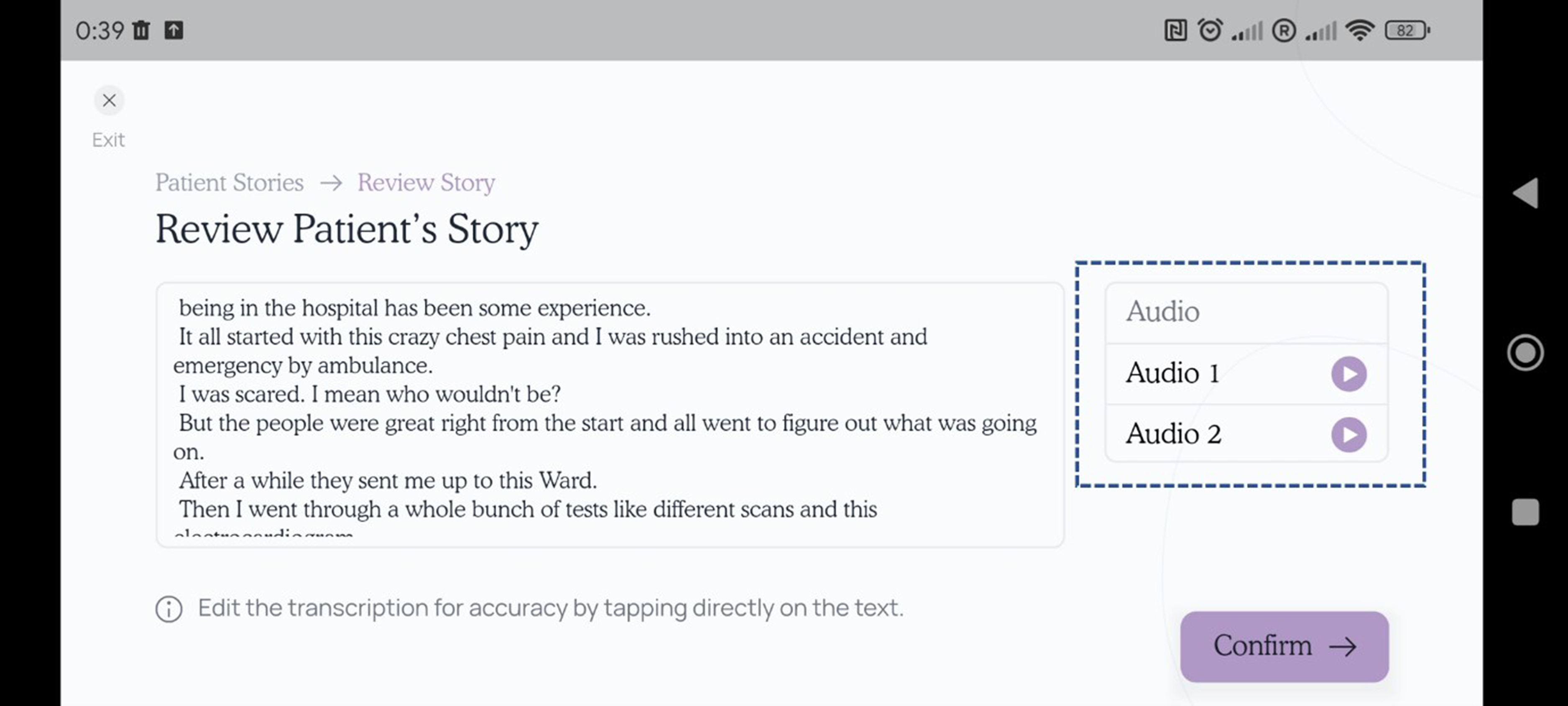
Screen shot from the page of the ‘patient stories’ section of the app where transcribed text can be reviewed to check transcription accuracy. The box highlights the audio files which can be played back by the user for this purpose.
A further change was to add a ‘help’ button on the first page of each section which provided brief instructions for that specific task. Small amounts of additional text were also added to provide a ‘reminder’ or ‘prompt’ for specific tasks. For example, text which read ‘please select one option’ was added at a point in the ‘Document Review’ section of the app (where users were required to determine if views on care priorities are ‘consistent’ between what is directly reported by nurses delivering care to a patient, and what is documented in the patient documentation). Several other changes were made to improve clarity and ‘flow’ when navigating through the app. This included removing the ‘alarm bell’ icons which had been included to highlight specific sections of text, often where some action was required, but were generally seen as distracting to users. In addition, data tables summarising previously gathered data were removed from the beginning of each section and replaced with data for the current cycle only. Submitting data when completing a section of the app was also simplified by reducing the number of steps required for this process. Text size was increased throughout the app to improve legibility.
Discussion
Acceptability of the iMPAKT App was assessed using a multi-methods approach based on iterative rounds of cognitive task analyses and qualitative interviews. Findings indicated that the app was seen as having a clear design and good overall usability and acceptability. This was apparent even though participants had only been given a short introduction to the app before testing.
The SUS score of 73.5 (SD: 7.9) was higher than the average reported score of 68/100. 24 This score, when converted to a percentile rank of 70%, suggests that the iMPAKT app has a higher score than 70% of all apps tested, and can be interpreted as having a grade of B-. 25 For the single-item questions on the SUS, the app scored highly with regards to the sections being viewed as well integrated with each other, and for ease of use, as well as for confidence using the system. In comparison, relatively low scores were observed for one item which was asked about the extent to which participants would want to use the system frequently. These findings further support the contention that the iMPAKT App could be used effectively, even without previous training or experience; however they also highlight that implementation strategies may be needed to support longer-term use of the app.
When examining the findings from the task analysis, the vast majority of the 16 tasks were carried out successfully and were seen as easy to complete by participants. Overall, findings suggested that around 80% of users were able to go through the app with only one usability issue encountered. One section of the app (the ‘Patient Stories’) did present frequent issues, and subsequently had lower completion rates, as well as a greater number of errors made during testing. These issues related to the audio-recording of people speaking about their experience of care; and with tagging the transcribed text to highlight information related to positive and negative experiences.
Thematic analysis based on the semi-structured interviews confirmed several of the key issues identified during the task analysis, and also highlighted issues related to implementation of the app in practice. Participants had positive views on the design, structure and appearance of the iMPAKT App, as well as the overall function of the different sections. However, similar issues with recording the ‘Patient Stories’ emerged and strongly influenced participant views on this section. A common topic of discussion was that issues with the ‘Patient Stories’ section could limit effective communication between the staff member using the app, and the patient discussing their experience of care. Other issues that emerged from the qualitative interviews were that navigation through some sections of the app could be improved by simplifying processes and providing further instructions for users. Participants emphasised how many of the issues identified could be resolved when users have better familiarity with the app and experience of using it practice settings. Findings also highlighted the importance for implementation of the app of being effectively integrated into routine practice, with ongoing training and support being an essential part of this process. The value of the data reports that could be accessed by teams, including the feedback from patients describing their experience of care, was also underlined as being an important tool in supporting practice improvement initiatives.
In summary, the most common issues identified in this study related to one iMPAKT App feature not operating as expected (the audio-recording and transcription of patients speaking about their experience of care in the ‘Patient Stories’ section), as well as font size being too small in places, and users finding it difficult to navigate through some app sections. These issues were partly addressed by modifications made to the design of the app (including, providing further instruction on how to ‘tag’, or highlight portions of transcribed text; and by simplifying the tagging process to make it more intuitive). However, testing also identified issues that were due to technical limitations. For example, the accuracy of audio-recording and the length of time that audio could be captured was restricted, due to the software used in the early iterations of the app. The software was not able to fully support the intended function of this section of the app, and therefore an updated, Artificial Intelligence (AI) based system (Google Cloud Speech-To-Text using streaming recognition) was implemented; as this allows for an unrestricted volume of transcription and for interim results to be provided in real-time, while the audio is being captured. While necessary to improve usability of the iMPAKT App, this type of modification, has implications for those developing mHealth apps that utilise large scale, AI powered, Speech-To-Text, data. Firstly, there is an associated cost issue, as the updated Speech-To-Text API, requires a subscription above a certain threshold or volume of data processing. In addition, there are also potential privacy issues related to the temporary storage of audio-files recorded as part of the ‘Patient Stories’ used within the iMPAKT App. Although these files do not include identifiable information, or other personal data about an individual, safeguarding individual privacy is still a concern for any AI driven mHealth app.28,29 Firstly, it is essential that if privacy leakages do occur, they should be quantified. Secondly, any personal data should remain on devices, with inferences being performed on the edge (or endpoint) device. 30 These concerns, although of minimal risk, will be fully taken into account during future implementation of the iMPAKT App.
A final consideration for further development of the iMPAKT App, is that AI could potentially be used to automate, or semi-automate some tasks, including the process of ‘tagging’ KPIs within the ‘Patient Stories’. While these types of adaptation would make it necessary for healthcare staff to adapt their practice as the use of AI increases, this automation could potentially provide more time for healthcare staff to communicate with patients, and address their concerns and goals. 31
Usability scores for the iMPAKT app assessed using the SUS are comparable to those reported in other studies examining digital health technologies.32–36 For example, a similar score was reported in a recent study examining a mobile app for supporting nursing staff to deliver exercise programmes for individuals with dementia (SUS score: 72.3 (SD 18.9)). 32 This study also identified a number of the same issues related to navigation, and problems with layout; such as excessive information being presented on one screen. Another study that evaluated a patient-centred guide during admission to a paediatric emergency department, found an overall SUS score of 80.88 (SD: 8.57), 33 with frequent issues related to the time required to access and complete data for some tasks, and to difficulties with locating important components of the app, including explanatory tutorial sections. While mHealth apps are considered to provide a feasible approach as they can be used at scale and at relatively low cost37,38; selecting appropriate strategies for implementing any mHealth intervention to enhance its reach and long-term sustainability can be challenging. Tailoring implementation can ensure that specific contextual considerations and needs are addressed, and that the most effective available strategies are used, dependent on the setting. 39 This is important since understanding the factors that affect adoption and sustainability is essential when interventions are used in heterogeneous settings. 40 Our findings also reflect those of other evidence which suggest that concerns around structural or technical issues, beliefs about technology effectiveness, and increased workload can be perceived as common barriers to use of digital technologies in healthcare settings. Conversely, training and support, including assessment of willingness to use such technologies, have been suggested as important enablers of uptake.41–44 Evidence has also suggested that while digital technologies could improve consistency of care and patient autonomy, they may lead to a perceived change in the roles of healthcare staff members and patients. 45 Planning for implementation and widescale use of apps aimed at improving patient experience of care, therefore needs to account for these important issues, in addition to providing clear evidence for the value and effectiveness of such interventions.46,47
Strengths and limitations
A key strength of this study is that a multi-methods approach was used with modifications being made to the iMPAKT App based on results from both cognitive task analyses and qualitative interviews. This allowed for iterative, person-based testing and optimisation that took into account critical issues and participants’ direct experience of using the app. A further strength of the study is that participants were broadly representative of the expected end users of the iMPAKT App. Given the small sample size we were unable to assess differences between healthcare professionals and patients participants. It is also acknowledged that most participants were female, and were frequent users of digital technology; potentially lowering the generalisability of findings. A further limitation is that findings are based on experimental testing of the app under controlled circumstances, and not on direct testing in clinical settings. For example, testing used standard scripts read out during the recording of the ‘Patient Stories’ section of the app, and the ‘Document Reviews’ section did not directly assess participants while using the app alongside actual clinical documentation. The experience of using the app in ‘real-word’ contexts will therefore need to be further explored in future studies.
Conclusions
The overall content, design and functions of the iMPAKT App were viewed positively by participants, who were able to use the different components of the app easily and without substantial issues emerging. Areas identified as requiring modifications to optimise the app included use of a consistent font size, as well as changes to improve navigation. Other changes included adding further instructions within the different sections of the app, in order to support users. A key issue influencing acceptability related to the recording of ‘Patient Stories’ within the app. This required an updated version of the Speech-To-Text software to be implemented to avoid limitations being imposed on the transcription of patients speaking about their experience of care. The use of such artificial intelligence-based software within the app represents an interesting area that requires further evaluation, particularly in relation to establishing the accuracy of the Speech-to-Text software. Findings also highlighted important issues to do with implementation of the app. In particular, the potential for feedback provided by the app was highlighted as a valuable tool for supporting practice improvement. Other implementation issues included ensuring the app is effectively integrated into routine practice, and that training is provided to promote uptake and support users. Ongoing research includes studies to develop an evidence-informed strategy for implementing the iMPAKT App, and a web platform to support training for app users. Future studies will also evaluate the app in different clinical settings and contexts to examine its effectiveness for improving person-centred practice and cultures; and its potential for large-scale collection of data on person-centred measures.
Supplemental Material
sj-docx-1-dhj-10.1177_20552076241271788 - Supplemental material for Development and optimisation of a mobile app (iMPAKT) for improving person-centred practice in healthcare settings: A multi-methods evaluation study
Supplemental material, sj-docx-1-dhj-10.1177_20552076241271788 for Development and optimisation of a mobile app (iMPAKT) for improving person-centred practice in healthcare settings: A multi-methods evaluation study by SR O’Connor, V Wilson, D Brown, I Cleland and TV McCance in DIGITAL HEALTH
Supplemental Material
sj-docx-2-dhj-10.1177_20552076241271788 - Supplemental material for Development and optimisation of a mobile app (iMPAKT) for improving person-centred practice in healthcare settings: A multi-methods evaluation study
Supplemental material, sj-docx-2-dhj-10.1177_20552076241271788 for Development and optimisation of a mobile app (iMPAKT) for improving person-centred practice in healthcare settings: A multi-methods evaluation study by SR O’Connor, V Wilson, D Brown, I Cleland and TV McCance in DIGITAL HEALTH
Supplemental Material
sj-docx-3-dhj-10.1177_20552076241271788 - Supplemental material for Development and optimisation of a mobile app (iMPAKT) for improving person-centred practice in healthcare settings: A multi-methods evaluation study
Supplemental material, sj-docx-3-dhj-10.1177_20552076241271788 for Development and optimisation of a mobile app (iMPAKT) for improving person-centred practice in healthcare settings: A multi-methods evaluation study by SR O’Connor, V Wilson, D Brown, I Cleland and TV McCance in DIGITAL HEALTH
Footnotes
Acknowledgements
The authors would like to thank all participants who took part in the study. We acknowledge the valuable contributions of the app development team at Miroma Project Factory (Australia), and the iMPAKT Project Advisory Board.
Contributorship
TMcC, DB and SOC conducted the user testing. TMcC, VW, DB, IC and SOC all contributed to analysis and interpretation of the data and to decisions made on modifications to the app. SOC drafted the initial version of the manuscript. All authors contributed to revisions to the manuscript and approved the final version.
Data availability
Data is available on request from the corresponding author.
Declaration of conflicting interests
The authors declared no potential conflicts of interest with respect to the research, authorship, and/or publication of this article.
Ethical approval
Ethical approval for the study Approval for the study was granted by the Nursing and Health Research Ethics Filter Committee at Ulster University (Reference: FCNUR-23-073).
Funding
The authors disclosed receipt of the following financial support for the research, authorship, and/or publication of this article: The iMPAKT project is supported by funding from a Burdett Trust Proactive Grant (United Kingdom) and the New South Wales Ministry of Health (Australia).
Guarantor
TMcC.

Supplemental material
Supplemental material for this article is available online.
References
Supplementary Material
Please find the following supplemental material available below.
For Open Access articles published under a Creative Commons License, all supplemental material carries the same license as the article it is associated with.
For non-Open Access articles published, all supplemental material carries a non-exclusive license, and permission requests for re-use of supplemental material or any part of supplemental material shall be sent directly to the copyright owner as specified in the copyright notice associated with the article.
