




Abstract
For some schools, using iPads instead of computer labs can be a cost- and space-saving endeavour. We decided to test students’ attitudes toward tablet functions and confidence in classroom objectives in three technical communication courses by administering a pre- and post-test. Two classes used iPads and one did not (the control). We analysed the data and triangulated it with classroom observations. We found that attitudes toward tablets did not change but confidences did, particularly in document design. We analyse the reasons for this and look at potential takeaways on a pedagogical level before addressing if these results can guide administrators contemplating purchasing tablets for the classroom. The study looks at current research in tablet pedagogy, discusses our classroom and study methodology, analyses the results, triangulates student responses with our observations and implicates conclusions while looking to future research angles.
In a recent study, technical communicators were asked what skills graduating students needed in the workplace; one of the major findings was for students to become adaptors of technology and software (Blakeslee and Savage, 2013). In some schools, funding flows for top-notch computer labs but in others access to cutting-edge technology is neither an option but nor a possibility. At Idaho State University, we have access to some technology but funding does not allow fully stocked computer labs for teaching. We were grateful when a grant gave our college access to iPad carts that could be rolled into any classroom. We sought to consider whether iPads could be a viable option for programmes that do not have access to fully stocked computer labs. Namely, we were interested if students perceived that they gleaned skills and knowledge from using iPads in class. We relied on iPads due to the grant, but we used technology that is available to most tablets.
Tablets and smart phones have been adapted faster than almost any other technology in history so it is not surprising that iPads have both found their way into many classrooms and been adopted by many educators. Yet despite broad use and a growing body of research, there are still major questions about the iPad’s impact on those classrooms. At Idaho State University, our goal was to incorporate iPads in two technical communication classrooms and teach the same curriculum to a control classroom without iPads. We asked a series of questions at the beginning and end of the semester to gauge students’ confidence toward learning on an iPad (labelled as mobile technology). To help teachers both teach with iPads and empower students to contribute effectively beyond the classroom, we offer our own experiences with teaching along with student data about how their perceptions of technology changed while using iPads in a college-level technical communication course. In this article, we will discuss other work done on tablets across multiple fields, the role of technology in the classroom, an explanation of our methods and results, and brief qualitative observations and analysis from the classroom. Overall, this article is meant to shed light on both teacher and student experiences with iPads, assisting innovative educators in their quest to integrate technology both efficiently and effectively into their curriculum.
Literature review
Despite the relative newness of iPads and tablets, there is already an impressive amount of scholarly publication about their impact on education. In a recent systematic literature review, Nguyen et al. (2015: 4) found 2764 journal and conference papers using the keywords ‘iPad, teaching, learning, m-learning, mobile learning, and e-learning’. Overall, the research over the past five years suggests that there are both pros and cons to using iPads in educational settings. One of the most oft reported findings is that iPads increase student engagement (Gong and Wallace, 2012; Mang and Wardley, 2012; Sloan, 2012; Wakefield and Smith, 2012), though some are quick to note that some of these findings are likely related to the novelty effect (Rossing, 2012). Indeed, it is difficult in any study to distinguish what results come from the catalyst and what are merely part of the Hawthorne Effect. 1 Others reported that iPads enhanced collaboration and facilitated effective group work among students, particularly because the iPads’ physical size, portability and internet connectivity make them amenable to natural interactions between students in class and asynchronous collaboration outside of class (Alyahya and Gall, 2012; Geist, 2011; Mang and Wardley, 2012; McBeth et al., 2015; Rossing, 2012). Educators and researchers also reported that iPads played a role in advancing real world problem solving and critical thinking (Rossing, 2012), improving digital literacy and innovative use of a variety of software and apps (Hargis et al., 2013; Robinson, 2012), and – to some extent – improving learning and learning efficiency for students (Kinash et al., 2012). These findings are encouraging for those considering incorporating iPads into college classrooms, and the possibility of improving real-world problem solving and critical thinking are of particular interest in technical and professional communication courses.
Despite these positive findings, however, there are at least three specific concerns about incorporating iPads in education. First and most common, many question the cost of purchasing a class set of iPads, particularly since mobile technology becomes outdated so quickly (Gong and Wallace, 2012; Sloan, 2012; Yeung and Chung, 2011). Second, some worry that tablets distract from rather than aid learning (Gong and Wallace, 2012; Robinson, 2012; Wakefield and Smith, 2012). Some worry that the tantalizing social media apps that distract many working professionals might also distract students from important in-class work. Third, is the concern of the hidden curriculum that comes with new technologies, or in other words, the fact that on top of learning the complex content required in college courses, some students also have to spend a great deal of time learning to use a new technology and thus struggle to keep up in class (Rossing, 2012; Villanueva and Arola, 1982/2011).
Since institutions vary in available funds and the students come from varying socio-economic backgrounds, the digital divide needs addressing. Moran (1999: 205) worries that scholarship has not acknowledged that access to technology usually depends on social classes and money. Selfe and Hawisher (2004: 535) echo Moran’s arguments relating to technical communication. They argue that the digital divide will not ever be fully satisfied until technology gets recognized as a ‘vital, multidimensional part of a larger cultural ecology’. They argue that these divisions are especially worth studying in relation to race, class, gender and age (p. 532).
It is important to note that Moran, Selfe and Hawisher are writing at the turn of the 21st century, and tablet and mobile technology has lessened access concerns considerably. Moran estimated in 1999 that students needed to pay $2000 for a computer and $500 for a printer (p. 209); however, in 2019, a smartphone, tablet, or netbook can be purchased for less than $300, and while the need for a printer has greatly diminished, one can be purchased for under $50. And with smartphone technology being the fastest adopted technology ever, some of these concerns become less pressing. While the divide may be diminishing economically, it is still an important topic. The use of iPads in the classroom at [our institution] also contributes to bridge this divide on a local level.
Many scholars suggest that relying on specific software fails to teach students broader skillsets applicable to all technology. Kentaro Toyama is no luddite, but he warns educators that if they are not thoughtful about integrating technology, these tools can actually exacerbate educational obstacles rather than helping students rise above them. For example, Toyama (2015) points out that though anyone can learn to use Twitter, ‘forming and articulating a cogent argument in any medium requires thinking, writing and communication skills’ and though many technologies require writing skills, the technologies themselves do not teach these skills (p. 13). For Rossing (2012: 72) giving students the ‘skills’ to both communicate effectively and use technology efficiently means not only teaching them how to use tools like the iPad, but also teaching ‘adaptable performance skills and artful critical thinking that will prove valuable for future technological contexts and transformations’. Kostelnick (2013: 265) argues for a callback to process and methods because technologies can be ‘potentially insidious to professional communication students’. Kostelnick is not arguing against technology, but for instructors to remember the focus of using technology in the first place is to facilitate writing and designing (p. 279). In other words, educators need to help students not only use the affordances of iPads, but also engage in the kind of problem solving and critical thinking that will lead them beyond the role of consumer and into the position of creative producers.
We considered these ideas as we began the process of seeking answers to how students react to iPads and whether tablets should be adopted by departments in lieu of computer labs. While our overarching question about tablets serving as a mobile computer lab was a bit difficult to quantify or qualify, we chose to simplify into a few digestible questions based on our test questions:
What are students’ perceptions on the use of iPads in the classroom? How can instructors adjust their pedagogical approaches and praxis activities to improve iPad use in the classrooms? Can mobile technology promote better classroom habits and prepare students for future workplace habits?
Methods
We thought of our study as a pseudo-sequel to McBeth et al. (2015) in that we wanted to test some of the authors’ conclusions about iPads and learning. To test them, we planned a mixed methods study using pre- and post-test data. Later we triangulated the results with classroom study observations. This methods section will first describe the three classes tested (two test classes and one control group) and then the study parameters and methodology.
Setting and participants
In the fall of 2015, Robert Watkins taught two introductory technical communication courses. The students spanned multiple majors and were primarily from the western United States with a large portion coming from the Middle East (mainly, Kuwait and Saudi Arabia). The class material was nearly the same in each course with some variation depending on the class’s needs. The use of iPads in class was consistent and the assignment variation was minimal (it is described in the Appendix 1). We randomly assigned the fall class as the control group. While both fall classes covered the same material, the class makeup varied (which will be described later), as did some day-to-day minutiae. The major difference was one class used the iPads and the other did not. This latter course serves as a quasi-control group for the study. 2 These classes are labelled as iPad Class #1 and the Control Group. Robert team taught a similar course in the spring of 2016 with Diantha Smith (who then became a co-author). While the spring 2016 course had a bit more variation than the two in the fall, including an assignment or two that varied from the other two courses, we decided to continue the study by including it. These differences are explained in the Appendix 1, but what matters most for this study is that the course used iPads as well. This course is referred to as iPad class #2. The iPads were generation 4 and equipped with a keyboard case. This allowed students to both use the touchscreen and type as if it were a more traditional laptop computer. While we acknowledge that our sample size was small, it is a typical amount for a technical communication classroom study due to time constraints.
Researcher roles
Robert was the lead instructor and in iPad class #1 and the control class, he both taught the course and administered the tests. Diantha co-taught iPad class #2 with Robert. She was also present when the tests were administered in iPad class #2. Mark McBeth designed the survey, posted the test on SurveyMonkey, and interpreted the data.
The test was posted on the class learning management system Moodle, and administered to the students on the class iPads. However, students had the option of taking the test on their own laptops or mobile phones; a handful chose the option of using their own technology. The Control Group also had access to the iPads on both tests. While this may have lead them to question why they did not have access to tablets all semester, especially since the surveys asked about mobile technology, they did not seem concerned. While students filled out the tests, the instructor(s) left the classroom.
Data collection
The evaluation design for the study was a pre- and post-test (available in Table 1). The pre-test was distributed to students on the first day of class and the exact same pre-test, now labelled post-test, was taken during the final week of the class. Twenty-four students responded to the pre-test in iPad class #1 and 20 responded to the post-test. Fourteen students responded to the pre-test in iPad class #2 and 23 participated in the post-test. For the Control Group, 22 responded to the pre-test and 20 to the post-test. iPad class #1 had a final registration number of 24 students, iPad class # 2 had 25, and the Control Group had 24. Additionally, a small number of students that took the post-test were not present on the first day of class while some students dropped the course after taking the pre-test. Thus, the design has some of the problems associated with quasi-experimental designs. These problems are both manageable and expected in this type of research.
Survey questions.
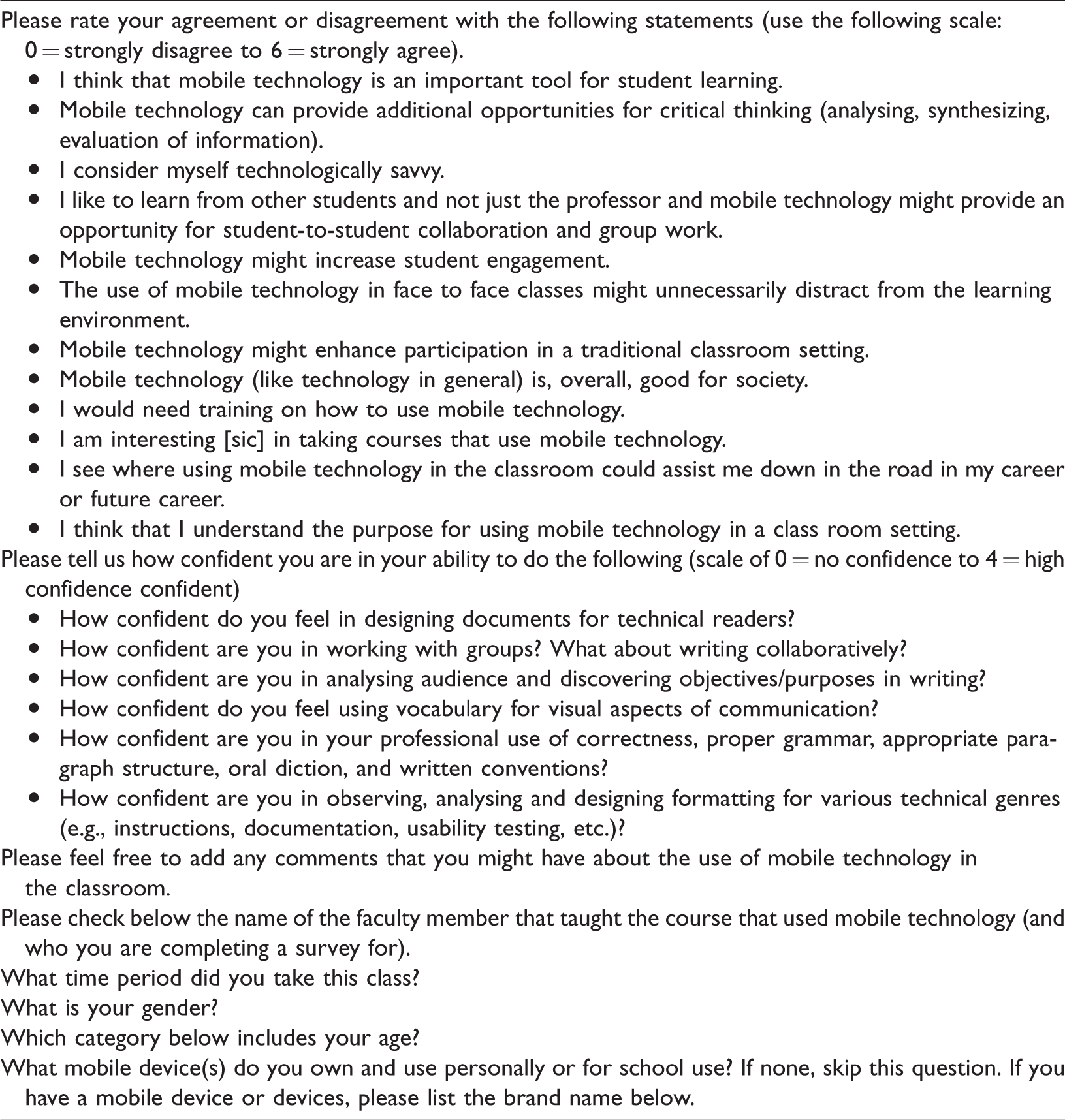
The pre- and post-test survey consisted of 12 statements that assessed the students’ attitude toward mobile technology in the classroom (using a seven-point Likert scale). These statements were taken from McBeth et al. (2015) and were all goals of the iPad Pilot Project being sponsored by the university where the research took place (see Table 1). These statements were designed to measure what students thought about the use of iPads in the classroom and how they might relate to student learning, critical thinking and enhancing participation and student collaboration. Additional statements asked students about their technological abilities, their views of technology and society, and how the iPads might benefit them in terms of career preparation. Students were also asked to evaluate their confidence in their ability to perform various tasks or to have knowledge in various aspects of tablet use (using a five-point scale). The six confidence measurements were all outcomes identified by Robert as student outcomes typically desired in a technical communication course. Students were also asked various demographic questions as well.
Methodology analysis approach
Using a t-test, 3 means were calculated for each statement and within group comparisons looking at statistical differences between pre- and post-tests. Additionally, a student t-test was performed to check for significant difference across groups (comparing the test groups with the control group). Finally, to provide better context to the data, we provide qualitative assessment of what occurred in the classroom to triangulate the data analysis. The design was a non-equivalent group design (Reichardt, 2009). 4 We want to add that relying on a single statement as a measure of a concept was a methodological flaw and that general practice is to measure concepts using at least two or more items.
We did not have a specific agenda in using the tablets aside from seeing how students would respond to our research questions. We taught a traditional technical communication service course and used the tablets as an aid. We did not go out of our way to incorporate the iPads into daily lessons for the sake of using tablets; we only used the iPads if they served as an effective catalyst or facilitator. If the class time seemed better served with a discussion or other activity, then the tablets were not used. Our approach resulted in our using the tablets for primarily informal in-class activities done occasionally. A case could be made for doing more time-intensive, major assignments were students brought the tablets home. However, due to our grant restrictions, the iPads had to remain at Idaho State. If students were allowed to take the iPads home, do longer assignments, and spend more time with the tablets our results may have been different.
Major apps used in the classroom(s)
We had no stake in promoting any app or program but we relied on the apps Paper, Google Docs and Prezi the most. The use of these three apps was not meant to teach the software but to serve as examples of what students could use and do with the tablets in relation to collaborative work, general writing and document design. We used the tablets in informal work within nearly every assignment module. We could have swapped the apps with others and most likely obtained similar results.
Using Paper
Paper allows students to draw in a way that is aided by the artistic guidance of the app. In other words, it can make mediocre art pop. When teaching document design, students used the app to create thumbnails of their documents in progress. We used it to showcase what is possible in the digital realm and to have them think about design more. Since the app was not registered to the individual students it was difficult for them to and save send their thumbnails to themselves. Later, we suggest that if we had allowed the tablets to be checked out this would have aided with document transfer.
Using Google Docs
Having a word processor available for students to use was helpful. We downloaded Google Docs because it is free. While we did not do many journal-based free writes like a composition course, we did pass out tablets at times for students to write rough ideas and when working in groups. The iPads did not come with Pages pre-installed, but in retrospect we realize that using Pages might have been better for typing and basic document design purposes.
Using Prezi
In iPad Class #2 Diantha spent time teaching the students how to use Prezi with the accompanying iOS app. While Paper was used to teach some presentation skills in iPad class #1, the Prezi app allowed more concrete lessons on slide presentation approaches. Diantha used the app to aid her instructions in teaching the concepts and the app itself. Students then experimented with the app in designing their slides. However, many chose to revert to their habits of using PowerPoint for slide presentations.
Results
As Diantha and Robert analysed what worked well in the classroom and what did not, Mark interpreted the test data. These results look at the indications of student data and what many of the numbers in the tables mean as well as some unique aspects that may have affected the results.
Student data indications
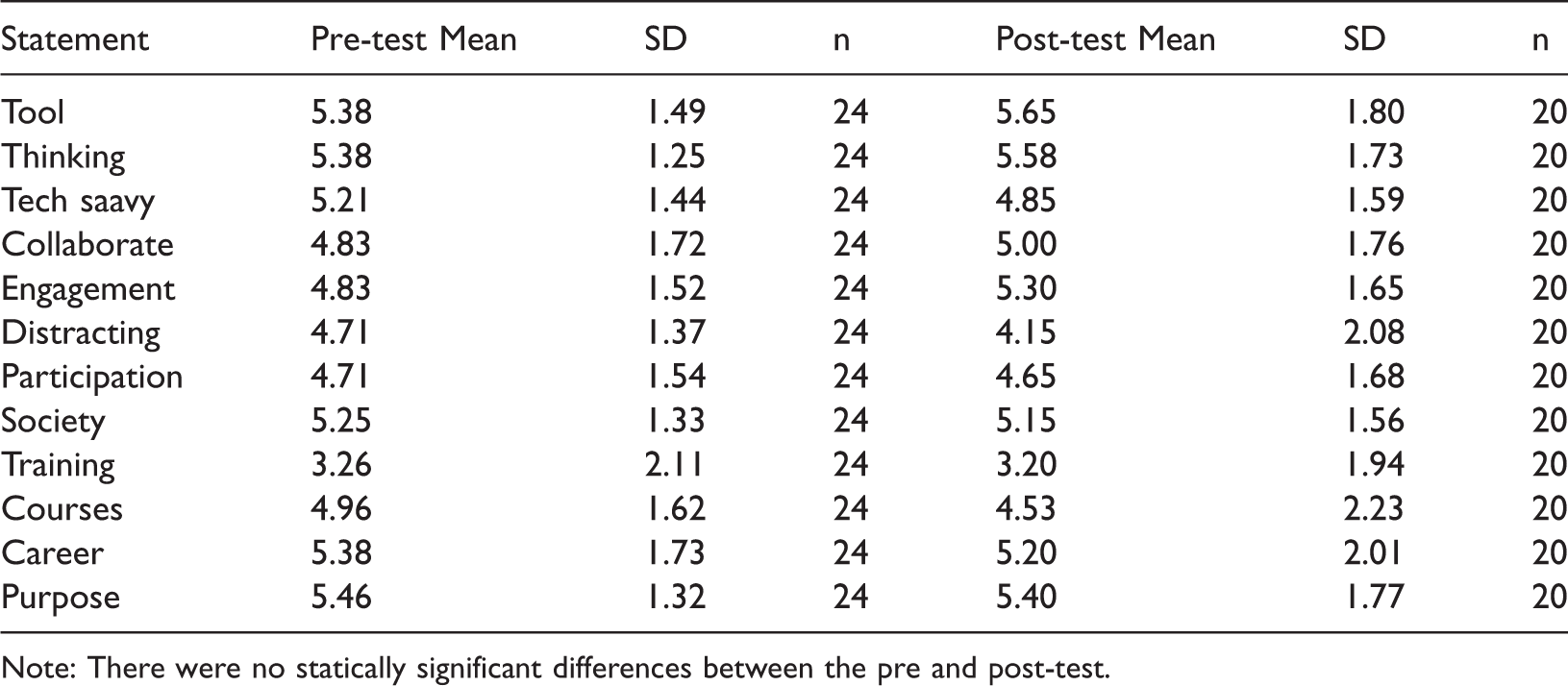
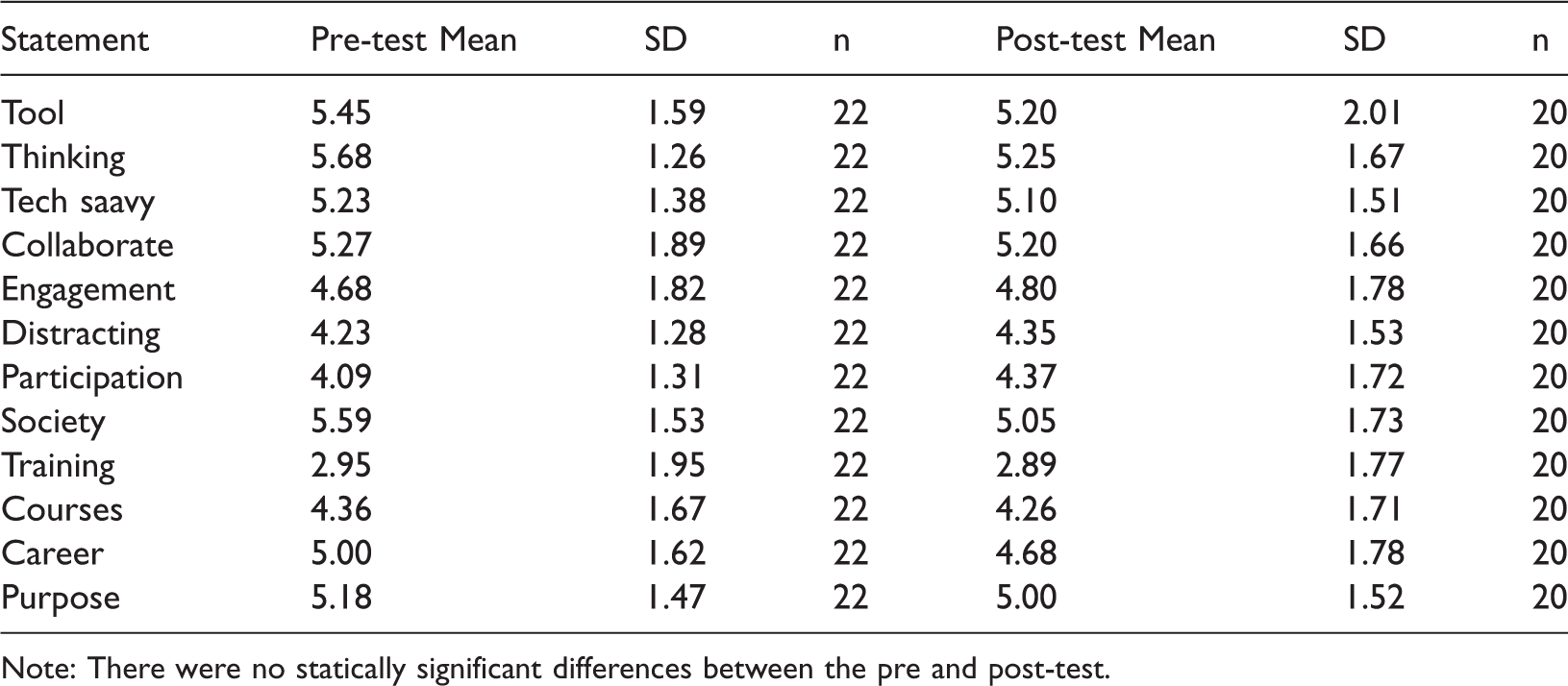
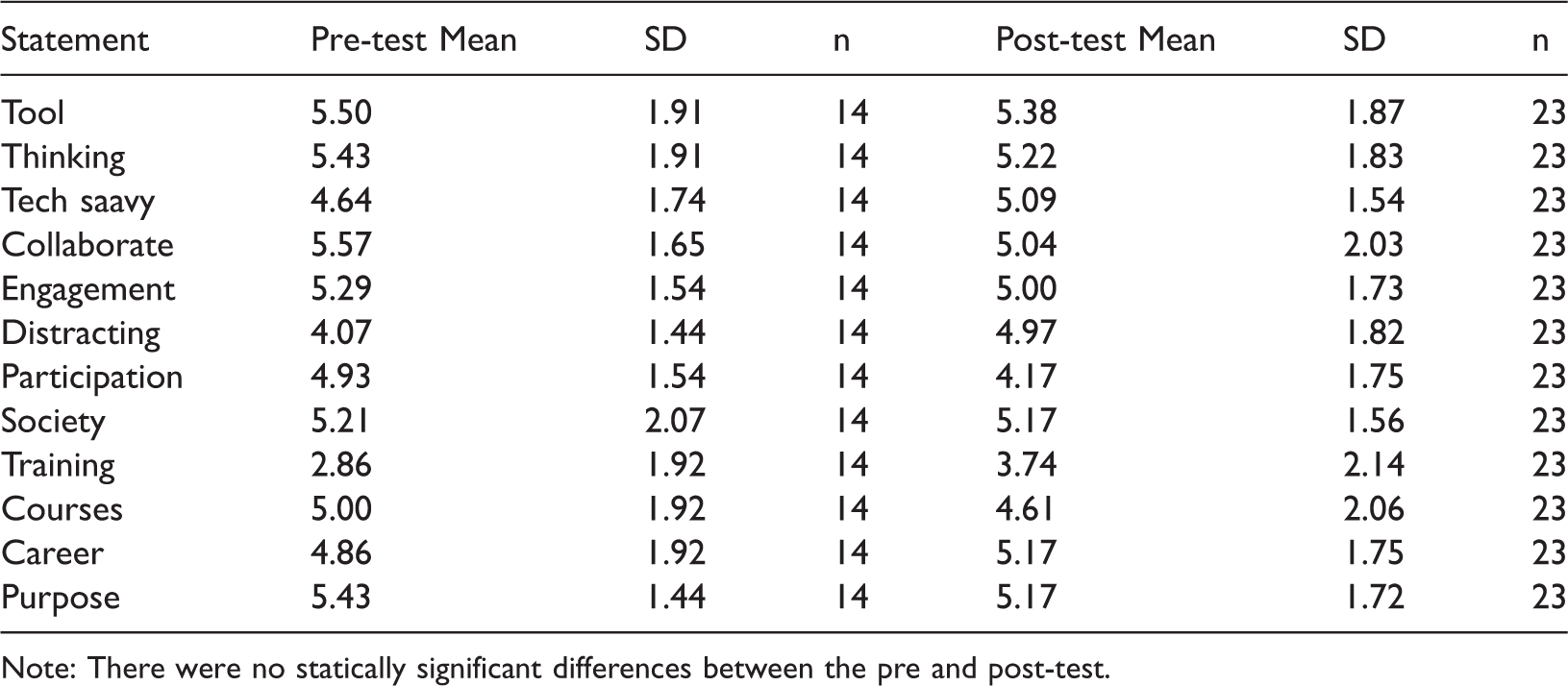
Table 2 presents the pre- and post-test data for iPad class #1 group and measures student attitudes toward iPad use and its purpose in the classroom. The data indicate no significant changes in attitudes between the pre- and post-tests. Table 3 provides the same data for students in the Control Group (the course that did not use the iPads). Again, there was no significant difference between the pre- and post-tests in this within subject design. Similarly, Table 4 provides the pre- and post-test data for iPad class #2 (the team-taught technical communication course). Once again, there was no change in attitudes toward iPad use. The data from Tables 2 to 4 seem to indicate that attitudes toward the use of technology in the classroom is fairly set in student’s minds and that the impact of using the technology is not going to change their attitudes significantly. In general, the data in Tables 2 to 4 reinforce the findings of McBeth et al. (2015) that students think iPads are an important tool in learning, promote critical thinking, help in collaboration and help in the student’s future careers.
Student attitudes about iPads – iPad Class #1.
Note: There were no statically significant differences between the pre and post-test.
Student attitudes about iPads – Control group.
Note: There were no statically significant differences between the pre and post-test.
Student attitudes about iPads – iPad Class #2.
Note: There were no statically significant differences between the pre and post-test.
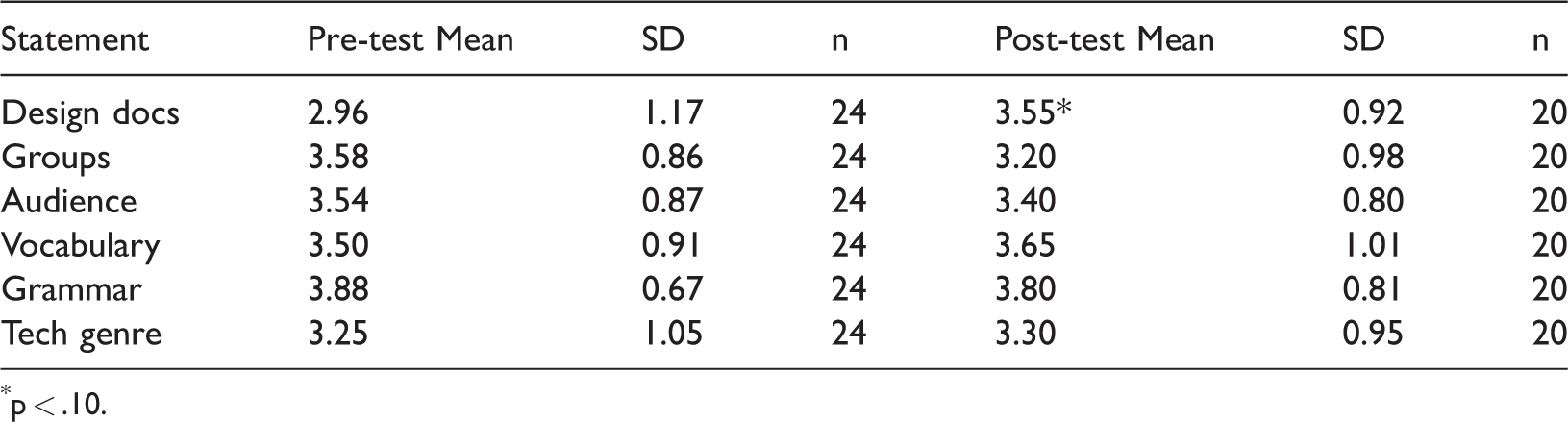
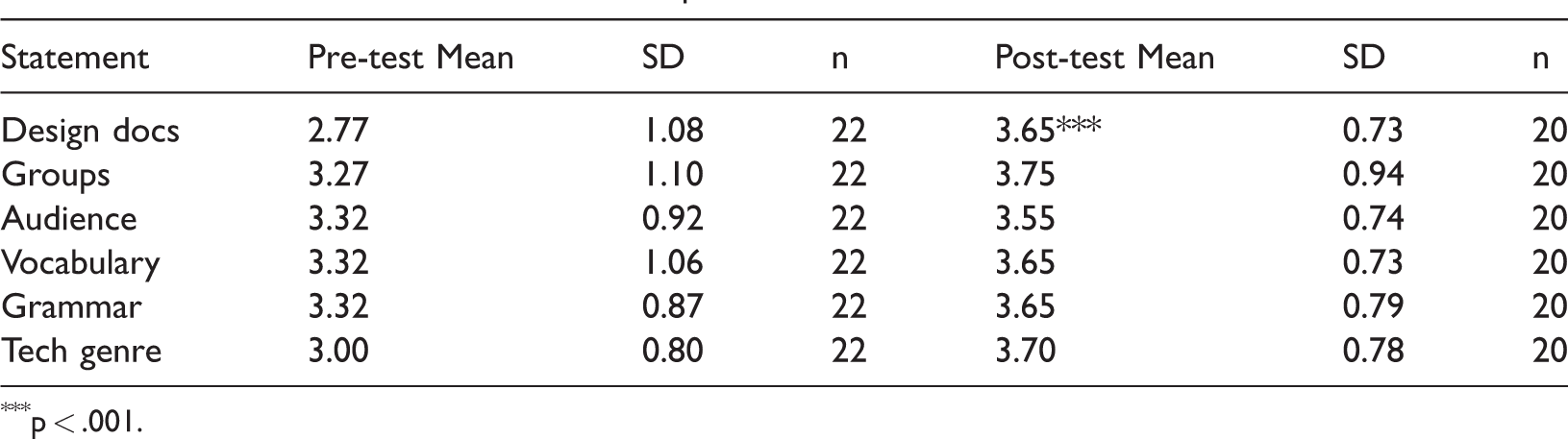
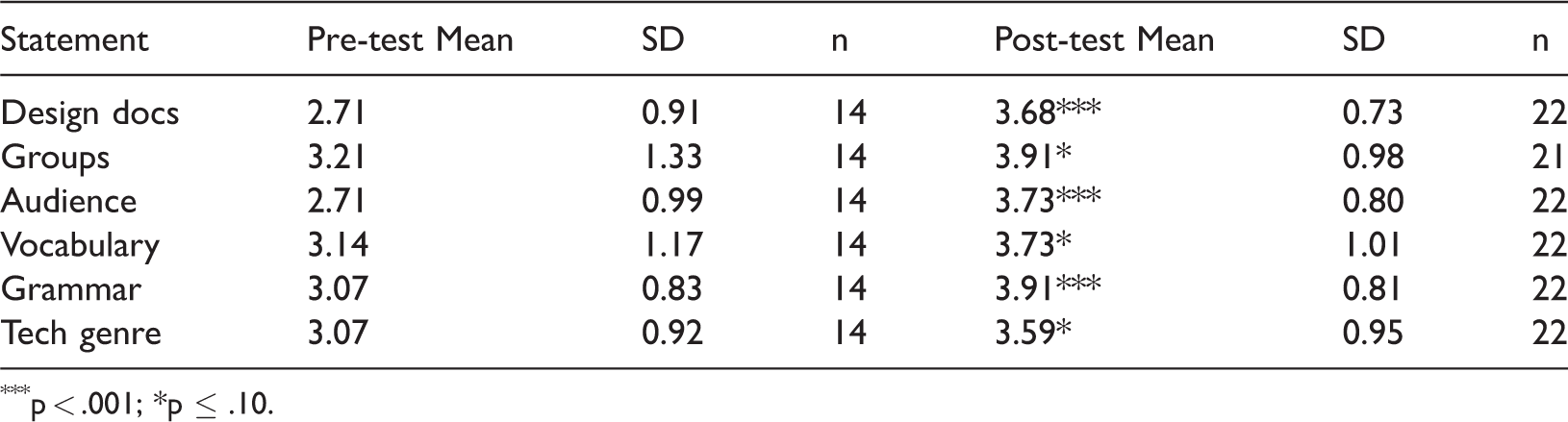
Tables 5 to 7 present the students’ confidence rating of various aspects of technical communication across the two test groups and the control group. Here we find somewhat dramatic differences in the within subjects testing. 5 Table 5 shows that the iPad class #1, iPad Class #2, and the Control Group produced one significant difference between the pre- and post-test: confidence in designing documents increased (iPad Class #1 had a pre-test mean score of 2.96 to a post-test mean score of 3.55, t = 1.83, degrees of freedom = 42, prob. = .07 6 ; the Control Group had a pre-test mean of 2.77 versus a post-test mean of 3.65, t = 3.06, df = 40; and iPad Class #2 had a 2.71 mean versus 3.68 mean, t = 3.76, df = 34, prob. = .00). Importantly, in Table 7, the within group test for iPad class #2 shows significant differences on all six questions of the confidence survey. Significant differences were found in confidence in designing documents (described above), confidence working in groups (3.21 mean versus 3.91 mean (t = 1.69, df = 34, prob. = 10), confidence analysing audiences (2.71 mean versus 3.73 mean, t = 3.61, df = 34, prob. = .000), confidence using vocabulary (3.14 mean versus 3.73 mean, t = 1.77, df =34, prob. = .085), confidence using proper grammar (3.07 mean versus 3.91 mean, t = 3.00, df 34, prob. = .005), and confidence in observing … various technical genres (3.07 versus 3.59, t = 1.88, df = 34, prob. = .068). Interestingly, however, the between groups ANOVA tests 7 did not produce significant differences between the three different groups. This means that the control’s final confidence scores were not significantly different from the post-test confidence scores in either test group. While the data did not reveal any major changes in students’ perceptions that can be directly attributed to the iPads, there were still some useful takeaways that will be covered.
Student confidence – iPad Class #1.
p < .10.
Student confidence – Control Group.
p < .001.
Student confidence – iPad Class #2.
p < .001; *p ≤ .10.
Potential conflicts
At least three small elements could have affected the outcome of the tests. While these elements were small, we felt it best to disclose them: the location of the classrooms, the class makeup of the students and students’ preference for personal technology.
Both iPad Class #1 and iPad Class #2 met in different buildings with #1 meeting in the same building were Robert and Diantha’s offices are located. Because of this, the iPad storage cart lived next to Robert’s office and could be wheeled to the classroom. iPad Class #2, however, met in a larger building on campus and the iPad cart was stored in a secure room tucked among the winding catacombs of the building. A gatekeeper had to be contacted to unlock the two doors to access the iPad cart. Because of this, at times we were hesitant to go through the rigmarole to access the iPads. While there is no record we kept to see if this class used the iPad less, we may have used the tablets less in iPad Class #2 than in #1.
The Control Group had a disproportionately high number of international students (17 of the 24 students). Many students were grappling not just with technical communication concepts but the English language. More time was spent helping students understand instructional elements than in the other classes. In retrospect, the iPads might have been more useful for this group, as it could have helped them with design and writing. Additionally, the language and cultural barriers may have affected some of the outcome in responses. However, we had assigned the control and test groups blindly.
One thing that surprised us, but maybe should not have, is how many students opted out of using the tablets if an option was given. In some class periods the iPad use was not mandatory but was offered as a way for them to access online activities. While the tablets offered a large reading screen and a serviceable keyboard many students chose to use their smartphones instead. They typed freewrites and filled out surveys on the comparably micro-sized screen of their phones. Our tests did not consider that students might already be quite familiar with their own phones and answered the question with their phone usage in mind when the tests referred to the term mobile technology. However, we chose the term mobile technology over iPad so as not to infer product loyalty bias (but perhaps we should have used tablets).
Discussion/implications
The qualitative discussion of the data and the class structure helped us make sense of the numbers we were seeing. Before analysing the results, we view it necessary to discuss the research questions – and our answers to them – as well as some qualitative discussion takeaways.
Research question responses
Before we continue, here is brief reminder of our questions:
What are students’ perceptions on the use of iPads in the classroom? How can instructors adjust their pedagogical approaches and praxis activities to improve iPad use in the classrooms? Can mobile technology promote better classroom habits and prepare students for future workplace habits?
The final question relating to workplace habits is a bit vague, but we are referring to the typical rhetorical and design workplace goals that the technical communication course addresses. We believe that these questions are particularly relevant to technical and professional communication courses, and based on two semesters of implementation of the iPads in this setting, we believe we have more to add to the conversation about overcoming these challenges.
What are students’ perceptions on the use of iPads in the classroom? As the data we collected suggest, most students had a positive perception of iPads in the classroom, and based on our day-to-day observations, even students who were less technologically savvy at first were able to learn to navigate to the tools they needed fairly quickly. Part of this perception was likely because one or two instructors and several peers were always on hand to provide some quick face-to-face assistance as needed.
One of the most important aspects of document design is gathering data about usability, and since our curriculum includes an assignment to write and test instructions, we had the perfect opportunity to help students think critically about how complicated user experience can be. Although we allowed students to choose any process for their instructions, many chose to teach a user how to use a type of technology or use a software program. This was primarily because students knew they could easily find other students on campus willing to learn more about technology through a user test, students could use technology expertise they already had, and students did not need to purchase any outside equipment but could simply use devices that were already readily available on campus.
Although they did not realize it at first, students had many assumptions about whether their peers were digital natives 8 and generally wrote their instructions for a technologically savvy audience. Through the process of user testing, however, they quickly discovered that their peers had a varied ability to use technology effectively, that demonstrating was much more effective than telling, and that simple yet specific guidance was necessary for even advanced users to navigate technology easily.
In the future, we plan to encourage all students to write instructions and conduct usability studies with the iPads so that students in future classes could benefit from their instructions, and more importantly, so that we could include iPads in our discussion of the hidden curriculum that often comes with new technologies. Through these discussions we hope to help students be more aware of how technology impacts their own educational experience and how they can proactively prepare to integrate technology into their professional lives in the future.
How can instructors adjust their pedagogical approaches and praxis activities to improve iPad use in the classrooms?
As many others have reported in previous studies, we found that iPads offered unique affordances for improving collaboration and group work and tried to adjust our use of the iPads accordingly (Alyahya and Gall, 2012; Geist, 2011; Mang and Wardley, 2012; Rossing, 2012). Like many other technical and professional communication teachers, we include a proposal assignment as part of our semester’s curriculum. In iPad Class #2 students were required to work in groups to prepare proposals for the university’s brand new Integrated Research Center. 9 Student groups proposed various ideas for staffing the centre, improving the space and adding new technology to the centre’s resources. Because finding a specific time to do group work outside of class can be very difficult, we allowed students to meet with their groups in class and gave students access to the class set of iPads so that they could easily access important documents on Moodle, look up research on the internet and type up notes as they worked together. In iPad Class #1, the proposal was less involved. Diantha suggested the Integrated Research Center concept, drawing from service learning pedagogy 10 and the proposal process seemed much more involved and complete in iPad Class #2. This increased collaboration work for such an interactive assignment could be part of the reason that confidence in collaboration increased. Some students found it easier to bring their own laptops, especially since the iPads had to stay in the classroom, but the iPads allowed all students to have access to the internet, a keyboard and important class documents.
Although the iPads made access to some resources easier for all students, not being able to take the mobile technology outside the classroom seems to have made it less appealing. Despite the possibility of uploading work to Dropbox or emailing it to themselves at the end of class, some students opted to simply take notes on paper (one of the oldest mobile technologies) so that they could take that with them after class. Therefore, to maximize students’ ability to use technology to amplify collaboration, it would probably be beneficial for some students if they could ‘check-out’ an iPad and continue communicating with their group and adding to group documents at home. This would also allow students to engage in lengthier and more demanding assignments.
Can mobile technology promote better classroom habits and prepare students for future workplace habits? One of the foremost concerns of modern educators is developing strong literacy skills in students, and today, that includes digital literacy. Because technology changes so quickly, however, some argue that it is important to not focus on teaching specific applications, but rather focus on giving students wide exposure to a variety of technology and the opportunity to play, problem solve and adapt the digital tools to whatever task they need to accomplish (Blakeslee and Savage, 2013; Northcut and Brumberger, 2010; Rossing, 2012).
In a unit on technical descriptions, we developed several different activities to help students find and make graphics that would support and enhance their writing. One of the key lessons involved helping students discover how to create graphics even if they did not have advanced skills with software like the Adobe Creative Suite. Instead we showed students how to create graphics with Microsoft Word and various kinds of presentation software (Prezi, Keynote and PowerPoint). Students learned that they could design custom graphics within these programs, and then either copy/paste or use screen capture to transfer the graphic to whatever document they were working in.
The skill of creating custom graphics is certainly useful in the workplace (for presentations, fliers, web design, marketing, newsletters, etc.), but we would argue that the more important skill embedded in this activity was problem solving. Though being digitally literate is a lifelong process, we wanted to help students see that they did not necessarily need specialized training to accomplish their goals. In fact, in some cases, adapting familiar resources in unique ways to meet challenges might even be more time and cost effective.
Analysis
The data indicate that attitudes about iPads in the classroom did not change between pre- and post-testing in either the test groups or the control group. While McBeth et al. (2015) measured attitude data about iPads among students (cross-sectional and one point in time) who were or were not technological savvy, that study did not show whether student attitudes toward the iPads changes over time. Our finding suggests that student attitudes may be stable and not necessarily amenable to change from use of the iPads in class based on the similarity in pre- and post-test attitudes toward iPads between the three groups. It seems that students are familiar enough with mobile technology that they are neither afraid of the technology nor fascinated by it. Rather, the data seem to indicate general acceptance of the use of iPads in the classroom at best, indifference at worst. What variation in scores does exist between the three groups is likely explained by the users’ own technological proficiency and whether they had been exposed to tablets in other courses at the university.
The significant improvements in knowledge confidence in iPad Class #2 is notable. While iPad Class #1 and the Control Group produced only one significant (and positive) change in knowledge confidence (designing documents), iPad Class #2 found significant and positive changes (measured by ANOVAs within groups) on all six measures of knowledge confidence. Some of this might be explained by the makeup of the students in the different courses. But likely, the dramatic increases were due to teaching innovation in the use of the iPads in the second test group. While attitudes about iPads in the classroom did not change between pre- and post-tests, knowledge confidence did.
As mentioned, all three groups marked increased confidence in document design. This might be due to multiple factors. First, they may have been unfamiliar with the concept of document design before class began. Second, students’ confidence increased in all three because we focused on document design in all three classes. Third, it could be due to the practice they did in the classroom. The tablets may have improved their document design confidence and this might be visible by setting up follow-up experiment focusing solely on document design. One could create a consistent pedagogy that incorporates the tablets in the courses but does not in the control group. The results could be analysed and coded to see if the instructors noticed improvement in their results as well as in their confidence.
Major pedagogical takeaways
Two qualitative observations that Diantha and Robert agreed upon were that students seemed to improve their collaboration comfort while working on the iPads and became more apt at designing documents.
Collaboration in teaching
It is no surprise that teaching with iPads gets easier and more effective as teachers gain more experience with it. Many instructors at Idaho State University who reported their experiences in the article by continued using iPads in their classrooms and tended to have better experiences with them in subsequent semesters. Thus, as Robert and Diantha worked together, it was much easier to plan and prepare to incorporate the iPads. For example, as Robert and Diantha planned the unit on Technical Descriptions, Robert noted that in the past students seemed overwhelmed with learning how to write the technical description and how to do document design at the same time. Therefore, in iPad Class #2, the schedule was adjusted so that instead of turning in one large assignment, students turned in three smaller assignments: a written draft of the technical description, a design portfolio with examples of effective graphics and typography, and a revised technical description that combined the students revised technical description with effective document design. The iPads were not used until students began the design portfolio and this seemed to help students stress less about word processing and designing on a device at the same time. Knowing this, a further study might focus on the specific affordances gained in document design by using iPads.
It was also helpful to have a fresh set of ideas from a second instructor, who had not used iPads previously, but had taught with many other technologies. Diantha used her knowledge of Prezi to introduce students to a new way of creating digital presentations and experimented with using different collaborative workspaces in our course management system (Moodle). Although not all of these ideas were immediately successful – the Prezi app had some unexpected limitations for example. Ultimately they allowed both Robert and Diantha to grow as teachers and gain confidence in their abilities to bring new technologies into the classroom.
Document design
Upon completing the study of the three courses Robert had a teacher’s intuition that if using the iPads changed anything in the students’ perceptions of technical communication, it was in their ability to design documents. During one of our authors meetings, Robert mentioned this hypothesis, and Mark (the expert on the quantitative data) responded that the data partially supported this assumption.
Robert began incorporating the aforementioned app Paper in iPad Class #1 and continued using it with Diantha in Class #2. While watching students work, we noticed that some of the visual rhetoric concepts were clicking as they drew on the tablets. When reviewing their work later, the documents in the two classes seemed more professional than those in the Control Group. They also seemed slightly stronger than previous technical communication courses Robert had taught. Additionally, students seemed to be excited that their doodles and sketches were actual digital drawings. As mentioned earlier, if students had the capacity to check out the tablets (and create a personal account to share their drawings) they might have engaged more in the technology.
Conclusion
What does this mean for our initial question of whether tablets make a good substitute for a fully stocked computer lab? It is difficult to say from the data we gathered. Students did not seem to indicate one way or the other on whether tablets increased their ability to learn. It did not detract from their learning, and the increased confidence in the instructors’ approach to teaching in iPad Class #2 indicates that the tablets might improve pedagogical praxis in the instructors themselves. If students are accustomed to tablets as the data indicate and if our observations that many students preferred using their own cell phones over the tablets, then programmes could consider various solutions. First, tablets do not hinder learning and our experience shows that in some situations it may aid. Second, tablets are useful in some classroom activities but in others offer few affordances that smart phones do not already carry. However, not all students have smart phones, so assuming that all students can refer to a smart phone in class feeds into turn-of-the-century concerns over digital divide and access. Third, tablets can replace computer labs in many activities but in others they are limited.
These limitations are found in what tablets do not afford: well-rounded software that interacts with their personal computers and access to school networks. Our tablet cart did not connect to the school network like most computer labs so students could not log into their personal accounts to access the iPads. Because of this, they were not directly connected to a cloud or other file sharing networks that would allow them to continue working on previous projects or save their work progress for use on their personal devices. Additionally, iPads do not have a traditional USB port to cater jump drives. This could be solved by allowing the iPads to be checked out to specific students, although this increases the risk of damage to the tablets that might not be worth the risk for departments (or even a possibility). Another solution would be to have students use a specific tablet in class all semester and dedicating time to file transfer discussions. However, these solutions are not as simple overall as having a student log onto a network that automatically connects them to their information and cloud services.
As, we have indicated in this study, tablets do show promise. They can serve the function of a computer lab in many ways. Due to rapidly evolving technology and increased access to affordable smartphones, the investment might not be necessary. That said, there are still plenty of interesting takeaways that we found from our study that could benefit programmes (namely instructor improvement translating to better pedagogy, document design aid, and engagement with technology and software aids students). Additionally, precise studies on specific use of apps and concepts (such as the tablets ability to improve document design) are highly welcome and could yield results in future work.
Footnotes
Authors’ note
The article “iPads or Computer Labs? A Technical Communication Classroom Study” is the original work of Robert Watkins, Diantha Smith, and Mark McBeth. This article is being submitted only to E-Learning and Digital Media, it has not been published previously, and we can supply all necessary permissions for the reproduction of any copyright works not owned by us. The included tables are all original creations.
Declaration of Conflicting Interests
The author(s) declared no potential conflicts of interest with respect to the research, authorship, and/or publication of this article.
Funding
The author(s) received no financial support for the research, authorship, and/or publication of this article.