




Abstract
Humanoid robotics is a complex and highly diverse field. Humanoid robots may have dozens of sensors and actuators that together realize complicated behaviors. Adding to the complexity is that each type of humanoid has unique application program interfaces, thus software written for one humanoid does not easily transport to others. This article introduces the transportable open-source application program interface and user interface for generic humanoids, a set of application program interfaces that simplifies the programming and operation of diverse humanoid robots. These application program interfaces allow for quick implementation of complex tasks and high-level controllers. Transportable open-source application program interface and user interface for generic humanoids has been developed for, and tested on, Boston Dynamics’ Atlas V5 and NASA’s Valkyrie R5 robots. It has proved successful for experiments on both robots in simulation and hardware, demonstrating the seamless integration of manipulation, perception, and task planning. To encourage the rapid adoption of transportable open-source application program interface and user interface for generic humanoids for education and research, the software is available as Docker images, which enable quick setup of multiuser simulation environments.
Introduction
Humanoid robotics is a complex and highly diverse field. Most humanoid robots have more than 20 degrees of freedom (DOFs) and may have up to several dozen sensors. Developing software for such robots is challenging because one needs to correctly integrate all the actuators and sensors to operate in a highly coordinated manner. We solve this problem for two state-of-the-art humanoid robots—Boston Dynamics’ Atlas V5 and NASA’s Valkyrie R5 (henceforth referred to simply as “Atlas” and “Valkyrie” by extending software provided by the Florida Institute for Human & Machine Cognition (IHMC) 1 and integrating several robot operating system (ROS) libraries. Most humanoid robot tasks require integration of perception, manipulation, and locomotion, realized through planning and control subject to constraints that are specific to each type of humanoid robot. For example, a humanoid manipulation task may require the planning of arm motions while ensuring that the robot remains balanced; footstep planning should consider robot-specific limitations; perception algorithms should be robust to vision sensor calibrations and noise uncertainty. To successfully integrate these modules, they must be developed by considering their impact on each other.
We use the legged locomotion algorithms and optimization-based momentum controller framework provided by IHMC Open Robotics Software. 1 The algorithms are generic to a number of humanoids and quadrupeds. The controllers are written in Java with a network interface supporting ROS-Java integration through defined messages. ROS 2 is one of the most widely used middleware for research and education in robotics. The transportable open-source application program interface (API) and user interface for generic humanoids (TOUGH) APIs discussed in this article communicate with the above-mentioned software using ROS topics to read robot state, sensor data, and send desired commands to the robot. Algorithms developed to work on one robot can be tested on another with great ease to make comparisons. The minimal setup and independent modules of TOUGH are designed to help new researchers and students focus on specific tasks without losing the impact of other modules on the task in hand. Through this framework, we attempt to provide a generic and integrated software stack, which would aid new researchers, educational programs, and the robotics community get started with humanoid robotics.
Using TOUGH, users can focus on high-level algorithms without worrying about robot-related configuration, system setup, message generation, and communication. IHMC provides open-source access to their low-level controllers along with several robotics libraries, however their mission control repository which is used for operating the robot is closed source. TOUGH utilizes most of the features provided by IHMC software and abstracts overwhelming details required by the low-level controller. It also adds customizable graphical user interface (GUI), ease of use, and several examples.
The second section talks about the existing open-source libraries commonly used in humanoid robotics followed by the design of TOUGH. “Getting started” section provides an example task highlighting the ease of use followed by performance comparison. The fifth section explains available Docker images. We then present three use cases of the APIs followed by future work and conclusions.
Related work
There are a number of open-source libraries for control of legged robots. Pinocchio 3 specializes with fast rigid body dynamics algorithms used for robotics, computer animation, and biomechanical applications. OpenSoT 4 allows rapid prototyping of controllers for high DOF robots. It can be used for computing inverse kinematics, inverse dynamics, or contact force optimization, which is commonly used while controlling humanoid robots. The iDyntree 5 library was designed specifically for control of free-floating robot as part of the iCub project. Tedrake and Drake Development Team 6 provide tools to analyze the dynamics, design control systems, navigation, and planning algorithms for all kinds of robots. ControlIt 7 provides a software framework for whole-body operational space control. These libraries provide a very specific set of tools for dynamics and control of legged robots. On the contrary, TOUGH is designed to provide a seamless integration of manipulation, navigation, perception, and control. There is heavy emphasis on high-level user experience and effectively managing low-level control for complex robots. TOUGH allows novice users to control the robot at higher level by abstracting low-level details. More advanced users, on the other hand, can write algorithms for control, motion planning, or perception based on sensor feedback from the robot and send the control input at joint level.
Design
TOUGH uses ROS as middleware to communicate with the momentum-based controller 8 running on the robot or simulator. At a higher level, TOUGH takes input from user, who converts it into appropriate ROS messages and sends it to the robot (In our case, most users are developers. Hence, when we refer to user, it should be noted that the user is a developer.). TOUGH APIs consist of five modules and two ROS packages, as shown in Figure 1. The modules inside the dotted lines form the core of TOUGH. These modules communicate directly with the robot. tough_examples provide examples of using the core module and tough_gui provides a GUI for operating the robot. Tough common contains classes that are required by all the other packages. Tough control allows sending joint level commands to different parts of the robot. Tough perception provides utilities for data processing of vision sensors. Tough motion planners allows planning of taskspace trajectories, which can be executed using the controller interfaces. Although the motion planners are not directly dependent on Tough control, user would generally need to make use of Tough control for sending planned trajectories to the robot. Tough navigation is used for sending leg trajectories to the robot. Although a user can move the legs in desired position in taskspace using this package, it is most commonly used for sending either footsteps or goal to which footsteps should be planned and executed by the robot.

Packages in TOUGH APIs. TOUGH: transportable open-source API and UI for generic humanoids; API: application program interface; UI: user interface.
TOUGH acts as an abstraction layer to hide details required by the lower level controller that does not concern the user. For example, to change the pelvis height of the robot to 0.8 m in 1 s using ROS message, a user has to send the following values as a ROS message.

ROS message to change pelvis height.
The above snippet is an example of ROS message to set pelvis height. It has some variables, whose values are important for the user to know like that of time and position in taskspace_trajectory_points. However, there are some variables, whose values are not required or could be computed without user input in most cases. For example, the reference frame IDs in frame_information mentioned as −102 is a hash for world frame, which need not be known to the user. Same is the case with the last variable, unique_id, if its value is 0, then the message is discarded by the controller. The above message is reduced to the following two lines using TOUGH.

TOUGH example.
Tough common
Tough common module is used for fetching details of robot model and robot state. It consists of two classes: RobotDescription and RobotStateInformer. Both the classes follow singleton pattern. Singleton implementation allows creation of only one object, which is shared with all the classes that access information through these classes. RobotDescription provides information about robot model like the frame names, joint names, joint limits, and so on. RobotStateInformer provides the current robot state, that is, values of robot’s joint angles, velocities, and efforts. It also provides functions to get the external forces from force sensors and the accelerations from Inertial Measurement Unit sensor. The robot state is updated at 1 KHz. It also provides methods for querying current pose of frames and transforming points or frames between different base frames. Figure 2 shows the class diagram of tough_common package. In the figure, RobotState is a struct with joint name, position, velocity, and effort of a joint. RobotSide is an enum with two values: LEFT and RIGHT. It is used to specify the side of the robot when sending commands to arms, grippers, or legs.

Overview of Tough Common module. This module uses ROS to fetch sensor data from robot/simulator and makes it available to the user via functions from tough_common library.
Tough perception
Tough perception module is an interface to access Multisense SL sensor using two classes: MultisenseImage and MultisensePointCloud. It also provides a few utility nodes that can be used with any other sensor. Figure 3 shows an overview of tough perception. Multisense SL has a stereo camera and a spinning Hokuyo lidar. Right camera of the stereo camera pair provides monochrome image and the left camera is RGB. Using images from both cameras, we can determine depth information. MultisenseImage class provides images from the stereo camera along with organized RGBD pointcloud, which can be used to find world coordinates of a pixel in the image.

Overview of Tough Perception. The libraries shown on the left provide access to the multisense SL sensor and the nodes shown on the right provides preconfigured pointclouds.
Lidar sensor provides laser scan, which consists of range and intensity, of points in a single plane. The Lidar spins about an axis parallel to ground to provide laserscan in all planes that can be assembled to form a 3D pointcloud representation. MultisensePointCloud class provides access to the lidar data. As the lidar needs to spin to gather 3D data, it takes about 3 s to generate an assembled 3D pointcloud. On the other hand, stereo camera provides a stereo pointcloud at higher update rates and lower data size but with the cost of less accuracy.
This package includes utilities that assemble pointcloud, provides registered pointcloud, and provides ground plane. Laserscan assembler assembles all laserscans within a set time to form a pointcloud. This assembled pointcloud is merged with previously assembled pointcloud to provide a registered pointcloud. The registered pointcloud has all the detected points filtered to a density of 1 point per 5 cm voxel. Ground plane is detected based on the lowest foot height of the robot and surface normals from the detected plane. ArucoDetector class provides detection of objects using ArUco markers. 9 This class detects and provides pose of registered ArUco markers in the field of view of the robot.
Tough control
Tough control module provides classes to interface with robot controllers using ROS. Figure 4 shows class diagram of the tough_controller_interface package. Each of the body parts has a controller interface class associated with it. This allows the user to send commands to the required part of the robot body. Each class provides functions for that specific part. For example, chest controller interface allows rotation of torso about x, y, or z axes, whereas pelvis controller interface allows setting pelvis height of the robot. Commands to multiple controller interfaces can be sent simultaneously and the robot executes the most feasible trajectory that keeps the robot balanced. If planners are used for generating whole-body trajectories, these trajectories can be sent to the robot using whole-body controller interface. All the controllers accept only joint level trajectories, however, motion_planners explained in next subsection can be used for taskspace planning.

Class diagram of tough controller interface.
Tough motion planners
Tough motion planners provide planning capabilities using MoveIt 10 configuration for four predefined planning groups. Two groups for 7-DOF planning of each side, starting from shoulder until hand and two groups for 10-DOF planning of each side, include roll, pitch, and yaw of chest along with 7-DOF arms. TaskspacePlanner class provides methods to generate joint trajectories for a given 3-D point in taskspace. It can also be used for generating trajectories to follow a set of waypoints in taskspace. These joint trajectories can then be executed on the robot using tough_controller_interface. It also provides inverse kinematics solution using TRAC-IK 11 for any of the planning groups.
Tough navigation
Tough navigation module provides RobotWalker class that can be used to send footstep locations to the robot. It allows the user to customize footstep parameters like the step length, swing height, swing time, and transfer time. Footsteps can be generated based on either fixed offset that user provides or based on a goal location. Search-based footstep planner 12 is configured for Atlas and Valkyrie based on the configuration of each robot. The footstep planner needs a 2-D occupancy map, which is generated by map_generator node in this same module. It uses the ground plane filtered by Tough Perception module to create a map.
This module also provides a class FrameTracker that can be used to track motion between two frames. This class is useful in cases, where we need to programmatically check if the robot is walking. Though it was developed in the context of walking, it can be used for tracking motion between any two frames. Another utility class in this package is FallDetector. FallDetector provides a way of knowing if the robot is standing on its feet or has fallen down. This is useful in scenarios, where operator cannot see the robot or in cases, where robot is working in complete autonomy.
Tough_examples
Tough_examples are split into four categories, namely control, manipulation, navigation, and perception. Each of these categories provides a comprehensive set of examples, which describe the proper usage of the APIs. The examples provided here are also used for sending some quick commands to the robot like reset_robot to its default position or rotate the neck to see around or walk a few steps. All of these examples take arguments and perform one specific task.
Tough GUI
Tough GUI provides the necessary information required for operating a humanoid robot along with a view of current joint angles, current pose of the robot, and buttons to send different commands to the robot. If required, RViz
13
can be used along with the GUI for visualizing the data from different angles. A default configuration file for RViz is included in tough_gui package. As seen in Figure 5, Tough GUI provides RViz-based render panel and other visualization tools. The robot model is displayed in either 3-D or 2-D view in the central panel. The lower left widget provides a view of robot’s camera. The lower central widget displays current values of various joint angles and current position of the robot. The widget on lower right consists of different tabs to control each of the body part. These tabs are Nudge—used for nudging either right or left hand by 5 cm in task space using direction buttons. Arm/chest/neck/gripper—provides sliders to move individual joints to move into a specific configuration. Walk—provides an interface to move fixed number of steps by a fixed offset, change walking parameters, and changing the pelvis height.

TOUGH GUI connects to the robot or simulator to show a 3-D rendered display of the robot-state and pointcloud. It also has several widgets to control different body parts. TOUGH: transportable open-source API and UI for generic humanoids; GUI: graphical user interface; API: application program interface; UI: user interface.
The top toolbar has RViz tools that can be used to fetch the coordinates of a clicked point in the render panel, measure distance between two points, send a 2-D navigation goal for the robot to walk. When 2D Nav Goal tool is used to send a goal location, the footstep planner generates a set of footsteps for the robot to follow. This planner takes care of robot specific constraints like the kinematics limits of the robot. For example, Atlas robot cannot place its foot such that the toe is pointing inward, the footstep planner is configured to take that into consideration. Once a plan is ready, those footsteps are seen in GUI and user must click on “Approve Steps” button for the robot to start walking.
Getting started
This section provides code snippets to perform a pick and place task using TOUGH APIs. The task is to detect an object, navigate to it, pick it up, navigate to delivery location, and place the object.
Initialization
First step is to initialize all the required objects, as shown in Listing 3.

Initialization.
Object detection
The next step is to detect the object of interest. Assuming the object has an ArUco marker with id 15, we can check the presence of the object in field of view using the code snippet below.

Object detection.
In case the object is not in visible range, HeadControlInterface can be used to turn the vision sensor, as shown in code snippet below.

Move head to look around.
Navigation
Assuming a walking goal is computed based on the detected object pose, such that the robot stands near the object, we can plan footsteps and make the robot walk to the goal position using the following code snippet.
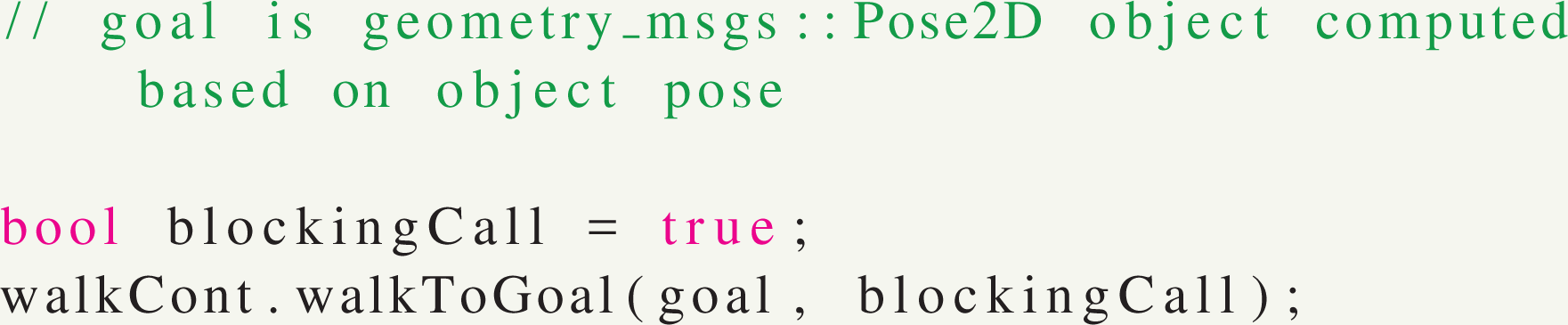
Navigate to a goal pose.
Motion planning and manipulation
Let us assume that the object is on the right side of the robot and it is in reachable space of right arm after the robot completed its walk. The pose of the object is stored in objectPose variable. We can then compute a trajectory to go to the desired pose. Assuming desired pose is same as objectPose. In real application, it can be different and computed based on object shape and placement of marker on the object.
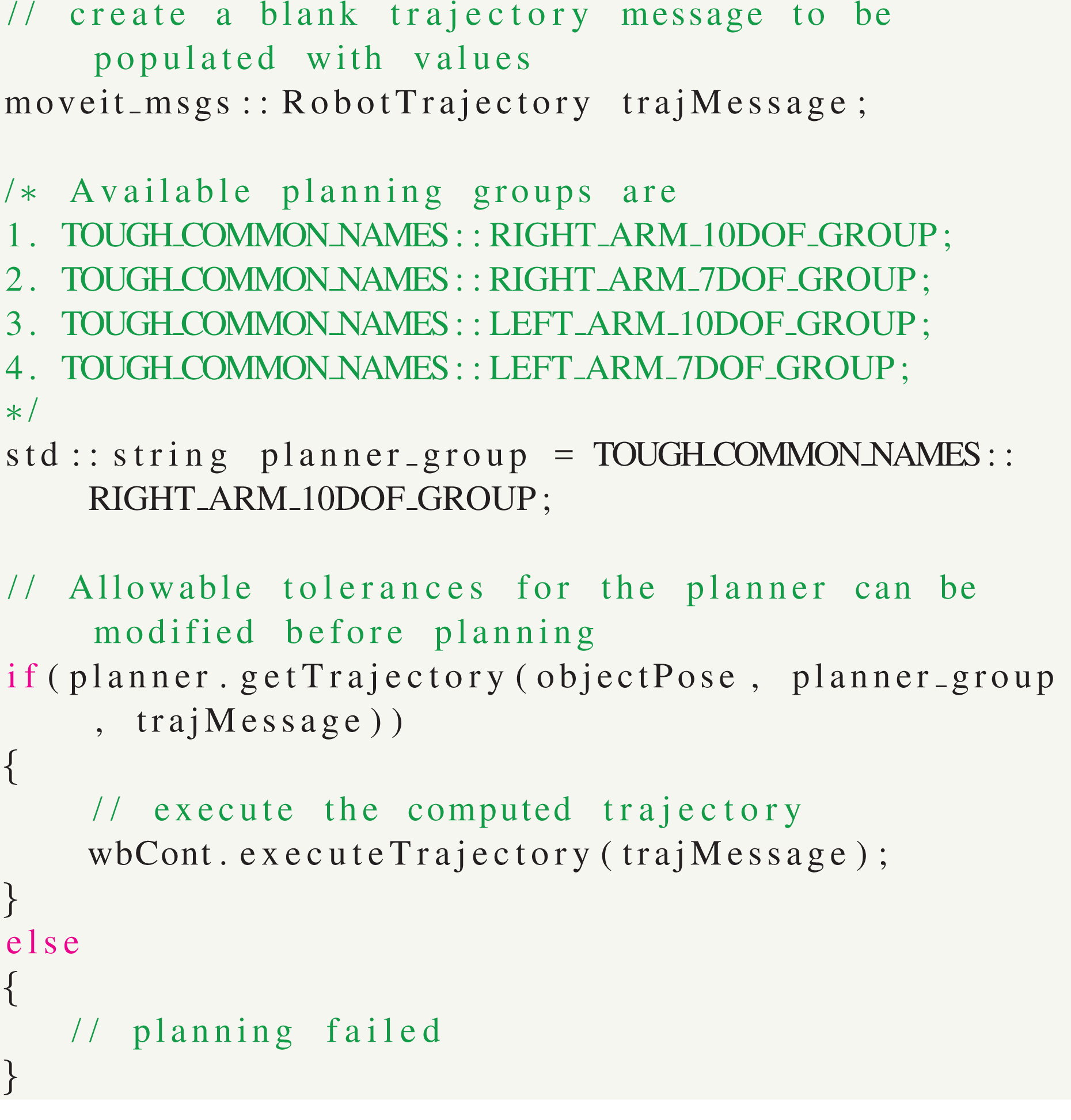
Trajectory planning and execution.
Once the trajectory is executed, we can confirm that the end effector pose has reached the required location.

Query pose of end-effector.
Grasping can be performed using gripper controller as shown below.

Operating grippers.
Placing of the object can be performed similarly using object detection to locate the pose for placing object, then navigating to it, planning hand motion to place the object, and placing it.
Performance comparison
The primary purpose of TOUGH is to act as an abstraction layer between the low-level controller implementation and the user input. It allows achieving more by writing less code. For most algorithms, the APIs depend on other open-source libraries, as mentioned above. It does not add any overhead on time complexity to the existing algorithms. Hence, we are using “lines of code per command” to compare the programs written using TOUGH APIs with direct ROS-based nodes. Figure 6 provides comparison of executables using TOUGH APIs and basic ROS nodes for performing the same task. The code used for comparison is available in tough_examples package. The examples are very basic and yet we see code reduction by approximately 75%. When compared with bigger tasks like writing high-level controllers or executing required motion trajectories, the overall code reduction would reach more than 80% as seen by more complex examples like “Walk N Steps” in the chart.

TOUGH APIs versus ROS nodes. TOUGH: transportable open-source API and UI for generic humanoids; API: application program interface; UI: user interface.
Docker container images
A Docker container image is a lightweight, stand-alone, executable package of software that includes everything needed to run an application. 14 We have created docker images for Atlas and Valkyrie, which helps in quick configuration and set up of the entire system. These images are self-contained and run the simulator in headless mode, that is, without graphical front end. User can connect to the simulation server from local machine and visualize the robot with data from its sensors or send commands to the robot. Using docker images allows us to separate the entire simulation with controllers from the TOUGH APIs or other code written using those APIs. When we execute the code on robot, that docker container is replaced with the robot.
Generally, docker images are independent of operating system on which they are running. However, due to specific requirements of controllers, ROS, and Gazebo simulator, we only support use of the docker images on Ubuntu 16.04 as of now. The host computer must also have a dedicated graphics card for simulation and processing of vision sensor data. Following docker images are made available on Github account of WPI Humanoid Robotics Lab (WHRL): https://github.com/WPI-Humanoid-Robotics-Lab. Repository name: drcsim_docker provides Atlas simulation in Gazebo. Repository name: srcsim_docker provides Valkyrie simulation in Gazebo.
The repositories are named based on the original simulation software names, which were created for DARPA Robotics Challenge and NASA Space Robotics Challenge by Open Robotics, Inc (Mountain View, CA, USA). The original simulation software has been modified to work on Ubuntu 16.04 and ROS kinetic. The controllers used in the original simulation software for atlas have been replaced with the momentum-based controllers. 8
Use cases
NASA Space Robotics Challenge
NASA Space Robotics Challenge, organized in 2016–2017, focused on developing software that would allow increasing autonomy of humanoid robots. TOUGH APIs are an outcome of that competition and provide a complete suite for developing autonomous solutions for known tasks. The premise of the competition was some time in future a sand storm on mars has misaligned communication dish, disconnected power, and caused a leak in the habitat. A Valkyrie R5 robot that is present onsite should fix the alignment of the communication dish, fix the solar array by deploying a solar panel and plugging power cable into it, finding and fixing an air leak inside a habitat. The restrictions on bandwidth and latency made it extremely difficult to control the robot manually. Jagtap et al. 15 designed extended state machine to complete two of these tasks autonomously. The state machine used TOUGH APIs, which were specific to Valkyrie R5 at that time and have been modified and tested to work on Atlas robot since.
Humanoid robotics course
For the very first offering of a graduate level special topic course on Humanoid Robotics at Worcester Polytechnic Institute, MA, we are using a virtual server, where all the students can log in and use atlas simulation for assignments and course projects. We also plan to execute some of the course projects on our Atlas robot, WARNER.
Virtual system is setup in a unique way to allow multiple users to access the system simultaneously. ROS uses random ports for different ROS executables, known as nodes, and all these nodes communicate with a single roscore. For multiple users, we needed multiple roscores configured. Moreover, the robot controllers use a fixed set of ports for real-time communication. To avoid cross talk between nodes of different users, we are using docker images that are explained in the section above. Each user has his own docker container with a different IP address. This allows running roscore and controllers on ports that are user specific and present in their own docker containers. The enitre setup is shown in Figure 7. Any command that needs graphics driver is run using Virtual GL. 16 Such commands are shown with green blocks in the figure. Users can now execute their nodes by setting ROS-related environment variables to talk to the roscore running inside the docker container. Running the docker container and setting correct environment variables require knowledge of docker and running various commands. To simplify the user experience, we provide intuitive aliases for the commands and scripts. The user can thus stay oblivious of the gritty details and yet efficiently use the simulation using these aliases.

Multiuser setup for humanoid robotics course. Each user session is represented by the encapsulating rectangle. Every session has a Docker container that runs the robot controllers and gazebo simulator. Green boxes are commands that need graphics card access via Virtual GL for visualization.
Research in humanoid robotics
In WPI Humanoid Robotics Lab, TOUGH APIs are used for research projects related to perception, manipulation, motion planning, and locomotion. Use of TOUGH eliminates the interdependencies of these projects. Although in real world, manipulation or motion planning is dependent on perception, it can be ignored completely using registered pointcloud provided by TOUGH for collision avoidance or ArUco markers for pose detection. Similarly, perception projects can test out their algorithms when the robot is walking or performing other motions and stay assured that the robot will be stable. There are minor differences in simulation compared to the actual robot and user should be wary of those. However, these differences are due to simulators in general and not specific to TOUGH. For example, the robot can walk much faster and perform faster motions in simulations but those trajectories had to be slowed down when executing on real robot.
Future work
TOUGH provides a complete suite for automating tasks, however it lacks predefined motion primitives. A database of motion primitives would be helpful for a user when operating the robot manually.
Use of state machines is common when programming a robot for known tasks. Having an interface that provides the basic skeleton of the state machine in which a user can define his own states, inputs, trigger functions, and so on, would allow faster programming for known tasks. The use of existing libraries versus building a new one needs to be evaluated.
Conclusion
We presented TOUGH APIs to program humanoid robots Atlas and Valkyrie. Docker images along with the APIs provide a complete suite for getting started with humanoid robots in education and research alike. After an example of one complete task, we presented three use cases of the APIs.
Footnotes
Declaration of conflicting interests
The author(s) declared no potential conflicts of interest with respect to the research, authorship, and/or publication of this article.
Funding
The author(s) received no financial support for the research, authorship, and/or publication of this article.
