




Abstract
The touch interface is an input method widely used in smart devices. Recently, new touch interface which supports force value has been introduced. The force-touch interface adds a factor called depth to the plane coordinates as compared to the existing touch interface. Despite the advantages of force-touch, which can provide touch position and force intensity information with one input, there are still many devices that cannot support force values. To provide them with a force-touch interface, we developed a force-touch cover for existing smart devices that do not support the existing force value. It is a way to provide the force value to the smart device by recognizing the force value through the sensor installed in smartphone case. However, it is difficult to apply the force value obtained through such a device directly to the force-touch interface, because it is necessary to distinguish between force touch and general touch. Therefore, in order to use the force-touch interface using the force-touch cover proposed in this article, the force value measured at the time of general touch is analyzed by user experiment to set the general touch area. Also, an area outside the general touch area is set as the force-touch area. In the force-touch and general touch area, the area is applied considering the error of the force value actually measured in the developed force-touch cover. Therefore, in this article, we analyze the force value input through the proposed force-touch cover and find a reference value that can distinguish force touch from general touch by user experiment and propose a method to apply it.
Keywords
Introduction
Since the introduction of the touch screen, the input method has been studied as being adopted as the main input device such as smartphones. General touch methods such as single tap, long press, and pinch zoom have been devised. The user commands to a multimedia device by touching parts of the screen. The touched part has its unique location information, which is composed of X-coordinate and Y-coordinate data. Typically, a smart screen processes common functions, such as zoom in/out or move smoothly on the screen, by requiring the geometric data (X-coordinate, Y-Coordinate) of at least two touched parts. A touch screen with multi-value geometric data is known as a multi-touch interface. 1 Recently, there has been introduced a technique called force touch or three-dimensional (3D)-touch, which uses the strength of a user’s touch as input. 2 An advanced multi-touch interface, namely, force touch, has additional geometric data (Z-coordinate data) that display touch-intension. The intension information is automatically calculated by the force/pressuring sensor of the screen. This interface is often considered an advanced new I/O method for accepting triple input data. Among recently released devices, iPhone 6S, iPhone 7, iPhone 8, Apple Watch, MacBook, and Huawei Mate S had force-touch interface.3,4
To use this force-touch interface, the device must be equipped with a sensor for measuring the force value. However, previously released devices do not have these sensors, so it is not possible to use force-touch interface. Therefore, it is possible to use force-touch interface by adding equipment that can measure force value to these devices. The methods of measuring the force value are divided into a method of adding a pressure sensor at the bottom of the instrument 5 and a method of measuring pressure according to the curved value of the instrument screen. 6 The method of measuring the force value of this study selects the former method. In order to use the method of measuring the curved degree of a device screen, a force sensor must be added inside the device, so it must be considered when designing the device. However, the method of attaching the pressure sensor at the bottom of the device can be easily made as a cover type.
In order to implement the force-touch interface, we should propose a method to distinguish the general touch area and the force-touch area. The force-touch interface used in the existing iPhone 6S, iPhone 7, and so on is implemented in such a way that it distinguishes the force values of the two levels of “peek” and “pop.” 7 The force values for the “peek” and “pop” interactions are 200 and 400 g, respectively, which is the only way to distinguish between the maximum force the device can measure and the half of it. That is, when the force less than 200 g is measured, it is recognized as the area of general touch, and when it is more than 200 g, it is classified as force-touch area. However, this reference point is not a value set based on a force value generated by a real user during touching a device. Thus, it is necessary for the users to recognize as a region of general touch up to a certain force value and to recognize as a region of force touch from above a certain value. Also, it is necessary to consider the time domain in addition to the force region as a reference for distinguishing the general touch and the force touch because it takes time from the moment when the device touches the screen to the time when the force value is generated. Therefore, in this article, based on the force value measured through the developed force-touch cover and the reference point analyzed by the user experiment, a method for providing the force-touch interface to the devices which do not support the force-touch interface is suggested.
Related work
Passive measurement methods for obtaining force intension data rely on internal smart force sensors within the device. Good examples of these methods are in the MacBook and Apple Watch developed by Apple Inc. Thus far, this technology has mainly been implemented in a typical PC environment and has only been implemented in PC or wearable devices very recently. Because users spend much more time interacting with smart devices, such as smartphones, than with typical PCs and wearable devices, 8 force-touch technology would be appropriate and necessary in a smartphone. Previous studies for measuring force values have not found a way to directly detect force values in smart devices. Therefore, previous studies have proposed a method of measuring the shape of a gel in a spring shape using a gel-type layer, 9 a method of measuring a touch input using an acceleration sensor of a smart device, 10 FAS (force estimation using acceleration sensor), and a method of measuring using FSR (force-sensitive register) behind smart device. 11 The method of using the layer is to measure the force using the three-degree-of-freedom (3-DOF) force sensor under the touch panel to measure the tangential force on the contact surface. Therefore, it is not properly reflected because it does not fully reflect the magnitude of the force by the gel. Pressure measurement through acceleration has a pattern difference in the value of the acceleration sensor when force touch and normal touch are generated. The FAS measurement algorithm measures the force intension by calculating the level gap between strong-touch data and weak-touch data obtained from the mobile acceleration sensor during the touching interaction. Therefore, the FAS does not acquire numerical force intension data; instead, it only obtains the level of force intension. This means that FAS is not suitable for smart applications, which would require a variety of force-touch data. However, the FSR method has an advantage that it can be easily applied to existing devices because it is possible to measure the pressure value at the touching moment by recognizing the pressure to press the smartphone. 12 Thus, in this article, we choose this method for equipment development for force-touch measurement.
In the existing research, they have studied a force-touch interface that does not consider the behavioral characteristics of force touch. 13 The normal touch interface instantly responds to the position of the user’s finger when the finger touches the screen and regards the input as an input. However, the force-touch interface must include more steps for force-touch input, unlike a normal touch interface. That is, the force-touch interface does not input only the position value when the user touches the touch screen with the finger. This has to ensure the time to press the force and force because it has to measure the pressing force with the position. So, the force-touch interface is basically composed of the following two processes: the process of touching a finger on the screen and the process of applying a constant pressure to the screen after touching. These processes are distinguished by the behavioral characteristics of posterity. 14 In other words, the force-touch interface must be presented using the force value after a certain time from the moment the user touches the screen. To find out this, we need to find out the minimum force strength and measurement time that the force-touch interface should operate through user experimentation. In addition, it is necessary to find a way to operate using the manufactured force-touch cover.
Development of force-touch cover
Force-touch cover design and method of operation
The force-touch interface is better than the existing touch interface because it can provide a way to control various movements. 15 The normal touch interface requires overlapping windows or iconic representation of information when displaying a large amount of information in a two-dimensional (2D) space. Also, because the 2D space is not intuitive, it has difficulties for users to perform and maintain related tasks. 16 However, the interaction of 3D space has an advantage that it can directly manipulate 3D in an environment such as virtual reality and augmented reality because operation method is directly related to the depth of force-touch interaction. Therefore, force-touch cover was fabricated to provide this advantage. 17 The force-touch cover, like the FSR type, is manufactured as a cover of the smartphone, and the intensity of the pressure can be measured using five channels. As shown in Figure 1, the force-touch cover consists of five force measurement sensors (blue squares), and it transmits the measured force value by Bluetooth communication. Details of the five channels are listed in Table 1.

Force-touch measuring cover design for LG G2 smartphone.
Bluetooth data format to measure the force-touch on the cover of the smartphone.

This smart cover is based on G2 smartphones. To measure the force value, the smartphone can be fixed to the force-touch measurement cover. The app receives the force data from the cover when it contacts the smartphone and saves or uses it on the smartphone. The converted value of the force can be measured from a minimum of 50 g to a maximum of 500 g, and each sensor can measure a minimum pressure value of 50 g to a maximum of 500 g.
According to the common theory of statics, the total force is equal to the sum of the force on the screen. So, we assume the sum of the data collected from the five sensor channels is same to the total combined force. The total force value is calculated using equation (1)

Measuring force value by screen position
We measured the force value for each screen position of the smartphone using force-touch cover. Through the measured force values, force values and time values that can be used anywhere on the smartphone were found. This is shown in Table 2. Table 2 shows the mean margin error (ME) and the stabilized receiving time (SRT) for the weight value, measured by the average value of each button pressure. If the measurement result shows that the force value is small, the input itself cannot be measured, and if the pressure is large, the error value is generated, but it is easy to receive the force measurement value. In conclusion, the force-touch interface can be used when the force value is over 200 g and the time is after 300 ms in force-touch cover. This result cannot be defined as a threshold value for the user to use the force-touch interface because it is just measured when the object is placed on a smartphone. That is, based on the pressure value and the time allowed by the force-touch cover, the user should apply the method for the force-touch input to verify that the time and force value of the force-touch cover can be used.
The mean margin error (ME, g) and stabilized receiving time (SRT, ms) for each button.

Separation of force touch by user experiment
Through user experiment, we can obtain force area and force measurement time that can distinguish force-touch interface from the normal touch interface.
Experiments method and procedure
A total of 22 users (11 males and 11 females, mean age 26.14 years, standard deviation (SD) 2.09) participated in the experiment. On the screen of the experiment app, there is a next button that moves to the next trial at the top, and a trial display field that shows the current number of attempts. There is a gray square icon in the middle, which changes to blue while touching to provide visual feedback on the touch. The subjects performed 10 tasks with normal touch and force-touch condition, respectively. While the task was being performed, the strength of the force entered by the subject via the app was recorded and stored at experimental app (Figure 2).
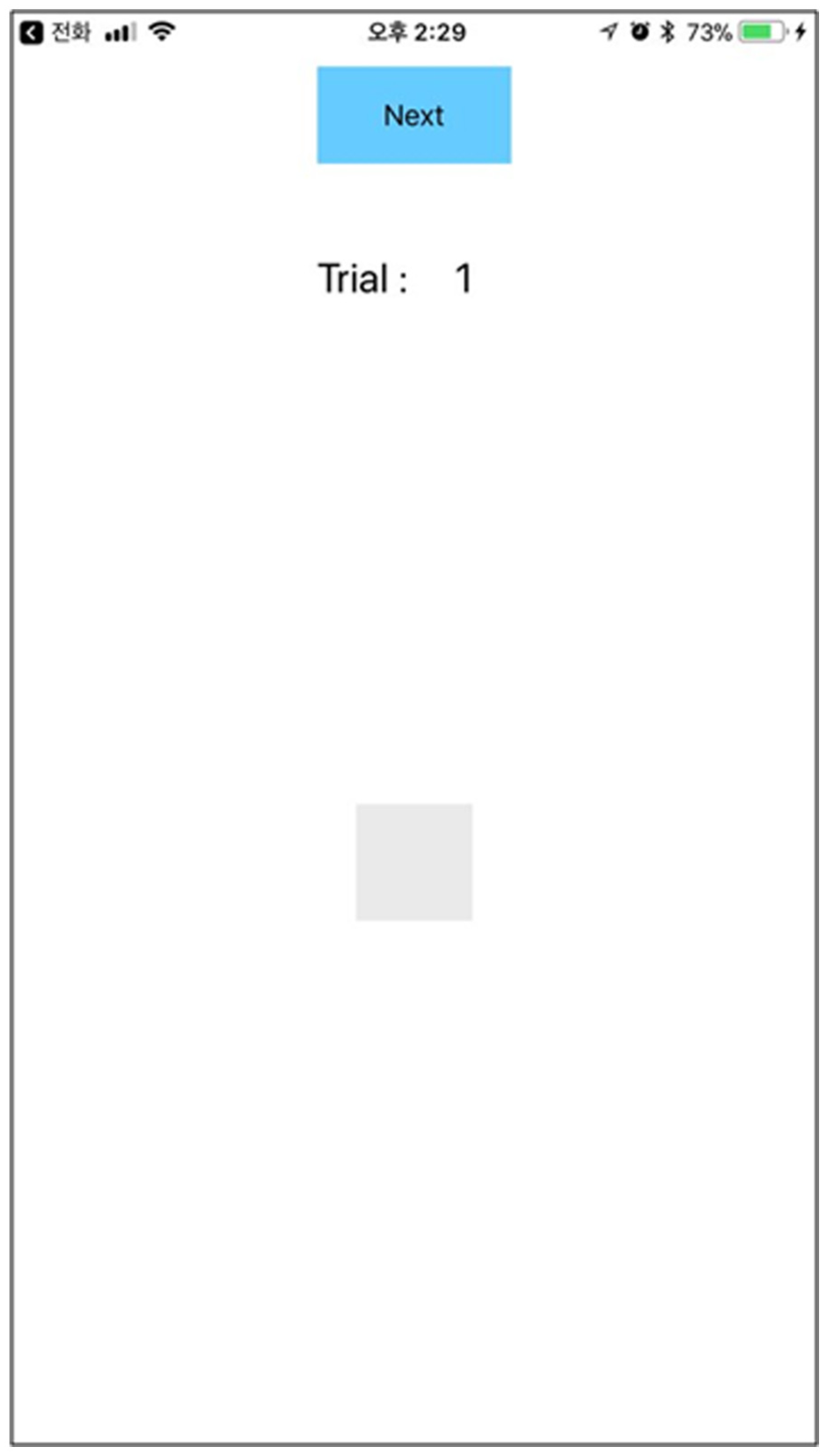
User experimental app for measuring force-touch interface and normal touch interface.
Experimental app development environment
Table 3 shows the app development environment for the experiment. We implemented the user experiment application on the iPhone 6S, which can input force touch, and coded it in swift language.
Development environment.

Change of force value in normal touch
In order to distinguish the force touch from the normal touch, the rest of the area except the normal touch area can be determined as the force value by changing the value of the force of the normal touch. Figure 3 shows the change in force when 22 subjects touched a normal touch 10 times. That is, 1–10 times on the X-axis is the amount of change in force at the time of general touch according to the number of experiments of one person. Except subjects 4 (the 31st to 50th on the X-axis) and 16 (the 151th to 160th on the X-axis), the force used for general touch is less than 300 g.

Force value when touching general.
Figure 4 shows the mean and SD of the subject’s force input during normal touch. The average value is 60.42 g, which is very low, but the deviation value of 81.37 g is higher than the average value. Therefore, force value of the normal touch that can be determined by the deviation value is about 0–141.79 g. This force value is found to be lower than the force value of 300 g for force-touch interface in force-touch cover. In fact, when the user performs normal touch, force-touch interface does not work even if force-touch cover is used. That is, this result shows that there is no interference between the normal touch interface and the force-touch interface. Thus, it is possible to set a force value of 300 g or more when using the force-touch interface using the force-touch cover.

Standard deviation of force value at normal touch input.
Change of time value in normal touch
In the force-touch input experiment, users reach the maximum value after a certain time. The time is 10–300 ms, and it is difficult to distinguish between force touch and normal touch only with force-touch input. Therefore, it is necessary to find a characteristic that can distinguish two inputs through the maximum time taken for the input during normal touch input.
Figure 5 shows the change of force according to the change of time with a normal touch. This result includes the change of all subjects. The force value of normal touch will appear and disappear within a certain time (200 ms). That is, the change in intensity of force over time for all subjects decreases from approximately 100 ms and cannot be measured after 200 ms. In the normal touch, normal touch is completed within 200 ms and ends even if each subject inputs various strengths of force. This is an important time value that can be distinguished from force touch. Also, the strength of the force measured within this time can be recognized as normal touch, no matter what value is measured.

Time value when touching general.
Figure 6 shows a comparison of the intensity change of the force with time in force touch with normal touch. It is difficult to determine the measurement time according to the change of the strength of the force so that the subjects may press the force touch at a maximum of 1400 ms. In addition, since the force value cannot be distinguished from the minimum of 38–400 g after 200 ms, which is distinguished from the normal touch, the intensity and time of the force cannot be distinguished from the force touch. However, since the normal touch is divided within 200 ms as shown in the figure, it can be classified as a reference value. Therefore, this result requires less time than 300 ms when using force-touch cover. Therefore, it is possible to apply the force-touch interface at 300 ms or longer in the force-touch cover. It is shown that force-touch interface using force-touch cover is possible through two important factors (time and force field) that distinguish normal touch from force touch.
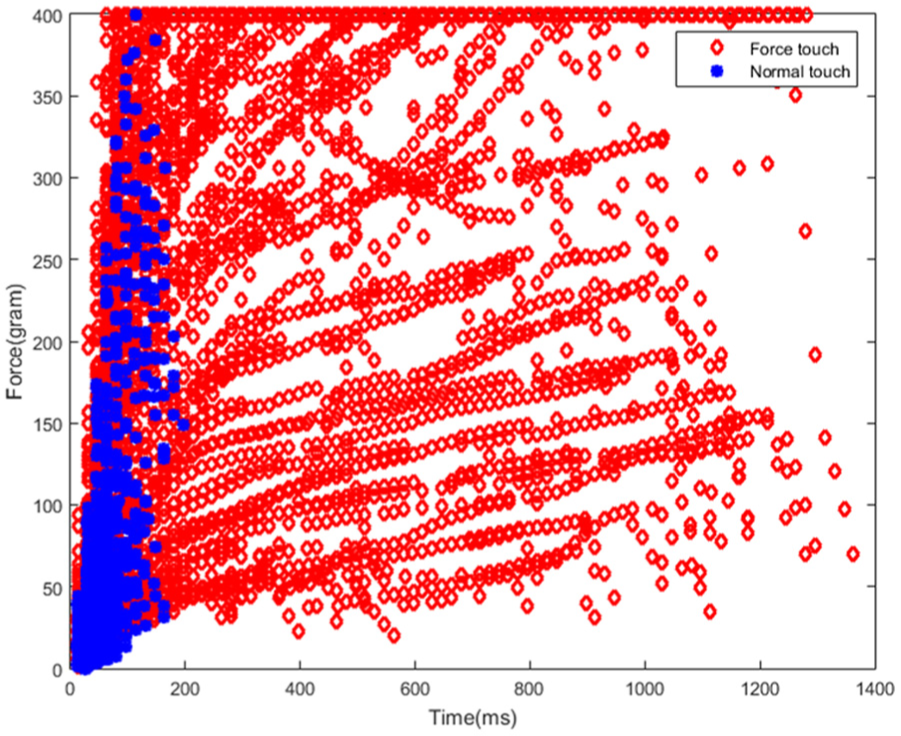
Comparing the intensity change of force with time during normal touch and force touch.
Discussion
This article is important in that it examined how the new input method, a force-touch device, recognizes users’ perception of their own strengths. More precisely, this study intended to identify how long a delay should be between the time when a force or force feedback is given and when the stimulus is presented in order for users to feel natural. This is to find the implications of offering optimized input and output devices for users. Much research has been devoted to exploring the same causal relationship on visual or auditory stimuli. However, as this research has never been carried out in mobile situations such as when using smartphones, this research is meaningful as the first work in this area. In this study, a force-touch experiment was carried out using sensors. This has a limitation in that it will be difficult to apply the results in situations where users directly input and output force on the screen. However, if a device or an accessory similar to the experimental apparatus used in this research is released, the results of this study could be a useful standard. In addition, it will be possible to conduct more accurate studies by performing calibrations on each button, which would lead to more integrative user data. The results of this study may reflect cultural differences, which is a very interesting part. Cultural difference has been reported at the level of interpreting visual stimuli, but there has been no such difference found in the case of the causal relationship between stimuli presentation and behavior. This may be a valuable topic to explore in future studies. Moreover, although our research was about force stimuli, it seems that future research is required on the relationship between force, visual, and auditory stimuli. With these data, we propose a measurement standard for inserting suitable pushing strength into smart applications using force-touch sensors. We expect that our study would serve as a useful implementation methodology for various smart devices such as wearable watches, touch pads of a laptop, and smartphones.
Conclusion
This article is a study on how to provide force-touch interaction to devices that cannot use force value. For this purpose, we developed an FSR-type force-touch cover capable of measuring force values. Using the manufactured force-touch cover, we found the force value that can be measured according to the position in the smartphone. The results show the minimum time and minimum force values that the poster can use in force-touch cover. In order to utilize the force-touch cover, we have experimented with how the user performs the normal touch and the force touch. Force time and force values were not predictable during force touch. However, when performing the normal touch, it was found that the normal touch is performed with a certain time and force value. Therefore, we have found out that the normal touch and force touch can be distinguished based on the time and force value used in the normal touch operation.
In future works, we will be carried out to investigate how many force levels can be identified by users in force-touch input. Through this, we will derive an interaction method that can execute various commands in one input method.
Footnotes
Handling Editor: Paolo Bellavista
Declaration of conflicting interests
The author(s) declared no potential conflicts of interest with respect to the research, authorship, and/or publication of this article.
Funding
The author(s) disclosed receipt of the following financial support for the research, authorship, and/or publication of this article: This research was supported by Basic Science Research Program through the National Research Foundation of Korea (NRF) funded by the Ministry of Education (NRF-2017R1D1A1B03032855).