




Abstract
The Intelligent Transportation Systems area has experienced great developments in the recent past, although suffering from slow adoption ratios thus depriving consumers of many interesting and innovative applications. The only solution to this problem is to develop Intelligent Transportation Systems solutions using the already available technologies that are within the grasp of the common people, to make them cost-effective, quick to deploy and easy to adopt. We have therefore developed an affordable Intelligent Transportation Systems that make use of standard smartphones to assist drivers when overtaking. The system autonomously creates a network among the close-by vehicles and provides drivers with a real-time video feed from the one located just ahead. Our system seamlessly offers a better view of the road, and of any vehicle travelling in the opposite direction, being especially useful when the front view of the driver is blocked by large vehicles. We have validated our overtaking assistance system, in both laboratory environment and realistic scenarios. The laboratory tests involved choosing the most effective video codec between MJPEG and H.264, for providing real-time video streaming. Then, using the chosen codec, we performed the outdoor tests to further tune our application to maximise performance. The preliminary results from our experiments allow being optimistic about the effectiveness and applicability of the proposed system.
Keywords
Introduction
Intelligent Transportation Systems (ITS) are advanced solutions that make use of vehicular and infrastructured networks along with other information and communication technologies to provide innovative services related to both traffic and mobility management, and that interface with other transportation models. ITS applications, without embodying intelligence as such, aim at enabling users to be better informed, thus encouraging safer and smarter use of the transport networks. It has already made its mark in areas such as travel information, traffic and demand management, smart ticketing or urban logistics. Our goal here is to integrate smartphones into vehicular networks to develop ITS applications that can reach out to the masses in a short period of time. The choice of smartphones is not only justified by their wide availability and use but also because they are evolving towards high-performance terminals with multi-core microprocessors packed with sufficiently accurate on-board sensors.
Accidents while overtaking are considered by many sources 1 as one of the main reasons behind injuries and loss of lives on the road. Owing to the fact that scarce opportunities arise to practise overtaking during standard driving lessons, it is no surprise that errors may be committed by both inexperienced and experienced drivers alike. Groeger and Clegg, 2 in their analysis of manoeuvres in lessons that stretched over 550 h, deduced that practising overtaking only formed 5% of the total duration. Once identified as a major and critical problem, overtaking was studied in detail at the University of Nottingham, and their findings can be accessed at the study of Clarke et al. 3 Thus, our aim was to address this problem and make the roads safer by developing a real-time visual overtaking assistant application that works without user intervention.
The application developed by Patra et al., 4 which will be presented in this article, aims at providing visual overtaking assistance and runs on the Android platform. The minimum hardware requirement for our application is the use of a smartphone equipped with global positioning system (GPS), WiFi and a back camera. The smartphone running our application is to be mounted on the vehicle windshield, and the camera is used to record a video which is transmitted over the vehicular network to the vehicle located just behind where it is displayed. This way, it provides an enhanced multimedia information aid to the drivers based on which they might decide whether to overtake. It is important that the devices being used possess GPS because, based on location information, both the source and destination of the video stream are chosen. It is to be kept in mind that the video streaming occurs between cars travelling in the same direction and always occurs from the vehicle in front to the vehicle travelling behind. The smartphones are to be mounted in such a manner that its screen faces the driver, and the back camera points towards the windshield. Care should be taken that the camera has a clear view of the road in front, and of the cars coming from the opposite direction, so that, when the video is streamed, the driver of the car behind is made aware of the traffic situation ahead of it. The drivers would only receive and check this video when they wish to overtake the vehicle ahead, basing their decision on what they see in the video, being especially useful in scenarios where the view of the driver is blocked by a larger vehicle or when a long queue of cars is located ahead and the driver wishes to overtake. It is important to note that our application works without user interaction once started. Since the application makes use of the GPS, wireless communication for the exchange of data, and always-on display, it makes our solution battery intensive. Nevertheless, since most vehicles offer the possibility to charge smartphones, battery usage is not a concern.
It is technically feasible for our solution to stream video using multihop communication, which would be useful for platooning situations where vehicles follow one another making a queue. In this case, the leader of the queue could stream the road conditions ahead to the vehicles following it, helping them decide whether to brake, as platooning vehicles seldom overtake. However, in our application, we aim solely at providing a reliable overtaking aid, and so we have intentionally left out this option; thus, the video streaming and playback always occur between the car just in front and the vehicle following it to eliminate any confusion that might arise if the video was streamed by the leader of the queue. In such a case, the driver, unaware of the number of cars ahead, would be overtaking in dangerous situations. Another added advantage of using this type of communication is that our application does not suffer from typical multihop delays.
Our application was tested in both laboratory and outdoor scenarios. The tests performed within the laboratory consisted of comparing the performance of the application using two different video codecs, namely, H.2645 and MJPEG, which involves compressing the video stream separately as Joint Photographic Experts Group (JPEG) 6 images. These two encoding formats were compared focusing mainly on their resistance to packet losses because the wireless medium is used for video data streaming. Once the encoding format is chosen, the application was tuned so that it can deliver real-time visual aid while overtaking, taking into account the delay between capture and playback of the video stream. Then, making use of the chosen application settings based on the laboratory experiments, we have performed outdoor tests involving real cars. A more detailed explanation about the developed application in terms of its architecture, design, implementation issues and obtained results will be provided in the following sections.
The rest of this article is organised as follows. In section ‘State of the art’, we survey some works in the literature that makes use of smartphones to provide intelligent services to users. In section ‘Application overview’, we will present a general overview of the developed application. Later, in section ‘Implementation details’, we will discuss in detail the application modules, the process of video streaming between the car ahead to the car following it, the setup used to create the vehicular network that is used by our application for exchanging data and possible security threats. Preliminary results from a real test bed, as well as from laboratory experiments, will be described in detail in section ‘Results’. Finally, we will conclude this article by summarising our contributions in section ‘Conclusion’.
State of the art
Both academia and industry have shown very keen interest in ITS solutions that uses mobile devices, resulting in many innovative applications. We are going to describe some of these interesting works that are closely related to our own, specially concentrating on solutions that are based on smartphones.
One of the first works done was in 2009 by Whipple et al., 7 who developed a safety application that collected the location and speed information using the GPS of the mobile devices; then, using the Google Maps application programming interface (API), they looked up for nearby schools and alerted the drivers if they drove at a high speed near these school areas.
After 2 years, an Android-/OSGi-based vehicular network management system was designed by Chen et al. 8 In the same year, Yang et al. 9 proposed an application that uses the location, moving direction and velocity of the vehicles obtained using the on-board GPS. This information is periodically exchanged between vehicles, and warnings are issued if the probability of collision is high. An Android-based application that detects accidents through the on-board diagnostics (OBD-II) 10 interface to inform predefined contacts was shown in the work of Zaldivar et al. 11 Carbon Recorder 12 is another application that can be used to detect the daily carbon emission of vehicles.
The year 2012 saw a lot of development in the field of ITS applications, and one of the applications developed during this period that is worth mentioning is DriveAssist by Diewald et al. 13 DriveAssist provides users with an overview of nearby traffic, triggering warning messages for certain traffic incidents. SMaRTCaR 14 is a platform also developed during the same period that integrates smartphones and provides support to traffic management applications. Another application that makes use of the OBD-II standard to extract safety and environment-related information was proposed by Wideberg et al. 15 The See-Through System, by Gomes et al., 16 aims at improving the visibility of the drivers using augmented reality components, while the developers of SignalGuru 17 predict the schedule of traffic signals leveraging collaborative sensing on windshield-mount smartphones. Tornell et al. 18 proposed an application that can display important vehicles like ambulances and police cars on a map view, which was later improved in the study of Patra et al. 19
Later, in 2013, the CarSafe App 20 was introduced by You et al., which is another driver safety app for Android phones that alerts drivers when detecting dangerous driving conditions and driver behaviour. It makes use of computer vision and machine learning algorithms on the images from front and back cameras of the smartphones to monitor and detect whether the driver is tired or distracted, while simultaneously keeping track of the road conditions. Another interesting application was proposed by Meseguer et al., 21 which incorporates data mining techniques and neural networks to analyse and generate a classification of driving styles using the data from the OBD-II, assisting drivers to correct the bad habits in their driving behaviour and providing tips to improve fuel efficiency.
Other interesting applications that are available online for download are Waze, 22 Torque, 23 and iOnRoad. 24 Waze is a well-known community-based traffic and navigation application where users share important traffic information on the go. Torque is an Android application that uses the data from the OBD-II connector to monitor different parameters in real time. The application iOnRoad, however, provides driving assistance functions including augmented driving, collision warning and ‘black-box’ like video recording.
Despite having found many different ITS applications for smartphones, we see that only a handful aimed at providing visual aids to the drivers, namely, SignalGuru, CarSafe and iOnRoad. However, none of these smartphone-based applications actually provides a real-time visual overtaking aid from other cars taking advantage of vehicular networks, even though the idea of video-based overtaking assistance systems is not new. Works like the See-Through System, 25 which was later improved in the study of Gomes et al., 26 although not targeted for smartphones, have also focused on the issue of video-based overtaking assistance. Other related works worth mentioning are Vinel et al. 27 and Belyaev et al., 28 which demonstrate the feasibility of such video-based assistance systems. Performance improvements related to a video-based overtaking assistant, that supports codec channel adaptation, is shown in the study of Vinel et al. 27 Instead, Belyaev et al. 28 focused on reallocation of wireless channel resources to enhance the experienced visual quality.
Encouraged by the findings from the aforementioned works, and in order to fill in the need for a visual overtaking assistance application that targets consumers, we decided to develop our proposed application that relies on smartphones to achieve rapid acceptance, studying the integration of smartphones with vehicular networks.
Application overview
Our application enables vehicles to perform real-time streaming of the view as seen by the driver sitting in the car ahead, thus providing users with visual assistance during overtaking. For our application to function properly, the users need to have a smartphone with GPS and a back camera, besides the availability of the vehicular network for data transmission.
The working of our overtaking aid application can be explained in three easy steps. In step one, the sender and the receiver vehicle of the video stream are selected using some special tests and validation conditions. The second step involves the transmission of the video being captured by the sender and its display at the receiver end. In the third step, which is also the last one, video transmission and playback are stopped when video transmission is no longer necessary.
Step one, which involves the election of video source and destination, begins with the broadcast of an advertisement message by devices running our application. This advertisement message is basically an announcement of video availability by nearby vehicles, containing information regarding the location of the vehicle broadcasting the advertisement packet and its direction of motion. Each vehicle, while broadcasting the video availability message, also listens for advertisement messages coming from its neighbours. Upon receiving an advertisement packet, the vehicle receiving it verifies whether the sender is a valid source from which a video stream may be requested. This validity check involves tests to find out whether the source is travelling just ahead of the receiver on the same lane and in the same direction. If more than one valid video source is detected, then the receiver selects the best source from all valid sources requesting the video. The selection is based on the distance between source and receiver. A more detailed explanation of the validity checks to select the video source is provided later in the section that follows.
The selected source vehicle, upon receiving the request for the video, starts streaming the video signal to the destination over the vehicular network in step two. However, before starting the video transmission, the source checks the validity of the request for video by performing the same validity check used by the destination node before sending the request in step one. At the destination, the video is displayed on-screen for the driver as soon as reception starts. The streaming of the video by the sender, and its playback at the receiver end, is stopped when the receiving vehicle successfully overtakes the sender or when it stops following the sender; in either case, the video stream becomes irrelevant.
Figure 1 depicts step one previously explained. In the case depicted in the figure, there are three cars, and all of them are using our application. CAR-A and CAR-B are moving in the same direction, while CAR-C is moving in the opposite direction. At the beginning, all the cars broadcast advertisement packets containing information about the sender location and the direction of motion, as shown in Figure 1(a). CAR-C is outside the communications range of the other cars, and hence, it is unable to receive any packets transmitted by them. Upon receiving advertisement packets, each car performs the validity checks to detect if the source of the advertisement is travelling ahead of it, on the same lane and direction. Here, only CAR-A finds the advertisement message sent by CAR-B to be valid and thus sends a video request to CAR-B, as depicted in Figure 1(b).

Functional overview of the application –Step one: (a) the vehicles exchange advertisements and (b) the client requests video from the server.
Once CAR-B receives the video request, it performs the validity tests to double check if the sender of the video request is following it and travelling on the same lane. Since here the validity tests are satisfied successfully, CAR-B starts streaming video to CAR-A, as shown in Figure 2. CAR-A then starts playing the video stream for its driver as soon it starts receiving the stream. Notice that a particular vehicle may act as both the video source and the destination, a situation which might arise when there is a queue of cars travelling in the same direction or platooning. In that case, a vehicle might receive a video aid from the node travelling ahead while streaming its own view to the node following it.

Functional overview of the application –Step two.
Figure 3 points out one of the two cases which might lead to the end of video streaming and playback. In the figure, we can see that CAR-A has overtaken CAR-B which causes the video streaming to stop. Now, since CAR-A is travelling just ahead of CAR-B and in the same direction, CAR-B might request overtaking aid from CAR-A.
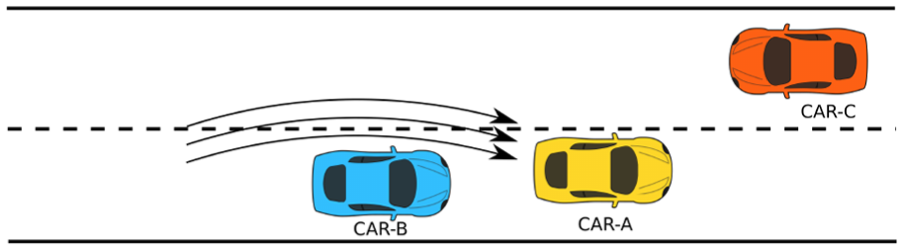
Functional overview of the application –Step three.
Implementation details
In the previous section, we have seen an overview of the main application features. In this section, we are going to see in detail the different working components of our proposed application and how they work together to provide users with the visual aid while performing overtaking manoeuvres.
The video server and client
Apart from the fact that the functionality of our application can be split into three steps, we are also aware that each node running our architecture can work as a server and client at the same time. This means that all nodes have the capacity to receive video from a node and display it, while streaming video to a completely different node. However, for the sake of clarity, we are going to consider two devices running our application placed in two different cars, out of which only one will be acting as the server streaming video, while the other as a client and merely receiving the stream. Even though at the beginning of step one the roles of vehicles are not defined, we will refer to vehicles as server and client according to the roles they will be attaining in the future.
Figure 4 presents all the possible states of the client and server. At the outset of step one, the server is in the notify state, while the client is in the listen state, as displayed in Figure 4(a) and (b). The server in the notify state starts advertising the availability of the video feed by broadcasting an advertisement message (hello packet) and also listens for replies from clients to its hello message. The hello message accommodates location and direction information of the server so that the client, upon receiving the message, can extract the location information and use it to analyse whether the server is just ahead of the client and travelling in the same direction. The client, however, remains listening for advertisements from servers, being in the listen state from the beginning, as depicted in Figure 4(b). Upon receiving hello messages from servers, the client performs validity checks and then, if the test conditions are satisfied, the information is stored in a queue of candidate servers.
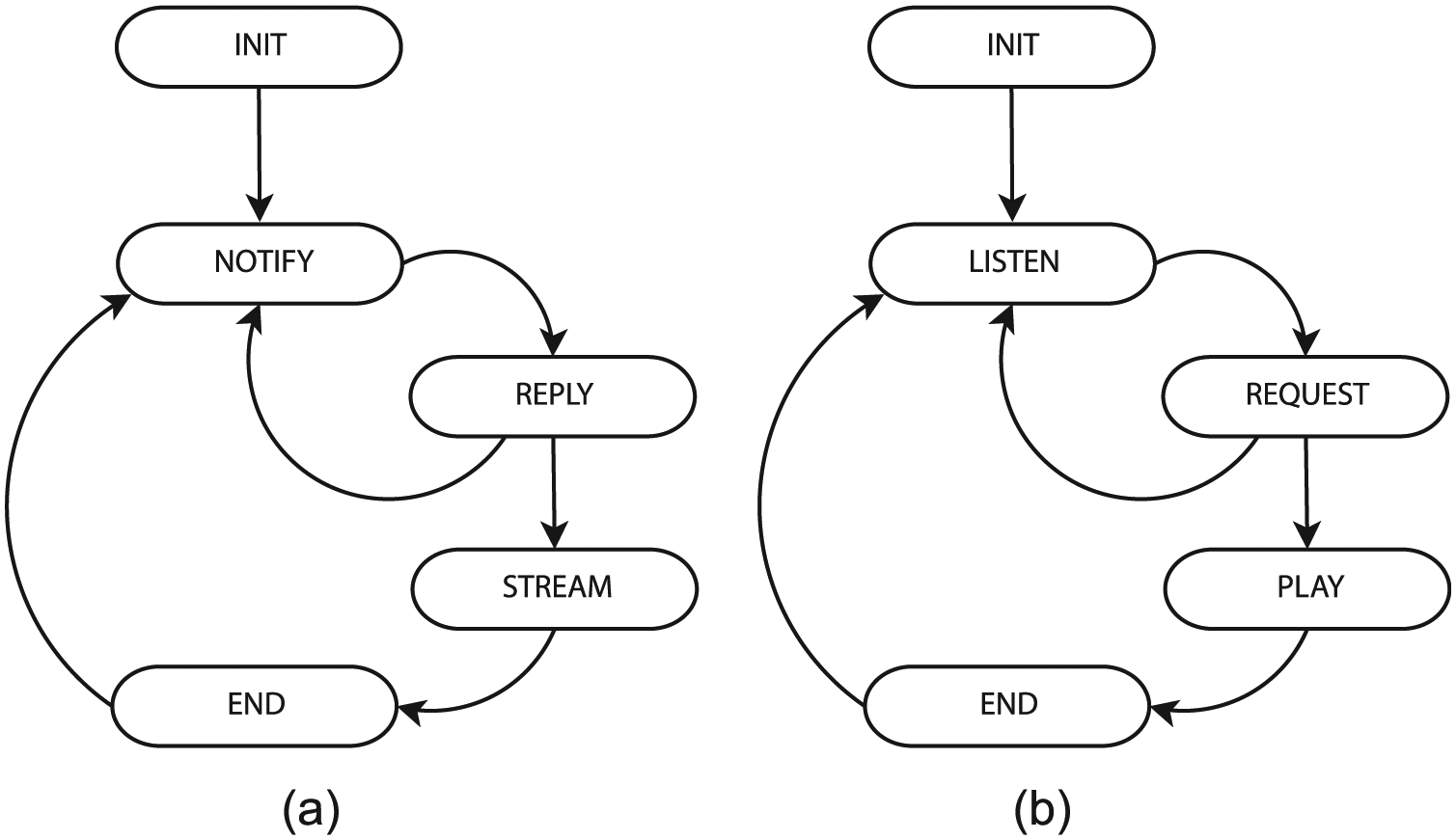
State diagram of the Server and Client: (a) different server states and (b) different client states.
The validity tests used to initiate video streaming, consists of two test conditions, namely, the same direction test and the same lane test. The same direction test, as the name suggests, is used to detect whether the two vehicles are travelling in the same direction. Instead, the same lane test is used to find out if the two vehicles are travelling on the same lane, one leading the other.
For understanding the same direction test, let us refer to Figure 5. As shown in the figure, we assume two vehicles, one moving from point A1 to A2, while the other is moving from B1 to B2. The current location of the two cars is thus A2 and B2, being their previous location A1 and B1. We now construct the displacement vector of the two vehicles using their current and previous locations and then measure the angle

Same direction test.
Even if the same direction test is satisfied, it does not mean that the two vehicles are travelling one ahead of the other. The vehicles may be travelling on different lanes or parallel roads altogether. Thus, to detect if one vehicle is following the other on the same lane, we perform the same lane test. The same lane test is explained in Figure 6. For performing the test, we again assume two vehicles travelling from A1 to A2 and the other from B1 to B2 where A1 and B1 are the previous locations while A2 and B2 are the current locations, respectively. In this case too, we determine the displacement vectors for the two vehicles from the previous and current location. We also draw an imaginary line joining the current locations A2 and B2 of the two vehicles. Next, we measure the angle of intersection of this line joining points A2 and B2 with the displacement vector of the vehicle behind. When the measured angle of intersection

Same lane test.
The client, which was in the listen state, now, after having prepared a list of all valid servers, and after making the validation tests, selects the best server based on the distance between server and client. Next, the chosen server is sent a request for the video stream by the client, which moves to the request state. The server, upon receiving the request from the client, evaluates the validation tests before replying to the client with a ready or reject message. A ready message is sent if the evaluation of the validation tests is positive; otherwise, a reject is transmitted, and the server state changes to reply. The server state may further change to stream, or move back to the notify state, depending on its own reply to the client. However, the client state changes from request to play only if the reply from the server was a ready message containing the video sender port number; otherwise, it may choose to contact some other server. Table 1 lists the different packets exchanged between the server and client.
Messages exchanged between the server and client.
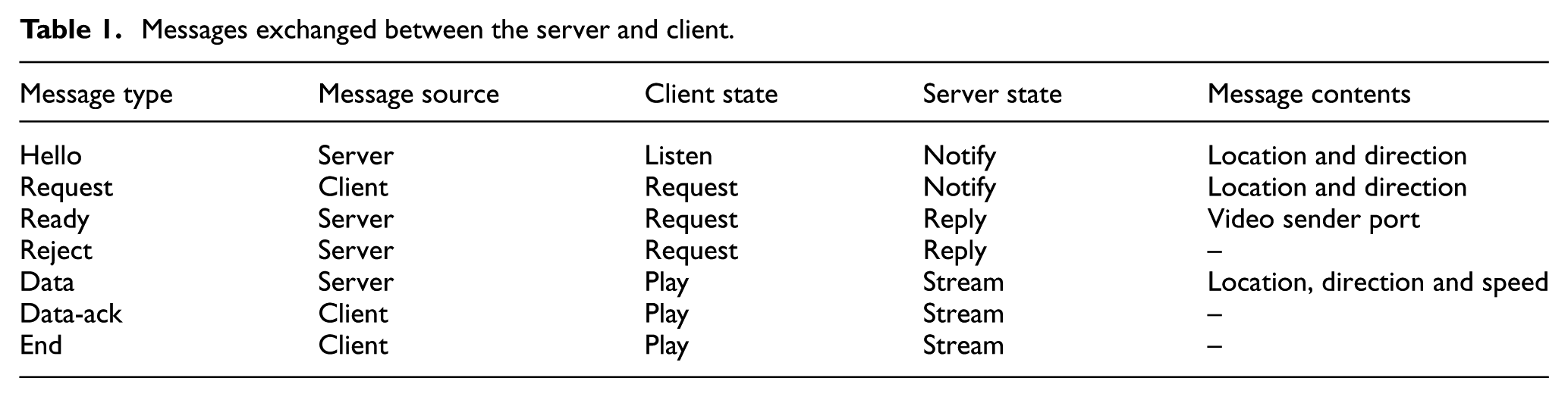
Step two, which involves video streaming and playback at the server and client ends, respectively, begins only if the server is in the stream state and the client is in the play state. Apart from streaming video, the server and client in this step exchange a data message containing the location and direction information. Such data message is exchanged every second, and the purpose of this message is to detect if video streaming is necessary. The client, upon receiving the data message from the server, checks if the validity tests consisting of the same direction test, and the same lane test are fulfilled. If not, it is assumed that the streaming of video is no longer necessary. If the validity tests give a positive result, it responds to the server by sending a data-ack message to keep the video connection alive.
If video streaming is no longer necessary, which would be the case upon the completion of overtaking manoeuvres, or if the car behind stops following the car ahead, step three is initiated. In this step, the client requests the server to stop the video streaming by sending an end message. The client state changes to the end state before switching to the listen state once again during step three. However, the server may end video streaming upon receipt of the end message from the client or if no data-ack message is received (it is used to keep the connection between the server and client alive). In our implementation, we have fixed the waiting time for all messages exchanged between the server and the client to 3 s, because the selected waiting time is considered to be adequate enough as all communication occurs between two cars, one just ahead of the other.
Video transmission
Our application relies on the real-time streaming protocol (RTSP) 29 for sending video over the vehicular network. It is used to establish and control the media sessions between the server and the client while they are in the stream and play states, respectively.
Figure 7 illustrates all the data and commands exchanged between the server and client. The server (video sender) initially listens for an incoming connection from the client (video receiver) on a predefined port, which here we assume to be port A. This port is made known to the client with the help of the ready message sent by the server in response to the video request made by the client. Thus, the client communicates with server at port A, making use of local port X to send or receive packets.

The video transmission process: client–server message exchanges.
The entire communication between the server and client can be explained in three steps:
(a) Step-I. Used to setup the video streaming process;
(b) Step-II. The video data transfer takes place;
(c) Step-III. Includes the exchange of data to terminate the video streaming.
In Step-I, the client enquires all the options supported by the RTSP server. The server replies to the request by listing all the commands that it supports, which in our case includes describe, setup, play and teardown. The client, using the describe command, asks the server about the video properties that the server would be sending, to which the server replies. Afterwards, the client requests the server to start configuring the video streaming process, using the setup option. This results in the server replying with the port numbers to be used for the sending and receiving of the video as well as audio data, if any. Note that our application only makes use of video data but no audio. In this case, port numbers B and C are to be used for receiving, while D and E are used for sending. Hence, following the instructions provided by the server, the client tries to open ports B and C before sending the play request. The server acknowledges the play request by the client, and then, in Step-II, an exchange of video data takes place between the server and client using the previously negotiated ports. User datagram protocol (UDP) is used for the sending of audio and video data, while in the other steps messages are exchanged using transmission control protocol (TCP). When the video streaming is to be stopped, the client initiates a teardown request to which the server acknowledges, causing the video streaming to end.
The vehicular network
The proper functionality of our overtaking assistance application is dependent on the availability of a vehicular network for data exchange. However, vehicles used on a daily basis still lack the capability to communicate with one another. Thus, for creating a network of vehicles, we employed GRCBoxes. 30 A GRCBox is a low-cost connectivity device based on the Raspberry Pi 31 which enables V2X communication and encourages the integration of smartphones into vehicular networks. The necessity for a device such as the GRCBox arose due to the difficulty in creating an ad hoc network merely using smartphones.
Figure 8 is one of the photos taking during our real experiments with our application, both the cars used in the experiments had a GRCBox mounted within to be able to communicate. The GRCBox consists of a controller, which is a RaspberryPi, a battery as a power source and a universal serial bus (USB) hub to connect various network interfaces. Each GRCBox has a minimum of two WiFi network interfaces, of which one works as an access point and the other one is used to create an ad hoc network. The smartphones and the mobile devices used to run our application connect to the GRCBox using the access point, and then, the data to be sent are forwarded to the other nodes using the ad hoc network. Thus, the GRCBox acts as a router for the exchange of data. Even though the GRCBox is supposed to be equipped with 802.11p for vehicular communication, we used 802.11a devices instead since 802.11p-enabled hardware was not available while setting up the GRCBox to perform the tests. In future experiments, we intend to use 802.11p-compatible hardware to take advantage of the WAVE standard. 32

The experiments with our application in real scenario.
Security threats
The solution present in this article is a smartphone software that provides overtaking aid and thus may be affected by different types of application layer attacks. It is to be noted here that we have not used any extra security measures to protect our application from the different security-related threats, which have been left as future work as a likely improvement in the next version. Thus, some of the possible attacks that might influence the performance of the designed application are denial of service, 33 non-control-data corruption, 34 malwares and hacks. Denial of service can occur if a server is unable to respond to a legitimate client when it is occupied in communication with the attacker. Approaches against this type of attack are usually based on the use of public key cryptographic protocols, an example of which is in the study of Fung and Lee. 35 Non-control-data corruption attacks, however, refers to the access and modification of user, user identity, configuration or decision-making data. Our application has been designed for the Android operating system, based on the Linux environment, which provides developers the possibility to store data that is private to the application, thereby rendering non-control-data corruption attacks difficult to execute. 36 An example of malware could be software that infects the original code by modifying the actual behaviour of the application; solution to this security threat includes the use of control-flow integrity, 37 that implies embedding within software executables both the control-flow policy to be enforced during runtime and the mechanism for that enforcement. Hacking is another security threat, whereby the attacker would be able to modify the performance of the application and supply receivers with a recorded video feed instead of streaming live road conditions. These types of problems can be easily dealt with by making the whole system embedded within the car and force the application to be proprietary software with manufacturer certification.
Results
In this section, we are going to present the experimental setup and the results obtained using our application. The application was deployed in both laboratory and outdoor scenarios. The experiments done in the laboratory environment aimed at selecting the best video codec between H.264 and MJPEG for our application. Once the codec was selected from our laboratory experiments, we went ahead to test the application outdoors. In our experiments in real scenarios, we tried to evaluate the thresholds used in the validation of the same direction and same lane tests used by the application to start and stop video streaming.
Laboratory evaluation
The setup used for our laboratory experiments with the application is very similar to the one that is to be used when the application works in a real scenario. All the experiments were done imagining that two cars are being used for the tests. We used two Samsung Galaxy Note 10.1 (2014 edition) tablets whose computational capabilities were similar to modern day smartphones. These Android devices were used for recording or displaying the video being streamed. The tablets were equipped with a quad-core 1.9 GHz plus quad-core 1.3 GHz processors, 3 GB RAM, 8 MP primary camera and 2 MP secondary camera. Each of these tablets used for the experiments were connected to a different GRCBox, which provided the vehicular network for the exchange of data.
Figure 9 shows the actual setup used for the test in the laboratory environment. It is important to note that each device in the real scenario has the capacity to stream its capture to another device while receiving video from a completely different device. In other words, the same device can act as source and destination of two different video streams; but to keep it simple in our tests, one tablet was configured to work as the server that streams video to another tablet, which acts as a client. In the figure, we can see that the device on the left, acting as the server, is recording whatever is being displayed on the screen of the laptop placed ahead. It first sends this stream to the GRCBox to which it is connected and placed right next to it in this case. The GRCBox, which is responsible for the vehicular network, forwards the video data to the next GRCBox where the client is connected. The client thus receives the video stream and displays the video on-screen. Using this setup, we compared two video codecs, namely, MJPEG and H.264, assessing how the video quality is affected in the presence of packet losses. Once the video codec to be used in our application was chosen, experiments related to application delay were conducted making use of the same setup.

Indoor demonstration of the application.
Video quality experiments
For the first set of experiments in the laboratory environment, we determined how the quality of the video is affected when there are losses. The idea here is to select the video codec that is least affected by losses because our application is to be used in wireless environments with nodes in constant motion, and so the communication between the nodes will be affected by information losses.
The first metric that we are going to use to compare the two video codecs is peak signal-to-noise ratio (PSNR), 38 which is the ratio between the maximum possible power of a signal and the power of the distorting noise that affects the quality of representation of the original signal.
Figure 10 shows how the PSNR for the video produced using H.264 and MJPEG is affected by the presence of packet losses. It can be seen from the graph that the percentage of packet loss was varied from 0% to 20%. A loss of 0% means that the receiver obtains exactly the same video that the sender transmits, in which case, the PSNR should be theoretically undefined. But since a comparison is made between the received video stream and the original raw data, which is encoded before being sent, the PSNR value is never undefined. For the case when there are no losses, it can be noted that H.264 performs better than MJPEG. The reason for this phenomenon is that MJPEG is a much simpler codec compared to H.264, and so there is no inter-frame compression involved, resulting in an output video that occupies more space. The encoder for MJPEG tries to reduce the network usage by producing a video of lesser quality than the one produced by the H.264 encoder, resulting in better PSNR values in case of H.264. However, as packet loss appears in the scenario, we can see that H.264 is more affected than MJPEG as PSNR values fall more steeply for H.264, which is due to inter-frame compression.

Variation of PSNR with packet loss for H.264 and MJPEG.
Another important metric for the comparison of image or video quality is structural similarity (SSIM).39,40 SSIM is a method for measuring the perceived similarity between two images, designed to improve upon traditional methods such as PSNR and mean squared error (MSE). 41 Similar experiments are repeated with H.264 and MJPEG once again, but this time to calculate the SSIM values for each of the video codecs.
Figure 11 compares the SSIM values for H.264 and MJPEG, and how it is affected by packet losses. This figure shows similar trends as in Figure 10, but in this case, the SSIM values decline more smoothly in the presence of data loss. It is important to note that, according to the SSIM index, the difference in the quality of the initial videos produced from the raw data by the two video encoders is not that significant, being that the video produced by the H.264 encoder is only slightly better. However, as packet loss increases, the quality of the H.264 video is more affected than in the case of MJPEG.

Variation of SSIM with packet loss for H.264 and MJPEG.
Thus, the inference from our video quality experiments is that MJPEG is a better choice as the video codec to be used in the proposed application for our high-mobility vehicular scenarios, considering the fact that it is more resistant to packet losses than H.264.
Application delay experiments
An important parameter to determine the functionality of our application, which is characterised by providing a visual aid to drivers to assist them in overtaking, is the delay between video capture and its playback. If this delay is too high, the video played at the receiver end would be of no real use to the driver. Thus, we first have to calculate the maximum admissible delay that we can afford and then find out if the delay requirement is fulfilled by the different resolutions of our chosen MJPEG video codec.
For calculating the maximum allowable delay for our application, it is important to have an idea of the safe overtaking distance between the car trying to overtake and the car coming from the opposite direction. This is because the application delay would cause the car coming from the opposite direction to be actually closer to the overtaking vehicle than it appears.
Figure 12 explains the idea that the vehicle coming from the opposite direction, in this case CAR-C, would be closer than it is seen in the displayed video at CAR-A, due to the delay in between capture at CAR-B and its playback at CAR-A. While studying the explained phenomenon, Crawford 42 found that, under ideal conditions, a distance of 228.6 m is required for overtaking at about 80.47 km/h. However, Hills 43 further showed that, for both overtaking and incoming vehicle speeds of 80.47 km/h, the total overtaking distance required is of about 457.2 m, twice that recommended by Crawford.

Error due to delay.
Our application has been designed to be used majorly while driving on single carriageways where the road is undivided and has traffic moving in both directions with high velocity. Now, let us assume that we have two cars moving in the opposite direction at 80.47 km/h (similar to the assumptions made by Hills). The relative velocity

where
The MJPEG stream is composed of separate JPEG images; thus, its performance when talking about compression-ratio is also limited due to its simplicity. The MJPEG encoder accepts, apart from video resolution itself, another parameter which is quality, and it may range between 0 and 100. Value 0 produces a video with maximum compression, but least perceived quality, while the opposite occurs when the quality parameter is set to the value of 100.
In Figure 13, the JPEG quality in our experiments with MJPEG video varied from 20% to 80%, as for values below 20% the video quality was too low, whereas values over 80% did not show any significant improvements in the perceived video quality. It is also important to note that the number of frames per second for the video stream was fixed at 10 to minimise bandwidth usage which in turn would make our application more scalable. We observe that, for a resolution of 320 × 240, the average delay suffer minimal variations (from 0.24 to 0.27 s), whereas for 640 × 480, it ranges from 0.26 to 0.31 s. Eventually, for a resolution of 1280 × 720, we see that the mean delay lies between 0.4 and 0.44 s.
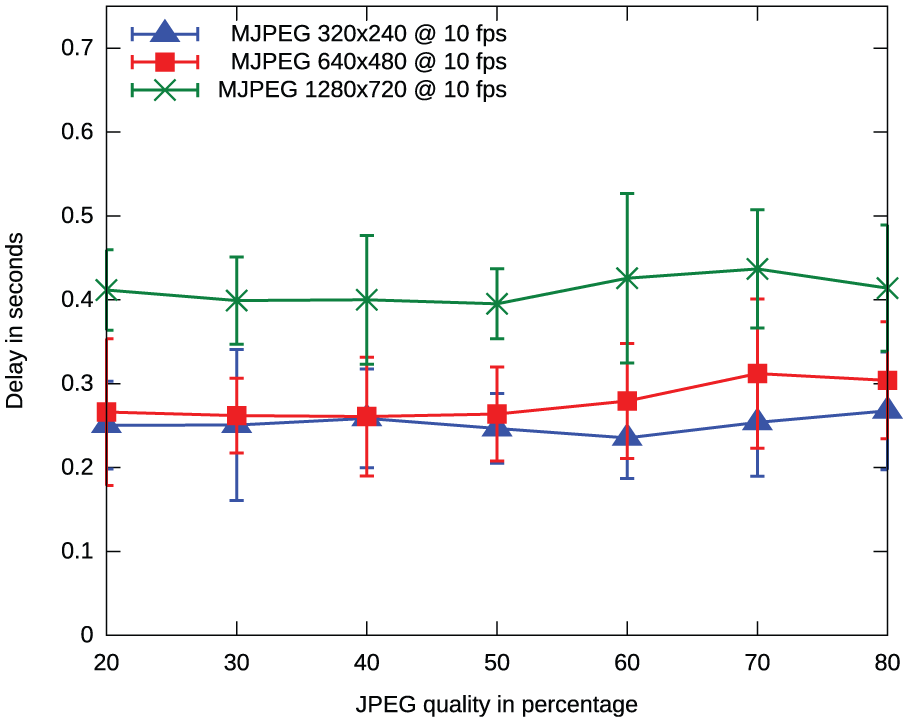
Delay comparison of different resolutions for MJPEG video.
Since all the three resolutions of quarter video graphics array (QVGA), video graphics array (VGA) and high definition (HD) for MJPEG video has delay within the previously calculated maximum allowable delay of 511 ms, it can be safely stated that MJPEG video encoding scheme is a wise choice and may be used in our application for streaming video data.
Chosen video settings
We have already seen that MJPEG was more resistant to losses in data than H.264, and later it was shown that it fulfils our strict delay requirement of 511 ms for all resolutions up to HD, which is very important for our application since it promises a real-time visual aid while overtaking.
Next, we would like to determine the most appropriate resolution and JPEG quality for the video stream to be used in the scope of our application. Since the vehicular network is provided using GRCBoxes, the decision regarding the choice of the video parameters largely depends on the performance of the GRCBoxes. It was observed from experiments performed with the GRCBoxes that they are capable of providing a mean bandwidth of 10.5 Mbps for TCP traffic and 15.5 Mbps for UDP traffic, 44 although, the worst-case bandwidth values for both TCP and UDP was close to 5.5 Mbps. Android devices using our application could be simultaneously operating as video sources and destinations, and so the effective bandwidth available for one-way video streaming, considering the worst-case scenario, is 2.75 Mbps.
Figure 14 shows the throughput variation for MJPEG video with different JPEG quality levels. We observe that, for a video resolution of 320 × 240, the average throughput varies from 0.405 to 1.029 Mbps, while for 640 × 480 it lies between 0.976 and 2.336 Mbps, and range between 1.805 to 4.177 Mbps for the resolution of 1280 × 720.

Variation of throughput with JPEG quality for a 10 fps MJPEG video.
Since the bandwidth available using the GRCBoxes was of 2.75 Mbps, we observe that MJPEG video streams of resolutions up to HD, with JPEG quality up to 50%, may be used as suggested by Figure 14. Thus, this is the default settings we use in our application, but they may be modified by users according to their preference.
Outdoor evaluation
In this section, we will discuss the test results obtained in the experiments done in the real scenario. The setup involved the use of two cars, each equipped with a GRCBox box for inter-vehicular communication and a Samsung Galaxy Note 10.1 tablet running our application.
Figure 15 shows the routes followed in our outdoor tests. The first route depicted in Figure 15(a), which is on a highway, was about 9.25-km long. Figure 15(b) shows the route taken around the Universitat Politècnica de València, considered as an urban scenario of 3.76 km in length. In both cases, the two cars used were driven one ahead of the other at all times, with the car behind receiving video from the car ahead using the GRCBoxes mounted within the cars. Data were collected during these experiments to analyse the two validation conditions important to our application, namely, the same direction and same lane test used to start/stop the video transmission. These validation tests were already discussed in the ‘Implementation details’ section. Since the validation conditions were dependent on separate threshold values, the aim of the experiments done in the outdoor environment was to calculate a reasonable value for the thresholds and to evaluate the usefulness of these validation conditions.

Routes used during the outdoor evaluation: (a) highway scenario and (b) urban scenario.
Figure 16(a) presents the observations from the same direction test that is used to detect if vehicles are travelling in the same direction. A comparison has been made between the use of unfiltered GPS locations and Kalman filtered
45
location data for the evaluation of same direction test. The Kalman filter used here is a simple one that just takes into account the location data. From this graph, we can see that the average angle evaluated by the same direction test using unfiltered data for highway and urban scenarios are 9.83° and 8.73°. While, using Kalman filter, similar values of 10.95 and 10.73 are observed for highway and urban scenarios, respectively. Since for both scenarios, it can be observed that the worst-case values are within 12.5°. Thus, 12.5° is selected as the threshold

Evaluation of the validation tests used by the application: (a) results of the same direction test and (b) results of the same lane test.
Figure 16(b) summarises the angles measured by the validation condition used to detect if the two cars are travelling one ahead of the other on the same lane; this condition is also know as the same lane test. Closely observing this particular plot we can see that, for the highway scenario, using unfiltered GPS data gives an average value of 15.37°, and the use of Kalman filtered data gives a result of 19.30°. However, experiments done in the urban scenario show less variation in the results obtained, where using unfiltered GPS data gives an average of 20.10°, while Kalman filtered locations gives a value of 20.74°. Thus, in the case of same lane test, the threshold
Thus, we see that the designed application worked when tested in real scenarios involving mobility. The study of the validation conditions used by the application for choosing the video server and client, as well as to start and stop the video streaming, reveals that the same direction test performed as per our liking. However, results of the more sensitive same lane test were greatly affected by the accuracy of the GPS hardware available to the smartphones.
Conclusion
In this article, we have introduced an application that is able to provide drivers with a real-time visual overtaking aid. The developed system makes use of smartphones to capture and display the video stream. The video provided by the vehicle ahead is visible without user intervention at the vehicle just behind it making use of the smartphone display. Hence, our application provides drivers with useful information about the traffic situation ahead, based on which the decision to overtake can be taken. This is specially useful when the view of the driver is blocked by a larger vehicle ahead. Also, since transmission of data takes place between the vehicles just ahead to the one following it, there is no multihop relaying required, which makes us optimistic regarding its scalability and use in regions with high-traffic density. The application functions correctly and was tested in both laboratory and outdoor scenarios. The tests performed within the laboratory involved choosing the best video settings for our application. In particular, it involved a comparison between the MJPEG and H.264 video codecs. MJPEG was chosen as the default compression scheme due to its simplicity, better performance under losses and lower encoding delay. We also introduced two validation conditions, namely, the same direction and same lane test, to choose the most adequate video server and client, as well as to initiate or terminate video streaming. These validation conditions were kept as simple as possible to achieve low delays and enhance the usefulness of the developed system. Our outdoor experiments demonstrate that a threshold of 12.5° is applicable to the same direction test. Concerning the same lane test, it was rendered useless due to the inaccuracy of the GPS technology available in smartphones. Despite this issue, we do acknowledge that the collaboration of vehicular networks and smartphones does open a new horizon for ITS application. Finally, we are currently focusing on ways to replace the same lane test by the use of image processing techniques to help in the correct selection of the video source and destination.
Footnotes
Handling Editor: Claudio Palazzi
Declaration of conflicting interests
The author(s) declared no potential conflicts of interest with respect to the research, authorship, and/or publication of this article.
Funding
The author(s) disclosed receipt of the following financial support for the research, authorship, and/or publication of this article: This work was partially supported by the Special Research Fund – funding for joint doctorates of the Ghent University with scholarship code 01SF3316, and the Ministerio de Economía y Competitividad, Programa Estatal de Investigación, Desarrollo e Innovación Orientada a los Retos de la Sociedad, Proyectos I+D+I 2014, Spain, under grant TEC2014-52690-R.
