




Abstract
The developments and improvements in human–computer interaction and information and communication technologies have resulted in innovative assistive technology (AT) solutions for the people with disabilities (PWDs). Although, there have been many new ideas and technologies for assisting the PWDs, still very few of them have considered the workplace environment. Therefore, there is a need to develop a comprehensive universal AT solution that can maximize the PWDs productivity at work. In this work, an AT and smart context-aware solution has been developed to assist the PWDs at the workplace. This has been achieved through the designing and the implementation of a smart unified interface to guide and assist the PWDs. A wireless sensor network has been employed in this context-aware smart solution in order to track and determine user’s location. The unified interface is adaptive and includes four modules that are smart helping, smart communication, smart editor, and auto emergency response. A proper AT process and technological design considerations have been adopted to achieve a comprehensive, universal, adaptive, and context-aware solution.
Introduction
Currently, over a billion people including children (or about 15% of the world’s population) have estimated to be living with disability. 1 The situation is getting worse as the number of elderly people is growing. As reported by World Health Organization 2014, the elderly represents quite a high percentage of the overall population in several countries such as Japan (87%), China, and so on (67%). The lack of supporting services can make handicapped people overly dependent on their families or care givers, which prevents them from being economically active and socially included. One of the important solutions toward engaging people with disabilities (PWDs) at work and having them economically independent is to build PWD-friendly environments. Any assistive technology (AT) solution which can help the PWDs to move and work smoothly and become productive in the work area represents an ideal example of the PWD-friendly environment.
According to World Health Organization, 2 the AT can be defined as any product, instrument, equipment, or technology which is adopted or specially designed to improve the functioning of the disabled person. As noted by Hersh and Johnson, 3 AT is a generic or umbrella term which encompasses technologies, equipment, devices, apparatus, services, systems, processes, and environmental modifications used by the PWDs and elderly people to encounter the social, infra-structural, and other obstacles to achieve independence, full participation in society, and perform activities safely and easily.
When designing AT solutions, it is critical to use a comprehensive set of design concepts and methodologies for solutions that are Universally Accessible and Design for All. 4 User-oriented focus targeted to collect the requirements of the different types of users and different usage context, and its adoption of intelligent interface adaptation determine the two main dimensions for the universal access solution. The most difficult task in designing for PWDs is that the designers have to depend on their own experience as users. Henceforth, the focus only on one concept may lead to an unsatisfactory solution. Therefore, the authors should consider user-centered design (UCD) to make sure that the system meets the expectations of the PWDs, 5 and universal design (UD) to assure that the system is flexible and usable by different groups of PWDs as well as healthy people. Moreover, the design concepts such as accessibility and usability,6,7 adaptability and context-awareness should also be given full consideration.8,9 Furthermore, a well-designed AT system should support comprehensiveness, 10 smartness, 11 heterogeneity, 12 mobility and navigability, 13 and innovation 14 in order to produce a system that is accessible, flexible, practical, marketable, and appealing to PWDs.
In this article, an AT solution which can help PWDs at the workplace is presented. It includes system software that provides personalization, communication, utility, and emergency services for the PWDs. The system incorporates a sensor network (SN) and radio frequency identification (RFID) to track the users for initiating the context-aware or emergency actions if required. This solution has been designed to support universality; comprehensiveness; user interface adaptation; and context awareness, smartness, heterogeneity, mobility, navigability, and innovation. As a result, the developed solution is unique, accessible, flexible, practical, marketable, and appealing to PWD’s.
In the secion “Related work”, related research has been presented, which cover the AT solutions that can be applied to PWDs to support their requirements at different environments including the workplace. In the section “Design considerations for PWDs at the workplace,” the design considerations have been covered to highlight the main AT design features that are needed for PWDs at the workplace. In the section “Design methodology”, the design methodology has been described, and in the section “PWD project development” the PWD system design and implementation are covered.
Related work
The wireless sensor networks are being used in many fields such as health-care monitoring, area monitoring, environment sensing, industrial monitoring, and so on. This section has rather focused on the research works that have utilized sensor networks for tracking purposes.
The different technologies can be used for tracking user location including Wi-Fi tag through access point (AP), 15 sensor technology based on wireless personal area network IEE 802.15.4, 16 and passive and active RFID sensors along with Global Positioning System (GPS) technologies. 17 Ning et al. 18 discussed the possibility of expanding the identification coding used for physical objects in RFID network. They proposed a tree-like code structure to establish a unified modeling scheme for physical objects without an identification code according to other present elements, and it also achieved the compatibility with the physical objects in the RFID network.
Dao et al. 19 introduced a conceptual design of a general hybrid platform using combination of multiple localization technologies by dividing monitored spaces into grid points. A system with RFID, WiFi, and GPS technologies was established where a user moved in a building with a smartphone and the location was detected by RFID readers and Wi-Fi APs. Experiment results showed that the accuracy was improved in comparison with using each technology individually.
Li et al. 20 proposed a scheme of a radio-over-fiber (RoF) network supporting the simultaneous transmission of RFID, Wi-Fi, and ZigBee services. All services shared the same optical transmitter and receiver to reduce the network complexity. They combined all the wireless signals in the electrical domain, and then modulated onto the optical carrier through an optical modulator. The system was tested over a 2 km RoF link where RFID, Wi-Fi, and ZigBee master nodes could communicate effectively.
Szewcyzk 21 described how to track persons at a smart home and learn about their behaviors using machine learning techniques. This article analyzed individual’s impairment behavior and divided them into categories. They used inhabitant feedback to decrease annotation time and improve performance but this affected the time of the residents.
Yella Reddy 22 developed a wireless body/personal area network that could be worn by the user. It included low-cost, light, and small sensors for continuous health monitoring and sending instantaneous feedback to the user.
Chan 23 described the ATs that can be used to help track and monitor the activity and vital signs of elder and motor impaired individuals, through different types of wearable sensors, implantable, and microsystems that can be swallowed such as microcapsule devices. Quynh Le et al. 24 proposed a framework which has five basic features: automation, multifunctionality, adaptability, interactivity, and efficiency which depends upon financial situation and health. A home care should be equipped with personal alarms that can be based on pendants and pull cords, auto video-supported door entry system, sensors installed on bed and chairs to initiate a warning signal in case of residents not returning on time, and other techniques such as bed lighting alarm, medical monitoring that can be assessed on site and relevant message forwarding, and the use of robotics to assist around the house.
Chen and Zhi 25 presented a solution for blind people where they were made to walk on the street installed with sensors to detect the blind movement through RFID tag on a cane. The path used by the blind man had electronic tags prebuilt underneath it. The tags worked with radio signals emitted by the RFID reader. The tags used to send their identity codes which were transmitted by the reader to the computer. The surrounding environment voice data was also sent via Bluetooth earphones connected to the blind.
Hesch and Roumeliotis 26 developed an indoor localization aid called portable position and orientation estimation (pose) for visually impaired persons in order to increase their safety and independence. The three-dimensional (3-D) orientation of the cane was tracked in the first layer through measurements from three-axis gyroscope and laser scanner. The two-dimensional position of the person was detected in the second layer using corner features extracted from the laser-scan data, linear velocity measurements from the pedometer, and a filtered version of the cane’s yaw to estimate the 2D position of the person with respect to a known building map.
Kammoun et al. 27 proposed a project called NAVIG. Their goal was to design a system to assist blind people in navigating indoor and outdoor environments through micro-navigation (sensing immediate environments) and macro-navigation (reaching remote destinations) functions, by using the traditional navigation tools. A user could ask for an object then the system started searching for it in the captured images. When detected, it would direct the user to move his hand to grasp it using voice commands. The user’s position was detected by geographic information system (GIS) and two inertial motion trackers. Wi-Fi techniques were used for navigation inside building.
Darrah 28 developed a user’s multisensory (audio and force feedback) learning environment for visually impaired or blind children. It consisted of a PC, low-cost force feedback stylus-based haptic device, auditory cues, and high contrast graphics. The system was mainly designed for teaching lessons in Earth and Space sciences. Based on statistical analysis, it was concluded that haptic-based system had a positive impact on the learning outcome of the visually impaired/blind students.
Bhatlawande et al. 29 presented an electronic navigation system for visually impaired and blind people. The system detected obstacles around the subject up to 500 cm in front, left, and right direction using a network of ultrasonic sensors. Gallaghera et al. 30 designed and tested an indoor navigation system for visually impaired persons. It was an application that could be installed on a user’s smartphone. The application used the internal hardware of the smartphone, such as the accelerometer, to measure the user’s position and direction. The system, named Simplified Information for Mobility and Orientation (SIMO), guided the user via graphical feedback and voice feedback.
Willis and Helal 31 developed a navigation and way-finding system for visually impaired persons. RFID technology was used to estimate the position of the user. The system was designed for indoor use and tags were installed under the floor. The tag reader was attached to a shoe or a stick that sent a query to tags. A mobile device held by the user received this information via Bluetooth. The system used in this article could not communicate effectively if the user moved quickly through tags. Certain challenges might arise if the system was implemented in an outdoor environment, such as installation of tags, and so on.
Ghiani et al. 32 built an orientation guiding system for blind persons using vibrotactile feedback. The prototype was implanted for guiding the blind person inside a museum. The author used RFID network and tags to determine the person’s surroundings. Murad et al. 33 proposed an RFID-based system for visually impaired persons. It helped the user to identify objects in the home/classroom. The system has four major components: (1) RFID reader, (2) FM transmitter, (3) database server, and (4) RFID tags. The hand/cane attached tag detection system consisted of a Robotic Connection’s low-power RFID reader. Using the chip antenna, the XBee transceivers could connect within 150 m of indoor range. Once the reader reached into close vicinity with a tag and reads it, the tag yields an ID that has been entered into a database, and the appropriate auditory description of the item was played.
El-Alamy et al. 34 proposed a system that would allow visually impaired persons to catch buses safely. The framework incorporated an auditory device, a tactile interface, and a wireless communication system. The current framework incorporated an equipment part that includes a sensor, a radio frequency reader (RF) which was employed in the transport station. This reader sensed the RFID tag and was employed in the bus. Then, the blind persons in the bus station would be intimated by an audio message when the requested route bus approaches the station.
Jain 35 developed a wearable device for blind persons for indoor navigation. The system had two major constituents: (1) wall modules installed in building and (2) user end including a waist-worn gadget linked with a smartphone. The system incorporates a grid of infrared (IR)-based wall elements retrofitted at particular areas in the building. IR technology was selected for finding the user in light of the fact that it was cheap and adequately accurate. All the instructions were communicated to the user via text-to-speech (TTS) engine of the smartphone application.
The “Drishti” project 36 was aimed at designing a standalone-integrated system to help blind and low-vision individuals during outdoor navigation. It consisted of a wearable computer, GPS receiver, headset, and access to a wireless network to deliver position information and way guidance to a user in the form of a TTS voice commands. The software included spatial database, route store, map server, and IBM viavoice. The user could interact with the system via speech command.
Gomez et al. 37 developed a system to provide visually impaired persons a more practical and functional sensory substitution methods (SSDs) device using computer vision and image processing methods called See ColOr. See ColOr consisted of SSD, a 3-D camera, Bone-phones, iPad for tactile feedback, and a 14-inch laptop. A recognition module based on the computer vision allowed the users to reach targets and avoid obstacles. It was found that with See ColOr system visually impaired persons were able to quickly locate the colored object, sense the wall almost like a sighted person, and find the person and shake hands in relatively less time.
Iannizzotto et al. 38 developed a system to help blind people to discover the objects in indoor environment around them. The system reads the barcode attached to all interested objects. The system used the ultrasonic sensor to detect obstacles (i.e., objects with no tags). The sensor detected obstacles and their distance with the help of reflected ultrasonic signal and the level of their frequency. The ultrasonic system was attached to the user’s belt. The system used a head-mounted camera to read barcode tags, and a headphone to get the voice feedback of query passed to the system about any interested object around.
Ando et al. 39 proposed a device that could help blind people in environment orientation and movement based on IR multisensory array. It adopted smart signal processing to provide user with suitable information about the position of obstacles found in his/her path.
Jamil et al. 40 developed a flexible speech to text recognition system for PWDs such as cerebral palsy. This disability could be addressed under the motor hearing impairment (HI) group. The system generated speech by understanding and acquiring knowledge about the oral articulation disorders of the PWD. In flexible speech recognition, different modules were developed like sample database, feature extraction, pattern matching, and classification.
Yang et al. 41 developed a blink scanning keyboard that was relevant for people with severe physical disability such as those suffering from motor neuron diseases or with cerebral palsy. The system used a Bluetooth headset incorporated with four sensors that could be worn on the left ear and the left forehead. The system was appropriate for both the users who couldn’t blink the right or left eye separately and the users who could blink both eyes simultaneously. The signal generated by pseudo electromyography (EMG) was transmitted to personal computer for processing through wireless transmission and the noise in the data was reduced through a self-derived algorithm. The EMG signal was used to control the scanning keyboard which included the intelligent character function to promote the typing speed. The main advantages of this system were its compact size, light weight, portability, and easy installation. The draw backs of the systems were its relatively high cost and that it was limited to Chinese language.
Kim and Ryu 42 proposed a smart wheelchair equipped with a laptop computer with a variety of graphical user interface (GUI) applications relevant for disabled people. The wheelchair movement could be controlled by the users through the application program and the local positioning information system. The application also allowed the wheelchair to follow preset paths to avoid obstacles, but this could only work with predetermined paths with known environment such as predefined indoor navigated path. The system used RF-broadcaster and ultrasonic positioning system with good accuracy. The system also used Wi-Fi, Bluetooth, or Zigbee for communication with server. The program on the server could monitor the location of the wheelchair as well as the condition of its users in real time. The proposed system was adaptable based on user’s degree of disability. The proposed system was suitable for the disable users with speaking and motor impairment (MI). It helped them to travel efficiently, safely, and easily through accurate ultrasound for position detection and through flexible GUI interface. However, the positioning system worked only with predefined path.
Most of the research works presented in this section have focused on home or outdoor ATs and neglected the social inclusion of PWDs at the workplace. In addition, most of the developed smart solutions and ATs were not comprehensive, as they addressed only one or two impairments. Furthermore, few of these articles tried to analyze PWD behavior in order to provide relevant intervention method to guide them to behave well at home or at the workplace.
Jääskeläinen and Nevala 43 conducted a study to find out the use of ATs specially information technology (IT) at the work place. It was revealed that AT needs to be personalized to the individual’s explicit requirements and preferences. A survey was conducted, and it was found out that 39% of the participants considered their knowledge and experience in the selection of AT. It was concluded that there is a need of a proper awareness about ATs at workplace to make PWDs a resource rather than liability.
National disability coordination officer program of government of Australia 44 published a guide for PWDs. It contains the various ATs that can be useful for PWDs at workplace. Each group of PWDs such as hearing impaired, visually impaired, and so on are covered in the guide, and different ATs are recommended. The benefit of using a particular AT was mentioned and its application to carry out a particular task has also been mentioned. Moreover, the name of company, website, and so on have also been mentioned to determine a particular AT solution. The sole purpose of the document is to increase the awareness among PWDs to make them more efficient at the workplace.
Illinois AT Program 45 developed a guide for PWDs. The major focus was the AT solutions at the workplace. The guide provides ideas about how employers can increase their work pool by accommodating PWDs. It has also been highlighted that the design of the workplace should be universal, so it can be efficiently used by everyone. Guiding principles of UD have been mentioned, such as flexibility in use, equitable use, low physical effort, and so on. Then, in the end, a survey of various AT solution for different groups of PWDs has been presented.
Strobel and McDonough 46 highlighted the use of ATs at the workplace. Moreover, they explained that there should be proper awareness about the use of particular AT, selection of AT, awareness about disability, awareness about job tasks, training, and operation and maintenance of ATs. It has also been emphasized by the authors that cost is an important factor while selecting and implementing an AT solution.
In order to develop a comprehensive AT solution for PWDs and healthy people at the workplace, there is a need to have a network solution with the right infrastructure that supports database server, e-mail and webserver, client–server application that support authentication, utility, and communication services. Also, there is a need to develop an intelligent interface that is flexible, adaptive to different impairment conditions of PWD users, and capable of monitoring their behavior and intervening with them and their caregivers as necessary. Moreover, to support behavior analysis and intervention, there is a need for a wireless network that can be used to track user movements within the building. Real-time tracking location system (RTLS) can be useful for behavior analysis of PWDs, as it helps identifying their location within home, building, and work environment. RFID and sensor networks play an essential role in tracking assets within a defined environment, where it transmits the identity associated with these assets wirelessly using radio waves. 47
In this article, we proposed a comprehensive solution for PWD users at the workplace which responds to their needs and conditions smartly and flexibly. The proposed solution supports different groups for PWDs associated with mixed hearing, speaking, visual, and MIs. Many important features needed at the workplace have been supported which includes utility services, ability to communicate efficiently to others, customizing user and environment profile, auto emergency response to guide PWD users, and supporting of intervention method that is based on user location tracking and behavior analysis as will be described in following sections.
Design considerations for PWDs at the workplace
The companies, as a result of various laws and the regulations have been forced to employ a certain percentage of the PWDs (the 1990 Americans with Disabilities Act). 48 This has given rise to the requirements of the PWDs. The standard and regulations such as section 508 of the Rehabilitation Act or the 1990 Americans with Disabilities Act48,49 have provided more accessible solutions and guidelines for the AT. Presently, the research on the ATs has been focusing on the special areas such as the human–computer interaction (HCI) and other related subdisciplines. They have also been addressing the issues such as the design for accessibility, diversity, universality, usability, and so on. There have been other related researches also, which cover solutions for the PWDs at the workplace such as efficient and ergonomic guidance of assembly workers, 50 the touchscreens to machine interfaces in production environments, 51 the ergonomics of human–system interaction that have become a part of an accepted standard like ISO 9241, 52 and the guidance on tactile and haptic interactions that was added to ISO 9241 as part 920 in 2009. 53
In developing the system, two types of operations were considered, process related and technology related.
Process features or criteria
The following process-related operations were supported to develop an efficient AT solution for PWDs:
Fp1: User involvement, data collection, and analysis
In order to develop an interactive product and services appropriate for the PWDs and normal people at the workplace, it is crucial to include all the possible users of the system. It will help to achieve the optimal requirements at the various phases of the development process. 54 It will also satisfy the principles of the user-centered design proposed by Norman and Draper. 55 Different methods including the brainstorming; direct observation, activity diaries and cultural probes, surveys and questionnaires, interviews, group discussions, emphatic modeling, user trials, scenarios, storyboards and personas, prototyping, cooperative and participative methods, as well as emerging approaches based on playing, arts, drama, and literature have also been suggested by Margeritha Antona. 54 These methods can be used to collect the requirements required to support the activities at the workplace, applicable to a variety of impairment groups. For example, brainstorm and observation have been used for MI and visual impairment (VI) groups, and the services of the survey and questionnaires are utilized for the HI, speaking impairment (SI), and healthy groups. In fact, the primary purpose of the prototyping is the usability test as well as the validation of design for all the groups.
Fp2: Validation inspection and performance criteria
In the early 1990s, the inspection approaches were partially borrowed by the usability experts and judgments for evaluating the hardware and software usability. 56 Recently, Wilson 57 has described different inspection methods such as the heuristic evaluation, individual expert review, perspective-based user interface inspection, cognitive walkthrough, pluralistic walkthrough, and formal usability inspection. It is always better to assess any technological solution using some well-defined criteria rather than an individual’s opinion. For example, Hee and Overveld 58 developed a set of criteria for the evaluation of technological design. Similarly, Kbar et al. 59 presented a step-by-step methodology for assessing an AT solution based on performance criteria. They identified 13 technological-based performance criteria (as shown in Table 1) to evaluate the ATs. A novel quantitative assessment methodology based on multi-weighted scoring model was employed. The developed methodology was successfully applied to assess various AT solutions designed for different impairment groups.
Technological performance criteria used for assessing technology-based solution.
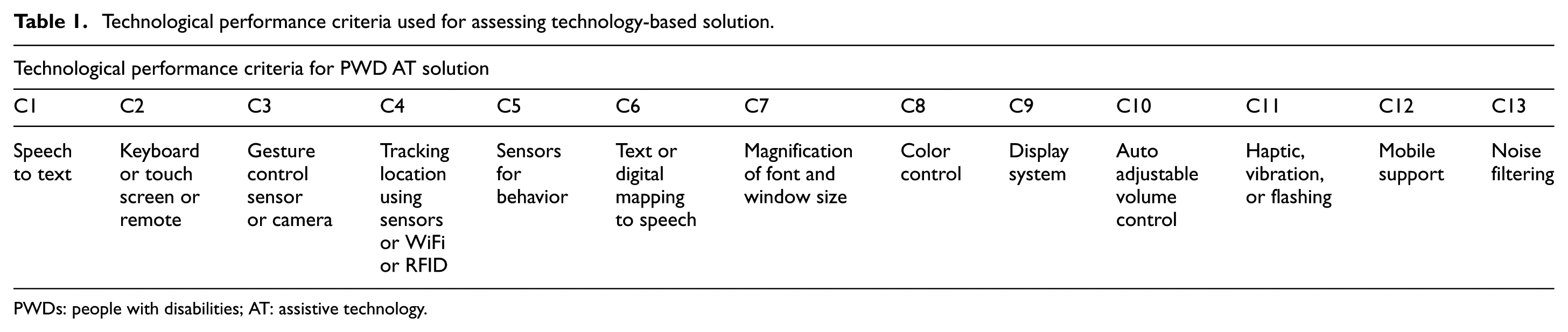
PWDs: people with disabilities; AT: assistive technology.
Fp3: Assessing the AT outcomes
The assessment of the AT outcome is very crucial to eventually achieve the customer satisfaction because it can minimize the gap between the user expectations and the actual AT outcome. 60 The assessment is helpful to the manufacturers, vendors, and so on, as it improves upon the effectiveness, efficiency, services of the AT systems, and minimize their costs. 61 Actually, the assessment of the AT outcomes provides an evidence-based data which help the AT users, insurers, social policy experts, and other stakeholders in decision-making related to the appropriate treatments. 62 For example, the item response theory which comprised of the mathematical tools and statistical methods can analyze items and scales, create and manage health outcome measures, and assess self-reported health outcomes. 63 Similarly, the matching person and technology64,65 can also be used as an assessment procedure to determine the appropriate AT for a particular user in the given environment. The qualitative and quantitative assessment based on 13 technological criteria has also been used to assess AT solutions. 59 These methods have identified the coverage of AT solution in order to satisfy the needs of the PWDs as well as identifying the gaps that needs further attention.
Fp4: Usability and adoptability
Usability has been a very important feature for any AT system or the solution. The usability can be viewed as a part of the product development process, which engage the participatory design concept into the product development process. Sweeney and Shackel 66 have provided a definition of the usability criteria, including the effectiveness, learnability, flexibility, attitude, or level of user satisfaction with the system, and errors or the ability to recover from the errors. The usability in simple words can also be defined as a quality attribute which assesses how easy user interfaces are to use. 67 In fact, Dharne 68 has developed a method to measure the usability, reliability, and validity of AT used for the PWDs (using wheelchair). Janice et al. 69 summarized the key points of the workshop by pointing that usability is critical to adoption and meaningful use. According to them, poor usability would be a barrier to adoption and might be harmful if users can’t find the relevant information. Rachel Harrison et al. 70 found that usability can be measured in terms of three attributes: effectiveness, efficiency, and satisfaction. Satisfaction is the perceived level of comfort and adoption. The other factors that can affect adoption as suggested by Nielsen 71 are learnability and ease of use to gain proficiency with an application, memorability which reflect the ability of users to retain how to use an application effectively, and identification and understanding the nature of errors which help to overcome future errors through a prevention mechanism.
Technology-related features
The following technological features were supported to develop the right solution for PWDs:
Ft1: Universality
Many researchers in the AT field have been working on the development of the systems that are universal and multimodal in order to support as many users as possible.54,72 In Antona’s study, 54 the author encouraged the researchers and the designers to use universal access principles while designing products and technologies instead of designing ATs for a certain group of the disabled people. Following universal access principles, developers can produce products by applying different relevant technologies, so they can be used effectively and efficiently by almost everyone. Although, a universal system is extremely beneficial and convenient, but achieving universality adds up to the increasing complexity as well as pushs the designers to incorporate features that might not be used frequently by many users. To accommodate multiple users with different impairment conditions at the workplace, there is a need to support universality which reduces the cost of the multiple solutions for different groups.
Ft2: Comprehensiveness and multimodality
To support comprehensive solution for people at the workplace including PWDs, AT system should also consider multimodal HCI. The multimodal HCI provides a flexible system which can support a variety of users with different conditions including the impairment conditions, a complex system which can use different technologies including the audiovisual to allow smart user interaction and support of communication. The multimodal system should support comprehensive solutions because it provides robustness to the interface, high bandwidth for communication, and help the users to minimize errors through intervention. 73 It should also support different applications such as meetings and remote collaboration as well as support computer input devices and support of different human senses such as vision (body, facial, gaze, and gesture), audio, haptic, smell, and taste. 74 It is always preferable to design and construct devices and environments that can be accessed and used by as wide a range of the population as possible. 75 In addition to the multimodal feature, comprehensive model architecture 10 addresses the needs for normal and PWDs at the workplace through the support of relevant services. This project supported different services needed at the workplace including user profile and personal noting, helping, communication, and smart editor. Furthermore, this project also supports tracking user location for behavior analysis and intervention.
Ft3: User interface adaptation and context awareness
The recent advances in technologies and the ubiquitous computing have encouraged the designers and organizations to develop systems which can customize access to a wide range of devices and services. In this regard, the context-aware systems have been developed to demonstrate the usefulness of context-aware computing technology. 8 A context-aware system can link location, user identity, and environmental resources to a mobile system. 76 It can be defined as a set of information that characterizes the situation of an entity, 77 where the environment is represented using a triplet of entities, namely < object; person; event >. The other researchers and the scientists have proposed context as a user interface adapted to the context of use and suggested a new triplet, namely < user; platform; environment >. 78 The systems that support AT and consider both the context and the user in real time can improve the assistance and maximize the productivity to ensure higher self-confidence and satisfaction among the PWDs. 9 For example, a context-aware assistive system has been designed by the Oliver 9 which included feedback system for the workers to enhance productivity, learning, and motivation. The user profile ontology for context-aware application which personalizes with the mobile environment has been covered by Skillen. 79 This ontology-based system provided a personalized service through adaptable user models depending on the user’s changing behaviors. Another example based on context-aware that is adaptive to the personalized mobile learning system has been proposed by Gómez et al. 80 The people-centric sensing framework for the health care of elderly and disabled people in the smart city, which focused on the context manipulation from the mobile device, emergency response using context base information, and modeling the mobile context sources as services has been implemented by Hussain et al. 81 An intelligent agent that combined the near-field communication technique with context acquisition has been proposed by Chih-Hao Lin 82 to support context awareness in internet-of-things environment. This system included the sensed data, context information, and user situation; knowledge-base ontology based on system’s situation such as location movement and time schedule; and semantic adaptation modules to determine the user’s decision and preferences. To support context-aware solution at the workplace, the AT system should address issues related to the user profile, health condition, work and social activities, and user’s location.
Ft4: Mobility and navigability
The support of mobility in AT offers flexibility for heterogeneous environment and has become an important dimension of the quality of life. Actually, the extent of mobility depends on both the capacity of the person and the nature of the environments in which the person operates. The mobility impaired people result in a heterogeneous user group with a wide range of diverse requirements relating to the navigation. 13 The navigation is an important mobile activity and can be described as the key for maintaining the mobility and independence. However, many older people find increasing difficulties with it, due to the weakening perceptual, cognitive, and motor abilities. 83 The process of navigation requires a continuous tracking of the user’s position and its surroundings in order to dynamically plan the route according to the desired destination. The GPS has eased the task of navigating outdoors in comparison to the indoor navigation due to the lack of signal reception inside buildings.84,85 The indoor navigation is actually required for inner space which includes the enclosed interiors of buildings above the ground and spaces underneath the ground that afford platforms for human activities. 86 The Trekker 87 is a commercially available complementary system designed by the New Zealand-based company Humanware. It provided GPS-based navigation support for blind people depending on map data and the user requirements. MobiliSIG 88 is a mobile multimodal assistive solution based on the principles of cognitive design. This system was designed to ease the mobility of persons with motor disabilities (especially those who use wheelchairs or scooters) in their daily activities. Similarly, in their project, Titus Zaharia et al. 89 aimed to improve the quality of life of aging people with impaired vision (totally blind and partially blind) through a navigational assistant with cognitive abilities. The support of indoor navigation is crucial for PWD at the workplace, as it can be used to guide them reaching their destination quickly. Outdoor navigation is less important for PWDs at the workplace, as they get assistance most of the time by caregiver when arriving and leaving work, but still essential at the car park for assisting them reaching the vehicle easily. The tracking PWDs mobile users which help in behavior analysis and intervention is also essential at the workplace.
Ft5: Innovation and marketing
The design for the user-centered innovation has been proposed by Zaina and Álvira 14 to guide the software development and integrate business innovation and the user needs. It can be helpful for producing a quality requirement through the development of the business-focused skills. Zaina and Álvaro 14 have also figured out the intersection between the models of UCD and the lean startup which lead to the development of the innovative ideas. The UCD actually engages the users in the development process to design and develops products which can satisfy their needs effectively. 90 The lean startup that combines the principles of agile software development and new product development develop prototypes at early stage to validate market assumptions and acquire customer feedback more quickly. This in turn assist the entrepreneurs to eliminate incorrect market assumptions more quickly and easily. 91 The solutions which ignore users’ needs or possess inadequate market research can cause mismatch of the engineer specifications and the customer needs leading to the failure of innovations. 92 The design-driven innovation considers formal roles and methods and relies on technology-driven innovation where market is the result of the interaction between the consumers and firms. 93 The design-led innovation also relies on design thinking that has the potential for significant innovation but it doesn’t consider input from end user at early stage of the process. 94 In co-creation, the tools and methods required at the design stage are used by the people (future end users) at early stage of the product development process. The human-centered design methods including the UCD and co-creation make professional and companies to respect the end-user needs and engage them in their design processes.
The provision of the innovative solution for the PWDs at the workplace is important in order to provide relevant solution that is practical and leads to product solution that satisfies the needs of these people. However, it doesn’t have to be profitable because its primary is to support a humanity mission and generate profit- or selling-oriented marketing solutions.
Conclusion of design consideration for PWD at the workplace
The above subsections have covered the important design consideration which led to identifying the relevant features to be considered for PWD at the workplace. The features defined in the process section including the PWDs user involvement, identification of the performance criteria, assessment of the AT outcomes, and the usability and adoptability techniques are critical to the success of AT solution for PWDs at the workplace. They can also be applied to designing an AT solution for PWDs at home and other places. However, the technique of applying these activities in designing an AT solution for PWD at the workplace are not the same as other domains and it depends on the technological features which have been covered in the section “Technology-related features” discussed above.
Design methodology
The following subsections present the parts associated with design methodology. These are the process for analyzing PWD activities at the workplace and how they map to AT design considerations and the design and development procedures and phases.
Analyzing PWD activities at the workplace
In order to apply the design considerations defined in the section “Design methodology” for designing a proper context-aware AT solution for the work environment, a list of activities have been determined for PWDs at the workplace as shown in column 2 of Table 2. There are four major groups of activities for PWDs at the workplace as listed in column 1 of Table 2. These are login, personal, work interaction, and intervention activities. Moreover, a list of 22 users’ and experts’ requirements were identified according to those activities. These requirements and their associated activities are then mapped to design considerations found in the section “Design considerations for PWDs at the workplace,” as shown in column 4 of Table 2. Some of these design features or considerations can be developed smartly and adaptively based on different context-aware situations as shown in column 5 of Table 2. Note that details of the development of the majority of these context-aware solutions are described in section “Context aware-based design.” However, some of the context-aware solutions listed as “TBD (to be done)” will be addressed in the future and briefly described in section “Smart context-aware tools.”
Mapping PWD working activities at workplace to design consecrations and context-aware solutions.

PWDs: people with disabilities; AT: assistive technology; UCD: user-centered design, TBD: to be done.
Design and development procedures and phases
UCD has been adopted in this project as shown in Figure 1, where users are involved at the requirements gathering, at the requirement analysis and matching phase to verify the interface specifications and technologies, at the design and prototype phase to test the specific design feature, and at the testing phase to test the system performance according to identified performance criteria.

User and professional centered design, design and development life cycle (UPC-D&D) model.
Professional designers and developers are involved at all development phases, where at the requirement gathering phase, they assess existing solutions and environment conditions as well as organization and users’ requirements to determine the usability goals, prioritize these requirements, and identify the system performance criteria. At the requirements, analysis and matching phase professionals and developers determine the user interface specifications that are aligned to system requirements and identify the relevant technologies that match these requirements. At the design phase, professionals and developers might develop prototype to test important design features by incorporating users in the test and then develop the complete solution that addresses the whole needs of users. Finally at the testing and improvement phase, professionals and developers involve users in the suability and field tests to identify the level of users’ satisfactions and the system performance, which can be used for further improvement.
PWD project development
The following subsections describe the activities executed by users, professionals, and developers based on the features listed in the section of design consideration in order to develop the AT system solution for PWDs at the workplace. Note that some of the features addressed in the design consideration section can also be applied to other domains than the workplace, but there are features that are more useful to workplace. These features are universality to support most of PWDs with different impairment conditions; comprehensiveness and modality to support all services needed at the workplace; mobility and navigability that is applicable to PWD users moving indoor and outdoor at the workplace; context-aware services that are relevant to work environment such as health and behavior analysis; and assessing the AT outcome by different PWD users at the work environment. Table 3 have listed out the activities described in the following subsections and have mapped them to the features identified in the earlier section of design consideration.
Mapping of developers and user activities to the features of design consideration.

PWDs: people with disabilities.
Collecting PWD user requirements
Collecting the right requirements is extremely important for the success of the system. To do so, the authors have used multiple requirements’ eliciting techniques as shown in Table 4.
Recommended methods for collecting user requirements at the workplace.
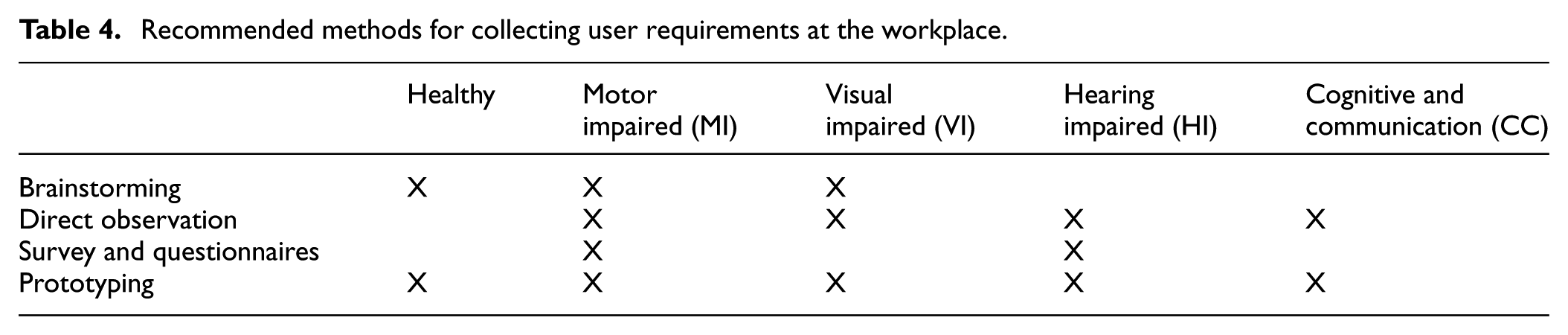
The following methods have been used to elicit requirements for PWD project at the workplace:
Brainstorm and observation/recording with group of full VI, MVI, and full MI
A total of 51-h-long sessions were held to collect requirements from the different groups. At first the authors met with each group separately. Then, they met with combinations of the different groups. Brainstorming with people suffering from number of impairment conditions was considered as well. During the process, the team was careful to meet with different people from the same group in different sessions to achieve more diversity. In each session, the authors welcomed the users and introduced them to the nature of this session. The authors used mind maps and did a strengths, weaknesses, opportunities, and threats analysis with the guests for each of the following technologies: gesture control, TTS, speech to text, color control, magnification, movement tracking, behavior analysis, vibration and notification, reminder and intervention. Notes were either written down or recorded in some cases. Results from the current session were compiled with those from the previous sessions to come up with a unified list of requirements. This method of collecting data was very expensive and time-consuming. Special arrangements were needed to transport and accommodate the users or to visit them where they reside.
Direct observation
This method was used with all of the groups except the healthy people group. After getting permissions from the users or their caregivers, the team spent a great amount of time observing the different groups at their work or residence. A total 240 h of direct observation were done. More time was spent with users suffering from cognitive and communication issues as this was the primary method of getting their input. Different people from the same group were observed to have more diversity. When this operation was carried out, the observer used a camcorder to record the person of interest during his/her interaction with technology. The videos were then analyzed and the requirements were extracted. It is worth mentioning here that all of the users involved in this process were visited at their houses after taking the permission of their families and caregivers. Also, during the process, different hardware/software technologies were used. For example, IPADs, laptops, and desktops were used. The main problem with this method was getting the permission to carry it out. A considerable amount of time and effort were needed to succeed in this task.
Questionnaire with group of SI, HI, partial VI, and partial MI
This method was used with only two groups, namely, HI and MI. The data from the other impairment groups of VI and MI have been collected through brainstorming and direct observation as described in the above subsections. The questionnaire (Appendix Table A1/) was created based on the outcomes of the first two methods and sent to a number of users from both groups. The users were different from those who participated in the above methods. A total of 40 responses were collected and analyzed. Requirements collected by this method were incorporated in the requirements’ document Table 5.
List of PWD users’ requirements.
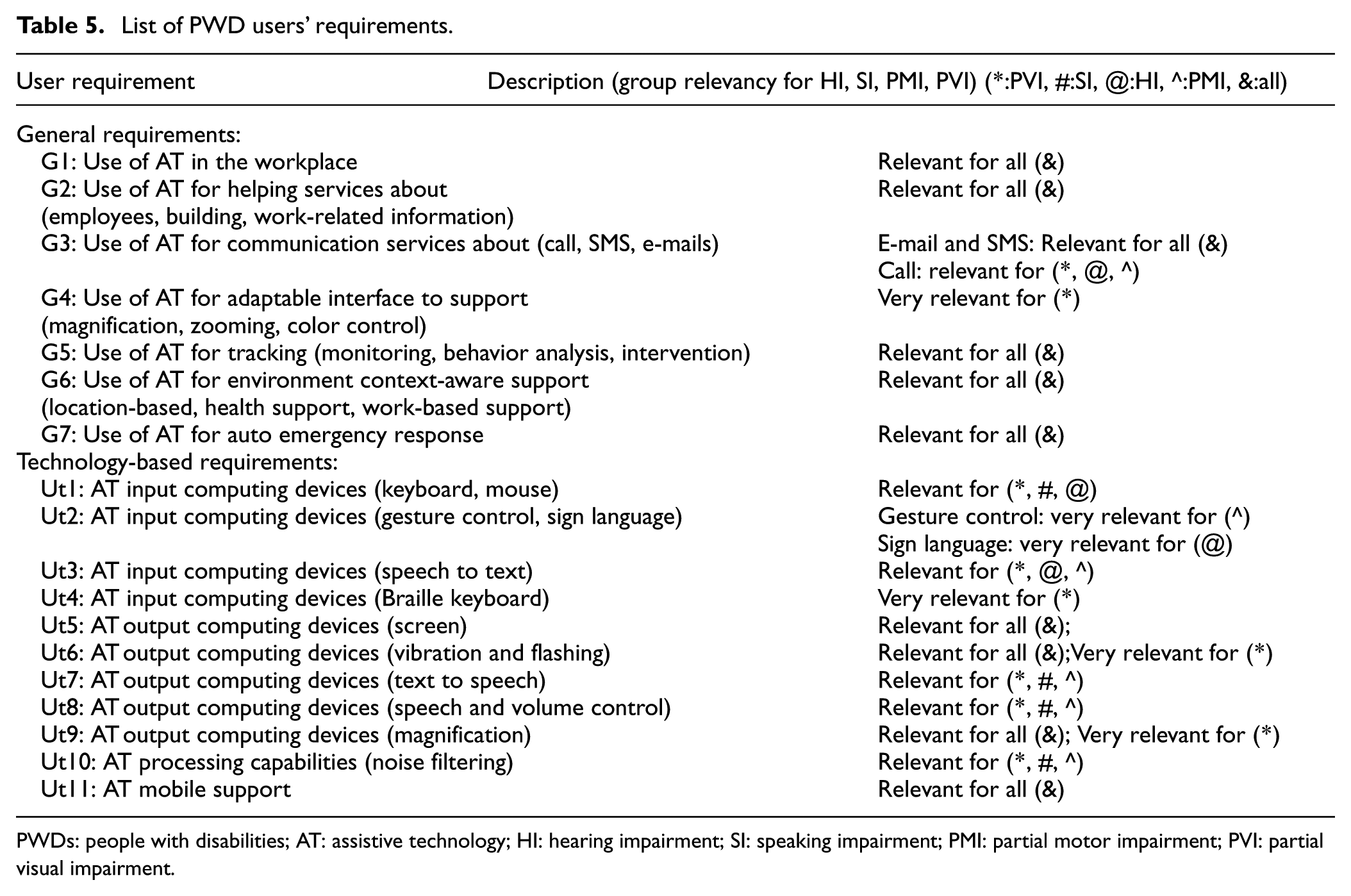
PWDs: people with disabilities; AT: assistive technology; HI: hearing impairment; SI: speaking impairment; PMI: partial motor impairment; PVI: partial visual impairment.
Prototyping
After collecting, analyzing, categorizing, and prioritizing the requirements from the methods above, the team developed a prototype to capture the main requirements. Users from all of the groups were then invited to try and assess the prototype. Feedback from the different users was recorded and efforts were made to consider their comments in the final product. The invited users were allowed to work with the prototype and give their feedback verbally or in writing. Few modifications and adjustments were pointed out during the hands-on experiments. For example, the button on the interface didn’t have any numbers but labels on them, some users pointed out the number on the button would be handy to speak. Another remark was related to the sizes of the buttons on the interface.
Requirement analysis and matching
We have used the technological features identified in the design consideration section in order to verify that identified requirements would be addressed by our developed solution as follows: The 13 technological criteria identified in Kbar et al. 52 matches the requirements ut1–ut11 in Table 5.
The following Tables 6 and 7 describe the matching of expert requirements with the criteria identified at the design consideration section.
Matching the criteria for assessing technologies for AT solutions to proposed design.
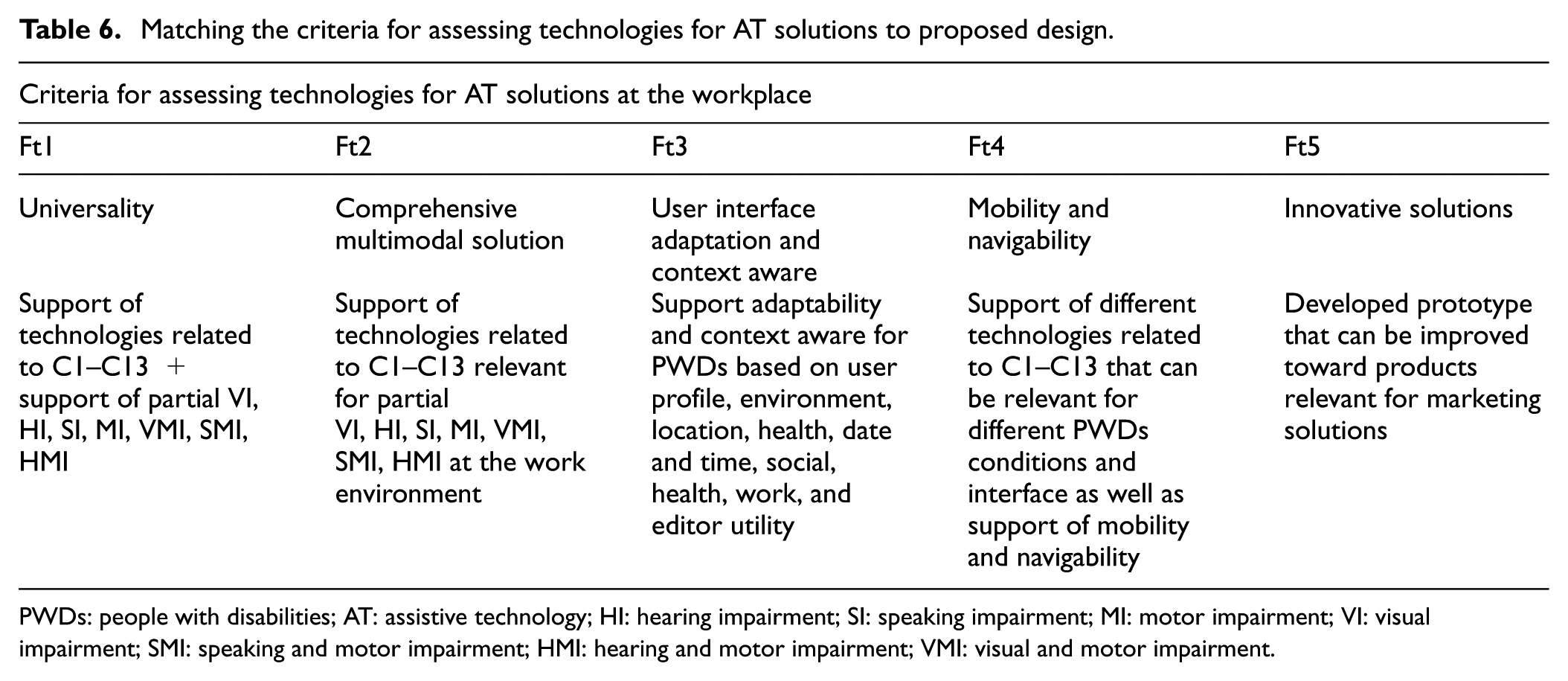
PWDs: people with disabilities; AT: assistive technology; HI: hearing impairment; SI: speaking impairment; MI: motor impairment; VI: visual impairment; SMI: speaking and motor impairment; HMI: hearing and motor impairment; VMI: visual and motor impairment.
Matching the criteria for assessing development process AT solutions to proposed design.

PWDs: people with disabilities; AT: assistive technology.
Design and categorizing
The unified modeling language (UML) is a general-purpose, developmental, modeling language in the field of software engineering, that is envisioned to provide a standard way to visualize the design of a system. 95 It can be easily adapted to a specific domain via syntactic and semantic extensions. UML syntax is defined by a metamodel, and its semantics are described precisely, but informally, in natural language. 96 A UML use case diagram to gather the system’s requirements and actors for PWDs at the workplace is shown in Figure 2. There are four main use cases that interface directly to one actor, which is the PWD user. These use cases are login, user profile, smart helping, and smart editor. Some of these use cases are further extended to other use cases, such as in profile setup which extended to personal page and personal noting. To classify these use cases and present the activities associated with them, Figure 3 illustrates the type of activities associated with these use cases (as shown in box with glow).

UML use cases for PWDs at the workplace. UML: unified modeling language; PWDs: people with disabilities.

Designing a comprehensive AT solution for PWDs at the workplace. AT: assistive technology; PWDs: people with disabilities.
Figure 3 also presents the schematic diagram for designing a comprehensive AT solution that supports universality, multimodality, context-aware-based services, mobility and navigability, and innovative solution with important services at the workplace for PWDs and healthy people. These important innovative services are organized in different groups including profile setup, communication, helping, and auto emergency response. Profile setup is adaptable and support personal page (adding friends, caregivers, and interests) and personal noting (such as birthday parties, pickup, medication, event setup, and break). In the communication category, users can manage events, monitor personal reminders associated with events and personal noting, location tracking and personal behavior, user call, and intervention management. In the helping category, different services are supported such as search (list, keyword, and previous search), auto search (location-based search and profile-based search), building information that is based on places and facilities, employees’ names, and my location. Auto emergency response allows users to communicate directly with server to guide them solving their problems.
Context-aware-based design
Context awareness refers to the idea of having computing devices and applications sense and react to their environments. In this project, context awareness is essential because it helps to identify the areas and requirements for the smart solution to become more convenient to its users. The user interface in this solution can adapt depending on the different contexts at the workplace. In fact, it senses and reacts to the following aspects: environment, location, social, heath support, date and time, and work activities, as well as personal context associated with the user’s profile as shown in Figures 4 and 5, respectively. The details regarding individual adaptation capabilities have been provided in the following subsections.
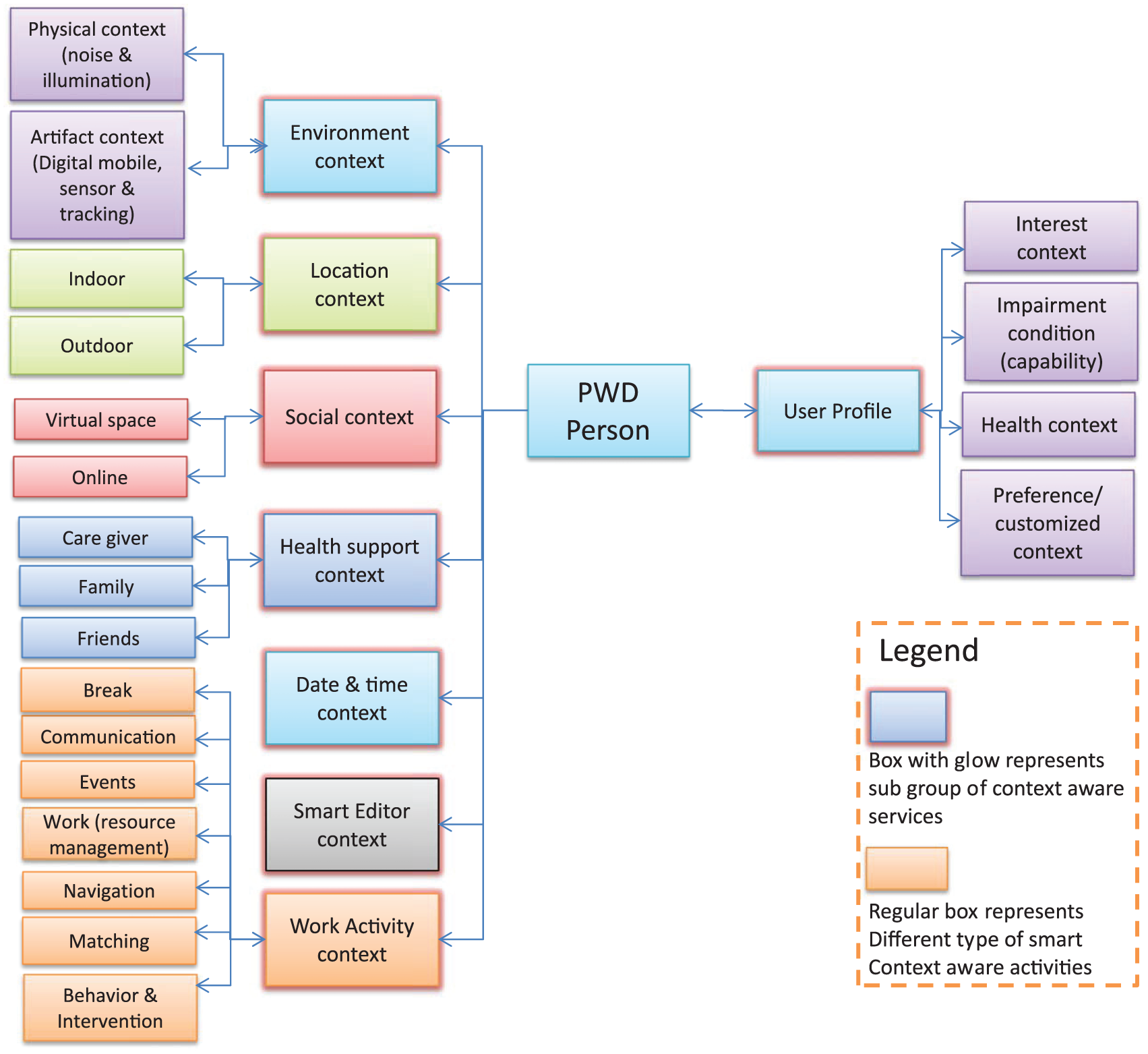
Context aware for PWD user at the workplace. PWD: people with disabilities.

Context-aware activities flow chart.
This smart context-aware-based design helps in analyzing PWDs users’ needs to perform their activities efficiently at the workplace. It also helps to meet the users’ requirements by designing and implementing a smart AT solution that is adaptable to different conditions according to the specific context and achieves better user satisfaction and adoption.
Log in context aware
First message at login: At a common interface, a user will be given the option to increase the size of fonts for first login interface to accommodate his/her needs, where the font size of this message is considered to be big for worst case of low vision of the user.
Customized profile/default profile: When a user logs in, the interface will be adapted based on the user profile (default group profile if customize profile is turned off, else use customized user profile). Adapting user interface is based on user profile, by adjusting the font size and color as well as the window background color and volume of speaker based on the user default group or customized profile. This will be implemented at the common interface when a user joins the system or at login. User can also change their environment setup.
Favorite behavior: Adapting user interest based on favorite behavior, such as break time every 2 h, or calling friend at 1 pm. This requires checking behavior changes to determine if favorite behavior is changed to display a message about this change.
Time context aware
Check time of the day and setup contrast of the screen accordingly. This would be done at 9 am and 4 pm. The system allows the user to fix contrast to a certain value, if fixed, the system will use the value from the user’s profile.
Between 9 am to 4 pm, use low contrast screen.
After 4 pm us high contrast screen.
Location context aware
Adapting the interface based on location of users where interface screen contrast will be adapted according to indoor and outdoor location. Location of user will be checked regularly at defined interval of time using RFID system and sensor network, or when user is changing location a message will be sent to server to make an action according to setup.
Outdoor and ground floor: For outdoor set brightness to low, and for ground floor set contrast of font and background to high, and change volume level to high.
Indoor: Change contrast of font and background to suit normal environment, and change volume level to normal.
Moving in the corridor: While PWD is moving his/her location will be tracked using sensor and RFID network and the interface will be adapted to display navigation map at the interface and display his/her current location and how far his/her office from current location. Voice instructions can be played if needed.
Smart editor context aware
Zooming of font/color and size of command icons: To zoom according to user customized or default group.
Auto zoom is also supported to change font size according to distance of user from terminal.
Voice controlling command: To control zooming according to user voice.
Customized icons’ display at interface: Check most frequently used icons by user and displays these dynamic options as extra controlling interface for users, as history of most used icons.
Social and communication context aware
Where a social network interface will display the latest users’ information that was contacted by PWD users through online and virtual space. PWD users will be added to a group in social network so the program can analyze the activities of the group and determine the right action and intervention to be taken.
Communication: When PWD user selects a social network to communicate with friends and relatives, the interface keeps track of people who were contacted and display a list of these people.
Events: If certain events relevant to users were planned or conducted, a message will be displayed to user on their interface.
Health support context aware
Where a message will be displayed to a PWD’s interface when his/her friends or family or caregiver are visiting the place.
Visiting of dependents: If user’s dependents including friends or relatives or caregivers were visiting the workplace, their names and locations as well and their contacts will be displayed on user interface automatically. User or their dependents wish to communicate together they can issue a call using VoIP or chat over the network. Determining if dependents are visiting the building will be done through face recognition and/or RFID tag recognition program, where a signal will be sent to user interface program to make the right action.
Pickup: If pickup is scheduled at particular date/time and a caregiver arrived at the workplace, a remainder message will be popped up to the user interface screen indicating that.
Checking the health of the users: A wearable health device along with the RFID connects to the system and sends signals to it. The systems analyze the data and check to see if the user is having a critical health issue or requires attention. If so, a message will be sent to a caregiver and the interface will be adapted to display some information and guidance on how to act to help the PWD. This requires carrying a health device by the user or using an app on the smartphone to detect some events such as falling down or lack of movement.
Working activities context aware
Breaks: According to scheduled user notes, a message will be issued to user interface at break time. If user communicates to certain people at the same time regularly such as during break time, then a message reminder will be displayed to user interface to remind them about this.
Events: A message related to scheduled events will be displayed to user to remind them about ongoing events. A reminder message will be sent to user interface about future events and users can respond to it by selecting confirm, decline, or ignore. The user can also look at previous events to check for missing ones.
Communication context awareness: The system continuously monitors all the users who are currently active or in a nearby location and have similar interests. If any exists, their details and contact information will be displayed to the user interface. This requires checking the location server at regular intervals to determine if a user is visiting a certain floor. It also requires the system to check whether the service is enabled in the user’s profile or not.
Meeting rooms: If a meeting is scheduled, then, a list of equipment and a preparation reminder will be displayed at the user interface. During behavior analysis and according to scheduling events for meetings, a message will be sent to the user’s display to do this.
Meeting people: When a user wants to meet with other people, the system will display the requirements and a snap shot of those people’s behavior. During behavior analysis and according to scheduling events for meetings, a message will be sent to the user’s display to do this.
Smart context-aware tools
The following context-aware tools would be developed in the future: smart tool for analyzing the users’ requirements which helps in defining the users’ needs and requirements based on the response of users to the use of AT solutions or/and based on observing users’ time taken to execute tasks using AT solutions; smart analysis of user satisfaction tool that can analyze the user reactions when using the AT solutions and help in defining the criteria for testing the prototype and usability test; smart interaction tool to allow users to interact with others including PWDs at the workplace smoothly, such as determining other people profiles for the meetings and bring them to the attention of the user; smart health monitoring to detect abnormal event such as sickness and respond to it appropriately; and smart response tool which allows users to interact smartly with auto emergency response to guide them in solving their requests.
Solution implementation
The following subsections describe the project implementation. It covers the system wireless technology solution infrastructure and software application program. The software application program has been written in Java and it includes the following options: unified common interface, smart editor, smart help, smart communication, and smart context-aware applications. The program interface interacts with the MySql database that stores the different activities executed by the users as well as stores the default user setup for login. The voice recognition has also been implemented in the interface program, which allows the users to control the interface through voice commands.
System wireless technology solution
In order to support the tracking system for behavior analysis and intervention, a tracking network based on Ekahau RTLS has been employed. This tracking network works with RFID tags and communicates through Wi-Fi network in the building as shown in Figure 6.

Wireless network and tracking system for PWD. PWD: people with disabilities.
The RFID tag which is carried by the PWD and gets continuously monitored using the RTLS. The tracking system has been deployed on 802.11b/g (2.4 GHz) wireless local area network (WLAN) technology using the building Wi-Fi network. The Wi-Fi tags are transmitted like any Wi-Fi client (e.g. a laptop) to the WLAN APs which work in the reception mode to measure the receiving tag signal strength. The six APs have been deployed on the ground floor to monitor the movement of the PWDs and to track and log their locations as shown in Figure 6. As a result, a good coverage could be achieved in the workplace. When the user carrying a tag enters a signal field of a particular access point, signal measurements are performed via radio communication and delivered to the RTLS software controller, which updates and stores the information in a Tracking and Database server located inside the building. The APs send signal strength packages to the tracking server so that the algorithm can determine the movement and store user location on the Database server. A behavior and a reminder algorithm have also been developed to read location data of PWD from Database server and analyze the behavior according to schedule events which determine if the PWD is executing the event according to their schedule. 10
Common interface
A unified interface for the 11 groups of PWDs with different impairment conditions has been designed and implemented. The first page of the unified user interface permits the user to change the font size by selecting the button “Change Font” or by speaking the word “eight” (figures 1 to 2 of Online Appendix A). The smart unified interface is designed to facilitate the PWDs at workplace mainly. The application starts with a welcome screen that contains three modes to log in into the system. The three login methods are normal login using username and password, RFID login, and voice recognition login (figure 1 of Online Appendix A). On first time login, the user will be able to customize his/her profile by defining his/her visual and hearing capabilities. The user will be asked to change their login details (figures 3 to 5 of Online Appendix A, and as presented in movie 1 of Online Appendix). After that, the user can login in the system as shown in figure 6 of Online Appendix A. At this point, the user can select one of the four available modules, namely, user profile, environment setup, smart editor, and smart help as shown in figure 7 of Online Appendix A. The user can then change his/her user’s profile setup and/or environment setup (figures 8 to 10 of Online Appendix A).
Smart editor and context aware
Smart editor is a replica of a text processing program designed in such a way that it can be easily operated by PWDs. Using one button press, shortcut keys, and voice commands, a user can perform various required functionalities such as open file, save file, create new file, copy and paste, write text, change font, search text, and so on. Smart editor has been implemented to display adjustable three main tabs (file, home, and control) and their related sub-tabs according to user profile which determines the icon size, the font size and color, and the window size and background color (figures 1–8 of Online Appendix B). Auto zooming based on the distance of the user to terminal and based on the user’s speaking control are also implemented (figures 9–10 of Online Appendix B, and as presented in movie 2 of Online Appenidx).
Smart helping and context aware
Smart helping is designed to ease the search and help process for PWDs. Using smart helping, users can execute multiple searches based on search list, keyword search, search employee by location, and auto search (see figures 1 to 10 of Online Appendix C, and as presented in movie 3 of Online Appendix). Users can also get help about building, name of employees (see figures 11 to 18 of Online Appendix C). In addition, users can also execute auto search that matches the search based on user profile or location (see figures 19 to 21 of Online Appendix C). A light version for smart help is also implemented on smart phone (iPhone; see figures 22 to 23 of Online Appendix C, and as presented in movie 4 of Online Appendix). Health context-aware messages for visiting of dependents and for pick up are also implemented (see figures 24 to 26 of Online Appendix C, and as presented in movie 5 of Online Appenidx).
Smart communication
The communication module contains all the services pertaining to connecting other users, locating them, and acting on them whenever needed. The users can choose and execute different options at the smart communication interface. This includes user call to communicate with other people at the workplace, location tracking for indoor navigation, event setup, personal reminder, and intervention (see figures 1 to 10 of Online Appendix D, and as presented in movie 6 of Online Appendix).
Behavior analysis and context aware
The user movements and activities can be tracked continuously to determine his/her behavior. For example, meeting events can be tracked to determine if the user has attended the meeting or not. A threshold for missing behavior for the same person and for the same event is used to determine the abnormal behavior. 10 The alert message can also be sent to the user to remind them about certain event as shown in figure 7 of Online Appendix D. The user can also view the list of the unconfirmed and the executed events (figures 8 to 9 of Online Appendix D, and as presented in movie 6 of Online Appendix). The user can also view the status of personal reminder tasks (figure 10 of Online Appendix D).
Test and verification
The developed solution presented in section “Solution Implementation” was tested thoroughly by the developers to verify that all the functional requirements illustrated in sections “Collecting PWD user requirements” and “Requirement analysis and matching” were met. The system was fully functional and free of bugs as presented in Online Appendix. Reliability of the system was also tested by having it running continuously for 1 month.
Usability test was also done by 50 PWD users with different impairment conditions (HI, SI, partial VI, and partial MI). These users were invited to try the system for 2 h per day for a period of 1 week. At the end of this period, users were asked to fill in a feedback form that measured their satisfaction. The feedback results are presented in Table 8 below. The different questions were prepared to test the different features identified in the section of design consideration. For example, question 1 was used to test the features fp1–fp4 that are related to the process of involving PWD users in the design and development as well as the usability testing, and ft3 that is related to adaptability.
Feedback result of the usability test.

As shown in Table 8 that all features identified in the design considerations were tested by different PWD users. The results of this test were satisfactory in terms of flexibility, comprehensiveness solution, adaptive and context-aware interaction services, and tracking and behavior analysis. However, the issue of security associated with the design features (user needs, performance criteria, usability and adoptability, and innovation and reliability) was a concern and requires further attention by developers. The security issue will be improved in the future prototype version.
Conclusions
A smart unified interface based on context-aware and adaptive interface has been developed for PWDs at the workplace. Wireless RFID and sensor network are used to track the users’ movements, and a smart unified interface is used to interact with users and provide them with full services’ support including smart editor, smart helping, smart communication, and environment context-aware applications. A literature review has been conducted to define the relevant wireless technologies and design consideration criteria suitable for AT system at the workplace. The user location-based search along with the adaptive user profile and keyword-search, make-up together the GIS solution a smart and very effective in determining the relevant information for parties as well as provide the ability to communicate with others effectively. The AT design considerations were analyzed to suit PWDs’ needs at the workplace and resulted in defining four important design features associated with design process, and five essential technological features that should be present in the AT solution to satisfy PWDs’ needs. These technological features are universality, comprehensiveness and modality, adaptability and context-awareness solution, mobility and navigability, and innovation and marketing. The implementation presented in this article proves a successful smart context-aware and flexible search which can be used as a professional networking tool that makes the working environment for PWDs more productive. The SMART HELP feature facilitates the usage of the system’s interface through voice commands. Furthermore, an intervention and behavior-based algorithm have been devised to identify the behavior of PWDs and take the right actions to inform caregiver about PWDs’ abnormal behavior so they would be aware of PWDs’ critical activities. This tracking of behavior also assists PWDs by alerting them or their caregivers about future or missing events. The system supports different context-aware applications relevant to PWDs at the workplace. This includes location-based context aware, health-based context aware, environmental-based context aware, smart editor context aware, and work activities context aware. These context-aware application services make the work environment for PWDs more enjoyable and encourage them to be more productive. The usability test results showed that the majority of the users felt more productive when they used the system. It also showed that the adaptive features were extremely convenient and helpful. The context-aware services were acceptable by a large number of users, while the privacy issue and location tracking was a concern for some of the users.
Despite the developed solution was satisfactory by the majority of PWD users and met the objective of building a smart context-aware and adaptive services, there is a need to further improve the system with functionalities related to social, navigation, and auto emergency response. In addition, there is a need to improve some of the developed functionality associated with privacy and health context-aware services. Furthermore, the quantitative verification to ensure the correctness, performance, and reliability of the system would be performed in the future in order to complete the final software innovative product following the prototype implementation done until now.
Footnotes
Appendix 1
Surveying PWDs about the importance of AT to intearct with others and the environment.

| Age | |||||
|---|---|---|---|---|---|
| Gender | |||||
| Stronlgy agree | Agree | Neutral | Disagree | Strongly disagree | |
| Using assistive technology at work is important | |||||
| I prefer to use AT to achieving different tasks at work | |||||
| The _______ is my best means to insert input to a computing device: | |||||
| Keyboard | |||||
| Gesture control | |||||
| Sign language | |||||
| Speech to text | |||||
| Mouse | |||||
| Braille keyboard | |||||
| Other (please specify) | |||||
| The _______ is my best means to receive output to a computing device: | |||||
| Vibration | |||||
| Screen | |||||
| Text to speech | |||||
| Speech and volume control | |||||
| Magnification | |||||
| Flashing | |||||
| Other (please specify) | |||||
| At work, getting info from the system about other employees is helpful | |||||
| At work, getting info from the system about the building is helpful | |||||
| At work, getting info from the system about work related issues is helpful | |||||
| At work, getting help in editing a doc from the system is helpful | |||||
| At work, a system that provides easier communications with others is helpful | |||||
| At work, a system that provides magnification is useful | |||||
| At work, a system that provides front and background color control is useful | |||||
| At work, a system that provides health monitoring and intervention is useful | |||||
| At work, a system that provides zooming is useful | |||||
| At work, a system that provides movements monitoring and navigation is useful | |||||
| At work, a system that provides behavior analysis is useful | |||||
| At work, a system that provides behavior prediction is useful | |||||
| At work, please specify other usfeul things a system can provide |
AT: assistive technology.
Declaration of Conflicting Interest
The authors whose names are listed in the first page certify that they have no affiliations with or involvement in any organization or entity with any financial interest or nonfinancial interest in the subject matter or materials discussed in this manuscript.
Funding
The author(s) disclosed receipt of the following financial support for the research, authorship, and/or publication of this article: This Project was funded by The National Plan for Science Technology and Innovation (MARRIFAH), King Abdul-Aziz City for Science and Technology, Kingdom of Saudi Arabia, award number (12-ELE3220–02).
