The logical operators & (“and”) and | (“or”) can sometimes be tricky in statistical software such as Stata. They are extremely useful, so you need to understand thoroughly how they work. Any trickiness arises mostly in translating from ordinary language to a statistical computer language. Here I survey various common confusions and explain what to do instead.
auto.dta in Stata will serve fine as a sandbox.

1 What is wrong, and why
The repair record variable rep78 in auto.dta takes on values 1 (poor) to 5 (best) and also missing. You can see that with a simple tabulation:

Let’s see which cars have repair record 1. You need to use the operator == when testing for equality. If this point is new to you, please consult help operators.

Two cars are shown, as promised by the previous table. Now consider this syntax, which is an attempt to also get those cars with rep78==2:
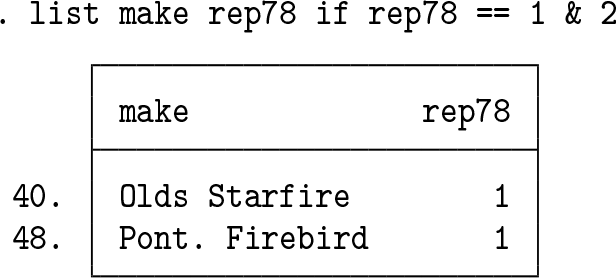
We get the same cars. Where are the 8 cars with value 2? The command was legal but wrong from our point of view. A legal command is one that runs without an error message, but evidently being legal does not make a command right for us. Now suppose you report your problem to a friend, who explains that you need the “or” operator there, not the “and” operator. It is impossible for a value of a Stata variable to be both 1 and 2 in the same observation. You do want those observations that are 1 AND those observations that are 2. For Stata, that means selecting those observations for which there is value 1 on rep78 OR for which there is value 2 on rep78.
Emphasizing operators by using uppercase (for example, AND, OR) is a practice I learned from John Tukey’s writing (for example, Tukey [1977]). As many people have a synesthetic sense that using uppercase is SHOUTING, it is best done sparingly. This is no more than presentation: AND and OR are assumed to behave exactly like & and | otherwise.
Suppose further that your friend does not spell out syntax, so you try
. list make rep78 if rep78 == 1 | 2
However, now those variables are listed for all 74 observations in the dataset. (The lengthy listing is not reproduced here, but you can check for yourself.) So, that command too is legal but wrong. Sooner or later—say, your friend is more explicit, or you look at some documentation—you reason or muddle your way toward
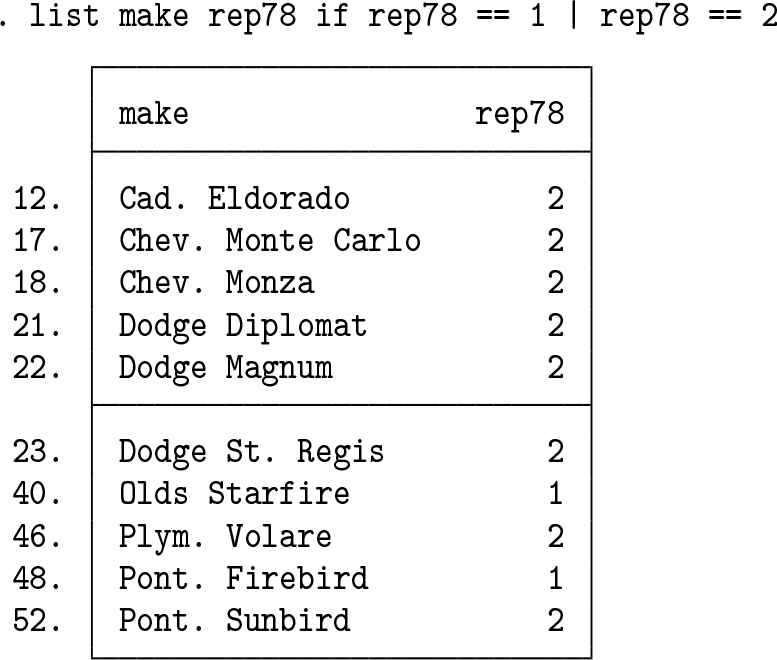
Eventually, you got what you wanted, but we now need to explain exactly why those earlier guesses are not right.
The first principle here is that an if qualifier selects observations if the stated condition is true. That was easy to specify when the condition was just rep78 == 1, but what was happening with a compound condition such as rep78 == 1 & 2—where now two logical operators are in sight? The answer lies in precedence of operators, namely, which operator is used first in evaluation. Stata’s precedence rules are documented at help operators. You do not need to learn the order in which operators are used in evaluation. All that I have found important is knowing how to look up the order and knowing to try to use parentheses, ( ), to insist on your intended meaning.
By the way, I recommend the terminology whereby ( ), [ ], and { } are called in turn “parentheses”, “brackets”, and “braces”. In turn, extra adjectives “round”, “square”, and “curly” are, according to taste, either redundant or revealing. For many other names, see Raymond (1996). Books on punctuation range from splenetic to scholarly: Houston (2013) and especially Parkes (1993) are nearer the latter.
The answer here is that == is used before &. So, faced with the condition
if rep78 == 1 & 2
Stata parses it as if it were
if (rep78 == 1) & 2
Just as in school mathematics, what is inside parentheses is treated first in evaluation. We now need to know Stata’s rule that expressions evaluating to zero (0) are false while expressions evaluating to any number other than zero are true. This last detail may be new to you, especially if you are more familiar with the vital implication, which is very widely useful, that 0 means false and 1 means true (Cox 2005, 2016; Cox and Schechter 2019). Imagine just the single condition
if 2
Clearly, 2 is not 0, so 2 counts as true—always, meaning for every observation. Stata does look at every observation and asks, with this syntax, whether 2 is true, given the information in this observation, to which the answer is always yes. Even though it seems unlikely to be something you would write on purpose, the syntax is legal and has meaning. For completeness, note that code such as if 2 is legal and has meaning also even if there are no data in memory.
So, if 2 is always true, but the compound condition if rep78 == 1 & 2 is true only when both conditions are true. That restriction narrows the scope to observations if rep78 == 1, as already observed.
Operator precedence also means that == is used in evaluation before |, so rep78 == 1|2 is evaluated as if it were (rep78 == 1)|2. The compound condition is true if either condition is true, and as already observed, 2 is always true; and so the entire condition is always true, with the consequence reported earlier that all observations are used whenever the condition is rep78 == 1 | 2.
It should now seem clear that compound conditions such as if rep78 == 1 | 2 | 3 | 4 | 5 do not offer a terse and generally applicable syntax for multiple conditions acting at the same time. But there remains much scope for small puzzles. Thus, the laststated condition almost does what may have been intended (it catches missing values too).
The foreign indicator variable takes on values 0 and 1 only in auto.dta. It follows that if foreign == 0 | 1 does what may have been intended—catch observations with values of both 0 and 1 on foreign—but by accident because the true condition 1 catches all observations. Conversely, the condition if foreign == 1 | 0 is not at all equivalent and will not catch any values of 0, because 0 counts as false. Otherwise put,
if foreign == 1 OR 0
and
if foreign == 0 OR 1
are not equivalent pseudocode.
2 Other ways to get it right
Earlier mentions may have left the impression that slow but sure is the only successful tactic in specifying compound conditions. The point of this section is to emphasize other syntax and other tactics. See also Cox (2006, 2011).
inlist(rep78, 1, 2) is another way to write if rep78 == 1 | rep78 == 2, and its appeal grows with the number of possible values given in the list, here just 1 and 2, but in many problems a longer list. See the help for inlist() for current limits on the number of arguments.
Mention must be made of the useful twist that inlist(1, a, b, c, d, e), mentally expanded as 1 == a | 1 == b | 1 == c | 1 == d | 1 == e, is thus a way of checking that any of a, b, c, d, e is 1 just as surely as 1 == a is equivalent to a == 1.
Because rep78 takes only integer values, inrange(rep78, 1, 2) is in practice equivalent, as is rep78 <= 2 or rep78 < 3. There are differences in principle. In the first case, that difference is the possibility of noninteger values in the stated range. In the second case, that kind of problem could apply, together with the possibility of values below 1.
It is always worth flagging that numeric missing values all count as nonzero and hence as true.
3 Strings cannot be true or false
This section separates off a warning that because string values are not numeric, they cannot themselves be true or false. Thus, suppose that we wanted all the available information on the two cars identified by the first line of code in section 2.

It should now not be surprising that this code is not what is wanted, but in this case, the code is illegal and so triggers an error message. The whole of make == "Olds Starfire" is a true or false expression evaluated as 1 or 0, but "Pont. Firebird" as a bare string cannot be true or false; hence, the error shown.
. list if make == "Olds Starfire" | make == "Pont. Firebird"
and
. list if inlist(make, "Olds Starfire", "Pont. Firebird")
are fine ways to issue the instruction.





