The parallel package allows parallel processing of tasks that are not interdependent. This allows all flavors of Stata to take advantage of multiprocessor machines. Even Stata/MP users can benefit because many community-contributed programs are not automatically parallelized but could be under our framework.
Most computers have multiple processors. Stata uses only one processor unless you are using Stata/MP with certain built-in commands.1 Many tasks, however, are logically easy to parallelize. These tasks, called “embarrassingly parallel”, have no dependencies (or need for communication) between the parallel tasks and include common tasks, for example, reshaping a large dataset, bootstrapping, the jackknife, and Monte Carlo simulations. In this article, we present the package parallel, which parallelizes these tasks.2
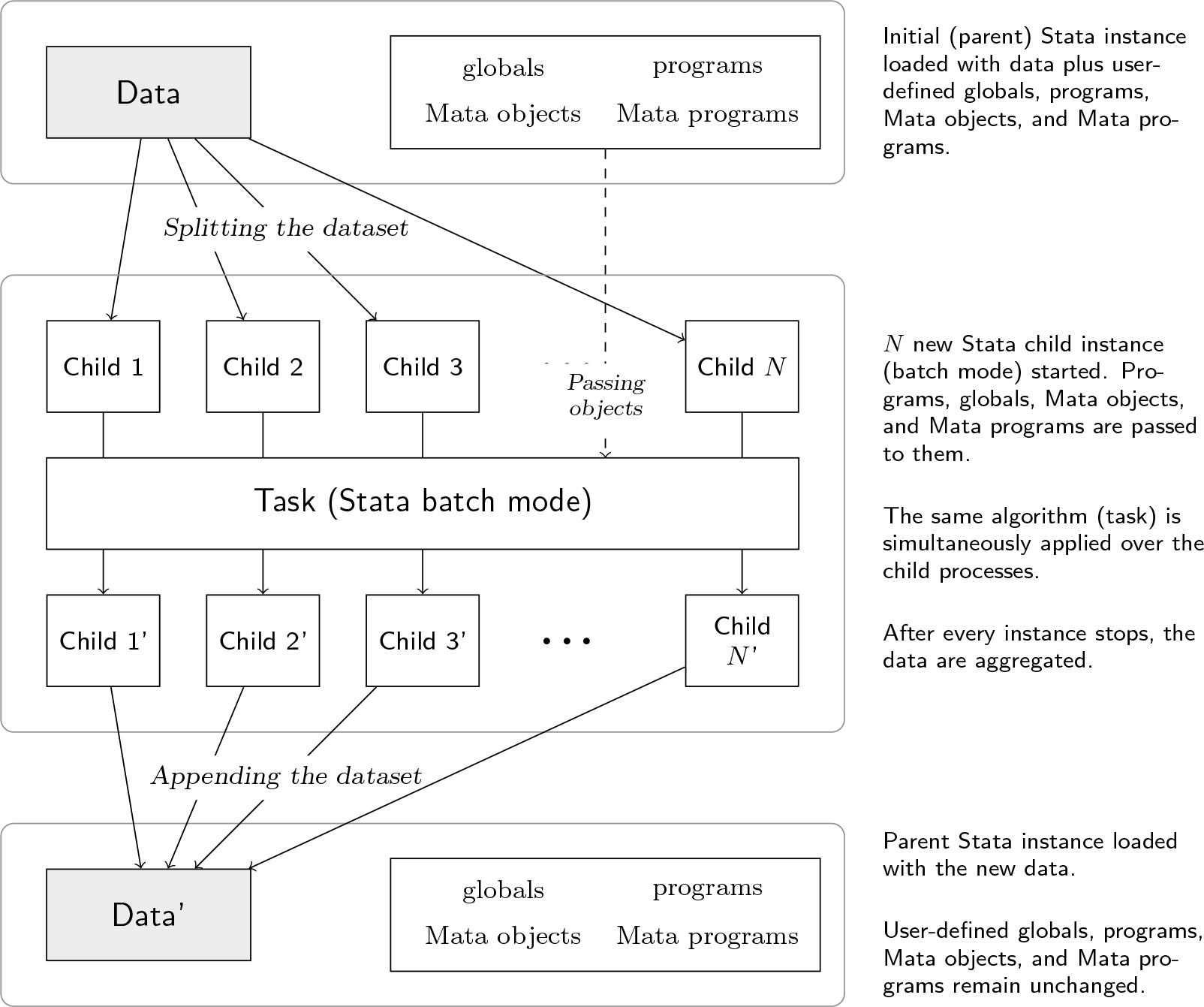
In general, parallel creates multiple “child” instances of Stata, each of which has its own copy of the data it is supposed to work with. With parallel, the user can distribute embarrassingly parallel tasks across those instances, taking advantage of multiple processors. The primary use is to invoke parallel with a command (or do-file) and distribute the load across N parallel child processes. It proceeds as follows:
parallel splits the dataset into N pieces.
parallel starts N new instances of Stata called child processes; the original is the parent. In each child process, one of the pieces of the split dataset is loaded, the command is executed, and the resultant data are saved.
parallel waits for the child processes to finish, then aggregates the resultant datasets and loads them into memory.
This is diagrammed in figure 1. Note that this is a setting with “distributed” rather than shared memory between the child processes.
How parallel works
Two considerations limit the parallelization in practice. First, it will never be useful to use more child processes than the number of processors on the machine. Second, processing a task in parallel with parallel uses more memory (that is, RAM). The user is trading memory capacity for processing capacity. Therefore, there is likely to be little benefit if a sequential setup would already use almost all the system memory. If run in parallel, the dataset is split, so the child processes’ memory will add up to the same amount of memory used in the parent Stata instance plus the amount of memory that Stata uses while doing its computation. Attempting to use more memory than is available on the system will cause performance degradations and possibly program errors.
Some existing solutions can take advantage of multiprocessor systems while implementing a shared memory model. Stata/MP is a flavor of Stata where internal routines can take advantage of multiple processors on a machine. parallel allows this for generic commands, which both expands the set of possible parallelizations and allows this for other flavors of Stata. This command is similar to R’s parallel package (R Core Team 2018) and MATLAB’s parallel toolbox (Sharma and Martin 2009).
The rest of this article introduces more details about the usage of the command and provides examples and benchmarks to help the reader better understand the potential benefits of using parallel.
2 A command for parallel computing
In this section, we discuss the syntax of the parallel subcommands, technical details of execution, and results returned from the commands.
2.1 Syntax and options
A typical program will use separate parallel subcommands for initialization, parallel task execution, cleanup, and possibly diagnostics (for when the user needs to debug failures reported by parallel).
Initialization
To initialize the parallel setup, use the initialize subcommand:
This command sets the number of child processes to launch when parallelizing later tasks. Options are as follows:
# specifies the number of child processes to use. If it is omitted, the default is to use max(⌊(num processors) × 0.75⌋, 1). If there are multiple processors, the default will leave some free for other computer interactions, which should be fine for testing on a personal computer. Note that if you are using Stata/MP with child tasks that are automatically parallelized by Stata, you should take care with this option and the processors() option for the execution so that you do not inadvertently use more processors than are available.
force prevents slowdowns due to context switching between tasks. There is a soft limit that restricts setting the number of child processes to be more than the number of processors on the system. Use this option to override the limit.
statapath(stata_path) overrides the default and forces parallel to use a specific path to the executable in the rare circumstance that this is hard to automatically identify (for example, network-mapped drives). By default, parallel tries to automatically identify Stata’s executable path.
includefile(filename) specifies that this file will be included in the child processes before the parallelized tasks are executed. This allows one to copy over preferences that parallel does not copy automatically (see section 2.3).
hostnames(string) specifies a space-delimited list of hostnames. For the local machine, use localhost. Work will be assigned in the order of the list, and the list elements will be reused if the number of child processes is longer than the list. An example would be localhost node2 node3. The default is hostnames(localhost). Leave blank for local execution.
ssh(string) specifies the command used to connect to remote machines. The default is ssh(ssh). This option is not needed for local execution.
procexec(int) specifies on Windows how child processes are spawned. The default is procexec(2), which will launch them in a hidden desktop (they can still be seen in the task manager) so that the child applications do not briefly steal the window focus. With value 1, the child processes will be launched in the user’s desktop. They will launch auto-minimized but may still briefly steal the focus.
Use the following subcommand to determine the number of processors on a system (c(processors_mach) returns this on Stata/MP, but it is not available on the other versions):
parallel numprocessors
Parallel task execution
The following are subcommands that execute tasks in parallel:
files specifies the explicit file or files to process.
The : (prefix) notation for parallel and the do subcommand are the main subcommands, while the others are helper utilities. Their usage is shown in section 3.
Options are as follows:
by(varlist) tells the command which observations the current dataset can be divided through, avoiding splitting stories (panels) over two or more child processes.3
force overrides the restriction on using more child processes than the number of processors on your machine. When using by(), parallel checks whether the dataset is properly sorted. The force option skips this check. This option is assumed when specifying hostnames().
nodata tells parallel not to use loaded data and thus not to try splitting at the beginning or appending anything at the end.
setparallelid(pll_id) forces parallel to use a specific ID.
execution_options include the following:
keep keeps auxiliary files generated by parallel. Use this and the next option with care because there can be many files that take up space.
keeplast keeps auxiliary files and removes those saved prior to the current execution.
noglobal avoids passing the current session’s global macros to the child processes.
programs(namelist) specifies a list of programs to be passed to each child process. This is useful for programs not in the ADOPATH. To pass them, parallel needs to print the contents of those programs to the output window. If parallel is being run from inside an ado-file (say, my_cmd.ado) and will need to access auxiliary local subroutines (other programs defined in the ado-file), then their names must be passed in as main_command_name.local_subroutine_name (for example, my_cmd.aux_prog) for them to be accessible.
mata specifies if the algorithm needs to use Mata objects. This option causes each child process to receive every Mata object loaded in the current session (including functions). Note that when Mata objects are loaded into the child processes, they will have different locations. Therefore, pointers may no longer be accurate.
randtype(current | datetime| random.org) tells parallel whether to use the current random-number generator seed (default), the current datetime, or a random.org application programming interface (API) to generate the seeds for each child process.
seeds(numlist) specifies that the user can pass specific random seeds to be used within each child process.
processors(integer) specifies, if running on Stata/MP, the number of processors each child process should use. The default is processors(0), which means to take no specific change in the child processes.
timeout(integer) specifies, if a child process has not started, the time in seconds that parallel should wait until it assumes that there was a connection error and thus the child process will not start. The default is timeout(60).
outputopts(namelist) allows generic file-based appending. Imagine a nonparallel setup where a program generates multiple outputs and the extra outputs are stored in files as in
This causes parallel to run the parallel tasks with their own pair of temporary files passed in for output1 and output2 and then aggregates those to create outputfile1.dta and outputfile2.dta.
deterministicoutput eliminates displayed output that would vary depending on the machine (for example, timers, seeds, and number of parallel child processes) so that log files can be easily compared across runs. Errors are still printed.
bs_options specifies further options to be passed to the official bootstrap command, including the optional reps() parameter.
expression(exp_list) specifies an expression list be passed to the official bootstrap command.
sim_options specifies further options to be passed to the official simulate command, including the required reps() parameter.
expression(exp_list) specifies an expression list be passed to the official simulate command.
do(command | dofile) specifies tasks to run in parallel. Note that parallel do does not support passing options to the do-file. If you need arguments, then use the prefix style. do() is required.
append_options include the following:
expression(string) specifies an expression representing filenames in the form of "%fmts,numlist1 [,numlist2 [,…]] ". See the Append example below for more details.
if(if) and in(in) open the file using if and in accordingly.
Cleanup
Log files from parallel execution are saved so that they can be inspected by the user. Use the clean subcommand to remove these and any other auxiliary files that have been saved:
parallel clean , event(pll_id) all force
Options are as follows:
event(pll_id)specifies which executed (and stored) event’s (an invocation of parallel) files should be removed.
all tells parallel to remove every remaining auxiliary file generated in the current directory.
force forces the command to remove (apparently) in-use auxiliary files. Otherwise, they will not get deleted.
If neither event() nor all is specified, parallel will use the most recent run’s pll_id.
Diagnostic tools
Additionally, there are some diagnostic tools:
parallel version
This command returns the version both to the screen and programmatically.
parallel printlog [# ] [, event(pll_id)]
parallel viewlog [# ] [, event(pll_id)]
These commands allow users to view logs of the child processes. The initial part of the log file will be from commands generated by parallel for setting up the child process (loading data, global macros, settings, etc.). The final part of the log file is where the user’s task is run.
# specifies which child process number of an event to display (default is 1).
The option for parallel printlog and parallel viewlog is as follows.
event(pll_id) specifies which event’s log file should be displayed.
2.2 Stored results
The primary result of parallel is to return a transformed dataset. In addition, parallel stores the following in r():
2.3 Technical details
parallel does not change the random-number generator state upon completion. Subcommands that invoke randomization functions restore the state before finishing.
Log files from the children are stored in c(tmpdir) so that they can be inspected by the user. The user will likely want to delete these periodically with parallel clean, all.
Given N child processes, within each child process, parallel creates the macros pll_id (equal for all the child processes) and pll_instance (ranging 1 up to N, equaling 1 inside the first child process and N inside the last child process), both as global and local macros. This allows the user to set different tasks or actions depending on the child process number. Additionally, the global macro PLL_CHILDREN (equal to N) is available within each child process. Note that the locals will not be available in programs that are called from parallel (in prefix or do-file setup) but will be available in a script called from parallel do.
When you launch child Stata processes, several settings are automatically copied over. These include the PLUS and PERSONAL system directories, the global S_ADO, the Mata library search index, and the tempname or tempvar state. To start child processes with additional setting changes, use the includefile() option.
Child processes are managed. If the command is stopped from the parent process, then all child processes will be killed directly. The parent process can recover both from errors in the child Stata program and if child Stata processes are killed by the operating system. Child processes are launched using the shell on Mac OS and Unix or Linux machines. On Windows machines, a compiled plugin launches the child processes using the Win32 API so that it can be used in batch mode (batch-mode Stata on Windows will not execute shell commands) and so that the child processes do not show a visual window that interrupts the user by flashing on the screen (there is no provided console-only version of Stata on Windows).
Results not explicitly saved in the child processes’ datasets will not be available afterward (for example, matrices, scalars, Mata objects, and returns). If the task to be parallelized returns results in this format (for example, regression), then modifications must be used to store (and later use) these results in either the primary dataset or secondary files (see the outputopts() option).
Although parallel passes through programs, macros, and Mata objects, it currently cannot do the same with matrices or scalars.
If the number of tasks to be done is less than the number of child processes, parallel will temporarily reduce the number of child processes. This is reported in the global macro LAST_PLL_N.
Expressions run in the child processes that contain n or N will be evaluated locally to the child dataset. These expressions may therefore be different if run in parallel than without parallel.
2.4 Extending parallel
One of the key features of parallel lies in its developer-friendly design. Motivated by ease of code maintenance, parallel‘s design is a rich and thoroughly documented API that facilitates the creation of new routines. Mostly implemented in Mata, parallel‘s API contains functions for splitting datasets, exporting Mata and Stata routines, writing do-files to be executed by the child processes, launching Stata instances, monitoring child processes, and collecting the results generated by the child instances.
In this section, we discuss basic usage of the commands in some common cases. The first demonstrates how parallel can be initialized, but the latter cases assume this has already been done.
3.1 Subcommand examples
► Prefix example
A minimal example of using parallel is
This example illustrates that many simple tasks can be parallelized. This particular task was not executed faster in parallel, because parallel execution has its own overhead and the task was quite easy.
The next example shows the usage of the do subcommand.
‣ Do-file example
Suppose that we had the existing do-file
We can execute it either sequentially or in parallel using
Imagine we have several datasets named income.dta stored in a set of folders ranging from 2008_01 up to 2012_12, that is, a total of 60 files ordered monthly that may look like this:
2008_01/income.dta
2008_02/income.dta
2008_03/income.dta
(output omitted)
2010_01/income.dta
2010_02/income.dta
2010_03/income.dta
(output omitted)
2012_10/income.dta
2012_11/income.dta
2012_12/income.dta
Now imagine that for all of those files, we would like to execute the following program:
Instead of writing a forvalues or foreach loop (which would be the natural solution for this situation), we can use parallel append,
where element by element, we are telling parallel the following:
do(myprogram): execute the command myprogram;
prog(myprogram), where myprogram is a user-written program that is passed to child processes; and
expression("%g_%02.0f/income.dta, 2008/2012, 1/12"): this should process files 2008_01/income.dta up to 2012_12/income.dta.
Besides the simplicity of its syntax, the advantage of using parallel append lies in doing so in a parallel fashion; that is, instead of processing one file at a time, parallel manages to process these files in groups of as many files as child processes are set. Step-by-step, parallel does the following:
it distributes groups of files across child processes;
once each child process starts, for each dataset, parallel
opens the file using if and in qualifiers;
executes the command or do-file specified by the user; and
stores the results in a temporary dataset; and
finally, once all the files have been processed, parallel appends all the resulting files into a single file.
3.2 Parallelizing a loop
If a user has a loop where the processing in each iteration is independent of the others and the output can be aggregated easily, then it is easily transformed using parallel.
Suppose we want to parallelize a general loop
We can transform this so that a setup can be done either in parallel or sequentially.
3.3 Consistency
For many tasks, we will want to ensure that there is exact consistency between multiple runs of a program. Deterministic programs virtually ensure this. With random functions, a sequential program is usually made consistent by specifying a fixed random seed at the beginning of the program. If one is always using the same number of child processes, then the same can be achieved by prespecifying the seeds with the seeds() option.
A similar notion of sequential consistency guarantees that results do not differ between sequential and parallel operations. Again, for deterministic programs, this is straightforward to check. If the program has a random component, then you must take more care. To do this, provide the seed for each repetition. You can then build upon the previous example about loops (section 3.2) so that the tasks are split to the child processes and show how to collect the output.
‣ Sequential consistency example
Here we do it with a custom bootstrap implementation:
The output will be the same no matter the number of child processes or if do_work is run without parallel.
3.4 Parallelizing user commands
A third-party Stata package developer with easily parallelizable tasks can write his or her packages to take advantage of parallel if it is installed. We suggest that parallel be a recommended dependency rather than a required one because users may be on machines with limited resources. The most common example would be wanting to parallelize an existing loop so one can follow the examples of the parallel for loops or the sequential consistency example. One can put that secondary program in the original ado-file (in which case, use the myado.ado.subtask form), or one can make a separate file.
3.5 Debugging
The parallel command will issue an error if either it or one of its child processes encounters an error. The first step toward debugging this is to look at the log files (using, for example, parallel viewlog). If this does not show enough information, you can turn on trace in the executed task or print custom diagnostic information.
4 Benchmarks
To assess the speed gains obtained when using parallel, we present what we think are the two most relevant uses of the command: bootstrapping and simulations. We compared the performance of running each routine on a computer with at least four processors in three ways:4 serial, parallel using two child processes, and parallel using four child processes. While the tasks on which we performed the comparisons were rather simple (and not particularly time consuming because all of them took less than a minute to complete), they are useful to illustrate the benefits of using parallel.
Keep in mind that, as we will see, the lack of perfectly linear speed gains is due to the simplicity of the problem with respect to the time that it takes to compute it serially. On the other hand, overall, as the problem size (number of simulations, resamplings, etc.) increases, the speed gains approach linear speedups.
4.1 Bootstrapping
In this first benchmark, we use auto.dta, which is shipped with Stata. After expanding each observation 10 times—so the size of the problem increases—we perform a bootstrap of a linear regression model as follows:
For each number of repetitions (1,000, 2,000, 4,000), we ran the problem 1,000 times and recorded the average computing time. The results are presented in table 1.
Computing times for each run of a basic bootstrap problem. For each given problem size, each row shows the time in seconds that each method took on average to complete the task.
Problem size
Serial
Two clusters
Four clusters
1,000
2.93s
1.62s
1.09s
2,000
5.80s
3.13s
2.03s
4,000
11.59s
6.27s
3.86s
4.2 Simulations
In the case of simulations, we perform a simple Monte Carlo experiment, which has two main steps: i) generate 1,000 observations as Y = Xβ + ε, where X ∼ N(0, 1), ε ∼ N(0, 1), and β = 2; and ii) obtain the parameter estimate of β. The code is as follows:
As before, for each number of simulations (1,000, 2,000, 4,000), we ran the problem 1,000 times and recorded the average computing time. The results are presented in table 2.
Computing times for each run of a simple Monte Carlo exercise. For each given problem size, each row shows the time in seconds that each method took on average to complete the task.
Problem size
Serial
Two clusters
Four clusters
1,000
2.19s
1.18s
0.73s
2,000
4.36s
2.29s
1.33s
4,000
8.69s
4.53s
2.55s
5 Discussion
5.1 Development and feedback
Development is done at https://github.com/gvegayon/parallel/. If you want to report a bug or request a feature, check first if there is an existing GitHub issue. Please also try the latest development version to see whether the problem has been solved already (see section 6). If these do not resolve the concern, please submit an issue at the GitHub address so that anyone available may help to solve the issue. The issue will prompt for the details such as the steps to reproduce the problem and the output of creturn list. The GitHub page also has a Wiki with a larger gallery of examples of parallelizing tasks.
5.2 Conclusion
The parallel package allows users to take advantage of multiprocessor machines for many generic tasks with a minimum of additional complexity. For tasks where the processor is the limiting factor and that are easily parallelizable, parallel may significantly speed up execution. We hope that this package is used not just for ad hoc processes but integrated into other packages as a recommended package.
6 Programs and supplemental materials
To install a snapshot of the corresponding software files as they existed at the time of publication of this article, type
. net sj 19-3
. net install st0572 (to install program files, if available)
. net get st0572 (to install ancillary files, if available)
The latest stable versions of parallel can be installed from a GitHub URL,5
If you would like the latest development version, use master instead of stable in the URL. If you are switching the source of the installation materials (for example, if moving from Statistical Software Components to GitHub versions), then uninstall the program before installing the new version.
. ado uninstall parallel
An older version of the package is available at the Statistical Software Components. However, it is not kept as up to date, so we recommend the GitHub version.
Supplemental Material
Supplemental Material, st0572 - parallel: A command for parallel computing
Supplemental Material, st0572 for parallel: A command for parallel computing by George G. Vega Yon and Brian Quistorff in The Stata Journal
Footnotes
Notes
References
1.
GalianiS.QuistorffB.. 2017. The synth_runner package: Utilities to automate synthetic control estimation using synth. Stata Journal17: 834–849.
2.
KaspereitT.2015. eventstudy2: Stata module to perform event studies with complex test statistics. Statistical Software Components S458086, Department of Economics, Boston College. https://ideas.repec.org/c/boc/bocode/s458086.html.
3.
MakT.2014. miparallel: Stata module to perform parallel estimation for multiple imputed datasets. Statistical Software Components S457822, Department of Economics, Boston College. https://ideas.repec.org/c/boc/bocode/s457822.html.
4.
R Core Team. 2018. R: A Language and Environment for Statistical Computing. R Foundation for Statistical Computing, Vienna, Austria. http://www.R-project.org.
5.
SharmaG.MartinJ.. 2009. MATLAB®: A language for parallel computing. International Journal of Parallel Programming37: 3–36.
Supplementary Material
Please find the following supplemental material available below.
For Open Access articles published under a Creative Commons License, all supplemental material carries the same license as the article it is associated with.
For non-Open Access articles published, all supplemental material carries a non-exclusive license, and permission requests for re-use of supplemental material or any part of supplemental material shall be sent directly to the copyright owner as specified in the copyright notice associated with the article.