




Abstract
This article presents a novel management and information visualization system proposal based on the tesseract, the 4D-hypercube. The concept comprises metaphors that mimic the tesseract geometrical properties using interaction and information visualization techniques, made possible by modern computer systems and human capabilities such as spatial cognition. The discussion compares the Hypercube and the traditional desktop metaphor systems. An operational prototype is also available for reader testing. Finally, a preliminary assessment with 31 participants revealed that 81.05% “agree” or “totally agree” that the proposed concepts offer real gains compared to the desktop metaphor.
Keywords
Introduction
When the desktop metaphor arose in the 1960s, technology had huge limitations compared to nowadays. Personal computers were rare, and the flow of information centered on the media, such as the TV, radio, books, magazines, and papers. 1 The goal of the desktop metaphor was to support the individual use of a stand-alone computer, be a tool in the workspace and keep the user experience of being in front of their usual working tools: typewriter, binder, calculator.
In a short period, everything changed handheld devices, widescreen aspect ratio (16:9), online, real-time information exchange, and high screen resolutions, among others, profoundly transformed the computer’s role in society and what people expect from information technology. Indeed, empirical studies and logical analyses indicate that the desktop metaphor does not support the distinct needs of these new technologies. 2
Nowadays, technology allows exploring spatial cognition, that is, the ability to perceive spatial relationships between objects, such as depth and distance, 3 or make interaction and visualization of information more natural. Combined with spatial memory and organization, this set of skills can help build interfaces that aid users in finding what they want more efficiently. 4 Besides, technology allows sophisticated combinations of metaphors (composite metaphors) from a more comprehensive domain. 5
This article intends to highlight some limitations of the desktop metaphor, as acknowledged in the literature and propose a new position related to the current context, emerging technologies, and other analogous proposals. Indeed, this position includes an alternative viewport-based workspace management system, conceptually founded on the geometrical properties of the tesseract and other related metaphors, comparing its potential with existing paradigms. HyperCube4x, a downloadable prototype, is available to demonstrate the proposal in action, highlighting the core interaction and visualization objectives, namely:
Presenting the set of metaphors as a composite metaphor: the 4D hypercube.
Demonstrating how metaphors and algorithms work together to create a brand-new interaction and information visualization environment.
Showing how the desktop metaphor integrates the model not as the dominant metaphor but as part of a bigger model.
This article is organized as follows. First, the “Literature Review” section explores previous work on historical problems of desktop metaphor, emerging interaction assumptions, and human capabilities that benefit from virtual reality. Then, in the section “Hypercube – a possible world,” the set of metaphors and the motivation behind them are presented. Next, the “Discussion” section compares the hypercube proposal with existing window management systems, highlighting the advantages of this new approach in solving the desktop metaphor limitations. Finally, in the “Conclusion and Future work” section, there is a roadmap for deepening the validation of the hypercube metaphor and final considerations.
Literature review
The theoretical roots of Human-computer interaction (HCI) include psychology, computing, ergonomics, and social sciences. 6 Indeed, human factors and ergonomics, cognitive science, and culture are the three core waves of HCI. 7 They study how to design, build, implement and evaluate human-centric interactive computer systems to maximize usability, effectiveness, efficiency, satisfaction, and other phenomena. 8 Moreover, technological advances directly affect the dynamic of this ever-developing discipline. 9
Visualization, a central element of HCI, is about perception and communication aided by graphical or visual representations of the data. Visual depictions of information enable users to understand the patterns and trends in the plethora of ever-growing datasets. 10 However, many users’ needs still exist, concluding that “one visualization does not fit all.” 11
Both interaction and information visualization are linguistic phenomena. Regardless of how interfaces present the information, it needs to be understood by the human brain. 12 How information appears directly affects its assimilation, manipulation, and application. 13 Scaife and Rogers argue that the cognitive process involved when interacting with graphical representations, the properties of the internal and external structures, and the cognitive benefits of different graphical representations should receive more attention, as cited by Liu and Stasko. 14 Individual differences also need consideration since concrete metaphors could help older people build mental models and reduce interaction problems. 15
The desktop metaphor is one of the first examples of HCI based on metaphors. It appeared and evolved in a time when technological limitations were the rule. Despite this, the desktop metaphor was successful, making it easy to believe it would rule forever. Katre argues that the desktop metaphor was the beginning of metaphor as part of the interface. Its success acquired the interest of researchers because it captures the mental model of users and inspired further initiatives for using cognitive psychology to improve user interfaces. 16
From a user perspective, workspace management systems barely changed, showing only minor differences, 17 thus sharing many limitations. For example, partial or total occlusion makes the windows’ arrangement time-consuming on a crowded desktop. 18 So naturally, the user cannot rely on the spatial position and orientation to organize windows as they would in an actual tabletop: essential items closer, less critical items farther. 19
Several studies propose going “beyond the desktop,” that is, exploring emerging technologies that can create new paths for interaction and information visualization, solving the current problems. 20 In that regard, Moran 21 suggests seven dimensions of changes: (1) information is not restricted to individual offices but spread over a network (2) the metaphor limits how information can be presented (3) new forms of computing devices require information to “follow the user” (4) the metaphor is still based in keyboarding and pointing (5) software applications must be computer independent (6) better interaction, and (7) focus must change from tools to tasks. Likewise, Stephanidis identified seven grand challenges for a better HCI. The following are relevant for this work: Human-Technology Symbiosis; Human-Environment Interactions; Accessibility and Universal Access; Learning and Creativity. 22 Shneiderman also enumerates 16 grand challenges for researchers, designers, and developers. These are related to this work: Shift from user experience to community experience; Shape the learning health system; Promote lifelong learning; Stimulate rapid interface learning; Design novel input and output; Accelerate analytic clarity; Encourage reflection, calmness, and mindfulness. 23
Virtual Reality (VR) is a beyond-the-desktop promising initiative defined as computer-generated digital environments where users can interact by experiencing a sense of immersion. Its research began in the 1960s, but commercial viability is recent, thanks to the high-performance graphics cards that ship with current devices. In addition, new technologies have arisen, such as head-mounted displays (HMD), Virtual Reality glasses, and CAVE systems (a wall-sized platform surrounding the user 24 ). Ambient intelligence is a new concept and stands for digital environments in which devices are sensitive to people’s needs and requirements, anticipating their behavior and responding to their presence. 25
Therefore, as proposals arise, the need for interaction metaphors grows. When creating visual metaphors, Colin suggests listing the properties of an object or geometric shape to an abstract concept and then transforming it into a metaphor. 26 Three questions can also guide the choice of metaphorical elements and their development methodology: (1) operational (“do they work?”) (2) structural (“what are they made of?”) (3) pragmatic (“how do they work?”). 27 Undoubtedly, Sci-Fi movies are a source of inspiration, not only for metaphors but also for many possibilities. They anticipate forms of interaction and impact the public mindset, making it easier to assimilate concepts. Hence, Figueiredo et al. started an open database with 221 scene parts from 24 different movies, 28 gathering the conceptual paradigms behind them.
Suppose digital environments merge into a cinematographic world with computational algorithms. In that case, they can represent what philosophers of modal logic call a “possible world.” 29 Real and virtual worlds may have elements that are (1) equal, (2) look similar, behave similarly, but are different, such as the eraser in a text editor, and (3) have no parallel in both worlds. 30 Bhargava et al. conducted a significant between-subjects investigation that utilizes bimanual interaction metaphors at six discrete levels of interaction fidelity to teach basic precision metrology concepts in a near-field spatial interaction task in VR. The research concluded that simple restrictive interaction metaphors and highest fidelity metaphors perform better than medium-fidelity interaction metaphors. 31 So instead of trying to mimic the real world, interfaces must implement alternative solutions that take advantage of the extensive studies in interaction metaphors.
Interaction metaphors were extensively studied, 32 stemming from the analysis of computer semiotics as a basis for understanding the behavior of human-machine communication. In this regard, Bowman maps the 3D interaction process in four primary categories: navigation, selection, manipulation, and system control. 33 Moreover, in a literature review, Costa et al. 34 identify the main types of interaction for which it is necessary to map metaphors: selection, navigation, and manipulation.
Indeed, computing devices have become ubiquitous, personalized, and provide always-on connectivity. 35 The advancement in ubiquitous computing requires the use of natural user interfaces such as non-verbal interaction (human gestures), speech recognition, 36 and gaze-based interaction. 37 Specifically, gesture-based interaction is divided into touch and touchless approaches. 38 Mid-air/touchless interaction is a kinesthetic interaction, that is to say, exploiting human postures and movements to interact with a computer system. 39 It can be highly complex because visual analysis of human motion depends on lighting, distance from the camera, and other conditions. 38 Despite its popularity, touchscreens are not a solution when the device is not close enough (such as smart TV), or the hands are dirty or not conductive. 40 As such, both methods may have to be available to the user.
An alternative for gestures, as described before, is head movements and eye-tracking. These techniques are even more relevant when dealing with people with limited hand movements or similar disabilities. 41 Gaze-based gestures have also become popular due to the cost reduction of devices. 42 Personal HMD VR includes Oculus Rift, HTC Vive, Sony PlayStation VR, Samsung Gear, or Google Cardboard VR. 24
VR environments also allow the exploration of human spatial capabilities for more intuitive interaction and a lower learning curve. For Stanley et al., 43 the geometry of the brain is often organized to reflect and exploit the geometry of the physical world, and sensory configuration allows the neural organization to mirror these same relationships. Indeed, spatial cognition is the ability to perceive spatial relationships between objects, such as depth and distance. Thus, it is an essential skill to explore the real world. Furthermore, research in the spatial organization of information field is relevant as a commercial subject once it is applicable to standardize file and document visualization and management tasks. Besides, spatial memory leads to more efficient information retrieval. 4
Some proposals for exploring spatial capabilities in VR and the hypercube already exist. For example, when presenting the “O system,” a prototype for Web searching and browsing on touch-enabled tablets using two-handed gesture interaction, researchers highlighted people’s intuitive interest in picking up an object and examining it from different perspectives. 3 Furthermore, as Costa et al. 34 mention, “[when] I see a book, I want to manipulate it, in the same way I manipulate it in the real world.” Thus, HyperCubes, a playful Augmented Reality platform, made it possible to present basic computational thinking concepts to late elementary school and middle school children by exploring spatial cognition through a set of paper cubes to create and program digital content. 44
In an experiment, Miwa et al. explained the hypercube structure to a group of participants and evaluated their spatial perception by performing some tasks. The results indicated that they could get 4D spatial perception. 45 Furthermore, using the notion of a hypercube in a case study with real-world event data and experts on this data, experts discovered several interesting patterns they were unaware of beforehand. 46
Meyerholdian used the relation between depth and surface to create a cube using curtains to simulate multiple planes across the depth in “Masquerade” and other projects. 47 Although the interest it arouses in the mathematical field, Rubik’s cube was first created to teach spatial relations to architectural students. 48 However, the literature review did not expose any proposal to use the magic cube (i.e. the Rubik’s cube) as a paradigm for building interfaces that explore spatial relationships such as symmetry.
Naturally, most of the references in this article propose using some technique to project 4D shapes to 3D viewports. 49 This research proposes a different approach. First, the user is a “3D observer” interacting with “interfaces,” such as papers, boards, and the Graphical Device Interfaces (GUI). Then, the observer and interface switch positions, that is, a “2D observer” interacting with a “3D viewport.” The techniques that make this interaction possible are the same if we add one dimension to the equation, that is, the “3D observer” interacting with the tesseract (4D-hypercube), as proposed by Sagan 50 in the Cosmos TV series. This approach shows how the number of dimensions of the observer’s world affects the perception of shapes and how the interaction between worlds with different dimensions is possible.
Ultimately, this article proposes a viewport-based management system, building upon the aforementioned “beyond the desktop” experiments and resorting to interaction metaphors that naturally integrate onto a tesseract, a 4D-hypercube. As far as we know, this is the first time a VR environment is presented based on the following characteristics: (1) a 4D information display and management system; which (2) modal logic is proposed to explain the behavior of metaphors as a “possible world”; (3) a magic cube is used as a paradigm for spatial localization, layout and self-organization of environments; and (4) HCI is treated as the interaction between worlds with a different number of dimensions from the problematic point of view. This proposal aims at advancing the state-of-the-art in HCI, namely in what respects information management systems, moving on to a “beyond the desktop” approach, and providing solutions to the limitations of the desktop metaphor.
Hypercube – a possible world
For the aims of this article, the hypercube metaphor is a viewport management system that mimics the geometric properties of the tesseract (a 4D-hypercube). Each time the user opens an application, its visible portion (viewport) “occupies” one of the sides of the tesseract. This placement helps the user remember where each application is. As it is a metaphorical approach, the number of faces does not limit the user. Instead, users can create and name tesseracts to group the applications, such as (1) work tesseract – tools to use on work; (2) school tesseract – doctoring research group of applications and others.
Figure 1 shows how the surface on which a shape is projected affects the perception of 3D and 4D shapes. For example, a 3D cube shows all its six sides as planes when unwrapped, but spatial relations are lost, as shown in Figure 1(a). Otherwise, projection preserves spatial relations, but some faces are not visible (Figure 1(b)). Once the plane is one dimension minor, the projected image has distortions and limitations. The same effect will happen when a tesseract is unwrapped (Figure 1(c)) or projected (Figure 1(d)) in a 3D-viewport. Therefore, projection and unwrapping are core interaction and visualization proposals. They join metaphorical elements, geometrical properties, 26 and computational algorithms to turn the user into a “virtual 4D observer,” thus using the different dimensions as an advantage. For example, in HyperCube4x, the implemented operational prototype, users can switch applications (1) using their spatial memory moving forward/backward; (2) visually searching a panel with all open viewports (like in Figure 1(c)); (3) managing all open applications simultaneously as if looking at the shadow of the tesseract (Figure 1(d)). These possibilities aid users in quickly switching from one type of disposition to another, aiming to fit their immediate needs.
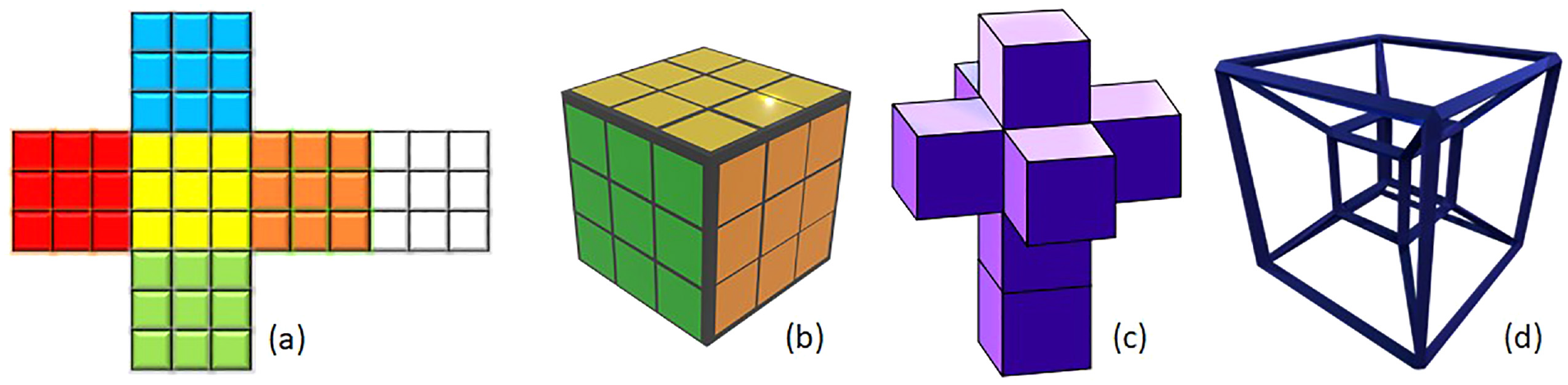
(a) Unwrapped cube, (six squares) (b) cube, (c) unwrapped tesseract (eight cubes), and (d) tesseract.
The prototype is available in the download section at the https://hypercube4x.com website. Video demonstrations showing the capabilities of the proposal are also available such as the 2-minute pitch, 51 which shows the prototype in action, making it easier to figure out how concepts and associated metaphors work and how it compares to the desktop metaphor. This video received a silver award in IWA – Innovation Week Award 2020. 52 Moreover, some inexperienced users left their impressions on the “contributions” section of the hypercube website. More videos are available on the project’s YouTube channel. 53
The HyperCube4x prototype also counts on three applications, called workscenes, developed to explore different types of visualization of information as shown in Figure 2, and shortly described below:
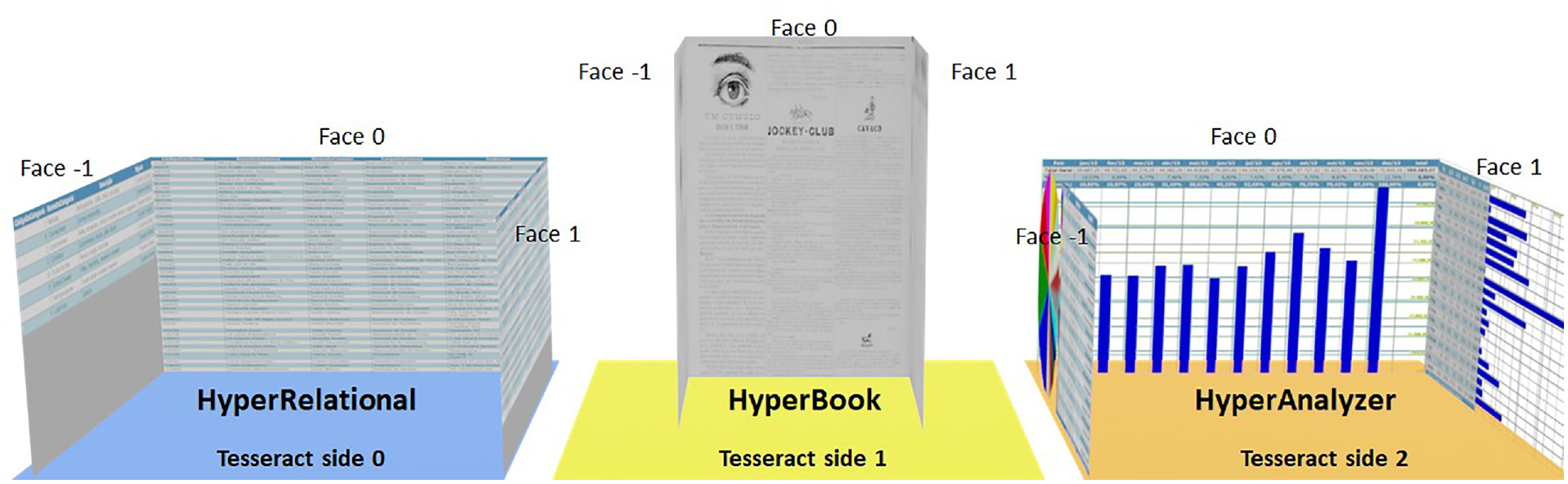
Workscenes created to test the concept.
Workscenes contain the visual part of the application (viewport) and specific built-in features not available in conventional viewports (shown below). In this regard, Figure 3(a) shows a traditional desktop compared to the
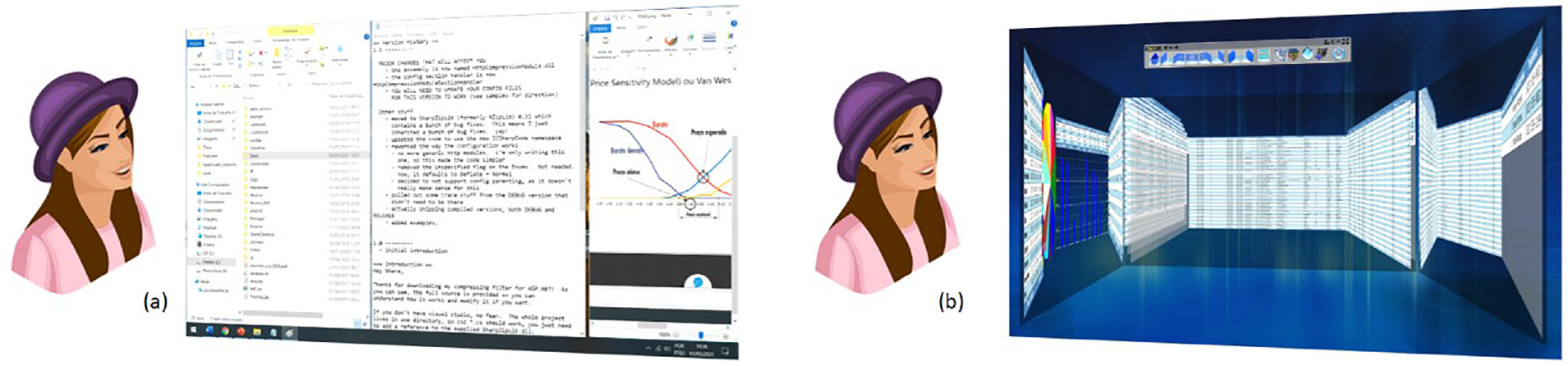
(a) Traditional desktop and (b) hypercube workscene screenshot.
Inside the workscene, information, such as tables/spreadsheets, pages of text, images, or charts, are organized as faces (mimicking the faces of a cube) and tied to an axis called
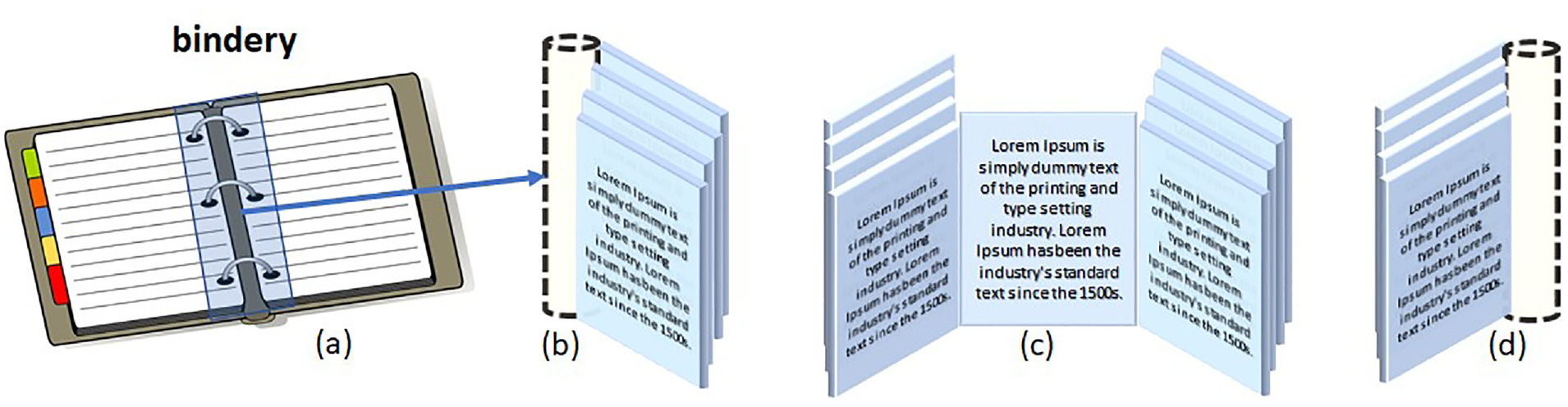
(a) Real bindery; (b) faces bundling right; (c) faces disposed left/right/front; and (d) faces bundling left.
The bindery metaphor also allows users to work with two or more files simultaneously and create a new organization of its pages. For example, Figure 5 shows how an
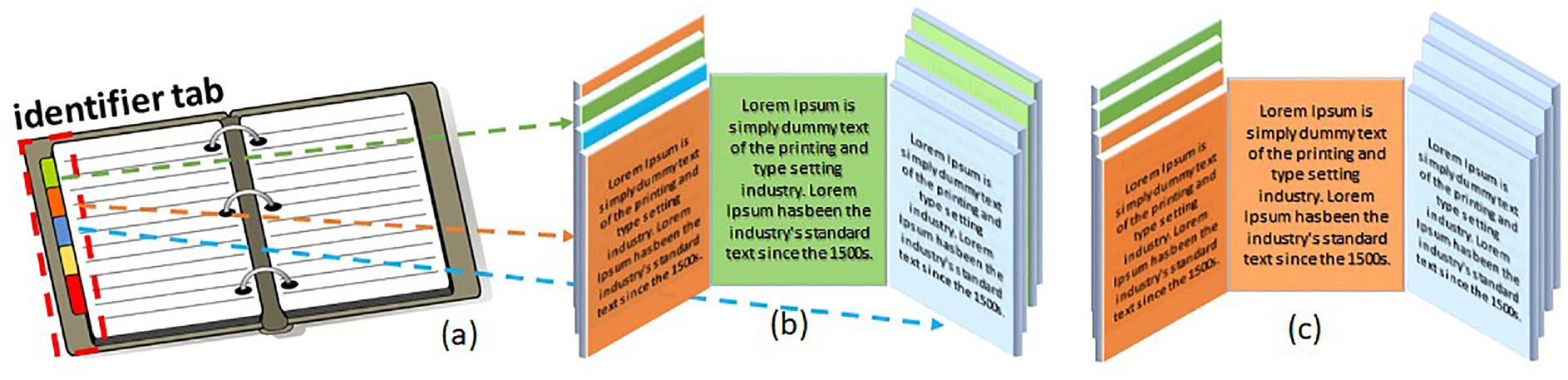
(a) Actual identifier tab; (b) faces marked by tag; and (c) faces organized by tag.
Also, a camera was implemented and designed to integrate with the bindery finely. Given that faces are in predictable positions, focus can move from a general view to a face view with a single predefined movement, started by: a mouse click, keyboard shortcut, gesture, voice command, or other devices. Users can also have manual control over the camera to rotate left/right and detailed views such as zoom in and out. Figure 6(a) and (b) show some predefined positions of the camera: Figure 6(c) shows a predefined camera rotation for a landscape page, while Figure 6(d) shows a manually rotated-zoomed-in position to focus on “Table 1.”
Acceptability test results.
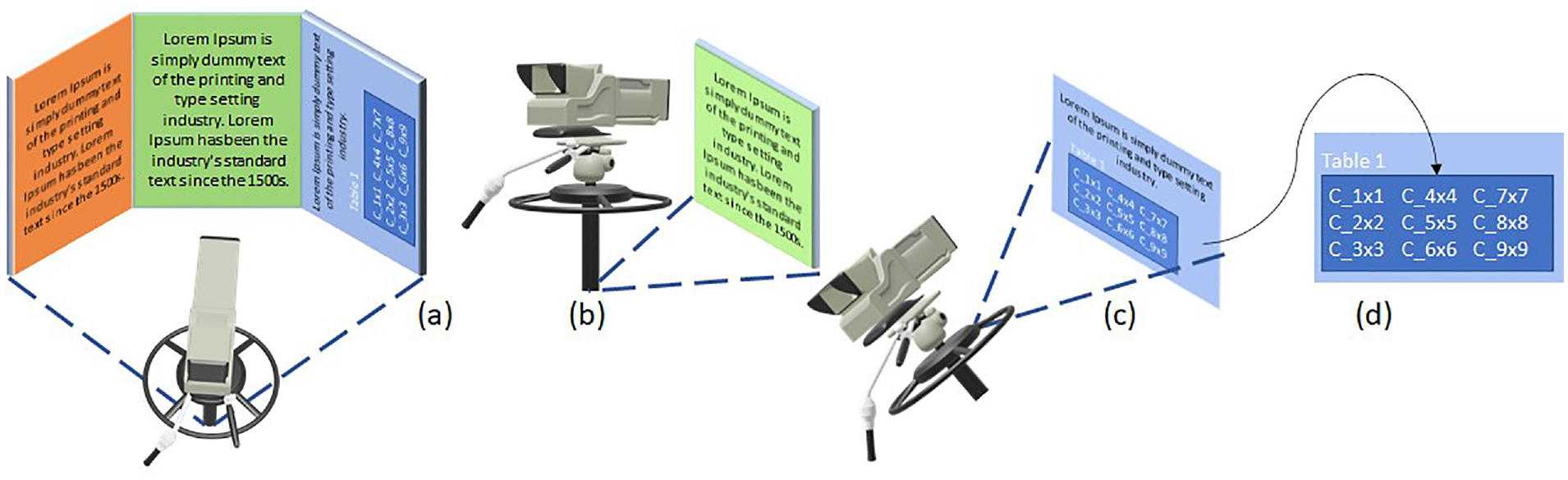
(a) General view, (b) single face view, (c) rotation, and (d) manual zoom.
On a different subject, the transparent area over the workscene is the
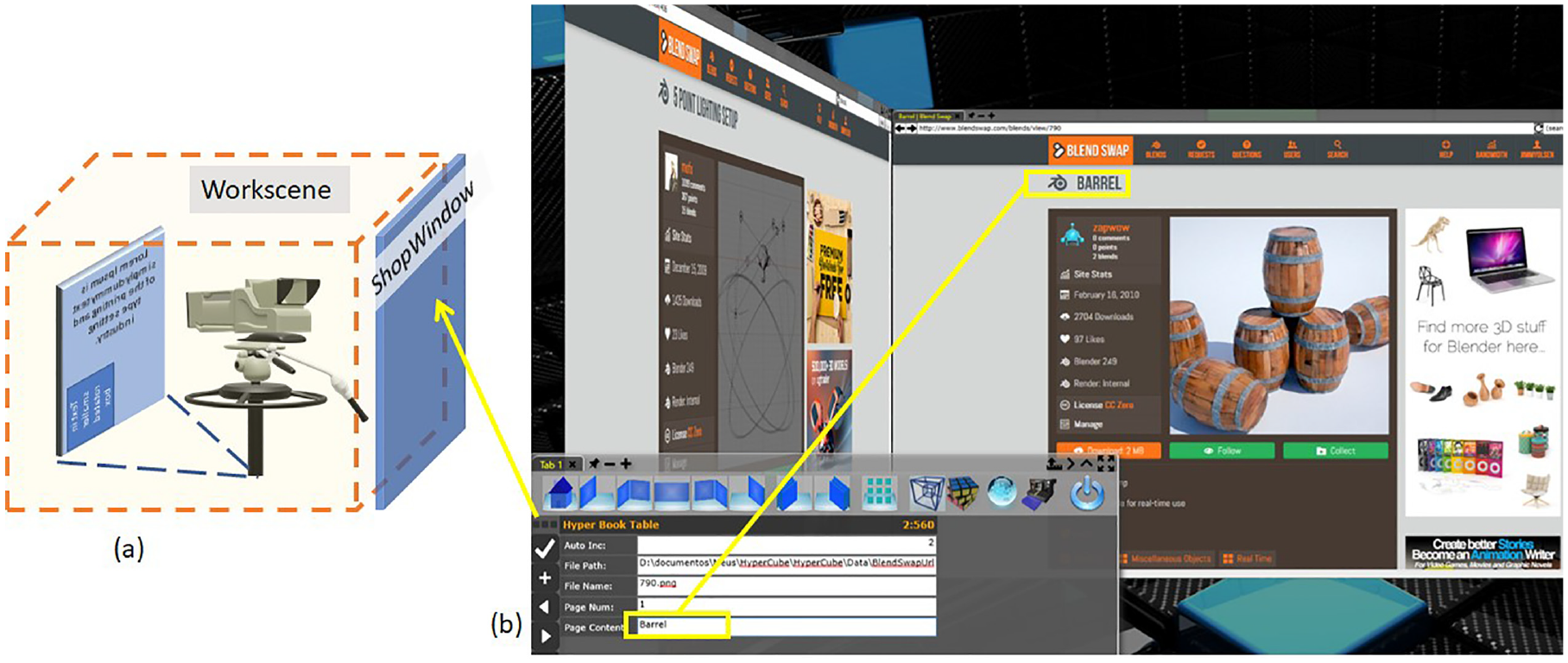
(a) Shopwindow placement and (b) shopwindow and workscene for depth and surface view.
Each workscene retrieves information from different sources and makes it available to the other workscenes through a
Figure 8 illustrates this behavior; first, workscenes one and two loads original data in T0 (Time 0), then both workscenes make changes in T1. Finally, the data axis automatically reflects both modifications (Figure 8 T2). Despite its similarity to other technologies, the revolving door is not a traditional database application since the repository is constructed and managed by demand. It is also different from interoperability technologies such as Dynamic Data Exchange (DDE) and Object Linking & Embedding (OLE), as data are not transferred or converted. It is a proposal to accomplish the recommendation of focusing on tasks rather than tools. 21 Different WorkScenes handle the same data independently, and the data axis keeps track of modifications, so changes are reflected and not lost.
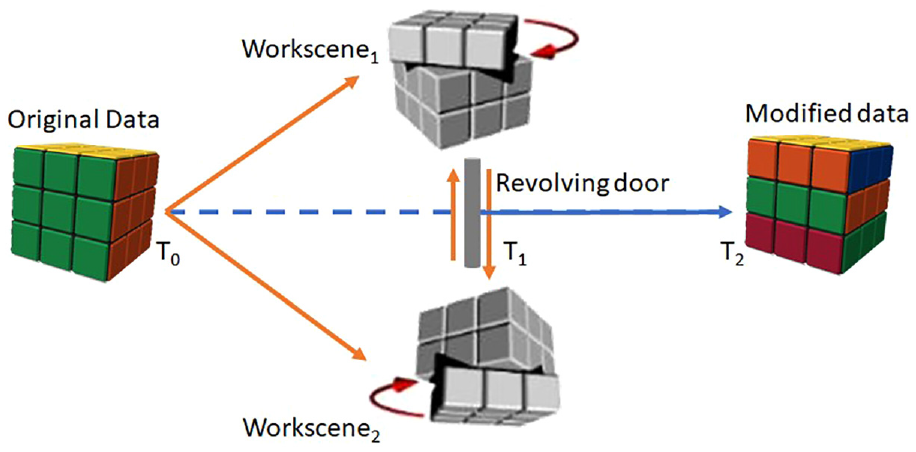
T0 data loaded to workscenes, T1 data modified, and T2 data axis reflect modifications.
Preliminary assessment
The central assumption guiding this preliminary assessment elaboration was: “
Indeed, we executed the test sessions by explaining the prototype and presenting a guide on how to operate it. Immediately after, the participants freely used the prototype for a few minutes, and afterward, the participants executed some simple tasks focused on camera and bindery manipulation. This process ensured that they had minimal awareness of the concepts. Finally, the participants completed a questionnaire to gather their perceptions on the matter.
We conducted the tests with 31 participants whose overall profiles are as follows, (1) They were most Business Administration, Accounting, and Engineering students; (2) Age ranged from 18 to 34 years; (3) Predominantly male; (4) Microsoft Windows® users (70.97%); (5) and with declared fluency levels 4 and 5 (64.51%) in a 1 to 5 scale. In addition, 77.43% of the participants took the test at an on-site lab.
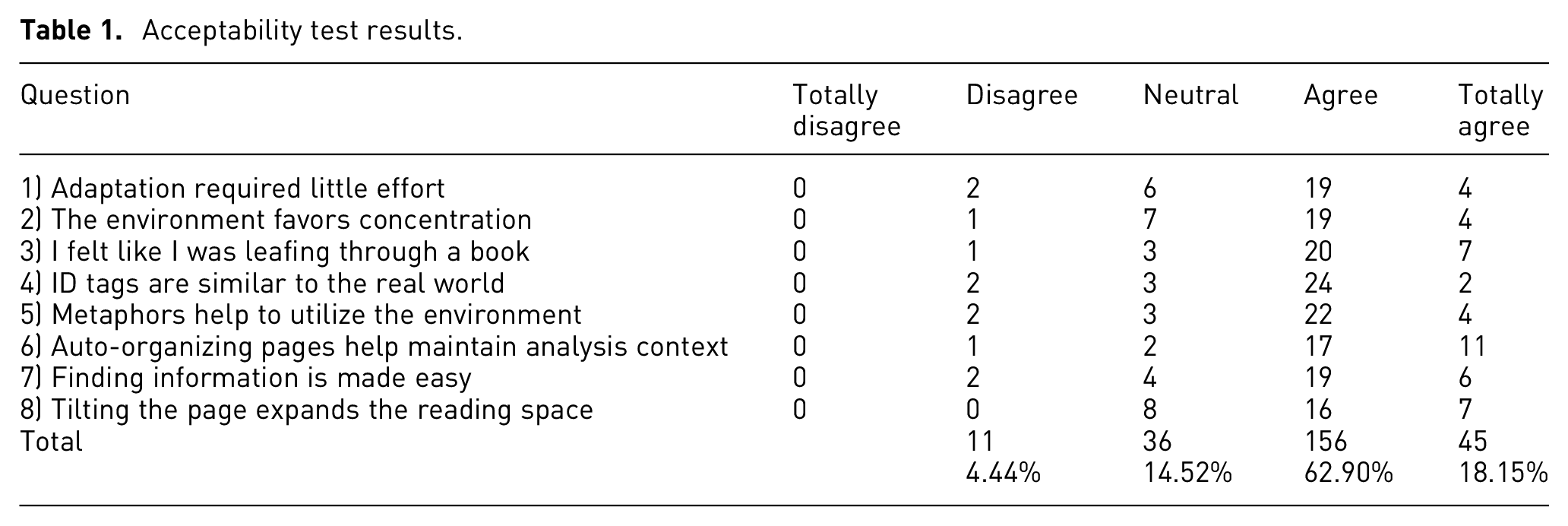
The final questionnaire revealed that 81.05% “agree” or “totally agree” that the proposed concepts offer real gains compared to desktop metaphor issues. Table 1 exposes the various responses from the participants regarding each question:
Despite our expectations for negative user feedback regarding question One, since the core interface elements differ from the desktop ones, we were pleasantly surprised to observe the contrary, indicating that the users may find the interface to be ease-of-use and intuitive. Nevertheless, it is a core concern that further usability tests will need to address.
Questions 3 and 6 present the highest score. Combined, they may indicate that the participants perceived the bindery as a familiar element and worth concerning its capability of keeping faces organized against the claimed hard way of manually organizing windows in desktop metaphor-based systems. Moreover, questions 4 and 5 affirm that the participants perceived the evaluated elements as familiar and relevant. Lastly, the results of question 7 may suggest the worth of spatial cognition in finding information in a virtual reality environment.
Finally, none of the statements was totally rejected (Totally Disagree) by any of the participants, and the number of rejections (Disagree) was minimal (4.44%). In addition, neutral opinions were lower than those who fully agreed (Totally agree) with the statements. It was another pleasant surprise, as many neutral opinions would be acceptable for a disruptive interface proposal if the participants could not identify its potential initially. So, we conclude that the acceptability test exceeded our expectations.
Discussion
Hypercube is a 4D information visualization and management system, device-independent as a concept, which takes advantage of modern hardware, interaction techniques, and devices for an extensive user experience. The proposal occurs when the offer of technological resources grows, and the amount and complexity of information people need to deal with grows even more.
Considering desktop metaphor-based systems such as a plane world people interact with, HCI can be considered the interaction of worlds with different dimensions. A plane working area that seems straightforward at first becomes confusing when crowded with windows. A 3D workspace seems more natural for the human brain, 12 but it is not a perfect real-world replica. So, a fourth-dimensional experience should be carefully presented/exploited to generate benefits because it is unfamiliar to most users. For example, Figure 3(b) shows that viewports placed as faces of another viewport generate an image similar to Figure 1(d). This panoramic view allows the management of open applications and generates the “virtual 4D observer” effect. Therefore, the management WorkScene (HyperCubeScene) is the metaphorical tesseract. Combined with the revolving door, the information can “travel” through workscenes without loading and unloading the file in each application. These behaviors allow focusing on the task instead of the application, as illustrated in Figure 8. Thus, the tesseract is a paradigm for multiple 3D viewport interactions that would share the same data and allow their manipulation from different perspectives and cooperation with other people. Consequently, the hypercube metaphor is not restricted to the properties and behaviors of an exotic geometric shape.
That is why hypercube is presented as a “possible world.” Starting on the geometric properties of the tesseract, combined with the VR properties, such as flow, immersion, presence, and arousal, 54 metaphors and algorithms work together to allow users to experience a parallel world of information, i.e., an approach to make people feel like traveling through a world where everything act to aid them on: ease of learn/use, focus and productivity. Thus, the proposal is more than going “beyond the desktop,” but even “beyond the real world.”
For example, the camera and bindery metaphorically reproduce how people read a book or paper and represent the core operations a user must master. 55 The ShopWindow reproduces some desktop metaphor features, and they can be combined once they are in different planes. “Depth and surface” (Figure 7) techniques allow viewing one workscene and editing data from another as it sits over the camera (Figure 9). These proposals can lead to better use of widescreen monitors while reducing the cognitive load and focusing on processes. 35 If users need to concentrate on some task in the ShopWindow, they can “close the curtains” for better focus. 47
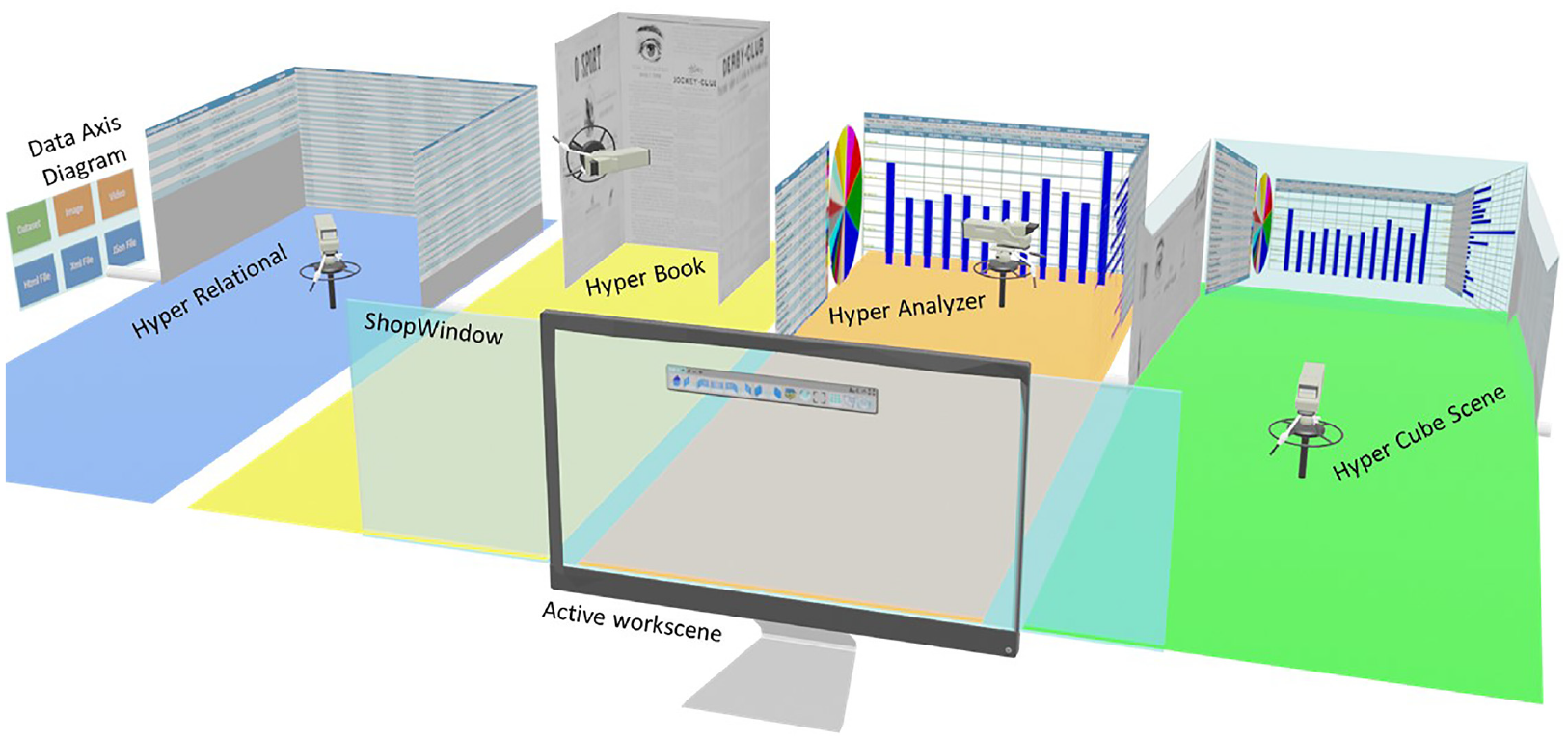
Full representation of HyperCube4x and metaphors.
Indeed, Moran’s dimension states: “the metaphor limits how information is presented.” If, on the one hand, the desktop metaphor was designed to support a simpler environment, on the other hand, the literal implementation of any metaphor will impose its limitations on the interface. Johnson’s words: “The desktop metaphor has as many limitations and conceptual blind spots as its command-line predecessors. The difference is that these restrictions result from an excessive fidelity to the original metaphor itself.” 1 The structural issues of the desktop metaphor limit the offering of new solutions. For example, editing/visualizing a file in many applications needs a feature like the proposed revolving door. In addition, reading multiple files in the same environment, as shown in Figure 5, is impossible without a bindery. Therefore, the tesseract geometric shape does not restrict the hypercube metaphor to its bounds. Future evolution will determine which properties would be worth exploring for better interaction, reading, and visualization information.
The hypercube’s “possible world” approach opens space for better handling of this aspect because it takes advantage of natural human abilities such as spatial cognition, organization, and memory for better exploring VR and responding to four of Stephanidis’ grand challenges: (1) Human-Technology Symbiosis, (2) Human-Environment Interactions, (3) Accessibility and Universal Access, (4) Learning and Creativity, as well as to Shneiderman’s challenges (Promote lifelong learning, stimulate rapid interface learning, and accelerate analytic clarity).
Shneiderman 56 describes the interpretation process as providing an overview and filter first, followed by details-on-demand, which is one of the better-developed features of the hypercube model. First, the camera can quickly switch from a panoramic view of all loaded workscenes to a general view of faces in one workscene. Then, the user chooses a specific face and views detailed information (Figure 6(a)–(d)) while preserving a well-defined spatial organization and removing the need to minimize, maximize, and resize windows. Note that once the desktop metaphor-based systems do not count on a camera, each application must provide proprietary solutions for zooming and rotation.
The predictable behavior of the camera and faces (attached to the bindery) also allows easier integration with other devices and new modes of interaction, such as a joystick, eye-tracking, touch, and touchless gestures or virtual reality glasses (going beyond mouse and keyboard), highlighted by Moran’s fourth dimension. Finally, the revolving door aids in addressing Moran’s seventh dimension: “focus must change from tools to tasks,” as shown in the previous section. Combined, this must result in better interaction (Moran’s sixth dimension).
The following example can help lighten the process: a user is preparing a project that needs input from multiple sources such as (1) database; (2) website text; (3) video footage; and produces outputs such as (1) a written document; (2) chart and analysis; (3) a presentation or a video. Using traditional desktop tools, users must accomplish each part of the work using one application at a time (application oriented). HyperCube allows the loading of all inputs to the
In a desktop metaphor-based system, windows overlap each other. Tilling and stacks are the tools to auto-organize the working area. This approach works fine for a few windows but becomes confusing when many are open. 18 Another issue is that spatial ordering is lost because a window becomes the topmost of the stack when activated. Thus, the user cannot count on it to switch between applications quickly. However, as shown in Figure 9, workscenes can be reordered in HyperCubeScene the same way information faces can be reorganized (see Figure 5). The user can establish a sequence for the workscene as the initial or the solved one. While working, users reorder the workscenes to accomplish some tasks. Finally, they press a single button, and all workscene return to the initial/solved position, as if in a magic cube.
The initial assessment point to a good acceptance of the concepts. The idea was to keep the interface as simple as possible, intentionally avoiding elements that refer to the desktop metaphor to verify how far users needed them. However, as expected, the first evaluation runs revealed the need for prototype modifications and adjustments in the conduction of the session. Indeed, these issues are usability related and, therefore, did not impact acceptability.
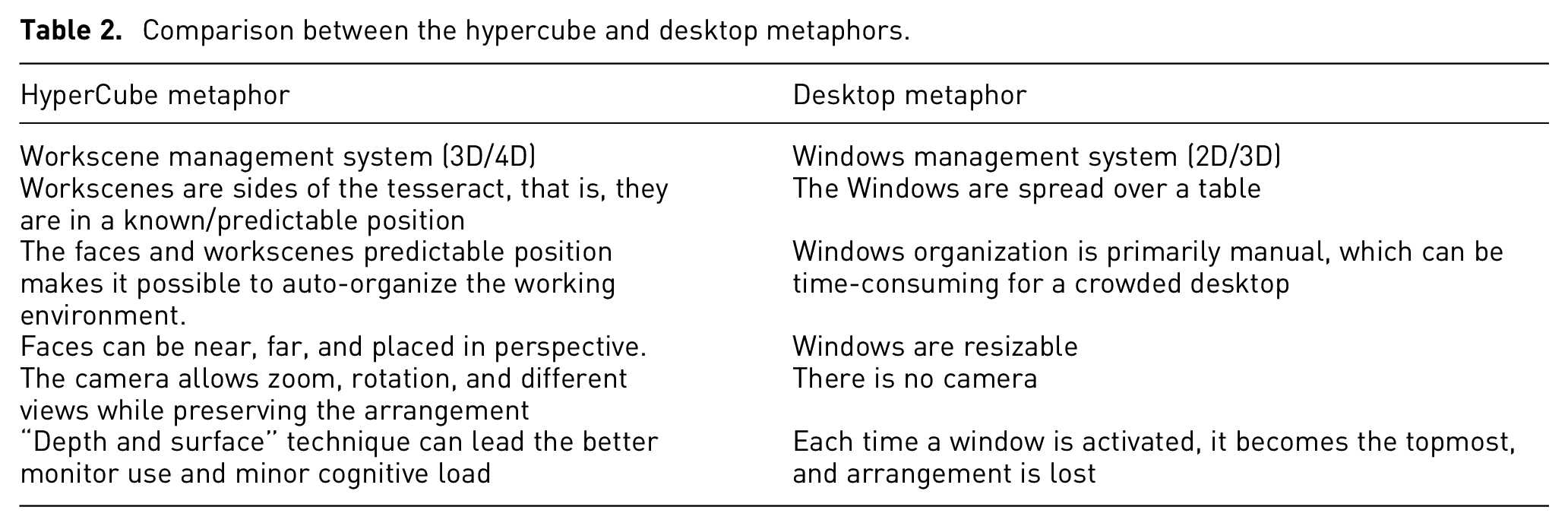
Summing up, the hypercube model is the combination of (1) “depth and surface” exploration; (2) the capabilities of individual workscenes; (3) the HyperCubeScene and the revolving door as a “junction point.” Lastly, a comparison of the significant improvements proposed by the hypercube against the desktop metaphor is in Table 2 below:
Comparison between the hypercube and desktop metaphors.
Conclusion and future work
This article presented a novel information visualization and management system proposal based on the 4D hypercube. By taking advantage of the natural capabilities of the human brain, the proposal is going beyond the traditional desktop metaphor and its limitations by exploring new ways of interacting and visualizing information.
Our focus with this study was Interaction and User Experience. Information visualization relates to each workscene, as each one explores different visualization perspectives. Besides, although introduced, the data axis and the revolving door have the potential to provide much more roles than briefly shown.
Finally, early tests addressed the bindery and camera metaphors because they explored the capabilities of one workscene. The design and implementation of further tests will encompass the complete set of metaphors, workscenes resources, and objective, quantifiable tasks. Overall, user feedback was optimistic. Nevertheless, it is essential to discover the underlying reasons for the current positive User Experience and Acceptability and determine a course of action for more testing, including a mass-scale assessment concerning different user profiles and contexts of use. Indeed, however promising the preliminary results of our tests may look, we acknowledge the need to perform in-depth usability tests to reinforce our findings. Still, we believe these qualitative results may clarify how this new interaction metaphor can improve the User Experience.
Research Data
sj-xlsx-1-ivi-10.1177_14738716221137908 – Research Data for HyperCube4x: A viewport management system proposal
Research Data, sj-xlsx-1-ivi-10.1177_14738716221137908 for HyperCube4x: A viewport management system proposal by Alessandro Rego de Lima, Diana Carneiro Machado de Carvalho and Tânia de Jesus Vilela da Rocha in Information Visualization
Footnotes

References
Supplementary Material
Please find the following supplemental material available below.
For Open Access articles published under a Creative Commons License, all supplemental material carries the same license as the article it is associated with.
For non-Open Access articles published, all supplemental material carries a non-exclusive license, and permission requests for re-use of supplemental material or any part of supplemental material shall be sent directly to the copyright owner as specified in the copyright notice associated with the article.
