




Abstract
The objective of this study was to conduct the first patient usability testing of a mobile health (mHealth) system for in-home swallowing therapy. Five participants with a history of head and neck cancer evaluated the mHealth system. After completing an in-application (app) tutorial with the clinician, participants were asked to independently complete five tasks: pair the device to the smartphone, place the device correctly, exercise, interpret progress displays, and close the system. Quantitative and qualitative methods were used to evaluate the effectiveness, efficiency, and satisfaction with the system. Critical changes to the app were found in three of the tasks, resulting in recommendations for the next iteration. These issues were related to ease of Bluetooth pairing, placement of device, and interpretation of statistics. Usability testing with patients identified issues that were essential to address prior to implementing the mHealth system in subsequent clinical trials. Of the usability methods used, video observation (synced screen capture with videoed gestures) revealed the most information.
Background
Mobile health (mHealth) devices and applications (apps) have become increasingly prevalent, particularly for the management of chronic conditions; 1 however, only a small proportion of studies report user assessment of technology. 2 Furthermore, few developers share whether or not their apps involved end-user feedback. 3 Usability testing of mHealth systems can influence patient engagement, 4 validate initial design, and shed light on user behavior, all elements that hold great potential for increasing the adoption of the technology.
Usability testing is the systematic observation of typical stakeholders under controlled conditions to determine how well people can operate the product.4,5 Quantitative approaches to assess usability include system usage data automatically captured by the technology (e.g. screens viewed by the user) and questionnaires. Additional information can be found using qualitative approaches involving focus groups, interviews, and think-aloud interviews (user inspects the technology while verbalizing his or her thought process). A literature review of web and mobile systems for diabetes found that qualitative methods reveal more usability problems than questionnaires alone; however, almost half of the studies used a mix of the two approaches. 4
Some researchers have used standardized methods to assess aspects of usability recommended by ISO 9241-11.3,6,7 This framework includes the effectiveness of a system (user ability to complete assigned tasks), efficiency (resources required to complete assigned tasks, such as time), and satisfaction (user feedback). Understanding these aspects of usability is important when determining whether changes should be made in subsequent device iterations.
mHealth system evaluated
Mobili-T®, short for mobile therapy, is an mHealth system developed to address limited access to swallowing therapy for patients. The system consists of a wireless data acquisition device and an app for Apple Inc. operating system (CA, USA), iOS. Initial development has been for, and with the input of, head and neck cancer (HNC) patients.8,9 The hardware includes three surface electromyography sensors (sEMG), two active and one ground, that measure the activity of muscles under the chin (submental) during swallows and swallow-like exercises. This information is transmitted via Bluetooth to the smartphone app and presented as visual biofeedback to the user. The hardware is attached to the skin via a single-use adhesive patch.
The Mobili-T app consists of two main modes: Learn Mode and Exercise Mode. The first time the app is opened, the user is guided through a tutorial (Learn Mode) that describes the hardware and charging dock, attachment of the adhesive, placement of the device under the chin, calibration, exercises, and progress interpretation from the summary screens (Figure 1). Completion of this tutorial is required before the first use. Subsequent launching of the app begins directly in Exercise Mode; however, tutorial topics are still available via a Learn Mode icon located on the app tab bar. Exercise Mode guides patients through prescribed sets of different swallowing exercises and displays biofeedback relative to a target line. The target line is a goal set by the system and is based on user performance during calibration swallows. Progress is tracked for performance (i.e. number of swallows where the target was achieved, number of swallows where the target was not achieved, number of trials attempted where the system did not register a swallow, and number of trials remaining to be completed from the prescription), compliance with the prescription over time, and a cumulative number of swallows completed overall.
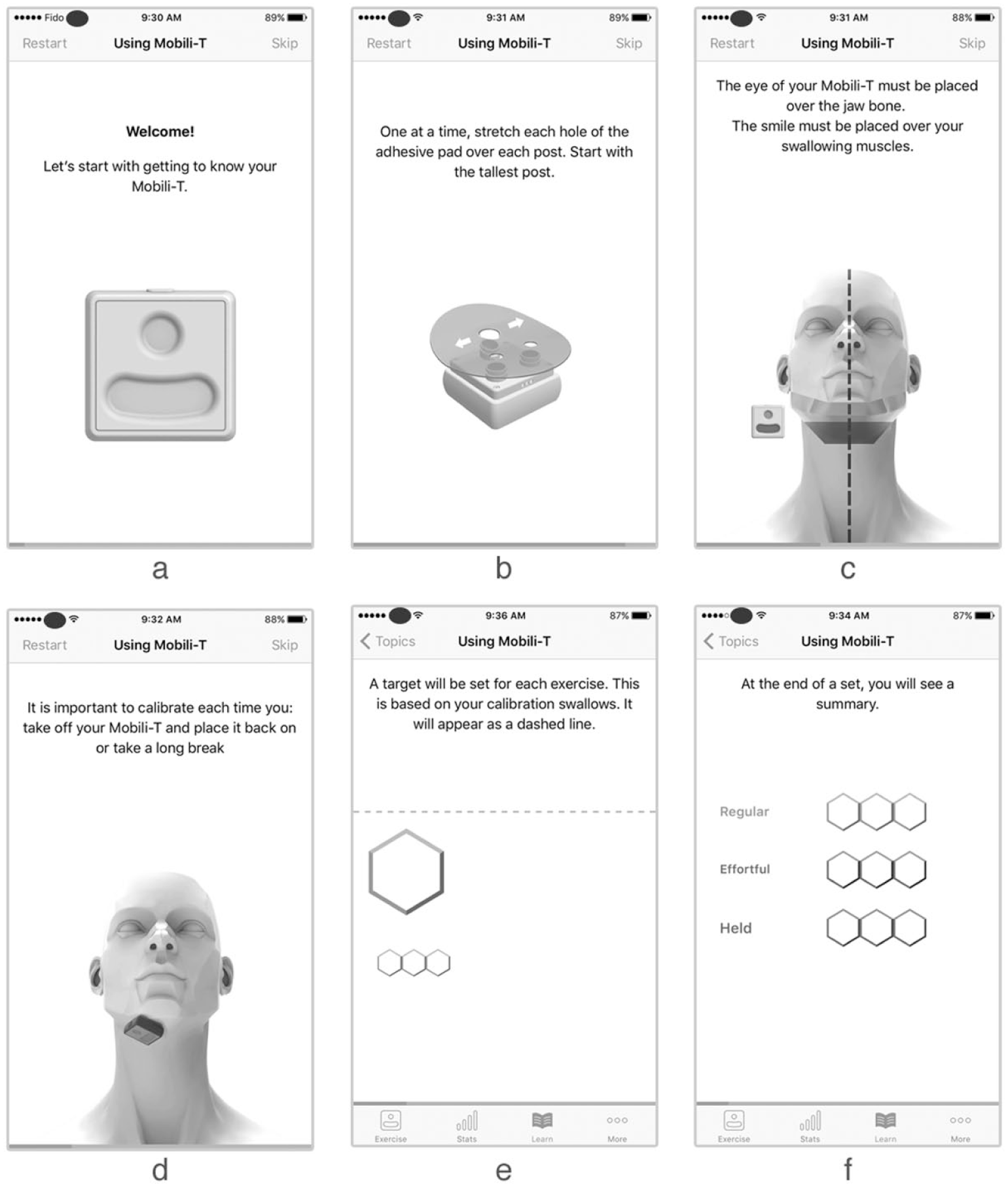
Sample screens from tutorial topics, describing (a) hardware features, (b) adhesive placement, (c) device placement, (d) calibration, (e) completion of exercises, and (f) progress interpretation from summary screens.
The design of the app was influenced by patient feedback from the inception of the project and uses game elements and remote clinician supervision to objectively track and influence adherence to home exercise. Throughout development, the team iteratively assessed the usability of the Mobili-T system internally; however, the evaluation of a fully functioning app had not been completed with patients. In this study, we conducted the first usability testing with HNC patients to identify issues critical to implementation, as well as any additional features that could be improved. Quantitative and qualitative methods were used to evaluate the effectiveness, efficiency, and satisfaction of patients using Mobili-T.
Materials and methods
This study was approved by the Health Research Ethics Board of Alberta Cancer Committee, Canada. Five adults with a history of HNC were recruited from a tertiary referral center. Virzi has shown that, regardless of participant expertise, 80 percent of usability problems are uncovered by the first five participants and little new information is gained from additional subjects. 10 Patients were excluded if they had a history of stroke, traumatic brain injury, or cognitive impairment.
Participants were booked for one-on-one sessions with a speech-language pathologist where they were introduced to the context of the study and encouraged to provide honest and detailed feedback. The clinician presented the system, demonstrated pairing the device to the app, and navigated through the tutorial. Following this introduction, participants were asked to complete five tasks, presented one at a time. Written instructions were left with the patient as reminders and the clinician stepped outside the room. Participants were encouraged to verbally describe their thought process (think-aloud) to troubleshoot any issues, and to only call the clinician back in the room if the task was completed or if assistance was needed. To eliminate confounds resulting from individual performance differences, biofeedback signals were presented using pre-corded swallowing sEMG data. Participants were aware of this.
The Self-Reported Health Literacy and the modified Computer Self-Efficacy Scale (mCSES) were administered at the beginning of the appointment.11,12 The Self-Reported Health Literacy scale is made up of three questions (e.g. How confident are you filling out medical forms?) and uses a 5-point Likert-type scale. The mCSES contains 10 questions and a 10-point Likert-type scale. The questions are based on a short scenario where the participant is asked to imagine that they received a new technology. The mCSES asks questions to determine how confident the participant thinks he or she would feel in using this new technology if, for example, there was no one to help. The same iOS device (iPhone 5s; Apple Inc.), iOS software (iOS 10.3(14E277)), and app (Mobili-T version 0.0.1(146)) were used with all participants. ScreenFlow for Mac (version 6.2; Telestream, LLC, CA, USA) was used to simultaneously capture screens from the iOS device, video from the FaceTime HD Camera, and audio. An additional camera (Nikon D5100) was tripod-mounted and used to record hand gestures. The two videos were later synced in iMovie (version 10.1.1; Apple Inc.) (Figure 2). Following each task, the After-Scenario Questionnaire (ASQ) was administered (three questions using a 7-point Likert-type scale). 13
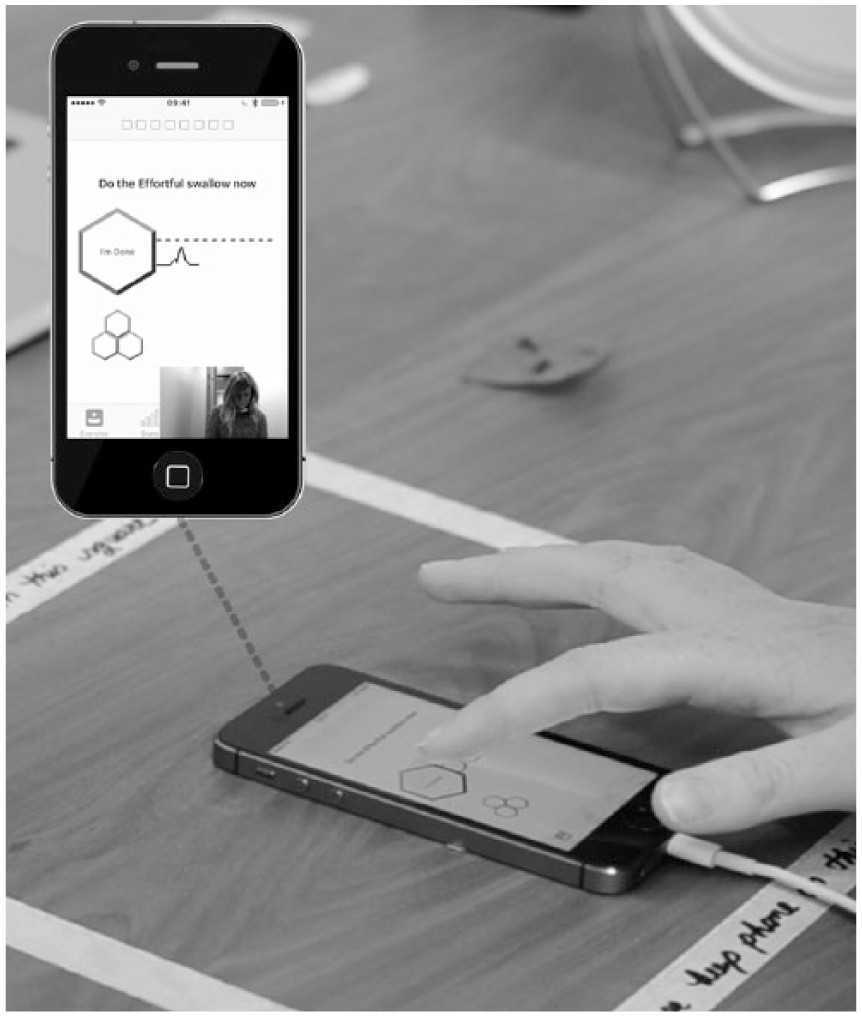
Sample screen from data collection set-up.
Tasks
A set of representative tasks was selected for testing. 6 Participants were reminded that they could revisit tutorial screens by going to the Learn section. Task 1 asked patients to turn on the device and Bluetooth pair it with the phone. Task 2 instructed patients to attach the adhesive pad to the device and place the device under their chins using a mirror if necessary. Task 3 asked patients to start an exercise session, follow the prompts, and complete calibration plus a full set of exercises (three exercise types with three trials each). Task 4 asked patients to navigate to the screen that shows their progress and state out loud how they interpret the information shown in the daily, weekly, and overall summaries. Finally, task 5 required participants to remove and charge the device, as well as exit the app.
Analysis
System effectiveness
To determine how effective the system is, the clinician recorded the number of times she provided assistance. This support was either requested by the participant (by calling her back in the room) or provided if the patient gave up during the task without requesting feedback or assistance.
System efficiency
To assess the efficiency of task completion, the following outcomes were captured: range and average time-on-task 3 and average number of gestures made by participants to complete each task. 14 The start of each task was defined by the phrase “Go ahead”; the end was determined when the participant called the clinician back in the room. For each task, all gestures were recorded, including ones that did not result in display changes. For scrolling motions, a single gesture was counted from the moment the finger touched the screen and left the screen (i.e. participant scrolling up and down without lifting finger from the screen was one gesture).
User satisfaction
Although the ASQ can be condensed into a single scale, in this study, each question was reported separately to understand satisfaction with ease, time, and support. Any comments, verbal or written in the questionnaires, were compiled.
Tasks that could not be completed independently by one or more participants were considered needing critical changes. Non-critical items were those not seen as essential to the successful function of the system, but that may improve user engagement or reduce patient-training time in the initial appointment. O’Malley et al. 3 used a similar approach, where authors categorized errors resulting in incorrect or incomplete tasks as critical; non-critical errors occurred when tasks were completed less efficiently.
Results
Participants
Four males and one female evaluated the usability of this mHealth system (Table 1). Median health literacy was 8 and median mCSES was 90. One participant mentioned he was a Samsung user, whereas another was noted to own a flip-phone. The remaining three patients were iPhone users.
Participant demographics.
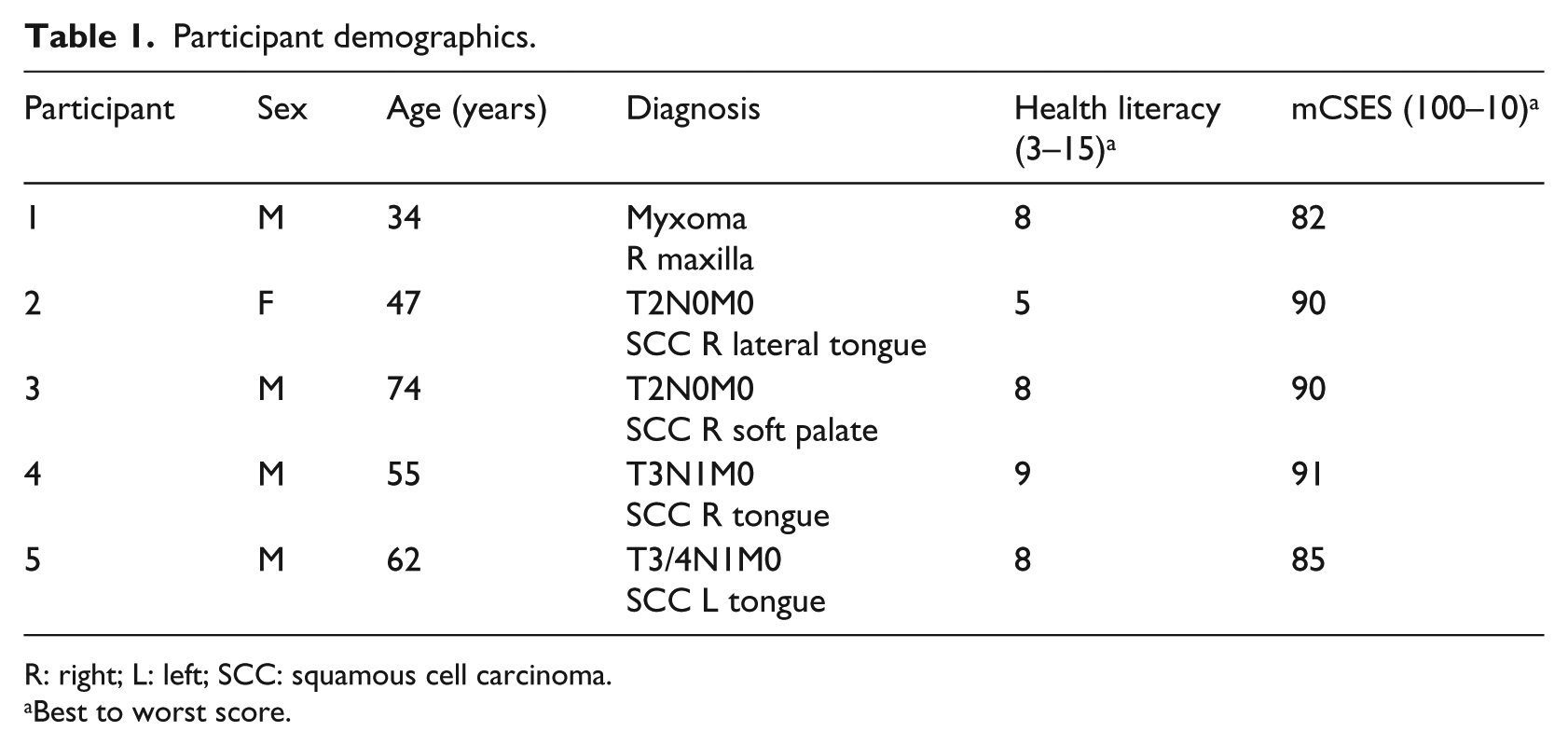
R: right; L: left; SCC: squamous cell carcinoma.
Best to worst score.
System effectiveness
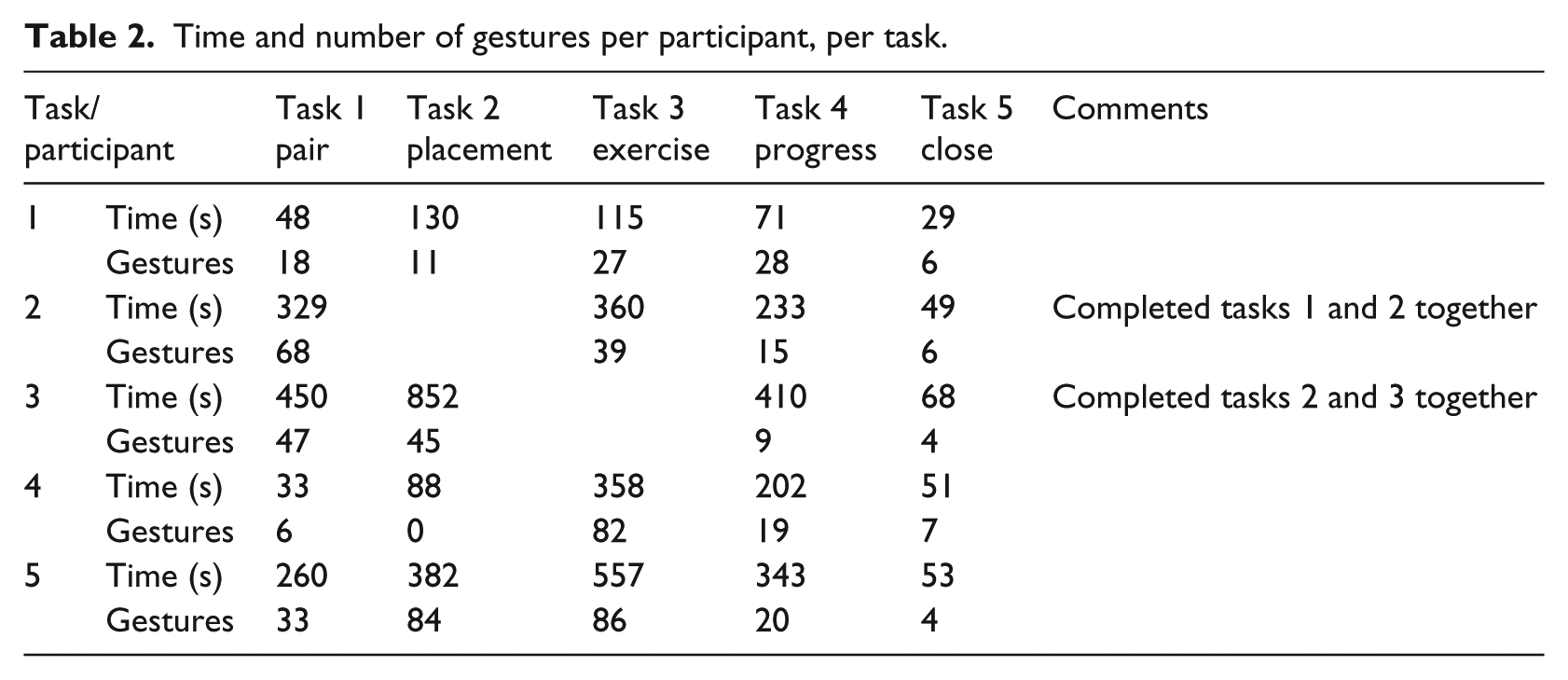
Task 1 required five instances of assistance across three participants. Tasks 2 and 4 required assistance once. Support with task 4 was the only time help was provided without request from the user. Some participants were eager to use the system and progressed ahead of the assigned task, occasionally completing two tasks together (Table 2).
Time and number of gestures per participant, per task.
System efficiency
Table 2 summarizes the resources needed to complete each task. For some participants, additional time and gestures may have been required in the first task (Bluetooth pair with the device) to become familiar with the smartphone. Some participants forgot to pair the device completely and just opened the app. Participant was unfamiliar with the term “pair.” In the Bluetooth section of Settings, some participants focused on the “Devices” heading, rather than “My Devices.” Here, seeing the pinwheel turn led users to believe the iPhone was still searching for the Mobili-T device.
The second task involved attaching the adhesive on the device and placing it under the chin. Some participants had difficulty with the adhesive: one participant pulled it off the device when trying to peel off the backing; another used a pen to stretch the adhesive holes over the sEMG sensors. During placement, two participants pushed on the device rather than press the sides of the adhesive to the skin. Notable comments made by patients during this task included “Because of weak upper body, it took some effort to pull the adhesive patch over the [sEMG] posts” and “I think for the first time I was unsure which side to use for the adhesive; I would get better each time I used it.” With respect to app navigation for this task, one participant attempted to find adhesive information in the “Placement” section of the tutorial; however, this material was located with information on hardware features. Furthermore, users continued to swipe to advance even when on the last screen of a topic, indicating that the progress bar at the bottom of the screen was either not visible or not informative.
The third task (complete a set of exercises) revealed a bug that caused the app to quit unexpectedly for two participants. These patients restarted the app and completed the task a second time. The first participant was forced by the app directly into Exercise Mode; he shared that a link to calibration would have been helpful.
The fourth task (interpret progress screens) presented the most difficulty of the five. Within separate progress meters, each of the three swallowing exercises was represented by a different color (e.g. effortful swallows were red), and levels of success in completing each exercise by a different gradient of that color. This visual language was present throughout the app within the Learn and Exercise modes. One participant indicated that he would like to see a number alongside these progress meters. Some participant comments signified confusion (e.g. “Daily is today?,” “I need more clarification here”) or a vague understanding of what was being represented (e.g. “It didn’t catch”). Furthermore, it was evident that the white section of the bar, used to represent both incomplete swallows and trials that were not detected by the app, was confusing.
The fifth task (close the app, remove and charge the device) did not present any difficulties.
Satisfaction
Figure 3 summarizes the ratings assigned for each of the three ASQ questions, per task, per participant. The best rating possible in the ASQ is a score of 1 or “Strongly Agree.” Visual inspection of this figure shows that, in general, participants scored the app favorably for ease of completing a task, the time it took to do so, and the support information provided. A single average score of 4 was given for “Time” for the task requiring interpretation of progress screens. This user encountered significant difficulty; he was unable to interpret the progress bar length (“But how far should it be?”) and color (“Why is this darker than this?”). Participant 1 rated the third task (Exercise) poorly for “Ease” because he was unable to find a link to return to the calibration section.
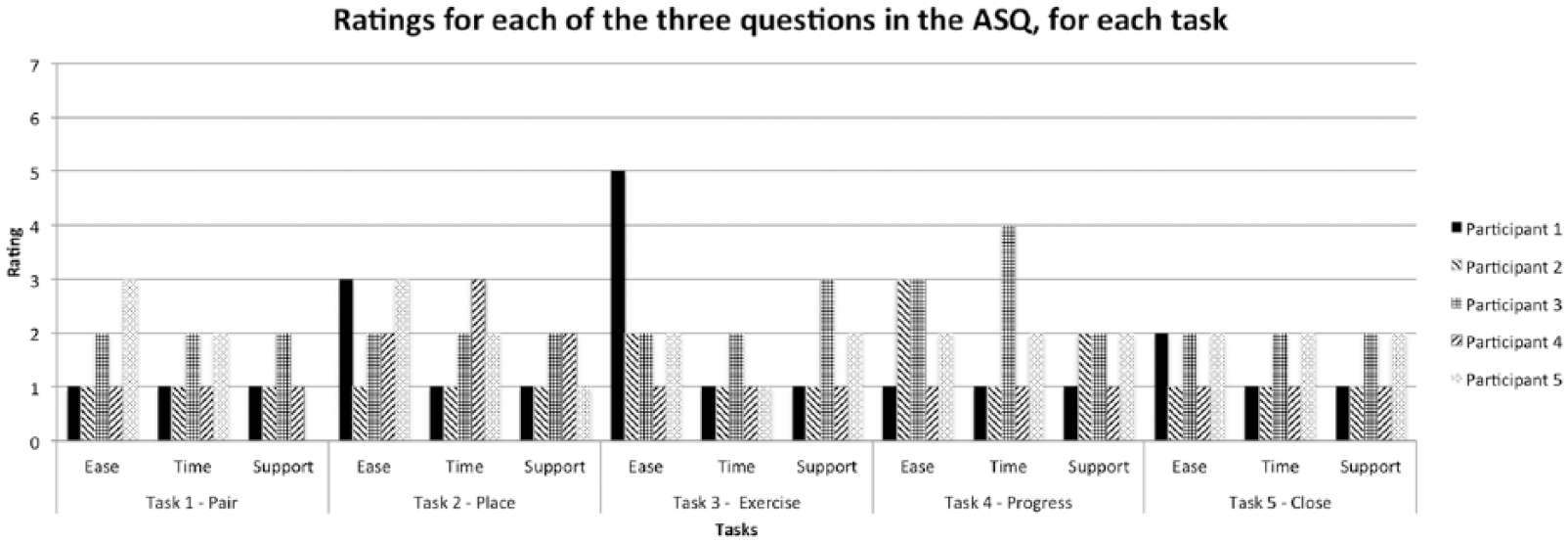
ASQ ratings for all three questions, per task, per participant. 1 = Strongly Agree; 7 = Strongly Disagree. Participant 5 wrote “NA” for the question on support following the first task.
Discussion
This study evaluated the usability of an mHealth system for swallowing therapy with HNC patients by employing ISO usability standards. Our aim was not to compare usability between different types of users or patients. Although the number of times assistance was requested (effectiveness) allowed the development team to prioritize recommendations, the length of time, and number of gestures (efficiency) was less meaningful. Watching videos of participants interact with the system and attempt to troubleshoot was the method that provided the most valuable information and revealed usability solutions that were either more intuitive for users (based on observed behavior) or specific to common issues. For example, whereas participants verbally shared that they were unable to pair the device, the video showed which displays in Settings were troublesome and why. This led to tailored explanations regarding pairing (e.g. “If a loading symbol appears beside ‘Other devices’, it can be ignored; Lost? Accidentally selecting the ⓘicon will bring you to your device’s information page. Navigate back to the ‘Bluetooth’ menu by selecting the back arrow at the top of the screen”). Finally, satisfaction questionnaires facilitated discussion following each task and could be used to evaluate modifications to future iterations; however, most scores clustered at the positive end.
The first task required the most support and was deemed critical to address before sending patients home with Mobili-T. Although participants were shown how to pair the device to the app in the same session, no in-app tutorial existed on this topic. Some level of support on pairing should be provided. The second critical issue was with placement. Although the development team anticipated that positioning of the device under the chin could be a challenge, the main issue was not this, but rather working with the adhesive. The following recommendations were put forward: move the adhesive tutorial to the Placement section (where users expected to find it) and include an extra screen instructing patients to push down on the edges of the adhesive. The final critical issue occurred with the fourth task, where patients were asked to interpret progress visuals. Here, it was recommended that percentages be added to the meters and that a new color gradient be introduced to distinguish swallow trials that were not completed from those that were attempted, but not registered by the device.
Finally, recommendations were made to improve the usability of the system. These included attaching a tag on the adhesive backing to facilitate peeling, adding a message informing users they reached the end of a tutorial topic, fixing app bugs, and providing users with a “Calibrate now” link, visible in Exercise Mode.
Future usability testing of Mobili-T should include an opportunity to engage with the system over longer time periods as this may identify different issues and reveal whether or not current issues were resolved. In this study, some participants interacted with the system beyond the assigned task, unwittingly completing two tasks together. This may be due to trait differences associated with a willingness to try out new technologies. 15 Whereas the mCSES was used to determine the level of self-efficacy with new technology, all participants self-rated high on this scale. In fact, the patient with a flip-phone self-rated the highest, indicating that self-efficacy and early adoption may be unrelated. Although systematic usability testing can result in a comprehensive set of variables, 6 it is possible that a more organic interaction with the system would yield additional information on how users expect the app to work and how to troubleshoot problems. For example, Georgsson and colleagues used a multi-method approach to evaluate an mHealth system for diabetes and found that usability testing alone only detected half of the issues experienced by patients, while post-testing interviews revealed close to another third.
Although there are likely additional issues that remain to be uncovered during long-term home-use of the Mobili-T system, the nature of the issues identified by patients, but not the development team, rendered usability testing at this stage a critical step before any additional clinical trials.
Conclusion
The aim of this study was to conduct usability testing with HNC patients and identify any issues that needed to be addressed before sending patients home with the system. The version of the Mobili-T system used was an iteration deemed sufficiently functional and usable by the development team. Critical and non-critical issues were found with a sample of five participants. This work also revealed that, for the purposes of identifying and understanding issues related to usability, qualitative methods were better suited than quantitative ones. This first patient usability testing of the Mobili-T set an example for testing during the development of a mHealth device for swallowing therapy in patients with HNC.
Footnotes
Acknowledgements
The team would like to thank all patient participants for their time. We also would like to thank Mr Fraaz Kamal, Mr Kent McPhee, and Webzao for their assistance in developing the Mobili-T® app, and Mr Dylan Scott for his work on the Mobili-T hardware and charging dock.
Declaration of conflicting interests
The author(s) declared the following potential conflicts of interest with respect to the research, authorship, and/or publication of this article: G.C., B.K., and J.R. are inventors listed on a patent for the mobile swallowing therapy device. The patent application was made through TEC Edmonton Office, University of Alberta (file number: 2014015. No commercial interest has been shown at this stage).
Funding
The author(s) disclosed receipt of the following financial support for the research, authorship and/or publication of this article: This work was supported by Alberta Cancer Foundation Transformative Program Grant (26355) and Alberta Innovates (AI) Clinician Fellowship (201400350).
