




Abstract

Ms. Veliz is a teacher in an inclusive preschool classroom that serves young children with a variety of strengths and support needs. Her classroom has a diverse group of children and families, including Hwan, a 4-year-old child in a family who recently moved from South Korea; David, a 5-year-old child at-risk for social delays; and Amy, a 4-year-old child who has a diagnosis of autism spectrum disorder (ASD). The program year has just started, and the children are adjusting to new classroom environments and routines. As Ms. Veliz reflects on the past few weeks, she notices that transitions are tricky for children and staff. She remembers one day when she announced that it was time to clean up and sit on the carpet for circle time—Hwan and Amy continued to play, and other children began throwing toys on the floor. When she walked near them to individually give clear directions to end their play and start cleaning up, David started yelling “No! No!” while Hwan took out another toy car and began rolling it on the track. Amy maintained her focus on making alphabet puzzles until Ms. Veliz approached her and demonstrated putting the puzzle piece in the bin, which immediately made Amy start crying. Ms. Veliz wonders how she can support smooth transitions in her classroom—this isn’t working.
Young children need support for smooth and successful transitions within and across preschool classroom daily routines. Transitions in classrooms include children moving from one activity to another (e.g., cubbies to circle time area) or from one context to another within the same activity (e.g., drawing a picture with markers to cutting it with scissors). Because some children exhibit lower engagement (Vitiello et al., 2012) and experience higher levels of stress during transitions (Sterling-Turner & Jordan, 2007), they may need additional support in understanding clear expectations on what to do and how to be successful in transitions (Hemmeter et al., 2012). Ineffective transitions may result in children engaging in inappropriate behaviors that can negatively impact their learning during and after transitions (Ostrosky et al., 2003). Thus, educators’ careful planning for transition in classroom routines can help young children make smooth transitions and promote their learning.
Many strategies can be used to make potentially challenging transition times less stressful and frustrating for young children and early childhood educators. In this article, we present visual cues created and implemented using mobile technology as one proactive strategy that can be effectively incorporated into daily classroom routines in early childhood settings to support in-class transitions for all children. In alignment with the DEC Recommended Practices (Division for Early Childhood [DEC], 2014), utilizing visual cues allows early educators to incorporate universal design for learning (UDL) principles to communicate with children about expected transition behaviors (i.e., E2). Early educators can also make adaptations and modifications in teacher-delivered directions during the transitions that are tailored to an individual child’s needs (i.e., INS4) using visual cues. We begin with a discussion of why transitions can be challenging for some children, and how mobile technology-based visual cues can be an effective strategy. Then, we provide steps for implementing mobile technology-based visual cues to support transition during daily classroom routines.
Challenges During Transitions
Challenges in transitions are caused by a number of factors, and children with a wide range of backgrounds may experience difficulties without adequate supports. For example, children with lower receptive and expressive language skills (i.e., children with or at risk for language delays, or children who are dual language learners) may take a longer time to process directions. Children who need support for language processing may have difficulty listening to and comprehending the educator’s verbal directions (Hollo et al., 2014). This may lead to feelings of frustration for young children. Children’s frustration can lead to externalizing behaviors and noncompliance (Chow & Wehby, 2018). In Ms. Veliz’s example, David’s yelling and Hwan’s playing behavior in response to teacher’s direction to clean up were viewed as challenging behavior. However, this may have been caused by their difficulties in understanding spoken language or not knowing expectations during the transition.
Children with autism spectrum disorder (ASD) typically have difficulty following verbal directions during transition times (Lequia et al., 2015); children at risk for social delays may also experience these difficulties (Zimmerman et al., 2020). Both groups of children are likely to engage in challenging behaviors often related to the relationship between language and behavioral development (Hollo et al., 2014). The social-communication differences that children with ASD or social delays exhibit may negatively impact listening and responding behaviors in classroom settings. Some children’s preferences for predictable routines and repetitive behavior patterns can also create challenges as transitions signal a change in activities or different expectations in a new environment. Given transitions may increase anxiety levels caused by the unpredictability of the environmental change, children may be less likely to engage in appropriate transition behavior. In the vignette (above), Amy may not have the ability to process multiple steps of directions that were verbally given to her and felt that Ms. Veliz was suddenly taking away her puzzle pieces. Moreover, transition times are less child-directed and naturally more teacher-structured, and often times the tasks may be less defined or motivating for children. However, with well-structured, visually presented directions, children can be motivated to engage in appropriate transition behaviors.
Visual Cues and Challenging Behavior
Children exhibiting challenging behavior during transitions are also likely to be unengaged in transition tasks. Strategies to support all children’s engagement during transitions should promote children’s independence as they move through each expected transition behavior. Proactive strategies such as visual cues can promote children’s engagement, prevent challenging behavior, and minimize the potential need for intensive, reactive adult support during in-class transitions (Banerjee & Horn, 2013; Hall et al., 2019).
Visual cues are images, photographs, drawings, text, or materials paired with, or used in replacement of a verbal cue. Visual cues provide children with explicit information about what is going to happen next (Zimmerman et al., 2017), steps of a required activity (Zimmerman et al., 2017, 2020), or ways to organize materials (Bennett et al., 2011). Information about the routine, activity, behavioral expectations, or skills to be demonstrated during an activity or routine may be included in visual cues (Blair et al., 2010). The benefits of using visual cues include improved children’s attentiveness to directions, independence, increased communication skills, and a reduction in the likelihood of children exhibiting challenging behaviors (Butler & Ostrosky, 2018). Visual cues can be mobile (e.g., digital schedules; Zimmerman et al., 2020), static (e.g., printed images of routine steps; Zimmerman et al., 2017), or editable based on individual activity requirements (e.g., manipulated icons or cues; Bennett et al., 2011). In addition, visual cues allow children to access the environment, reduce response latency (i.e., the amount of time that lapses between the teacher’s directive and the children beginning to engage in the specific behavior directed by the teacher), decrease the duration of tasks (i.e., the total amount of time children engaging in transition behaviors), and guide and maintain children’s attention (Hume, Sreckovic, et al., 2014). Moreover, visual cues can be paired with child preferences to increase motivation for young children exhibiting challenging behavior who have disabilities (Hume, Wong, et al., 2014) or who have support needs that may not yet require specialized services (Zimmerman et al., 2020). Thus, using visual cues during transitions can prepare children for expected or unexpected changes in their environment and support their engagement.
Ms. Veliz shared with her mentor teacher the challenges she has been encountering during transition times. The mentor teacher recommended Ms. Veliz consider using a visual schedule and showed an actual example of a visual schedule board that he had been using in his classroom. Although Ms. Veliz agreed using visual materials can be helpful, she wondered, “Would I be able to carry the visual schedule board to all the different places we transition to, such as the cafeteria, outdoor playground, or the gym?,” ‘What would I do if some children were not interested in this picture board?.’ The mentor teacher and Ms. Veliz started to brainstorm how to make visual supports easier and quicker to create and present to children.
Mobile Technology Visual Cues and UDL
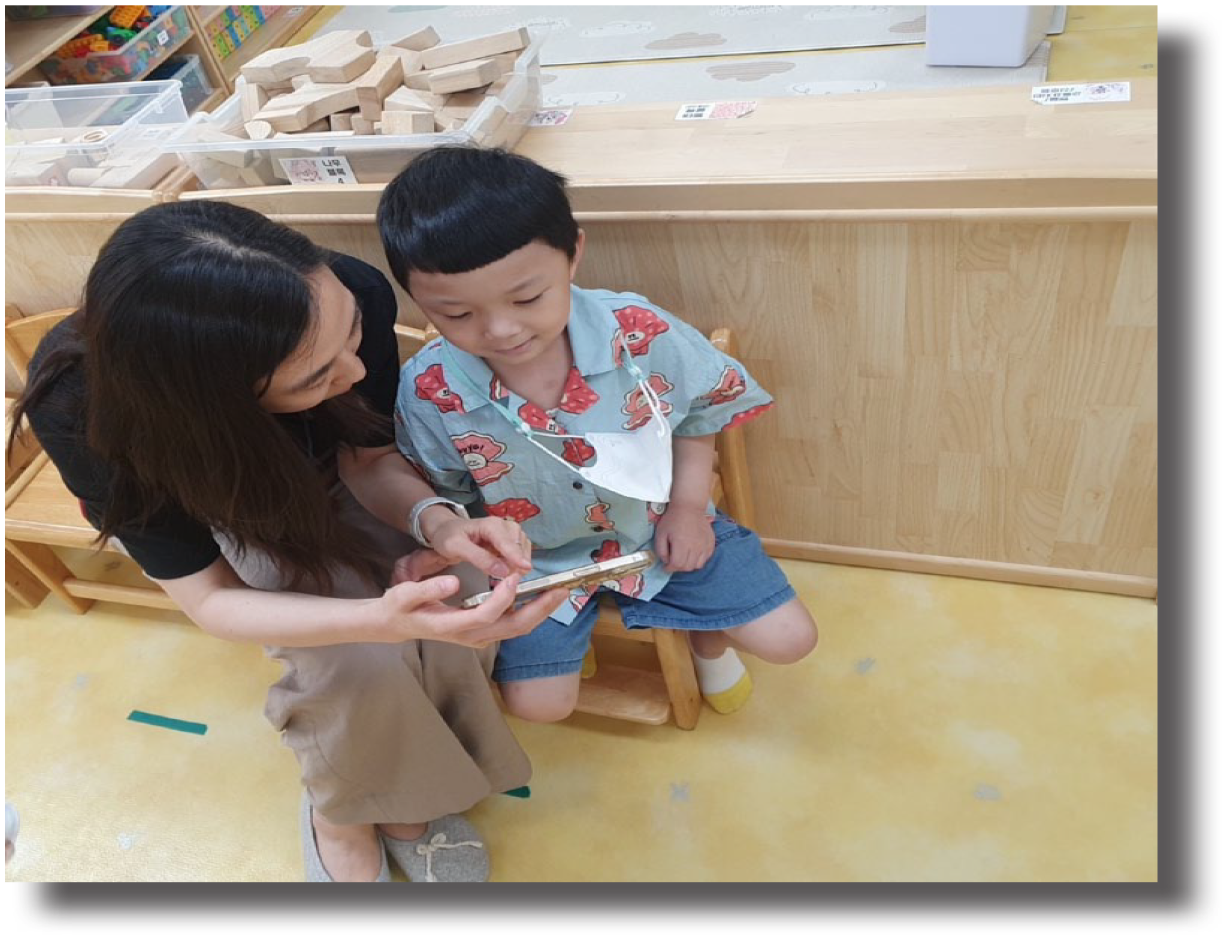
Although visual cues can be created using objects, photographs, pictures/symbols, visual boundaries, or text, integrating mobile technology allows for a variety of options to be included without the need for additional materials (Sung et al., 2016). While visuals have long been suggested in early childhood classrooms to support young children’s interaction with their environment, our discussion of mobile technology-based visual cues provides an innovative opportunity for educators to use technology-based devices commonly found in classrooms to quickly and feasibly implement visual cues. Rather than using static images that must be printed, laminated, and updated to reflect each child’s identities and individual needs, technology-based visual cues can quickly be created, adapted, and implemented with a fast snap of a photo or recording of a video. Using mobile devices, educators in the classroom can integrate audio functions, videos or animations, or photographs of the classroom environments. While mobile technology-based visual cues can include video (similar to video modeling procedures; Mitsch et al., 2021), they can also simply be a series of photographs, or a single quick video clip or photograph snapped with a piece of technology. The benefit of mobile technology-based visual cues is their accessibility and inclusiveness for all children, which aligns with UDL principles (CAST, 2018). Mobile technology-based visual cues can provide children with a variety of ways (e.g., audio, visual, video) to acquire and integrate information regarding routines and activities (i.e., multiple means of representation), an individualized way to demonstrate transition behaviors (i.e., multiple means of expression), and multiple ways to become motivated and excited about engaging in routines through embedding children’s preferred sounds or visuals (i.e., multiple means of engagement).
Other benefit of using mobile technology-based visual cues in early childhood classroom settings is its effectiveness and feasibility. First, young children, regardless of their disability status, can be more motivated and engaged in listening to educators’ directions during the transition if the direction is augmented with mobile technology-based visual cues (Blackwell, 2014). Using mobile technology allows for instructional materials to be tailored to an individual child’s strengths. For example, educators can visually present cues for transition to communicate expected transition behaviors, building on children’s existing visual strengths. Auditory information or sounds can be embedded for children who learn through listening, and children’s home language can be visually or auditorily incorporated for dual language learners. Second, educators can create, edit, and present auditory and/or visual information to children in the classroom using one portable device. This provides for time efficiency and convenience as educators can use mobile technology-based visual cues in any context/setting for whoever needs support during any point of a transition period.
After brainstorming with the mentor teacher, Ms. Veliz decided to use her mobile phone to create visual cues which allows her to incorporate various forms (e.g., different languages) to meet the diverse needs of children. For example, she can include Korean in visual cues for Hwan, who just began to learn English and better understands directions that are given in his home language. For David, she can download and use photos that are representative of each transition step to increase the likelihood of his response because he typically responds better when augmentative communication is used. She may also insert small alphabet letter figures on the side of each visual for Amy, who is motivated in activities that involve visual representation of alphabet letters. With these new ideas, Ms. Veliz and the mentor teacher started listing the steps to plan, use, and monitor visual cues for her classroom.
Plan, Use, and Monitor Visual Cues
Planning Visual Cues
Step 1: Identify Target Transition Contexts/Settings
The first step for early educators is to identify when, where, and for whom transition times can be challenging. In-class transitions can include transition within the activity or across activities, across social partners, and between locations. A pre-assessment form (see Figure 1) can be used to gather contextual and child information, such as the type of visual cue, form of cue, and children’s preferences that can be incorporated into the visual cue. Identifying a specific child helps educators tailor the support type and form of visual cue, and allows them to plan for cues that incorporate that child’s preferences.
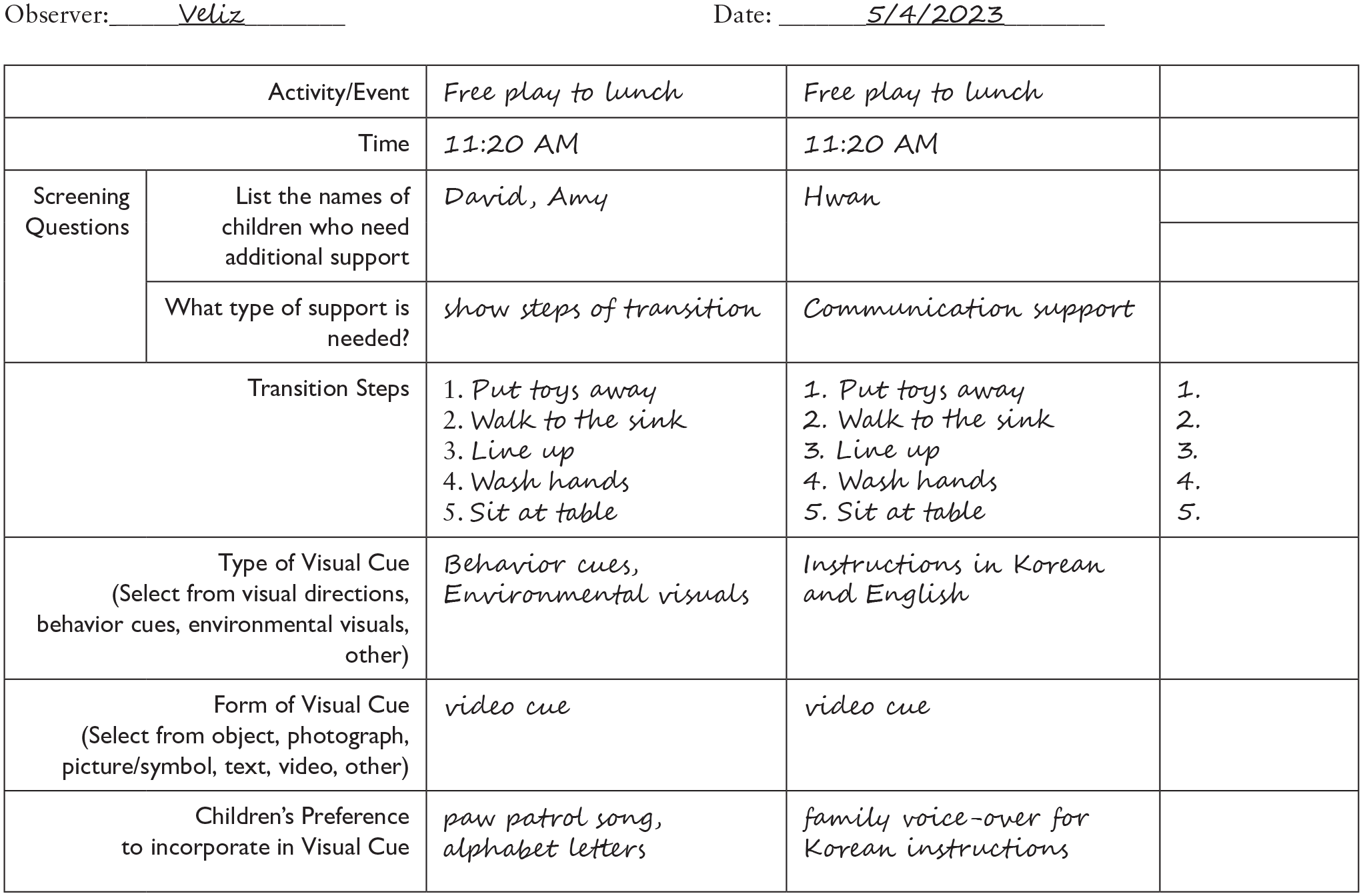
Visual cue pre-assessment checklist sample
Ms. Veliz completed the Visual Cues Pre-assessment Form (see Figure 1) to identify who can primarily benefit from additional support, what type of support, the type and form of visual cue, and what times of the day she needs to support children’s transition. As she reviewed the completed form, she noticed that transitioning from free play time to getting ready for lunchtime was the most challenging time of her daily routine.
Step 2: Prepare and Create Visual Cues
Once the type of visual cue is decided, educators need to prepare equipment such as mobile devices, apps to create the video, or music/sound files that are necessary for creating visual cues. Using mobile devices, educators can take photos that represent the area or activities in the transition. For example, a photo of a book can represent the literacy center, and a photo of a sink can represent handwashing. Educators can place photos in sequential order and transform them into video clips for children. Audio recordings or music that children prefer can also be added to these video clips. Examples of free mobile phone apps that can be used to create these videos are presented in Table 1.
Example of Mobile Device Applications for Creating Visual Cue
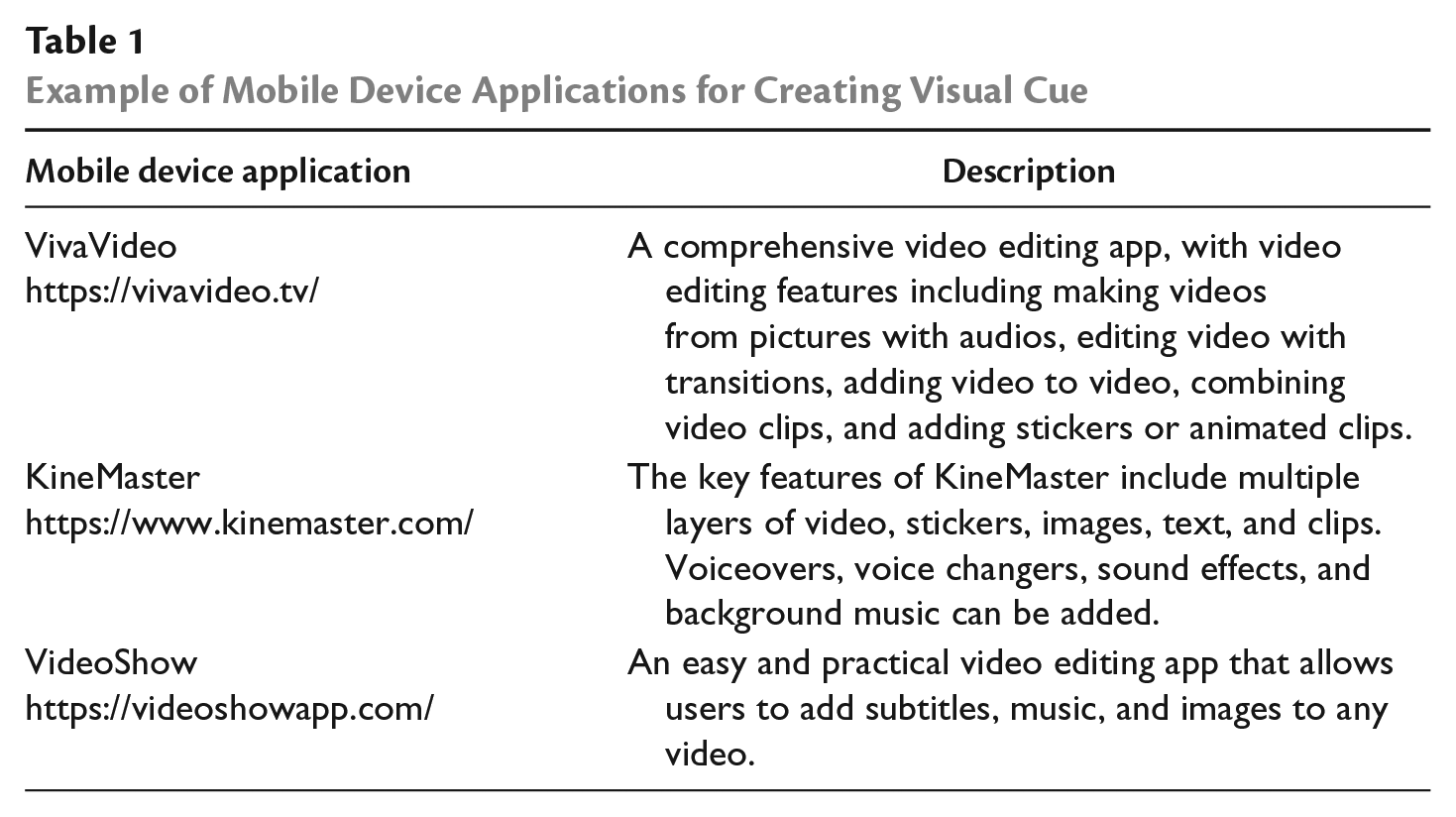
Using the information she had on the pre-assessment form, Ms. Veliz gathered materials for creating visual cues by downloading the VivaVideo app on her mobile phone. She took photos of materials or the environments that represent each step of the transition, downloaded music that children prefer, asked Hwan’s parents to audio record “It’s time to clean up and get ready for lunch” in Korean, and inserted image files of alphabet letters. Next, she put together the photos of each step in sequential order, embedded music, and alphabet letters, and incorporated video recordings into the video.
Using Visual Cues
Step 3: Introduce Visual Cues to Young Children
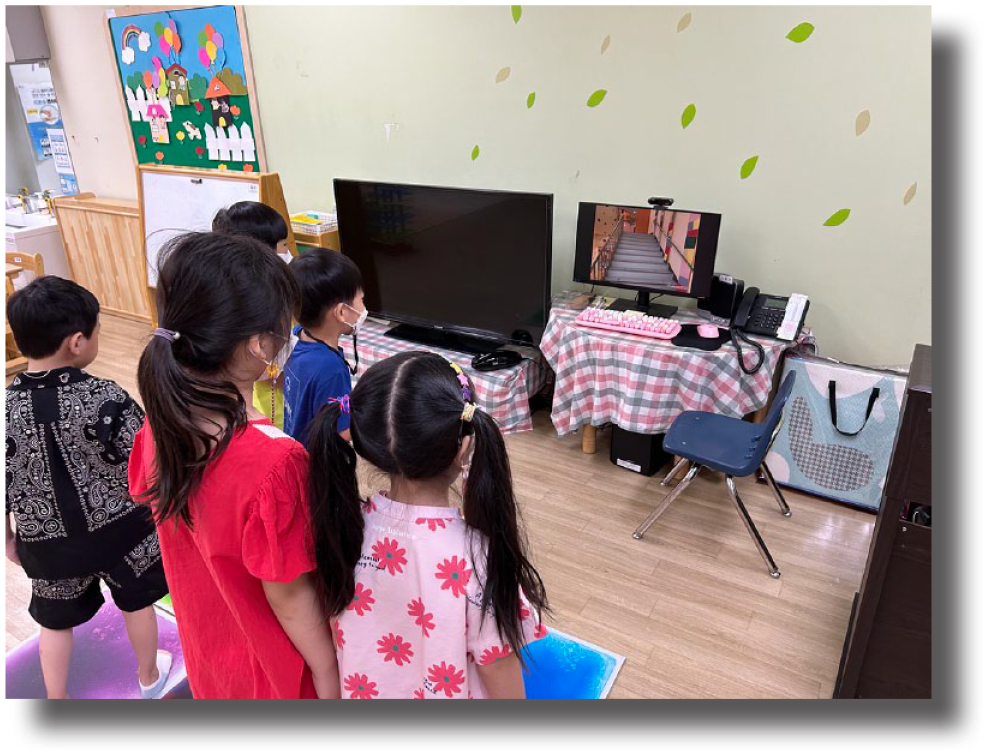
The third step is to show children the developed visual cue (see Figure 2). Early educators should incorporate prompting or other behavioral management strategies to help children engage jointly in the video. Systematic prompting procedures such as progressive time delay (PTD) or constant time delay (CTD) can provide educators with an errorless process for teaching visual cue use in early childhood settings (see Bennett et al., 2011; Zimmerman et al., 2017, 2020 for detailed explanations of systematic procedures when teaching visual cue use in classrooms). When selecting a controlling prompt (e.g., prompt to signal the targeted step), educators should select a gestural (e.g., point or tapping object/schedule; Zimmerman et al., 2017, 2020) or physical prompt (hand-over-hand; wrist prompt; Bennett et al., 2011) rather than a verbal prompt to decrease the language input delivered to children during times in which challenging behavior is likely to happen. When the visual cue is used before the transition, some children may need to watch the video multiple times for visual cues to function as an advance notice to support their receptive language skills. While using visual cues during the transition times, educators can pause the video after each step of the total transition sequence so that children follow each step along with the visual presented on the mobile phone.
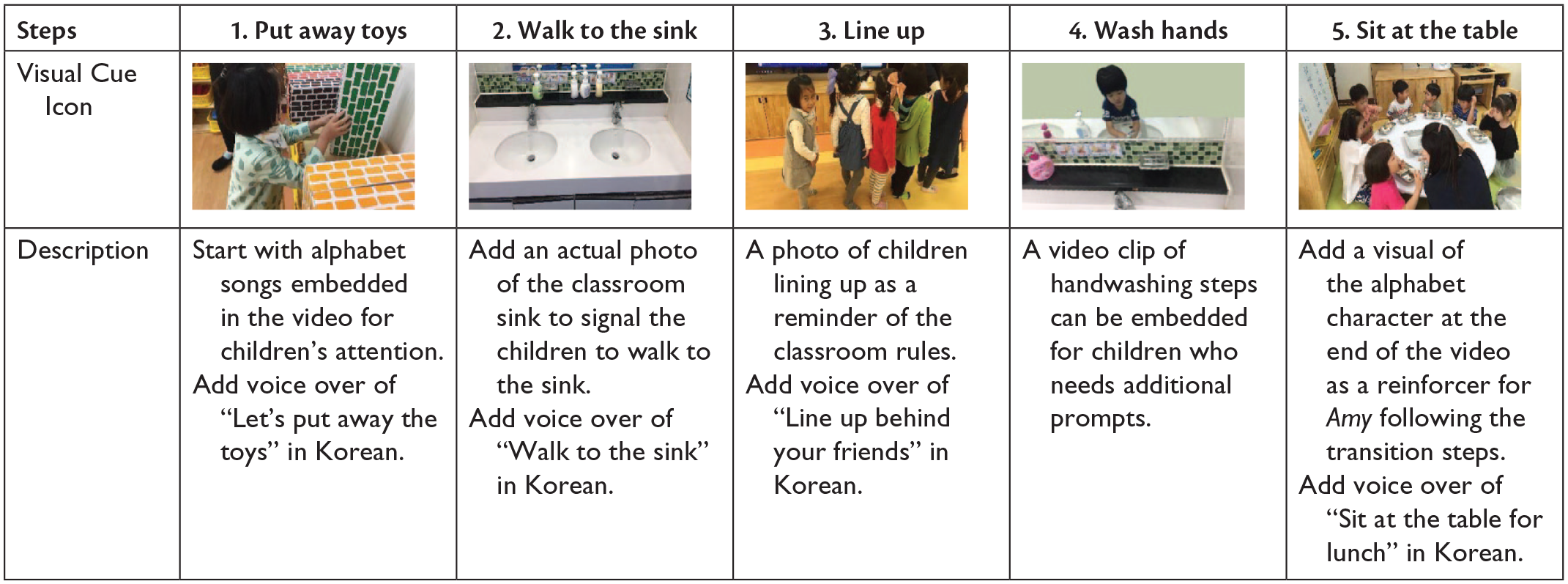
Example of mobile technology-based visual cue
Step 4: Use Visual Cues Consistently Across Contexts and Settings
Early educators may create visual cues that can be used by all adults supporting children in the classroom. It is important for all adults to be consistent with the children about expectations during transitions. Children who are learning classroom routines may benefit from the consistent use of visual cues to independently follow daily routines. Visual cues can also be used as prompts to support or remind children after routines have been taught. Technology-based visual cues allow educators to support the entire class, even if they are created for a single child or group of children. In other words, showing the entire class the cue originally developed for just one child will only provide more universal support for everyone. Educators may choose to show the individual child the cue again but supporting the entire class may be a feasible place to start consistently using the cue as part of the transition routine, especially if staffing limitations prohibit pulling a child aside during an already tricky time period.
One morning when the two paraeducators and Ms. Veliz were getting ready for the day, Ms. Veliz sent the visual cue that she had created to both of them via mobile phone text message and explained to them briefly what it was and when to use it so that all three adults in the classroom can consistently present it to the children during the transition. She also modeled the use of the visual cue that day for her team.
Monitoring Visual Cues
Step 5: Collect Data on the Use of Visual Cues
Monitoring the use of visual cues includes data collection on the children’s behavior during targeted transitions. Data collection involves collecting information on the frequency and the steps when the visual cues were presented, often using a task analysis (see Figure 3 for a sample). Systematic prompting procedures (PTD; CTD) can be used to teach visual cue use—collecting data on correct implementation of these procedures can inform decision-making on the effective, planned implementation of visual cues (see https://tinyurl.com/k3bkm9ya for freely available video models, flowcharts, and data collection forms). Collecting data on activity engagement and instances of challenging behavior can also inform decision-making about the effectiveness of visual cues. Different methods for direct observation of child engagement are available for educators to choose from based on their purpose of collecting data and practicality given the context (Ledford et al., 2018). The total duration of engagement can be measured in seconds or minutes using a stopwatch. Educators can click when a child becomes engaged and pause when the child becomes disengaged. Continuous measurement of engagement through total duration may less likely be used given (a) children move between engagement and disengagement quickly, causing difficulty in knowing exactly when engagement changes, and (b) continuously watching just one child may not be possible in a classroom. Engagement can be estimated using momentary time sampling procedures (see https://tinyurl.com/4cv9x2rr for a freely accessible form) to quickly look up at the end of a predetermined interval of time and see if a child is engaged in that exact instant, rather than always watching a single child. Target behavior can be continuously measured by tallying or counting each instance of behavior using a tally sheet or using an antecedent-behavior-consequence form (see https://tinyurl.com/bdhu28m5 for a freely accessible form) or scatterplot data (see Green, 2018).
“Utilizing visual cuesdesigned and implemented by mobiletechnology as a UDL-alignedapproach may be an effectivestrategy for smooth transitions for allchildren.”
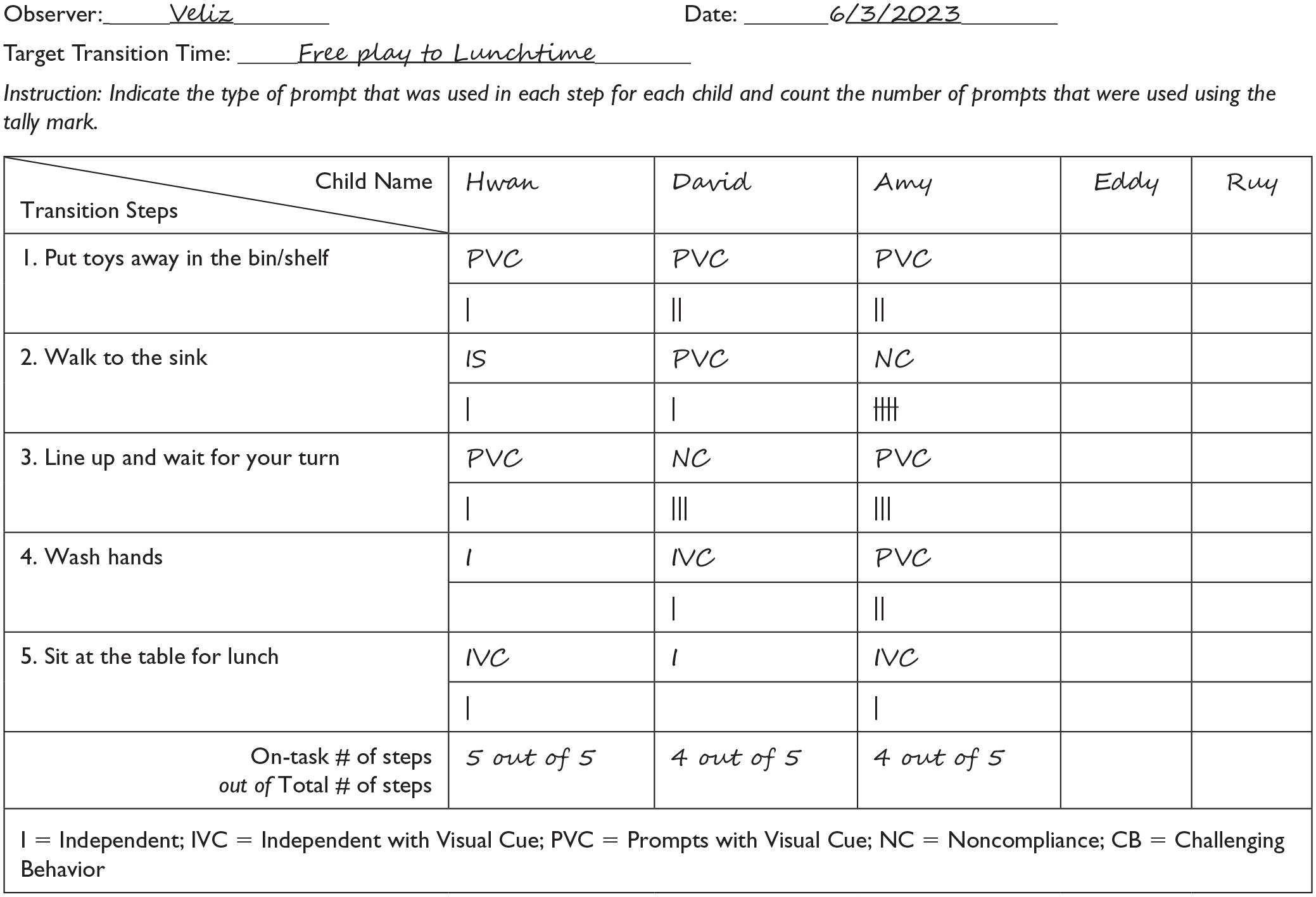
Visual cue progress monitoring form
Step 6: Determine the Next Steps Based on Children’s Progress
The last step of using visual cues is to make decisions contingent on children’s progress. If the data suggest children are making progress engaging in expected transition behaviors without exhibiting challenging behavior (referring to visual cue task analysis data and engagement or challenging behavior data), then educators can continue to use visual cues to support children’s smooth transitions. If children’s skills or behaviors are not improving (e.g., challenging behavior is occurring at the same frequency or intensity or engagement data are not improving), the educators may want to reexamine the efficiency of the prompts that were used (referring to the task analysis fidelity form referenced above), whether the educators followed adequate procedures in creating and using visual cues, and how well the visual materials represent the expectation (Table 2). As children become more successful during targeted transitions, new transition times or contexts can be targeted by using visual cues.
Visual Cue Implementation Checklist
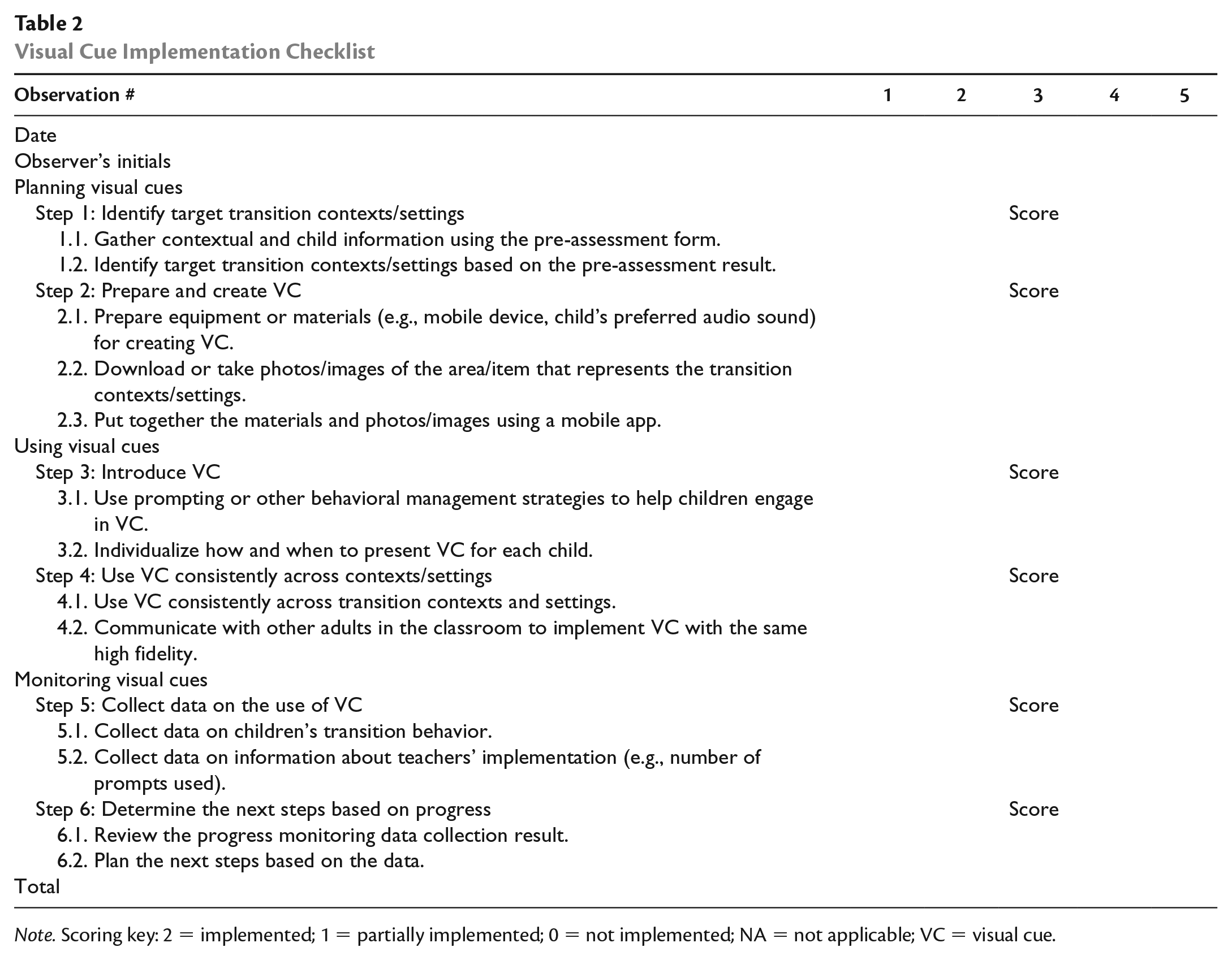
Note. Scoring key: 2 = implemented; 1 = partially implemented; 0 = not implemented; NA = not applicable; VC = visual cue.
Ms. Veliz made a progress monitoring form to collect data on children’s behavior during the targeted transition time. Ms. Veliz used the datasheet to make decisions about her next step, including whether to modify a few steps for other transition contexts or to add more steps depending on the children’s response.
Conclusion
Transitions can be challenging for children who have or are at risk for disabilities, who are dual language learners, and who are unfamiliar with classroom routines if they are asked to understand and follow the educators’ verbal directions alone. Utilizing visual cues designed and implemented by mobile technology as a UDL-aligned approach may be an effective strategy for smooth transitions for all children. Early educators can plan, use, and monitor visual cue use by (a) identifying target transition contexts/settings, (b) preparing and creating visual cues, (c) introducing visual cue to children, (d) using visual cue consistently across contexts/settings, (e) collecting data on the use of visual cue, and (f) determining the next steps based on the data.
In the middle of the program year, Ms. Veliz’s classroom was busy building a giant house with their friends in the block area, decorating birthday cards for one of their classmates in the art area, and playing board games (they had just started the second round on a large carpet). When it was almost time for lunch, Ms. Veliz called out, “Five more minutes, and then we’ll clean up to get ready for lunchtime.” She then connected her iPhone to the large screen in the classroom and played the 10-second visual cue of the steps for children to follow during cleaning time. The visual cue had Amy’s favorite music embedded, and she stopped playing and watched the video. Other children, including Hwan and David, also stopped what they were doing and watched the short video. Five minutes after Ms. Veliz’s announcement, she reminded the whole classroom again by saying, “Now it’s time to clean up,” and again played the video on the screen. She checked in with Amy, who was dancing to the video and cleaning. David stood and watched, and then a paraprofessional replayed the video, one-on-one using her mobile phone, pausing at each step for David—he began cleaning up to see more of the video. Hwan smiled when he heard his family’s voices, then engaged in the clean-up routine. Now children understood the transition and had fun while transitioning too. It was a win-win situation and Ms. Veliz was excited to continue trying integrating visual cues into other routines!
