



Abstract
Traditional tools for ergonomic assessments of workstation designs often involve ergonomists using Digital Human Modeling (DHM) software to simulate worker motions. However, these tools can be limited by posture prediction algorithms that fail to capture the full range and variability of human behavior. Virtual Reality (VR) offers an alternative by enabling workers to perform tasks within simulated workspaces, where their movements are captured using motion tracking systems. This approach generates kinematic data that can overcome the shortcomings of DHM tools, facilitating improved accuracy in the ergonomic evaluation of workstation design. Building multiple alternative virtual workstations is not only quicker but also more cost-effective than building physical prototypes. In this paper, we introduce a VR application, ErgoReality, and discuss its three main components: simulation development, data collection, and ergonomic analysis. We also explore further research areas to enhance the tool, address potential limitations, and propose strategies to mitigate these challenges.
Introduction
Existing tools for ergonomics assessments of proposed workstation designs require ergonomics engineers to simulate the motion of workers as they perform their tasks in Digital Human Modeling (DHM) software. A limitation of DHM software is the reliance on pre-defined criteria and assumptions, in which posture prediction algorithms do not always account for the natural range and variability of worker behavior or movement (Lämkull et al., 2009). Cort and Devries (2019) compared the joint angles and ergonomics metrics derived by simulated posture in DHM software with data collected from real motions. They have shown that there are significant differences in joint angles and ergonomics metrics between the two methods. This is especially important when design decisions are based upon the predicted motion in DHM, as it may underestimate the physical stress, resulting in less than ideal job design.
Virtual Reality (VR) environments allow workers to physically perform tasks within simulated workspaces while their movements are recorded using motion tracking systems. The resulting kinematic data can be imported into the DHM software for analysis, eliminating the need for assumptions and posture prediction algorithms. These analyses can provide a more accurate assessment of ergonomic risk and allows for better decision making around preventative workstation design. Building simulated virtual workstations can be faster and cheaper than building physical prototypes that would otherwise be required to collect real motion data, and allows for the analysis of alternatives in the concept design phase.
The potential for using VR simulations in combination with digital human modeling to capture more realistic human movement has been explored in work by Kumar and Ashok (2021) who validated RULA measurement comparison between a DHM simulation and VR mockup, and by Kačerová et al. (2022) who employed a motion capture suit to compare joint angles between real world and VR simulations.
We have built a VR application called ErgoReality to allow for customizing simulations and interactions, and to integrate with motion capture and ergonomic analysis solutions. There are three primary components to this approach of using Virtual Reality for ergonomic analysis—the development of simulations, the collection of data, and the resulting ergonomic analysis. In addition to employing this tool for ergonomic analysis, we have also identified areas of further study for enhancing the tool, identifying potential limitations, and working on strategies for mitigating those limitations.
Approach
Simulations are developed in Unity 3D allowing for integration with VR systems and providing a platform for implementing interactions and environmental details (Figure 1). The level of detail varies significantly depending on the workstation and area of focus. Some tasks require simple interactions such as lifting a box. Others require more specific interactions of using levers, interacting with fabric, or following variable instructions. The environment can include realistic visual graphics of a work setting or can attempt to match only the relevant surfaces and dimensions related to the task.
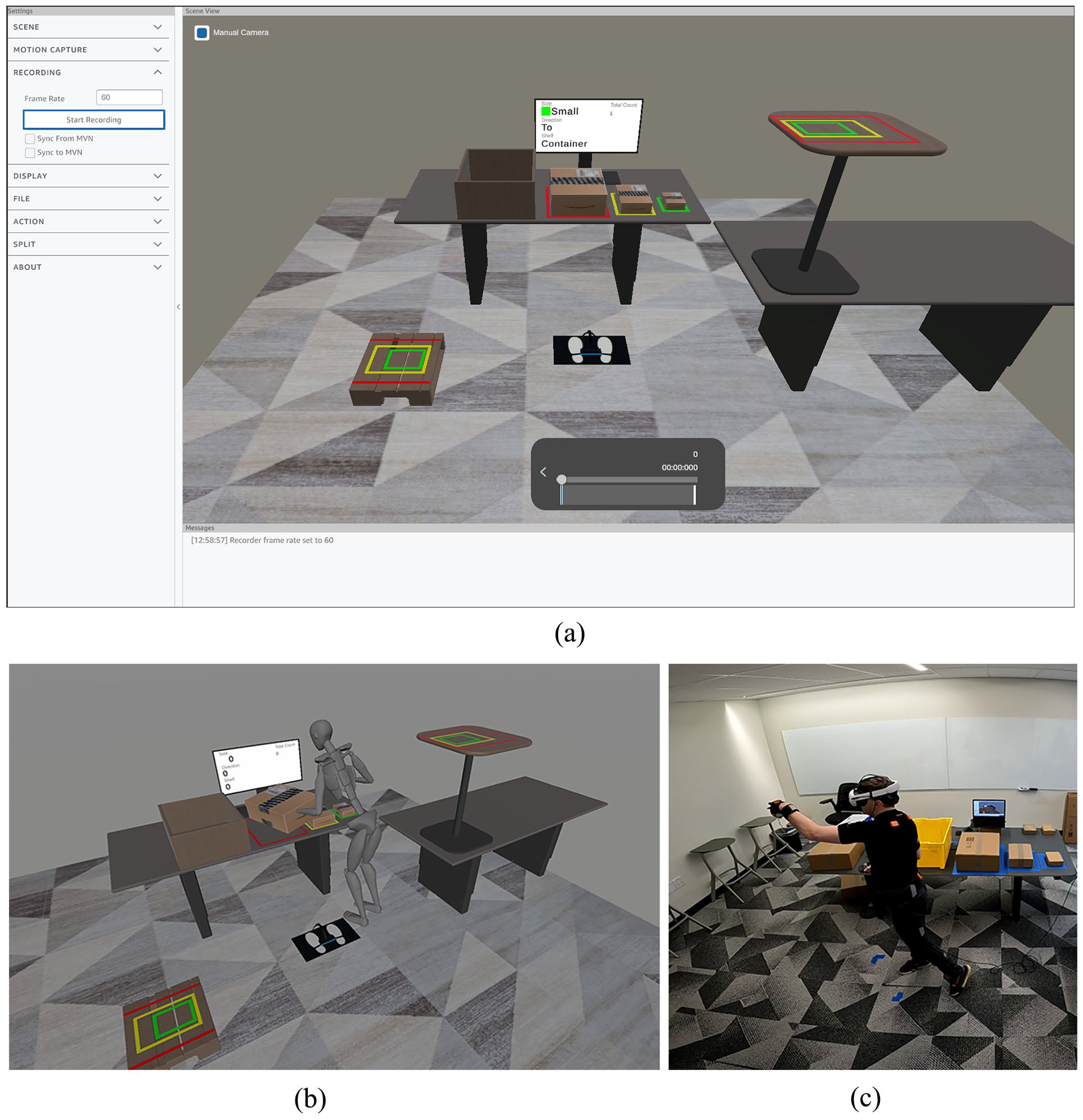
(a) ErgoReality software, (b) Virtual simulation of material handling tasks, and (c) Performing material handling tasks in VR simulation, using motion capture.
Collecting data requires integration with a motion capture system. To provide flexibility to researchers, we have developed multiple levels of integration. The most robust is a using a full-body motion capture IMU system from Xsens. We sync recorded data from the motion capture with additional data from VR, and also stream movement from the Xsens system into VR for custom real-time ergonomic analysis. Another solution uses the tracking of the VR systems with inverse kinematic processes to estimate likely postures based on three or more tracked points. These solutions require less equipment and set up, but at the expense of reduced accuracy of the motion.
Finally, the results of the motion capture are processed and analyzed. Metrics including joint angles and RULA/REBA scores can be provided in real-time, while detailed analysis requires additional offline processing. A custom set of workflows combine the motion data with additional data from the VR to help increase the accuracy of the resulting metrics beyond DHM solutions.
Findings
The most immediate benefit of this method is the ability to capture real human motion data for a person performing a task at proposed workstation without the need to build a physical prototype. This method is an improvement of using DHM modeling solutions alone, and is cheaper and faster to implement than building prototypes, as well as allowing for early evaluation of multiple different design options.
Another important benefit is the ability to record supplemental data in addition to motion capture postures. These data can include the size of objects, specific locations or tools participants interacted with, timing information, or other associated characteristics. These can allow researchers to drill down into individual moments or subtasks and provide a fine-tuned evaluation of an entire process.
The development of virtual simulations also brings some additional complications. While faster and cheaper than building physical prototypes, the development still requires more time than many DHM simulations tools. It requires access to VR hardware and equipment, as well as space in which to perform the tasks, which may be a challenge in certain office environments.
Finally, there are physical limitations to what can be done in VR. The simplest simulations cannot recreate the physical weight of heavy objects, and generally use controllers to manipulate boxes and objects. This makes VR less well-suited for analyzing tasks that involve heavy objects or where the wrist and hands are the primary area of concern. Stairs, ladders, or height changes can also pose a challenge to a VR simulation.
Conclusion
We have found that VR simulations can be an effective tool for evaluating ergonomic risks of workstation design, especially where there are multiple design options to be evaluated and where physical prototypes are expensive or impractical to build. It is currently best used with tasks that do not include a lot of heavy lifting and for which hand and wrist motions are not a primary area of concern.
Advances in technology and computation can help reduce or eliminate some of the complications. Wireless VR displays, higher computing power, and wider adoption of standard development tools will all help to decrease the development time, and increase the comfort and realism of the simulations.
One area of interest is in the level of details developed for a virtual simulation. The effect of photorealism or self-representation of the body within VR might affect the user’s movements. Additions details such as motion and activity surrounding a workstation or noise recordings of the environment could be added.
Further research can help to identify the degree to which physical limitations of VR impact ergonomic results. For example, a comparison of body postures while lifting actual heavy boxes can be compared with virtual simulations to see how similar the resulting ergonomics are. Further study can also identify strategies to mitigate differences and enhance the accuracy of VR. Some potential solutions could include UX designs to encourage different ways of interacting with virtual or using augmented reality to allow for virtual design while interacting with real objects.
Footnotes
Declaration of Conflicting Interests
The author(s) declared no potential conflicts of interest with respect to the research, authorship, and/or publication of this article.
Funding
The author(s) received no financial support for the research, authorship, and/or publication of this article.