



Abstract
I have recently used several systems that are not usable but have been declared successes. Success means that their use is increasing, no one was fired, and the usability problems are solved by the users who either work much harder or through surrogates. After defining usability, I describe these systems and provide a list of reasons why these systems are both unusable and successes, seemingly a paradox for human factors. The article concludes by explaining this paradox, noting several ways this can happen, particularly when stakeholders’ viewpoints are excluded or discounted by designers and by other types of users.
Keywords
There have been a series of systems at my university that are not usable but are treated as successes. By successes, I mean that their use is increasing, no one was fired, and the usability problems are either ignored or solved by the users working harder or often much harder, or people are hired to use the system for the existing users. These types of systems appear to be a general problem across a wide range of organizations (e.g., Wong & Gerras, 2015, other colleagues’ reports).
I had to think for a long time about how unusable systems could be unusable and yet be successful. Unusable systems that are successful violate what is existing good practice in what we teach in my college, what is in our textbooks (Oury & Ritter, 2021; Ritter et al., 2014), my colleagues’ textbooks (Carroll, 2000; Rossen & Carroll, 2001), the National Research Council report on system design that I helped write (Pew & Mavor, 2007), and is in nearly all human–computer interaction (HCI) and human factors textbooks (e.g., Dix et al., 1998; Lee et al., 2017; Lewis & Reiman, 1998; Norman, 2013).
Without facetiousness, I thought we should perhaps reconsider what we teach given this repeated anomaly as well as whether these unusable, miserable systems should be allowed to continue to be used based on what we teach. Enterprising students have also asked this question and deserve an answer.
In this report, I describe briefly what might be a simple definition of “usable” and then describe several of these systems and explain why they are both unusable and successes, which appears to be a paradox. I will conclude by explaining how it is possible for unusable systems can be considered successes in organizations. Along the way, I will include advice about how to avoid this where possible or ameliorate it from a designer’s, manager’s, and user’s perspective.
Usable and Well-Developed Systems
It may be helpful to provide a short description of a usable system. A successful system, in this case, can mean a system that supports the range of stakeholders (Boehm & Hansen, 2001; Pew & Mavor, 2007). For complex systems, this often means a wider range of stakeholders than might be apparent, including users. For example, the website development team for our department’s website considered only two types of users—students and faculty. On further consideration, a group of students in my lab and I found 13 types of users for department websites as well as numerous other stakeholders including many across and outside the university (Ritter et al., 2005).
The direct users of systems might more correctly be noted as just one of the stakeholders. Stakeholders are a broad group, which would include the people developing the system, supporting it, and paying for it. (These might all be quite different groups, and may not even know that the others exist.) There are numerous books on how to develop a useful system and what useful systems look like (e.g., Cairns & Cox, 2008; Dix et al., 1998; Lazar et al., 2010; Lee et al., 2017; Lewis & Reiman, 1998; Pew & Mavor, 2007), and other fields address this process as well.
For the purpose of this article, by usable I mean that the system does not make the user worse off than they had been with the previous system. This includes not increasing the user’s workload above the level it had been with the previous system, or providing other benefits, or a balance of these. Other stakeholders, as we shall see, may see a system as usable that decreases their workload without regard to reducing other stakeholders’ workload or other costs.
Example Systems that Lead to this Analysis
Here are the systems that gave me food for thought.
LionPATH, Student Records System
The LionPATH student records system for Penn State was rolled out at the beginning of the fall 2016 semester. It is used by students, administrators, and faculty. It is hard to use. There were rumors of students who could not register or complete the necessary registration tasks in time and might have had to drop out. Some features are hard to find, and some previous features were removed. Faculty lost functionality to allow students into their classes for special cases. Numerous informal workarounds were created. The provost sent out an email apologizing for it. In spite of the direct impact LionPATH was to have on students, as far as I am aware (including discussions with student leaders), student feedback was neither solicited nor considered during acquisition, implementation, or upgrades to the LionPATH system.
The Renaming of the Information Sciences and Technology (IST) Building From IST Building to Westgate
The Information Sciences and Technology building has been renamed to Westgate, or, more accurately, it is in the process of being renamed. A new nameplate is fixed to it, but its old name remains in many maps, files, stationary, and maps screwed to kiosks on campus. Its natural name is something like “the Information Bridge,” where bridge is used because it is literally a bridge across a major highway and was designed by its architect (Rafael Viñoly) to be literally and metaphorically a bridge between information technology and applications.
It did have to change its name because there are two units housed in it: one is the College of Information Sciences and Technology, and the other is not. The part that is not IST rightfully did not wish to be in a building named after another unit. The two halves of the building will become East Westgate and West Westgate. I write this to you now in west East Westgate. About 50% of the people hearing this naming convention chuckle. The U.S. Postal Service also legally recognizes other names, including the Goat Roping Building (I have received first class mail delivered to that address).
Renumbering of the rooms has also occurred—not starting at the middle or end—but at the third-floor elevator. The elevator is where the Office of Physical Plant folks get off to meet with deans about naming and numbering, so they started the numbering there at a third of the way through the building (!), which we suggest is not a natural place to start based on a survey of where students would expect numbering to start (Ritter & Zhang, 2016), nor based on traffic patterns. There is a not a good article summarizing that this numbering scheme is a bad idea, so we have started to write one based on our preliminary report. Of the suggestions in our draft report shared with the Office of Physical Plant, not one suggestion was taken up.
25Live Room Scheduling Software
25Live integrated all rooms across the university into a uniform scheduling system. It is used by administrators booking classrooms, faculty for meeting rooms, and students for student group meetings. It is easy to use if you know how (Robert St. Amant taught me this phrase), but it has taken a 5-minute task for many faculty that was a quick call to the college office, and turned it into a 30 min. task that often leaves a wake of rooms scheduled in addition to the one desired, and then a call to the college office for help.
One large problem in the current system is that 25Live offers a lot of choices of rooms because it is based on such a large campus. There are also numerous small usability problems based on users not being able to interpret outputs (e.g., rooms are not named like in the real world until you know the coding), and actions are not clear, and it sends uninterruptible emails that require logging in and checking all details of the reservation, and even then, some email updates are “no change” announcements. The resulting reservations still have to be approved by the previous person you would have called. This has led to a process now where you email the college office, and then folks in the college office use the system to make your reservation. On the other hand, students booking for organizations or personal use are unable to cancel reservations—to unbook a room, they must go in-person to an event management office on campus, or risk having booking privileges revoked for not using a room they had previously booked.
Academic Insight Faculty Activity Reporting System
This system attempts to document the output of academics. It is used by faculty and administrators. It has taken a 1-hour job (filling in a Word document), and, as I measure this each year that I do it, turned this task into a 10-hour job through forcing all the details to be cut and pasted into web forms. Some departments some years provide admin support to help with this; most do not. Some folks do not report all their articles to this system; others hack the system and put all the details in one field (I have been told to do this by numerous colleagues). This has led to erroneous reports because the system is truly not what you see is what you get; the input forms are not aligned with output forms; some fields and headings are redundant; and some output types are not included. It is also a moving target as the developers try to improve the system with piece-wise patches.
Canvas Learning Management System
Angel, the academic course support system, has been replaced by Canvas. It is used by students, faculty, and administrators. There have been numerous courses offered on Canvas about about how to use this “easy to use system” and at least four tiers of support. The terms of service, the end user licensing agreement (that I see when I approach it in any case), are well outside of our other administrative and academic guidelines (e.g., they reserve the right to delete anything at anytime). Its compelling benefits include turning in documents remotely and sharing documents (e.g., readings) in a secure way. Users report numerous headaches. Students like that they can see their grades, which is useful for checking faculty grade entering. Seeing grades is detrimental, however, in that the displays in Canvas hide constraints and students are less likely to do the computation by hand and thus are far less likely to adjust their priorities based on understanding the grading rubric. Some students have forgotten or never learned how to compute their own grades and to do sensitivity analyses to learn what exam grades they need to obtain a desired final grade. It thus appears to help with grade inflation. Grading homework in Canvas appears to take three times longer than on paper.
Coins
Our (potential) conflict-of-interest disclosure system (COINS) is a complex system. It is used by faculty and administrators. It asks perhaps four times more questions and details about my finances than the similar U.S. Navy OGE 450 (Confidential Financial Disclosure Form) that I have had to fill out for similar reasons when working with the Navy. The OGE 450 is available as a PDF and took about 30 minutes to fill out the first time and about 10 minutes subsequent times. Its directions left me understanding potential conflicts-of-interest and desiring to make my potential conflicts appropriately known. The OGE 450 wants to know if there are conflicts >$5,000 (or not) and does not ask the exact dollar amount.
The COINS system takes an hour or two to fill out based on my notes. The forms are included across multiple pages, and navigation is not uniform. The required forms include too many constraints on what can be entered, down to the level of wanting to know my wife’s salary—to the dollar (which she will not tell me to tell them) and other financial interests of hers (let alone mine) to the dollar on the day (and presumably, every day it changes). This approach thus causes much more angst than the Navy’s system, although the Navy is 77 times larger than Penn State and well known for being bureaucratic. This level of detail is more than the National Institutes of Health (NIH) requires (NIH is the basis of the process we are using—and I called NIH to confirm that they do not need the exact dollar amount).
Why are these Systems so Unusable and yet Deployed?
All these systems have been promulgated and continue to be used, and new systems to automate processes are coming online yearly at our university and elsewhere. The new accounting system (SIMBA) would easily provide another case. I would argue that the administration treats these systems are successes because they have commissioned these systems and mandated their use, the systems and changes are used to a certain extent, and there are no replacements in sight. 1 Yet, most of them are acknowledged by many users as miserable to use.
How can there be so many systems that to me as a user and as an HCI/human factors professional seem to be so poor? I thought about this for several months, ruminating over it as I used the systems and walked into and out of work. How can systems that are basically unusable because they more than double the work of the users be possibly seen as “successful?” It really violates what I teach and what I thought human-computer interaction was about. I asked a most senior colleague in this area, and he could only sort of shrug.
The initial answer finally came to me: in these cases, the users are not treated as stakeholders. The opinions and time of the faculty, staff, and students who have to use these systems are not valued. Their time and ease of use are simply not part of the evaluation process. At our university, at least in these ways, we are not stakeholders, which is a sad thing to say, and makes this a sad day to say it, particularly if you thought you were a stakeholder. The answer to this problem is for the designers and managers to measure the usage costs, and for the organizers to care about all stakeholders.
But, the review process for Ergonomics in Design and time encouraged me to think more deeply about how systems that are failed systems from my perspective might not be failed systems from other perspectives. A review of related reports also helped (Harris, 1994; Pew & Mavor, 2007). A set of reasons to explain these situations is shown in Table 1, but further reasons can be found in publications beyond just those two reports. This list may be very helpful as it puts names to the reasons, applying the Rumplestiltskin principle that naming the object helps understand and defeat it (Patrick Winston introduced me to this principle). There are likely other reasons that could be put in the table, where other risks are answered besides usability, or other ways the process could be maladaptive.
Why Unusable Systems Might Be a “Success”
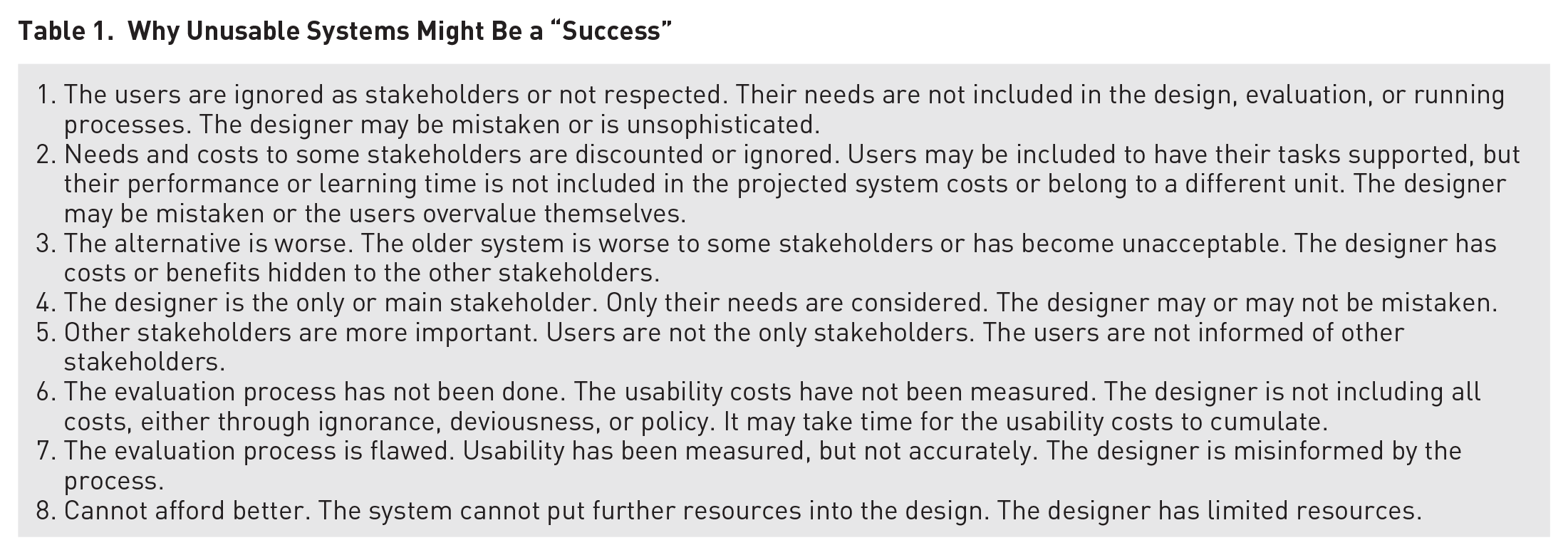
Reason 1 is, of course, that some sets of users are not stakeholders. This appears to be a major reason in the systems described above. But the situation can get more complicated. Who pays for the time to use these systems? A good manager should consider all costs. This also might be a case of discrimination, of ignoring the opinions, time, and concerns of undervalued groups such as admin assistants and students.
Reason 2, ignoring costs of a group of stakeholders, addresses this allocation of time. For example, organizations can adopt cloud-based services to cut IT costs, but these services are usually designed as one-size-fit-all, general purpose systems to serve average users. Consequently, they overlook or totally ignore the concerns and costs of some stakeholders with specific needs. In addition, if the users are on salary and their time is not costed per hour, it can be easy to not see the costs. This is also true if the users are in another organization even if their time is accounted for (e.g., admin assistants in departments) or if the users are captive users (i.e., students).
I have asked several times what not to do in order to find time to use these systems. I have not received an answer. I believe I have not because the answers are uncomfortable or untenable. The time that these systems take from university users comes from four sources, as it only can (a) teaching or mentoring students less; (b) performing less service, such as interviewing job candidates and PhD candidates, reviewing papers, or giving service talks; (c) doing less research; and (d) from sleep or family time. In a university these times are all hard to monitor and few will directly see this time disappear—administrators certainly will not. Research sponsors and the students not helped may see this time disappear but not be able to ascribe what happened, but it is small amount, only 1% to 3% of total time per system, but this could be 50% of discretionary time for starting new projects or a lifetime of support for students in trouble. University administrators and system designers will definitely not see the time disappear unless they tie these time losses to other measures, such as less folks attending talks or meetings, decreased grant submissions or publications, or decreased student retention. We should consider creating a tool to cost these times on a micro- and macrolevel.
Reason 3 is that the alternative to the system may be worse. This reason may be hidden from many stakeholders if the designers and administrators do not disclose or publicize this information to other stakeholders. For example, it could be that the old course scheduling system no longer works, state or federal regulations require a system that can perform a new aspect of the previous task, or the back-of-house benefits are delightful.
The answer here is for the system designers to tell the stakeholders about these constraints and the design rationale. This is a failure to communicate. There are numerous ways forward to solve this problem, including providing more design rational for why the systems are necessary and why they function the way they do, and providing further information such as manuals, training, FAQs, and strategies for using them more efficiently that are found to help. If this was done, designers and purchasers might realize themselves that the new system systematically exploits other stakeholders (which might be necessary, but might be compensatable more directly).
Reason 4 is that the designer may be the only stakeholder (Baxter et al., 2014). If the system’s design or performance is not reviewed, then the design only has to please the designer. A solution to this factor is to campaign to be a stakeholder, although this is not always successful, as noted here and can happen too late.
Reason 5 is that other stakeholders may be more important or their needs may be more compelling. This is almost certainly an aspect in most system designs, with usability for some types of users not ignored, just not as important. The solution here is, I believe, to document the costs of usability and the risks to system success, as the Pew and Mavor (2007) report encourages. This article starts that process for these systems.
Reason 6 is that a user evaluation process has not been done, so the usability costs are not seen by the organization. This is likely a contributing cause of the systems above. Without even a survey, the developers will not know the pinch points of a system they know very well how to use, or the use cases that they did not include in their design. The designers also might make the mistaken assumption that users will find the system as easy as they themselves do (Baxter et al., 2014). I have been that designer myself. In these cases, the standard mantra for usability evaluation is necessary because the developers may be so far away physically, culturally, and in use cases and knowledge, that they may not see the difficulties.
A solution to this factor is to get the costs computed. I personally believe that the answer will not often matter due to other reasons being also applicable. But this reason does suggest that we need to make the ability to cost usability easier to do. Making tools to compute usability has been worked on for a long time (Ivory & Hearst, 2001; Pew, 2007), and called for by numerous authors and governments (Pew & Mavor, 2007; Ritter, 2019). The problem of passing system costs onto other units (e.g., creating a system that needs more training, but as a buyer you do not pay for training) is a well-known problem.
Reason 7 is that the usability evaluation process might be flawed. If the users are consulted by proxy (“looks good enough to your folks?” “Yeah, but did not have a time to really look at it,” which happened in the building naming), or if a wide enough range of users are not consulted or the evaluation period is too short (it can take months to learn how a complex system is used, e.g., Gray et al., 1993), the usability of the system can be mis-measured.
Finally, Reason 8, the last reason is that you might not be able to afford better as an organization. The best an organization might be able to do may be less than other organizations or may be less than ideal. In many cases, this may be the bottom line. If a generic system is fit to a complex situation without foresight or adequate planning, difficulties can arise.
Conclusion
This approach to explaining unusable but still successful systems does offer succor to designers and users. While these conclusions are based on several cases we might not like to see with respect to usability, we may wish to keep these systems in mind. As human factors and HCI teachers and researchers we used to decry not taking input from users because the system will end up unusable. The lack of usability is clearly not always a problem as illustrated by these systems. If the users can be ignored or exploited by the system designers, then the users’ problems are simply not the designers’ problems.
Similarly, if one stakeholder group is not supported, the reasons for not supporting them might be worth noting why if the case is compelling. Increasing costs, inability to report to governments, or lack of central resources, which these systems might solve, could all contribute to the usability problems in the systems noted here. Similarly, if the hidden costs are incurred, there will be decreased performance and discrimination elsewhere in the system. This is what we must decry.
The organization’s leadership is the level that will have to weigh these otherwise hidden costs and their overall effects on the bottom line of the organization (e.g., increased health care costs, which my university has seen, perhaps caused by stress, which are not included in these system development and maintenance costs). Leadership will have to request input from and protect and respect stakeholders that are more distant to the design process, such as faculty, staff, and students in these examples. Otherwise, unfunded mandates from other units’ systems can pass costs onto other units in training or staff time.
This approach does provide some further insights to designers, both good and bad. One aspect is that unusable systems can be successful for other reasons. In large-scale system development, we need to keep in mind that there are other stakeholders, and they have needs that might trump usability. In these cases, it is probably worth informing users why they are suffering.
A perhaps better approach would be for top-level managers to keep in mind the total costs that a system incurs, not just the development costs that are most easily seen. Otherwise, the hidden costs and the associated running costs to the organization will be paid, but mindlessly.
Taking a risk-driven approach perspective, there may truly be larger problems or risks that these systems have solved or appear to have solved. Perhaps in these cases physical plant managers and registrars are no longer bugging the leadership about their problems, but only faculty and staff pay these costs, whom the leadership see less often. So, when we teach usability, this explanation can help explain why really poor systems are seen in the wild. This has also been seen in open office spaces vs. programmer productivity (DeMarco & Lister, 1999).
Two other implications are also available. When I am asked to provide feedback on yet another new system locally on top of existing duties as a member of a minority stakeholder group, I should and have declined unless I think the concerns will be heeded. Such feedback, which has been offered on several of these systems, is wasted time because the comments will not be heeded for these other reasons. In addition, if I am asked to provide feedback on the process, I need to keep in mind that other stakeholders need to be represented (such as cost and backend maintenance), and I may wish to raise their concerns if I believe they will not be represented.
The other implication is that if systems have to be used, and if the users have not been treated as stakeholders, then the systems will be used, and poor usability is not as large a risk to the system’s success as a system as we thought. We can stop teaching that all systems have to be usable to be successful. Being usable helps, but so does being affordable, deployable, and looking good in demos to purchasers, or by providing summary statistics to administrators, and shifting work between groups, particularly to groups that are not stakeholders or whose time is “free” or who can be discriminated against. And, now you know how unusable systems can be successful. But that don’t make it right, boss.
Footnotes
Three anonymous reviewers provided useful feedback. Chris Barrett, Jack Carroll, Alex Kirlik, Clayton Lewis, Joseph Ritter, Deja Workman, and Luke Zhang provided useful discussions on this topic. Garrett Barch, Fred Ryans, Isabella Webster, and a current honors student provided numerous comments that improved this article. Comments from Steve Crocker were precluded by a successful email system.