




Abstract
A large-volume infusion pump is a medical device with a big job: infuse patients with life-sustaining fluids and medications at a known and controlled rate. And, do it safely. Because infusions are frequently administered therapies, the opportunity for use error–induced adverse events is amplified. To develop a safer infusion pump, Ivenix, Inc., committed to a comprehensive usability engineering effort that included over 400 hours of usability testing. As a result, the pump’s design includes risk controls for mitigating potential use errors not available on today’s pumps. The resulting product was the winner of the 2019 Stanley Caplan User-Centered Design Award.
Keywords
A comprehensive usability engineering and risk analysis effort helped produce a smart infusion pump with new safety features.
Much has been written about the potential for unsafe administration of intravenous (IV) fluids and medications to patients (Association for the Advancement of Medical Instrumentation, 2010; U.S. Food and Drug Administration [USFDA], 2017). Infusion pumps have been both a source and the last line of defense for infusion administration errors in health care environments (Giuliano, 2018; Ohashi et al., 2014; Wynn et al., 2014). Given that approximately 90% of inpatients receive intravenous therapy (Baranowski, 1995), use errors involving infusion pumps have been associated with many serious or even fatal patient outcomes (Flynn et al., 2003). From 2005 through 2009, the FDA received approximately 56,000 reports of adverse events associated with the use of infusion pumps, including numerous injuries and deaths (USFDA, Center for Devices and Radiological Health, 2010).
These adverse events prompted the FDA to launch an infusion pump improvement initiative (USFDA, Center for Devices and Radiological Health, 2010). As part of that initiative, the FDA issued guidance titled, “Infusion Pumps Total Product Life Cycle,” that compelled infusion pump manufactures to prepare a safety assurance case to argue the infusion pump system adequately addressed hazards associated with its use (USFDA, Center for Devices and Radiological Health, 2014). The FDA recommended a premarket submission include a human factors report and usability test data to validate use safety.
Against the regulatory backdrop of increased infusion safety concerns, Ivenix, Inc. (North Andover, MA) was established in 2012 to bring a new large-volume infusion pump to market that would deliver infusions more safely. This involved the development of a more accurate pumping technology combined with a new administration set to address some of the use safety shortcomings of today’s large-volume pumps.
In this article, we describe the Ivenix infusion pump, the usability engineering process we employed, and some of the innovative use error mitigation strategies used to control risk.
Ivenix Smart Infusion Pump Overview
Smart Pump
A large-volume infusion pump is at the core of the Ivenix infusion system (Figure 1) that includes an infusion management system and single-use administration sets. Infusion pumps integrated with a dose error reduction system are commonly referred to as “smart pumps” since they use a drug library with established limits to augment infusion therapy safety (Reeves, 2003). For example, the system notifies pump users of potentially unsafe infusion programming and hence serves as a mitigation for keystroke and program entry use errors.
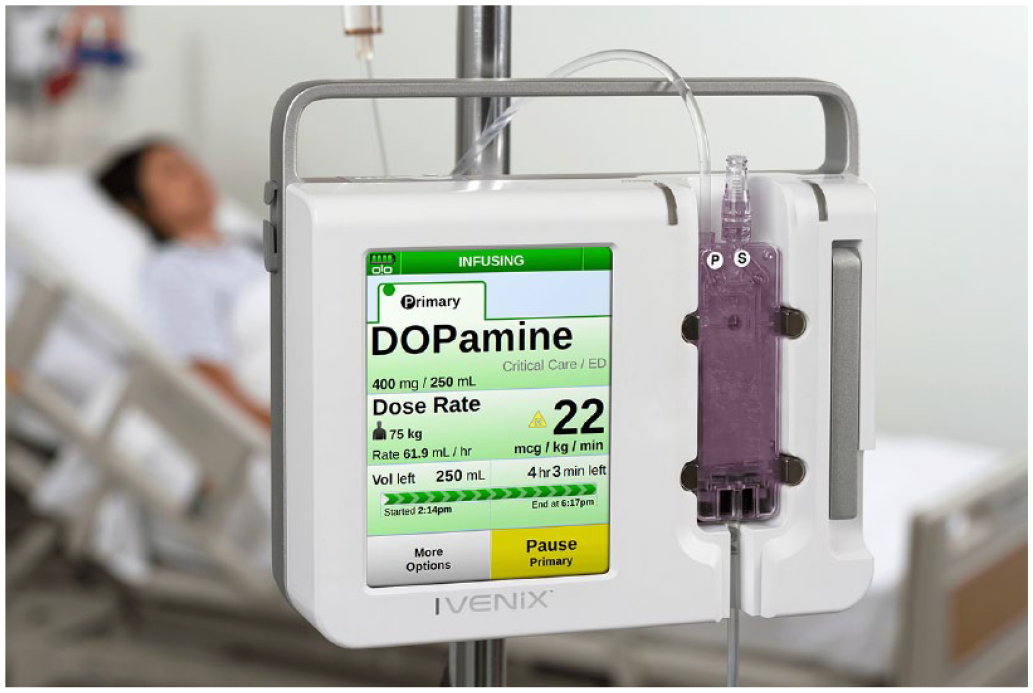
The Ivenix large-volume smart pump.
Fluid Delivery
Many of today’s large-volume pumps employ a peristaltic pumping mechanism to deliver fluids. A computer-controlled set of fingers compress a silicone or PVC (polyvinyl chloride) tube in sequence to move fluid from a bag to the patient. The tubing maintains sterility as fluid is squeezed through it. However, drawbacks such as blood hemolysis, mechanical tubing degradation, and variable flow accuracy due to changing flow conditions are inherent to this approach (Bahal & Romansky, 2002; Pronk Technologies, 2020; Stull et al., 1988; Wilson et al., 2016).
The Ivenix pump uses a pneumatically driven silicone diaphragm to pull fluid from a bag, fill an internal chamber, and then push the fluid to through tubing toward the patient as shown in Figure 2. The fluid flow is measured via closed-loop control of the pneumatic drive.
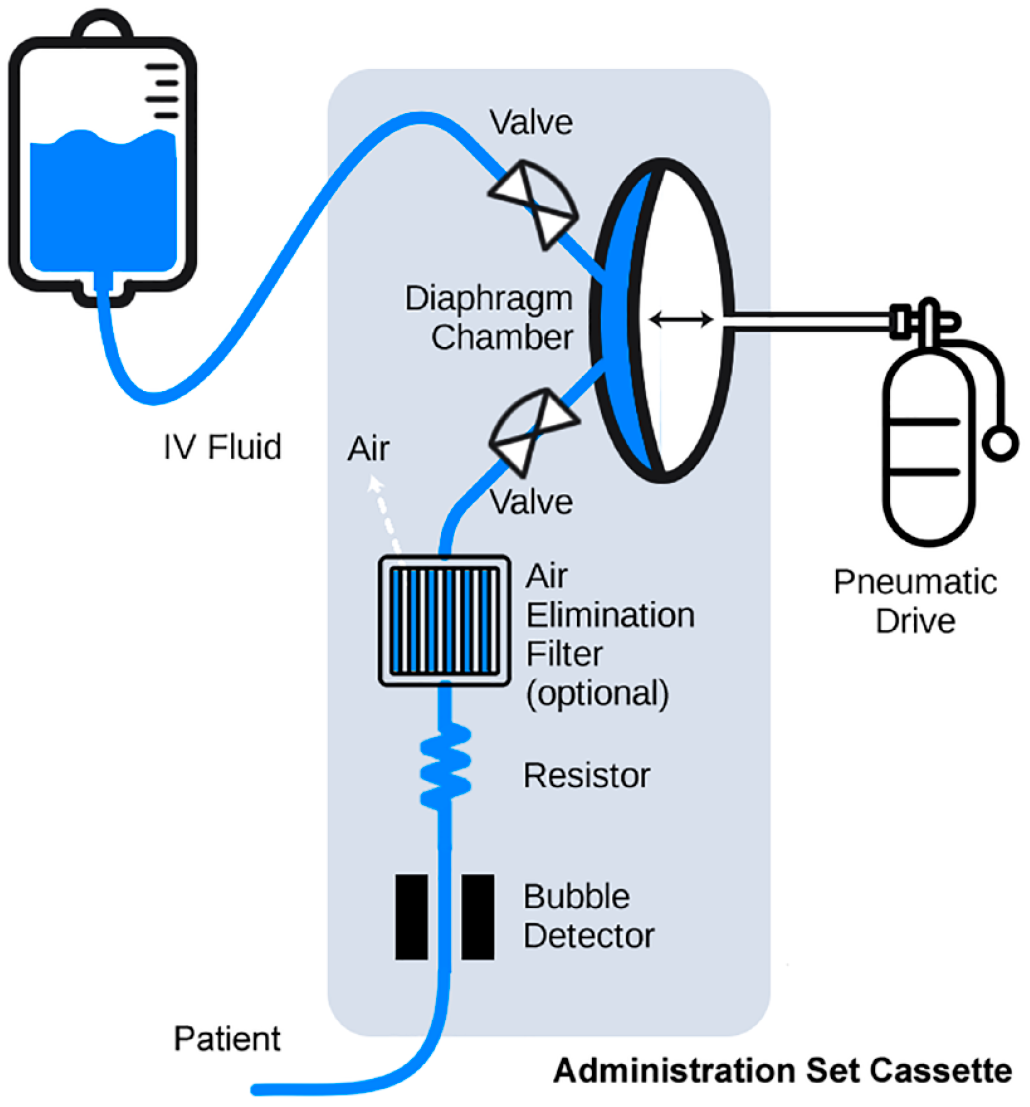
Diagram showing the pneumatically driven diaphragm pump and administration set components.
This controlled approach to pumping delivers fluid to patients more smoothly and accurately and without the drawbacks associated with peristaltic pumps. It also provides usability and use safety benefits:
Bag height independence: With closed-loop flow measurement, it is not essential for fluid bags to be hung up on IV poles above the pump. The pneumatic drive pulls fluid into the diaphragm chamber without gravity assistance. Thus, pump users can hang the bag(s) directly on the pump to facilitate single-hand use during patient transport between beds.
Simple piggyback setup: For similar reasons, piggybacking a secondary infusion (a commonly used bag and tubing configuration) no longer requires that the primary bag be lowered below the secondary bag. This eliminates a step for pump users and a potential use error.
Large-Volume Infusion Pump
Large-volume infusion pumps are used regularly in hospitals and infusion clinics and offer a wide range of rate control for infusion therapy. They are typically used by registered nurses and anesthesia providers to administer fluids, medications, blood products, and nutrition from bags and bottles. As such, they are used in a variety of patient care areas and to provide continuous therapy during intrahospital transport.
User Interfaces
The pump’s size and shape resemble other infusion pumps and so it is familiar to users. As shown in Figure 3, a prominent metal handle on top of the enclosure affords a secure grasp when the pump is moved to and from care areas and on and off IV poles.
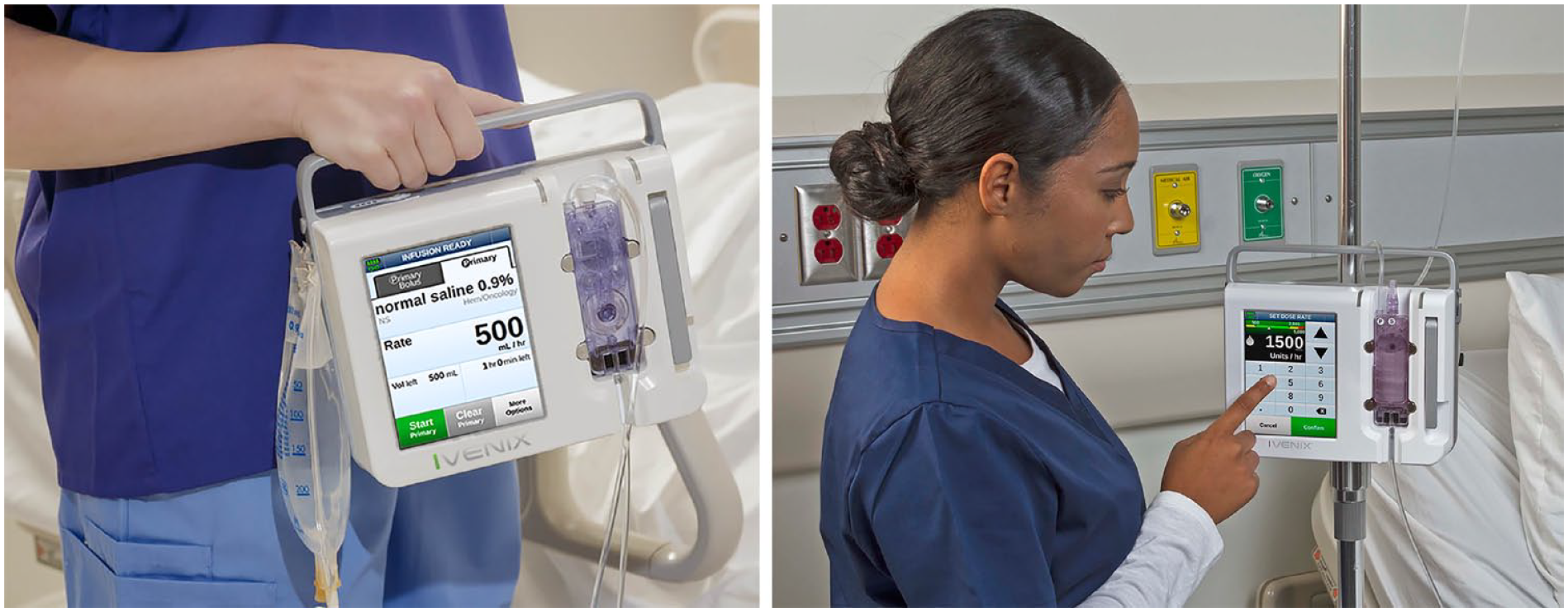
An infusion therapy provider holding the pump’s handle during transport (left) interacting with the pump’s touchscreen programming user interface (right).
Screen Display
The 145-mm (5.7-in) color screen is one of the largest displays used on today’s pumps and also one of the few with a touchscreen interface. The screen’s size accommodates the use of large-size graphical touch buttons (Figure 3). Consistent with Fitts’s law, the buttons enable busy and distraction-prone users to interact with more speed and accuracy as compared to smaller softkey buttons used on many of today’s pumps. The screen’s text employs larger font sizes for viewing critical alphanumeric information at a distance and, together with the sans-serif typeface and the font’s high-contrast color against the background, helps reduce reading errors.
Administration Sets
An administration set for an infusion pump consists of tubing and components used to convey fluids from a bag to the patient. Its interface with an infusion pump must support a number of complex functions that include pumping fluid, occlusion detection, air bubble detection, and free-flow protection. To achieve those functional goals, many of today’s pumps rely on administration sets with tubing that must be carefully threaded across the pumping mechanism and detectors. Free-flow protection is achieved with a mechanism that ensures the tubing is clamped before a loading door is opened and unclamped after the door is closed. As such, loading an administration set on today’s pumps can be a time-consuming and less intuitive task that is prone to use errors that could result in therapy delays and patient harm.
The Ivenix pump employs a cassette-based administration set with integrated free-flow protection that offers added use safety and usability innovations. It was designed with a door-free latching mechanism (Figure 4) to enhance the speed and ease of loading. The tabs on the cassette guide it vertically down onto loading levers that hold the cassette when the latch is closed. A pump user can load a primed cassette and be ready to deliver therapy in seconds. After latching the cassette in place, users have confidence that the administration set is loaded properly, and, because it is locked during an infusion, it is secure from tampering.
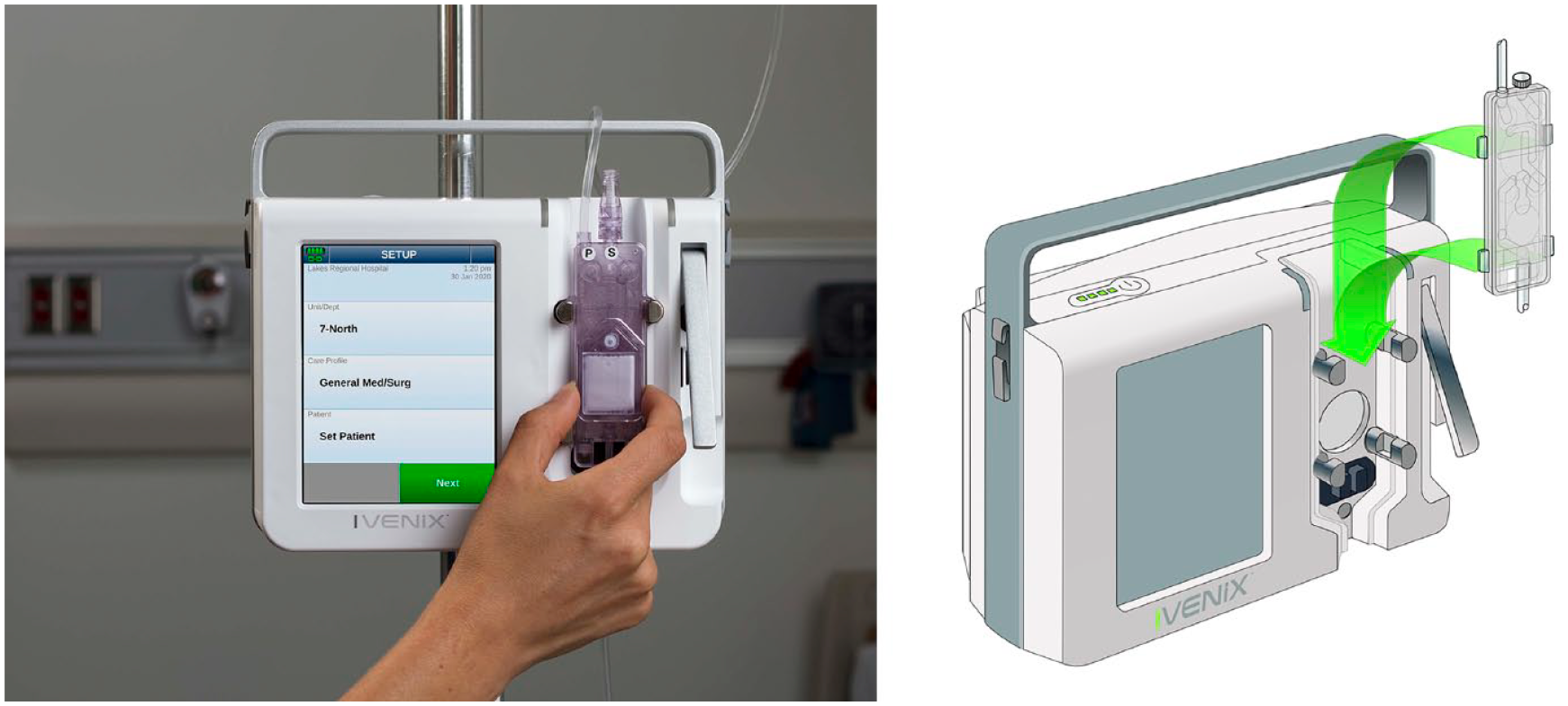
Loading an administration set cassette.
Methodology: Usability Engineering Process
In developing the infusion pump, Ivenix’s feature-driven software development approach was integrated with an iterative usability engineering process. This process adhered closely to guidance found in national and international standards (Association for the Advancement of Medical Instrumentation, 2009, 2013; International Electrotechnical Commission, 2015).
Intended Users
Individuals with appropriate backgrounds were recruited to participate in design evaluations and usability testing. Based on the drafted use specification, our intended users were U.S. health care professionals who are licensed to provide IV infusion therapy in an acute care hospital and regularly use a large-volume infusion pump. In contrast to a device that might be used by a layperson, our intended users constituted a fairly uniform population.
Registered nurses represent the largest user group and are predominately female (89%), 46 years old on average, and have a bachelor’s or associate degree (U.S. Department of Health and Human Services, 2010). Anesthesia providers (nurses and anesthesiologists) include a larger percentage of men, are of similar ages, and have additional education. All the intended users read and speak English proficiently, have normal or corrected vision, and have normal or corrected hearing. Generally, they have no significant physical, dexterity, or cognitive deficits that would impair their ability to use an infusion pump or perform other patient care duties. The incidence of color vision impairment was expected to mimic that of the general population.
Health care professionals using infusion pumps generally have a high-intensity workload that involves numerous tasks to ensure patients receive high-quality care. Therefore, they are at a higher risk for committing errors due to interruptions or workload fatigue.
Prototyping
We developed physical and computer-based models of the evolving software and hardware user interfaces (UIs) and then transitioned to commercial software and actual hardware. The software UI was prototyped using Adobe Flash on a touchscreen that allowed usability test participants to evaluate on-screen interactions, such as scrolling lists, in a realistic manner and provide more meaningful feedback (Figure 5).
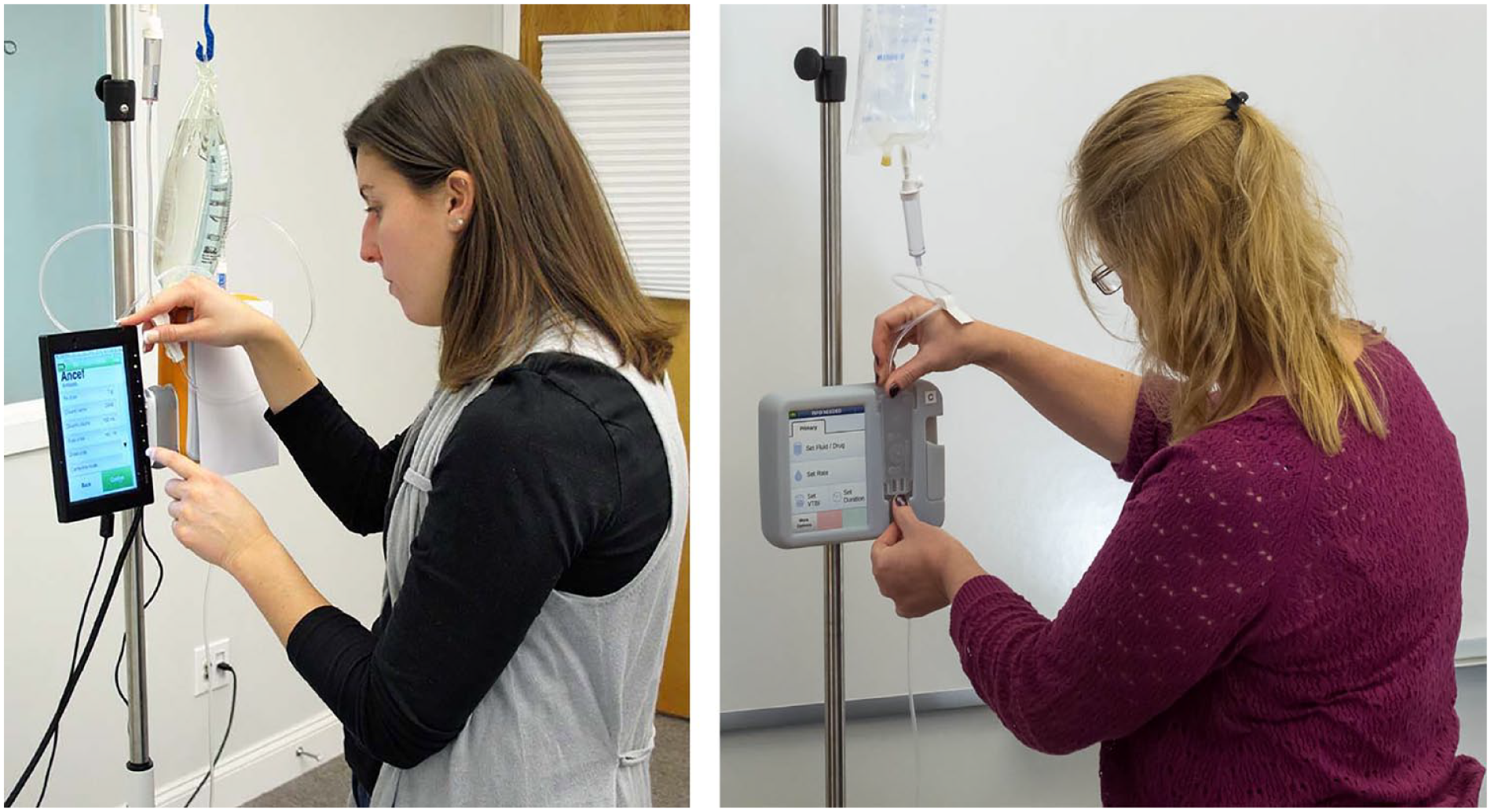
Usability test participants interacting with a user interface prototype (left) and a 3D printed design mockup (right).
The UI models, ranging from computer renderings to physical working models, were made using prototyping tools and 3D printers. These models enabled test participants to evaluate different design approaches to IV pole mounting, administration set loading (Figure 5), and tube priming.
Usability Testing
Given the company’s focus on safety and the product’s regulatory environment, we started usability testing early by verifying basic workflows and then progressed to more complex and less common workflows. The usability testing effort was synchronized with software and hardware prototype developments to aid design decision making with user preference findings. The testing strategy then transitioned to a less directed, use scenario-based approach in an attempt to discover potential use errors before summative testing. Over the course of 6 years, we conducted 19 formative tests with 204 participants that resulted in approximately 400 hours of testing.
Usability testing was conducted with untrained (i.e., naïve) users initially and then with trained users. This approach allowed us to determine if training methods and materials inadvertently induced use errors.
Use-Related Risk Analysis
Ivenix applied an iterative effort to analyze use-related risks concurrently with the design, development, and usability testing of the pump’s UIs. Our software development approach enabled rapid development and testing of mitigations for potential use errors that were identified by the analysis.
Hazards and Harms
The risk analysis began with an inventory of hazards, associated harms and their severity. We identified 11 hazards to both patients and pump users that included excessive delivery (e.g., overdose), insufficient delivery (e.g., underdose), infection, and embolism. For each hazard, our clinical specialists described up to five harm severities that varied from inconvenient to catastrophic. For example, the severity of harm for a trauma hazard varied between mild acute pain (inconvenient) and lethal electric shock (catastrophic).
Use Scenarios, Task Analysis, and Potential Use Errors
Next, users’ goals for using an infusion pump and administration set were inventoried into a list of 85 use scenarios. These use scenarios were then expanded into list of sequential physical, sensory, and cognitive tasks. Each task was then analyzed for failures in cognition, perception, and action (i.e., potential use errors) that might result from normal use. Our analysis revealed over 300 potential use errors that were then related to worse-case hazardous situations (or no hazard) and then related to one or more harms and an associated severity.
For example, priming air from an administration set is a use scenario that consisted of 21 discrete tasks. One task is to inspect the tubing downstream from the pump for any air bubbles. Failure to perform the task, a potential use error (e.g., user omits or skips task; lighting conditions inhibit detection), might result in air bubbles being infused (a hazardous situation), which might cause an embolus (harm). An embolism can result in severe vascular damage (a catastrophic severity).
Hazard-Related Use Scenarios
Consistent with FDA guidance (USFDA, Center for Devices and Radiological Health, 2016), our objective was to trace back and identify those use scenarios containing tasks that could result in use errors associated with significant harms (i.e., critical and catastrophic severities). Twenty-eight use scenarios (about one third of all use scenarios) were designated as hazard related and formed the basis for conducting summative usability testing.
Risk Controls
After each pass through the use error analysis, the Ivenix risk management team considered if the most effective strategies were in place to mitigate potential use errors associated with significant harms. These mitigations would be validated later in the summative usability testing.
In the hierarchy of risk control strategies, inherent safety by design is a more effective strategy as compared to a protective measure. And that is more effective as compared to information for safety. For example, locking access to the administration set’s cassette during an infusion protects against uncontrolled delivery to the patient so it is safe by design. And detecting occlusions (and providing an audible alarm) is an example of a protective measure against leaving tubing clamped inadvertently. Accompanying documentation that provides safety information (e.g., labeling, screen alerts, quick reference guide, user training, etc.) is considered a less reliable mitigation strategy and one that we endeavored to avoid in order to minimize residual risk and ultimately achieve a successful summative usability test.
Mitigating Use Errors: Enhancing Usability
At the time the infusion pump development began, many potential use errors associated with significant harm were known from reviewing FDA’s MAUDE (Manufacturer and User Facility Device Experience Database) database of medical device adverse events (USFDA, n.d.). By reengineering the administration set and the approach to pumping fluids, it was possible to employ additional risk control strategies that served to help improved use safety and usability as illustrated by the following three features.
Integrated Air Elimination Filter
Inadvertently infusing air is a paramount concern for health care professionals providing infusions. Despite their best efforts, it is possible for small air bubbles to remain after priming or form over time in the infusing fluid. An air bubble, if infused, could lead to a harmful air embolism. All infusion pumps detect upstream bubbles, stop the pump’s flow, and annunciate an alarm. However, clearing an air bubble is a multistep, time-consuming process, which is prone to use errors that are associated with significant harms. Furthermore, the alarm and air-clearing task interrupts fluid delivery that might be a life-sustaining medication. And, when the tubing is disconnected to clear the air, there is an infection risk if inadvertent contact occurs with the sterile components (another potential use error).
The Ivenix administration set offers, as an option, an inline air elimination filter (AEF) that removes air from fluid while maintaining a sterile barrier (Figure 6). The AEF mitigates use errors associated with air removal and maintains continuous medication delivery. Note: At the time of manuscript submission, this option has not yet been reviewed by the FDA.
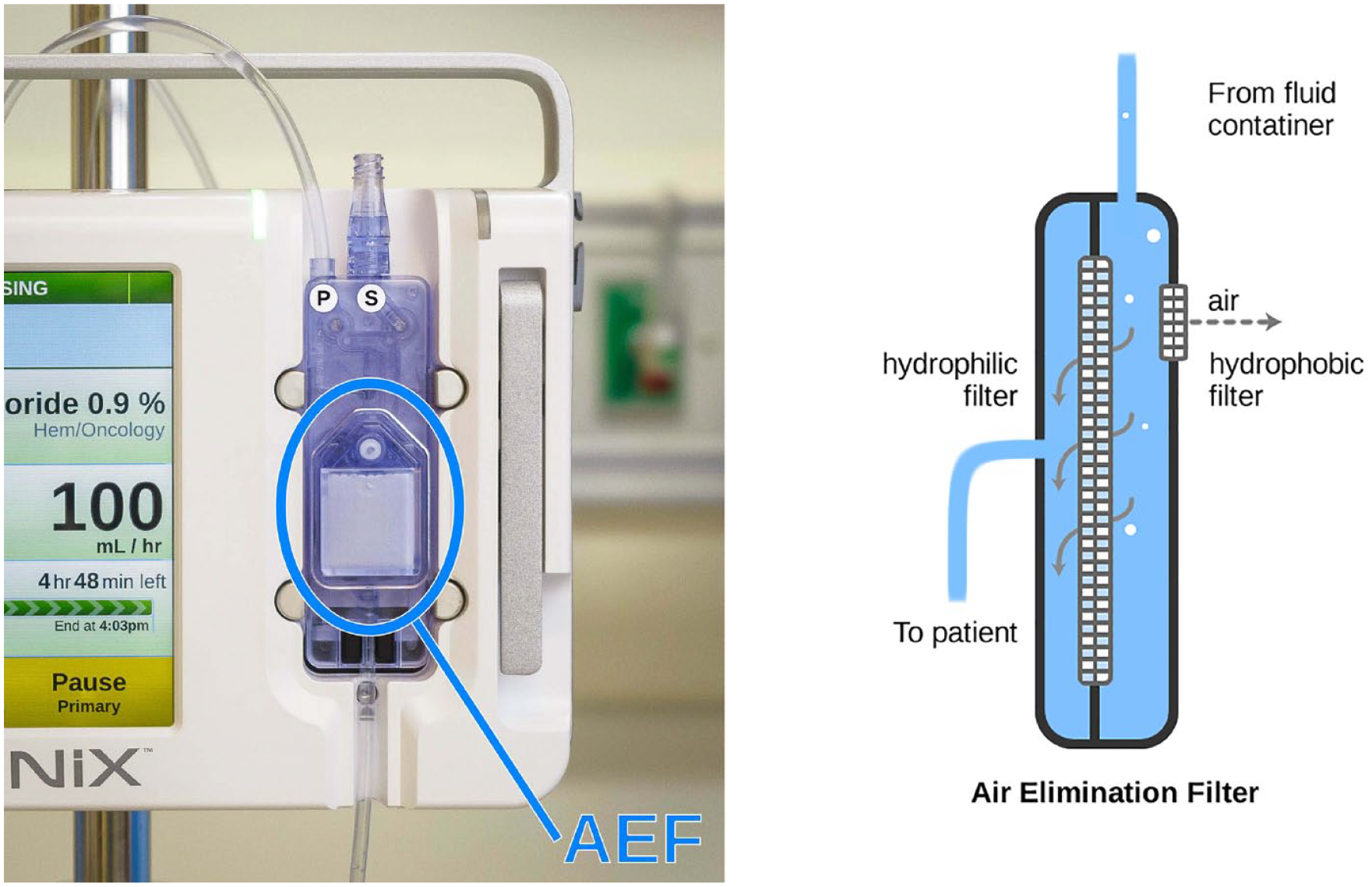
A loaded administration set with an inline air elimination filter (left) and a diagram showing the air elimination components (right).
The filter also speeds air removal during initial administration set priming and further removes all micro bubbles (those too small to be detected) that would otherwise be infused and increase the risk of a harmful air embolism in some patient populations.
Independent Secondary Inlet
Infusing a medication via a “piggyback” is common practice in which a medication bag, called a secondary bag, is connected to the administration tubing upstream from the pump. In today’s single-inlet pumps, the secondary bag must be positioned above the primary bag in order to infuse properly as, initially, the secondary bag fluid infuses until its level is the same as the primary bag fluid due to its higher hydrostatic pressure.
The piggyback administration method avoids the need for an additional IV access (thereby lowering infection risks) and helps reduces nursing workload. However, the practice is prone to use errors that can lead to wrong or delayed therapy owing to the need for a special administration sets and sequenced interactions involving tube priming and clamping. In a controlled study of infusion pump use, 44% of the nurse participants committed drug administration errors when administering piggyback infusions (Trbovich et al., 2010).
As shown in Figure 7, the Ivenix infusion pump has a secondary inlet on its cassette intended for piggyback administrations. This unique design feature ensures that fluid from the secondary bag is pumped independently. Infusing via an independent inlet provides the following use error mitigations:
Clamped tubing detection: A primed secondary tube is normally clamped before being attached to an administration set. Due to distractions or haste, users can neglect to unclamp it before beginning a piggybacked infusion. With today’s single-inlet pumps, the patient would inappropriately receive fluid from the primary bag. As the Ivenix pump infuses directly from a secondary inlet, it can detect and sound an alarm if the tubing is inadvertently left clamped, which could prevent a significant delay of therapy.
Complete secondary bag administration: Today’s single-inlet pumps are generally programmed to deliver a secondary bag’s nominal volume. However, bags are often overfilled during manufacture or have medication fluid added. Accordingly, the excess volume is either delivered slowly with the primary fluid or, in some cases, the bag with the “excess” medication is discarded (Plagge et al., 2010). By infusing directly from the secondary inlet and detecting an empty bag, the Ivenix pump delivers all of the bag’s medication at the programmed rate, thus avoiding any therapy delay or incomplete therapy.
Interrupted medication prevention: With today’s pumps, it is possible to use piggyback administrations unsafely (Cassano-Piché et al., 2012). For example, a user can start a piggyback administration without considering that it would stop a life-sustaining medication being given from the primary bag. By having independent inlets and using drug data from its infusion management system, the Ivenix pump can ensure critical medication infusions are given from a primary bag and are not interrupted by a piggyback administration.
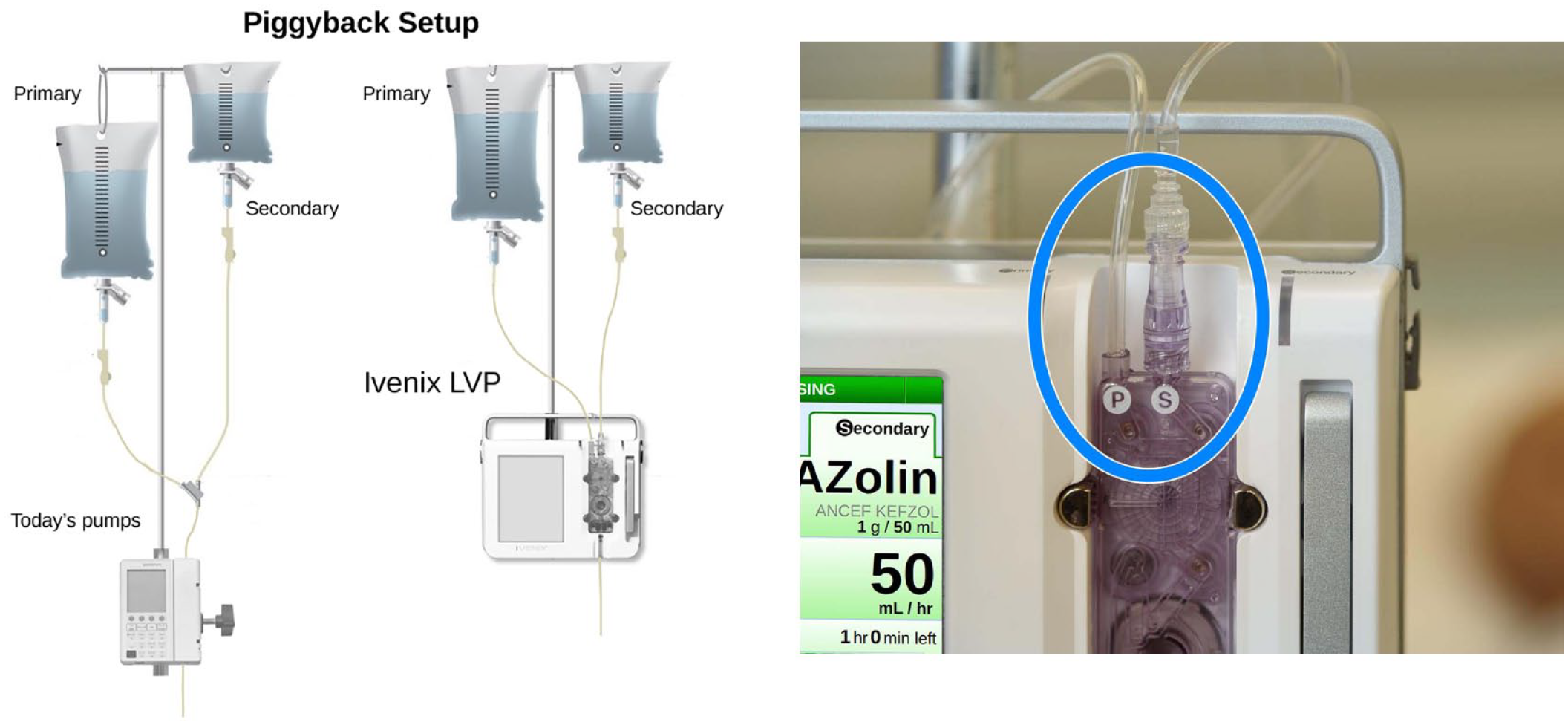
Diagram showing how primary and secondary bags are set up for a piggyback infusion with today’s pumps and the Ivenix pump (left) and an image showing the independent primary and secondary inlets on the Ivenix pump (right).
Administration Set Identification
The Ivenix pump is the first infusion pump that can prevent use errors related to administration set use by detecting which set is loaded. It uses the detected set type and data from the infusion management system to prevent or notify users of an inappropriate fluid or drug administration.
For example, not all IV fluids can be administered through an AEF (e.g., blood products, lipids). These fluids can clog the filter, occlude flow, and delay therapy. Accordingly, if a set containing a filter is loaded, the pump prevents the programming of a filter-clogging fluid.
As shown in Figure 8, when a blood products set is loaded, the pump configures the graphical UI to make the secondary inlet intended for blood administration more conspicuous (e.g., labeling, use of red-color graphics) as compared with the primary inlet.
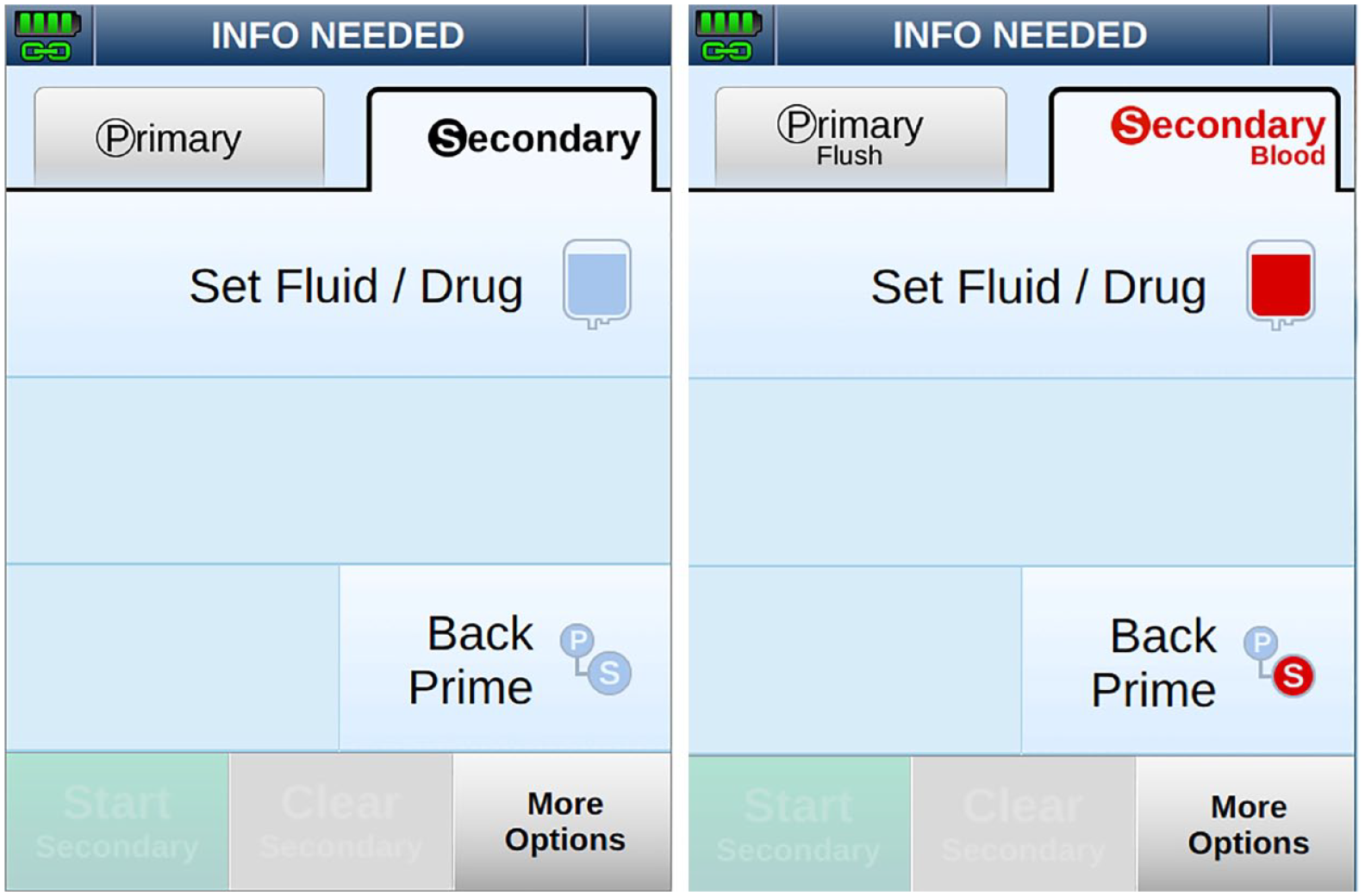
Screenshots showing the user interface for programming the secondary inlet when a primary set is loaded (left) and a blood products set is loaded (right).
Summary
The human factors validation (summative usability) testing conducted at the end of the usability engineering process showed the residual risk had been controlled to the necessary degree. These findings, as part of the human factors report, were part the premarket submission sent to the FDA. Subsequent to that the Ivenix Infusion System earned a 510(k) clearance from the FDA in 2019.
Ivenix committed to an extensive usability engineering and risk control effort to comply with the regulatory landscape that had evolved to scrutinize use safety in medical devices and, in particular, infusion pumps. This commitment served to optimize feature implementation for usability and appeal. But more important, it focused the development team on implementing effective risk controls for mitigating potential use errors during infusion therapy. It is our expectation that the state-of-the-art Ivenix pump has not only set a higher standard for infusion safety it has raised the bar.
Footnotes
The authors prepared the work as employees of Ivenix, Inc. At the time of manuscript submission, the air elimination filter (AEF) mentioned in this article has not been reviewed by the FDA.
 .
.