



Abstract
Computational Thinking (CT) and the understanding of how programs are being executed is internationally acknowledging as a necessity for today's students and citizens of tomorrow. Despite the multifaceted nature of CT, the introduction of CT and associate concepts such as coding is regarded as developmental acceptable for preschool and kindergarten children. For a decade, there has been a focus on educational reform in the form of educational apps. For young children, an influx of mobile apps offering various interfaces and styles promote themselves as having educational value to introduce children aged 5–7 to essential CT, coding, and problem-solving skills. On the contrary, little is known about the educational value of these apps. The fast pace at which developers produce these apps and the breadth of the available apps have gone beyond what it is reasonable for researchers and experts in the domain to evaluate. This article presents a literature review on how the ScratchJr app affects young children's CT, coding, and general literacy skills. The literature review includes 18 studies. The main conclusion is that although ScratchJr is not a panacea, it seems to be a helpful app that positively affects children's CT and coding skills.
Introduction
Studies undertook internationally acknowledge Computational Thinking (CT) and understand how programs are being executed as a necessity for today's students and citizens of tomorrow. Many education systems (hereafter countries) have integrated CT into compulsory primary and secondary education (Zhang & Nouri, 2019). Estonia, Australia, New Zealand, Cyprus, Greece, the United Kingdom, and the United States have already incorporated computing into almost every curriculum subject (Dufva & Dufva, 2016). Furthermore, many organizations such as Code.org and the EU Code Week, Black Girls Code, STEM Center USA, Girls Who Code work to bring young children, girls, and minorities into programming (Kyza et al., 2021).
Despite the multifaceted nature of CT, the introduction of CT and associate concepts such as coding is regarded as developmental acceptable for preschool and kindergarten children (Kyza et al., 2021). Three main motives primarily drive interest in these approaches: to teach children CT, to build a foundation for later learning skills. In this scenario, coding is both a skill and a tool that can deepen students' diverse talents and help them achieve their learning outcomes (Moreno-León & Robles, 2016). Furthermore, to encourage the widest participation in science and relative fields by women and underrepresented minorities (Dietz et al., 2021, p. 291). In addition, students exposed to CT, coding, and STEM opportunities early on develop fewer gender-based stereotypes regarding relative careers associated with work and life (Bati, 2021; Sullivan & Strawhacker, 2021; Videnovik et al., 2021).
Young children have become research focused on introducing CT and coding-based curricula in early childhood (Pila et al., 2019). Researchers assert that very young age children can engage and adequately understand basic CT concepts, such as sequence, conditional statements, and looping procedures. They can also improve their pre-math and preliteracy skills while working with developmentally proper tools that support such learning (Pila et al., 2019; Strawhacker et al., 2018; Sullivan & Bers, 2019). An influx of mobile apps offering a variety of interfaces and styles promote themselves as having educational value to teach young children essential CT, coding, and problem-solving skills (de Ruiter & Bers, 2021; Kyza et al., 2021; Rose et al., 2017; Sheehan et al., 2019; Sullivan et al., 2017; Wu & Su, 2021). In their study, Macrides et al. (2021) mentioned the following web-based and digital apps: Daisy the Dinosaur, Kodable, Code Studio, Lightbot, The Foos, and Code.org. These tools combined with mobile media devices can help advance digital equity in coding initiatives due to their relatively low cost, ease of use, and familiarity. In addition, these tools can facilitate social interaction and collaboration (Judge et al., 2015).
However, not all apps contribute the same, or they have the same capabilities. Integrating apps into educational material and curriculum is essential to select the apps that promote effective teaching and learning (Ehsan et al., 2017). The years of extensive research and development, prototyping, and field testing make the current version of ScratchJr an ideal app for five- to seven-year-olds children's developmental needs. For instance, the code is written from top to bottom in other coding environments that target the specific age group. On the contrary, ScratchJr code is written from left to right, similar to reading (Sullivan et al., 2017). The present literature review focused solely on the ScratchJr app for the following reasons. ScratchJr is used more frequently than any other similar app. More importantly, ScratchJr has several advantages for young age children. It enables “lower the floor” programming helping young learners engage with CT and coding activities earlier (Papadakis, 2021a). ScratchJr has a significant number of users (https://scratch.mit.edu/statistics). Other coding apps targeting young children, such as LightbotJr, are best suited for students with prior knowledge emphasizing a more rigorous approach to developing CT and coding skills (Papadakis, 2021b).
The paper is structured as follows: Section 2 summarizes the literature review findings relative to the study topic. The following section explains the procedure for designing the study, conducting the literature review, and acquiring the data; Section 4 presents the review results and findings. The final section presents the conclusions.
Literature Review
In recent years, CT, coding, and related content and activities have been integrated into school curricula. In the educational literature, CT is a broad term used to summarize the mental processes relative to computer science (CS) concepts and problem-solving skills (Anaclara et al., 2021). CT has often been equated with coding or programming. Nevertheless, many researchers conceptualize CT as a primarily cognitive skill than coding (Bakala et al., 2021). In addition to the broader context, the term CT includes all concepts and practices involved in formulating and solving problems and understanding human behavior by drawing on fundamental computing concepts (Wing, 2006, 2008).
Coding is the formal act of writing code, encompassing the peculiarities of CS (Dufva & Dufva, 2016). In addition to this information, coding possesses a considerable amount of knowledge on CS. Thus, academicians support the idea that coding is a meaningful window of opportunity for CT to develop for students of all ages and backgrounds (Popat & Starkey, 2019). In other words, coding ability and CT are closely related (Wang et al., 2021). Thus, educators can quickly implement CT and coding to young children through plugged and unplugged activities (Lee et al., 2021).
CT's fundamental aspects are in place when students start formal schooling. Children of age 4 or 5 have the cognitive capacity to comprehend abstract concepts and engage in relative activities (Dietz et al., 2021, p. 292). The researchers claim that the learning goal for introducing CT and coding to young children may not necessarily be described by technical proficiency. On the contrary, coding should consider as similar to learning a new language; a fluency to convey some of the ideas through the making of projects like stories (de Ruiter & Bers, 2021). In early childhood education, young children can discover and understand the technologies encounter in day-to-day activities by integrating CT and coding activities. The further aim is to become creative producers of technology rather than passive consumers by developing problem-solving, planning, and decision-making skills (Bati, 2021). Furthermore, these activities have significant performance benefits in the learner's early literacy and numeracy skills while promoting peer collaboration and teamwork (Sullivan & Strawhacker, 2021). Also noteworthy is that there are no gender differences in learning CT and coding concepts (Bati, 2021).
For a decade, there has been a focus on educational reform in the form of educational apps. As most young students are familiar with mobile technologies, it is also common to use mobile devices for educational purposes (Videnovik et al., 2021). Given the increase in the use of mobile technology and the ubiquity of various smart mobile devices, learning experiences can also be ubiquitous, personalized, and outside of formal learning environments (Booton et al., 2021). Specifically, one of the largest categories on the two major digital stores (Apple's iOS App Store and Google's Google Play store) targets preschoolers and toddlers (Papadakis, 2021a, 2021b). Early childhood researchers argue that new interactive technologies can provide space for children to express themselves (Samuelsson et al., 2022).
Similarly, the growing emphasis that academia has placed on CT and coding has driven researchers and profit organizations to develop programming environments and kits for novice programmers of all ages and educational backgrounds. Successfully, examples are the Scratch, the Kodu Game Lab, the Makey Makey, and the Micro: bit. Especially visual programming environments, also known as block-based, are suitable for developing coding skills for primary school children (Sáez-López et al., 2016). Unlike professional text-based languages, these environments use a coding language based on predesigned blocks. Each color-coded block represents a command, fitting together similar to puzzle-making resulting in an error-free syntax (Toma, 2021).
For young age children, an influx of mobile apps offering a variety of interfaces and styles promote themselves as having educational value to introduce children aged five to seven to essential CT, coding, and problem-solving skills (Rose et al., 2017; Sheehan et al., 2019; Sullivan et al., 2017). Studies with apps have supported the idea that young children can use these tools for learning essential CT concepts such as sequence, loops, and conditionals (Macrides et al., 2021). On the contrary little is known about the coding apps targeting young age children. Apps for preschoolers often include text-based interfaces (Judge et al., 2015). Further investigation has revealed that many apps do not provide developmentally appropriate experiences (Sheehan et al., 2019). The fast pace at which developers produce these apps and the breadth of the available apps have gone beyond what it is reasonable for researchers and experts in the domain to evaluate (Hirsh-Pasek et al., 2015).
It is widely accepted that children require access to developmentally appropriate technologies to develop critical skills and capabilities (Murcia, 2021). Educators face challenges effectively integrating digital technologies into early learning environments (Kyza et al., 2021; Murcia, 2021) to mitigate the difficulties young age face while trying to learn CT and coding (Papadakis, 2021a). Thus, using developmentally appropriate environments to reduce code learning challenges is vital for young students (Fessakis et al., 2019; Resnick et al., 2009). Drag and drop-based visual-based programming environments keep novice programmers focused on the coding process while decreasing the cognitive load met in text-based languages (Terzopoulos et al., 2019).
Resnick (2013) argues that coding should be viewed as not just a “pathway to good jobs, but as a new form of expression and a new context for learning” (Resnick, 2013, para. 16). Educators are suddenly responsible for introducing this new type of literacy in their classrooms, with an increasing number of media, governments, and researchers advocating the CT and coding development from the early grades and many available coding apps (Walsh & Campbell, 2018). Nevertheless, to integrate apps into educational material and curriculum, it is essential to select the apps that promote effective teaching and learning (Ehsan et al., 2017).
ScratchJr
An increasing influx of manipulatives, toys, and learning materials, ranging from digital tools to tangible interfaces, are available to teach young learners the essential CT and coding skills (Hamilton et al., 2020). Research on mobile technology has documented a significant rise in mobile device use in schools, and with this, offering new ways for teachers and students to create, exchange and share information (Galway et al., 2020). Nevertheless, many of these tools are inaccessible due to the cost, the lack of professional support, and teachers’ development. For instance, with an average price of 250 euros per kit, it is often beyond the budget of many early childhood educators. Similarly, many educators cannot pay for app licenses (Terzopoulos et al., 2019).
The ScratchJr design is based on the popular Scratch programming language for older children, eight years of age and up (Resnick et al., 2009). It is designed to be a “coding playground” (Bers, 2019), reducing unnecessary low-level burdens so that programming can become another language of expression (de Ruiter & Bers, 2021). However, because ScratchJr aims at younger children, it differs from Scratch in fundamental ways. Importantly, ScratchJr does not require children to be literate. All instructions and menu options are identifiable through symbols and colors (de Ruiter & Bers, 2021).
ScratchJr is considered a computational construction kit as it engages children to get involved in science, math, and relative activities. Due to the app learning design, children can create interactive stories and animations. Kids can program sprites by dragging and dropping blocks that represent different programming commands. Each sprite has its scenario, while four pages represent a story (Roque et al., 2021).
The ScratchJr app is freely available for tablet-type devices running the Android and iOS operating systems. There is also an unofficial version of Scratch for desktop computers (Windows and Mac) in the following link: https://jfo8000.github.io/ScratchJr-Desktop/. The software has been released as a stand-alone tool; however, the ScratchJr research team on the ScratchJr website (https://www.scratchjr.org/) has published freely online learning material that enhances the functionality of the existing app (Flannery et al., 2013; Kazakoff, 2015).
Research
Review Protocol and Questions
This review synthesized research on the ScratchJr impact on developing CT and coding skills of young children. The present study review protocol aimed to 1) maximize the scientific area, 2) identify the related work, and 3) analyze data from known scientific databases. The researcher formulated four research questions to achieve this goal based on relevant literature and personal experience:
RQ1: How does ScratchJr affect CT and coding skills development and encourage students' learning? RQ2: What are the students' experiences and perceptions of using the ScratchJr app? RQ3: What are the teachers' perceptions of using the ScratchJr app? RQ4: What are the researchers' perceptions of the ScratchJr app in their research?
Inclusion and Exclusion Criteria
The present study considered the following criteria for a comprehensive and balanced topic overview. The inclusion criteria were the following:
The article is a journal article or book chapter The article is published in a peer-reviewed journal. The article is presented at academic conferences The article is published in international book series. The article is written in English. The article is not available online. The article is a conference abstract, editorial, letter, opinion, audit, or review. Articles carried out before 2010 were excluded, as, in 2010, the first tablet-type device (iPad) was released.
The exclusion criteria were the following:
Literature Search Process
The author screened the titles and abstracts of the papers resulting from the predefined database search using the eligibility criteria. Based on Kitchenham’s (2004) recommendations, the author defined the search criteria and the electronic searches (see Figure 1 for databases used). Four keywords relevant for the review with their synonyms were used: app, Computational Thinking, coding, and preschool education. The search terms determined were app*, Computational Thinking, preschool*, young children, early age*, kindergarten, lower education, childhood, early years, elementary education, and young learner*. The researcher adjusted the search terms for databases settings. Furthermore, the author searched in Google Scholar English using the exact keywords (see Figure 1 for databases used).
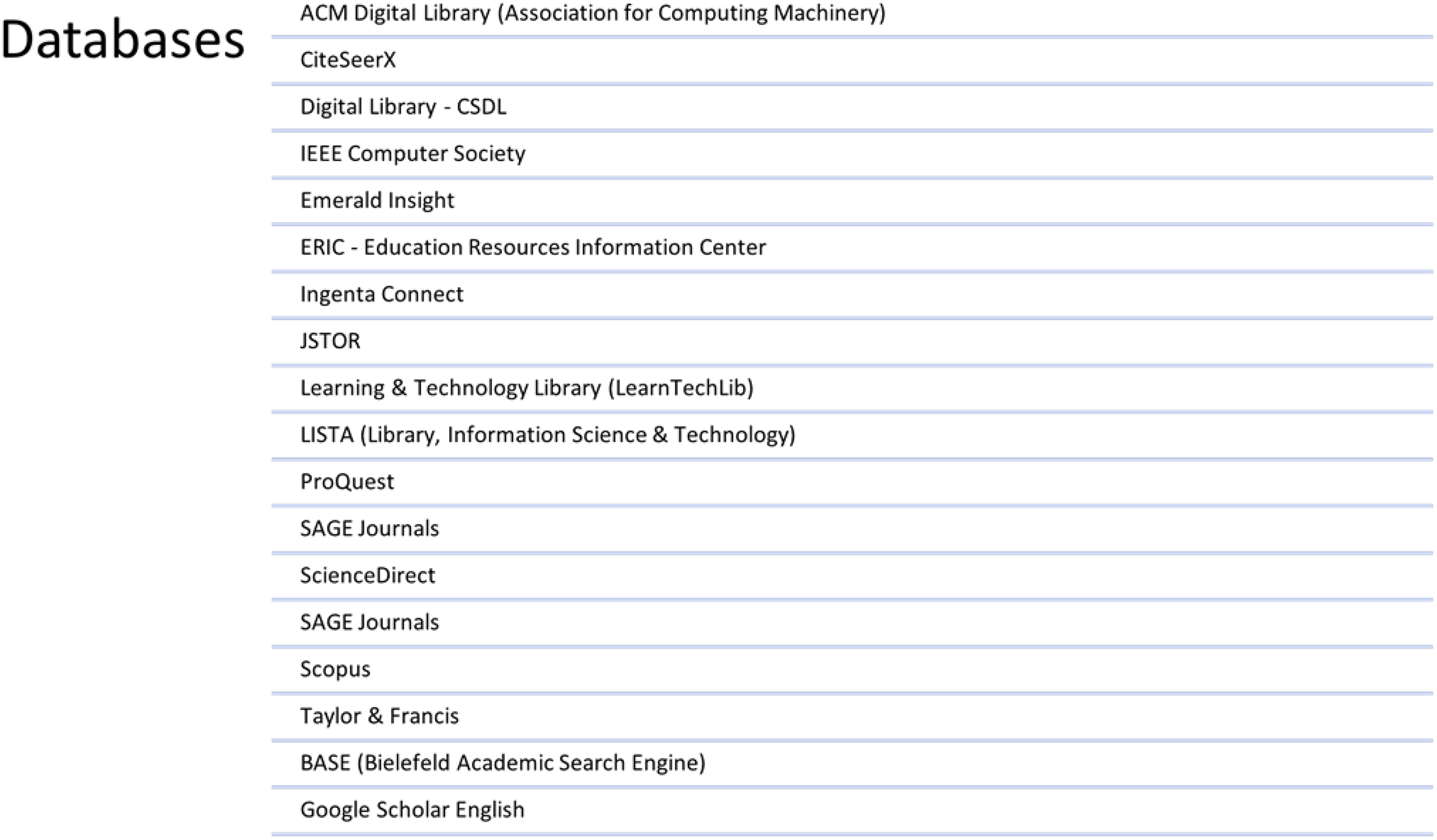
Databases used for the systematic literature review.
Research Method
The research was carried out in line with the Kitchenham (2004) guidelines and following the rules of PRISMA (Preferred Reporting Items for Systematic Reviews and Meta-Analyses) (Moher et al., 2009). Three phases were followed: the review protocol's development, the definition of the inclusion and exclusion criteria, the literature search in predefined databases, the critical appraisal, the data extraction, and the information synthesis (see Figure 2 for the PRISMA flowchart).
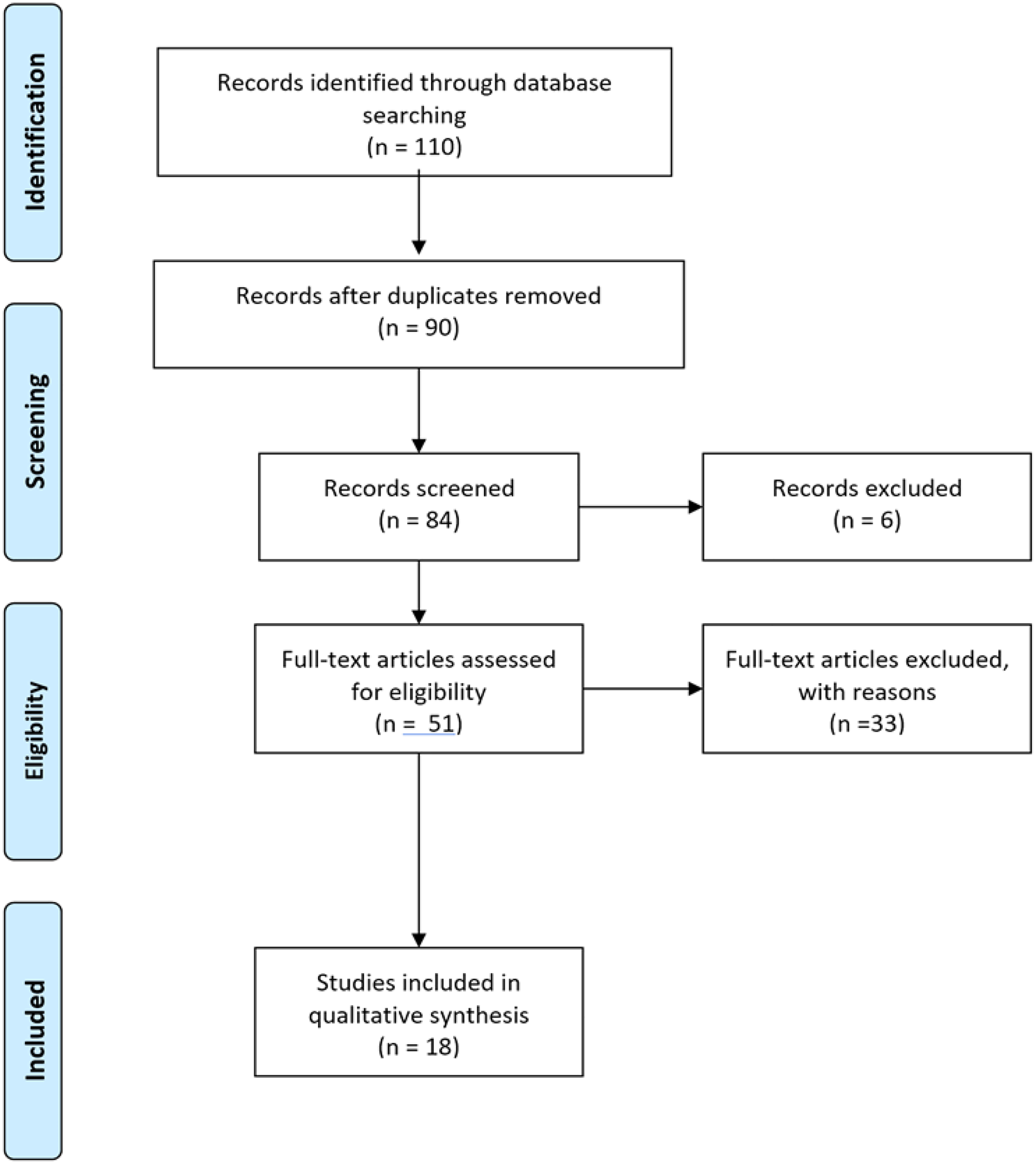
PRISMA (Preferred Reporting Items for Systematic Reviews and Meta-Analyses) flowchart for selection of studies.
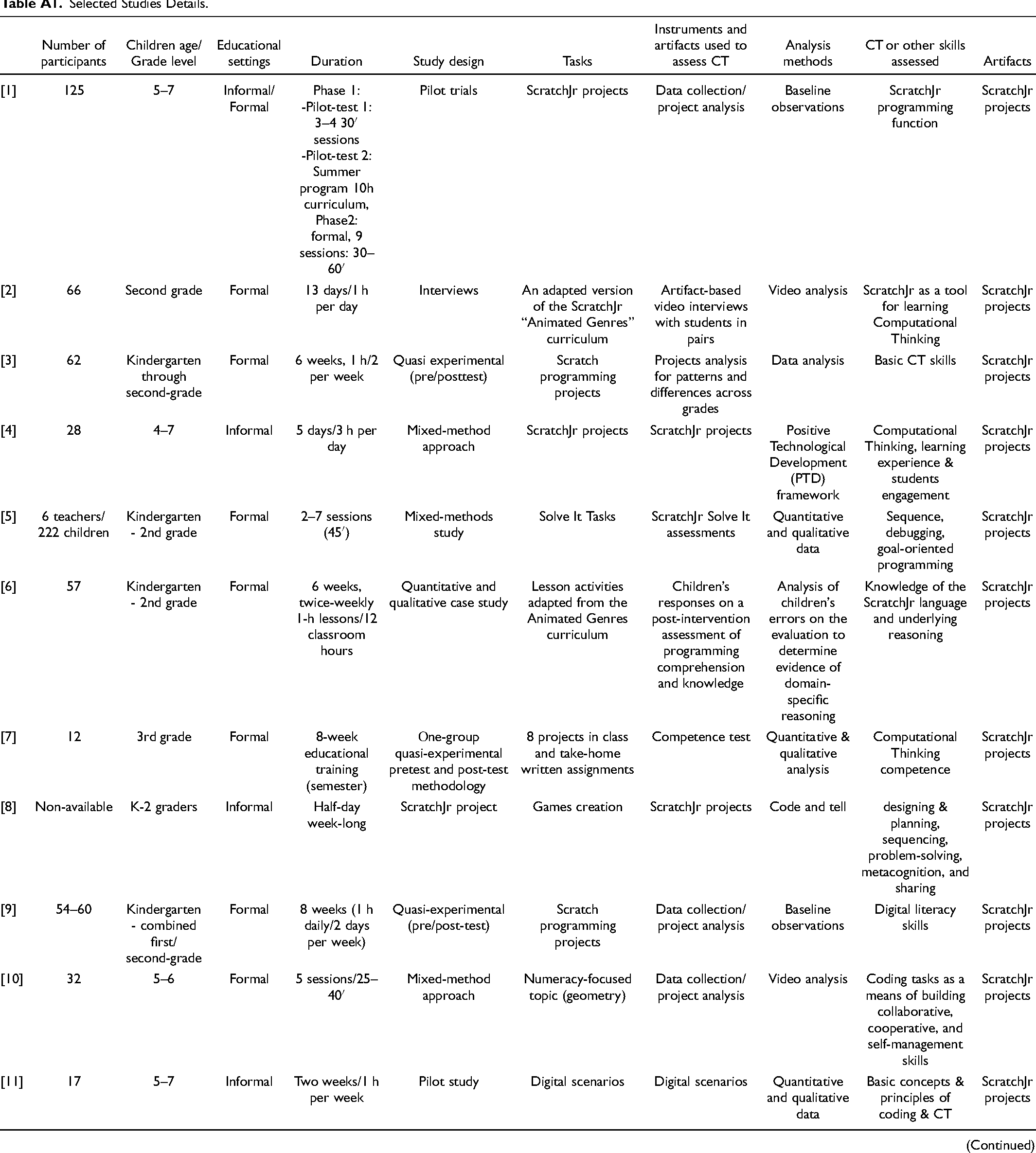
Figure 3 summarizes the search results. Titles were screened, and the researcher checked the abstracts for relevance. The researcher downloaded the eligible studies for further analysis. The majority of rejected articles were not written in the English language. 18 (38%) of the 51 articles were accepted. Thirty-three studies (62%) were excluded as they lacked sufficient rigor. These articles lacked adequate description or did not have proper use of the English language. The author used a Microsoft Excel file to store the data (see Table 1). The author analyzed each study to derive these data, presented in the results section (see Table A1 in the Appendix).
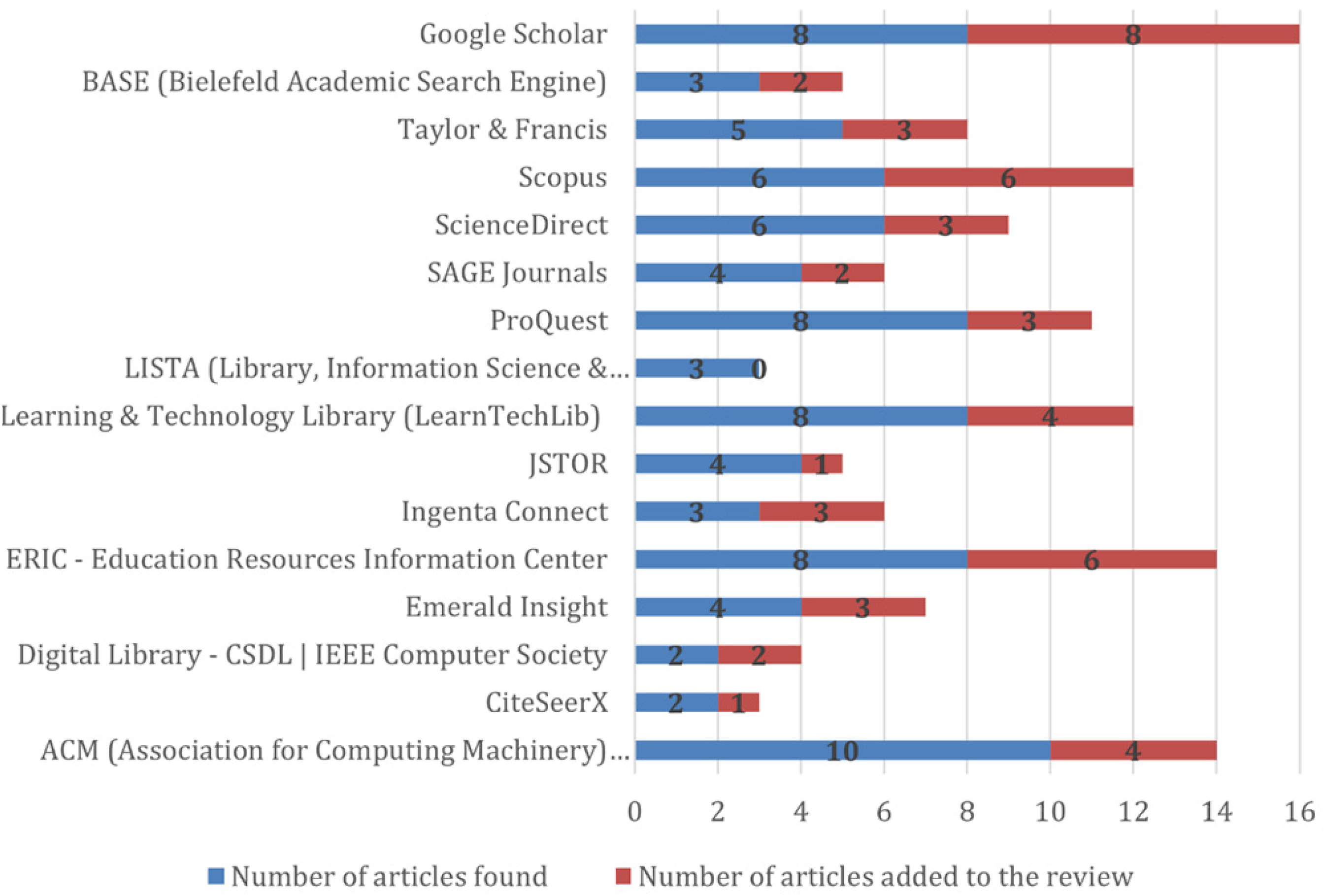
Results of the search undertaken in predefined databases.
Selected Studies.
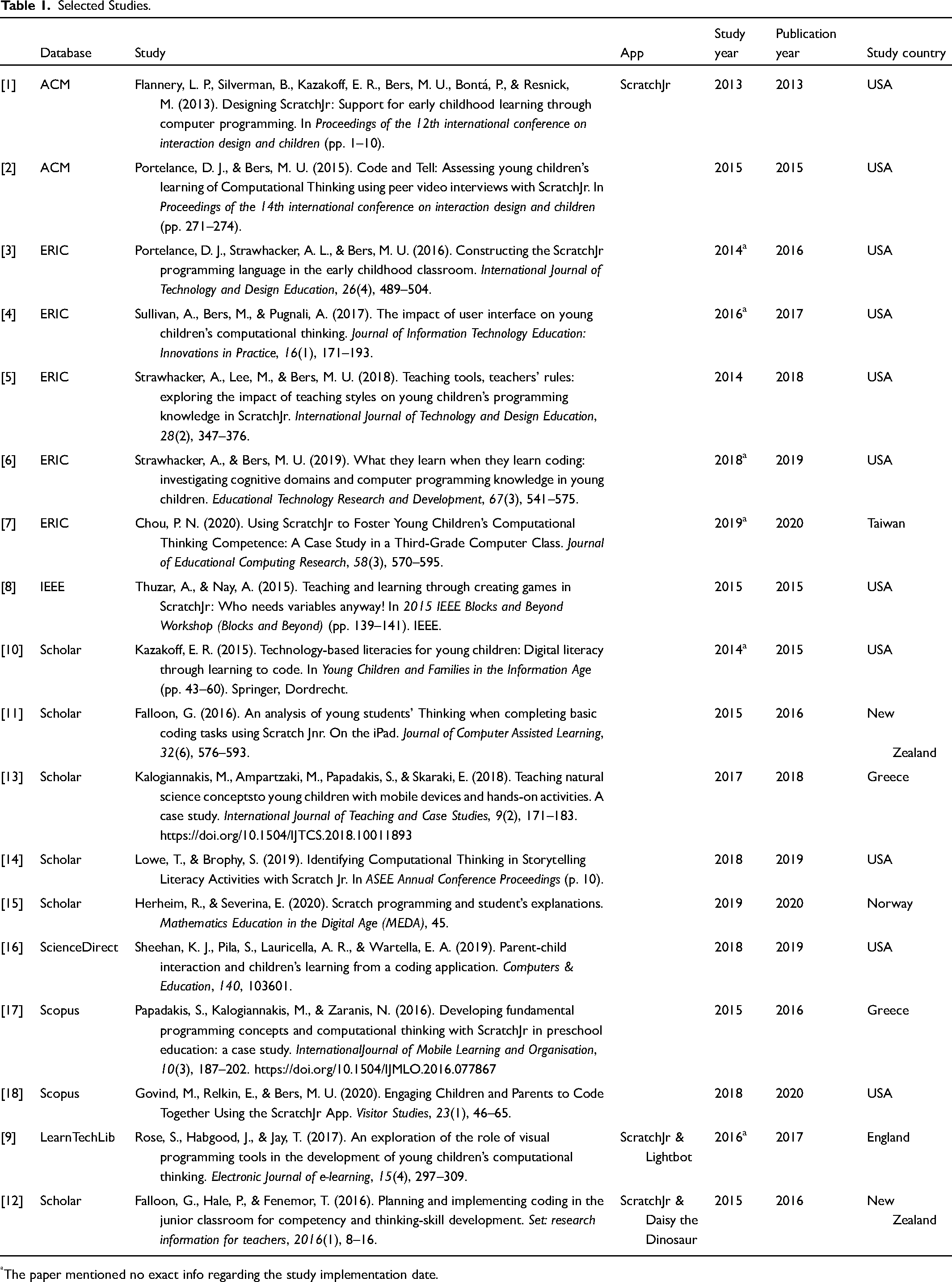
The paper mentioned no exact info regarding the study implementation date.
General Results
A total of 18 articles were retrieved from the published literature. The highest number of articles was retrieved from Google Scholar (6), followed by ERIC (5). Additionally, seven articles were retrieved from five different sources (ACM 2, Scopus 2, IEEE 1, LearnTechLib 1, ScienceDirect 1) (see Table 1). The studies' yearly distribution illustrated in Figure 4 was not easy to find. Some studies did not mention the year's study intervention. However, an attempt was made to determine the study's year based on relevant info reported within the paper, such as the app's screenshots, the relevant studies mentioned within the document, or the study's initial submission date to the journal. The publication date for the 18 articles illustrated in Figure 4 does not reveal an upward trend in published studies on coding apps. With the growing popularity of tablet-type devices and apps and the necessity of developing young children's coding skills, one might expect a more considerable number of comparative studies in recent years. An explanation could be that researchers do not have enough data for relevant studies due to the pandemic in the year 2020. The United States of America was the most productive country regarding an absolute number of studies (11). There are six other countries with a small number of studies: Greece (2), New Zealand (2), England (1), Norway (1), and Taiwan (1).
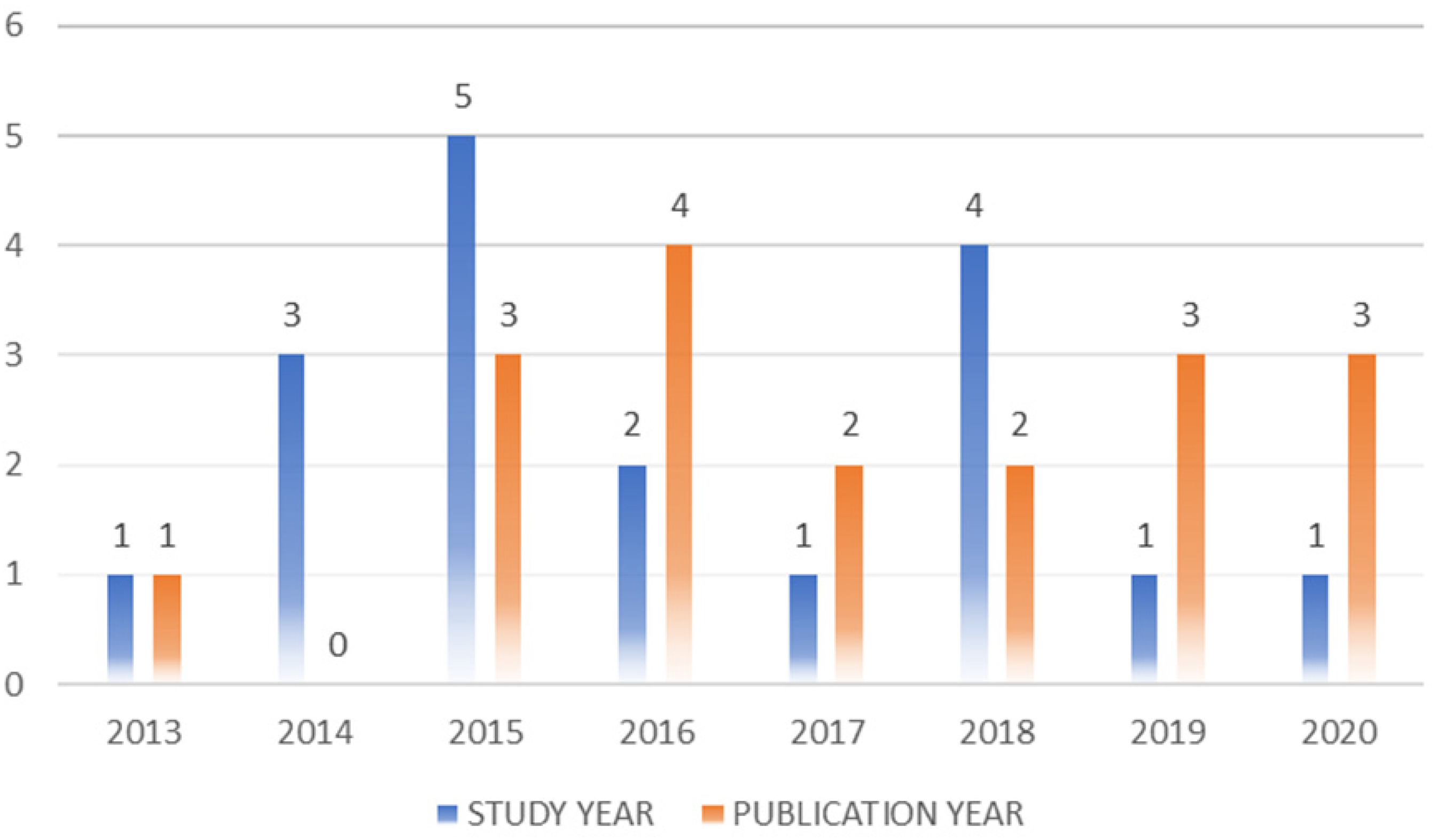
Articles distribution over intervention and publication year.
The sample size varied from 12 to more than 200 participants, including children and dyads of students/teachers or students/parents. Moreover, two studies did not specify the number of participants included. Sixteen papers mentioned ScratchJr solely, while two articles described two apps (Lightbot-ScratchJr, Daisy the Dinosaur-ScratchJr). Most studies used experimental study designs to isolate the impact of ScratchJr on students’ CT and coding skills development. Three studies tried to determine whether the app can help children learn core mathematical concepts. Furthermore, one study examined whether the ScratchJr helped children to learn science concepts. At the end of the intervention period, all studies asked participants to create digital artifacts in games, animation, or storytelling projects.
Research Questions
RQ1: Learning Effects of Using the ScratchJr as a Coding App
All studies reported that the ScratchJr app helped young learners understand CT concepts and practice coding skills, including sequence, repetition, and debugging skills. Furthermore, the app cultivated a positive coding experience for children. Many studies have highlighted the importance of this positive experience on children's socio-emotional development (Chou, 2020; Govind et al., 2020; Strawhacker & Bers, 2019; Sullivan et al., 2017). Since its development phase and the first pilot studies, the ScratchJr helped children substantially progress toward meaningful tinkering and creating mini projects compared to Scratch (Flannery et al., 2013). In another pilot study, the children successfully attained foundational ScratchJr programming comprehension. Children “demonstrating computational thinking skills of symbol decoding and sequencing comprehension and computational thinking practices of debugging and goal-oriented programming” (Strawhacker et al., 2018, p. 368). Other studies commented that ScratchJr could help young students learn problem-solving strategies, planning methods, and thinking (Papadakis, 2021b; Thuzar & Nay, 2015). By integrating programming concepts into creating stories with ScratchJr, students could “learn key digital literacy skills in developmentally appropriate ways within traditional early childhood curricular themes” (Kazakoff, 2015, p. 58). Nevertheless, some studies showed that younger students could also use the ScratchJr to introduce themselves to STEM learning. The ScratchJr can also help students understand numeracy concepts. These include positive and negative integers, multiplication tables. One study helped children understand science concepts (Papadakis, 2021a; Thuzar & Nay, 2015; Herheim & Severina, 2020; Sheehan et al., 2019). Furthermore, studies showed that the children, regarding their gender, culture, language, and socioeconomic backgrounds, enthusiastically explored, programmed, and created animated scenes with the ScratchJr.
RQ2: What are the Students’ Perceptions of Using the ScratchJr App?
Of particular interest, it seemed surprising that all children enjoyed their interaction with the ScratchJr app. These reactions did not differ concerning their demographic characteristics. Strawhacker et al. (2018) noted that the ScratchJr “flexible design allowed many children to continue to explore coding with their personal goals” (p.371). In the same study, the teachers highlighted that the participants “were enthusiastic and engaged in ScratchJr lessons” (p. 372). Nevertheless, in Thuzar and Nay’s (2015) study, although most students enjoyed the ScratchJr app lessons, others felt restricted by the limited number of messages and scenes the software enabled. The researchers noted that the students asked for more “messages” and “scenes.” Some students also felt frustrated by the nonexistence of variables and the delays they experienced due to the increased number of sprites inserted in their projects.
RQ3: What are the Teachers’ Perceptions of the ScratchJr App?
Strawhacker et al. (2018) commented on teachers' perceptions regarding implementing the ScratchJr app in the classroom. Most educators were positioned positively on the ScratchJr utilization in the school. The teachers, despite their teaching style, enjoyed the open-ended app design. They also advocated its flexibility and multiple roles in various educational contexts to empower teachers and learners. The educators also reported that their students enthusiastically engaged in the learning activity. ScratchJr’s flexible design allowed them to focus on aspects of their interests.
RQ4: What are the Researchers’ Perceptions of the ScratchJr App?
In general, researchers concluded that ScratchJr could support student-centered teaching. They also endorsed that the app potentially provides easy integration for digital literacies in authentic tasks within the classroom (Kazakoff, 2015). Kazakoff also recommended ScratchJr implementation in preschool classrooms to help children acquire language and cognitive and social skills.
Lowe and Brophy (2019) acknowledged the app as an accelerator for young children to understand computation in developmentally appropriate situations. They also highlighted its environment designed to inspire open-ended play. The results of Strawhacker and Bers’s (2019) study also recognized the efficiency of ScratchJr. Despite the significant differences in student performance levels across the three grades, the researchers advocated the usage of ScratchJr as a part of a well-designed intervention adapted to the different students' needs. The reason is that younger children cannot perform the same in complex ScratchJr concepts as older children. Similarly, Sullivan et al. (2017) concluded that ScratchJr could encourage positive behavior for learning and a positive social environment combined with an appropriately designed curriculum. This positive behavior can help young children learn necessary CT skills.
Portelance et al. (2016) and Portelance and Bers (2015), in their studies, concluded that there is convincing evidence in ScratchJr's role as a teaching tool to help children engage in coding activities. Falloon (2016) highlighted that the app's open-ended design supports children's experimentation and exploration. Thuzar and Nay (2015) emphasized that ScratchJr is a flexible learning tool supporting a “low floors” and “wide walls” approach. They also stated that the software was ideal for younger students to introduce themselves to numeracy concepts. In general, despite the constraints of ScratchJr, researchers agreed that the ScratchJr characteristics appear to positively influence the extent that some students could develop their ideas in a digital environment (Chou, 2020; Falloon, 2016; Herheim & Severina, 2020).
Researchers also mentioned ScratchJr constraints. Falloon (2016) noted that as students and educators will perform CT and relative activities in multidisciplinary approaches in the school curriculum, “the minor addition of a sprite pencil would be helpful (p. 589)” (Falloon, 2016). Thuzar and Nay (2015), based on students’ comments, highlighted the importance of having a more significant number of messages between the sprites. They also mentioned the limitation of the small number of “pages” (four) that a ScratchJr project can support, asking for more “pages.” They also highlighted the delays students experienced when they inserted a relatively significant number of sprites in their projects. They also negatively experienced the inexistence of variables.
Limitations
The current study has limitations. The study conclusions were limited to the selected studies' findings based on the criteria determined and analyzed in this research. A quantitative synthesis (meta-analysis) was not performed as the diversity of smart mobiles features and CT and coding skills concepts did not allow statistical evaluations of the results. Furthermore, the present study analyzed seven publications coauthored by Marina Bers, constituting almost 40% of the analyzed studies. This fact makes the present study results biased toward her approaches. It was impossible to overcome this bias since all the studies were relevant to the current research scope.
Discussion
Coding apps are an app category designed to help the general population develop the necessary skills to introduce computer programming (Hutchison et al., 2015). There are dozens of free or low-cost apps designed to teach the basics of CT concepts quickly. However, not all apps contribute the same, or they have the same capabilities. The years of extensive research and development, prototyping, and field testing make the current version of ScratchJr (see Figures 5 and 6) an ideal app for 5–7-year-olds children's developmental needs. For instance, unlike other coding environments that target the specific age group, which code is written from top to bottom, ScratchJr code is written from left to right, similar to learning to read (Sullivan et al., 2017). Furthermore, the ScratchJr app's core is the idea that children in kindergarten through grade two have minimal abilities compared to older children in fine motor control, reading level, and self-regulation (Kazakoff, 2015). For instance, the icons of the blocks in ScratchJr are larger than in the original Scratch, a better fit with younger children's motor skills (i.e., more surface area to target with finger).
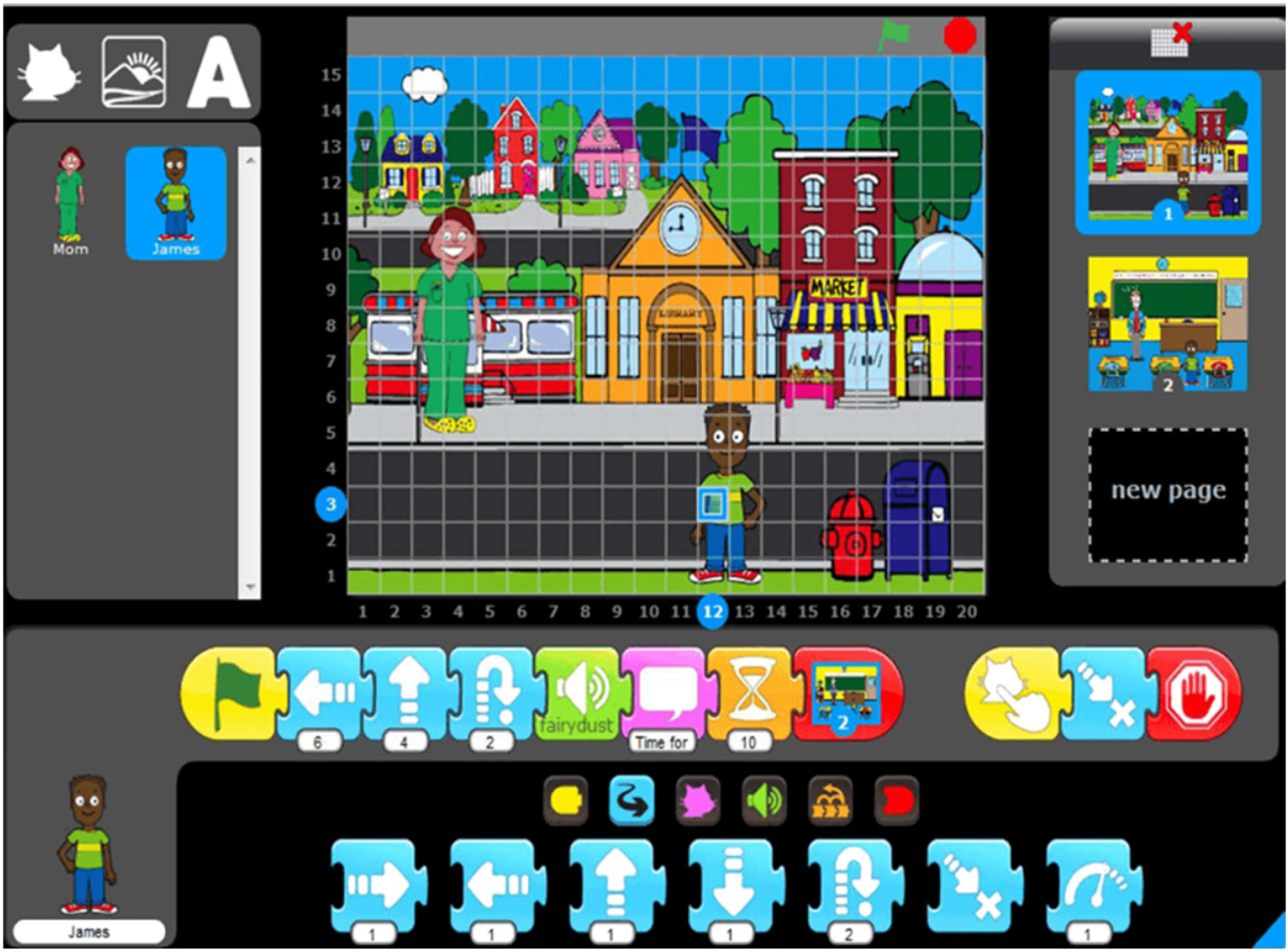
ScratchJr interface in prototype version (2012). Source: ScratchJr wiki, https://en.scratch-wiki.info/wiki/ScratchJr.
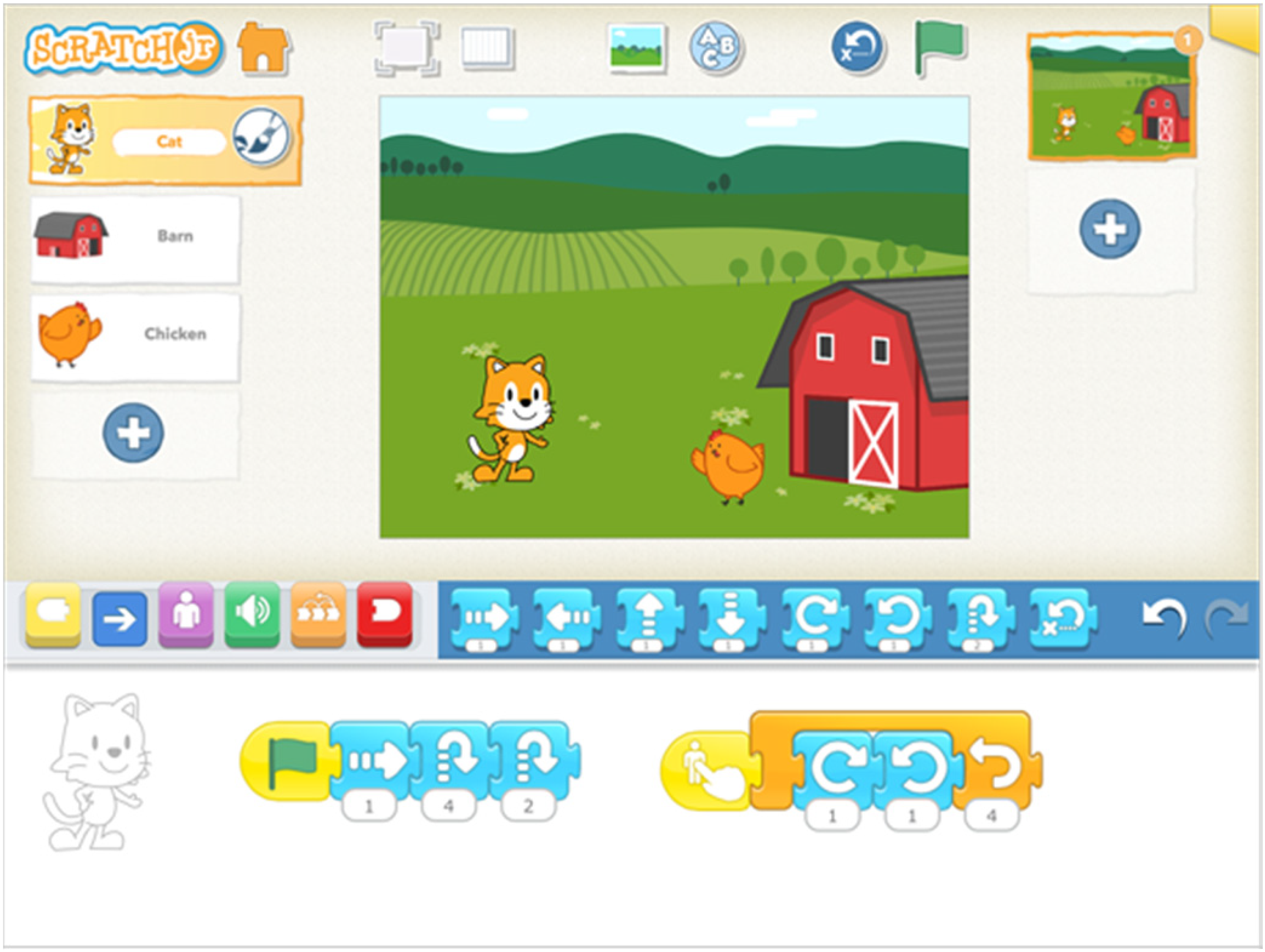
ScratchJr interface in the last ScratchJr version (2021). Source: ScratchJr.org, https://scratchjr.org/.
To summarize the present study results, ScratchJr effectively delivers coding education and other skills to young children coherently and offers advantages over other apps. First, its open-ended environment provides an interdisciplinary approach to the curriculum. Second, it is free and available for both iOS and Android tablet-type devices. Third, it encompasses all necessary dimensions for the specific age group: exposes children to powerful ideas from CS in developmentally proper ways, provides a mean for self-expression, prompts debugging and problem, and offers a low-floor/high-ceiling interface (Sullivan & Bers, 2019). Additionally, by using math and language in a meaningful way, the children can develop early childhood numeracy and literacy skills (Kazakoff, 2015). ScratchJr can help teachers construct the relationship between teaching and classroom management styles and their children's learning needs (Strawhacker et al., 2018). Many available apps can make it difficult for teachers to design learning content adapted to their needs and the app's characteristics. On the contrary, with ScratchJr, teachers can use the curricular activities created by the ScratchJr team, which complement and scaffold the software and introduce children to CT concepts with relative ease.
Of course, the ScratchJr app is not a panacea as it has drawbacks. The app lacks conditionals, supports only four different pages per project, and faces delays when the user inserts many sprites on the screen. Additionally, the app does not operate on iPhone devices. Although users can install it into smartphones with the Android operating system, the ScratchJr interface is not optimized for devices that have screens smaller than 7 inches.
Concussion
Since 1984, Pea and Kurland (1984 as cited in Sung et al., 2017), wondered, “How can we organize learning experiences so that in the course of learning to program, students are confronted with new ideas and have opportunities to build them into their understanding of the computer system and computational concepts?” (p. 140). By focusing on low-tech and developmentally appropriate approaches in coding, it is possible to teach technical CT and coding skills to young learners without access to expensive digital technology in both home and school settings (Sullivan & Strawhacker, 2021).
“Technology is here to stay” (NAEYC, 2012, p. 18) as smart mobile devices and apps are now almost seamlessly integrated into life. Thus, it is not whether we should use smart mobile devices and accompanying apps in early childhood classrooms. On the contrary, new empirical research must examine which features of apps positively impact CT and coding learning (Booton et al., 2021). Furthermore, intervention approaches must focus on how educators can integrate these tools effectively into the curriculum considering learners' interests, needs, and abilities.
Supplemental Material
sj-xlsx-1-ref-10.1177_10567879221076077 - Supplemental material for Can Preschoolers Learn Computational Thinking and Coding Skills with ScratchJr? A Systematic Literature Review
Supplemental material, sj-xlsx-1-ref-10.1177_10567879221076077 for Can Preschoolers Learn Computational Thinking and Coding Skills with ScratchJr? A Systematic Literature Review by Papadakis Stamatios in International Journal of Educational Reform
Footnotes
Authors’ Note
The author confirms that the data supporting the findings of this study are available within the article or its Supporting Information and are available on request from the corresponding author. All procedures followed were under the ethical standards of the Ethical Committee of the University of Crete, Greece.
Declaration of Conflicting Interests
The author declared no potential conflicts of interest with respect to the research, authorship, and/or publication of this article.
Funding
The author received no financial support for the research, authorship and/or publication of this article.

Supplemental Material
Supplemental material for this article is available online.
Author Biography
Appendix I
Selected Studies Details.
| Number of participants | Children age/Grade level | Educational settings | Duration | Study design | Tasks | Instruments and artifacts used to assess CT | Analysis methods | CT or other skills assessed | Artifacts | |
|---|---|---|---|---|---|---|---|---|---|---|
| [1] | 125 | 5–7 | Informal/Formal | Phase 1: -Pilot-test 1: 3–4 30′ sessions -Pilot-test 2: Summer program 10h curriculum, Phase2: formal, 9 sessions: 30–60′ | Pilot trials | ScratchJr projects | Data collection/project analysis | Baseline observations | ScratchJr programming function | ScratchJr projects |
| [2] | 66 | Second grade | Formal | 13 days/1 h per day | Interviews | An adapted version of the ScratchJr “Animated Genres” curriculum | Artifact-based video interviews with students in pairs | Video analysis | ScratchJr as a tool for learning Computational Thinking | ScratchJr projects |
| [3] | 62 | Kindergarten through second-grade | Formal | 6 weeks, 1 h/2 per week | Quasi experimental (pre/posttest) | Scratch programming projects | Projects analysis for patterns and differences across grades | Data analysis | Basic CT skills | ScratchJr projects |
| [4] | 28 | 4–7 | Informal | 5 days/3 h per day | Mixed-method approach | ScratchJr projects | ScratchJr projects | Positive Technological Development (PTD) framework | Computational Thinking, learning experience & students engagement | ScratchJr projects |
| [5] | 6 teachers/222 children | Kindergarten - 2nd grade | Formal | 2–7 sessions (45′) | Mixed-methods study | Solve It Tasks | ScratchJr Solve It assessments | Quantitative and qualitative data | Sequence, debugging, goal-oriented programming | ScratchJr projects |
| [6] | 57 | Kindergarten - 2nd grade | Formal | 6 weeks, twice-weekly 1-h lessons/12 classroom hours | Quantitative and qualitative case study | Lesson activities adapted from the Animated Genres curriculum | Children’s responses on a post-intervention assessment of programming comprehension and knowledge | Analysis of children's errors on the evaluation to determine evidence of domain-specific reasoning | Knowledge of the ScratchJr language and underlying reasoning | ScratchJr projects |
| [7] | 12 | 3rd grade | Formal | 8-week educational training (semester) | Οne-group quasi-experimental pretest and post-test methodology | 8 projects in class and take-home written assignments | Competence test | Quantitative & qualitative analysis | Computational Thinking competence | ScratchJr projects |
| [8] | Non-available | K-2 graders | Informal | Half-day week-long | ScratchJr project | Games creation | ScratchJr projects | Code and tell | designing & planning, sequencing, problem-solving, metacognition, and sharing | ScratchJr projects |
| [9] | 54–60 | Kindergarten - combined first/second-grade | Formal | 8 weeks (1 h daily/2 days per week) | Quasi-experimental (pre/post-test) | Scratch programming projects | Data collection/project analysis | Baseline observations | Digital literacy skills | ScratchJr projects |
| [10] | 32 | 5–6 | Formal | 5 sessions/25–40′ | Mixed-method approach | Numeracy-focused topic (geometry) | Data collection/project analysis | Video analysis | Coding tasks as a means of building collaborative, cooperative, and self-management skills | ScratchJr projects |
| [11] | 17 | 5–7 | Informal | Two weeks/1 h per week | Pilot study | Digital scenarios | Digital scenarios | Quantitative and qualitative data | Basic concepts & principles of coding & CT | ScratchJr projects |
| [12] | 18 | 1st grade | Formal | Two half-day CT lessons | Qualitative analysis | 1st lesson: algorithms 2nd lesson: ScratchJr | Children's stories evaluation | Qualitative data | ScratchJr is a powerful accelerator for understanding computation | ScratchJr projects |
| [13] | N/A | 1st-year preservice teachers and 4-year students | Formal | 2 mathematics lessons/2 days | Design-based research project | Students used multiplication tables (corresponding number sequences) to navigate characters when creating an animation in ScratchJr. | ScratchJr projects | Audio & video recordings | ScratchJr has some functions that can foster mathematical argumentation | ScratchJr projects |
| [14] | 31 parents / 31 children | 4–5 | Informal | Parent-child dyad lab visits. Time spend N/A | Parent-child interaction coding using a coding scheme | Free play with the PBS KIDS ScratchJr | Audio or video session transcribed & coded | Video-audio/analysis | Young children can learn coding skills from the ScratchJr app | ScratchJr projects |
| [15] | 43 | Kindergarten | Formal | 13 h (1 h daily/twice weekly) | Qualitative and quantitative analysis | ScratchJr projects | Project analysis for CT skills | Data analysis | Basic CT skills | ScratchJr projects |
| [16] | Study 1: 58 parents/children Study 2: 3 parents/children | 5–7 | Informal | Study 1: ScratchJr Family Days: single-day events Study2: same protocol as study1 | Two case studies: young children & families | Creative coding activities using ScratchJr | ScratchJr projects | Pre-and post-surveys | Algorithms, design process, debugging | ScratchJr projects |
| [17] | 40 | 6–7 | Formal | Each child played their version of the game for 30 min. | Εxploratory approach | Children use both versions of the game. | A range of measures such as a test of non-verbal reasoning, Program manipulation, | Quantitative data | Both groups had similar overall performance, but as expected, the children using the ScratchJr-like interface performed more program manipulation. | - |
| [18] | 36 | Junior Primary (Year 1 and 2) | Formal | N/A | Case study | Geometry coding challenges | Interview, document analysis, iPad display, audio capture & a specially developed app | Quantitative and qualitative data | Findings suggest using Daisy for learning the “mechanics” of building code. While ScratchJr proved reasonably helpful, it was difficult for the students to visualize the shape and dimensions of objects their code created. | - |
Note. CT = Computational Thinking.
Appendix II
References
Supplementary Material
Please find the following supplemental material available below.
For Open Access articles published under a Creative Commons License, all supplemental material carries the same license as the article it is associated with.
For non-Open Access articles published, all supplemental material carries a non-exclusive license, and permission requests for re-use of supplemental material or any part of supplemental material shall be sent directly to the copyright owner as specified in the copyright notice associated with the article.
