




Abstract
Background
In the hospital, interprofessional team members must work collaboratively. That creates a gap in medical practice, particularly in a hectic emergency that may lead to medical errors, with associated ethical, legal, and financial consequences. Mannequin-based simulation can be a solution to bridge this gap in
Objective
To develop a
Methods
Tools and technologies used for this
Results
A
Conclusions
CyberPatient
Background
In industries where the outcome depends on the performance of interprofessional teams, team training is the key to success (Weaver et al., 2014). Team training to improve team dynamics and personal attributes that enable someone to interact effectively and harmoniously with other people is highly effective (Allianz, 2015). For example, in the aviation industry, 1959, 40 airplane accidents occurred out of one million aircraft departures in the United States. In only ten years, accidents improved to less than two in every million departures, and by 2015, down to 0.1 per million (Allianz, 2015). Many advances in aviation, such as improved aircraft engines, structure, communication systems, and airports, reduced accidents. However, the role of simulated team training in improving communication skills in reducing aircraft accidents is essential, as others describe (Allianz, 2015; Hamman, 2004). Based on the aviation industry’s success, the assumption is that these types of simulations also work in other complex systems, including healthcare (Salas & Rosen, 2013).
In medicine, interprofessional team members such as nurses, physicians, technicians, pharmacists, social workers, and others receive training and credentials individually by profession; however, they must work as a team in the hospital, which could create a gap in medical practice, particularly in a hectic emergency, that may lead to medical errors, with associated ethical, legal and financial consequences (Rosenberg et al., 2001). At this time, this gap is filled with the use of mannequin-based simulation.
Effective teamtraining programs can provide scholars with information, demonstrations, guided practice, and timely diagnostic feedback (Baker et al., 2005). Teamwork processes and patient outcomes can improve with various training strategies to teach team training in medicine (Weaver et al., 2014). One example is assertiveness training. Assertiveness training helps to develop communication strategies that support task-relevant and team-performance-relevant assertiveness (Weaver et al., 2014). Communication is crucial to optimize teamwork but has yet to be improved for medicine (Brindley & Reynolds, 2011).
One example where medical professionals must cooperate in teams is collaboration in an emergency room (ER) where patients require immediate critical care. Teamwork techniques are effective in the care process to improve safety in such complex care (Leonard et al., 2004) Manser (2009). elaborates on this in his review of research on teamwork in highly dynamic healthcare domains (e.g emergency medicine), focusing on aspects relevant to the quality and safety of patient care. His findings show that teamwork contributes to the causation and prevention of adverse events and is effectively supported by communication, coordination, skill, and leadership (Manser, 2009; Nelson et al., 2017).
High-fidelity simulations allow interprofessional medical teams to train under close-to-realistic conditions while being allowed to make errors (Baker et al., 2005; Kneebone, 2003; Brown & Overly, 2016; Acero et al., 2012; Armenia et al., 2018). Boling et al. (2016) reported that training with high-fidelity simulations is as effective as clinical training in improving knowledge and confidence in critical care (Boling & Hardin-Pierce, 2016). However, while mannequin-based simulations are effective as a synchronous method, they are expensive. The expenses may include the cost of mannequins, space, technology, technicians, tutors, and others. They are also limited in time and space, use up hospital resources, and require the whole team to be present, creating a backfill cost (the hospital must pay for additional staff while professionals are training) (Cook et al., 2018; Rosqvist et al., 2021). This can be challenging, particularly in remote and rural healthcare centers with limited access to simulation equipment, facilitators, and other consultants.
Therefore, we hypothesized that asynchronous simulation training for non-technical skills in a computer-based 3D virtual environment can be as practical for team training with mannequin and that computer-based virtual simulation will be more accessible and much cheaper as an additional tool to practice team training simulation and drilling of communication skills.
Our objective was to develop a prototype of a computer-based 3D virtual simulation environment called CyberPatientER for practicing communication skills in interprofessional team training. We also test the usability of CyberPatientER for team training in a training session with a clinical scenario.
Development Questions: 1. Is it possible to develop a computer-based virtual simulation environment for asynchronous communication skills in interprofessional team training? 2. Can the developed technology be used to train communication skills in a clinical case scenario?
Design Thinking
This project used the Design Thinking (DT) framework (Lewrick et al., 2018). DT is an iterative process that helps the team to understand users and create a solution. The six stages are: empathize, define, ideate, prototype, test, and implement. In the ‘empathize' stage, the team researched to empathize with the potential users (medical professionals) and understand their role-specific needs and their training environment. The problem of how to transfer mannequin-based simulation team training to a digital environment was narrowed down in the ‘define' stage based on all combined research and observations. In the ‘ideation' stage, we tried to develop as many ideas as possible about features for CyberPatientER and how to prioritize them. In the ‘prototype' stage, ideas were made tangible and testable to receive feedback as early as possible. In the usability testing (described below), participants' feedback and feedback from advisors and supervisors, such as Dr. [xxx] and Dr. [xxx], was received and reviewed in the context of the participants' needs. After gathering the findings and before the new iteration, the team reflected upon the feedback to inform further decision-making. This project was guided by co-creation, an approach that engages stakeholders (non-designers) in the design process. Stakeholders in the project were the Centre for Digital Media, Interactive Health International, and ER doctors from the University of British Columbia, Department of Medicine. Based on the feedback, the research team decided on what to keep, fix, or change on the prototype before testing again. The stage ‘implement' includes the execution of the design in the life of the potential users. For the objectives of this paper, we focus on the two most iterative stages of DT, prototype (technology development) and test (usability testing) (Lewrick et al., 2018).
Prototype Development
The primary objective of this research was to develop a prototype of CyberPatientER for interprofessional team training where the team members are in control of their avatars, in the virtual space, performing specific actions on a patient avatar. The patient avatar is controlled or may not be controlled (manual vs programmed) by the facilitator. Every member controls their avatar by using a keyboard and a mouse. The team can communicate with the team leader and with each other through the speaker system. The project team consisted of a product owner (Interactive Health International IHI), two project managers, a User Interface (UI) designer, a User Experience (UX) designer, and two developers. In addition, a faculty member from the Centre for Digital Media (CDM) and the CEO of IHI supervised the team. The development started after the development plan was approved by the CDM faculty. The project completion timeline was three months.
Developmental Goals: 1. Build a 3D ER or trauma bay environment with all the necessary equipment and accessories. 2. To develop a team of 3D Avatars and a patient Avatar controlled by actual team members located at various distances from each other. 3. To develop a programmed patient Avatar that can react to the team members and can change its status automatically (Smart Mannequin). 4. To develop a voice communication system between the team leader and each team member and between the team members. 5. To develop a mechanism for recording the actions of team members during the event and be able to replay time-sensitive actions for a better learning effect. 6. To develop a room and mechanism for debriefing.
Tools and technologies used for this prototype included the Unity platform, C# programming language, and Photon Voice 2. With 3DS Max, we modified and created 3D assets in the ER simulation room. Adobe XD was used to create interactive prototype iterations. Cases were developed with simple algorithms to prove the concepts.
Part of the assertiveness training strategy is Closed-Loop-Communication (CLC). CLC, common in ER training, means giving clear instructions, citing names, closing the loop by asking for feedback upon task completion, and analyzing what happened after (Brindley & Reynolds, 2011; Abd El-Shafy et al., 2018; Salas et al., 2008). CLC helps not only to prevent errors but is also more efficient in completing tasks (Abd El-Shafy et al., 2018; Salas et al., 2008). To demonstrate effective communication outcomes, CLC was used during the simulation. Medical professionals and students can communicate live in real time. The users can play the simulation in real time from anywhere with internet access and a computer. The facilitator chooses the scenario and the challenges in the virtual space. The team must then effectively communicate with each other to solve the challenge.
CyberPatientER has three stages of replicating real-life simulations as close as possible: pre-briefing, simulation, and debriefing.
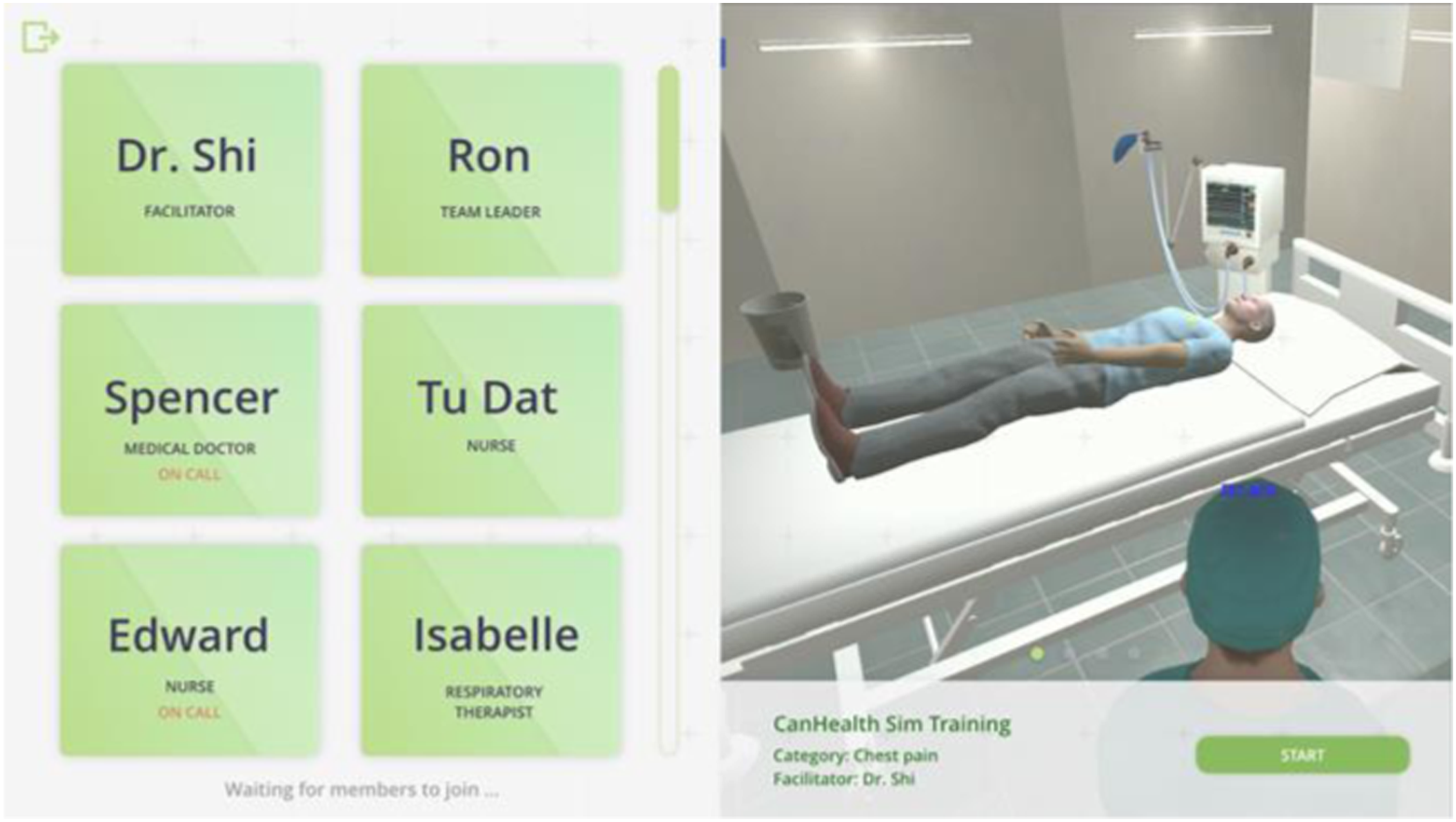
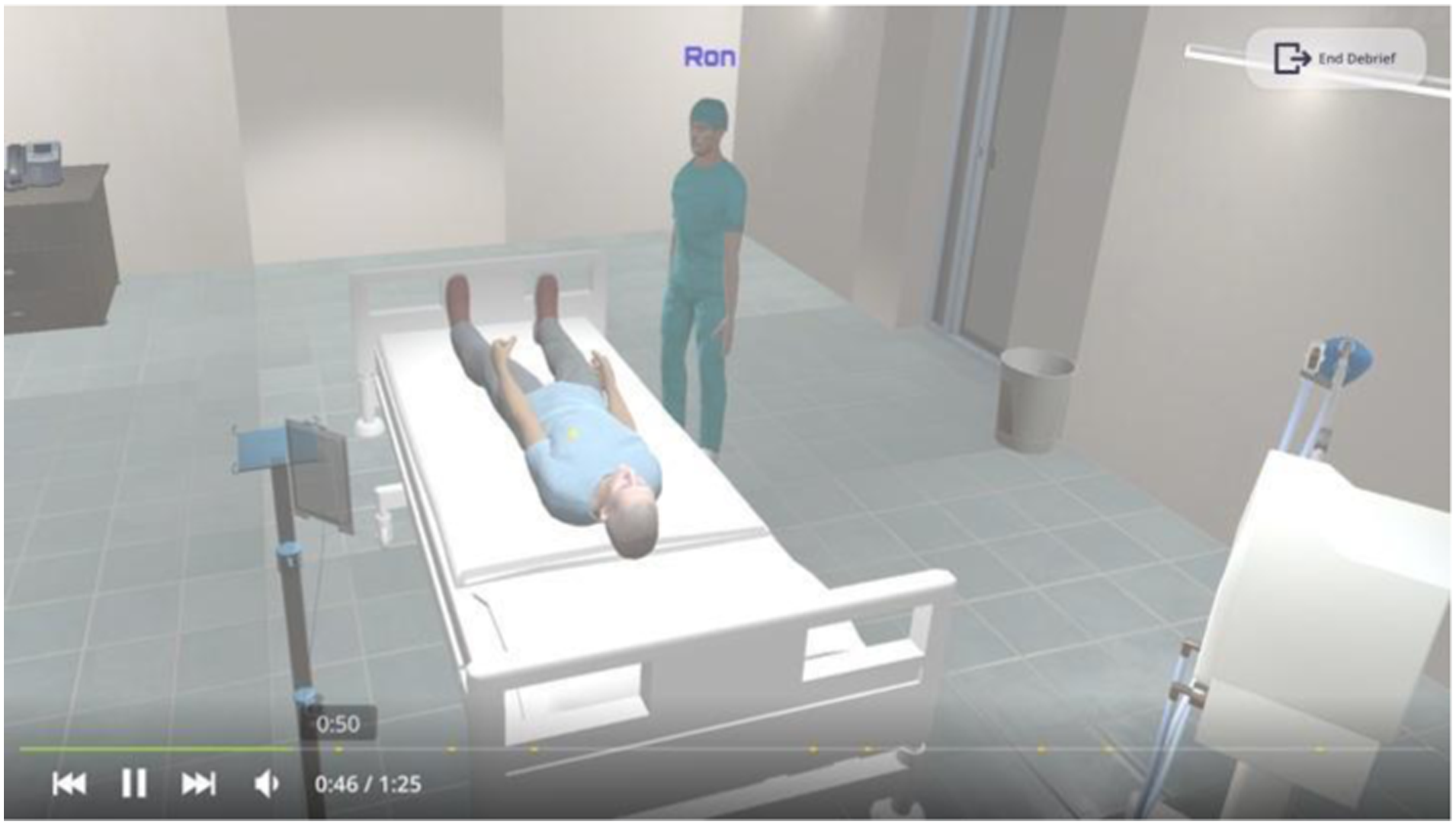
Stage 1 (Pre-briefing): Users sign in as the facilitator or participant. The facilitator is responsible for creating the virtual ER room for the team. First, they need to type the room's name and choose the categories of the scenario that the team will practice, such as chest pain, coma, and brain injury. After the whole team has joined the role selection room, under the facilitator's guidance, they will watch the CLC tutorial together. The tutorial includes an introduction to closed-loop communication, how to navigate the platform (e.g., how to move the avatar with the mouse and keyboard), and a case presentation of the patient's condition. After that, the team leader will assign each member their role via voice chat (e.g., physician, nurse); the facilitator recites the patient handover and starts the simulation when the team is ready. Figure 1, 2, 3, 4, 5, 6, 7, 8, 9, 10 (left) Microphone activation page. (right) role selection page. (left) default color (right) talking color. Talking modes. (left) Facilitator screen. (left) onboarding page. (right) panel interaction. Member on call. Debrief Video with bookmarks.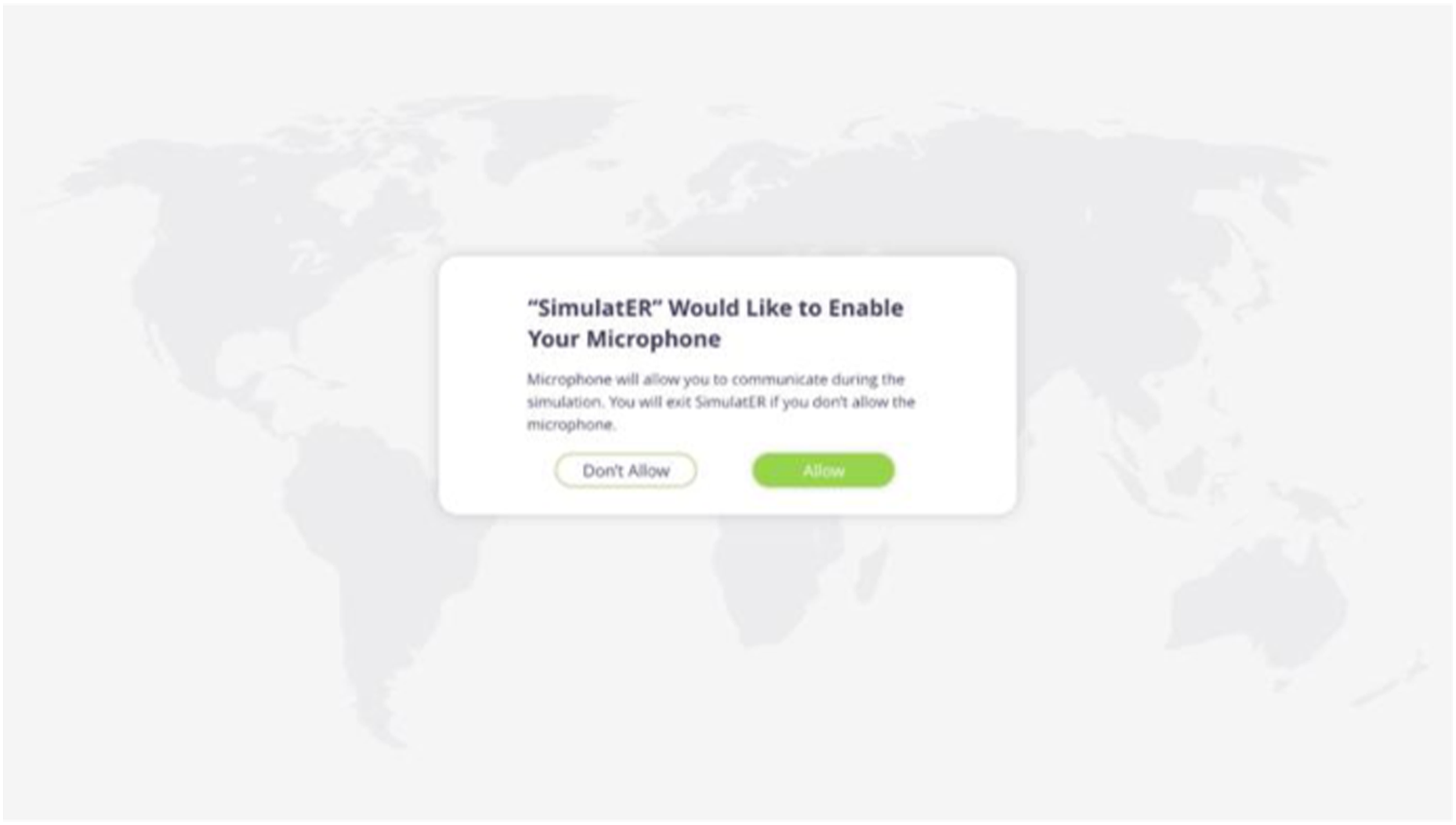
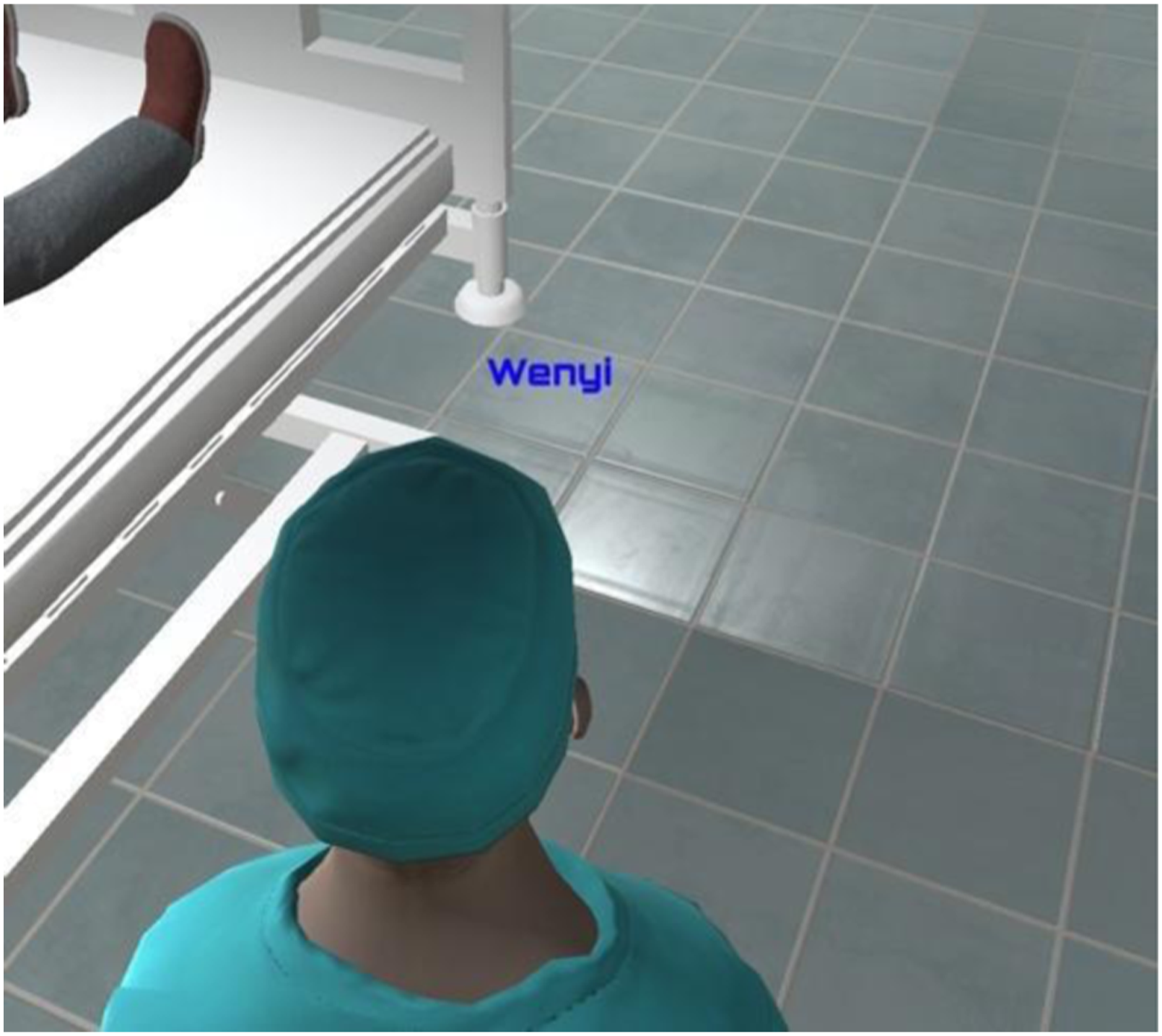
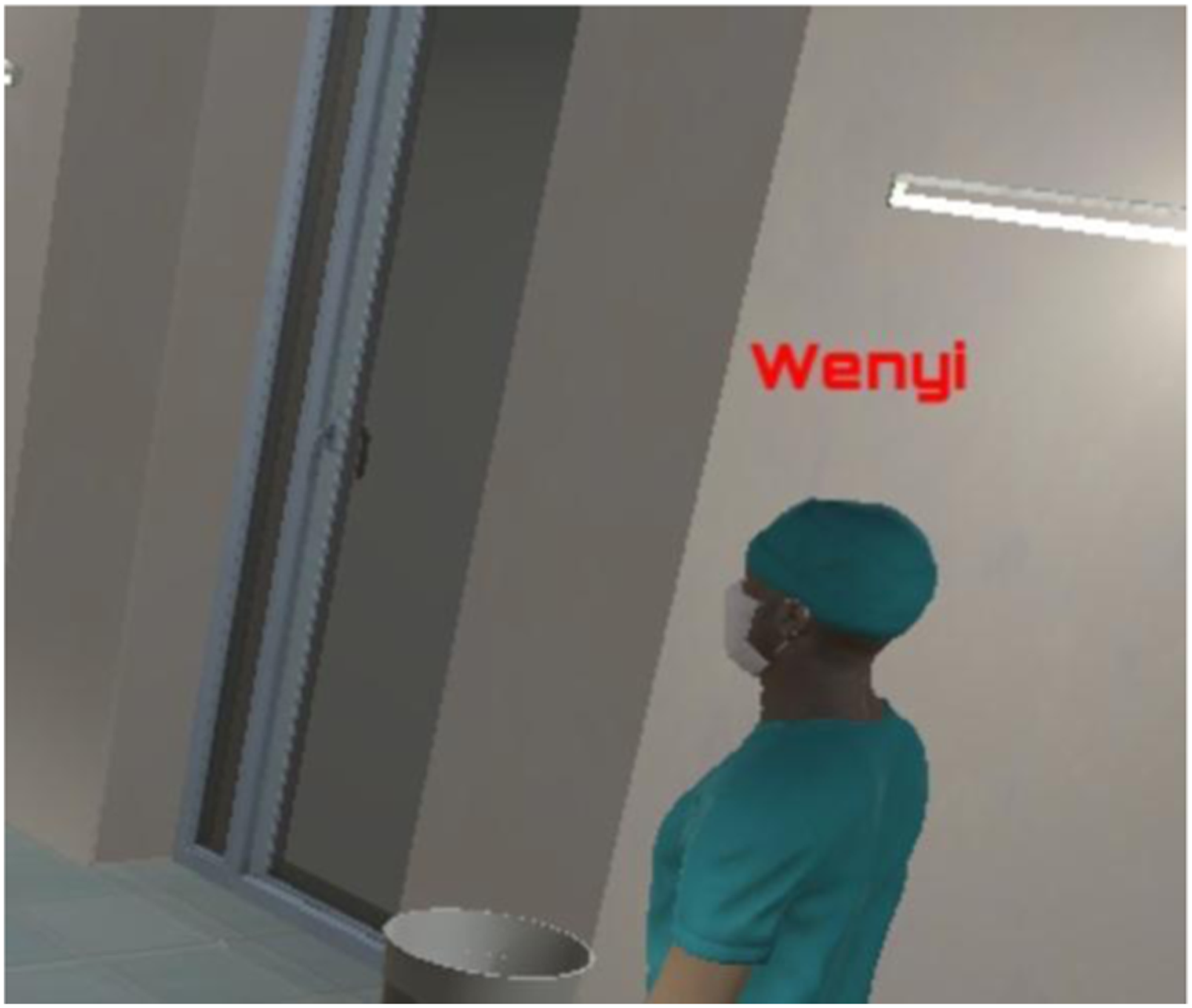
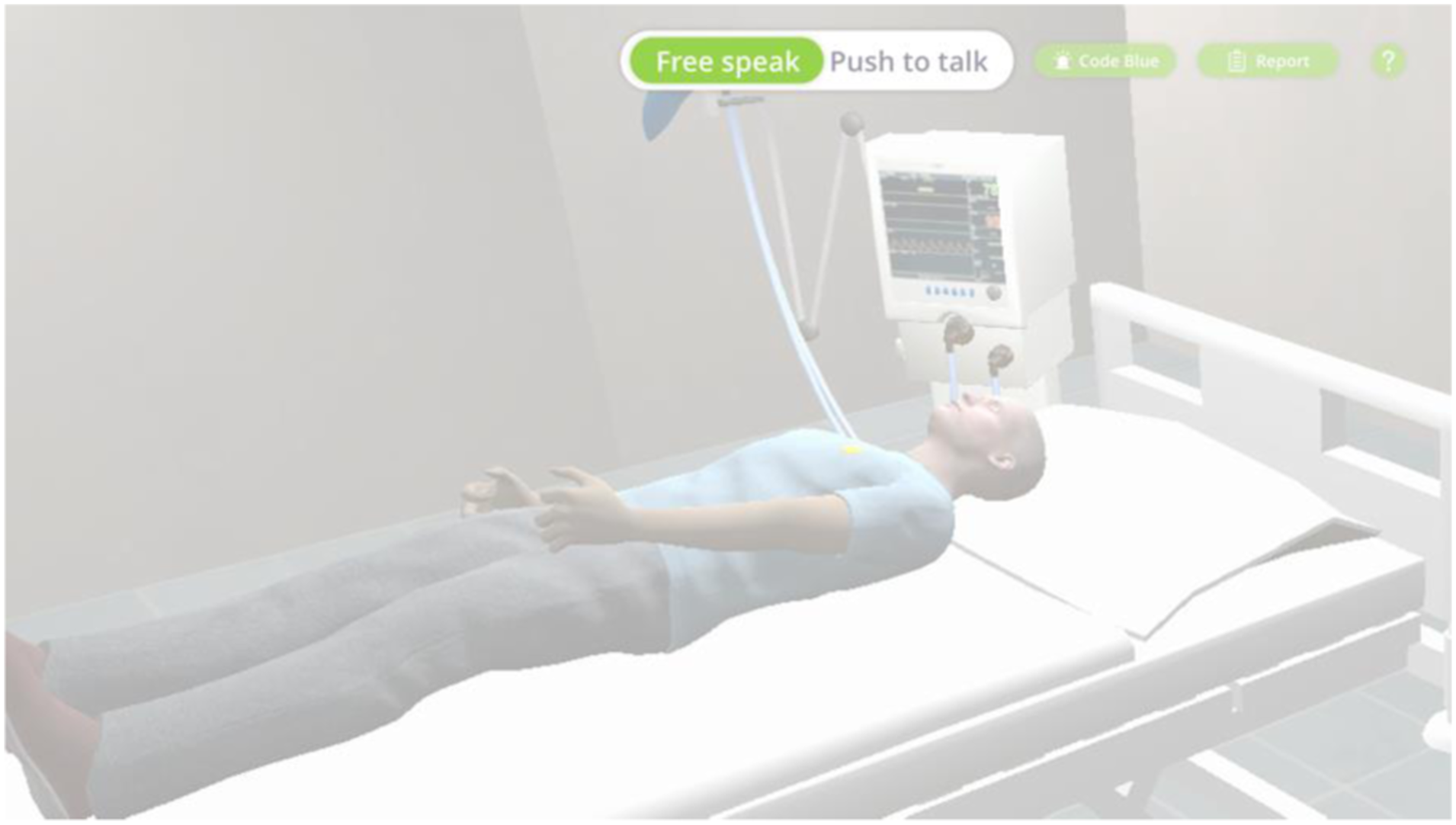
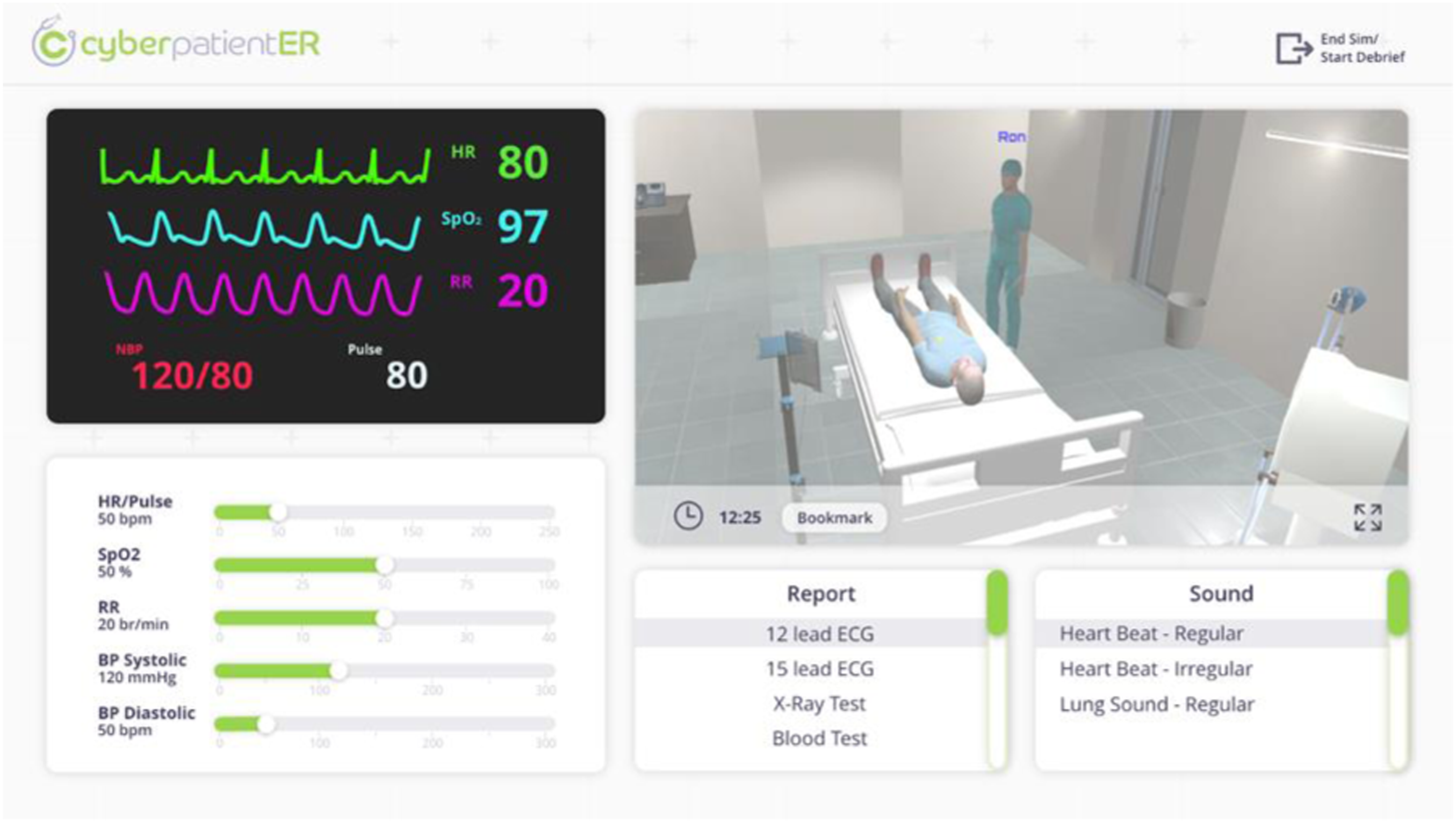
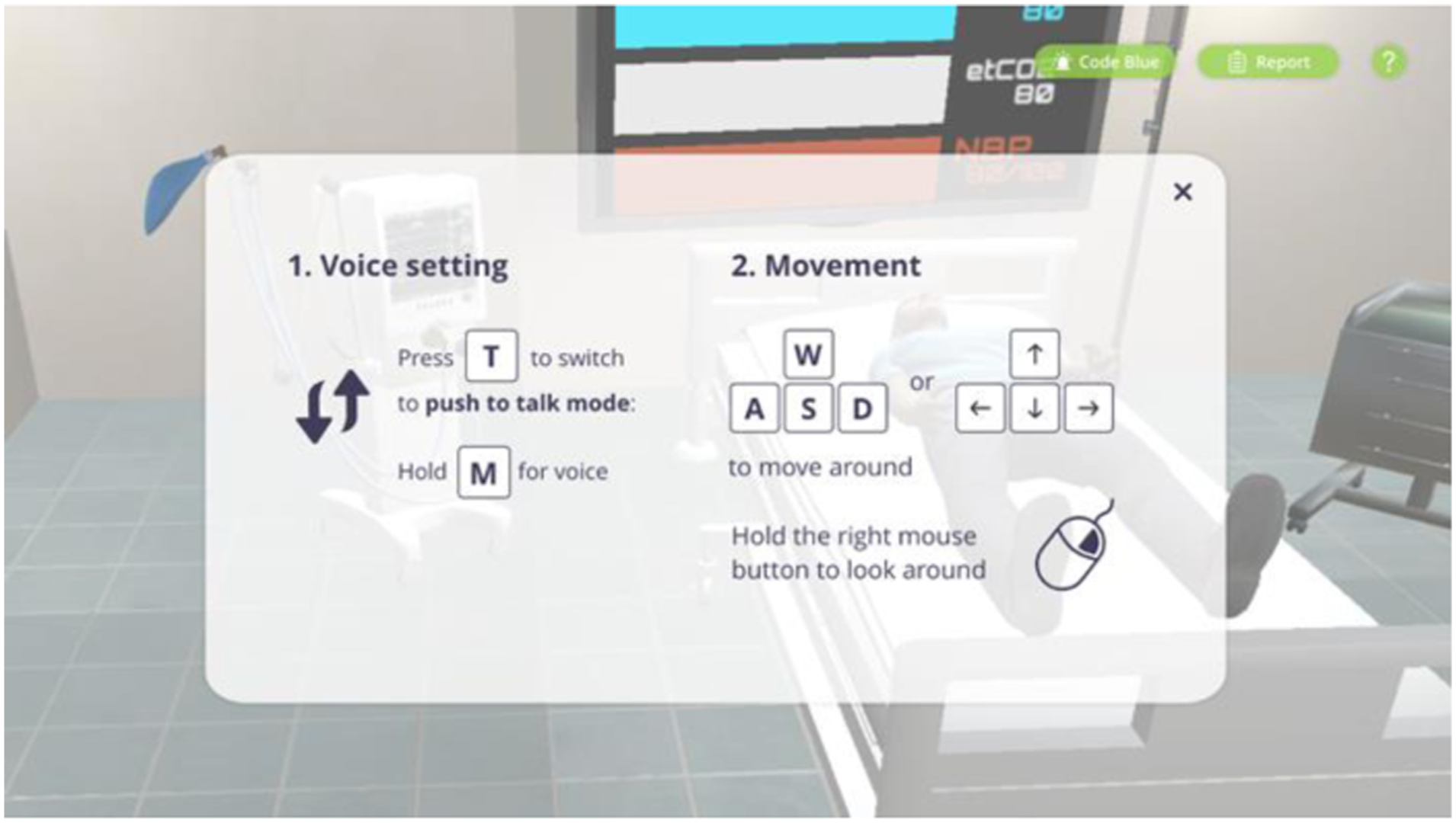
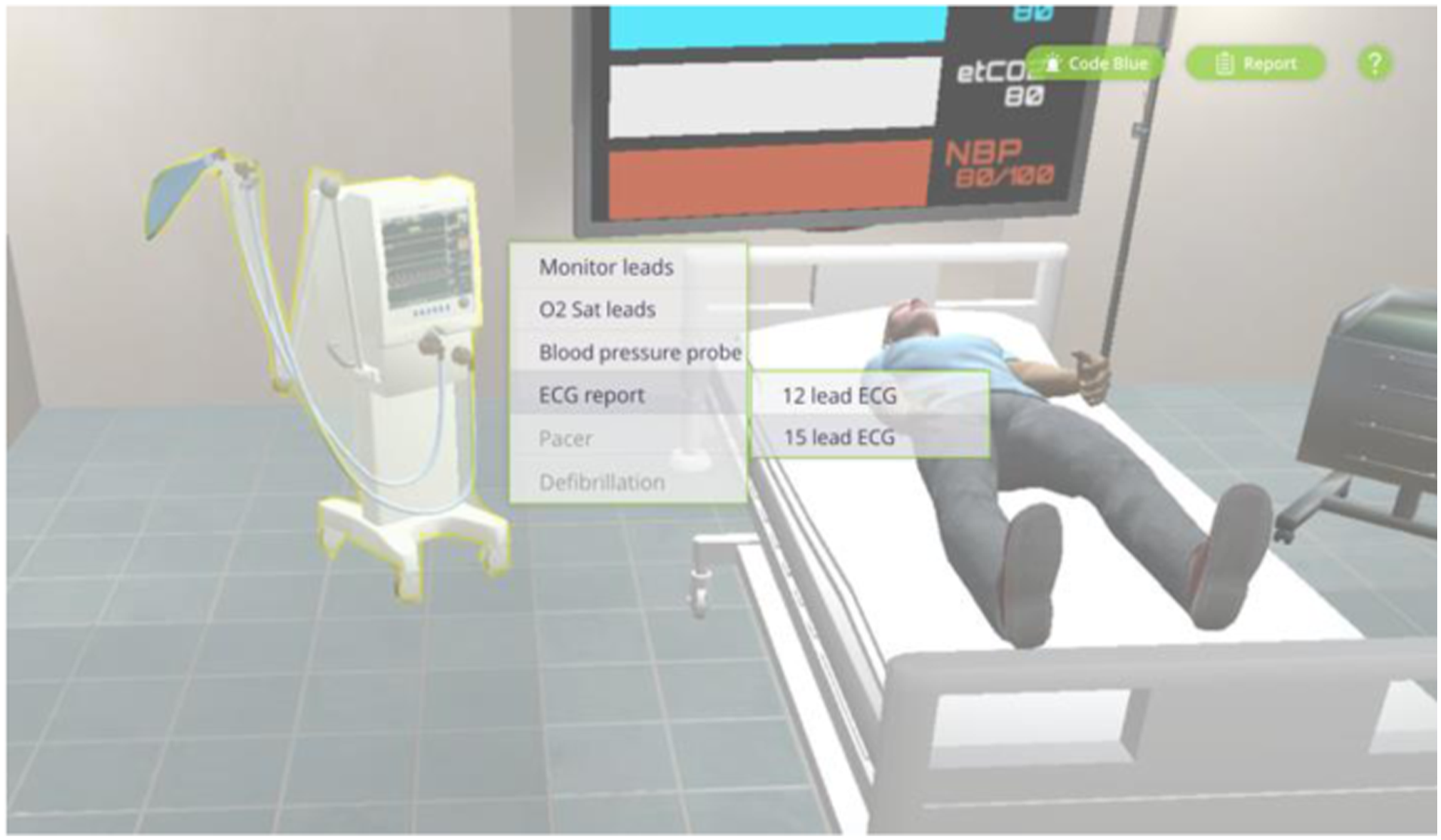
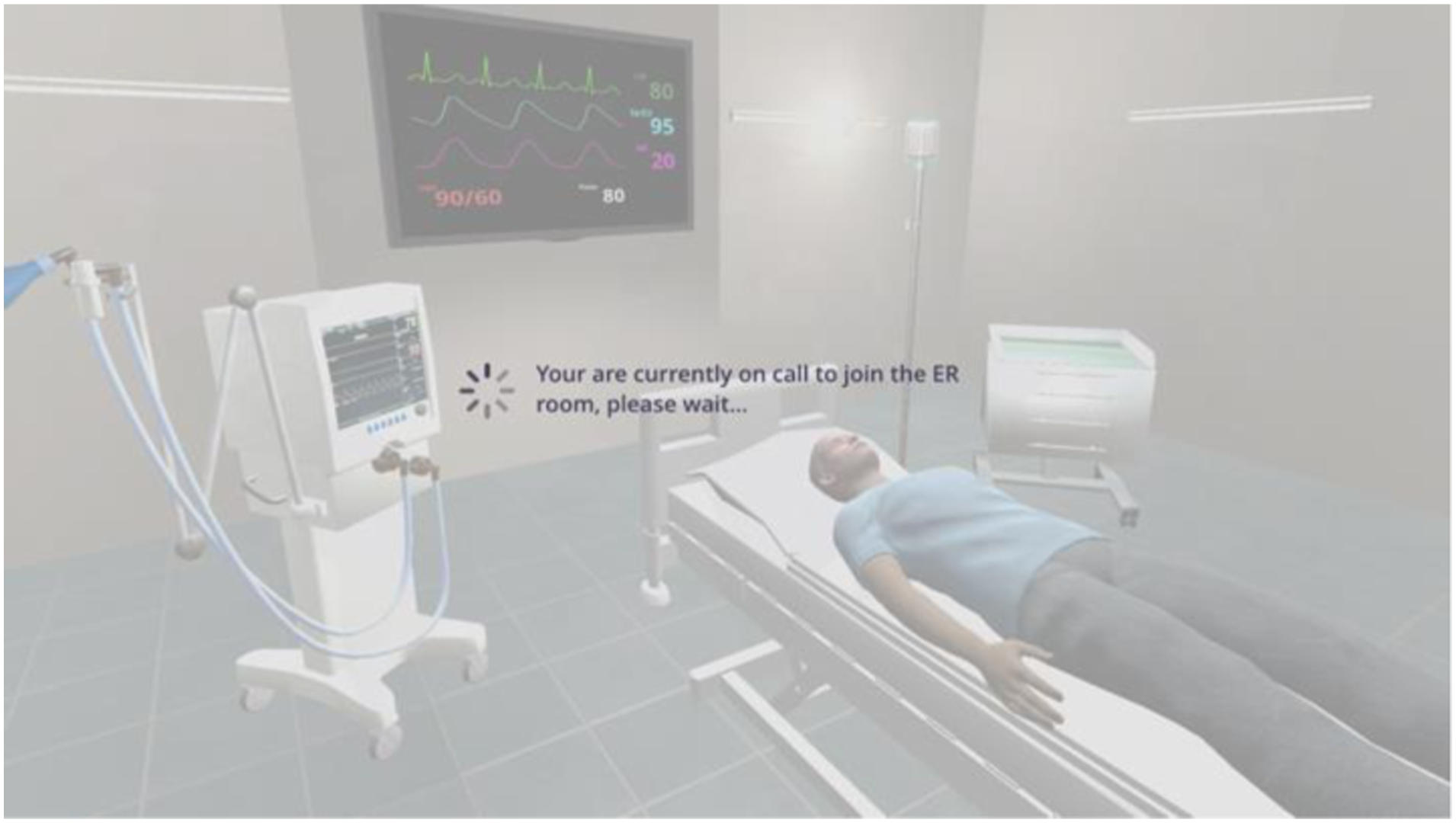
Stage 2 (Simulation): Medical professionals practice CLC through the microphone during the simulation. Once the team enters the simulation room, the actions are recorded. Their avatars appear in their positions (around the patient bed); they can interact with the patient avatar and the environment based on the tasks they receive from the team leader. The unity assets include six initial avatars, including health professionals and patients. Diverse female and male doctor/patient avatars can be created by modifying the original avatars’ attributes, such as faces, skin tones, hats, masks, and clothes. The team leader's avatar gives tasks to each member via voice chat. Name tags are hovering above avatars, showing the name of each user. The default color of name tags is blue, which the color will then turn red if a user starts talking. This function allows other users and the facilitator to see who is in the emergency room and use the voice chat function.
The prototype consists of two cut-scene actions (ECG machine, IV), one animation (chest compression), and one voice chat signifier. A voice chat signifier is designed for the user to toggle between two voice chat modes manually: free speaking mode and press to talk mode. In addition, the user can see the voice chat signifier automatically change after toggling between the modes.
The team and the facilitator interfaces are different during the simulation phase. The facilitator screen is a dashboard that contains several controller panels: vital signs, parameter controller panel; a live stream monitor; a report, and a sound panel. The facilitator also has the option to respond as patient. For the live stream panel, the user can enlarge the panel to have a clear view and observation of the ER simulation room. When the facilitator sees something, he would like to discuss later in the debrief, he can click the bookmark button to save the exact moment to review later.
The team member receives an onboarding pop-up page, showing instructions on how to control the avatar and communicate with each other. Once the user hover-over an asset they want to interact with, the object will be highlighted, and as the user clicks on the asset, the semi-transparent panel shows up. On-call team member(s) will stay in the waiting room until someone in the simulation room presses the code blue button, which they will then enter the room. The team was briefed on the patient's status and the roles already assigned to them. Therefore, the team will start treating the patient and communicating with the team leader and other team members. The facilitator can modify the patient's clinical status depending on the participants' actions.
Once the objective of the simulation session is reached, the facilitator clicks end simulation, and the whole team goes to the debrief session.
This control scheme was largely chosen due to the potential audience of the application. We predicted that users of the application would not have extensive experience in FPS (First-person shooter) video games; thus, our team tried to find a control scheme that was not profoundly reliant on such experience. In our decision, we performed an AB user test within our CDM cohort and found that those with video game experience preferred the traditional FPS control scheme. In contrast, those without experience preferred the third person control scheme. Due to the point of view of the user’s camera, we found it may restrict the user’s peripheral vision. Therefore, the view panning feature was introduced to allow the user to pan the camera horizontally and vertically. However, because this panning of the camera does not move the character itself, it was recommended to have the camera snap back to the character’s facing direction to avoid confusion of having the user move the avatar forward while facing in a different direction. It was further suggested by the investigators to have the camera angle retain the original angle to view vital signs on the TV screen.
As part of our primary objective, we developed a prototype of a patient avatar that could react to the team’s actions without a facilitator being in control. Because the given data points for the calculation of the new patient’s vital signs were too simplified, the following assumptions were made to serve the purpose of the prototype: 1. Only consider the difference in vital sign values based on the applied dose. 2. The change of vital signs is linear. 3. Medication has an effective period/decay (default 300s). The dosage will accumulate if the same medication is applied within this time. For example, if a medication profile has the following: 0.5mg will increase HR by 10, and 1mg will increase HR by 30. If 0.5mg is applied, the HR will increase from 60 to 70bpm (60 + 10) and if within 300s of this medication another 0.5mg is applied, the HR will increase from 70 to 90 (60 + 30). 4. Within the effective period of a medication, the max change is the max difference between the first and last data points.
Stage 3 (Debrief): The debriefing screen is a recording from the simulation. Highlights in the timeline show the bookmarks the facilitator saved earlier. Based on the bookmarks, the team member can jump to the exact time to discuss issues or things to work on that the facilitator has flagged. The debriefing is performed by an experienced facilitator of the medicine department. The debriefing included a combination of two debriefing methods, “Standard Debriefing” and “Video-Assisted Debriefing”. All elements of debriefing are confedered to mimic the face-to-face debriefing event during mannequin-based simulation.
Usability Testing
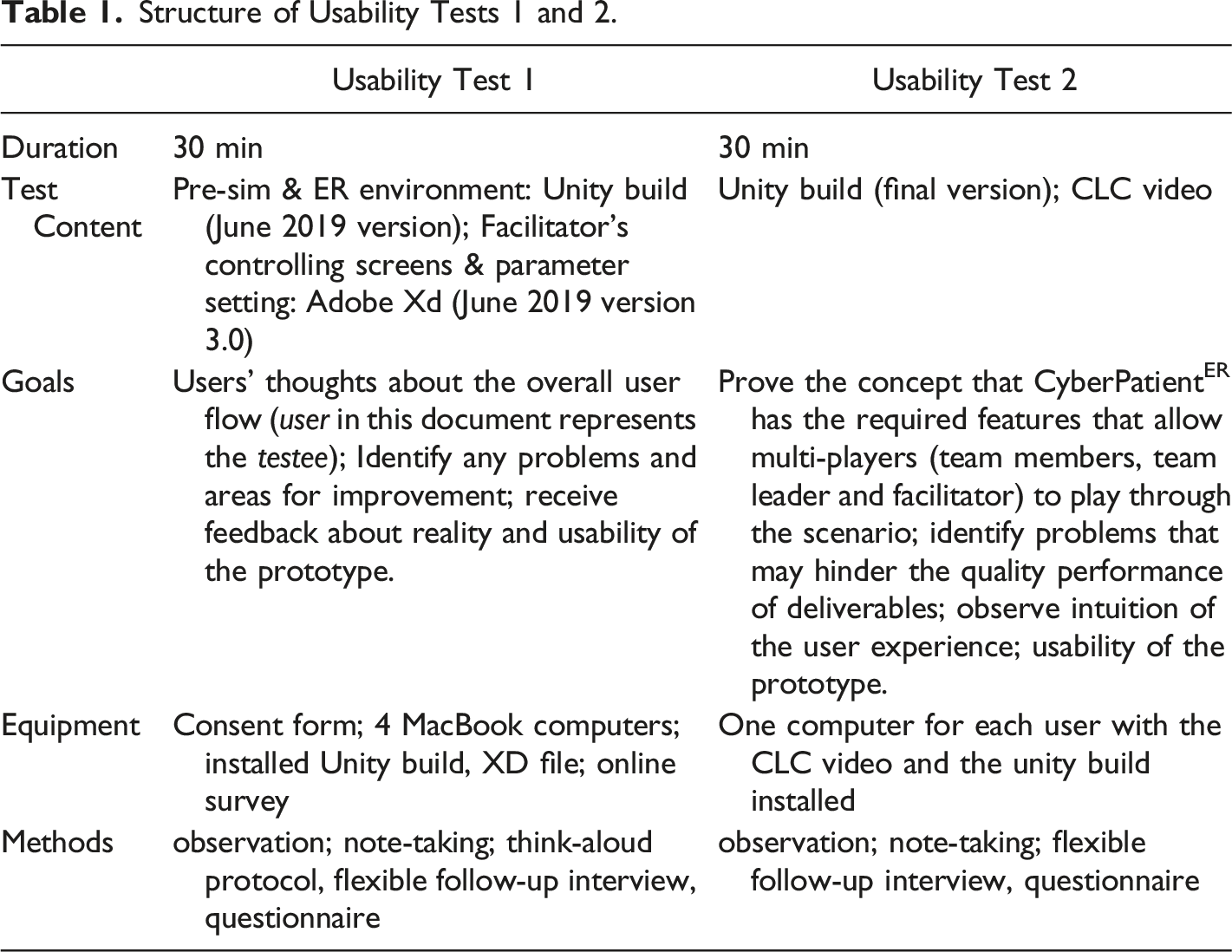
The aim was to test the usability of CyberPatientER for team training in a training session with a clinical scenario for closed-loop communication. During the early stages, usability tests were carried out internally with members of the development team at CDM. Usability tests included feature tests, such as user flow, speaking sign signifiers, user perspectives, room layout, hidden menus, and setting menus. In addition, internal usability tests were conducted after each prototype version to increase the user experience going through the prototype.
Structure of Usability Tests 1 and 2.
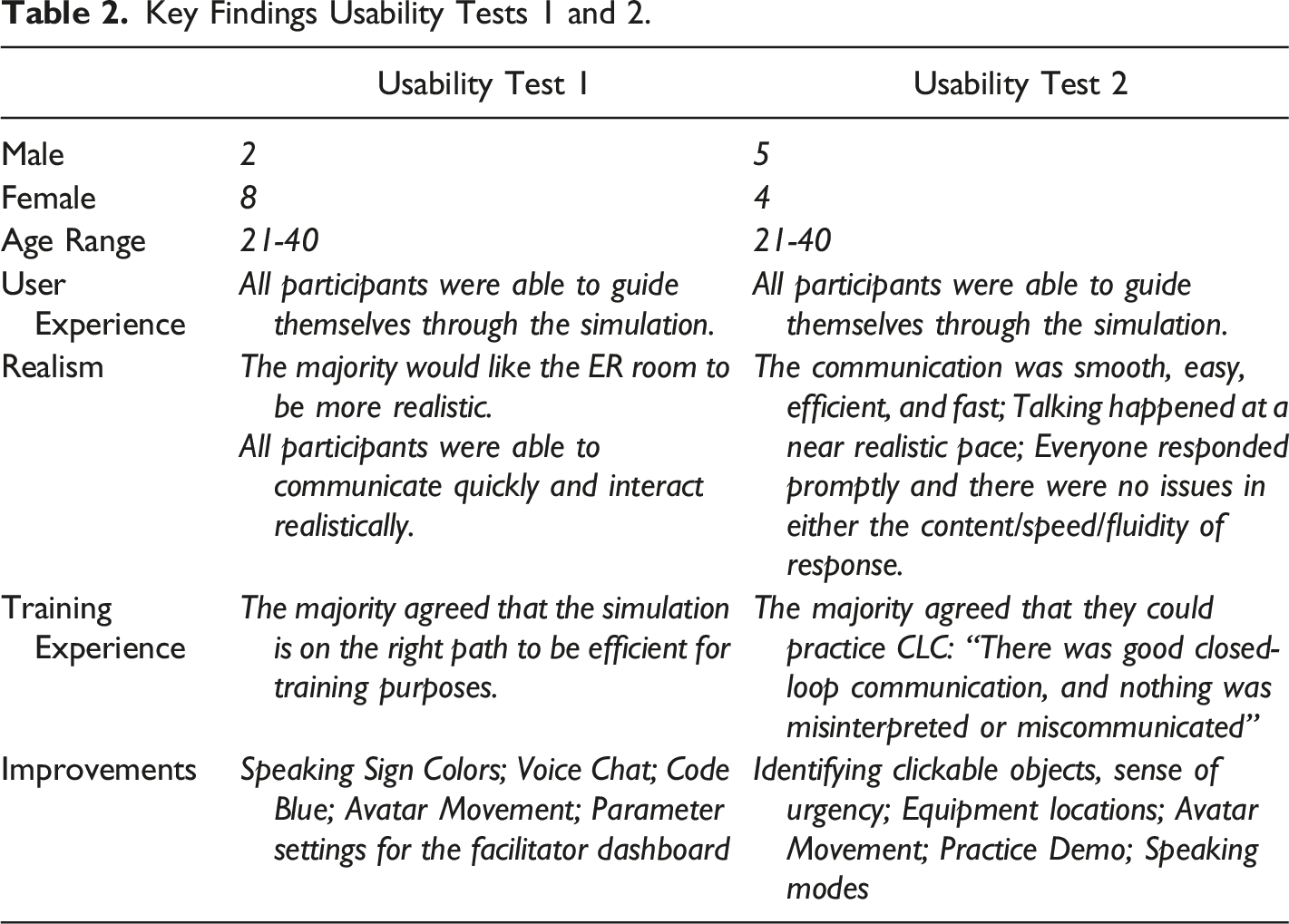
Key Findings Usability Tests 1 and 2.
For the internal usability tests and the first external test, the think-aloud method was used (Cooke, 2010; Charters, 2003). It provides direct insight into the participant's thinking while going through the steps of the product. Additionally, during the interaction with the prototype, the interviewer observed interaction behaviors, e.g., if the user takes a long time to find something or wanders around and takes notes. Participants were reminded to think aloud when more than a few seconds passed without verbalized thoughts. The think-aloud method was not used for the second external usability test because the participants had to communicate with each other during the test. The development team observed the participants for all tests and took notes.
The follow-up interviews for all tests were conducted 1:1 after each test and covered questions that were adopted from Kirkpatrick's Model Level 1 (Reaction) (Kirkpatrick & Kirkpatrick, 2016), such as “Did you feel that the training was worth your time?”, “Did you think that it was successful?”, or “What were the biggest strengths and weaknesses of the training?”.
In addition, surveys were completed individually, anonymously, and electronically. The surveys included technical questions about the overall understanding of the design, the features, the controls, the environment, and the voice chat.
Results
The analysis by Kushniruk and Patel (2004) was used to analyze the usability tests, including their follow-up interviews and the survey (Kushniruk & Patel, 2004). Based on their process, we developed a coding scheme based on the prototype goals (e.g., navigation, realism, usability), then familiarized ourselves with the data and think-aloud transcripts and generated codes (Kushniruk & Patel, 2004). Findings from the usability tests were categorized into 5 themes: User Experience, Realism, Training, Experience, and Improvements. The usability tests proofed the concept of closed-loop-communication for team training in CyberPatientER.
Discussion
The team answered the first research question by developing a Prototype of a computer-based 3D virtual simulation environment (CyberPatientER) for interprofessional team training that captures the essential aspects of team training related to non-technical skills.
In a realistic situation, a sense of urgency and real-life stress is added to the emergency, which impacts communication. The team had to ensure they were serving the purpose of communication while replicating what real simulations are like. Previous research has shown that technology-enhanced simulation training for health professionals improved knowledge, skills, and behavior but only moderately affected patient outcomes (Cook et al., 2011; Kononowicz et al., 2019). CyberPatientER focuses on communication rather than the skills practiced in an emergency: professionals and students in the medical industry must communicate effectively with each other to administer the appropriate actions required to stabilize the virtual patient. For that, we implemented a third-person point of view (POV) to better overview the room and team. Users gain a sense of existence by having their avatars in the virtual emergency room. Additionally, the sounds in an actual emergency room, such as the monitor alarms and phone ringing, are implemented to give players a sense of emergency. The phone ringing additionally signifies that a report has arrived in the virtual emergency room. Although the primary objective for using this technology is communication skills, we also simulate specific skills as an action point in a video format, such as IV insertion, defibrillation, urinary catheterization, etc. In the fully developed CyberPatientER, we also envision including decision-making skills and consequences associated with students’ decisions.
Leonard et al. emphasize the need for effective communication to reduce human failures that lead to mistakes (e.g., limiting memory, effects of stress, distractions and interruptions, and limited ability to multitask) (Leonard et al., 2004; Reason, 2000). Live communication via chat function was essential to the learning environment to train CLC realistically. CLC does not only help to prevent errors but is also more efficient in completing tasks (Abd El-Shafy et al., 2018; Salas et al., 2008). We implemented a CLC training video before the training session to remind users of the right way to communicate. Lee et al. emphasize that pedagogical elements contribute most to the learning experience (Lee et al., 2020).
A mannequin-based simulation is an effective tool for teaching CLC. The training is associated with a significant decrease in medical errors. Though, to sustain communication skills, Diaz & Dawson conclude, ongoing training is needed (Diaz & Dawson, 2020). With the tool being accessible from anywhere, at any time, the possibility is there to sustain skills and train frequently. The debriefing room with the recording option of miscommunication enhances the learning experience as it is in the mannequin-based simulation. It is important to mention that the computer-based virtual simulation dose does not replace mannequin-based simulation or other methods of clinical education; however, it is less costly) (Cook et al., 2018; Rosqvist et al., 2021) and provides the opportunity for frequent training. It also makes the simulation accessible for low-income countries or rural and remote areas. Kononowicz et al. confirm in their systematic review on ‘Virtual Patient Simulations in Health Professions Education’ the importance of the global applicability of virtual patients (Kononowicz et al., 2019). Science players in this technology can be located anywhere in the world, students and health professionals can build an international team and learn from each other in the comfort of their homes without travelling expenses.
The usability of CyberPatientER was tested with medical students and professionals. A recent literature review identified simulation-based training only in a hospital setting. The studies reported improvements in non-technical skills, such as teamwork and communication (Buljac-Samardzic et al., 2020). Furthermore, Gjeraa et al. found a significant increase in team performance (non-technical skills, e.g., communication) based on simulation-based learning (Gjeraa et al., 2014). Our results show that participants were able to communicate quickly and were able to interact realistically. Everyone responded on time, and there were no issues in the content/speed/fluidity of responses. The participants found the communication smooth, easy, efficient, and fast.
Davies classified communication according to five characteristics of medicine: 1.Safe: communication reduces morbidity and mortality; 2.Accessible: communication skills can be demonstrated by all team members; 3.Feasible: communication can be accomplished with practice but without difficulty; 4.Effective: communication improves team function(s); 5.Right: communication saves not only lives but also time and money (Davies, 2005). Our simulation is accessible, which was highlighted by users easily navigating through the simulation. It further covers most aspects of Davies classification:(Buljac-Samardzic et al., 2020) Safe – It was found that communication skill such as CLC was able to deliver for trainees; Accessible – CyberPatientER is an intuitive platform and therefore easy to deliver; Feasible – repeated training possible from anywhere at any time; Right – it simulates the true values and is at low cost. Our results underline previous research outcomes that found simulation-based training to provide the greatest opportunities for improvement in team functioning (Buljac-Samardzic et al., 2020).
Limitations and Future Directions
Technological limitations include realism and interactivity. Currently, it is possible to create avatars that are close to actual human beings; however, considering internet speed, we had to choose between realism and functionality. Therefore, we choose to have sufficient realism to accurately reflect human anatomy without jeopardizing the platform's functionality. The second technological limitation of this prototype was the use of accurate physiological modelling to automatically reflect the consequences of actions such as drug therapy and procedures on patients’ conditions. Further, a lack of resources and lack of connectivity can be a challenge when using computer-based virtual simulation.
The assessment part of the project was not scientifically designed to prove the efficacy of the prototype. It was designed to assess the useability of the prototype (Kirkpatrick level – I, Kirkpatrick & Kirkpatrick, 2016).
Soon, we plan to develop a full version of the CyberPatientER technology with implementation of technological advances such as physiological modelling and others to support realism as much as possible. A pilot study with a larger sample size will be the next step. We also envision having an experimental design that would look into the effectiveness of this method in comparison to other methods of education used for team training.
Conclusion
We conclude that CyberPatientER may add another tool to support team training in a less costly, easily accessible computer-based virtual clinical environment. CyberPatientER will be able to provide a gamified 3D simulation that emphasizes the practice of effective team communication combining voice chat and dynamic actions by learners based on the facilitator's decision and students' reactions. Full production of CyberPatientER is underway and will be commercially available soon.
Footnotes
Declaration of Conflicting Interests
The author(s) declared no potential conflicts of interest with respect to the research, authorship, and/or publication of this article.
Funding
The author(s) disclosed receipt of the following financial support for the research, authorship, and/or publication of this article: This work was supported by the Interactive Health International.
