



Abstract
This study investigates the issue of digital exclusion resulting from the digitisation of government and council services within the United Kingdom. An initial analysis of customer support log data from a council in a large UK city helped identify the most commonly queried services and modes of support. The main findings are based on qualitative analysis of 10 interviews, structured around the results from the log analysis, conducted with front-line staff members at the central library of the same council. The study identifies a range of issues associated with the provision of e-government services and the subsequent under-utilisation by the public, including poor design, issues with effective access and the level of digital literacy among end users. The study also proposes the concept of the ‘digital carer’, a friend or family member who is relied upon by users unable to interact with e-government services themselves. The findings of this study have implications for the way in which these services are designed and delivered and point to the need for further work that can contribute to the UK digital economy by facilitating better access to e-government services and reduce digital exclusion, especially for elderly and marginalised users.
1. Introduction
The use of web-based services for essential everyday tasks, including many local government services, is rapidly increasing in the United Kingdom [1]. In many cases, these digital surrogates have completely replaced existing ‘legacy’ implementations, leading to the coining of the phrase ‘digital by default’ [2], although this is slowly being replaced by the more politically beneficial ‘digital by choice’. A virtual approach is assumed to increase access – and therefore uptake and participation – and reduce communication and transactional costs for both end users and service providers [3].
However, the use of such services is not equal across society: a Government report [4] estimates that the gap in digital skills in society costs the UK economy £63 billion a year in lost productivity and related research by the Centre for Economics and Business Research (CEBR) [5] predicts that digital exclusion alone will have cost the economy £22 billion by 2028. Issues can arise among several vulnerable groups [6], including the disabled, ethnic minorities, those with low socio-economic status and, increasingly, refugees [7]. Some groups also experience issues related to (a lack of) language skills and little familiarity of cultural norms and, among rural communities and those with lower economic status, even a deficiency in access to necessary enabling technologies.
These issues are particularly acute among the elderly [8]: compared with their younger counterparts, those aged 65+ years are 37% less likely to use government/local authority web sites to obtain information and 58% less likely to download government forms [1]. There are a number of key barriers to older adults using Internet services, including a perception that such systems are complex to use and hard to learn, lack of confidence in their own abilities, lack of trust in the security of the system and a physical inability to use a system [8,9].
In response to this, local councils have provided drop-in sessions and support call centres where people can get help when they need it, typically delivered through local libraries. While these ‘information intermediaries’ [10] are certainly helpful, they negate many of the mooted benefits of transitioning to an all-digital provision and require vulnerable individuals to seek out help and, often, to travel to contact centres to get it. They also do not necessarily allow those disadvantaged by the growing digital divide to catch up with others in society [11]. Despite the expectation that e-government would reduce costs for all stakeholders and increase availability and uptake of local services, many ‘hidden’ costs may exist and some users may actually be disenfranchised and disadvantaged by its introduction and widespread use.
The aim of this work is to investigate how these all-digital council services are used, by which groups, how end users are supported, the costs incurred by the various stakeholders in the process and the barriers preventing the usage of online services. We do this in the context of a single local council in a large UK city and obtain data by interviewing 10 staff members at the city’s central library, whose job it is to support end users (or ‘customers’) in using such services. Our research focuses on five key council services (e.g. benefits and social housing) and not specifically on the performance and utility of the aforementioned provisions provided to support end users in accessing and using said services. This work forms a key part of wider project, which aims to investigate how the design and delivery of the most frequently used council services in households can be improved in order to reduce hidden costs and barriers to access, and to improve equality of use and benefit. Our results confirm many extant findings but also reveal other issues and provide novel insights into the problems experienced by e-government stakeholders in this context, leading to discussions and suggestions for changes to e-government provision that may reduce the digital divide and prevent further digital exclusion.
2. Literature review
2.1. E-government and the provision of digital services
E-government was first introduced into the United Kingdom in the mid-1990s, and refers to the use of digital technologies for the provision of government services [12]. The UK Government’s 2012 digital strategy proposed the implementation of services that ‘are so straightforward and convenient that all those who can use them will choose to do so, while those that cannot are not excluded’ [2]. This vision of universal adoption is yet to materialise, however: uptake is slower than expected and greater levels of availability are yet to be reflected in high levels of utilisation [13].
Even widespread broadband Internet and digitisation of much of everyday life have not produced the expected level of enthusiasm for digital services. Despite 87% of UK households having access to the Internet since 2013, uptake of government digital services has lagged behind, with 2018 levels recorded at 61% [14]. Although we focus here on the United Kingdom, this figure, and the lack of widespread uptake, is broadly representative of other high-income countries [15].
The benefits associated with e-government systems have been well-documented: facilitation of more dynamic relationships between public services and citizens [16] and positive effects on social inclusion and belonging among the population [17,18]. The digital service transition has been used by local authorities as a means to mitigate the effects of ever-declining budgets. An online transaction for social housing payments saves the service provider nearly £8 compared with a face-to-face transaction [19]. However, many issues also stem this approach: there are implications for social rights and the ability for citizens to fully participate in society [20]. Driven purely by economics and without a digital inclusion strategy, e-government risks exacerbating the digital divide.
2.2. The digital divide
Inequalities relating to accessibility of digital technologies have lead to the development of the term ‘digital divide’ [21]. Initially, the term was used to demarcate those who did or did not have access to the Internet, but over time, this has expanded to also consider the skills gap between capable users and novice or inexperienced users, and later to motivation and usage [22]. Many scholars now suggest that it is the significant variation in digital literacy skills – the skills necessary to understand and use digital systems, once access has been secured – that is contributing most to the digital divide [23]. Selwyn [21] relates the digital divide to three types of capital: economic capital (access to material resources), cultural capital (technical or IT skills) and social capital (access to a network of contacts with the requisite knowledge or skills to effectively interact with digital technologies). Although figures are decreasing, it is estimated that around 21% of UK citizens still lack at least one of the basic digital skills [5].
Research shows the digital divide is both caused by, and reinforces, social inequalities [22]. A Denmark-based study demonstrated that the digitisation of welfare agencies had resulted in increased levels of social inequality [24], as individuals already struggling to navigate the welfare systems were faced with further difficulties. First, gaining access to the technology to access digital services, and second an inability to interact with the systems well enough to produce a successful outcome. The real-world implications of this can be severe: an inability to overcome either of these barriers may result in the claimant losing access to their benefit entitlement. Researchers such as [11] have questioned why, despite supposedly equalising measures being introduced by governments and local authorities, such divides still exist and are continuing to grow.
2.3. Digital exclusion
Due to the proliferation of online services, digital exclusion may result in financial, cultural and educational exclusion, among others [19]. While digitally excluded citizens are a somewhat heterogeneous group, there are two principle demographics that appear most vulnerable: the elderly [25,26] and those belonging to less advantageous socio-economic groups [27]. Ofcom [14] identifies those from lower-income households as most likely to require access to social housing and universal credit, while simultaneously being the least likely to have reliable access to the Internet. Similarly, individuals over 65 years are less likely than average to have undertaken government or council processes online. This illustrates one key issue arising from e-government: many people who utilise the services provided by local councils are not able to access the digitised version of those services [19], while it is commonly those very individuals that are most in need of these same services.
Additional factors that increase an individual’s predisposition to digital exclusion include educational attainment [26,28,29], ethnicity [30], disability status and social isolation [31]. There is also evidence of geographical divides, with those living in less affluent regions and outside major metropolitan areas being less likely to be Internet users [29]. In Sweden, those with disabilities have lower levels of access to IT and are less likely to search for information online [32], while an Australian study identified refugees as a demographic prone to digital exclusion [7]. It should, however, be noted that within each population of these groups, there is considerable heterogeneity and, therefore, considerable variation in digital literacy skills.
2.4. Barriers in using digital services
While a lack of universal Internet access is a significant barrier, it is not the only obstacle preventing further engagement with digital services. This may include factors such as a fear of technology, an unwillingness or inability to gain the required skills or a lack of confidence [20].
Much existing literature on the provision of e-government services has failed to adequately represent the attitudes held by end users (and other stakeholders) towards the systems they are required to interact with [33,34]. One of the principle factors that affects one’s willingness to engage with digital service platforms is trust, which can be gained through the quality of the systems and the level of supporting information available [35]. Another is cost, both in terms of actual fiscal costs of access but also time lost in searching for and using e-government services, both of which have an impact on user satisfaction [33]. Weerakkody et al. [33] highlight the need for further exploration of these factors and suggest that interviews with stakeholders and qualitative analysis may provide more in-depth understanding.
While local authority websites do contain relevant information, it may difficult to access for some users due to a lack of knowledge and skills [36]. There are issues related to a lack of translation for non-English-speaking people, implying that local authorities may be oblivious to that population or simply do not have the resources to cater to their needs [37]. To encourage higher levels of service engagement, it is argued that systems should be developed to a standard which mirrors those to which end users are typically accustomed (i.e. non-government websites), and to make certain that information on how and why these platforms should be used is easily accessible. While current knowledge regarding the factors affecting use of e-government is growing, Alcaide-Munoz et al. [38] argue for more research to be performed that focuses on the different barriers faced by individuals when accessing new tools and engaging with digitised public services.
3. Method
We employ a mixed-methods approach within this study, employing an analysis of quantitative data followed by the collection and analysis of qualitative data, gathered through a number of semi-structured face-to-face interviews. This approach provides a platform for each methodology to complement the other, allowing for a more general understanding of the problem area to be formulated prior to the more targeted process of interacting directly with participants [39]. We first sought to gain an overview of people’s use of council support services in Newcastle upon Tyne, a large city and regional centre in the United Kingdom. We obtained log data summarising the number of times each service was accessed each month over the period of April 2018 until March 2019. The numbers were broken down by functional unit (e.g. Adult Social Care and Benefits), by enquiry type (e.g. Welfare Rights and Appeals) and by mode of enquiry (either assisted, self-serve or telephone). Analysis of this log data was able to highlight the most commonly used services, which would become the themes used within the interview process which was to follow, and was used to provide context and background information during the interviews themselves.
We chose to conduct semi-structured interviews with the people actually responsible for helping users when they are unable to use digital services on their own, and who, through their interactions with end users, have developed a robust understanding of the challenges faced by them. A semi-structured approach was chosen to allow for open discussion between the interviewer and the interviewee – providing a means for unforeseen subjects to be explored – while still retaining sufficient structure to ensure that all of the required topics were covered [40]. The majority of the interview questions were open-ended to engender rich descriptions and to permit the interviewer, where appropriate, to probe further into answers that naturally led to unforeseen areas of the discussion [41].
The interviews were conducted with a sample of 10 workers at the city’s central library over three sessions during August and September 2019, with each expected to take between 20 min to half an hour. The interviewees were chosen such that they covered a range of different levels of seniority within the organisation but were all involved in day-to-day interactions with council service users. The city’s central library is used by the council as a customer-facing support hub for all of its services, as well as a venue to offer training and workshop sessions to the public. All interviews were recorded using both a dictaphone and a mobile phone, ensuring redundancy, and were transcribed using a partially automated online service. 1 Transcripts were made available to the participants to allow them to redact anything that they did not wish to be used in the analysis. None of the participants asked to see their transcripts. Interviewees were incentivised with a £20 Amazon gift voucher and recruitment was performed by our contact at the city council, who advertised the study to colleagues at team meetings. Based on our research aims, key themes from existing literature and insights from analysis of the log data, we developed interview questions covering the areas of discussion detailed below.
Interviews began in part one with general questions about the interviewee’s experiences with customers and supporting them using the online systems, without discussing specifics related to any one service or topical area. Analysis of the log files identified five areas which received the greatest volume of enquiries. These areas (shown in Figure 1) were chosen as the basis for part two of the interviews, which involved questions specifically in the context of two of the topic areas (apart from for P1, who chose to extend their interview to cover three of the topics due to their extensive knowledge of the organisation), with each topic being covered by a minimum of three participants. Topics were allocated on the basis of the level of experience held by each participant in terms of their familiarity in dealing with enquiries relating to that topic. Each interviewee was only asked specifically about two services to mitigate against participant fatigue and to ensure that interviews would not go beyond the half-hour interview slots managers had permitted.
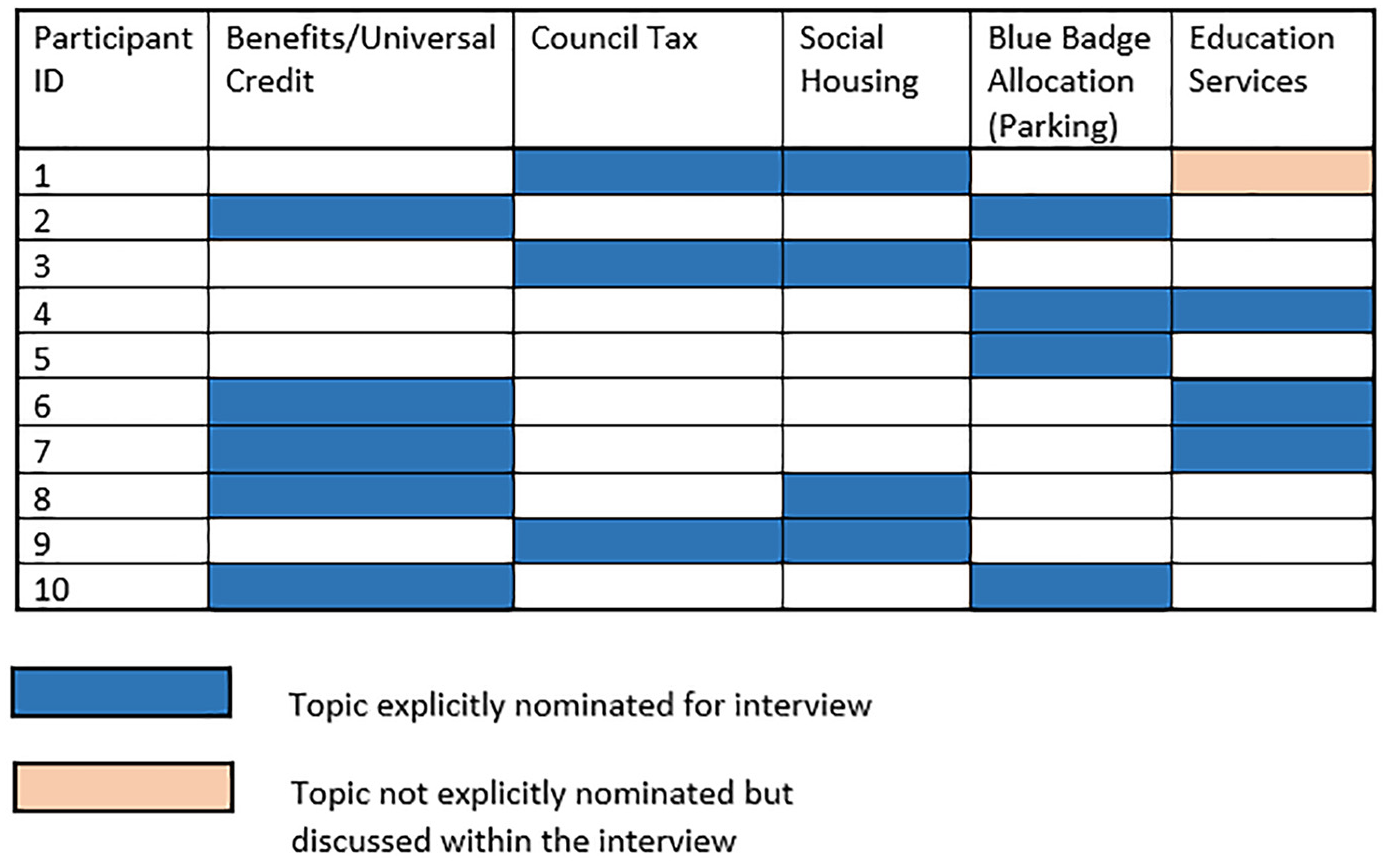
Allocation of topics among participants.
Part one included questions about general experiences with end users and their awareness of the online systems, the main challenges end users face in using these systems and the most common issues they report, and any thoughts they had about what could be done to improve the systems. Part two began by discussing the demographics of customers who inquired about the topic of interest and whether they do so on a regular basis. This was followed up with questions about case resolution, including methods employed to resolve the issues, difficulty of resolution and whether staff seek to resolve the problem directly or rather teach the customer how to do this themselves.
4. Data analysis
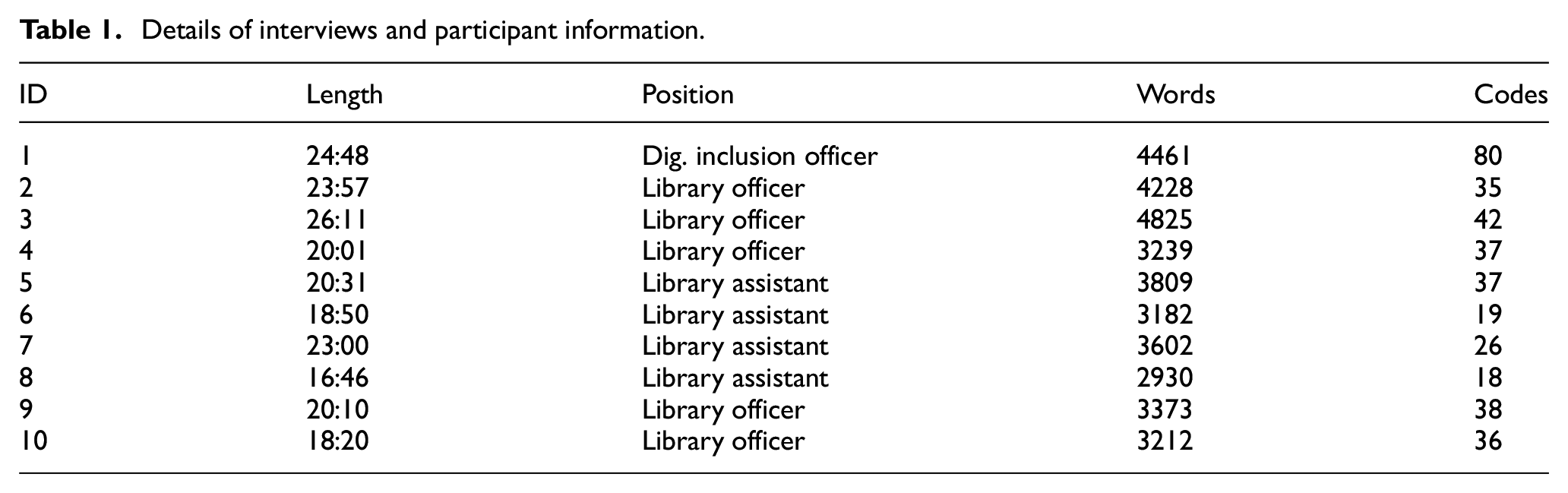
Interviewees (see Table 1) held one of three job titles, ranging in seniority/experience from digital inclusion officer, the most experienced, to library assistant. The interviews had an average duration of 21 min and 15 s and ranged from 16 min and 46 s up to 26 min and 11 s, yielding 3 h 32 min and 34 s of interview material. Recordings were transcribed, and double-checked for accuracy and completeness, generating a total of 36,861 words.
Details of interviews and participant information.
The interview transcripts were thematically analysed using six stages [42] to identify low-level codes by open-coding using on online tool. 2 Two researchers initially familiarised themselves with the data, reading the transcripts several times and noting down initial ideas. The same two researchers then worked together to code the first two transcripts, discussing and agreeing on any contended sections. The remaining eight transcripts were split between the two researchers, who proceeded to code them individually using the approach developed through the collaborative coding. This resulted in 368 coded excerpts over 29 different codes. The various codes assigned, as well as their hierarchies, groupings and any non-hierarchical associations (as denoted by the dotted lines between related codes) are visualised in Figure 2.
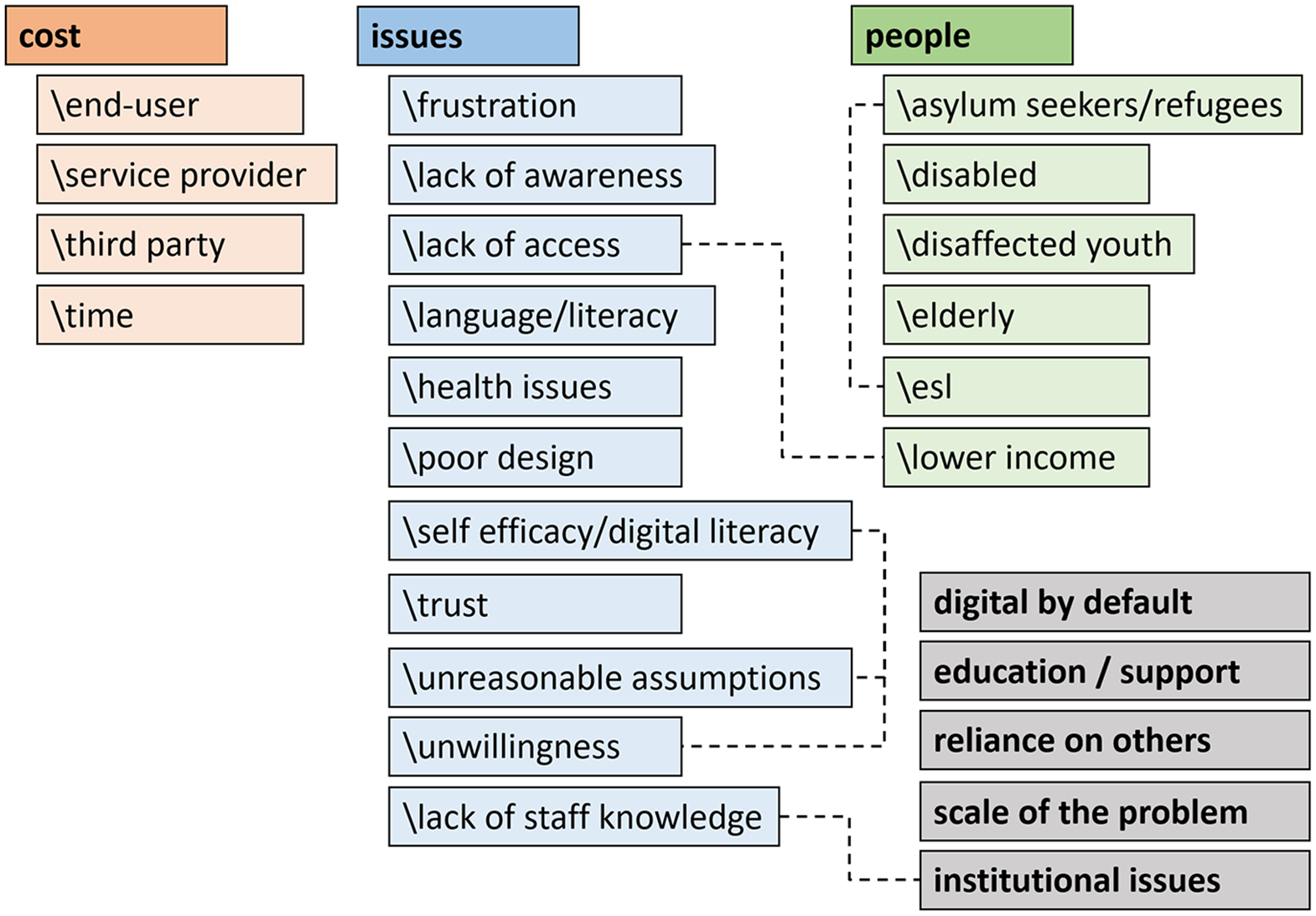
Diagram of codes identified.
Codes were collated, combined and contrasted into a potential initial set of themes, gathering all data extracts relevant to each potential theme. Identified themes were checked against the coded extracts for coherency, consistency and uniqueness. Each theme was then described by looking back at the data extracts, defining the theme and creating a narrative around the theme’s story, which we describe later. We note that the main codes identified all coalesced during the initial joint coding of the first two transcripts and were stable after that point. All of the codes we include were exemplified by multiple coded excerpts from more than one interviewee, indicating that some level of saturation had been achieved.
5. Findings
Analysis of the interview data generated 29 different codes, which we arranged into a hierarchy; most codes sit beneath higher-level themes of cost, (specific) issues, and people, while five others stand on their own. This scheme is depicted in Figure 2, which also indicates non-hierarchically related codes by means of dashed lines. Note that each quote below is followed by the ID number of the participant.
5.1. Cost
The cost theme explores the impact of financial and resource-based issues on end user engagement with the online services. Participants frequently mentioned, or strongly alluded to, different costs associated with the processes being investigated; from time costs to directly incurred fiscal costs. These costs were incurred by various stakeholders, including (unsurprisingly) the service provider and the customer but also in some cases third parties, such as family and friends.
5.1.1. Cost/service provider, cost/end user
Various costs are incurred by the service provider (i.e. the Council), many of which are related to providing call centres, staff and buildings for training sessions and on-site support. Participants often mentioned the need for customers to call the Council and that, even when customer sought assistance by other means, staff often simply referred them to these phone lines ‘So I tend to just direct the customer straight to the telephone to do it themselves [P10]’. Alternatively, this may be a choice on the part of the customer, but still incurs a cost for the Council ‘somebody may not want to use the PCs themselves […] they may prefer to use the telephones [P6]’. One participant suggested that this might not be a particularly cost-effective way to provide support: ‘time management should have been looked up and the cost effectiveness of setting this process up over the telephone [P1]’.
Less frequently discussed costs included the Council paying for translators for non-English-speaking customers ‘there’s often a language barrier […] again, the council pays for a translation service [P9]’; and postage costs due to services still not being all-digital ‘we’ve got 26,000 households that we post bills out to so if those people could access that information online it would be much more cost effective [P1]’. Some costs are incurred by the customers themselves, who must often travel to the Library if they are not able to complete some services online. If they’re not able or willing to complete forms online, they now have to pay for these forms to be printed ‘it sounds awful [but] you have to pay for the printing [P2]’.
5.1.2. Cost/third party
A surprising number of costs related to third parties were mentioned, where users have to rely on others, such as family members, but also friends or colleagues or even other governmental services (e.g. the Citizen’s Advice Bureau). ‘They put the barriers up for elderly people and they have to ask somebody in the family [to help] [P9]’. Sometimes this seeking of third-party support is even recommended by staff ‘what you would generally do is ask if they had a family member or friend who could come along with them to support them [P5]’. Therefore, any travel costs and time costs are incurred by both the customer and the accompanying third party.
5.1.3. Cost/time
Many costs are fiscal in nature; however, using a support system also incurs temporal costs: time spent travelling to somewhere where support is provided, waiting in a physical queue to be seen or waiting in a virtual support line queue. Council staff naturally also must take time to man support service telephones, assist customers in person and design and deliver training and educational interventions.
One participant, a senior member of staff, talked at length about the costs of operating a phone help service: So 99.9% of customers […] have to ring somebody up, and that phone call can take over half an hour [and] it’s costing the company quite a lot of money. If you think the minimum time on a telephone call is 30 minutes [P1].
Many documents need to be scanned and the library has to provide scanners for this, incurring a temporal cost for the user visiting the library and costs for the Council in providing the scanners and attendant support staff: ‘you would have to come to the library to scan in your information [P1]’ and ‘we will help you to scan your documents to the benefit office [P2]’.
The library (and wider Council) provides a number of training courses and workshops to help people develop the skills necessary to use digital services. These vary from short interventions to much longer training courses, sometimes delivered over multiple sessions: ‘We run a learn my way online basics, which is a structured resource which we deliver over five hours to people who want to learn how to get online and access the Internet [P1]’.
5.2. Issues
The issues’ theme explores problems that are faced by stakeholders with in the system being investigated, that served as blockages or bottlenecks, directly or indirectly inhibiting end user engagement with the online services. Issues often prevent customers from using online services themselves and, therefore, necessitate the provision of help and support services. Some of these are caused by poor practice, a lack of training or a lack of understanding of end users’ needs on the part of the service provider – and could, therefore, be remedied by making changes to the systems themselves – while others are due to customers not having access to the necessary technology. Others still are caused by issues such as language barriers, lack of experience or knowledge on the part of the end user or even unwillingness to transition from the older physical, form-based services to an all-digital provision, sometimes because of a lack of trust in technology.
5.2.1. Issues/lack of access (links with people/lower income)
Despite Government policies designed to ensure access to enabling technologies, there was considerable discussion around this topic: ‘A lot people don’t have a home computer, [and] I would say that and a lot of people don’t have Internet access [P3]’. This also included users who did not have access to a smartphone device: ‘so people aren’t able to use their smartphones because they don’t have one; We assume they do [P1]’. The library helps when people do not have their own means to access online services; however, opening times were highlighted as being insufficient: ‘this library used to be open every Sunday, and from last April, it closed, and a lot of people were really struggling […] without the library being open then you’ve got nowhere to go [P7]’.
5.2.2. Issues/poor design
Poor system design often causes or exacerbates issues associated with the e-services. For example, unclear wording of instructions or form elements: ‘questions are badly worded and it is quite an awkward form to fill in [P10]’; poor UI design: ‘Yeah, the way it’s laid out, it is terrible, it really is [P3]’, ‘now we’re in the process of looking at revamping some of the systems because they’re not very customer friendly [P1]’; or a confusing/complex structure: ‘there’s a million links [that] take you here there and everywhere, so you have got to be really careful [to choose the right one] [P7]’.
Interviewees suggested such issues may stem from a lack of user testing and involvement of users and staff in the design process: ‘the online systems have been written by IT people and haven’t been tested properly on customers […] it’s the language that it’s written in – it’s very hard [P1]’. Some of this may be due to unreasonable assumptions being made by senior staff members of developers, although sometimes the system may not be fit for purpose at all ‘a lot of, you know, the uploads and a lot of the links don’t work [P1]’ or don’t work on some devices ‘I’m sure there’s some forms that you can’t read properly […] on mobile [P3]’.
5.2.3. Issues/language and literacy
Issues related to language and literacy were frequently mentioned. Some due to people having little to no English skills and, therefore, being unable to complete the forms or even engage with support staff: ‘even on a face-to-face basis there’s often a language barrier [P4]’ and ‘someone who is digitally illiterate or doesn’t speak English and how do you describe things to people over the phone digitally when that person doesn’t understand? [P1]’. As discussed above, these problems are sometimes resolved by employing the services of a translator or interpreter, although this is clearly not a practical solution at scale.
People may have some language skills but struggle as instructions are not always written in plain English: ‘they don’t understand the questions that are being asked. It’s not always clear enough English […] I don’t think the forms are clear enough [P9]’. Some customers may lack literacy but are not helped by the kind of language used on forms and the lack of features to assist and guide customers through the online processes. Many forms are unnecessarily complex and require people to enter excessive amounts of information: ‘the fact that people have low levels of literacy and the fact that so much information is required (is a problem) [P1]’. Many of these issues could be prevented or lessened by making changes to the user interface and/or form layout and, as such, are related to issues of poor design.
These issues were related to demographic profile – those who speak English as a Second Language, often refugees and asylum seekers and people of low socio-economic status. Like many other issues discussed, problems caused by poor literacy can lead to considerable anxiety and frustration: ‘they literally panic if they haven’t got the vocabulary; they haven’t got just that knowledge and education [P3]’.
5.2.4. Issues/self-efficacy and digital literacy (links with issues/unreasonable assumptions and issues/unwillingness)
A common code relates to people’s self-efficacy with technology or digital literacy. Often people simply have had little or no experience in using digital technology, for example, the elderly: ‘in some cases, you’re asking them to go and learn how to use a P.C. and they haven’t done that in their life or they don’t know where to start [P10]’. Technical language and terminology often presents a barrier: ‘I think the computer language is the biggest barrier [P2]’. Many customers lack what are assumed to be fundamental IT skills, such as how to use a mouse: ‘[many] people have got very low levels of digital literacy and I see that on a daily basis. So that’s people not be able to use a mouse or a keyboard or a library computer [P1]’.
The issue is not just restricted to the elderly: ‘And we’re talking young and old. Oh definitely. But I would say there’s a lot of young people out there who I haven’t got a clue [P3]’. The common assumption that young people are ‘digital natives’ and, therefore, comfortable with modern information technology may not always be accurate. There is also an incorrect assumption that working-age people will have been exposed to information technology in their jobs: ‘it’s a combination of both having never used it in a workplace and they aren’t using them with family […] It’s familiarity in terms of just not having the exposure to using computers [P6]’.
This may be a solvable problem in many cases with appropriate education ‘[they say] “I’ve never used a computer in my life” [but] you take them across, sit them down, it’s dead easy. It’s all you need to do and the majority of them [understand] [P5]’ but participants believed that in some cases, it would be impossible to improve people’s digital literacy and confidence sufficiently: ‘you can give people all the courses in the world and you[‘re] just never never going to have the confidence [P3]’.
5.2.5. Issues/unwillingness and lack of trust and issues/frustration
Although a lack of knowledge or experience of customers or staff or physical barriers to entry are often problematic, other problems are caused by either a lack of trust in digital systems or frustration at having to use them.
Participants highlighted people being unwilling to learn or engage with digital services ‘there’s an element of reluctance there just to take that first step and to try and learn [P10]’ and ‘some people are just adamant they won’t do it online “I can’t do it” [P5]’. Participants often felt this stemmed from an inherent laziness: ‘some will just flatly refuse and deny all knowledge and want somebody to do it for them [P9]’. However, sometimes this unwillingness to engage was due to trust issues: ‘[there are people] who will say that they’re very wary of Internet safety and who’s spying on them … they’ve read all the scare stories in the media [P9]’.
These issues, as well as those listed under other ‘issue’ codes, have potential to lead to significant frustration and anxiety, which may increase resistance to engage with the digital services. There was evidence of customers being transferred from one department or advisor to another without gaining resolution ‘they’ve been told to either go online or on the telephone and [they’ll say] “I can’t go online” […] and obviously they get very frustrated, you know? [P10]’ and ‘It’s the frustration of people that are trying their best to do something and it seems like it’s being blocked everywhere they go [P7]’.
5.2.6. Issues/unreasonable assumptions
Interviewees agreed that the Council (and/or staff working for the Council) often had unreasonable assumptions about: (a) the technical skills and knowledge of users and (b) the knowledge of users about the organisation’s procedures to complete forms and resources required for this. Such assumptions can further increase a user’s frustration levels, lack of trust in the system and, ultimately, have a negative impact on their willingness to use the systems as intended.
Examples of (a) included ‘there’s a lot of assumptions that people have more IT skills than they actually do [P1]’ and ‘some of them that don’t understand that you actually have to maintain a universal credit account [P8]’. Some elements of the online forms that an IT-savvy person might perceived to be basic or elemental cause problems for some users: ‘Also the password side of things and not being able to see the password […] the [need for a] mixture of characters for your passwords[P1]’ and ‘it asks you for an activation code; we don’t actually need an activation code but then you have to wait for an e-mail again, so the process is not straightforward [P1]’.
Examples of (b) included: ‘Sometimes they come in and they just don’t have enough information with them. So we send them away, or maybe they just don’t know what’s involved [P8]’ and ‘it assumes that you’re at home, that you have a scanner next to you and that you can upload the document straight away [P4]’.
5.2.7. Issues/lack of staff knowledge (links to institutional issues)
Participants discussed instances where staff were unable to assist customers as they lack either technical IT knowledge/training or understanding of how services operate in other departments. Responding to a question about assisting customers in using council-provided computers, one participant said: ‘I’m still waiting for the training for that [P6]’ and earlier said that they were ‘not yet trained in a lot of the council services [P6]’. Another participant noted, I can direct them to the phones and I can direct them to the computers and there’s very little other than that I can actually do for them, which I think is quite frustrating […] I had very basic training … this is how we deal with inquiries – you direct them online, you direct them to the telephones. [P9]
This was echoed by another participant: ‘Unfortunately we just don’t have expertise or the knowledge to give them what they need [P5]’.
There was frustration at being unable to directly help customers due to having insufficient IT knowledge: ‘They assume that we are all completely expert in all forms, all computer programs that basically we are IT experts and we’re not [P9]’ and ‘we try our best to fulfil the request to the customer without asking the IT technician to come and have a look but sometimes it’s beyond our capability [P7]’. These comments would imply that the online services and systems are, in some cases, not only too complex for customers to use but also for the Council’s own staff.
5.3. People
The people theme explores how individuals belonging to certain demographics are less likely to engage with online services, when compared with other groups, and some of the reasons for this lack of engagement. Previous research highlights some demographic groups who typically struggle to engage with digital services; we wanted to know whether these same demographic profiles would be highlighted by our participants or whether there are other important groups that are less frequently discussed. The expected demographic groups – the elderly, disabled and people with low socio-economic status – were indeed mentioned by our interviewees but non-native speakers, and particularly asylum seekers, also constituted a large percentage of struggling users mentioned.
5.3.1. People/lower income (links with issues/lack of access and unreasonable assumptions)
Many lower-income users are unemployed and so many have to register for (and maintain eligibility for) universal credit. To do so they must maintain an online journal of their job-seeking activities, which requires an Internet-enabled device. Several participants mentioned that these people often come to the Library to use the equipment and connection: ‘Not having a computer for a start, at their home. That’s financially they maybe just can’t afford it. Can’t afford broadband [P8]’ and ‘A lot of people who are coming here, they’re claiming benefits and they just simply can’t afford to do it at home. So they rely on the library a lot [P7]’.
5.3.2. People/the elderly and/disabled
All participants confirmed that the elderly constitute a large proportion of those they help and that they often struggle with IT and using computers at a fundamental level: ‘They just haven’t used the computer before or haven’t needed to. […] this is a keyboard, this is a mouse […] the mouse controls the cursor around the screen. And so very, very basic. I.T. is very poor [P10]’. This lack of familiarity often also manifests as nervousness and distrust: ‘Among a lot of older ones, yes, they’re very nervous of the Internet and security [P9]’. Participants also mentioned physical barriers and issue due to age, describing additional issues for those that ‘can’t type or have arthritis in their hand or whatever [P3]’.
5.3.3. People/ESL and people/asylum seekers
We specifically asked about ESL users and participants’ responses were surprisingly consistent: around 50%–60% of the people they help are ESL, which is clearly high relative to their proportion in the general population. ‘Well I’d say it’s 40% British people, 60% other [P7]’. This does seem to vary considerably by location, however: ‘It could be 60/40. I work in a customer service centre in the West End and there’s a lot of different ethnicities [P8]’.
Clearly the majority of asylum seekers will also be ESL users. There was some mention made of these users being vulnerable: ‘They’re putting people who are vulnerable. Because they can’t speak [English] they’ve never used the system to speak in English [P3]’ and being from different backgrounds or having diverse reasons for being in the United Kingdom: you get a lot of single, lone males in like their late twenties, early thirties. You get a lot of families from Libya and stuff … but you also get people who come … to study, bring their kids over and stuff [P3].
There was a suggestion that these users had become more numerous recently due to political events: ‘I think that’s definitely more noticeable in the last two years since, you know, the economic migration across Europe. Definitely [P3]’.
5.4. Standalone codes
Although the majority of codes identified were subsequently grouped into the three supercodes (cost, issues and people), there was also a number that was kept separate.
5.4.1. Digital by default
The digital by default agenda was mentioned frequently, typically with negative sentiment: ‘there’s no face-to-face contact anymore, so it has to be online [P4]’, and there was some evidence that people weren’t aware of this ‘they haven’t been aware that they have to do it online [P9]’. For a number of customers, this is seen as a retrograde step as they would much prefer to be able to use the old forms and systems: ‘So at one point people used to come in, then they would get assistance to fill in the blue badge form, and that doesn’t happen now, got to be done online … [P2]’ and ‘A lot of people say “I want to speak to somebody face to face or a pen of paper form like In the past”. Yeah well they just don’t exist anymore here. Some people just like a paper form [P5]’.
5.4.2. Education and support (links with cost) and scale of the problem
In an attempt to remedy some issues around digital literacy, the Library provide services to help people, including free skills courses: ‘we would book it for them or we would be signposting them to [the] skills hub where they’ve got courses [P6]’; however, these are not always sufficient, and in some cases, scheduled one-to-one sessions are offered: ‘if somebody needs additional help with something or if somebody’s got a specific issue … they might do three sessions of the same thing [P6]’ or even ad hoc assistance: ‘I like to try and show people how to do IT stuff [P8]’ and ‘We’ll sit and we’ll help but we can’t fill [out] forms for people [P4]’. Although this provision will often allow a customer previously unable to use the online systems to use them without much or any further support, this is clearly not always the case. As highlighted earlier (e.g., in section 5.1.3), customers often require further assistance and one-to-one support, even after considerable time spent in classes and workshops.
Although not explicitly prompted to do so, interviewees frequently hinted at the scale of the problems they are faced: ‘Maybe 1 out of 10 can get through the system. And that’s with my support. So that’s with me helping them [P1]’ and ‘99.9% of customers who are trying to sign up for an online process have to ring somebody up [P1]’.
5.4.3. Institutional issues
The code institutional issues were used when a participant mentioned a problem that was caused by the Council due to decisions at the management or government policy level. Many instances involved the perceived decrease in staffing levels, which resulted in services becoming more difficult to access or, in some cases, unavailable entirely: ‘with reduction in staff, the face-to-face option isn’t available now [P9]’. Participants mentioned that customers sometimes preferred (or were accustomed to) how things used to be done, but that services had transitioned from being face-to-face to contact centres and/or web sites: ‘A lot of people say “I want to speak to somebody face-to-face” or [use] a pen and paper form, like in the past [P5]’. There was irritation that issues experienced by staff at a customer-facing level (which were subsequently raised to those responsible for change) were not being investigated or acted upon: ‘it was done by IT gurus who thought that it would be [fine]. It was tested and it didn’t actually work […] We fed that back but it was still rolled out [P1]’ and ‘But it was set as a priority and I was told that [it] could not change [P1]’.
6. Discussion
6.1. Cost
A key theme, which was often mentioned explicitly by participants but could also be inferred from their discussions, was the massive costs in providing and running digital services. While many are obvious – the costs of providing a call centre, for example – many are indirectly incurred and considerably less obvious. We might even refer to these as being ‘hidden’ costs. Some are borne by all stakeholders and many are not fiscal in nature but rather are in terms of time and effort. Lost time and fiscal costs when searching for and interacting with e-government services have been previously identified as important factors [35], although little research has considered other forms of cost or has quantified their magnitude. This is important for both the service provider and users, as council budgets are becoming increasingly constrained and cost is an important factor in user satisfaction; higher costs are associated with reduced satisfaction [33]. Several participants expressed frustration and surprise at the lack of efficiency embodied in some of the council’s processes around service support. Although some attempt is made to educate users on how to better make use of the services and information available, it would still seem that in most cases people need to repeatedly rely on the often costly support services.
An understudied stakeholder group are the people (typically family members or friends) who take time to help others in using and understanding digital services, although the importance of social networks for supporting older adults’ IT use has been identified [43]. The staff we interviewed would also be considered to be ‘information intermediaries’, as identified in previous work, and play a critical role brokering between the users and the information sources/services [10]. However, here we see the reliance on not just employees or formal volunteer organisations, but also on more ad hoc forms of support from the user’s own social network. We refer to these people as ‘digital carers’ and, much like carers who look after ill family members, they are often forgotten and not recognised to the extent that they perhaps should be [44]. There was considerable evidence that such people are frequently involved and users are even being encouraged to seek help from those close to them to reduce the burden on the service provider.
Although e-government implementation should not be primarily driven by economic savings [20], there may be ways to reduce costs without reducing service and inclusion through optimisation [33]. Some costs would be difficult to remove entirely but many could be avoided, or mitigated, through more efficient processes and/or putting more initial thought and effort into system design. User-centred design, a focus on what users actually require – and what they enjoy using – permits the development of pull factors that incentivise the adoption of digital services [45]. Indeed, technical factors such as system, service and information quality are crucial antecedents to trust in e-government systems leading, ultimately, to increased uptake and use [35]. Savings could also made through more efficient use of existing resources and different approaches to education, support and training. Many costs are duplicated as people are not necessarily supported to learn how to use the systems for themselves and must engage the support team every time they use a council service.
6.2. Issues
Beyond cost we identified several other barriers or issues preventing users from effectively engaging with services. These barriers are often the root causes of people having to rely on expensive support provisions in order to access vital services and contribute directly to the digital divide. One was a lack of access or, more accurately, lack of effective access to the services, which are not necessarily the same thing [46]. While physical access gaps have almost closed in developed countries like the United Kingdom, those of motivation and skills remain and may even be widening [22]. Although few people in the United Kingdom now lack access to the Internet in some form, this does not mean that this access is usable by them. There is an assumption that people will use a full-sized computer; however, 35% of UK adults only use a device other than a computer for online connectivity [14]. E-government services that are not optimised for mobile or tablet devices effectively remove access from a substantial portion of the population. This issue may be partially resolved by councils and governments providing facilities – for example, kiosks [47] – to engage with digital services in public buildings, although this would clearly require users to travel to these public buildings, thus incurring costs.
Despite the importance of technical factors, such as systems and service quality [35], there was little evidence of involvement from key stakeholders – end users and support staff members – in the design of digital forms and systems. The lack of end user input in the design phase has previously been recognised [19], and it is recommended that stakeholders be involved in all stages of the development process through the use of co-design principles [34]. It is not sufficient when transitioning to ‘digital by choice’ to simply create a virtual facsimile of existing physical forms – characteristics of the new medium should be considered and, where possible, exploited to improve usability. The capabilities of users and their level of digital literacy must be taken into account with services designed to assist those with weaker IT skills.
Other issues involve language – the kind of language used on the forms and the varying language skills and literacy of users. Previous work has highlighted the potential dangers of ESL users being over-confident in their own language skills and therefore misunderstanding critical information sources, including e-government [48]. Language skills issues were not just restricted to those who are illiterate or have poor English skills, although this is certainly a problem [36] – digital literacy plays a big part [23]. The lack of user-centred design has led to language being used that is too technical, requiring knowledge of terminology that cannot be assumed of all users. These issues can be mitigated through avoidance of technical terminology, where possible, or better descriptions of unavoidable technical terms in plain English. This would increase systems and information quality, both significant factors in determining user acceptance and use [34,35].
Literature on use and acceptance of digital systems has highlighted that trust can be an important factor [33,35], a concern echoed by our interviewees, who linked a lack of trust to ‘scare stories in the media’ about identify theft and account hacking, leading some users to develop a paranoia of all things digital. Another significant barrier was a lack of motivation to engage with e-government services and an unwillingness to learn how to use them, often because they are ‘new’ [49]. While some of this may be due to general indolence, much stems from a lack of confidence in one’s own abilities [20]. This may be due to scepticism about why the change to digital services has been made, with some questioning whether this is really intended to benefit end users or whether cost saving is the real driver.
6.3. People
Previous research has identified demographic factors that impact digital exclusion and the digital divide: age, gender, educational level, income and ethnicity, among others [19,31]. Our findings also confirmed that the elderly in particular tend to struggle with the transition to e-government services and are, consequently, more at risk of exclusion [36]. This is not only caused by a tendency to lack previous experience with digital technologies but can also be due to physical or mental issues, such as arthritis or dementia. Trust is also a considerable factor here as older people are less likely to have had positive experiences using digital technologies in other aspects of their daily lives, for example, digital banking.
An under-represented demographic in the e-government literature is asylum seekers and those who do not speak English as their mother tongue. Although such people constitute a relatively small percentage of the overall population, they represented a massively disproportionate percentage of the support cases in our interviews. Barriers for these users are typically language related [7], requiring the council to employ translators at considerable expense, but also include a lack of digital literacy, cultural understanding or awareness. Conventions that may seem obvious to system designers may in fact be artefacts of a particular culture, which may not be so obvious to recent immigrants. Previous work has demonstrated that refugees often struggle to engage with the complex information landscapes in their new countries and tend to disproportionately rely on ‘trusted mediators’ to help them navigate through this new space [50]. The barriers we identified earlier may be more difficult to overcome for such users, preventing them for participating fully in their new communities and putting them at increased risk of social and economic exclusion.
6.4. Limitations
While our results provide understanding of the issues around provision and support of UK e-government services, the methods employed do suffer from some limitations. Due to cost and time constraints, we interviewed only a relatively small sample of council support staff. These may not be entirely representative of the team as a whole, although their experiences and individual opinions are still valid and useful. The sampling method used, opportunity sampling, may suffer from self-selection bias and, as recruitment was done by a high-ranking member of the team, some participants may have felt pressure to participate.
We note that, despite the relatively small sample size, the interview data obtained is rich in detail and the concepts identified converged quickly as we worked to code the data and stabilised after around half of the interviews had been coded. Such a sample size is not uncommon in the literature when employing this approach and can be small if the group sampled are homogeneous in their views on the subject of interest, which was the case here, given the tight scope of our interview questions [51].
Our findings are from a single UK council and, while many discussion points are likely replicated elsewhere, some issues may be particularly prevalent in the particular council area studied. However, the literature surveyed, which covers many other geographic contexts, suggests that digital divides and digital exclusion caused by the introduction of e-government services (and the phasing out of ‘legacy’ service paradigms) is widespread in the developed world. Our findings and recommendations, and discussions we have built around them, may therefore have much more general relevance, particularly in the United Kingdom. Further work could focus on interacting directly with end users to gain a better understanding of their perspective towards the issues which have been identified.
7. Conclusion
This research investigated digital services in a UK council from the perspective of the support staff who assist users when they are unable to use these services on their own. Our findings support the observations made in the 2019 ONS report on digital divide [52] that (1) despite the recent developments in information and communication technology (ICT), some people in Britain still remain digitally excluded, and (2) lack of skills is the main reason for digital exclusion among the elderly and disabled population. We have seen evidence of the transition from ‘legacy’ systems to an all-digital paradigm being difficult for many people, and in many cases often it is not really ‘by choice’, leading to instances of digital exclusion and a widening and deepening of the digital divide [24]. Institutional issues play a big part; staff are not always sufficiently trained to be able to help people, and unreasonable assumptions are made during the design phase about users’ skills and existing knowledge. However, many stakeholders – both end users and support staff – could be helped to effectively use these systems without resorting to human-based support services and their inherent costs.
Our findings highlight the importance of employing good design principles, including stakeholders in the design process and ensuring the services are accessible by all – not everyone has access to a PC and so responsive design is crucial. The findings also raise the issue of digital literacy and who is responsible for ensuring that citizens are given sufficient support in developing these crucial skills. It is clear that this often falls on councils, and predominantly libraries and their support staff, who are already struggling with reducing budgets and role creep. Finally, more empirical studies are necessary to identify how much time and resources are given up by ‘digital carers’ and such hidden costs need to be further addressed.
Footnotes
Acknowledgements
The authors are indebted to Luke Burton for his input to the project and for arranging the interviews, as well as to all of the staff at Newcastle City Council who participated in the research.
Declaration of conflicting interests
The author(s) declared no potential conflicts of interest with respect to the research, authorship and/or publication of this article.
Funding
The author(s) received no financial support for the research, authorship and/or publication of this article.
