




Abstract
The purpose of this article is to describe how to teach students to use smartpens to record notes in their classes. Notetaking is a complex cognitive process that requires students to listen, process, organize, and record notes, while dealing with the temporal demands of trying to record notes fast enough to keep up with the teacher. Fortunately for students with disabilities, smartpens can help them compensate for slow writing and processing speed by allowing them to record partial notes and then easily amend them after the lecture.
Keywords
Kevin prepared for chemistry with Ms. Williams, with a notebook and pencil on his desk. Ms. Williams was lecturing about ionic bonds, where she told students information to jot-down for upcoming labs and exams. Kevin was trying to keep up by recording notes as she spoke. He raised his hand a few times asking Ms. Williams to repeat what she said. However, after a few times of asking, Kevin got frustrated with not being able to get everything written down, wrote a couple more words, and put his pencil down.
After class, Kevin met with his learning support teacher, Mr. Sullivan, who supports him in all his classes, due to his identification of a specific learning disability. Mr. Sullivan asked how Kevin’s chemistry class went and to see his notes from class. Mr. Sullivan noticed that many of Kevin’s notes are incomplete and disorganized, the words on the page often do not relate to one another and have some unnecessary information thrown in, that ultimately makes them unclear. Also, because Kevin is trying to keep up with what Ms. Williams is saying, his handwriting at times is illegible. He reminds Kevin that he should have access to notes and that he should ask Ms. Williams to repeat information. Kevin explained that he asks a few times during class but still finds it difficult to follow along with the lecture and besides, according to Kevin, Ms. Williams speaks too fast. Mr. Sullivan told Kevin that he will meet with Ms. Williams soon to discuss Kevin’s notetaking.
When Mr. Sullivan met with Ms. Williams, she expressed concern regarding Kevin’s poor performance on recent labs and exams and that his low grades may be a result not being able to keep up with in-class notes. During the meeting, Mr. Sullivan suggested that Kevin could try a new technology, an Echo Livescribe smartpen, that the school recently purchased from a state technology grant. Ms. Williams thought it was a great idea.
In secondary inclusive classrooms, students like Kevin are expected to record notes and learn from teacher presentations (e.g., class discussions, watching educational videos) (Landrum, 2010). Chemistry and biology teachers often use these daily presentations as one way for students to learn science content (Wingard, 2019; Smith, 2019). In fact, middle and high school teachers have reported that they spend about 30–50% of their time in whole class activities (e.g., lectures, discussions, explanations) in mathematics, science, and social studies classes and these activities often involve students recording notes to learn content (Craven, 2019; Havekost, 2019; Moin et al., 2009; Rocca, 2019-2020). Further, when middle school teachers were surveyed about which “writing to learn” strategies are used most often in their classes, teachers reported notetaking for reading and notetaking while listening as the two of the top three strategies they use in their classes (Ray et al., 2016). Similarly, students feel that recording notes in classes is beneficial to their learning and that notes help them to understand and remember material (Salame & Thompson, 2020). Despite the benefits and frequent use of notetaking in classes, notetaking is often an overlooked skill in secondary education classrooms.
As illustrated in the vignette, Kevin has a difficult time recording notes because it is such a cognitively demanding task. Notetaking during lectures involves listening to information (e.g., lecture points) as it is spoken by the teacher, temporarily holding lecture points in working memory, paraphrasing, and writing down the information, and successfully doing this while new, incoming lecture points that are being spoken by the teacher are being processed in memory. If the student does not record this lecture information in notes, there is a good chance that it will be lost forever. This temporal aspect (i.e., time pressure) of notetaking makes it particularly challenging for students (Olive & Barbier, 2017). Temporal tasks are tasks that cannot be slowed down or delayed and place a heavy demand on cognitive resources (Piolat et al., 2005). Unfortunately, students with disabilities (SWD) often experience cognitive overload during teacher presentations and lectures (Boyle & Forchelli, 2014). Further proof of the detrimental effect of cognitive overload can be found in previous studies that examined the note taking skills of students without LD (e.g., general education). When comparing SWD to peers without disabilities, SWD significantly perform worse when recording notes (e.g., SWD only record about half as many total lecture points and half as many important lecture points as students without LD) and on a lecture comprehension measures (Boyle, 2010; Rosen et al., 2014). For some SWD, teachers may provide accommodations to circumvent poor notetaking skills.
Accommodations and Notetaking
For students like Keven, typical accommodations include either the teacher providing him with notes ahead of time or the paraprofessional or student serving as a scribe to record notes for him. Using a peer note taker, or scribe is a commonly used accommodation that relies on the presence of another person to take notes during a lecture and provide notes to the student (Maydosz & Raver, 2010). This accommodation assumes there are peers and/or available adults with the appropriate skills to provide notes for the student. However, opting for this accommodation for notetaking deprives Kevin of the learning effects that come with taking one’s own notes and more importantly fails to teach students the strategies for engaging in the notetaking process (Parsons et al., 2021). While accommodations and modifications might help students circumvent their disability, research has also shown that students can be taught notetaking skills, strategies, and technology to become autonomous note-takers (Boyle & Joyce, 2019; Rosen et al., 2014).
Fortunately, technology such as smartpens can be used to help students manage the temporal demands of notetaking by supporting memory, retention, and retrieval by capturing the important verbal content during whole class presentations and at a later time, students can efficiently amend targeted areas in their notes (Serrantino & Hori, 2017). Rather than listening to the entire lecture again, smartpens can sync up with specific portions of the lecture allowing students to jump around in their notes and only focus on specific parts of their notes, like incomplete or partial lecture points, making amending notes a quick and efficient process. By only writing a few notes on the page, students can cognitively offload much of the lecture information during presentations, enhancing their learning and understanding in real time, and then return later to amend notes (Risko & Gilbert, 2016).
How Smartpens Work
Livescribe smartpens work by digitizing notes written by hand, while also synchronizing recorded audio to what is written. The smartpen has the ability to record the lecture directly on the pen device, which is then stored in the pen’s memory. Using the smartpen requires the use of the unique Livescribe notebook paper. The notebook paper has a grid pattern of tiny micro-dots that perform like a GPS system for the smartpen. The smartpen works with the notebook by having an embedded IR camera that is located in the pen tip. The camera takes continuous snapshots of the grid pattern that is decoded by the pen software to determine a (x,y) coordinate pair which indicates where the pen is located on the notebook page. The smartpen location is mapped into an application within the smartpen software. This process allows the smartpen to remember where ink is written and where the buttons to manage different features (e.g., volume, menu, etc.) are located.
Using the Livescribe smartpen and notebook paper technology also provides users with the opportunity to transfer information to the Livescribe apps on a compatible device (e.g., laptop, mobile device). Students can convert handwritten notes to various formats and share them with others. Using a USB port, an electronic copy of the notes can be downloaded to a computer or laptop and stored electronically. The notes can also be played back using the Livescribe app. Using the utilities, students are also able to backup, search, organize and share notes from their device (Livescribe, 2023).
Prior Smartpen Research
While several studies (e.g., Cirillo & Hummer, 2021; Harper et al., 2017; Knox et al., 2011; Rawson et al., 2017; Tucker & Zamfir, 2021) have documented the success of smartpens in the classroom, three specific studies have shown that smartpens are an effective technology tool for students with disabilities to use to record better notes, and improve achievement (Belson et al., 2013; Boyle & Joyce, 2019; Joyce & Boyle, 2019). In the first study, Belson et al. (2013) examined the notes of ten students with learning disabilities as they recorded notes using the Cornell notetaking strategy in conjunction with Echo Livescribe smartpens. In their study, the researchers compared students’ notes prior to being taught to use the smartpen with notes after smartpen instruction. From the findings, the researchers found statistically significant differences on rubric ratings of content (e.g., main ideas and details in notes) and selectivity (e.g., including only important words and ideas) in students’ notes taken after smartpen training.
In a second study, Boyle and Joyce (2019) randomly assigned students with and without disabilities to either a smartpen strategy group or control group. In the findings of this study, the researchers reported that students who used smartpens, along with a smartpen strategy, performed significantly better than students in the control group on number of lecture points recorded in notes, number of words in notes, and test score that assessed lecture comprehension. In addition, students who used smartpens added on average 27 new words during the amending step of the notetaking process. Finally in a third study, Joyce and Boyle (2019) examined the use of smartpens and a smartpen strategy among students with and without disabilities. The results from this study found that high school students with disabilities who used smartpens recorded more words in notes and performed better on a recall measure than students with disabilities in the control group. This study also indicated that students with disabilities who used smartpens recorded more notes than students without disabilities in the control group, indicating that when students with disabilities use smartpens they can perform as well as or better than students with no disabilities (e.g., general education), closing the gap in performance between SWD and peers without disabilities. In summary, when teaching students to use smartpens via a smartpen strategy, they are able to record more notes and (without studying notes) improve their comprehension of the lecture.
Teaching Students to Use Smartpens
Overview of Teaching Students to Use Smartpens.
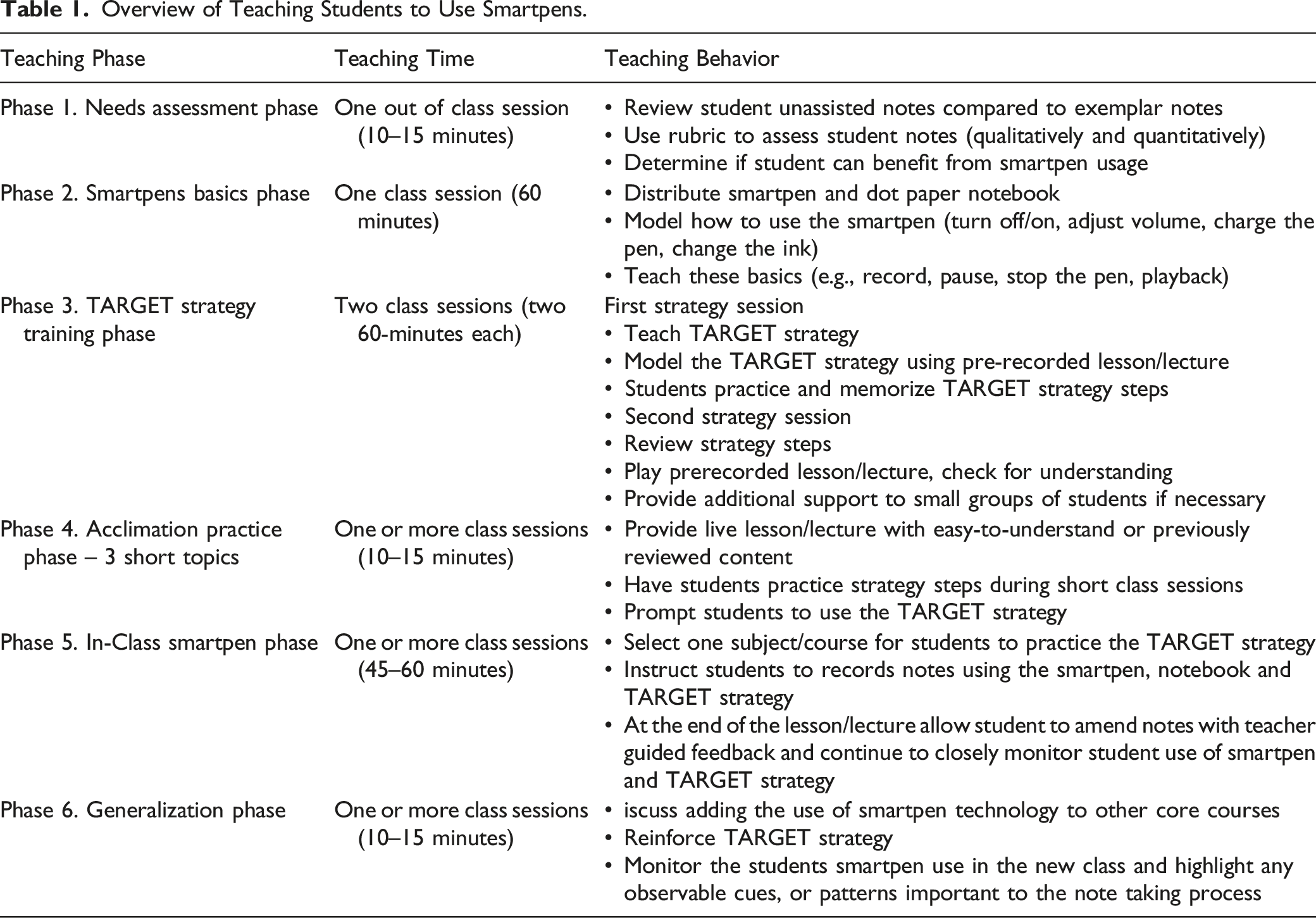
Needs Assessment Phase
During the needs assessment phase, the teacher determines if the student’s notetaking performance requires training. During the needs assessment, the teacher will need to have access to the student’s previously recorded notes (i.e., notes that the student recorded on their own, without any assistance from a teacher or scribe) and exemplar notes that were recorded during the same class session. The exemplar notes can either be the teacher’s notes or another student’s notes (e.g., a student who is an excellent note-taker). Although there are a variety of aspects of notetaking that a teacher can examine when assessing the student’s notes, there is some basic quantitative and qualitative information that should be assessed in students’ notes. For example, quantitative information that the teacher can count in a student’s notes might include the number of important lecture points (or main points from a discussion), number of vocabulary words in notes, and total lecture points (or total main points from a discussion). In terms of qualitative aspects of notes, teachers can examine legibility of notes, organization of notes, and details in notes (e.g., vocabulary with definitions, completeness of lecture points). See Figure 1 for a rubric that teachers can use to assess students’ notes. Once it is determined that the student can benefit from smartpen training, the teacher can move onto teaching the basics of smartpens. Assessment of student’s notes. Note: Adapted from “Note-Taking and Secondary Students with Learning Disabilities: Challenges and Solutions” by J.R. Boyle, 2012, Wiley, Copyright 2012 by Joseph R. Boyle.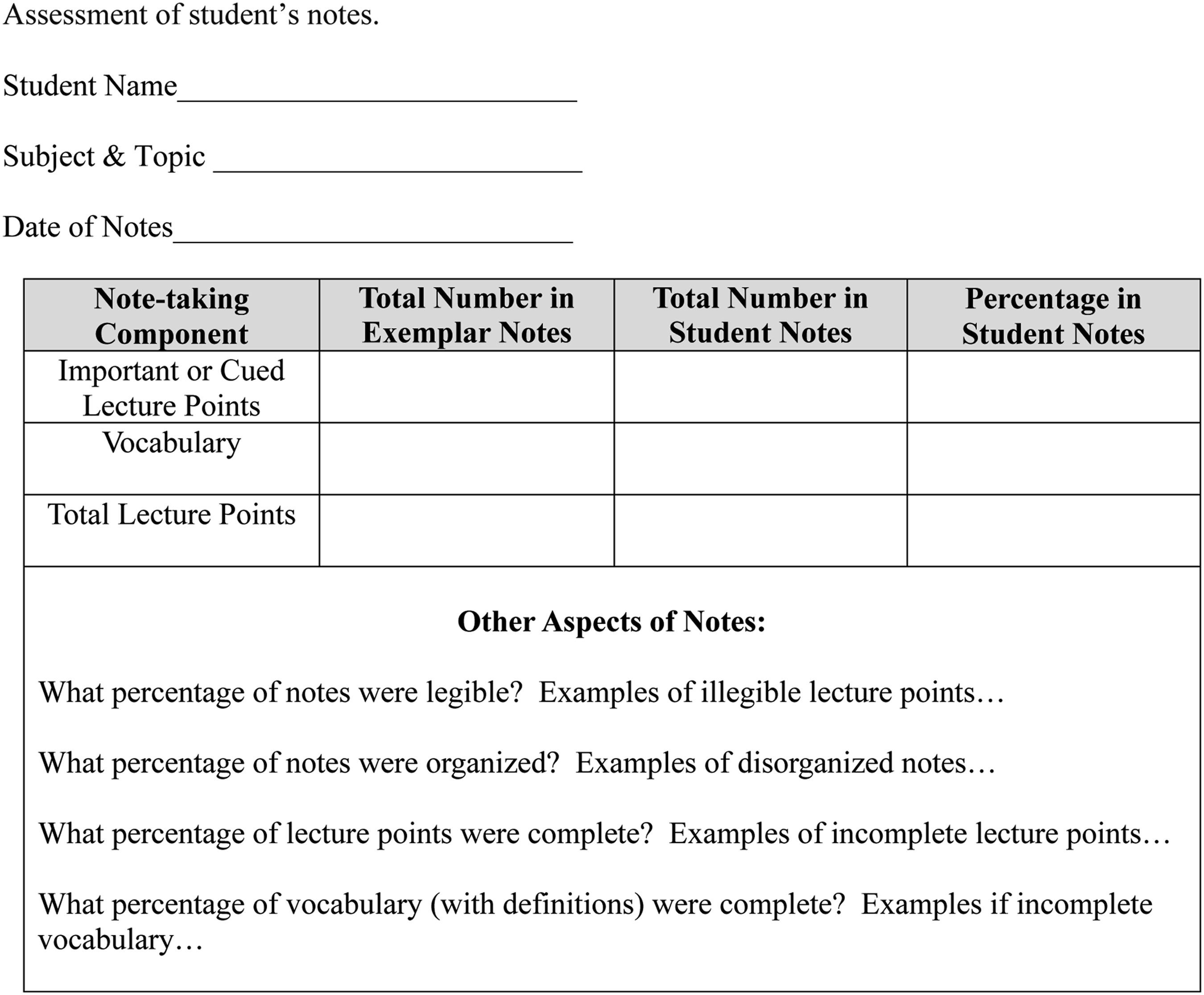
While there are multiple areas to assess notes (e.g., total lecture points, cued lecture points, vocabulary, organization of notes, and illustrations), when Mr. Sullivan examined Kevin’s Chemistry notes, he decided to focus in on the three areas of cued lecture points, vocabulary, and legibility. He compared Kevin’s notes to Ms. Williams’ notes and found that Kevin was only able to record 25% of the important (e.g., cued) lecture points, 43% of the vocabulary, and Mr. Sullivan had difficulty reading several sections of Kevin’s notes.
Some examples of missed lecture points include Kevin missing Ms. Williams’ cued lecture point when she said that, “It is important to remember that ionic compounds commonly form when a metal reacts with a nonmetal and the metallic atoms lose an electron or electrons” (e.g., an importance cued lecture point). Kevin also missed her telling students three common iconic compounds found in your home are: 1. sodium chloride or table salt; 2. sodium fluoride found in toothpaste, and 3. calcium chloride found in antiperspirants and deodorants (e.g., an organizational cued lecture point). Instead of writing this information in his notes, Kevin simply wrote, “compounds found in your house.”. Kevin missed several key vocabulary words and definitions that included: cations are positively charged ions; anions are negatively charged ions, and covalent bond is a bond in which electrons are shared.
Smartpens Basics Phase – One Class Session
The first session begins by allowing students to become familiar with the functions of a smartpen. For our studies, we have used the ECHO II smartpen by Livescribe (see Figure 2). Teachers should model and provide some practice with feedback when teaching them how to use smartpens. Begin by handing out a smartpen and dot paper notebook to each student. Next, explain some functions that include turning the pen on and off, adjusting the volume, some basics of recording notes and using the playback function, how to charge the smartpen, and how to replace the ink cartridge. Initially, teachers should begin by teaching students how to turn the pen on and off using the power button. Once the smartpen is turned on and in coordination with the dot paper notebook, the teacher can show students how to adjust the volume (for playback) and how to use the menu that appears in the pen’s window. By tapping icons on the dot paper, the teacher can show students how to control the volume, and how to record, pause, and stop the pen (see Figure 2. Basic Dot Paper Buttons and Icons). While there are multiple buttons and icons on the dot paper, it is best to begin with just the basic icons needed to record notes and playback the teacher's presentation. Finally, teach students how to charge the pens via the USB cord and how to replace the pen tip once it runs out of ink or if the students want to change the ink color. Once students have learned these basics (e.g., record, pause, stop the pen, change the ink, and charge the pen) they have the prerequisite skills needed to learn how to record notes in class. Echo II Livescribe smartpen and Basic Dot Paper Buttons and Icons.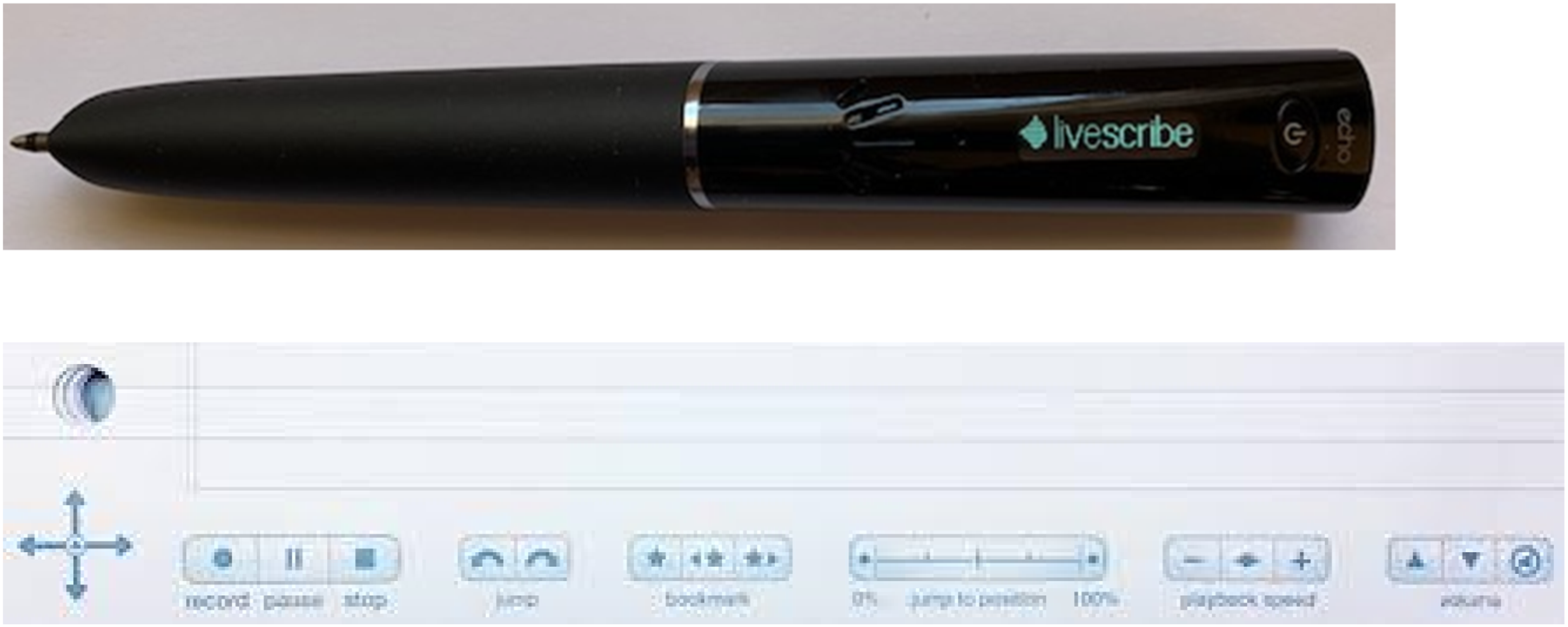
TARGET Strategy Training Phase – Two Class Sessions
Once students are familiar with how the smartpen works, the teacher can begin teaching the two strategy training sessions. Each session lasts about one hour in duration. During the first strategy session, the teacher spends time by describing, modeling and begins practice with feedback on how to use the TARGET strategy. During these two sessions, the teacher uses a previously recorded video teacher presentation or lecture. The purpose of using a recorded video allows the teacher to stop and pause the video and model the various strategy steps in small increments (e.g., 3–4-minute sections).
A. First Strategy Session Training
Next, the teacher provides each student cued lecture paper that lists the TARGET strategy as shown in Figure 3. During this session, the teacher should focus on teaching the TARGET strategy to students. Teachers should begin by providing an overview of the steps of the strategy and why each step is crucial to successful notetaking. Students should be taught that the steps T1, A, E, & T2 are one-time steps that students complete only once in a notetaking session and the steps R & G are recursive steps that should be used continually during notetaking. When teaching the R & G recursive steps, teachers should point out that a common mistake that students make when recording notes is that they try to record every word that the teacher speaks (Boyle et al., 2015). Instead, skilled note-takers focus on and record only important (e.g., cued) lecture information and vocabulary (Boyle & Forchelli, 2014), which are foundations of the R & G recursive steps. TARGET strategy for notetaking with smartpens.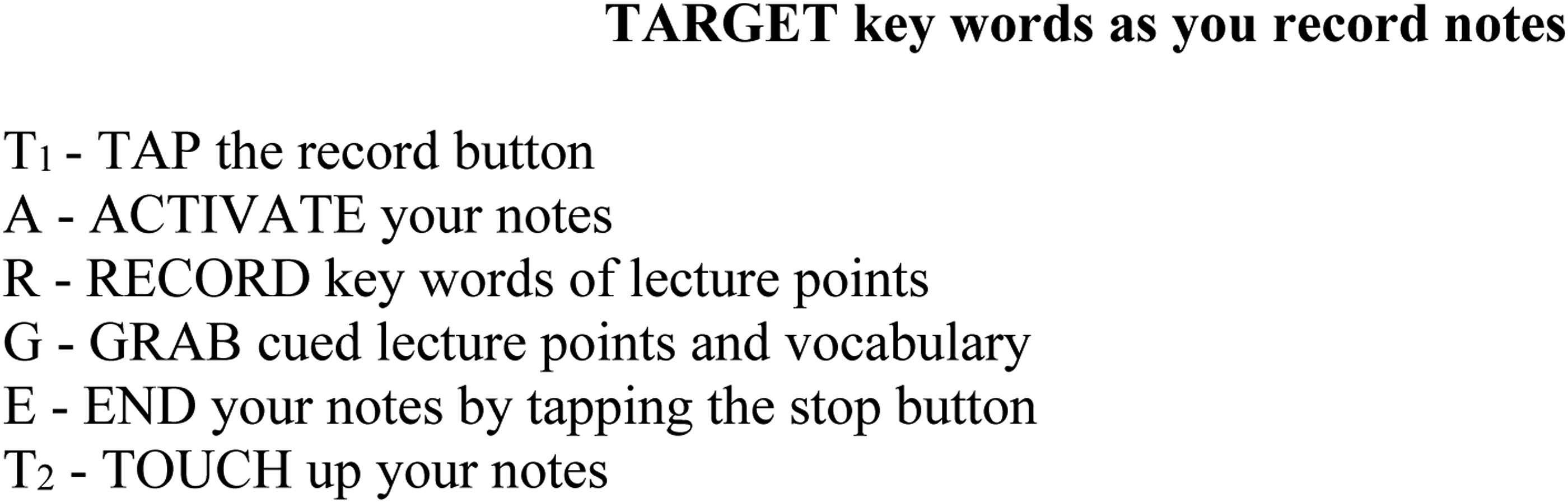
Model the Strategy Using a Pre-recorded Teacher Presentation
Once the teacher explains each step, they will need to model each step. To model correctly, teachers will need a video (with audio) of a previously recorded teacher presentation or lecture. This recorded video should be short in duration (10–15 minutes) and the teacher should be able to start, pause, and stop the video lecture as the teacher instructs students on how to use the strategy.
Next, the teacher will model each of the steps of the TARGET strategy. In the first step, T1, students are instructed to Tap on the record button to begin recording notes. In the next step, A-Activate-students write their name, date, and topic in their notes at the top of the page. This step is important so that students can go back and find their notes by topic or date. Students are also instructed to write on every other line so that there is room in their notes for writing additional information during the amend (T2) step. In the R step—Record—students are instructed to record important lecture points. More specifically, students were told not to record every word the teacher spoke, but to listen for and record three different types of cued lecture points: (a) importance cues (“it is important to remember that mitochondria produce chemical energy called ADT”), (b) organizational cues (e.g., “there are six parts to the cell”) and (c) other cues (e.g., information written on the white board). These types of cued lecture points are critical for students to record because they have been shown to be correlated with test scores of lecture information (Boyle & Forchelli, 2014). In addition, students should pay attention to vocabulary and their definitions whenever possible. Next, students are instructed to use the G step to Grab vocabulary words by writing any vocabulary word with its corresponding definition. Once the lecture was over, students are instructed to the E step, End their notes by tapping the stop button and changing the pen-tip color from black to red. Finally, during the, T2 step, students Touch up their notes by tapping on any word or cued lecture point and fill in the missing information in red ink.
As Mr. Sullivan modeled the strategy steps to Kevin, he would periodically stop to ask Kevin if he understood each step. Once he felt that Kevin could understand the strategy steps, he asked Kevin to record notes using them with a few portions of the video recorded lecture. He gave Kevin feedback on his notes and told him to study the strategy steps for homework.
Students Remember the Strategy Steps
During this step, students practice the strategy steps, so they are able to recall them with very little difficulty. Some teachers ask students to study the strategy steps and will quiz students verbally the next day or will have students write out the strategy steps. Memorizing the strategy steps is important because each step prompts the student to take some action. Students are expected to achieve 90–100% mastery of the strategy steps before actually using the pens to record notes in the classroom.
Second strategy session
Guided Practice with Feedback
The purpose of the second session is to allow students to practice using smartpens and the TARGET strategy to record notes using during a pre-recorded video teacher presentation. Since students have practiced using the strategy steps in the previous session and have memorized the strategy steps, it is now time to play the entire video lecture from start to finish and allow students to use the strategy steps with the smartpen. The teacher prepares students by conducting a short review of the strategy steps and then begins playing the video lecture. As the lecture is playing and students are recording notes, the teacher circulates around the classroom and provides students with feedback on their use of the strategy steps with the lecture. If students are having difficulty, the teacher could always play the video in short segments and provide more specific feedback to students. Once the teacher feels that the students can use the strategy steps with the smartpen successfully, the teacher can then move to the acclimation phase. If the student needs additional practice, the teacher can find short (5 to 10 minutes) e videos that are germane to the content of the target class (e.g., science, social studies, ELA) and have students record notes using the strategy and accompanying smartpen.
Mr. Sullivan assessed Kevin’s knowledge of the TARGET strategy steps and found Kevin knew all the steps. Next, Mr. Sullivan told Kevin that he would play the same video lecture and that Kevin would record notes using the smartpen, TARGET strategy, and notebook. Once the 12-minute video lecture was over, Mr. Sullivan evaluated Kevin’s notes and gave him feedback on the areas where he performed well and areas that he could still improve.
Acclimation Practice Phase – 3 Short Topics in one or more Sessions
The purpose of the acclimation phase is to allow students to become comfortable using the smartpen with dot paper (e.g., just like they would a normal pen and paper) during short class sessions with easy-to-understand content (e.g., a short discussion about previously covered content, recording notes while the teacher explains something that not essential-to-learn content like a news item from the Internet). The purpose of the acclimation phase is not to have the students learn new content, but practice using the strategy steps and to help students to become comfortable using the smartpen in conjunction with dot paper during short easy sessions. During this phase, students use the smartpen and dot paper notebook to record notes via the TARGET strategy. For example, the teacher might read about a local or national news event, such as why the government wants to ban the TikTok app; why high schools should start at a later time to allow students to get enough sleep; or why single-use plastic products should be banned. Although the content might be of interest, it is not essential content for their science or social studies classes. As students record notes, the teacher should provide prompts such as, “be sure to record important points,” “don’t try to write down every word,” “pick keywords to record in notes and then later you can fill in the details,” and “make sure that you add the definition for a vocabulary word when you amend notes.”
Since Kevin performed so well with the practice videos, he was now ready to use the smartpen and strategy in Chemistry class.
In-Class Smartpen Phase
In this phase, students begin to use the smartpen, strategy, and dot paper notebook in one target class (e.g., Chemistry class or American History class, but not both). Once a target class is selected, the teacher should prepare the student beforehand by making sure the smartpen is fully charged, conducting a quick review of the strategy steps, and assuring the student that they need to record only the important notes because after the lecture, the student can amend notes. Next, the student will record notes during the target class and at the end of class, spend a few minutes amending notes. Generally, it was found that giving students five minutes to amend their notes was sufficient for them to make substantial changes in their notes (Boyle & Joyce, 2019). During this phase (e.g., five class sessions), the teacher should provide specific feedback (e.g., “be sure that you record the definition of vocabulary words in your notes”) on how well the student recorded notes. Typically, the teacher will compare the student’s notes with the teacher’s notes or exemplar notes from another student to determine the number of key notes recorded and the quality of information recorded in the student’s notes. Also, if the student changed pen tip color prior to amending, the teacher will be able to easily see the original notes compared to the amended final notes.
During the first five class sessions, Ms. Williams and Mr. Sullivan closely monitored Kevin's notetaking using the smartpen. Mr. Sullivan had Kevin download his Chemistry notes to his laptop so that he had a copy of his notes and Kevin could take his notebook home with him for homework and other Chemistry assignments. Once the notes were on Mr. Sullivan’s laptop, he was able to assess and score his notes. Every morning during homeroom, he would provide feedback to Kevin on his notes from the previous day. When he scored Kevin’s notes with Ms. Williams' notes, he found that Kevin was now able to record 73% of the important (e.g., cued) lecture points and 83% of the vocabulary. These levels were commensurate with other exemplary students in the class. Also, because Kevin was not rushing to record every word that Ms. Williams spoke (i.e., he only recorded important points and vocabulary), his notes were legible and easier to read. It was now time for Kevin to use his smartpen and strategy in his U.S. History class.
Generalization Phase
During this phase, teachers will first discuss how to use smartpens in a new class. As before, teachers should reinforce students’ recording of important lecture points (i.e., cued lecture points) and vocabulary. They also need to emphasize the importance of amending notes after class. Keep in mind that if students do not amend the notes, they will end up with partial notes which are not as practical as complete notes. It would also be helpful for the special education teacher to visit the new class a few times to see what cues the teacher is using and to record notes in the class. The special education teacher and student can then compare the student’s notes with their own notes and discuss how the notes differ and account for any differences in cues that the teacher uses compared to other classes. For example, in the new class does the teacher use different cues to ensure students record important information? If so, what are some examples of the new cues?
Mr. Sullivan spoke with Kevin's U.S. History teacher, Mr. Blitzer, and informed him that Kevin would be using his smartpen in his class to record notes. He also asked if it would be ok to record notes in three of his classes so that Mr. Sullivan could compare Kevin’s notes and give Kevin feedback. Mr. Blitzer liked the idea and asked to be kept informed of Kevin’s notetaking. After each class, Kevin met with Mr. Sullivan, compared notes, and discussed any differences. For example, Mr. Sullivan noted that Mr. Blitzer liked to pause for 7–10 seconds when he wanted students to record an important point that he made and he often repeated the important information. This cue was different from what other teachers used in their classes, so Mr. Sullivan made a point to emphasize this to Kevin. When the notes were scored, Kevin recorded notes as well as skilled note-takers in the class.
Tips for Improved Notes Using Smartpens
We recommend some helpful tips for teachers to keep in mind when teaching students to use smartpens and notetaking skills. Teachers should first anticipate any potential problems that may arise with the procedure of using smartpen technology. This involves making sure that students’ smartpens are charged and that students have all necessary components such as pen tips, charged smartpens, notebook paper, and access to the online application. Teachers should remind students to charge their smartpens and store backup interchangeable pen tips in an easily accessible location. Teachers should also be mindful that smartpens can connect to the online app, where prior notes can be downloaded, saved, and re-printed. This means that if students lose their notebook, they will still have access to what they had written. Teachers should also have a structured routine for using smartpens daily. This routine includes prompting students to record notes, reminders of key terms, and setting aside time (generally around 10–15 minutes) for students to review notes (Boyle & Joyce, 2019).
In conclusion, notetaking can be a difficult cognitive process for students with disabilities. For students, the multi-tasking steps involved in notetaking can create intense demands on cognitive resources, particularly when attention is split between multiple components (e.g., listening, processing, writing), resulting in cognitive overload (Kennedy & Romig, 2021). While accommodations such as using teacher’s notes or having a scribe record notes offer students a possible short-term solution, in the long run, students do not actually learn how to record notes through these accommodations. However, if students are taught how to manage the cognitive demands through strategy instruction and use of smartpens, they can learn how to record notes, and in the process, improve their notetaking abilities and increase their recall of the information. Learning notetaking skills and strategies will not only help students to become autonomous learners but will provide them with skills they can use for the rest of their lives (Blik et al., 2016; Boyle et al., 2016).
Footnotes
Declaration of Conflicting Interests
The author(s) declared no potential conflicts of interest with respect to the research, authorship, and/or publication of this article.
Funding
The author(s) received no financial support for the research, authorship, and/or publication of this article.
