



Abstract
Virtual reality (VR) is an innovative technology that is rapidly gaining popularity in and out of the classroom. With improvements in hardware and software technology and the push for one-to-one computing, teachers have access to innovative VR supports and resources. These innovative technologies have the potential to improve instruction for diverse learners in today’s classroom, particularly students with identified disabilities. VR, as an interactive and visual tool, provides teachers with the ability to support and enhance traditional classroom materials for students, particularly those with disabilities. However, teacher time is often compromised and finding new technology can be daunting. This article intends to assist educators in utilizing VR in the classroom, with minimal effort and money. Using a detailed vignette, we guide the reader through a detailed example of how VR apps can be located and implemented for students with disabilities who struggle with motivation and engagement through experiential learning. Finally, we offer additional apps and their delivery devices as a starting point for teachers to begin creating more immersive and interactive content through VR technology.
Keywords
Mrs. Johansen is a middle school special education teacher working with students in eighth grade. She enjoys creating materials and integrating technology to support her students with diverse learning needs. She also recognizes that her students are more engaged in content when presented through technology. As a result, she often prepares lessons focusing on real-life experiences and hands-on learning. Several of her students struggle with social skills, which limits her ability to plan for authentic, real-life experiences for her students. Recently, her students have expressed interest in virtual reality (VR). She is planning for an upcoming social studies unit on art and is looking for an interactive way to teach contemporary art to her students. Through experience, she knows her students are often not interested in art. She feels this may be the time to try to implement some sort of immersive VR application for the lesson. She understands there are expensive headsets and other ways to experience VR but wants to understand how versions of VR can be used in the classroom for her diverse learners. Mrs. Johansen decides to take a free training on YouTube on VR at https://youtu.be/HclTLf2FQqc. After this introduction to VR, she is even more determined to find technology to better engage all students in her upcoming lesson.
Mobile devices are quickly becoming ubiquitous in the 21st century classroom (McGee & Welsch, 2020). A variety of mobile devices exist to support the diverse needs of today’s students, especially struggling learners and students with disabilities. These technologies range from low technology (e.g., Timers and Handgrips) to high technology devices (e.g., iPads, Chromebooks, and laptops). As technology progresses, the cost of attaining large quantities of new technology decreases, making purchasing more affordable for schools. A survey in 2019 by the National Science Foundation (NSF) found that 87% of high school students and 79% of middle school students have access to mobile devices (National Science Foundation NSF, 2018). Furthermore, in a survey by Edweek, as of March 2021 more than 90% of educators reported each student had access to their own device in the classroom (e.g., iPad, Chromebook, and laptop) (Klein, 2021). With this large increase in accessibility, mobile devices are being used worldwide to support learning in classrooms. It is important to note, we understand that not every district will have access to a specific technology. The intent of this manuscript is to highlight the ease of use and the virtual reality (VR) capacity of typically used devices such as mobile phones, tablets, and laptops.
Levels of Immersion Associated With Virtual Reality (Carreon et al., 2022).
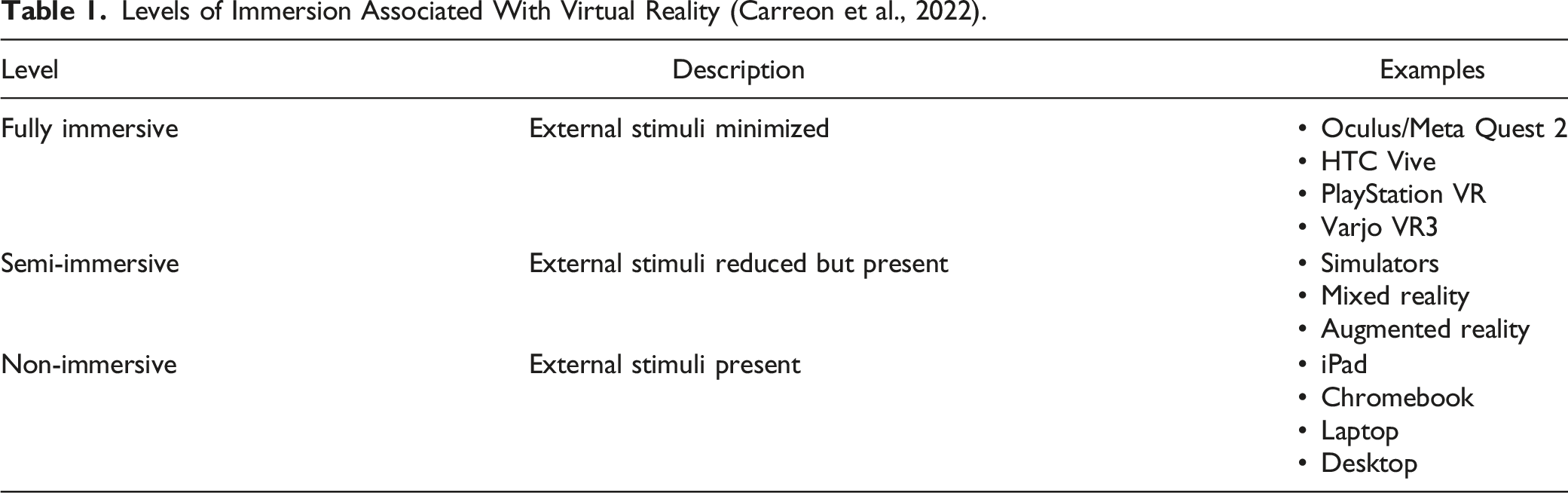
While VR has existed for decades, only recently has the technology been attainable for the average classroom. Mobile devices are now powerful enough to run VR through applications and improved hardware. While we recognize VR is often regarded as a head-mounted display, our intention is to provide teachers with an attainable way to provide virtual experiences to their students. Research shows that immersive experiences can be as effective to the learning process as more expensive technology (Rogers, 2020). We also recognize the ambiguity in technology but want to provide teachers a cost-effective useful solution to having VR experiences. This allows teachers access to deliver classroom content through VR in traditional school settings, blended learning, online learning, and home settings. Students can download applications to their device and then have access to the VR experience. However, among the four major brands with application stores (i.e., Google Play, Apple App Store, Windows Store, and Amazon Appstore) there exists more than six million applications to download (Statista, 2019). The vast amounts of applications and the time spent locating quality content can be overwhelming. Further, for some reason, the application stores do not aggregate virtual reality, virtual learning, and 360-degree applications together. The challenge for Mrs. Johansen, then, is to easily locate VR resources that are not only within the underwhelming budget of a teacher but that can also and be thoroughly implemented to support her students with disabilities. Therefore, the purpose of this article is to understand what VR is, the challenges teachers face finding and implementing VR in the classroom, and potential solutions for implementation in the classroom. Further, we provide a list of affordable, available, and effective VR applications broken down by cost and features that can be used in the classroom tomorrow.
VR for Students With Disabilities
Design features within technology provide for the ability to adjust instructional demands, scaffold content, increase practice opportunities, and provide immediate feedback which have all been shown to assist students with learning disabilities (Bryant et al., 2016). There are unique features within technology which provide the ability to present evidence-based practices for students with support needs (i.e., video modeling, graphic organizers, scaffolding, and social narratives) (Chelkowski et al., 2019). The ability to provide students within technology an experience of attunement and support can enhance student engagement and optimize new knowledge retention (e.g., (Schmitz et al., 2015) . Investigations into numerous pedagogical practices within technology have occurred over the past decade. These include mobile technologies (Rodríguez & Cumming, 2017), online instruction (Lorenzo et al., 2013), personalized learning (Basham et al., 2020), video modeling (Scheflen et al., 2012), serious video games (Israel et al., 2016), robotics (Saadatzi et al., 2018), VR (Garland et al., 2012), and augmented reality (Taryadi & Kurniawan, 2018). Of these technologies, the use of VR has seen exponential growth in the past 5 years with the release of affordable technology. Facebook’s HMD Meta Quest 2 sold over 14 million units by the summer of 2022 in part due to the technology’s affordability and appeal (Sutrich, 2022). Furthermore, the two most popular application stores (i.e., Apple App Store and Google Play Store) available on most mobile devices offer hundreds of free VR applications along with numerous applications for purchase. This VR availability and affordability coupled with technologies success for students with disabilities has sparked interest in usage by schools.
VR has the potential to provide many benefits to teachers and students alike. In their review of VR research in the k-12 classroom, (Freina & Ott, 2015) found several studies showing positive results when learning through VR. Additionally, (Krokos et al., 2019) found students may retain information and apply what learn, when compared to traditional teaching method. Further, in a 2018 study, Allcoat and von Muhlenen compared traditional textbook learning, video from immersive VR, and immersive VR. They found the two VR conditions significantly improved engagement compared to the textbook learning condition (Allcoat and von Mühlenen, 2018). A meta-analysis from Howard and Gutworth (2020) reported VR successfully taught complex social skills and enhanced un-targeted skills. For example, Tsiopela and Jimoyiannis (2014) used a non-immersive virtual computer game to teach primarily prevocational skill speed, the accuracy of vocational skills (e.g., organizing, sorting), and self-confidence. Researchers reported a positive impact on non-targeted communication skills, social awareness, and relationship skills, as well as targeted skills of confidence and accuracy of prevocational skills. This finding suggests that students may observe and practice skills within the technology beyond the technology’s instructional objective. (Stichter et al., 2014) utilized non-immersive VR to present the software program iSocial to students with disabilities to teach relationship skills, motivation, social awareness, executive functioning, and cooperation. Parents and students reported improvements in multiple skills that generalized to the school, home, and community. An increase in availability of VR along with research to support its potential seems to provide an ideal match for the classroom.
For students with disabilities, often, motivation, engagement, and overall learning are lower than their peers (Smith et al., 2019). The novel environment created in VR could provide improved motivation and engagement by allowing students to safely replicate, without failure, authentic classroom experiences while matching student skill level. This ability to replicate also provides opportunities to learn meaningful subjects. In a review of VR, Vasquez et al., 2015 found replication in authentic settings through VR could provide a beneficial component to learning content such as social emotional learning (Vasquez et al., 2015). However, in traditional school environments creating authentic settings with replication can be a difficult task. For example, a social skills lesson on greetings can only be created and repeated naturally or through role play. With VR, educators can provide a similar environment and situation allowing the interaction can be replicated as many times as necessary without degradation (Lorenzo et al., 2013) and in a seemingly safer manner where students can feel comfortable practicing and learning skills without failure in front of their peers (Bellani et al., 2011).
Similar to creating an authentic and replicable setting, VR allows educators to match each student’s interaction to their unique needs for assistance. Students with disabilities are often at varying levels of ability and would benefit from a more personalized instructional setting. In fact, current research indicates meeting students’ individual needs is an important aspect to content learning (Cook and Rao, 2018) as well as motivation. For example, utilizing the free Math VR app (available on most platforms), students can experience a sequence of math problems beginning at their exact entry point of need (i.e., addition and subtraction). The ability to address the unique needs of learners while providing realistic experiences with timely feedback places VR at the forefront of classroom innovations for supporting all students, particularly those with disabilities.
Choosing a Virtual Reality Option
Mrs. Johansen recognizes that she will not be able to buy headsets for the classroom at this time as those are often very expensive. Recently, Mrs. Johansen’s school went to a one-to-one initiative where all students are assigned to a new Apple iPad or Chromebook for use in the classroom. While she understands the devices are innately interactive and believes VR could offer the interactive experiences she is missing in her classroom, she wants to further support her students' learning through more innovative and immersive VR applications on the iPad. She went to the App Store, searched “virtual reality in education” and received over 1,000 search results. However, the results she found were overwhelming due to the limited ability to narrow her search appropriately on this platform. Ultimately, most of these results were not helpful due to the technology being geared toward a different age group, the primary purpose of this technology being entertainment rather than systematic education, and the lack of VR properties. She wondered why there wasn’t an easy way to locate the applications she believes exist. Mrs. Johansen wants to incorporate VR lessons into her classroom, but has limited experience, resources, and time to spend time searching for the perfect application. She understands the benefits but is interested in learning how to aggregate matching VR applications and how to select the best options for her students’ diverse needs.
Limited Resources
It can be easy to get caught up in the appeal of the newest VR technology. The reality is that most classrooms will not be able to buy 30-plus VR headsets and further may not be able to have a classroom set of any device. Mrs. Johansen was lucky to be in a district that invested heavily in one-to-one device learning. The devices she and others have provide educators with the ability to deliver successful VR interventions and experiences. Many classrooms and schools like Mrs. Johansen have already made investments into one-to-one initiatives with the ability to provide a near similar product. According to the National Center for Educational Statistics (NCES), as of 2018, more than 80 percent of students across the country had access to a digital device (National Center of Educational Statistics NCES, 2018). This statistic was surely increased with the acquisition of technology during the COVID-19 pandemic. With this investment, teachers currently have access to high-tech devices with the ability to provide quality VR instruction.
While the investment into devices is excellent for education, the budget for adding applications is often low. However, the explosion of mobile computing has allowed for the development and availability of affordable, and in many cases free VR apps. Unfortunately, finding the VR applications that will help educators, like Mrs. Johansen, is not an easy task. The main application stores do not have a specific search result or location for educational VR applications will result in underwhelming results. Fortunately, there are a few workarounds that will help teachers. The steps following will assist in finding VR applications that may be difficult to locate or that may not be found upon first search attempts.
To find the free VR applications, Mrs. Johansen must first identify which device she will be using. Once that is identified, she will go to the device’s application store. This is typically going to be the Apple App Store or the Google Play Store. However, there are applications worth utilizing in the Microsoft, MacOs, and Linux operating systems.
From there, the easiest option is to search for the subject of interest with “VR” following. For example, if she was interested in using an art VR application, she would type “Art VR.” This search will find the surface level applications that have been titled likewise. Another consideration would be to spell out “virtual reality” and search. However, most applications are titled by the abbreviation, if utilized.
The next way to search is to tap into the 360-degree feature of VR. 360 searches are used for content that is labeled to use 360-degree navigation. While 360-degree video is popular, we do not consider this to be VR by definition and 360-degree video will not populate in application stores with this search. To unlock these search results, the teacher would search the topic followed by “360” (Art 360). Finally, you can combine the content with “VR” and “360” (ART VR 360) to combine the first three steps and achieve the most diverse search population.
Utilizing the different search strands will return many options for her to explore. However, she is interested in free applications due to constraints in budget. In this case she would then filter by price, free. All of the platforms have an option to press filter, then by price. This will leave Mrs. Johansen with many free “ART VR 360” options to choose from. The process can be repeated with any subject within a few seconds by utilizing the four step method
Limited Knowledge of VR Classroom Application
As with any technological advancement, there are strengths and weaknesses. Outlined above are many strengths of utilizing technology. To reiterate, there are millions of applications for available devices accessible to students and teachers. However, after locating the application through the search procedure listed above, these applications need to be vetted prior to implementation, as the quality and content can vary immensely. It becomes the teacher’s responsibility to understand what the application provides and the intent of the application. There are two ways that Mrs. Johansen can quickly vet the application prior to implementing it in the classroom. It can be as simple as utilizing the application prior to student use, which allows her to see the content and judge whether or not the application has merit for her classroom. The option would be for Mrs. Johansen to conduct an in-depth investigation of the company or developer and the intent to which the application was created (e.g., profit, education). To accomplish this, she would need to click on the application in the application store and read about the application and its developer. If necessary, she could also perform a web search on the developer and/or application. Obviously, this would require more time, but there are situations where it may be necessary.
After trying to search and research different available applications utilizing the search by “VR” and “360”, Mrs. Johansen was surprised at the range of experiences available through VR apps. She found apps that provided social skill interventions where students can practice communication and relationship skills in a digital world. She also found apps that provided digital laboratories where students could experience animal bisections not typically afforded to her classroom. As she perused the search results, she started to see the many VR resources available and began to determine what may be beneficial to her students with autism. After her initial search, she narrowed her search to focus on virtual field trips for her students. Field trips were a great way to introduce her students to different settings and experiences they might not otherwise have had. Field trips through VR will allow her students to experience new places, including art exhibits, from the safety of their own classroom. She narrowed her search to include “360 VR Art Museum” and found an app that provides an immersive field trip to the Renwick Gallery in the Smithsonian American Art Museum. The free app allows her students with autism to explore the museum as if they were visiting in person and watch videos about the exhibits, giving them the hands-on learning that they typically would not receive for learning about famous art pieces.
Before you can implement, you must ask what do you want your students to get out of it, and what options are there for beyond the classroom? Mrs. Johansen now needs to take the application she intends to use and design her instruction around the included features of the VR application. One of the two potential features associated with integrating VR into the classroom is the innate ability to be more engaging and motivating. These features need to be at the forefront of implementation after Mrs. Johansen has vetted the application. She needs to ask herself, “Is what I am choosing going to further engage, motivate, and ultimately affect the end goal of learning?” This will allow her to make the best-informed decision on the experience and lesson she wants her students to have. In her case, she believes the field trip to the museum will be an ideal accompaniment to engage and motivate her students who may not find art to be that way.
Engagement
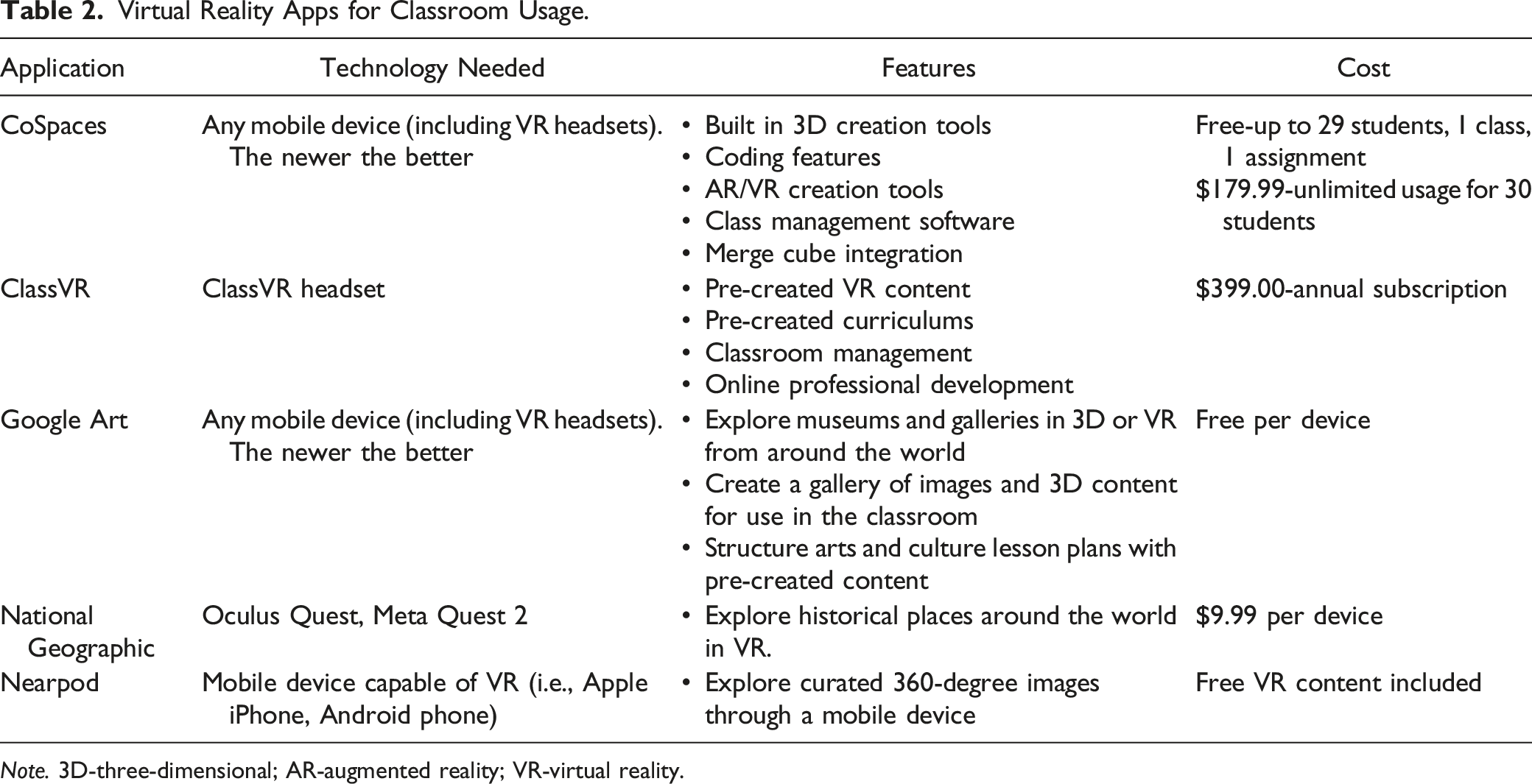
Virtual Reality Apps for Classroom Usage.
Note. 3D-three-dimensional; AR-augmented reality; VR-virtual reality.
Motivation
Mrs. Johansen can also utilize VR to further motivate her students with disabilities who struggle with motivation, to experience, practice, and engage with content. This improved motivation to complete the task is important as students with disabilities often have reduced motivation and low academic achievement (Rhew et al., 2018). The innate features of VR (i.e., interactive, visual, and replicable) provide an environment capable of producing increased motivation for students. Through the use of colors, motion, graphics, and overall experience, VR offers a learning environment that is not replicated anywhere in education. Overall, in VR, students can manipulate objects, settings, and abstract concepts in a way that allows for innovative ways to observe, explore, and actively learn new content. Furthermore, VR allows students to explore new concepts or experiences in safe environments. For example, a teacher could use a virtual reality setting to teach and practice abstract science skills, such as DNA, in a more concrete and visual manner. DNA is basically invisible and nearly impossible to understand without a visual. Through VR applications students can maneuver and explore a previously difficult topic. This use of VR creates a safe atmosphere for students to explore, develop new skills, and practice fluency of an established skill.
Delivering Hands-On Learning Through VR Technology
Mrs. Johansen decided the VR museum would be the perfect accompaniment to her classes’ art history unit. She believed the application would provide the motivation and engagement needed for her students with differing disabilities. Further, they would receive hands-on learning not typically associate with this type of learning.
After introducing the VR app to her students, she was excited to see the engagement and interest in visiting the museums. Her students were having fun with art, learning and the technology. The students were able to navigate through the virtual museum at their own pace, explore different exhibits independently, and virtually interact with the space. She even found several supplemental resources on the museum’s website to further engage her students in their observations during the VR field trip. Mrs. Johansen was so impressed with the technology she looked for more VR field experiences for her students.
Advancements in VR technology have allowed teachers to simulate real-life experiences with virtual field trips in their classrooms. Virtual field trips allow students and teachers to explore once inaccessible settings without additional time, expertise, and expense. Research behind virtual field trips is in its infancy, yet initial findings are positive (Zhao et al., 2022). In Zhao and Colleagues study, (2022) they found head-mounted display and mobile device VR field trips had positive effects on student learning, engagement, motivation, and enjoyment. For teachers, such as Mrs. Johansen, field trips may be challenging due to budgetary limitations, time constraints, and health concerns of today. For example, if a class is learning about the ancient pyramids in Egypt, the class can explore the pyramids and learn about Cleopatra through a virtual field trip on CoSpaces or watch interactive videos with National Geographic or Nearpod. Exploring the pyramids in VR provides interactive tours, 3D models of historic items, and narrated information from experts (see Table 2 for more VR resources available to teachers broken down by cost).
VR also allows students and teachers to experience lab-like experiments while maintaining safety. Using online resources, such as Gizmos, students can manipulate materials to understand chemical changes or explore rock classifications. This allows students to interact with materials that may not be safe (i.e., chemicals) or attainable to the classroom (i.e., budget and safety). VR lab interactive experiences offer engaging and immersive science classroom experiences where students can perform lab experiences safely from their own classrooms.
Conclusion
Mrs. Johansen was able to utilize her resources and technology to deliver a VR experience to her students who are often unmotivated and unengaged with typical classroom lessons. Mrs. Johansen, like many teachers, has a lot of time-consuming tasks that make learning and implementing new technology difficult. However, we sought in this article to introduce VR experiences to educators, many of whom associate VR experiences with expensive equipment, and to highlight how implementing can be cost-effective, efficient, and useful. Many educators, particularly those who support students with disabilities, now access to resources they have never been able to implement due to the advancement and investment into mobile devices. VR provides the ability for educators to enhance their classroom with a unique use of interaction with three-dimensional virtual environments. This access offers immense potential to revolutionize the support motivation, engagement, and potentially successful learning outcomes for students. The popularity of VR, features associated with VR, and students’ typical comfort with mobile devices may present a scenario where students’ motivation and engagement with traditional content may be enhanced when presented via VR. It is imperative, as technology continues to permeate education, that educators learn to use current and future technology through experience and collaboration with other stakeholders to understand exactly how they can enhance their classrooms. If teachers can harness VR and other innovative technologies, students can only benefit from the features provided by the technology.
Footnotes
Declaration of Conflicting Interests
The author(s) declared no potential conflicts of interest with respect to the research, authorship, and/or publication of this article.
Funding
The author(s) received no financial support for the research, authorship, and/or publication of this article.
