




Abstract
With the recent rapid technological advance, second language (L2) educators have increasingly incorporated technologies into writing pedagogy. Two of the major technologies to promote L2 writing are e-portfolios and automated written corrective feedback (AWCF). Notably, feedback-rich portfolios facilitate L2 learners’ self-regulation and writing development. In addition, AWCF itself can help them notice the gap between their interlanguage and the target language (i.e., the AWCF) in the writing process and incorporate the noticed language features. However, fewer technologies have been developed to maximize the combined use of e-portfolios and AWCF. This review proposes that the use of Notion as an e-portfolio platform and its embedded artificial intelligence (AI) (i.e., Notion AI) as an AWCF generator has significant potential to address such issues uniquely and seamlessly. Notion is a freemium application where users can manage their tasks on one platform individually and collaboratively, while Notion AI is an AI-powered writing assistant that edits users’ texts in terms of lexico-grammar, cohesion and structure. This technology review reports an overview of the complementary use of Notion and Notion AI and discusses their affordances and limitations for L2 writing pedagogy.
Keywords
Introduction
Portfolios and feedback play a complementary role in promoting successful second language (L2) writing. Notably, feedback-rich portfolios help promote self-regulation and writing development (Lam, 2013). With recent technological advances, L2 educators have increasingly incorporated electronic portfolios (e-portfolios) and automated written corrective feedback (AWCF) into writing pedagogy. E-portfolios are a digital collection of learners’ written scripts selected over time, which creates both a learner-centred reflective space that promotes self-regulation and an interactive space that scaffolds writing processes through feedback from multiple sources (e.g., teachers and peers) (Lee, 2017). The latest artificial intelligence (AI) writing assistants (e.g., Grammarly, Wordtune, ChatGPT and Notion AI) help learners immediately receive AWCF on lexico-grammar, cohesion and text structure, and then consciously notice the input, resulting in writing development (Barrot, 2021). Given the benefits of these technologies and that fewer technologies have been developed to maximize the combined use of e-portfolios and AWCF, the use of Notion as an e-portfolio platform and its embedded AI as an AWCF generator has significant potential to address such issues uniquely and seamlessly. This technology review reports an overview of the complementary use of Notion and Notion AI and discusses their affordances and limitations for L2 writing pedagogy.
Overview
Notion is a freemium application where users can manage tasks individually and collaboratively on one platform. Users can write text on a created page and use Notion AI to proofread and revise the writing (see Figure 1). By creating a team space, pages are easily shared for collaboration. Notion AI is an AI-powered writing assistant that edits or generates content in response to users’ commands, including fixing spelling and grammar, changing text length, changing the tone according to the purpose, translating and summarizing. Users can give a command, either highlighting the target text and selecting one of the listed selectable commands within the “Ask AI” function (see Figure 2) or typing a command they want to give (see Figure 3). It utilizes machine learning algorithms and natural language processing techniques that find the patterns in vast amounts of data sets gained from users. It then creates and trains an iterative model to generate linguistic outputs. Notion is free on most websites, computers and mobile devices for individual users at accredited universities with 10-guest invitations. The “Plus” plan costs US$10 monthly, allowing 100-guest invitations. Free Notion AI is limited to 20 responses, while unlimited use costs US$10 monthly. For more information on Notion and Notion AI, visit https://www.notion.so/.
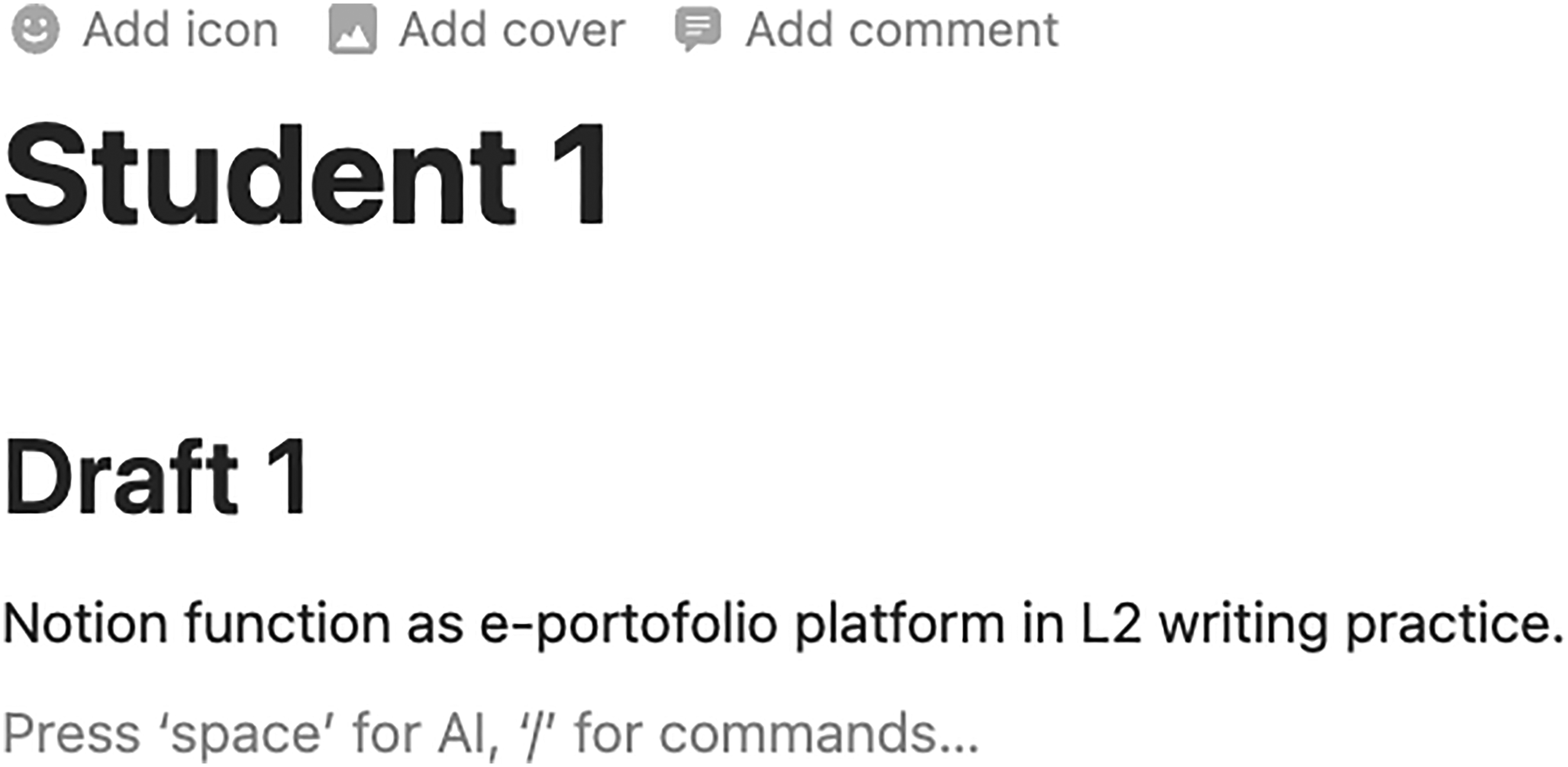
Appearance of a page for writing practice within the Notion platform.
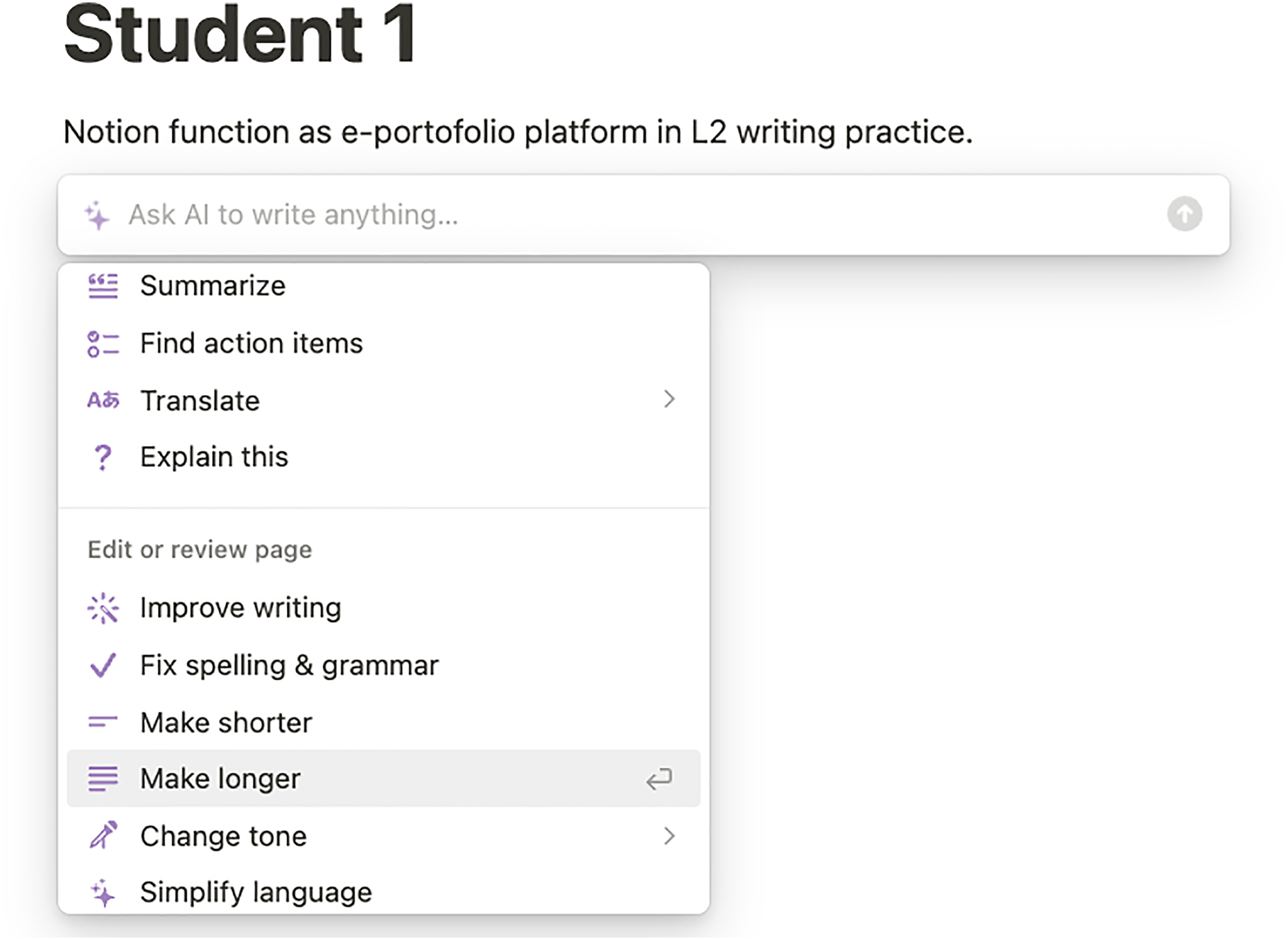
The selectable “Ask Al” function within Notion Al.
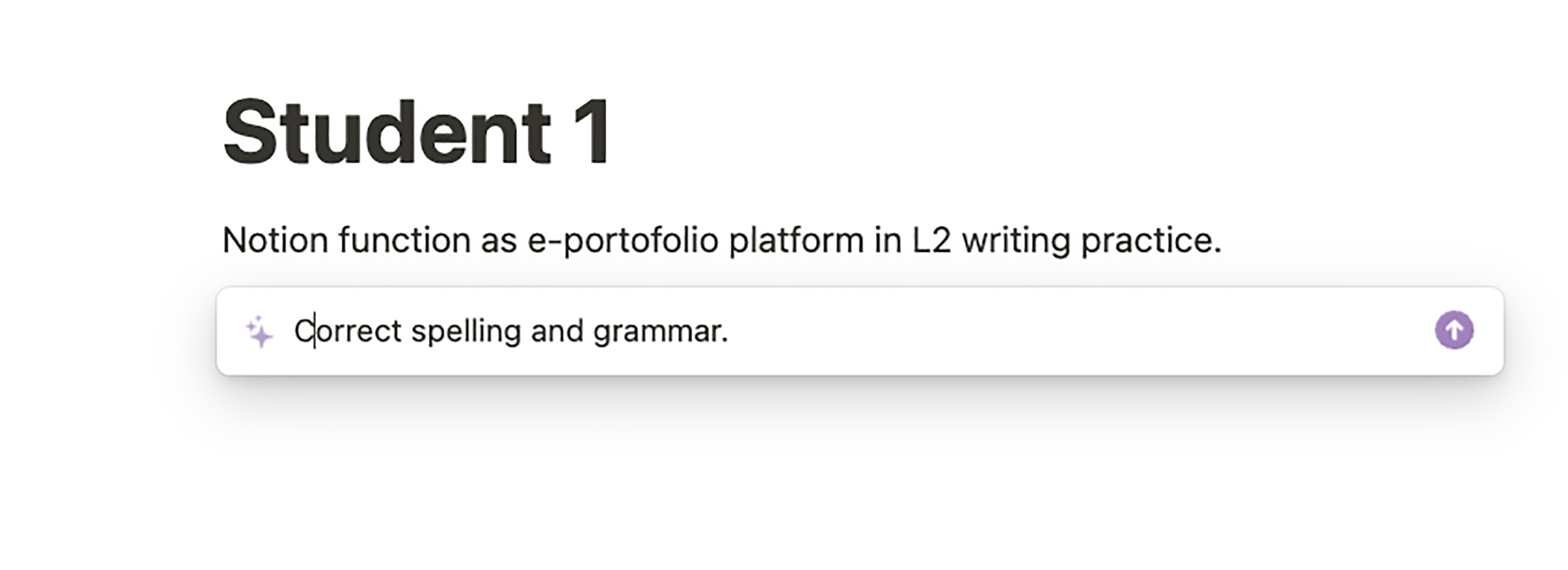
Example of typing a command to Notion AI.
Affordances for L2 Writing
The complementary use of Notion and Notion AI can function as an e-portfolio platform with an AWCF generator, which helps learners promote self-regulation and noticing, and receive scaffolding in ways other AI writing tools cannot offer. First, Notion can help improve self-regulation. Notion records the whole writing process (e.g., drafting, revising and receiving feedback) on a single page. This process is made more noticeable through the “updates” function that shows all the changes made (see Figure 4). Such explicitness of writing processes can function as e-portfolios where learners monitor and reflect on their writing progress, which enhances self-regulatory capacities (Lee, 2017).
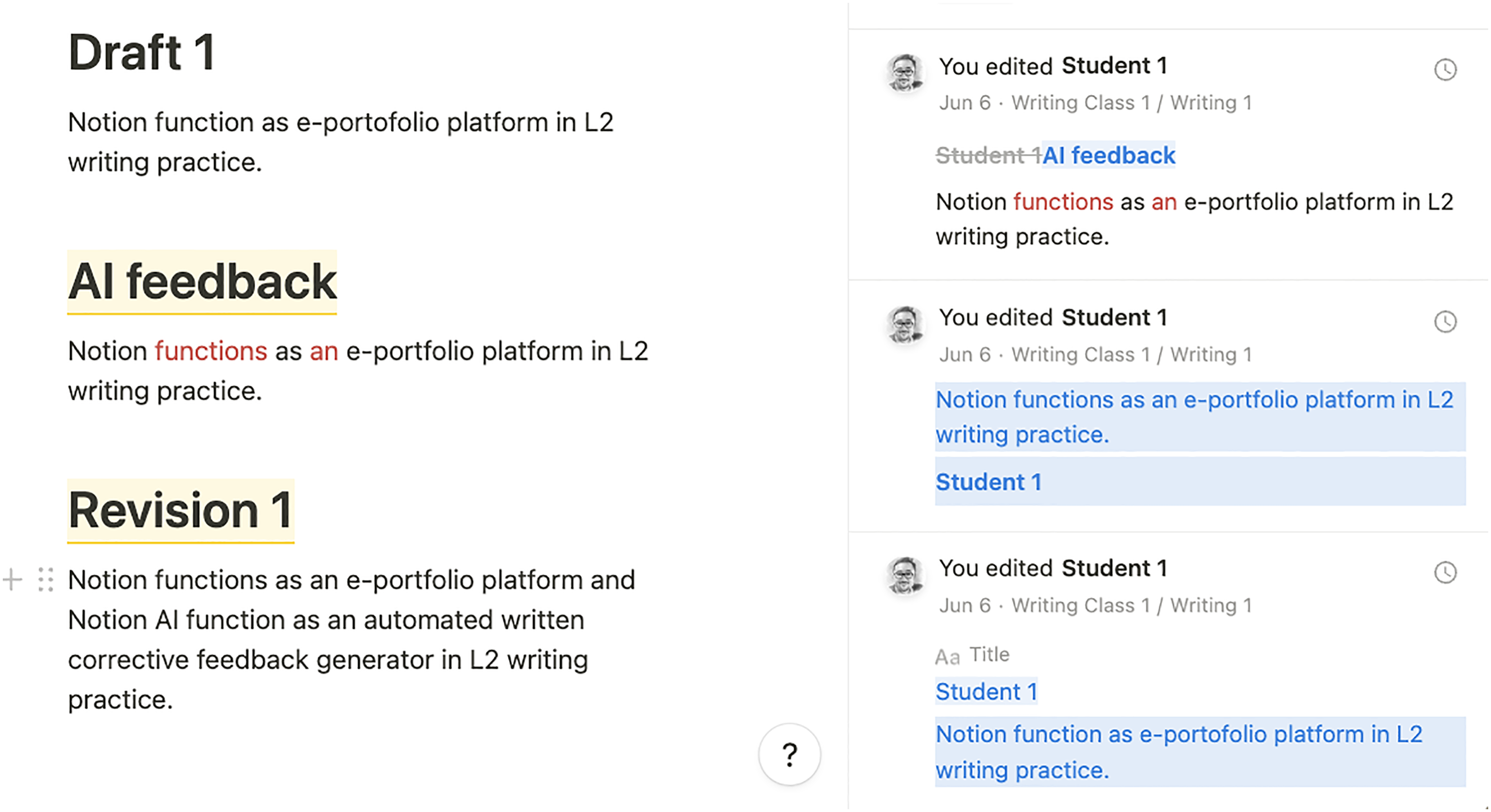
The update function that shows changes which learners made in the writing process.
Second, Notion can help teachers provide scaffolding seamlessly. The record of learners' writing process allows teachers to monitor and assess their abilities properly and then provide feedback adjusted to the current level of their abilities to complete the task (i.e., scaffolding). Teacher feedback through the “comment” function is useful to facilitate teacher-learner interaction due to the high level of noticeability (see Figure 5). Additionally, the “share” function that invites other learners can help learners receive peer feedback. In terms of social constructivism, such input and interaction are critical to language development (Vygotsky, 1978). In terms of L2 portfolio assessment, creating feedback-rich portfolios can facilitate writing improvement, promoting discourse-level revision behaviour (Lam, 2013). Furthermore, the “analytics” function, which enables teachers to see how often learners visit an assigned page, can help teachers monitor and improve their engagement (see Figure 6).
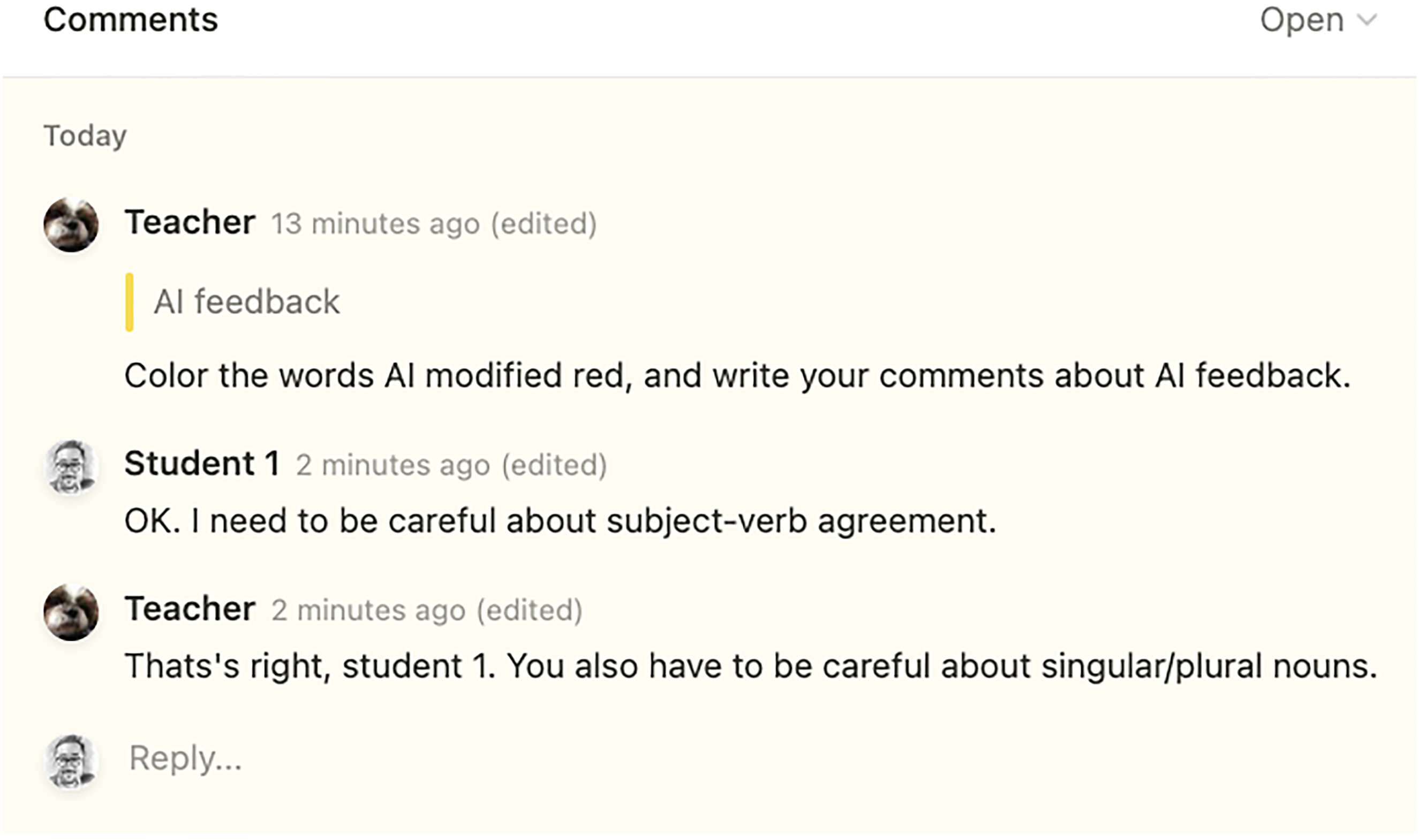
Teacher–learner interaction through the comment function.
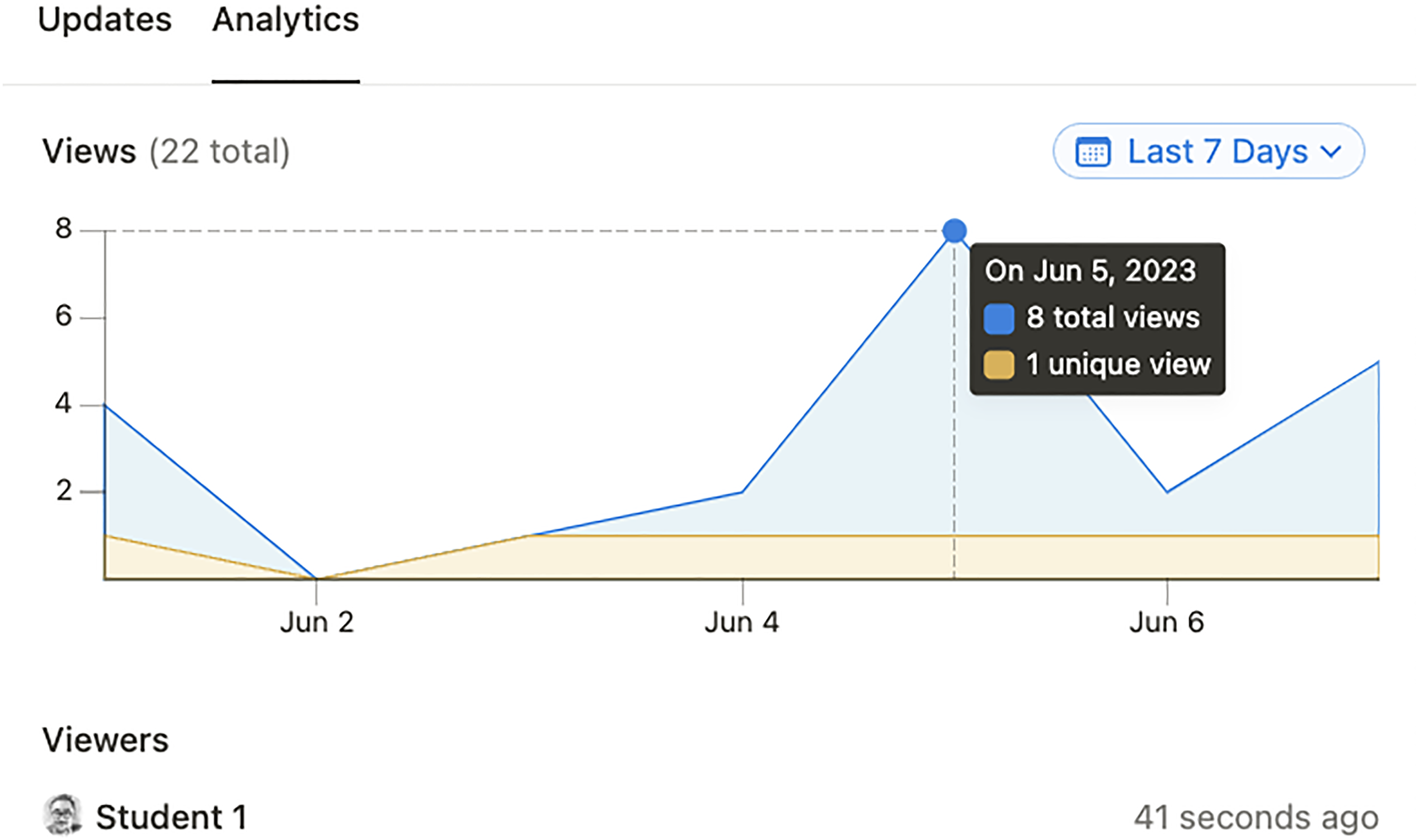
The analytic function that makes engagement visible.
Finally, Notion AI allows learners to receive immediate, self-tailored, comprehensive AWCF, which may promote language-related noticing. Through AWCF, learners are pushed to notice the gap between their interlanguage (i.e., their written texts) and the target language (i.e., the AWCF) and then incorporate the noticed language features (Swain and Lapkin, 2002). For example, the “Fix spelling & grammar” option within the “Ask AI” function provides a rewrite of learners’ texts, which can encourage learners to examine the difference between their texts and the AWCF. If further information is required, learners can type a command (e.g., List up all revised grammar and spelling), which could facilitate the noticing process (see Figure 7).
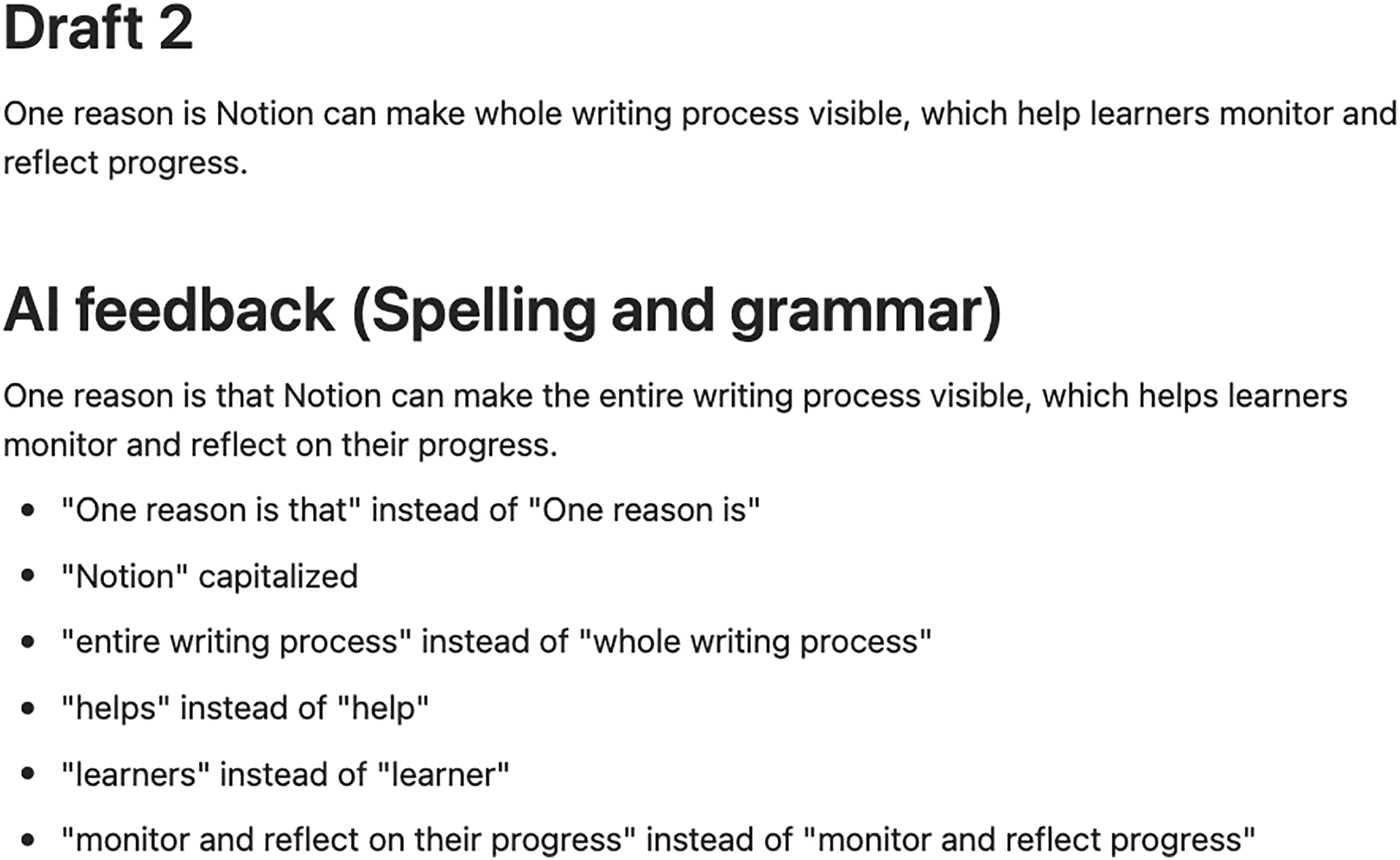
Generated automated written corrective feedback (dotted parts) when users type, “List up all revised grammar and spelling” to Notion AI.
Conclusion and Limitations
Notion is a platform application, and Notion AI is an embedded writing assistant that edits and generates content. The combined use of Notion and Notion AI can help learners to promote self-regulation, receive scaffolding and enhance noticing. However, there are limitations to this use. Beginners may find it difficult to notice the gap from the AWCF generated from Notion AI since it only provides a rewrite without any suggestions or reasons for the revisions, something that other AI assistants usually offer. Thus, teachers should encourage learners to reflect on the AWCF or scaffold their writing processes if necessary. In addition, given the rapid development of other large language models (e.g., GPT-3.5 and GPT-4), Notion's linguistic output quality should be examined continuously to ensure that learners receive appropriate AWCF in writing.
Footnotes
Funding
The author received no financial support for the research, authorship, and/or publication of this article.
Conflict of Interests
The author has no conflict of interests to declare.
