




Abstract
Smartphones and tablets proliferation enabled by accessible prices and also by the inclusion of sensing abilities promotes their use in several areas, such as healthcare. It opens new horizons in the field of continuous and noninvasive monitoring and support to population, namely, to seniors. Despite the great benefits that mobile sensing and social computing could provide to increase elderly's quality of life, many studies have shown that elderlies deal with difficulty with Information and Communication Technology (ICT). In this paper we present a solution to overcome barriers between elderlies and their ICT usage in order to potentiate all the benefits provided from mobile sensing and social computing. A survey on guidelines, standards, and advice regarding usability and accessibility issues when developing solutions for elderly people was carried out. This survey was made having in mind that senior population have singular requirements due to age related changes and also frequently technological illiteracy. We have identified and applied the most important guidelines to our solution. A prototype was made using responsive design in order to be adaptable to any type of devices. Regarding evaluation, usability tests and semistructured interviews were conducted in real scenario.
1. Introduction
Modern society has brought new challenges and issues that need to be dealt with. We are aware that life expectancy has broadly increased. The United Nations' reports show this trend and make projections, indicating that while in 2012 one out of nine persons in the world is aged 60 years or over, in 2050 that relation will be of one to five [1]. Ageing of the world population, on the one hand, and the faster rhythm of life, on the other hand, lead to the inexistence of proper care by family members regarding their elderlies. Generally, older people feel more and more alone, isolated, and insecure and they consider themselves to be a burden to their family and to the society as a whole. This social isolation and lack of emotional support are risk factors for depression in older adults [2], often aggravated by environment physical barriers and age-related functional limitations.
Emerging technologies can be pointed out as possible solutions to overcome some of the mentioned problems that affect the senior population, including mobile devices and internet use by older adults [3]. The study presented in [4] clearly shows that older people feel less lonely after the computer training course.
There is an enormous potential regarding the use of new technologies by senior population. For instance, sensor technology can be applied to monitor vital parameters and collect data to improve medical diagnosis and prevent illnesses, whereas serious games can be applied to improve posture and potentiate home-based exercises [5] and also to improve memory and stimulate active ageing [6].
The appearance of the World Wide Web has suggested an idea of universality and accessibility. On the one hand, the increasing number of mobile devices has potentiated access anywhere and anytime. Additionally, the inclusion of sensors in mobile devices has allowed monitoring environment parameters and personal physical aspects. On the other hand, it was seen as a concept to network people that could provide equal access and equal opportunity to people with special needs, including older people with changing abilities due to ageing. Despite the increase on web access and mobile devices, some obstacles still exist for users, including ageing people. Regardless of being a heterogeneous group, most of older adults still have the perception that digital technologies are difficult to use [7]. Unlike younger users, for whom computers, mobile devices, and Internet have all become part of their daily activities in school or work, older users have a more abrupt path to walk. It is therefore extremely important not only to provide new online features, but also to assure that the target population is able to use them. Older adults have age-related issues and are often technologically illiterate and thus there is the need to adapt interfaces and the way elderlies interact with emerging technologies, in order to potentiate their use. By removing the barriers of communication between senior population and computers or mobiles, we improve the way devices interact with humans and we allow for a natural collaboration leading to cognitive computing.
The purpose of the present paper is to give a contribution presenting and validating a guideline checklist merging all the essential requirements to design simple and accessible interfaces for elderly's digital inclusion. Figure 1 represents the research methodology process.

Research methodology process.
Firstly, we make a literature review on the age-related changes and their impact in Information and Communication Technology (ICT) usage. Furthermore, we have also analyzed the main common characteristics of older adults to elaborate a survey with the essential guidelines to design web applications for elderlies. Additionally, we have considered related projects, both academic and commercial. These issues will be held in Section 2, although the literature review was made along all the research process. After the literature review, we presented our solution (called elderly support cloud service platform, eServices) in Section 3, followed by a list of guidelines which we consider to be the most important when facing elderly and ICT, in Section 4. Afterwards a prototype was made using responsive design in order to adapt to any devices, along with usability tests and semistructured interviews. These issues will be addressed in Section 5. Finally, conclusions drawn over the findings will be presented in Section 6.
2. Background and Related Work
In order to propose a solution to overcome the gap between technology and older adults, it is pertinent to briefly explain why elderly people usually have difficulties in using new technologies and what can be done to remove these barriers. Also, we indicate some of the related work in the area.
2.1. Age-Related Changes
When developing solutions for older adults, it is imperative to acknowledge that older users have different needs and interests when compared to younger adults [8]. This difference results in part from the natural physical and cognitive changes that come with ageing, such as vision decline, hearing loss, psychomotor coordination diminishment, and cognitive deterioration [9].
In vision decline, elderlies usually experience a decreasing ability to focus on near tasks, a condition called presbyopia. Another aspect is contrast sensitivity and brightness impairment. Color perception can also be affected and exacerbated by diabetes onset. Elderlies' eyes also become drier as there is a decrease in the blinking rate making it more difficult to read from computer screens.
Regarding hearing losses or presbycusis, 80% of hearing loss cases occur in elderly people [10].
The loss of psychomotor coordination often results from common age-related diseases such as arthritis or Parkinson's. These diseases lead to reduced dexterity and fine motor control and consequently make precise movements more difficult. Therefore, the use of traditional inputs like mice or keyboards associated with clicks make small targets very hard to be reached.
Cognitive deterioration is also a rising factor in older adults, making it harder to encode new memories, that is, having reduced short-term memory. They can be the consequence of dementia (including Alzheimer) or mild cognitive impairment, both common in older adults. Regarding cognitive concerns there is also the awareness that seniors experience some concentration difficulties. Older adults are more likely to be unaware of computers and to experience some anxiety and distrust regarding first use [11].
Along with the barriers resulting from the natural ageing process, [9] refers other obstacles to computer use by older adults, namely, the perceived lack of benefit, lack of interest or motivation, lack of knowledge, lack of access, and cost [12].
Another important aspect to consider when designing interfaces especially for older people is that many of them are still illiterate. According to [13] the adult literacy rate is about 84.1%.
Together with the age-related issues regarding senior population and some of their common characteristics is the fact that their needs and interests are quite different from younger users' [14].
As a heterogeneous group displaying several needs, it seems simplistic to perform solutions for elderlies that only allow the provision of a particular service. In addition, despite the offered service, it is of extreme importance to know how to provide that service and what kind of interface to develop. It must be simple, intuitive, and easy to use. If not, senior population will neither adopt the available services nor potentiate what the solutions can offer.
Despite the mentioned barriers, when older adults acknowledge the benefits and learn how to use ICT, they become very enthusiastic about it [15].
So far we have identified the target population, their specifications, and characteristics. The next step is to verify what kind of areas and concepts might be relevant to suppress the barriers between elderlies and new technologies.
2.2. Elderlies and Information and Communication Technology (ICT)
There are several concepts that are linked or overlapped regarding the improvement of new technology usage by human beings, such as usability, accessibility, design, and ergonomic or human-computer interaction (HCI). Many of these concepts' researchers published several guidelines, standards, and advice to overcome difficulties between emerging technology usage and people, several of them essential for senior population.
One of the mentioned concepts is HCI, which by definition is “a discipline concerned with the design, evaluation, and implementation of interactive computing systems for human use and with the study of major phenomena surrounding them” [16].
Furthermore, usability, which is a subset of HCI, is defined by ISO9241 as “the effectiveness, efficiency, and satisfaction with which specified users can achieve specified goals in a particular environment.” Usability is related to five features: easy to learn, efficient to use, easy to remember, few errors, and subjectively attractive [7].
While usability problems impact all users equally (whether or not a person is disabled), accessibility issues make access to products more difficult by people with disabilities. We can consider that older adults have special needs due to age-related impairments, like people with disabilities.
Following this idea, the World Wide Web Consortium (W3C) works to make the web accessible to all users regardless of resources, education, ability, physical limitations, or culture. Web accessibility implies that all users can perceive, understand, navigate, and interact with the web.
In order to accomplish web accessibility, the W3C develops web specifications, called recommendations [17]. The Web Content Accessibility Guidelines (WCAG) 2.0 are a set of recommendations for making web content more accessible [18]. WCAG 2.0 recommendations or guidelines are based on four principles: perceivable, operable, understandable, and robust [19].
Perceivable means that all nontext content on a web page, including images, audio, and video must be available to the user in a way that is visible to them. For instance, if the user is unable to see, it must be heard or must be accessible by some nonvisual way.
Operable indicates that the user must be able to interact with the interface. For instance, in older adults with limited fine motor control, there must be an alternative interaction besides the traditional mouse.
Understandable implies that all content must be clear and free from ambiguities.
Robust denotes that every user agent must retrieve and present all contents. User agents are browsers, media players, plugins, and other programs, including assistive technologies.
The WCAG 2.0 principles and guidelines can be applied to users in general, but it is necessary to understand older people's needs and look at constraint impairments associated with ageing. The WAI-AGE project is presented in [20] “to help connect researchers and practitioners across different areas and to share knowledge that will encourage further development and support of existing web accessibility standards. The project also aims to bring the ageing and disability communities together to promote and support these standards.”
Regarding the abovementioned areas and concepts, it is important to survey which guidelines are required to be applied to web content specially designed for older users and to check for feedback among the target population and others.
2.3. Related Work: A Social Perspective
In order to suppress social isolation feelings and improve elderly's well-being, several solutions have already been suggested for senior users.
One of these examples is [21], a website to collect senior and family stories. The idea is to bring the elderly to write down their life stories, divided by chapters (such as “Romance and Marriage” or “Words of Wisdom”), to share it with others.
Another project is [22], where members of this association help other people to create personal stories, including memoirs, video tributes, autobiographies, biographies, family histories or cookbooks. It is interesting to observe some of the comments on this association's blog and to appreciate not only the seniors' will to leave their testimony, but also the family members, especially sons, overjoy to have their parents voices and laughs recorded on video.
Also Microsoft research has a work group project committed to designing for older people. One of the projects consists in creating a digital timeline about their personal histories with the Project Greenwich tool [23].
An asynchronous communication system between elderlies and their family members is presented in [24]. Their methodology was based on the User Centered Design approach to identify elderly's communication needs. Despite their obvious concern to emphasize the simplification of interfaces and the interoperability with other common devices such as televisions when designing applications for older adults, they do not point out any accessibility apprehension towards the interface.
A reminder system for seniors is implemented in [25]. The authors use a pen-based user interface technique and a tablet PC in several codesign sessions using experience prototypes with participants over the age of 60. Involving end users and mimicking aspects of users' existing reminder strategies proved to be an advantage to obtain a usable system. Nevertheless, a guideline survey is missing.
An application to stimulate elderlies' cognitive functions across a gamming platform is presented in [6]. This application was developed for tablets due to size and mobility since many elderlies might be confined to bed. The authors also started prototyping with pen-based user interface.
A telemonitoring tool based on serious games for people with intellectual disability that can easily be applied to senior population is presented in [26], focused on improving money management.
The majority of the stated solutions were developed especially for elderlies. However, older adults still experience web accessibility barriers due to a little or inexistent computer experience, complex software, and poor or careless design. This disregard among web applications developed for elderlies leads to the inability of end users to fully take advantage of the available features. Quoting [20], “web designers and researchers are not considering the WAI guidelines when making recommendations about website design for older people.”
To overcome the gap existing towards special care when developing solutions for elderlies, we propose the solution called elderly support cloud service platform (eServices). The recommended solution aggregates in a single place the access to several services available to senior population on the cloud. The essential feature of eServices is simplicity, with no configuration or installation needed on the client side. There has been a special concern not only to provide services that seniors need and express interest in having, but also to guarantee that the platform users can take full advantage of these services through a simplified interface. As for eServices communications, a proprietary asynchronous communication system developed by our research team was applied. This system allows people to communicate via voice commands using an email type interface.
In the next section the solution will be shown in greater detail.
2.4. Related Work: A Physical Perspective
There are solutions more focused on elderly's physical aspects, sensing life signs and environment, reacting in emergency situations, and collecting data to infer potential risk situations [27].
Some solutions consist in embedding sensors to clothing; others are more invasive and consist in implantable sensors; and another group involves the use of wristbands and belts with sensors. Many of the solutions collect body vital signs and some are focused on the fall detection issue, which is one of the most important distress signals regarding senior population [28, 29]. Additionally, there are solutions that are seeking to improve senior well-being by using emotion regulation techniques [30].
Also, in these solutions the interaction between the seniors and technologies must be as intuitive and simple as possible.
3. Elderly Support Cloud Service Platform
In the previous chapter we have approached age-related changes and their impact on elderlies using ICT. We have also addressed several concepts that can easily be used to reduce the barrier between elderlies and ICT. Additionally, some solutions developed for elderlies were presented. Regardless of the impact of several of them in older adult's well-being, many of them do not take into account accessibility and usability issues.
Having this motivation in mind, we suggested the solution named eServices, elderly support cloud service platform, a solution that combines both concerns towards elderly's social exclusion and physical issues.
eServices provides a gateway access to several services through a catalog service. Some of the categories that will be presented in the catalog are already identified: medical services, maintenance, call center, leisure, and culture. But, as a scalable solution, new categories and services can be easily added and requested as we are fully aware that although the elderlies' group is very specific, each individual has their own interests.
The solution will also collect information from a body area network connected to the elderly and from environment sensors and actuators present in the elderly's home or nursing home [31]. The consented and ciphered information will trigger an immediate response in case of an emergency risk situation. Over time the system will learn to recognize potential threat situations. We hope to develop a sense of safety not only to the senior, but also to the family members that will be aware of this motorization. The elderly's privacy will not be jeopardized; the idea is not to give report activities to family members but to assure that their elderly will be immediately and properly assisted whenever an abnormal situation occurs [32].
Another input will be the interaction between the elderly and the services available in the cloud service platform. This interaction will allow the system to recognize behavior patterns and also to establish routine deviations that may indicate a state that needs special attention. From the combination of physical values with behavior patterns, a more precise identification of potential risk situations will be possible. We intend therefore to minimize false positive alarm situations [33].
The eServices solution is represented in Figure 2 with three major modules: end users, cloud service provider platform, and service providers. End users will have biosensors, environment sensors, and a service access device to access services available in the catalog service. The cloud service provider platform for elderly support will not only have the service catalogue, but also the system administration module and the event management module. While the system administration module will hold issues such as security, authentication, authorization, access control, and user and service administration, the event management module will be responsible for the detection of potential risk situations and alert deployment. End users will consume services available in the catalogue service and provided by several service providers.
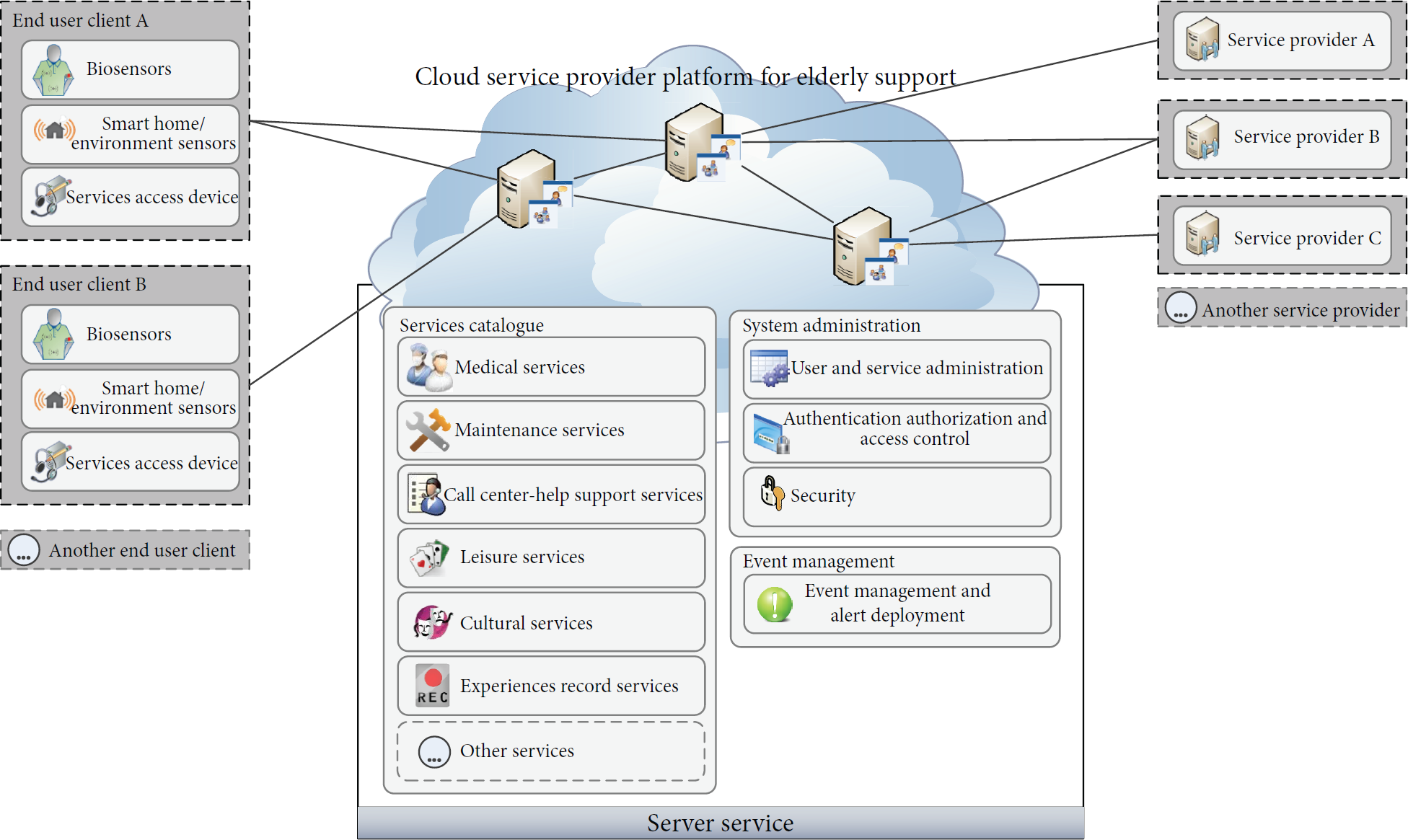
eServices, elderly support cloud service platform.
The challenge is not only to provide services that the senior population need and wish to enjoy, but also to eliminate technological barriers that still exist so that they can take full advantage of these services.
To answer to this necessity, our research team developed the above scalable multiservice platform, integrating a service ecosystem aimed for elderly population. The eServices platform stands out from the remaining platforms by proposing unique features, where simplicity is the essential keyword.
Other key features patents in eServices platform are the strong concern about the individual as a whole, where physical, social, and psychological subjects must be addressed; it is vital to obtain body vital signs but also to assure that loneliness and info exclusion are reduced, reliability, according to which the system can detect exactly when there are real danger situations and act in accordance, maintaining a reactive and preventive response, working not only in imminent danger situations but also in detecting potential future risks through behavior and data pattern analysis, granting a secure system due to the sensitive data collected, allowing any user to access every service anytime, anywhere, with any device, assuring a scalable solution to add new users, new services, new sensors, and new service providers, having a special concern developing an easy interface for older adults.
Having developed the eServices platform and, in order to grant simplicity and avoid the barriers between our target population and the suggested solution, a survey was made to obtain the essential guidelines to be applied when designing web applications for elderlies. These guidelines and recommendations are going to be listed in the next chapter.
4. Designing Web Applications for Elderlies
As previously mentioned, to suppress the barrier between technology and senior population, usability and accessibility issues must be considered. Although some literature distinguishes usability from accessibility, many of the existing guidelines are equivalent.
A survey with 49 usability and accessibility guidelines groups from governments (comprising Commission of the European communities), universities (including MIT), institutions (such as W3C, IEEE), and companies (like IBM, Microsoft) is shown in [34]. It demonstrates the existence of a wide range of guidelines, standards, and advice. They also highlight that cultural differences must be taken into account. Furthermore, merging cultural and individual factors influences the impact of the guidelines. We can conclude that it is important not only to survey the existing guidelines, but also to be aware of the target audience regarding cultural and individual factors. This awareness will potentiate the removal of barriers between new technologies and their use by the target population. In this context, it is imperious to survey which guidelines exist either in usability or accessibility and to know which ones are directed to the senior population, indicating their priority. It is also important to be aware of the characteristics of the senior population and of their interests and needs.
As earlier stated, the older adults' group has special needs regarding their interaction with ICT due to age-related issues and, in some cases, illiteracy. Moreover, elderlies show curiosity about several areas, although we can be unanimous in affirming that their interests rely mostly in having additional means of communications to downfall social isolation. This older adult profile will help us to define essential guidelines to suppress barriers between elderlies and ICT. Despite some obstacles, the gains and advantages that can be achieved through the interaction between the elderly and ICT, both in physical, psychic, and social level, are obvious.
4.1. Proposed Guidelines
The easiest way to make elderly use new technologies is to have natural user's interfaces [35]. Elderlies are already using televisions and radios. If they find familiarity towards some of the features they are already used to, it will be more likely to suppress the initial barriers and use new solutions. This is one of the principles of usability regarding learnability. We think that it is one of the most important guidelines concerning elderly people, since ICT must appear as much as possible as a natural result of daily activities and not in an abrupt way. The goal is to achieve a solution where the elderly could interact with a computer as he/she interacts with a friend, family, or doctor.
Another clear guideline regarding website solutions is to plan their structure. An earlier planning will allow a more consistent design and navigation. This will meet the understandable principle of accessibility by granting clear content, free from ambiguities. An easy navigation and a simple and coherent structure will help elderly's with cognitive deficits. Consistency prevents the elderly from being forced to memorize.
Regardless of the ease of navigation and good website structure, help should always be available to the elderly. It is important to have tips and an explanation about the system overview. This measure rests on the “help and documentation” Jakob Nielsen’ usability heuristics [36].
Regarding of navigation, it is also important to always show the breadcrumbs and have a site map so that the elderly can be advised.
After planning the website structure, the next step will be to fill the content having in mind the elderly's special features.
About vision losses, some of the recommendations for a better reading by the elderly are as follows:
Concerning background, colors, and contrasts, avoid patterned backgrounds preferring the use of solid colors as white or black, for example. Use a high-contrast between text and background colors. Choose complementary colors that will, when placed next to each other, create the strongest contrast and reinforce each other (for instance blue and orange). Avoid bright, fluorescent, or vibrant color, which tire the eyes. Ensuring a contrast ratio of 4.5 : 1 between text and background will meet the WCAG 2.0-1.4.3 Guideline [37]. When text is considered, use sans-serif text types, use underlines only for links, and avoid using italic that may suggest that the letters are wobbly, avoid using bold that might look like blur, double spacing all text, left justify text. Also consider providing tools to enlarge or reduce text and images. Do not write lines too long. Use white spaces between lines. All of these measures will improves readability [38].
Concerning hearing reduction, advice go to avoid background music in podcasts and other audio due to their difficulty to separate sounds.
In relation to physical ability, it is recommended to give an alternative to interact with the computer by means different from the traditional inputs such as keyboards and mice, like using voice commands or touchscreen interfaces, create large and representative buttons that will allow less precision by clicking on them, either with mice or by touchscreen interfaces, avoid scrolls, preferring breaking longer pages up into sections, in order to keep the mouse movements simple, remove double-clicks, as they can be difficult for users with more limited motor control, minimize the click numbers to overcome a task.
Regarding cognitive issues restrictions it is important to maintain a consistent layout, granting uniformity, avoid long pull-down menus and other complex forms of navigation, make a distinction between visited and unvisited links and between active and inactive functions; it may be harder for older adults to remember what links they have already visited or to distinguish what functions are active or inactive, group by similar tasks, include escape hatches or emergency exits that allow users to undo or cancel their actions because they are afraid to tinker; This measure, particularly important for older users, is one of the Jakob Nielsen’ usability heuristics entitled “user control and freedom” [36], provide a support phone number on the web site, to where elderlies can call whenever they have doubts, which is another measure to suppress anxiety, be aware that older users take more time to consolidate information; it is important to give them the proper time to accomplish a certain task, not use automatic scrolling due to the fact that older users may have slower reading and word recognition rates, avoid configurations and other complex tasks done by the senior; the solution must be easy to use, use concise language, short, and clear messages without ambiguity. It is important to ensure that the messages and the concepts presented are evident to the target population.
Illiteracy in older adults also raises a concern. Regarding this subject, the instructions to are to combine text along with images and sounds to make the communication possible; this is aligned with the WCAG 2.0-1.1 Guideline text alternatives, grant the ability to interact by voice and touch.
Another usual concern of senior population is about financial constraints, which may lead elderlies to use obsolete equipment and low bandwidth Internet connection. Therefore, there is the necessity of developing simple and light web sites that do not require good hardware or a high speed network connection.
Having identified the age-related issues and other characteristics usually present among older adults, as well as their impact on the use of the proposed solution, the next step was to implement the abovementioned guidelines.
5. Evaluation
Having as a starting point a survey with the essential guidelines to design web applications for elderlies, a prototype was developed to apply this information to our platform interface. Moreover, we further discuss it with end users to obtain their feedback and make usability testing.
Figure 3 represents the prototype system flowchart. It is asked for the user to access the platform (1). If the user is not already registered in the system, registration is required (2) through a virtual keyboard (3). Otherwise, the login process is immediate (4). Login is also available through a virtual keyboard (5). After accessing the system, the user reaches the eServices main screen. If it is a first access, the user may not have activated the voice command option (7, 8). If voice recognition is started, it will be available for the rest of the session (9). The eServices options available in the main screen are now accessible for the user both by touch or voice commands (10). One of the options available, where the evaluation is more focused, is videophone call (11). Other services are going to be available in the service gallery (12).
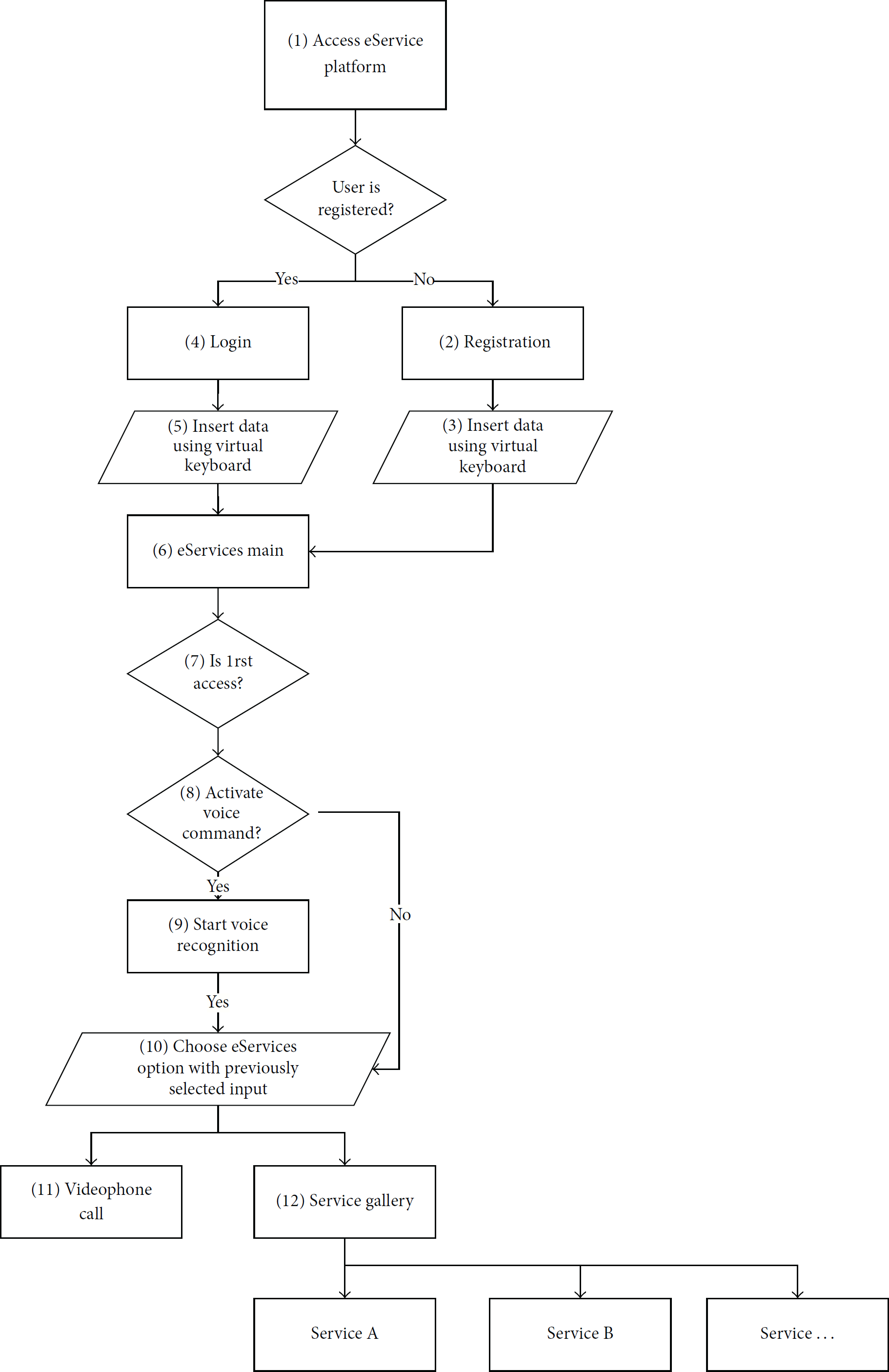
Prototype system flowchart.
To access the eServices platform, an authentication is required. Figure 4 shows authentication window where users must provide their user name and password and press the enter button to access the platform.

eServices authentication.
After being authenticated, users access a screen where they can make a videophone call or submit the remaining services as represented on Figure 5. Both functions are available by touch. Another option to use these features is to press the icon for voice activation (available on the bottom right side of the screen) and provide voice commands. Besides, users can exit the application by pressing the exit icon, existing on the bottom left side.

eServices main screen.
By selecting the button to make a videophone call, all of the contact users are presented, as displayed on Figure 6. Afterwards, the user may select one of the contacts to start the videophone call. Again, two icons are displayed in the bottom of the screen to grant uniformity, one to allow returning to the main screen and the other to activate voice commands. For easy identification, each contact has a photography associated to the text name.
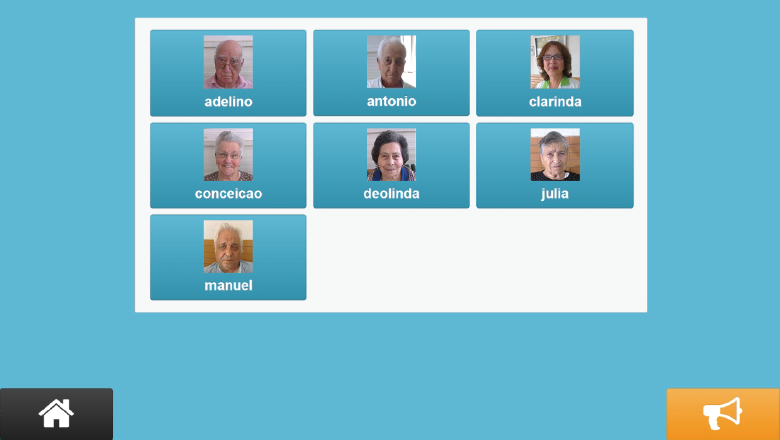
eServices contact window.
Regarding services option, elderlies will be able to access them by retrieving the service button. A page with every service group by category will be shown, leading to its subsequent selection.
As it can be observed, only few clicks or voice commands are required to make a videophone call. Our major concern was to potentiate a simple interface, with few options to avoid memory issues. Other followed guidelines were to have solid background color and high contrast ratio, 11.73 : 1, passing a level AAA concerning success criterion 1.4.3 of WCAG 2.0 [39]. To grant readability's intensification the text font was also taken into consideration.
The interface colors and options were maintained to provide layout standardization. There are elucidative icons associated with each task. These measures will help elderlies to remember and acquire understanding to easily perform every assignment.
All the presented buttons were scaled to a size that easily allows their selection without precise movements to avoid fine motor issues. Furthermore, the application prototype was developed using a responsive design to adapt to any screen such as tables or smartphones.
After the prototype's implementation, usability tests were conducted. Figure 7 illustrates one of the tests.
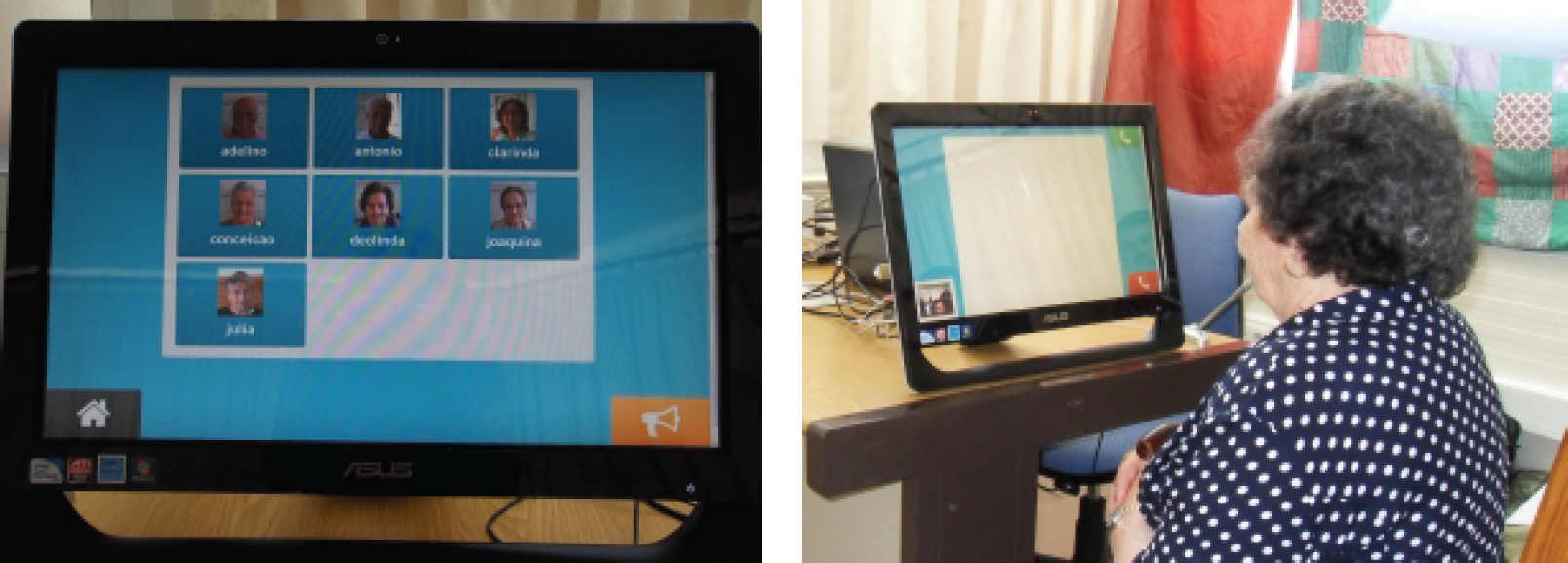
Usability tests.
It is referred by [40] that design guidelines for older adults can be improved to include various user groups having different ages and backgrounds. Older adults have generally less technological know-how but have more experience and knowledge background when compared to younger adults. Applying the same studies to different population groups may lead to unexpected conclusions comparing both results.
Therefore, the evaluation of the high-fidelity prototype was conducted with 19 seniors and 4 younger people. The evaluation on seniors took place in a nursing home where the subjects live, to avoid any constraint instilled by a strange environment. The tests on the 4 younger adults were conducted on their own homes. Each interview and testing was made individually.
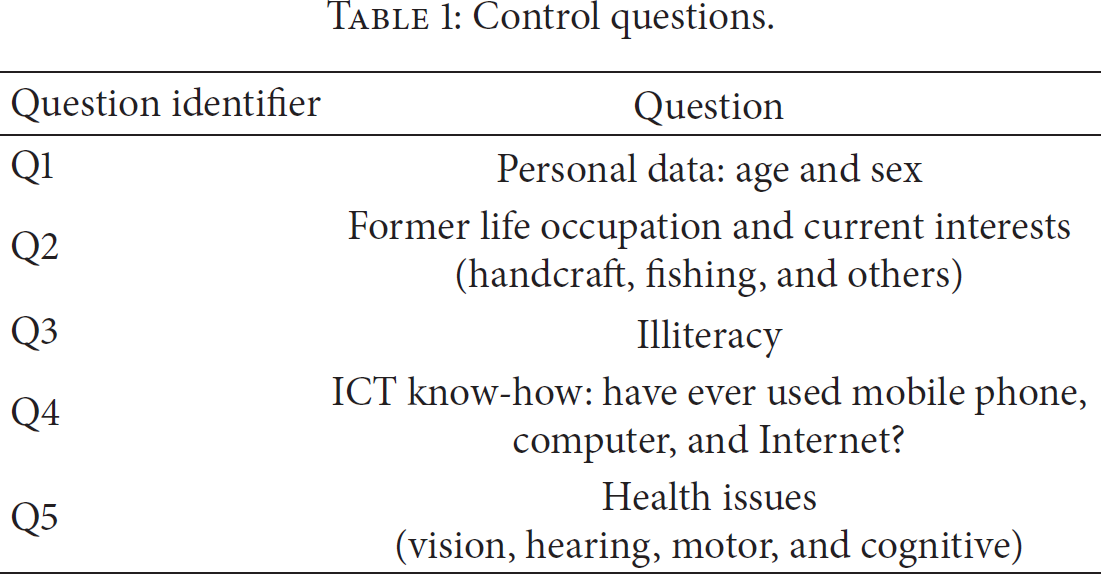
We have adopted semistructured interviews instead of formal questionnaires especially due to the senior population. Some of them cannot read and, even though we might read the questions for them, older adults are always eager to talk and to express their opinions. Questionnaires also demonstrate more detachment and we have observed that seniors enjoy the proximity made possible through informal conversation. Nevertheless, some questions were asked to conduct the interviews and obtain the information needed. Table 1 presents those requests. Q1, Q2, Q3, Q4, and Q5 were made before the usability tests. Table 2 shows the control questions' results.
Control questions.
Control questions results.

(1) Use computers, mobile phones, and Internet on a daily basis (do not use a smartphone).
(2) Use computers, mobile phones, and Internet on a daily basis (including smartphone).
(3) Technologically illiterate: any computer skills or interaction or ever had used a mobile phone.
Before the usability tests, our research team members have explained how the system works and have made a brief demonstration. Afterwards, we have conducted usability tests by asking the users to accomplish the tasks specified in Table 3.
Tasks in usability tests.

For each task we have observed if the user was able to perform it and the time needed, in seconds. The graphics shown in Figures 8 and 9 show the results.
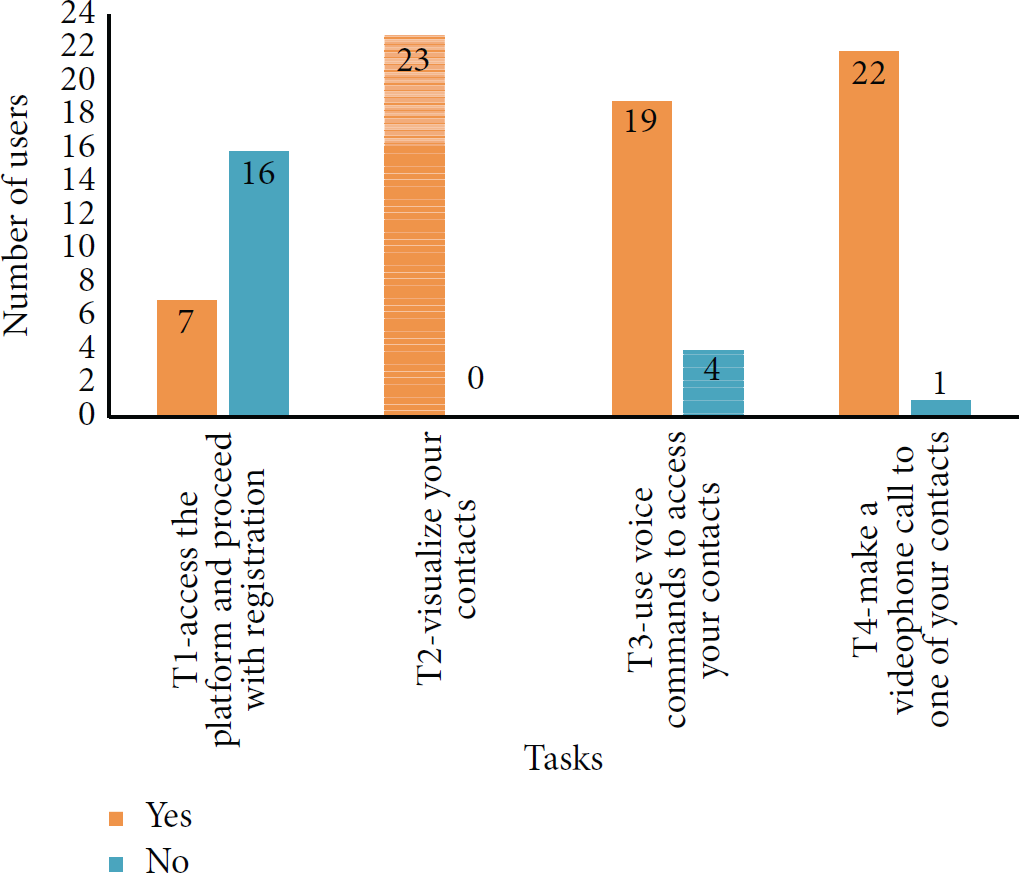
Task completion.
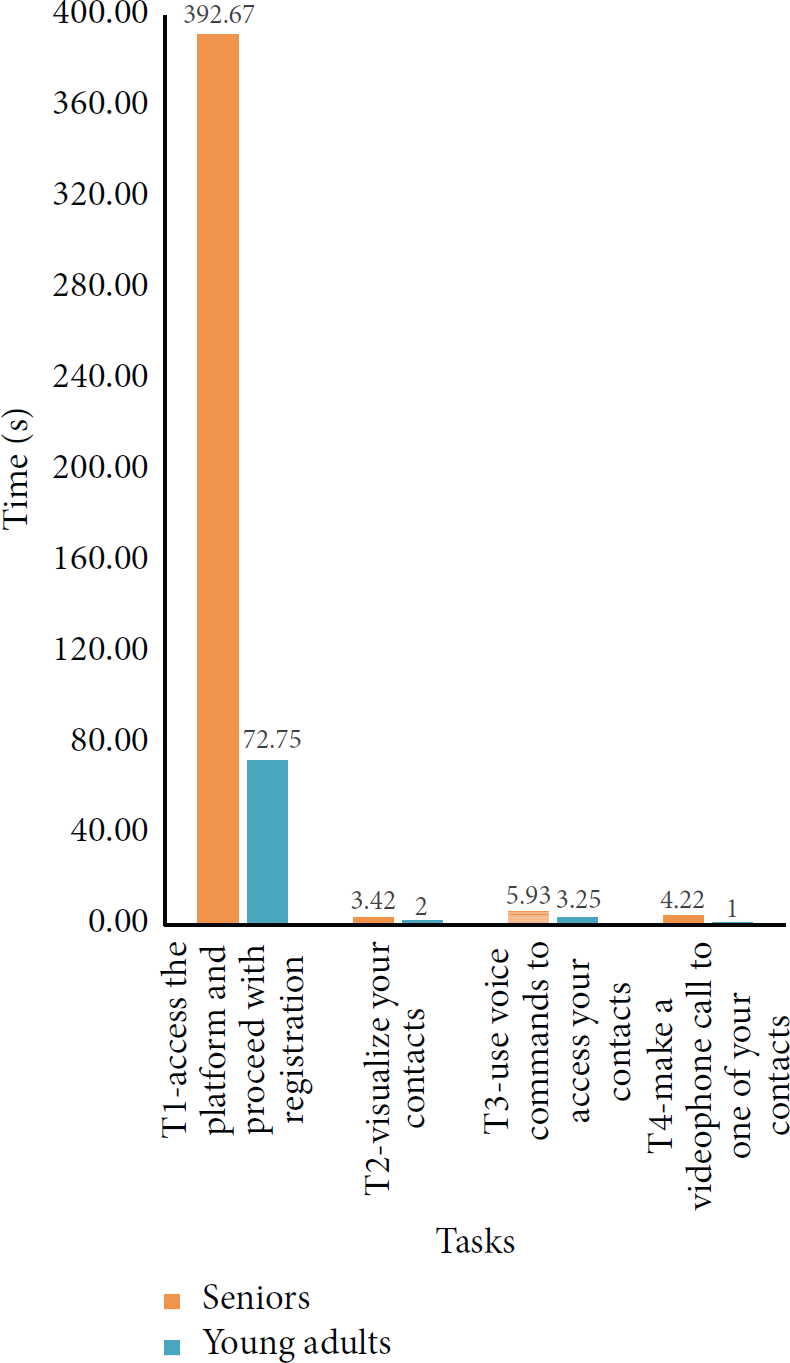
Average time (seconds) for each task.
As we can observe, few elderlies were able to make the registration, as it was a process requiring reading and writing. Those who were able to accomplish the task spent many seconds finding the letters in the virtual keyboard. In the future, registration must be available with alternative voice command options or identification card authentication.
Another improvement must be on voice commands that sometimes are not recognized. Elderlies were apparently afraid of speaking too loud and did not pronounce voice commands clearly.
Additionally, during the interviews elderlies were insistently asking about when they could use the eServices platform in their quotidian, thus showing enthusiasm towards the perceived benefits.
Having done usability tests and drawn some conclusions about them, the next section will present global conclusions and point out future work.
6. Conclusions
It is known that world life expectancy is increasing and that elderlies can improve their lives benefiting from ICT services [12]. We are also assisting in growth in mobile devices usage in senior population, like smartphones or tablets. Additionally, the inclusion of sensing ability in mobile devices allows continuous monitoring, in a noninvasive way, of basic life signs. Sensing ability can also be applied to monitor environment variables. Furthermore, all of the information collected from sensors and from seniors behavior patterns can provide essential information for physicians to give more accurate diagnosis. These big data can be treated and presented in indicators for decision support, given that computers are able to treat enormous data sets. From a collaborative work between physicians and computers results can be potentially outstanding. Moreover, mobile devices can also provide applications to improve cognitive functions, namely, to remind elderlies to take medication, to potentiate social inclusion, and to create networks.
As new technologies are emerging and are able to give responses to seniors special needs, it is important to focus on ways to remove barriers between elderlies and ICT, to guarantee the success of the developed solutions. In this paper we present a solution to improve elderly's quality of life and well-being, giving a contribution to clarify how the use of technologies by seniors can be promoted.
The research work was carried out by verifying solutions that aimed to reach the same goal. We also presented age-related issues when referring to the interaction between the senior population and ICT. Moreover, we surveyed about guidelines, standards, and advice on usability and accessibility issues, focusing on the most important ones when designing web applications for elderlies. We have developed the eServices platform using the acquired knowledge to make an application easily handled by seniors. eServices platform is a cloud scalable platform that allows service addition directed to older population. These services intend to operate on a physical side where body vital parameters are being continuously monitored thus guaranteeing an immediate response in emergency situations. From a social and a physiological point of view, this solution offers services to avoid isolation and loneliness of seniors. Apart from the attention on the available services and the concern about developing services that meet older adults' interests and needs, our research team is deeply focused on removing any barriers that may exist in the interaction between elderlies and our platform. Furthermore, our intention is to contribute with findings that may help other creators and researchers to improve their own systems by applying our recommendations. We believe that a user-centered design is essential when developing solutions for elderlies.
Devising the eServices platform with the usability and accessibility guidelines, we have conducted usability tests and semistructured interviews to evaluate our work. These tests and interviews were made not only to target users, but also to younger users in order to search for broader conclusions. We have observed that (i) voice recognition may be difficult among elderlies because they often do not pronounce words clearly and (ii) that they are more comfortable with touch screen interaction. We have also concluded that it is important to simplify the registration process eventually by identification card authentication. Additionally, we have verified that elderlies were thrilled and very enthusiastic with the proposed solution and kept asking when they could use it on a daily basis.
Concerning future work, the next steps will be to improve senior's registration in the platform by adding voice commands to grant an alternative method, as well as to improve senior speech recognition. We also want to develop and add more services to the platform.
Footnotes
Conflict of Interests
The authors declare that there is no conflict of interests regarding the publication of this paper.
Acknowledgments
This work has been partially supported by (i) the Innovation Network of the Central Region, Portugal (RICE) Project, cofunded by Portuguese Program MaisCentro (SAICT); Body Area Networks for Elder's Support (BodyNet), project funded by Polytechnic Institute of Leiria; and the +Social Platform (+Social), project funded by INOV INESC INNOVATION, Institute for New Technologies, (ii) the Agrupamento INBIOMED [2012/273] from DXPCTSUG-FEDER unha maneira de facer Europa, and (iii) the [14VI05] Contract-Programme from the University of Vigo. In addition, a special thank you is due to Memoria nursing home collaboration and to all the elderlies that collaborated in our tests and gave their opinion, thus making our work possible.