




Abstract
DIY vision for the design of a smart and customizable world in the form of IoT demands the involvement of general public in its development process. General public lacks the technical depths for programming state-of-the-art prototyping and development kits. Latest IoT kits, for example, Intel Edison, are revolutionizing the DIY paradigm for IoT and more than ever a DIY intuitive programming interface is required to enable masses to interact with and customize the behavior of remote IoT devices on the Internet. This paper presents the novel implementation of such a system enabling general public to customize the behavior of remote IoT devices through a visual interface. The interface enables the visualization of the resources exposed by a remote CoAP device in the form of graphical virtual objects. The VOs are used to create service design through simple operations like drag-and-drop and properties settings. The design is maintained as an XML document, thus being easily distributable and recognizable. CoAP proxy acts as an operation client for the remote device and also provides communication link between the designer and the device. The paper presents the architecture, detailed design, and prototype implementation of the system using state-of-the-art technologies.
1. Introduction
Human nature has a strong tendency to do or try to do things itself. There are various drivers which push human towards the Do-It-Yourself (DIY) approach. The major drivers for DIY paradigm are creativity, simplification, extension, economic reasons, and the need to control things [1]. Apart from these drivers, the recent advancements and innovations in the DIY electronics are providing an opportunity for the masses to portray their creativity. System on chip (SoC), electronics development platforms, and kits in the form of Arduino and Raspberry Pi are a huge inspiration for DIY. The simplicity and ease of development on these platforms are attracting more and more people towards the DIY and hence enabling the general masses to express their creativity and genius.
According to a report from the International Telecommunication Union (ITU) in 2005, “Internet of Things (IoT) will connect objects from the world, both in a sensory and in an intelligent way” [2, 3]. IoT as it was perceived until the recent past had not been adopted by the masses [4] while the connections and devices in the IoT have grown in numbers since its advent [5, 6]. This means that end-users' involvement in the IoT creation process is a crucial factor for its successful adaptation. According to the recently updated Gartner Hype Cycle [7], IoT is of great importance and presents the idea that IoT has come out of its imaginative and fictive stage [8] and now it is considered as a real deal [9, 10]. However, the end-users should be a part of the creation process while having the power to discover things [5, 11], control it, and effectively use the applications for smart environments [12]. The same idea is also presented by Xiao et al. [13].
In addition to the DIY driver, motivations, and the need for mass end-users' involvement for the realization of IoT, the current Makers Revolution [14] is inculcating a new version of the DIY culture. Connecting things, people, and ideas together is conceived as the term “Making” [15]. Internet is providing the bridge between the makers and the masses. Online communities of people not only share their ideas and creations but also have a chance to communicate and help each other on a larger scale [16]. DiYSE [17] presents a DIY manifesto of 13 statements focused towards the developers who design and implement digital creation systems for end-users. The manifesto also highlights the relation of DIY IoT to the maker movement.
Recently, there have been several efforts focused towards mass DIY in the fields of electronic device design, creation, and programming. Some efforts are based on hardware boards which come with electronic block modules for the general public to combine these blocks in any way they like and express their creativity by creating new and smarter things. Raspberry Pi [18] and Arduino [19] boards are one of the first and most popular efforts in this regard. These boards provide their own programming environment and the users must be able to know programming languages such as Python or Java to write code for these boards. Microsoft .NET Gadgeteer [20] is another open-source toolkit for creating customized electronic devices by combining smaller electronic blocks onto a mainboard. The mainboard of the .NET Gadgeteer system has an embedded processor and sockets to connect simple plug-and-play Gadgeteer modules which include display, camera, networking, storage, and sensors. The toolkit is based on .NET Micro Framework and the electronics are programmed using a visual interface and C# .NET programming language. .NET Gadgeteer is aimed at exciting students about learning programming, electronics, and design using an object-oriented environment of development.
SAM [21] is another Kickstarter [22] project which provides blocked electronics modules which can be used by inventors, creators, designers, and so forth, without any distinction of being beginner or expert in the field. The main theme of the SAM project is to combine hardware, software, and Internet. All the block modules in the SAM kit are wireless and Python language is used to program the modules. Not only is the DIY approach limited to basic hardware kits that can be combined as the user likes but a recent trend is to investigate generic electronics with a higher degree of customizability and to involve general public in the design and creation of such products has been investigated by Mazzei et al. [23]. The same idea is backed by many other studies such as Feki et al. [24] where DIY has been considered among the future trends in the field of IoT development. The study by Scott and Chin [25] provides an instance of the application of DIY approach to IoT development based on low-cost systems on chip (SoC) as suggested in the previous paragraphs. A more recent application of DIY IoT approach to digital agriculture in the form of crop growth monitoring and irrigation decision support, and so forth, is presented by Jayaraman et al. [26].
Internet is a key player in the implementation and adaptation of IoT. World Wide Web (WWW) and web services have also been used to provide a medium for makers or creators to share their inventions and creation. This way they may be able to aggregate and reuse creations of other people to make more useful and smarter things. Pachube [27] is a web centric service to aggregate streams of data “feeds” to acquire and store information related to different types of sensing devices and the data they produce over time. It also provides the capabilities of processing, integration, and data visualization in the form of a collection of applications and is based on the idea of “triggers.” A trigger can be defined as the arrival of data from a resource (hardware or software) and in response it can be forwarded to a specific URL based on some rule/condition or processed in order to activate some other triggers. In Pachube, the feeds integrations or triggers created by one person can be shared for use by others enabling rapid development and creativity.
A more recent development came in the form of IBM's Node-RED [28] with a focus to reduce the coding efforts and lower the technical bar for the developers. Node-RED users wire together graphical nodes taken from a panel in order to create flows and then deploy these flows to get the results. The nodes in Node-RED represent devices, software platforms, and web services [28]. The approach used by Node-RED is better solution for enabling mass involvement in the realization of IoT, specially from a makers or creator's perspective. Although these efforts have simplified the design and creation of things for the end-users still there is some level of experience required on the part of the developer. One way or the other, the developers must know how to program in order to use these hardware platforms or web services.
We present a visual service designer with the same drag-and-drop approach as Node-RED but with the focus on zero-programming customization of the functionality offered by remote and constraint CoAP devices. Constrained application protocol (CoAP) is among the most popular communication protocols for devices having limited resources. It is being standardized by the Internet Engineering Task Force (IETF) [29]. The proposed system utilizes CoAP resources as part of a CoAP server which is implemented using the Intel Edison board. Intel Edison is the latest SD card size platform with its own Yocto distribution of Linux OS. The reason to select this platform is the growing acceptance of the platform for the development of IoT devices by the DIY community all over the world. These CoAP resources are shared by the CoAP server with the visual service designer via a CoAP proxy. The proxy is a Java implementation based on the Californium [30] framework which facilitates the discovery of CoAP resources and provides libraries for generation of CoAP commands. The designer represents the resources as virtual objects. The user uses the graphical representations of the virtual objects to design a service flow. The service design is sent back to the proxy in the form of an XML document where it is parsed to extract the information regarding the customized behavior of the remote CoAP device. The proxy then generates CoAP commands using the Californium framework in order to operate the devices according to the new functionality defined.
We believe that it is not far in the future when such IoT devices will be commonly available through the Internet and the nonprogrammer users will require such a DIY interface to customize the functionality of those devices. The focus of this work is not how to implement CoAP devices and program them as is the case for several implementations discussed in this section. The focus is rather to enable general public to easily access remote devices and, based on the resources and functional capabilities exposed by these devices, provide an intuitive representation to the users in order to customize device's operations according to the users' needs. To our knowledge, the proposed system is the first ever step towards the behavior customization of remote CoAP devices using a visual interface.
The rest of the paper is organized as follows. Section 2 presents the conceptual architecture for the proposed system and provides a brief description of the process through which it achieves the goal. Section 3 includes detailed design of the proposed system. This section presents the interaction design and an overview of the generic process of the system in the form of a sequence model. Section 4 includes the implementation details while Section 5 presents the execution results for the implemented prototype. Section 6 provides a brief comparison of the proposed DIY interface with two of the popular and similar interfaces. The comparison also highlights the significance of the proposed DIY interface and the prototype implementation. Finally, Section 7 concludes the paper and presents the future work related to the proposed system.
2. Conceptual Architecture
Figure 1 illustrates the conceptual architecture for the DIY service designer based operation for CoAP devices. As a CoAP device acts like server and it requires client to request the functionality (e.g., getting readings from sensors or operating the actuators) of the resources associated with the server, the architecture is based on a proxy which acts like an operating client for the connected CoAP devices. The proxy decouples the CoAP devices from the visual designer. This means that the connection (via proxy) between the designer and the devices is required only when a change in the device operation is intended; otherwise the proxy acts as the CoAP client and controls the operation of the connected devices as specified by the XML profile from the visual designer.

Conceptual architecture for the DIY visual service design system based on CoAP proxy.
The CoAP proxy communicates with a CoAP server (device) only through CoAP protocol commands. For the connection to establish, the proxy must know the initial information about the CoAP server. This initial information is the IP address and CoAP port for the said server device. The proxy, using the IP and port, establishes a connection with the CoAP server and retrieves the information about the available resources from the server in the form of a string. This information about the resources on the CoAP server is then communicated to the visual service designer which initiates the designer interface with the virtual representations of the available resources. The virtual representation of the CoAP resources is termed as virtual objects (VOs) in the visual service designer. The communication between visual designer and the CoAP proxy takes place using socket connection. In this communication, the CoAP proxy acts as a server while the visual service designer acts as client entity.
The user of the visual designer then uses these VOs to create a service flow which describes the functionality of the CoAP server in terms of the available resources. The service flow is termed as the profile which is an XML representation of the graphical design. The CoAP proxy uses the XML profile from the visual service designer to extract the role of each CoAP resource by parsing the XML profile and then dynamically translate the roles into CoAP commands. The CoAP commands are then executed on the remote CoAP server.
3. Interaction Model
Figure 2 illustrates the sequence of connectivity among the CoAP devices (server), the Java based CoAP proxy (client), and the visual service designer. The figure also provides a general overview of the operation of the while configuration. The CoAP server is the device which is intended to be operated via the CoAP proxy according to the graphical service design created through the visual service designer. For this purpose, the CoAP server must be running with a known IP address and port. The CoAP proxy connects as a client with the CoAP server using the IP and port number.

Sequence of the operation of the visual service designer system based on CoAP proxy.
As the CoAP proxy successfully connects with the CoAP server, it sends a discovery request to the CoAP server and as a result gets a string representation (core link format) of the available resources on the server. This string of resource names is tokenized and then converted to a format understandable by the service designer for further interaction between the proxy and the designer. The CoAP proxy first checks whether an XML profile exists for the connected device and if it finds one then the profile is read from the file. The XML is parsed and CoAP commands are generated accordingly to operate the remote CoAP device. If no XML profile file is found by the proxy, the names of the available resources on the CoAP server are sent to the visual service designer in order to create a new service, that is, XML profile.
As mentioned earlier, the proxy acts as a server for the visual service designer. Once the designer initiates the connection with the proxy, the names of the available resources received from the remote CoAP server are sent in a predefined string format. Upon the reception of the resource names, the service designer activates the virtual objects representing the resources. The user then uses simple operations as drag-and-drop and property settings to create a visual service design. The design is saved as an XML file and can be reopened for updating the design flow. Once the visual design is complete, the user can send the XML profile to the proxy. Proxy saves the received XML profile in a document and parses it to generate appropriate CoAP commands in order to operate the remote CoAP device according to the visual service design created by the user.
4. Implementation Details
This section provides an overview of the implementation tools and technologies used to develop the system. As the project has three main modules, the implementation tools have been summarized in three separate tables. Table 1 shows the implementation technologies for the CoAP device and resources used in this system. The CoAP device was implemented using Intel Edison with the Arduino breakout board. TinkerKit LED and thermistor modules have been used as the resources defined as part of the CoAP server. For programming the CoAP server and defining the behavior of the CoAP resources, Libcoap [31] library has been used. The library is based on C language so we had to use the Eclipse IoT Development Kit as the IDE for coding the CoAP device module.
Development environment for CoAP device.
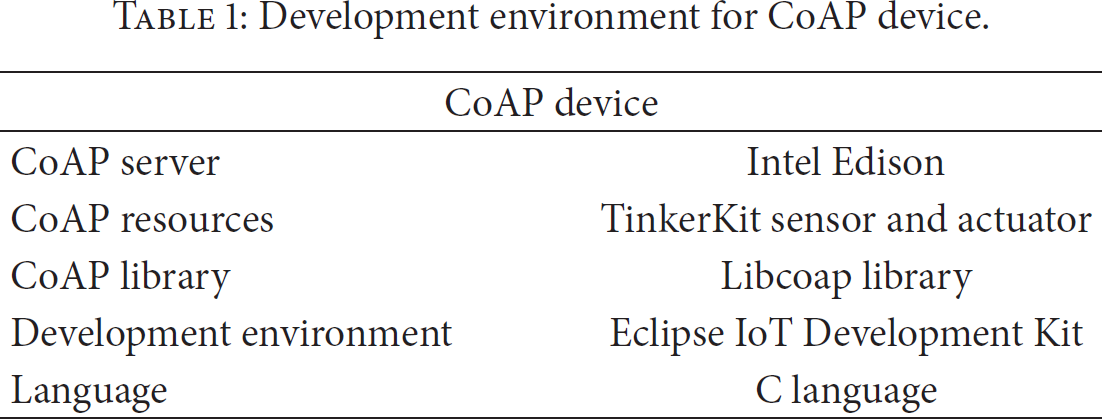
Table 2 summarizes the tools and technologies used for the implementation of the CoAP proxy model which acts as the programmable client for the automated operation of CoAP devices. In order to generate CoAP commands from our proxy module we utilized the Java based Californium framework. The development environment for the proxy module consists of Eclipse IDE for Java programming run over Windows 7 64-bit operating system on a system with Intel Xeon processor and 8 GB of memory. The proxy module acts as client for the CoAP server while it acts as a server for the visual designer.
Development environment for CoAP proxy module.

Table 3 presents the tools and technologies to develop the visual service designer module. As the functionality of this module is to provide a graphical DIY interface for programming the functionality of the CoAP client in order to control the CoAP devices, it has been implemented using C# . Net platform. The hardware used for the implementation and execution of the visual service designer is the same as the one explained in the previous paragraph.
Development environment for the visual service designer module.

5. Execution Results
This section shows the execution of the proposed system and provides some snapshots illustrating the process of execution. Figure 3 shows the execution of the CoAP server instance on the Intel Edison board using the Eclipse IoT Development Kit IDE. The server initializes its own resources in the form of LEDs and a thermistor. The hardware package of the CoAP device with its resources is also shown in the same figure. The hardware package consists of the Intel Edison with Arduino breakout board along with the resources based on TinkerKit LEDs and thermistor modules.

Execution of the CoAP server on the Intel Edison board.
Figure 4 shows the execution of the CoAP proxy module. The proxy module is implemented using the Java based Californium framework. It acts as a client for the remote CoAP server and gets the available resource names from the CoAP server as soon as it establishes a connection with the remote CoAP server. In the figure the proxy receives the string representation of LED and temperature sensor resources from the CoAP server upon connection. The proxy then waits for the visual service designer to connect or starts to execute an existing service profile sent by the visual service designer. The figure shows the connection between the designer and the proxy where the proxy sends the string representation of resource names to the designer for activating the virtual objects of the said resources.
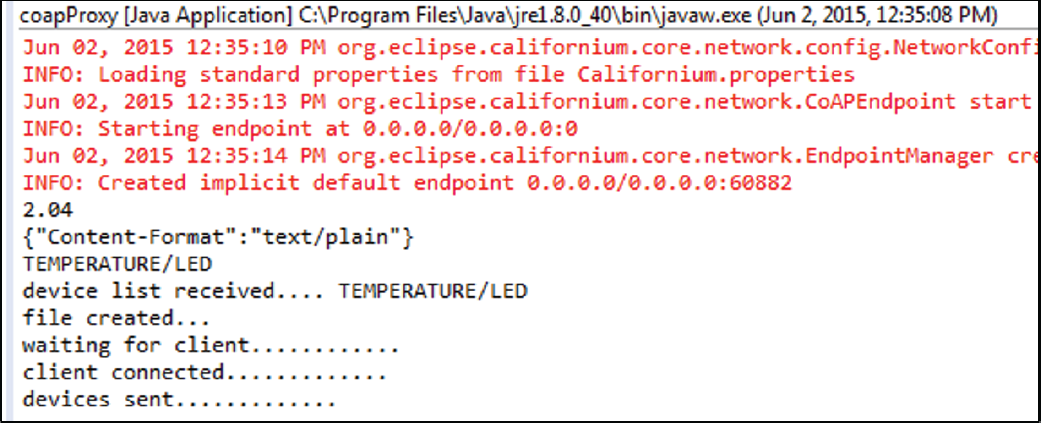
CoAP proxy execution in Eclipse environment.
Figure 5 shows the interface for the visual service designer with the activated virtual objects (VOs). Only those virtual objects are activated by the designer whose names are sent by the proxy module. The user then uses drag-and-drop and mouse clicks on the activated VOs to create a service design. Figure 5 also shows an instance of service design created by user. The design shows that the user has connected temperature sensor VO with the LED VO. The connection specifies that the temperature sensor will produce an input for the LED resource. The behavior of the temperature sensor and the LED resource is then defined by the parameter settings of the connection between the two VOs.

Visual service designer interface.
Figure 6 illustrates the parameter setting screen for the connection between the input and output VO. The screen shows that the temperature value from the thermistor will be read in degree centigrade. When this value is over 23 degrees then the red LED will blink for 30 seconds. This is a simple example of how easily the user can modify the behavior of a remote CoAP device using simple actions such as mouse clicks and value selection. This service design is automatically converted to XML format and can be saved, edited, or transported like any computer file. When the user chooses to upload the new defined behavior to the remote device, the XML file is sent to the CoAP proxy, which parses the XML document according to a preprogrammed scheme in order to extract the newly defined functionality. Accordingly, the proxy generates CoAP commands based on the Californium framework to execute the new commands on the remote CoAP device.
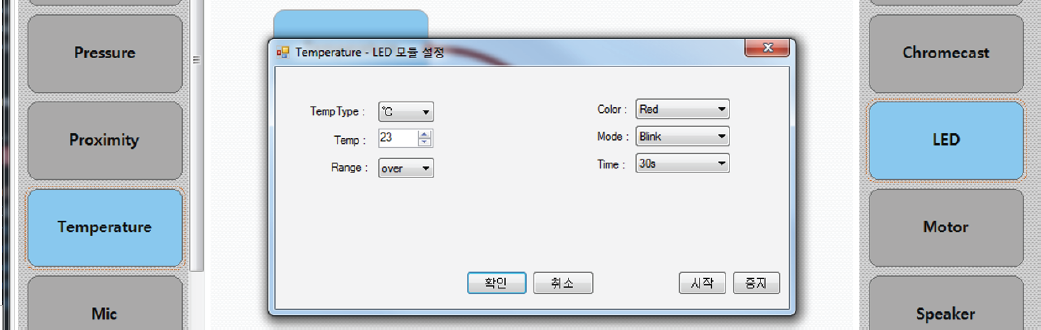
Resource's behavior definition through connection parameter settings.
Figure 7 shows the snapshots of the CoAP commands execution on the CoAP server. The left portion of the figure shows the parsing of the XML profile by the CoAP proxy in order to extract the newly defined behavior of the remote CoAP resources. It also shows the generation of the CoAP commands in a loop for the execution of newly defined behavior. In this instance, CoAP get command is generated at a predefined interval to get the temperature value from the remote CoAP server. Once the value is above the defined threshold value, that is, 23-degree centigrade, another CoAP command is generated in order to blink the red LED on the remote CoAP server. The right portion of Figure 6 shows the red LED being blinked in response. The acknowledgement from the blink action can also be seen on the left portion of the figure after the temperature value greater than 23 degrees has been recorded.

Execution of CoAP commands based on new behavior definition.
6. Comparison and Significance
As described in the introduction of this paper, to the best of the authors' knowledge, this implementation is the first ever attempt towards the behavior customization of remote constrained IoT devices (sensors and actuators). There are only a few similar user interfaces such as Node-RED currently being utilized by the research community and SAM, a Kickstarter project, both of which are described in Introduction of this paper. First and foremost, the DIY interface presented in this paper is intended for customization of the behavior of remote constrained IoT devices based on their resources while the other two interfaces do not acquire the available resources from the device; rather they just provide an interface for visually creating a program for a specific device. The interaction protocol developed as part of the presented DIY interface enables it to communicate with remote devices (not a specific type of devices) in order to receive the available resources such as the sensors and actuators and enables the user to modify the behavior of the remote device based on the capabilities of those resources.
Node-RED and SAM are based on blocks of code represented visually for the user to combine them into a program flow that is executed by the specific devices supported by the two platforms, respectively. Our DIY interface prototype is focused on any remote CoAP devices capable of sharing information regarding their resources. The resources of those devices and their capabilities are presented to a user in an intuitive way to enable even nonprogrammer users to modify or customize the behavior of those devices. The hardware independence, resource based behavior customization, and the DIY nature of the presented system makes it a significant and ideal solution towards the programming and customization of future IoT devices which will demand the general masses to interact and customize the behavior of remote constrained devices in order to get services and fulfill their needs.
7. Conclusions
This paper presents a novel system offering simple and intuitive interface for behavior customization of remote IoT devices. As CoAP is growing in popularity in the IoT paradigm, state-of-the-art Intel Edison board has been used to implement CoAP server acting as a remote IoT device. A Californium framework based CoAP proxy has been developed as part of the system to act as a bridge between the visual interface for behavior customization of the device and the remote CoAP device itself. Resources from a remote device are represented as virtual objects on a graphical design interface. The VOs are used to draw the behavior model for the device and shared in the form of an XML document. The proxy module operates the remote device according to the behavior model by generating equivalent CoAP commands. The novelty of the presented system is that it provides a generic interface that is not limited to be used with a specific hardware platform. The CoAP proxy makes it useable with any CoAP device regardless of the underlying hardware platform. To our knowledge, it is the first attempt towards providing a simple DIY interface for programming remote CoAP devices. As a part of the future works of the presented project, we intend to improve the system capabilities to handle multiple devices simultaneously and to provide interface for designing the interaction behavior among multiple remote IoT devices.
Footnotes
Conflict of Interests
The authors declare that there is no conflict of interests regarding the publication of this paper.