




Abstract
In the past, we used to call the name of members for the purpose of attendance checking by managers (or instructors). They verify the identity of member's participation by human recognition using facial and voice matching. This approach is time-consuming because the number of members is getting increased. Moreover, they may have to recheck any of the students’ presence at the end of the period manually. In this research, we offer a convenient novel attendance checking method to take advantage of Wi-Fi 802.11x technology. Our application initiates AP mode Wi-Fi service for checking attendance of users in which a token is generated only to a person who is close to a manager. If a member has the token, the smart application of the member will connect and report to attendance server. Otherwise, the smart application of the member will report to the server that the users/students are not near the manager. By this way managers/instructors can easily check the member's attendance. In addition, this research proposes a novel concept that unlimited number of devices can be supported. We make use of Wi-Fi scan (rather than connect) to the manager's AP enabled smart devices, resulting in an enhanced scalability.
1. Introduction
Checking students’ attendance in schools, universities, kindergartens, and travel agencies is a time consuming process, because the instructor has to call each person by person when the number of students/users are big. So, instructors/leaders have to consume more time for students to check attendance. I suggest a smartphone based attendance management system using Wi-Fi signals. In this research, students/users do not have to recognize or tag such a RFID card to reader. Attendance is automatically checked only if I have the smartphone. I aggregate statistics about absences, lateness, and attendance, automatically.
In the past, we used to call the name of members (including students, travelers, and children) for the purpose of attendance checking by managers (teachers, leaders, and employer, etc.). Usually, instructors verify the identity of students by human with facial and voice recognition. The matching along with facial and voice recognition will be done against the presence status of the student. The instructor may recheck any of the student's presence during the lecture by manually checking the updated attendance list that shows the matching weights during or after class. Recently, an automatic attendance checking by using a RF communication is widely used. However, if the RF card is faulty or students/users do not get the RF card, this RF based attendance checking cannot work properly. Moreover, it is not enough to cover the entire areas of a certain lecture room for Near Field Communication and Bluetooth technologies.
To resolve these problems, we offer a novel attendance checking method by convenient and correct way to take advantage of the Wi-Fi 802.11x technology on smart mobile devices. In this research, managers initiate AP mode Wi-Fi service for checking attendance of users. Whereas managers have to install a manager version smart application, users can optionally install a client version smart application only if it is necessary for the users to use add-on functionalities. Manager's smart device is connected to the student's smart device at all times. Therefore, the manager can decide whether a student is close to the manager during a specified period of time.
This method prevents the student from leaving the classroom right after checking a present or from answering the call for checking instead of other students. During outdoor activities, it can automatically check periodically whether children and infants are close to leader (instructor or teacher, etc.), since the leader must move together with children or infants during outside activities. Otherwise, the children or infants may get hurt from car accidents. When groups of tourists move (for purposes such as tourism and business trips) somewhere using a charter bus, a tour guide can easily check whether all the people are on board the vehicle.
Figure 1 shows the necessity of Wi-Fi attendance checking system. When you move a large number of members group by a group of transport (charter bus, etc.) for purposes such as travel, tourism, or business trips, you need to stop moving and then start moving again, repetitively. Here we take advantage of this system because we can easily check all members (only if predefined) whether or not the instructors/managers are easily able to check, get in touch quickly by displaying the smartphone leader in instant contact list of members, and do not ride the present invention relates to using a Wi-Fi to be automated attendance management method.

The necessity of Wi-Fi attendance checking system.
In order to verify that a user is within a defined distance to manager, beacon signal, alive message, or packet are interchanged by communication at regular time intervals (e.g., 10 seconds and 60 seconds) periodically with each other. For the purpose of checking the attendance of the members (students, etc.), students have to connect to instructor's smartphone (not necessary only for smartphone, it may be any embedded systems) which is Wi-Fi AP enabled system. In addition, this system supports that unlimited number of devices may be connected. We just make use of Wi-Fi scan to the manager's AP enabled smart devices, rather than be connected to the manager [1, 2].
The rest of this paper is organized as follows. Section 2 describes related works. Section 3 explores the architecture and process of our E-authentication system and presents the experimental results using our system. Finally, we conclude and summarize our work in Section 4.
2. Background and Related Works
Before we go into more detail, we first review the background knowledge and related researches done previously. There are many proposals for Automatic Attendance Systems in the literature and in the market. Most of them do focus on applications to be installed on the lecturer device, whether a smartphone or a laptop. In this section, we will mention briefly few of these proposals.
Reference [3] proposes software to be installed in the instructor's mobile telephone. It enables it to query students’ mobile telephone via Bluetooth connection and, through transfer of students’ mobile telephones’ media access control (MAC) addresses to the instructor's mobile telephone, presence of the student can be confirmed.
In [4] there is another example on a proposal that uses real time face detection algorithms integrated on an existing learning management system (LMS). It automatically detects and registers students attending a lecture. The system represents a supplemental tool for instructors, combining algorithms used in machine learning with adaptive methods used to track facial changes during a longer period of time.
On the other hand, in [5], the proposal uses fingerprint verification technique. They propose a system in which fingerprint verification is done by using extraction of minutiae technique and the system that automates the whole process of taking attendance. Since biometrics are concerned with the measurements of unique human physiological or behavioral characteristics, the technology has been used to verify the identity of users. It is becoming critical to be able to monitor the presence of the authenticated user throughout a session.
Thus, another proposal [6], discusses a prototype system that uses facial recognition technology to monitor authenticated user or students. A neural network-based algorithm was implemented to carry out face detection, and an eigenface method was employed to perform facial recognition. The experimental results demonstrate the feasibility of near-real-time continuous user verification for high-level security information systems [6].
3. Wi-Fi Attendance Checking System Architecture
3.1. Overall Architecture
The overall system architecture of our Wi-Fi attendance checking system is as shown in Figure 2. Our system consists of two subsystems: smart device application and smart device operating systems. Smart device operating system is to check the student/user's attendance by sensing the Wi-Fi signals. The attendance management system comprised of RESTful open API web service and smartphone/web client applications. The implementation details are described in Section 4.

Overall system architecture.
As shown in the left side of Figure 2, our platform supports not only Wi-Fi but also Bluetooth and near field communication (NFC) protocols for checking attendance from students/users. The smart phone/device operating system will schedule and allocate system resources such as CPU, hardware, and software into the required modules/processes. On top of the start phone/device operating system, the smart phone/device application works on checking attendance by Wi-Fi consisting of attendance management part, network connection management part, embedded DNS server (optional), and embedded web server (optional). In the right side of Figure 2, Wi-Fi using the automatic attendance management process will be described. Users/students connect to server and the manager/instructor, and manager/instructor also connects to server. If the user has “token,” the user/student smart application will report to the server that the users/students are attended the class. If the user has not “token,” the user/student smart application will report to the server that the users/students are not attending the class.
Moreover, the system requires a setup in priori by the manager/instructor through its server module to configure the class/tour information for advertising the title/purpose of the tour program or the class. The manager/instructor may choose to encrypt this code depending on the level of protection needed. This will include the following information: course or tour id, date and beginning time of the lectures/tours, manager/instructor name, and some passcode (if necessary). This can be added or modified at any time before class/tour. During the class/tour, or at its beginning, the manager/instructor leverages the users/students to participate the class/tour from their signed-up classes/tours/programs through clicking on their participation button. From then on, the students can then be tracked by their location using the system, as shown in Figure 3.

Communication in attendance check application between instructors and students.
As shown in Figure 3, the smart phone/device of user/student communicates Wi-Fi primitives (such as beacon signals, alive messages, or packets) which are interchanged by the communication at regular time intervals (e.g., 10 seconds and 60 seconds). For the purpose of checking the attendance of the members (students, etc.), students have to connect (not “connect” strictly, just “scan”) instructor's smartphone (not necessary only for smartphone, it may be any embedded systems) which is Wi-Fi AP enabled system.
The server then has to run the identity check on the registered group members/users/students. This is done by comparing the Wi-Fi MAC address which is sent from the user's smart phone/device and that is stored on file for the users/student in priori. To this end, every traveler or student should register their information before departing their trip or at the beginning of the lecture, respectively. At that time, the Wi-Fi MAC address of the travelers/users is transferred and stored to the server. A matching MAC address will be added to the attendance sheet so the instructor could perform a manual check either during the lecture or after the lecture. The identity check can be done once the attendance registration transaction is received, or at a later scheduled time. We recommend to perform the identity check of a student at the beginning of the lecture, but if the number of students and concurrent lectures are large compared to the speed of the server, then the job could be performed say at a random instant in the second half of the lecture. The purpose of this job is to allow the instructor to check the results of the identity check before the end of the lecture, if he/she wishes to do so.
As shown in Figure 2, the system comprising of two applications on smart phone/devices (manager and user), a database server, and a web application server [7]. Now we take a look at the operation of the smart phone/device applications. These applications are the parts that students/users usually install on their smart phones. These are standalone applications that communicate with the web application server for attendance checking. The user detection will be achieved by scanning through the Wi-Fi network, and communication will be through the 3G/4G internet.
Figure 4 describes the algorithm of manager/instructor and user/student application in the left side and right side of the Figure, respectively. As shown in the left side of Figure 4, manager application activates the Wi-Fi AP mode at the beginning of the application. Then, the bottom half of the left side of Figure 4 represents attendance recording process if web server is embedded in the instructor's smart devices or APs. As mentioned in early part of this Section 3.1, our attendance check application may have an embedded web server and an embedded DNS server. The web server is necessary within the system, since the users/students have to connect to the instructors smart devices or APs through Wi-Fi. But, there is no problem, even if a web server is not embedded. This is because the manager/instruction application can connect and report the attendance check result to the third party web application server through 3G/4G networks, not to the manager/instruction application itself. This is the enhanced version of the attendance checking with supporting unlimited concurrent connections which will be described in Section 3.2.
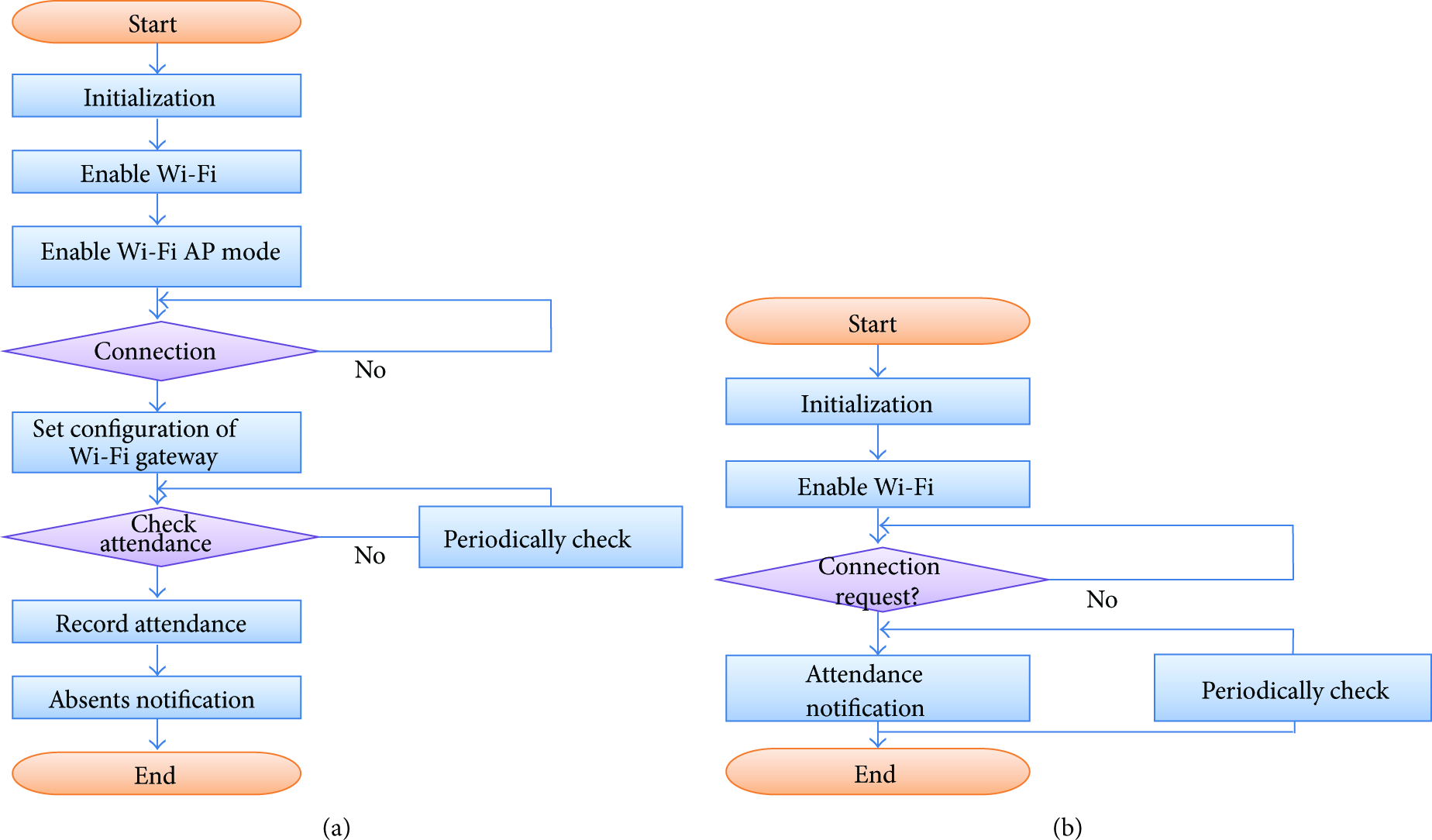
Flow chart of attendance check for smart applications.
Now, we are going to discuss the distance estimation method from the signal strength. Fortunately, we can apply a well-known signal propagation model which maps RSSI value to distance estimates [8]. We exploit the most widely used signal propagation model of the log-normal shadowing model as follows:

3.2. System Approaches for Supporting Unlimited Number of Concurrent Connections
Maximum numbers of Wi-Fi connections for a single Wi-Fi depend on the devices. We have to deal with interference between those 60 radios all trying to broadcast. Engineers of planning an 802.11b wireless network normally say that the rule of thumb was about 10–12 clients per AP for best performance, you can probably move that up to 20–25 (pure off the cuff number) with today's newer technologies. But that still does not get you to 60.
This is because bandwidth we are actually contending for is not the back end ethernet link, but the wireless link speed. So on a 54 mbps Wi-Fi AP you would be contending for the 54 mbps. At 60 clients that would be about 900 kbps each, not counting TCP overhead; counting TCP overhead you are already down to ~720 kbps [9].
In order to overwhelm this limitation, this research proposes the Wi-Fi attendance check which supports unlimited number of concurrent connections. That means it supports that unlimited number of devices may be connected, so that unlimited number of users/students can connect to the managers AP and check/confirm the attendance. To this end, we make use of just Wi-Fi scan to the manager's AP enabled smart devices, rather than be connected to the manager, as shown in Figure 5.

System architecture for supporting unlimited concurrent connections.
Figure 5 shows our key idea that the Wi-Fi attendance check system supports unlimited number of concurrent connections [10]. A leader/manager has an access point (AP) as shown in the right side of Figure 5. We depicted the coverage of AP as a solid line of circle in the right side of Figure 5. In order to verify that a user is within a defined distance to manager, the smart device of leader/instructors/manager has to check the smart device of children/students/users periodically. So, the communicate Wi-Fi primitive signals (such as beacon signals, alive messages, or packets) are interchanged by communication at regular time intervals (e.g., 10 seconds and 60 seconds). For the purpose of checking the attendance of the members (students, etc.), students have to connect (not “connect” strictly, just “scan”) instructor's smartphone (not necessary only for smartphone, it may be any embedded systems) which is Wi-Fi AP enabled system.
Manager smart application initializes the device. It also sets Wi-Fi module to operate as an access point- (AP-) mode, so that Wi-Fi beacon signal is to be broadcasted, resulting in that user devices can detect the Wi-Fi beacon signal. But, in this research we do not require for the user device to fully connect to the manager AP, because there are limits on maximum number of Wi-Fi connections for a single Wi-Fi. For this purpose, manager device can utilize access point mode, tethered mode, and Wi-Fi direct connection mode, and so on. By this way, the user node which detects the manager AP's SSID will be called a client node having a “token.” So, we can reasonably infer that the applications having the “token” must be close to manager AP. Thus, the user applications having the tokens can only report the fact that they attended the class or that they are near the instructors. This attendance information will be saved to server by RESTful open api web service [9].
The most advantage is that coverage of Wi-Fi is bigger than any wireless networks such as Bluetooth and NFC. Usually, the size of big lecture room is larger than 50 m~100 m. So, wireless networks such as NFC or Bluetooth cannot cover all the attendance of candidates/students in the room by a single access point. But, the Wi-Fi network coverage is enough to cover all the area of the large lecture room.
4. System Implementation and Evaluation
Up to now, we described the system architecture for higher scalability. From now on, we are going to illustrate system implementation and evaluation in detail. Each communication in Figure 6 between attendance server and user/student can be implemented by RESTful open API interface or general HTTP web interface [11–13]. The reason why we provide both interfaces is because we try to realize the platform independence by supporting as web/mobile application and general PC applications, simultaneously. One of our key approaches in attendance server system is that function of user discrimination and validation during attendance checking depend on a request. To this end, the user client generates MD5 hash fingerprint using MAC address and SSID and uploads these information onto server. In this research, we implemented the user client prototype on Android 4.3 operating system by smartphone mobile application, as depicted in Figure 8. The server runs on Apache Tomcat 8.1 web application server. We make use of JERSEY 1.8 server and Spring Framework 3.1 for REST open API [14–17] based attendance server implementation. Spring Framework provides an API so that developers may extend Spring to suit their needs. We make use of both Tomcat and Spring in order to implement our systems. We constructed 4 node Linux clusters of Core i5 machines each with 4G RAM. The machines are connected by network and managed by giga-bit ethernet interconnection network as shown in Figure 7.
Token Generation (Instructor AP ↔ User). User first scans nearby Wi-Fi APs. If the user/student finds out a designated AP, then a user application of user/student will generate a MD5 hash fingerprint. The MD5 hash fingerprint will be stored somewhere in user's smart device. We call this MD5 hash “token.” The reason why we have to generate the MD5 rather than using only the raw data of MAC address and SSID is because exposing the raw data only in URL is not appropriate for security concerns. If only the raw MAC address and SSID are exposed in RESTful web service URL, malicious user/student can manually adjust the information to answer the roll for another student skipping the class. In order to avoid such threat, using both raw data and MD5 hash fingerprint rather than using only the raw information is better in terms of system protection. Attendance Check/Upload with Token (User ↔ Attendance Server). It is used to upload a token into server platform. This is to store a token into server (MD5 hash fingerprint), which is generated from SSID and MAC address. SSID comes from Wi-Fi access point which is used to identify whether a student/user is close to the manager during a specified period of time. MD5 hash fingerprint was already generated using the token and user's MAC address. The reason why the MD5 should be utilized during attendance checking is to protect duplicated attendance check trial for students skipping class using the same device, if a student/user tries to maliciously check the attendance by answering the roll for another skipping student. Attendance Inquiry (Either Instructor ↔ Attendance Server or User ↔ Attendance Server). It is used to check attendance record from database. If a user/student wants to check his/her attendance record, then the user can inquire to attendance server with his/her identification, for example, MAC address. Then attendance server can provide the results to validated user with the identification.

The core flow chart of attendance checking supporting unlimited concurrent connections.

Evaluation model.

Screenshots of user/traveler/student client application.
As a result, a user only has to keep both of the MD5 fingerprint file consisting of MAC address of the user and SSID of an instructor's AP; then a server can check and validate the attendance request, afterwards, especially on a specific time and a specific web site. When someone needs authentication for a portion of the snapshot screen, it is also possible on our system. User can drag the region using a mouse from the captured screen. Then, authentication/validation will be started additionally through generating the MD5 hash by attendance servers using the submitted MAC address and SSID from users. Then, the attendance server compares the requested MD5 and newly generated MD5 data. It makes a decision of data integrity if they are the same or not.
In this section, we provide experimental result for the attendance checking system. We have implemented the Wi-Fi attendance checking application on Android operating system. REST web service is one of the most convenient methods for accessing information through internet [18]. Usually, a smartphone application needs information from several sources of (one or more) REST web services. In this experiment, we adopt the Apache Tomcat 7.0 as a web application server and Spring 3.0 for REST Open API Service Provider as server. Apache Tomcat is open software with Java Servlet and JavaServer Pages technologies. Apache Tomcat powers numerous large-scale web applications across a diverse range of industries and organizations. Spring Framework is the open source JAX-RS (JSR 311) Reference Implementation [14] for building RESTful Web services. Figure 7 shows an overview of our system architecture. Spring Framework is to manage web services instead of web so as to provide web server maintenance service, especially composition, deployment, and management. Requests traverse via the new incoming node and are received by the “In,” represented by the components at the left top of Figure 7. Our system model is a sort of open queueing network that has external arrivals and departures. The requests enter the system at “In” and exit at “Sink” of attendance server system, respectively.
Prior to evaluating the performance in detail, we present a model of system model as shown in Figure 7. The system is composed of three components: (1) user/students, (2) instruction nodes (Aps), and (3) web application server, (4) DB server, and (5) REST open API server. As shown in Figure 7, there are a number of components (nodes) comprising of several queues. A request may receive service at one or more queues before exiting from the system. In the evaluation model, jobs departing from Apache Web Server arrive at another queue (e.g., the REST Server Farm from B1 to B4).
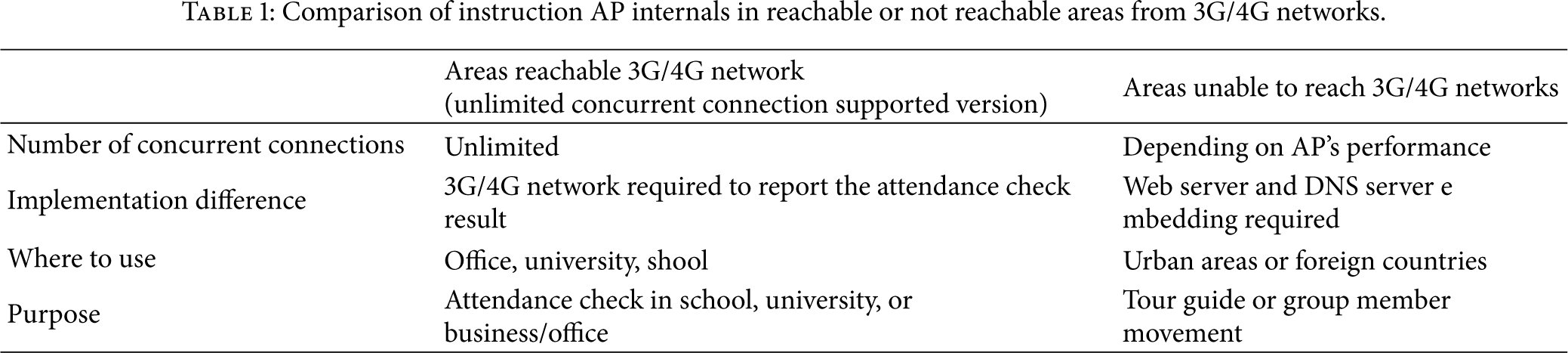
All requests submitted must first pass through the web server for providing HTTP service before moving on to the REST web servers, Jersey. Requests arrive at the web server at an average rate of 1000/sec to 15000/sec, as shown in Table 1. To handle the load, the REST web server components may have several parallel cloud or cluster architectures. The number of requests in the system varies with time. In analyzing an open system, we assume that the throughput is known (to be equal to the arrival rate), and we also assume that there is no probability of incomplete transfer in this system, so there is no retrial path to go back to Hadoop clusters. The initialization process for the request is done at the scheduler. Then, the job proceeds to the component, Spring Framework, depending on the type of the request. A request may receive service at one or more queues before exiting from the system. A job departing from user/student/traveler arrives from a dedicated node for JERSEY and Spring Framework for REST web service. All jobs submitted must first pass through the job scheduler/tracker for determining whether it is REST open API request. Requests arrive at the web server at an average rate of 1000/sec to 15000/sec. Traffic intensity is calculated by the arrival rate over the service rate that means how fast the incoming traffic are serviced on the server. The key feature of our design is to separate the JERSEY web server onto a dedicated node.
Comparison of instruction AP internals in reachable or not reachable areas from 3G/4G networks.
Requests arrive at the web server A with frequency “In.” The initialization process for the request is done at node A. Then, the request proceeds to the component depending on the type of the request; if the request is for a REST open API, it goes to the JERSEY or Spring 3.0 server. If the request is for just HTTP web pages, then it goes to the Apache Tomcat servers. The web requests traverse via Apache Tomcat and DB server. They are finally collected to the Sink node, represented by the components at the right bottom of Figure 7. Our system model is a sort of open queueing network that has external arrivals and departures. The requests enter the system at “In” and exit at “Sink.” The number of requests in the system varies with time. In analyzing an open system, we assume that the throughput is known (to be equal to the arrival rate), and we also assume that there is no probability of incomplete transfer in this system, so there is no retrial path to go back to node A. Now, the CPU components of recent smartphones can have more than one CPU, known as dual-core or quad-core. However, we assume that smart mobile device in this research has single-core CPU.
Figure 9 shows the performance evaluation of this Wi-Fi attendance system as increasing number of servers. X-axis represents the number of servers. Y-axis of the left and right sides of Figure 9 describes the number of members refused and the number of members processed, respectively. The number of members turned away from the servers is getting decreased, because the number of servers is increasing. At the same time we can see that the number of members processed can be scalable as the number of server increases. As the number of server node increases, the total processing time on each server decreases. On this multiple server environment, the identity verification task are distributed and computed concurrently. Since server nodes distribute the same amounts of data to all participant nodes, the execution times are almost the same on every server. And the final execution time contains more time such as communication overhead, fork-join overhead, processing overhead on mobile devices. However, the computation power in servers of data center is significantly better than the power in a single server. The total execution time will be improved if identify verification workloads are well balanced among various computing nodes. This achieves server scalability through the distributed processing. As shown in these experiments, there are no limits of concurrent users/members who are gathered in the same or near location.

Time number of refused and processed members as increasing number of servers.
Figures 10 and 11 show the distribution of percentage of time depending on the queue numbers on arrival rates. Figure 10 depicts the distribution when the arrival rate is low, whereas Figure 11 shows the distribution when the arrival rate is high. This graph describes. Higher arrival rate occurs when more students/users/travelers exists within a designated area or close to an instructor, whereas lower arrival rate comes from the situation that less students/users/travelers are crowded within a specified area or close to an instructor. As shown in Figure 10, lower arrival rate leverages the number of queue to temporarily stay in the small number of queue entries, for example, 3 or 6. However, higher arrival rate leaves the number of queue to constantly stay in the state of large number of queue entries, for example, more than 9.
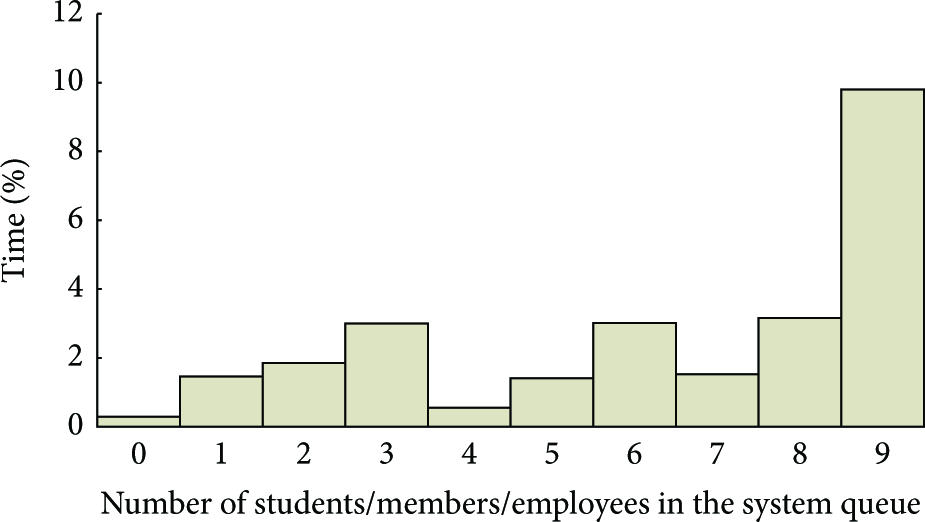
Distribution of percentage of time depending on the queue numbers on low arrival rate/sec.
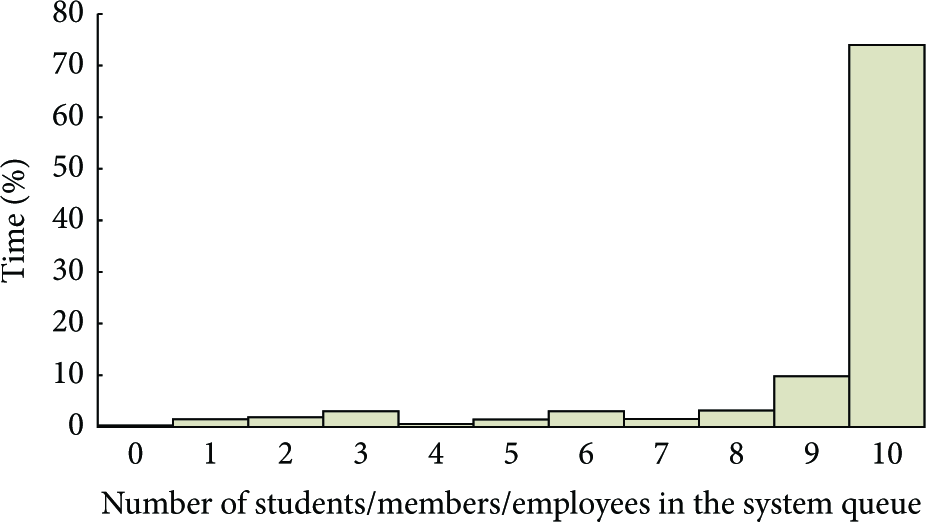
Distribution of percentage of time depending on the queue numbers on high arrival rate/sec.
5. Conclusion
With the spread of IT technologies, we offer a novel attendance checking method by convenient and correct way to take advantage of the Wi-Fi 802.11x technology on smart mobile devices. In this research managers initiate AP mode Wi-Fi service for checking attendance of users. The key algorithm in this research is as follows. A “token” is generated only to a person who is closed to a manager (or instructor). If a member has the “token,” a smart application of the member (or student) will connect and report to the server that the users/students are attended the class or near the manager. If the member does not have the “token,” the smart application of member will report to the server that the users/students are not attended the class or not near the manager. By this way instructors can conveniently check the member's attendance with a smart phone.
In addition, this research proposes a novel concept that unlimited number of devices can be supported. Engineers of planning an 802.11b wireless network normally say the rule of thumb was about 10–12 clients per AP for best performance, you can probably move that up to 20–25 (pure off the cuff number) with today's newer technologies. But that still does not get you to 60. In order to overwhelm this limitation, this research proposes the Wi-Fi attendance check which supports unlimited number of concurrent connections. That means it supports that unlimited number of devices may be connected, so that unlimited number of users/students can connect to the managers AP and check/confirm the attendance. To this end, we make use of just Wi-Fi scan to the manager's AP enabled smart devices, rather than be connected to the manager, as shown in Figure 5. We utilized Wi-Fi scan (rather than connect) to the manager's AP enabled smart devices, resulting in an enhanced scalability.
Footnotes
Conflict of Interests
The authors declare that there is no conflict of interests regarding the publication of this paper.
Acknowledgments
This work is supported by the Basic Science Research Program through the National Research Foundation of Korea funded by the Ministry of Education, Science and Technology (NRF-2010-0025748, NRF-2013R1A1A2063006); this research was supported by Gangneung-Wonju National University.