




Abstract
This paper investigates the capability of Kinect sensor as interactive technology and discusses how it can assist and improve teaching and learning. The Kinect sensor is a motion sensor that provides a natural user interface. It was implemented by Microsoft for the Xbox 360 video-game console to create a new control-free experience for the user without any intermediary device. The Kinect sensor can enhance kinesthetic pedagogical practices to profit learners with strong bodily-kinesthetic intelligence (body smart). As a learning tool, the Kinect sensor has potential to create interactive games, to increase learner motivation, and to enhance learning efficiency via its multimedia and multisensory capacity. Many students must learn spatial skills to improve learning achievement in science, mathematics, and engineering. This paper will focus on developing the Kinect sensor-assisted game-based learning system with ARCS model to provide kinesthetic pedagogical practices for learning spatial skills, motivating students, and enhancing students’ effectiveness. The responses to the System Usability Scale indicated that our system demonstrated usability and learnability. We conclude that the Kinect sensor-assisted learning system promotes the development of students’ spatial visualization skills and encourages them to become active learners.
1. Introduction
Natural user interfaces (NUIs) provide a great potential to facilitate new ways of computer enhanced learning; these have the potential to enhance classroom interactions, by increasing learners’ participation, facilitating the teachers’ presentations, and creating opportunities for discussion [1]. Learning with virtual objects integrated into realistic interactive technology has produced a novel digital learning type [2] in recent years and has become a controversial discussion topic in e-learning research. However, to guide learners to learn scientific knowledge quickly and efficiently, integrating innovative technology into scientific learning activities without causing any distraction from learning is a crucial research topic.
Physically interactive and augmented reality is increasingly used; ARCS model and game-based learning requirements for digital learning applications have become critical. Learners can learn effectively when they use multimedia-assisted learning systems, which motivates them to focus on the information presented and effectively retain the information. Lu and Yao stated that presenting abstract material using multimedia enables learners to clearly understand the material, and audio and visual displays allow learners to interact with the material [3]. Although a teacher's professional education seems to play a vital role in the teaching process, innovative instructional designs that differ from traditional teaching designs must be developed. The education mode must be changed from “technology-adapted instruction” to “instruction-adapted technology” [4]. Most learners demonstrate difficulty with reasoning and the conversion of shape and space in elementary school mathematics education, causing learning achievement in this unit to be lower than that in other units [5]. However, spatial ability plays a crucial role in learning geometry [6].
The National Council of Teachers of Mathematics [7] suggested that geometry helps students to analyze the characteristics of geometric shapes as well as to use visualization, spatial reasoning, and geometric modeling to solve problems. Van Hiele [8] described a theory of mathematical education, the development of geometric thought, to enhance the achievement of learning and to promote learner comprehension. Van Hiele suggested five teaching phases in designing teaching methods and materials step by step. This model of teaching phases was used as the fundamental theoretical framework for this study. Game-based learning (GBL) is an instructional method that incorporates educational content or learning principles into video games to engage learners. The use of this method in the field of natural science and technology has increasingly been an object of study in recent years. Learning through digital games not only increases motivation, active learning, and individual learning opportunities, but also reduces the learning pressure experienced by learners.
The primary focus of this study was on developing and evaluating a cubic net interactive system using the Kinect sensor for enhancing learners’ spatial ability. We developed courseware for interactive learning using an interactive cubic net system and applied it in a lesson on space geometry at an elementary school. The content of the system was based on the geometric learning theory, and real-time three-dimensional (3D) objects were used to provide various viewing angle controls. A qualitative analysis was also performed to evaluate the learners’ interaction with the Kinect sensor design through observation records, video recording, and structural interviews.
This paper is structured as follows: The foundations for the development of the research are discussed in the subsequent section; the research methodology is then presented in Section 3, with full details on the system development and the instruments and procedures used; the results are then presented, with a thorough description of the system usability, in Section 4; and finally, the results are discussed and the conclusion is presented in Section 5.
2. Related Work
2.1. ARCS Model
According to Keller's ARCS model of motivation design [9, 10], he found possible ways to supplement the learning process with motivation. There are four major steps for learners to become and remain motivated in the learning process: attention, relevance, confidence, and satisfaction (details in Table 1 [11]). The first two steps can be considered the backbone of the ARCS theory, the latter steps relying upon the former. In accordance with the theory, attention refers to the interest displayed by the learners in taking in the concepts or ideas being taught. Relevance to consider in the process must be established by using language and examples that the learners are familiar with. Confidence focuses on establishing positive expectation for achieving success among learners. The last aspect of this model is satisfaction, in which learners must obtain satisfaction or reward from learning experience. Feedback and reinforcement are important elements and when the learners appreciate the result, they will be motivated to learn. However, ARCS model cannot explain how information processing elements are integrated with the learning process or how these elements interact with motivation. Designers should increase motivation and germane cognitive load to enhance learning effectiveness [12]. This paper focuses on knowing, understanding the implementation of ARCS motivational model in teaching and learning process, understanding the precise definition of kinesthetic pedagogical practices learning, the approaches in the implementation, the advantages and disadvantages of kinesthetic pedagogical practices learning, and finally the implication in the teaching and learning experience. Following Keller's ARCS model of motivation, we design our game with four key components: interactivity (attention), representation and story (relevance), rules and goals (confidence), and consequences (satisfaction).
ARCS motivational theory and game components.

Bishop [11] referred to the power of spatial ability in assisting learners in visual and figural representation and in introducing complex abstractions in mathematics. Piaget and Inhelder [13] determined that children initially recognize various objects through the sense of touch alone and then develop and use certain primitive relationships (topological space). Contrary to the historical development of geometry, which began with the treatment of straight lines, angles, distances, and plane figures, children begin by observing the topological rather than the metric properties of objects (projective space and Euclidean space). Lohman and Kyllonen [14] determined that spatial abilities include spatial visualization, spatial perception, spatial orientation, spatial imagination, and spatial translation and transformation. We focused on the spatial visualization skill, which is the ability to mentally manipulate complex spatial two-dimensional and 3D figures. Van Hiele describes a theory of mathematics education, Development of Geometric Thought [15], to enhance the achievement of learning and to promote learners’ comprehension. Van Hiele suggested five teaching phases to design teaching methods and materials step by step (see Table 2).
The model of the Development of Geometric Thought [15].

2.2. The Kinect Sensor
The Kinect sensor for Windows functions as a computer's eyes and ears, and the sensor provides the capacity to use those functions. To access the Kinect data using nonproprietary software, the USB communication had to be reverse-engineered. The basic parts of the Kinect device are (Figure 1)
video camera (color stream) that delivers the color stream data with the combination of three basic color components red, green, and blue (RGB); IR cameras (depth stream) composed of an IR projector and a monochrome CMOS sensor, which captures video data under any ambient light conditions; microphones (audio stream) which consist of a four-element, linear microphone array to capture audio data at a 24-bit resolution. tilt motor (direction and angle control) that allows us to adjust it at any vertical angle between 27 and −27 degrees according to learners’ height.

Recommended design of Primesense chip. (Reference: Traumabot blog.)
The Kinect sensor receives the information stream (e.g., video, depth, or audio stream) and delivers it to the natural user interface library. We used the application interface (API) to control all of the functions of the Kinect sensor, such as hand tracking, skeleton tracking [16], speech commands, and face tracking. The OpenNI (natural interaction) organization provides a framework and application programming interface (API) for dealing with devices like Kinect. OpenNI addresses a range of devices including visual and audio devices as shown in Figure 2.

OpenNI middleware provides natural interaction tracking functionality. (Reference: Microsoft Wiki.)
2.3. Game-Based Learning
Game-based learning (GBL) is a specific term used in instructional strategy or activities associated with applications that have defined learning outcomes. As an emergent learning process, GBL is designed to balance subject matter with gameplay and to help players retain and apply the subject matter to the real world [17]. GBL typically uses video-game technology, scoring strategies, interactive interfaces, flexibility courses, and real-time feedback to engage learners in learning. GBL not only makes learning meaningful, but also creates a mental model that motivates the participants [18].
Because information and communication technology has rapidly developed, computer and simulation games have become popular leisure activities in daily life. Some scholars assert that computer games are natural and necessary elements in student learning and that they should be integrated into instructional design as well as learning environments [17]. Scholars also believe that the concept of “learning-by-playing,” which helps students overcome the boredom of classroom learning, applies to playing computer games [19]. However, weaknesses and drawbacks in the implementation of GBL remain: (a) GBL requires substantial preparation and effort, and (b) the subjects and content are usually predefined and fixed. As Clark and Mayer [20] noted in their review of e-learning, a well-designed system can help generate the content of an entertaining scenario that corresponds to the learning subject. In other words, a game-based e-learning system enables simple and efficient preparation of learning applications. Figure 3 shows the key component game cycle that is triggered by game characteristics and instructional content come together to bring about learning outcomes [21].

Input-Process-Outcome Game Model.
Input-Process-Outcome Game Model includes three parts. The first is input phase; the objective is to design an instructional content that incorporates characteristics of games. The second is process phase; these features trigger a cycle that includes user judgments (enjoyment or interest), user behaviors, and system feedback. Finally is outcome phase; this shows the learning achievement and learning outcomes.
3. Method
3.1. Teaching Materials
To develop material using the Kinect sensor, various programming frameworks, such as the OpenNI architecture, which was used to control the Kinect sensor, and the OpenTK architecture, which was used to provide a cross platform library, must be surveyed. The system architecture is shown in Figure 4.
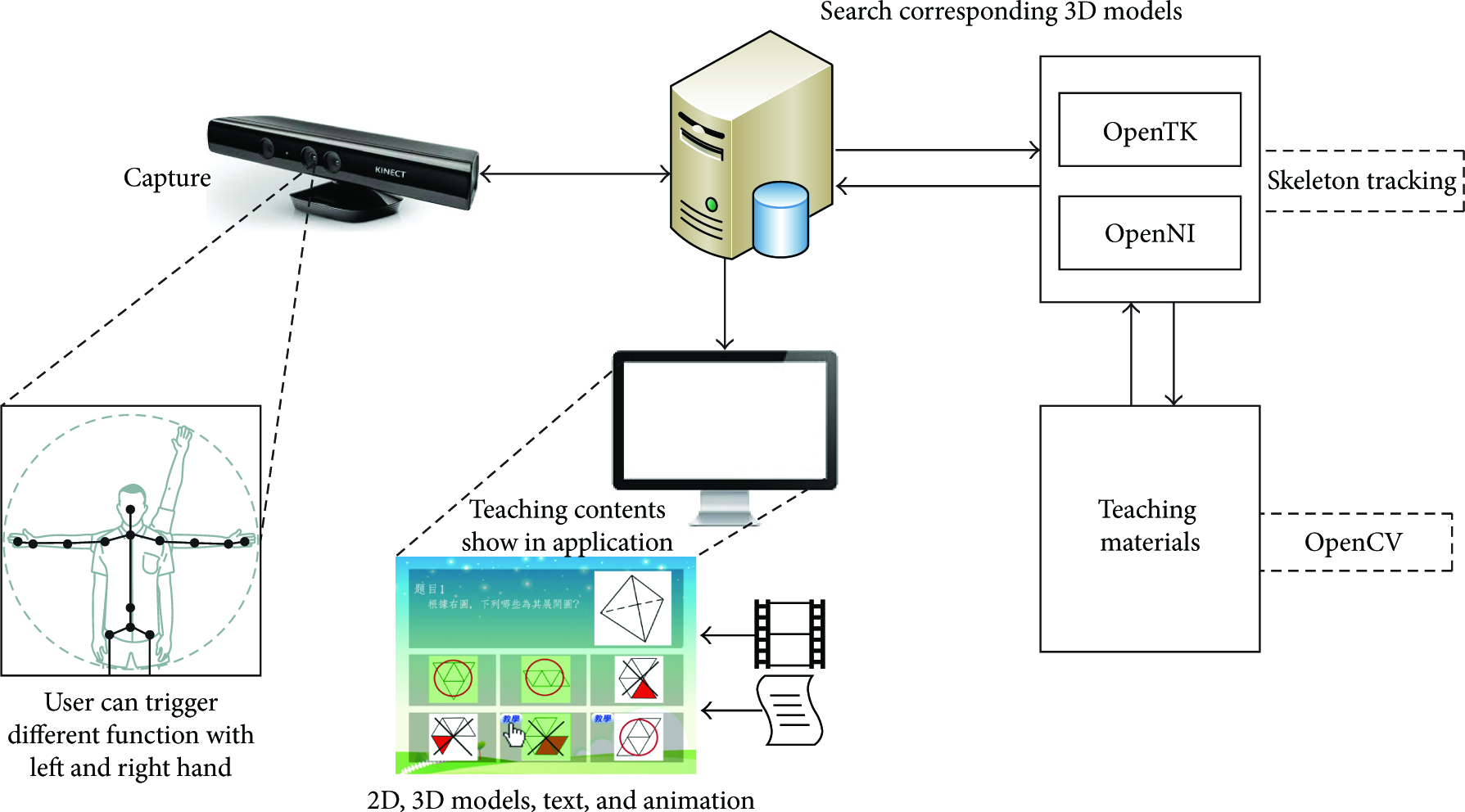
The system architecture.
Using the Kinect sensor to present questions and interactive games and including a hand-mouse function (joints tracked by the Primesense NITE middleware skeleton tracking algorithm) enable learners to learn the geometric learning theory and relevant information (shown in Figure 5). We provided three types of learning models.
Shapes and space: a questions’ and answers’ game where you can recognize the properties of geometric shapes. There are different levels of difficulty and random questions. Student stands in front of the screen and operate with both hands to select, confirm, and check the answer. Drawing and visualization: we generate a random visualization shape, so that student uses the right hand as a brush to draw the same shape. After that, the system compares drawing shape with the answer and informs the teaching contents for student. Skeleton interactive model: a questions’ and answers’ game where you can recognize the properties of unfolding and reconstructing polyhedron. Student needs to imagine a classic open problem whether the surface of every polyhedron can be cut along some of its edges and unfolded into the plane without overlap and operate with both hands to select, confirm, and check the answer.

Kinect sensor-assisted learning system process.
3.2. Experiment Participants
The subjects included three classes and total of 146 students participated from the University in Northern Taiwan that study natural sciences course in general education. They were assigned into two groups randomly. The experimental group, including seventy-two students, was received the bodily-kinesthetic intelligence materials developed by Kinect technology (3D objects, related information, and interaction) for learning the concepts of spatial visualization skills, while the control group with seventy-four students was received the simulation-based materials devised by flash animation technology that consisted of the same learning materials as those used by the experimental group. All of students were taught by the same instructor who had taught the natural sciences course for more than 10 years.
3.3. Research Tools
The research tools used in this study included the learning achievement tests and the questionnaire for measuring the system usability for surveying the students’ acceptance in learning system.
The achievement test sheets were developed based on the content of the “spatial visualization” by three experienced instructors (teaching more than a decade) in this field. The pretest was composed of 20 multiple-choice items designed to evaluate the learners’ prior knowledge about the course unit “knowing the spatial visualization in Taiwan” before the learning activity, 5 points for each item, out of 100 points. The posttest followed the same structure and aimed to evaluate the learners’ ability. The test scope of the posttest was the learning materials of the learning activity and the perfect score was 100. The questionnaire of System Usability Scale (SUS) [22] was administered to evaluate system usability. It is a Likert scale used to assess system usability, learnability, and users’ subjective satisfaction concerning specific aspects of the interactive interface. In addition, we included an adjective scale to rate our SUS (Figure 6). The SUS was highly reliable (alpha = 0.91) and useful in a wide range of interface types [23]. The SUS was intended to measure only perceived ease-of-use; however, Lewis and Sauro [24] demonstrated that it provides a global measure of system satisfaction and subscales of usability (Items 1, 2, 3, 5, 6, 7, 8, and 9) and learnability (Items 4 and 10) (the summed score contributions of the usability and learnability items were multiplied by 3.125 and 12.5, resp.).

Mean score ratings corresponding to the seven adjective ratings.
3.4. Procedures
Before the experiment, students completed a two-unit course on the basic knowledge of spatial visualization. Instruction consisted of 4 hours over a period of 2 weeks. For each unit, both groups completed learning activities that included readings, videos, field observations, and classroom discussion. At the beginning of the learning activity, students in the experimental and control groups took the pretest simultaneously. The purpose of pretest was to find out the equivalence of the two groups in their abilities and readiness before the treatment.
Afterward, students in the experimental group learned with the bodily-kinesthetic intelligence materials developed by this study employing Kinect technology for the unit “spatial visualization.” Learners were allowed to manipulate the Kinect sensor aforementioned to immersion interaction with the 3D virtual objects and understand the knowledge related to them. On the other hand, those in the control group learned with the simulation-based materials developed by flash animation technology for learning the concepts through 2D animation and diagrams. The duration of the experimental instruction was 2 weeks. After the learning activity, the students took the achievement posttest and completed the questionnaire of SUS. All the learning activities were video-recorded for later observation and further analysis. Figure 7 shows the procedure of the experiment.

Procedures of the experimental design.
4. Evaluation Results
One-way ANCOVA was conducted to examine the research questions. The significance level was set at 0.05. The effects on learning performance and system usability toward natural science learning are analyzed in the following sections. Originally, the mean scores and standard deviation of the pretests and posttests of both groups are shown in Table 3.
The mean scores and standard deviation of pretest, posttest of learning achievement.

The purpose of this study was to examine the effectiveness of the different learning approach in terms of improving the students’ learning achievement. After the learning activity, one-way ANCOVA was adopted for the analyses, in which the posttest scores were the dependent variable, the pretest scores were the covariate, and the type of using authentic technology was the fixed factor. As can be seen from analysis of covariance (ANCOVA) of the posttest score, the mean value and standard deviations of the posttest score were 83.19 and 11.29 for the Kinect group and 77.48 and 12.72 for the animation group. That is, students who learned with the Bodily-kinesthetic intelligence (Kinect) showed significantly better learning achievements than those who learned with the non-bodily-kinesthetic intelligence (animation) when exploring spatial visualization skills knowledge of natural science.
The participants operated the system and completed the SUS questionnaire. The mean score of the SUS was 71.73 (SD = 13.06) for the Kinect group and 73.17 (SD = 12.85) for the animation group. According to the adjective rating score, the assisted learning system in this study lies between “good” and “excellent.” We discussed opinions on the interactive learning system with the participants after they operated the system and completed the SUS. The participants generally agreed that the interactive learning system increased their interest in the concept and made them aware of various things.
Figure 8 lists the student distribution regarding system usability, which indicates that most of the learners agreed that the Kinect-based support system is satisfactory and also suggested that the system is helpful for learning. Figure 9 shows the student distribution regarding the two-factor orthogonal structure, usability and learnability. The scores indicate that high usability is not highly consistent with high learnability. However, usability plays a vital role in the initial adoption or rejection of a technology, and learners believed that the system can facilitate learning.
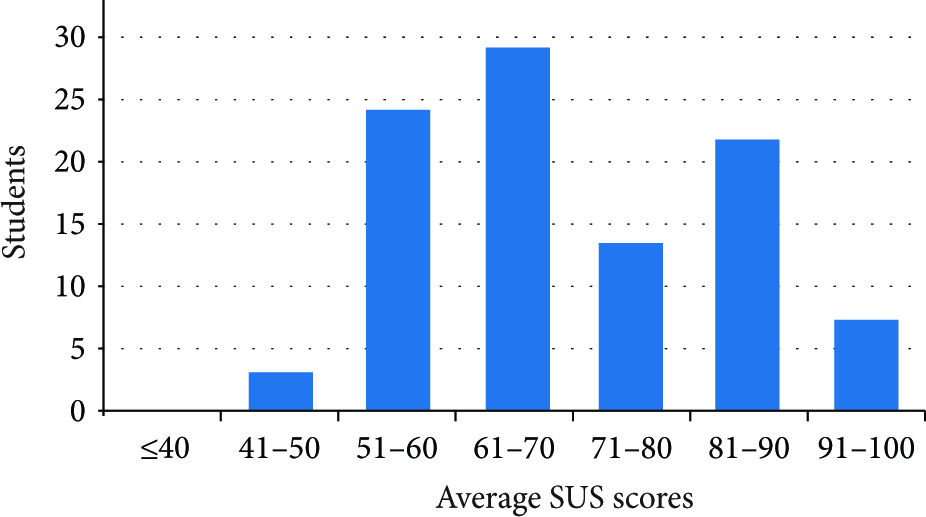
Distribution of SUS scores.

Distribution of usability scores and distribution of learnability scores.
Regarding the analysis of the scale, we further discuss the mean, usability, and learnability scores that can help improve the system. Hence, we summarize the following reasons that may affect system satisfaction:
the control and learning interfaces were not sufficiently smooth; the materials could not be displayed properly because of the angle and distance, which may confuse learners’ operation.
5. Conclusion
In this paper, we presented the results of the learning achievement and system usability of a bodily-kinesthetic intelligence assisted learning system using the Kinect sensor. Regarding the SUS questionnaire, most learners highly appreciated employing the Kinect sensor to present the teaching materials and considered the material to be interesting, easy to control and play with, and simple to operate using the interactive functions. The learners also reported that teaching by employing an interactive system enhanced their motivation to learn and was helpful for learning spatial visualization skills. Several parts of the system must still be improved. A small portion of the learners reported that the learning system performed undesirably in response to speed during interactive operation. The buttons should be clearly defined, the cubit net knowledge should be highlighted, and proper instructions should be provided to ensure that the learners are focused on learning the knowledge expressed in the teaching materials. We conclude that the Kinect sensor-assisted learning system promotes the development of students’ spatial visualization skills and encourages them to become active learners. This is a case study for exploratory purposes; it will be more efficient to test the effect of Kinect on the game-based learning class with a larger sample size in the future and compare between the results before and after using the sensor. Furthermore, instructors need to improve Kinect's graphical interface which may increase the efficiency of the feedback.
Footnotes
Conflict of Interests
The authors declare that there is no conflict of interests regarding the publication of this paper.
Acknowledgment
The funding of this study was supported by the Ministry of Science and Technology of Taiwan under Grant MOST 101-2511-S-147-001-.