




Abstract
Different from the traditional office software, due to the limited storage and computational capability of mobile devices, how to support the page editing in a fast and energy-efficient manner is fundamental. To address this challenge, we propose an MR*-tree based indexing mechanism for supporting the fast and energy-efficient retrieval of spatial objects in mobile PowerPoint pages. Based on this, techniques are developed to support the operations when editing mobile PowerPoint pages. Prototype has been implemented for facilitating the operations of spatial objects when editing mobile PowerPoint pages. Experimental evaluations on computers, pads, and smart phones show the effectiveness and efficiency of this technique.
1. Introduction
Nowadays, the mobile devices are widely used in the life of people, largely due to the development of mobile communication technology and the increasing coverage positioning technology [1]. Besides, the more endurability of battery can make the mobile devices operate for a longer time and support more computational-intensive applications, which are usually supported by computers traditionally [2]. These indicate that mobile devices are taking a role that is more and more important in many aspects of people's life [3–6]. Along with the blossoming of the mobile Internet, mobile applications are used widely and the mobile office has been a popular software for users who travel often, which let the users work using any mobile device and at any time and place, whenever and wherever there is an Internet access. This has promoted the demand for mobile office to a large extent [7]. A good mobile office application should let users deal with anything with the software at any time in any place, getting rid of the limitation of the screen size and the computational capacity of devices [8–10].
It is worth mentioning that, compared with the traditional office software, the mobile office does not require to support the complete functionalities. Instead, fast and accurate response to users' requests is essential, including accurate cursor locating, guideline generation for facilitating images, and full-text transformation from one place to another when editing pages. This is fundamental especially when users edit mobile PowerPoint pages [9]. With the relatively large number of spatial objects in a mobile PowerPoint page and relatively small storage and computational capabilities in smart phones, PDA, or other mobile devices, an energy-efficient technique of managing these spatial objects, which can facilitate the mobile PowerPoint page editing, is required for mitigating the problems described as follows.
(i) Data of Big Volume for Spatial Objects with respect to the Limited Storage Capacity of Mobile Devices [11]. The rapidly increasing volume of data makes a great demand for the storage capacity of smart devices, where the location data contributes with a majority of the storage capacity and computational resources. Consequently, a more effective data structure is required for organising the location data more efficiently. Generally, the location data is represented in terms of
(ii) The Complex Query Processing of Spatial Data with respect to Relatively Low Performance of Smart Devices [12–15]. Traditional relational database is not appropriate for storing and querying spatial objects, and an efficient spatial indexing mechanism is necessary for facilitating the query processing of spatial objects with limited storage and computation capability of mobile devices.
To address the challenges discussed above, a spatial objects indexing mechanism, denoted by MR
The rest of this paper will be organized as follows. In Section 2, we introduce the model of the mobile PowerPoint and build a spatial index on spatial objects in mobile PowerPoint pages. In Section 3, we present the model of some operations for mobile PowerPoint pages and develop algorithms for supporting these operations. In Section 4, experiments are conducted for evaluating the applicability and efficiency of proposed algorithms. In Section 5, relevant techniques are discussed and reviewed, and finally we conclude this work in Section 6.
2. Indexing Spatial Objects
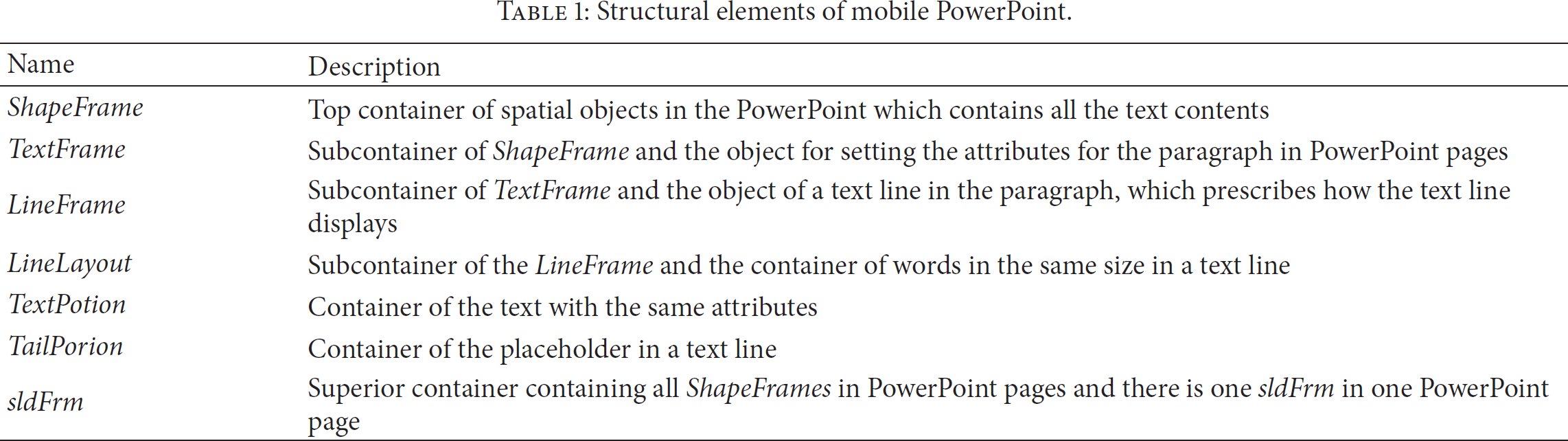
In this section, we will present how to organise spatial objects in mobile office PoewrPoint by means of the spatial index. Generally, the structure of PowerPoint is shown in Figure 1 [17], and the description of these structural elements is shown in Table 1.
Structural elements of mobile PowerPoint.
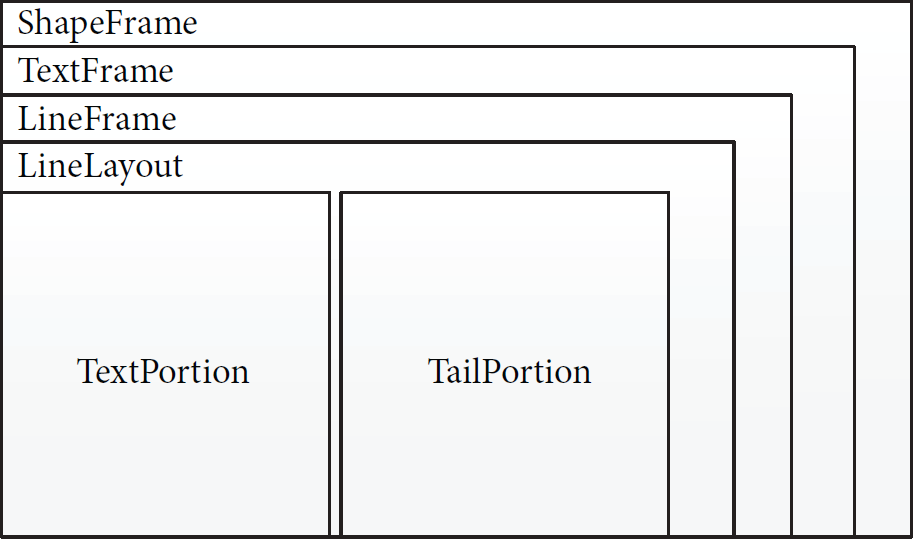
Structure of a PowerPoint page.
The spatial indexes are built on ShapeFrame and TextPortion, since they are either the largest or the smallest containers of the pages in PowerPoint. The reason why we cannot build spatial indexes on every kind of container is that a page could include multiple ShapeFrames and there can be multiple subcontainers in the superior containers, which leads to the unacceptable time complexity
ShapeRTree and TextPotionRTree are constructed (1) (2) (3) add (4) (5) (6) add (7) (8) (9) (10) ( (
Generally, we retrieve objects in sldFrm (line 1). For each ShapeFrame in sldFrm, we add it as an element of the spatial index sldFrm. ShapeRTree (lines 2-3). Then, ShapeFrame is treated as a loop object, and every TextPortion in ShapeFrame will be added to the spatial index ShapeFrame. TextPortionRTree (lines 6–9). Consequently, the spatial indexes of ShapeFrame and TextPortion are constructed. The spatial indexes are represented as rectangles, which specify the the bound of the spatial object using the elements of maxX, maxY, minX, and minY.
3. Retrieving Operations for Spatial Objects
This section will present the mechanisms of optimizing the operations of mobile applications leveraging the spatial indexes constructed in the previous section. We first show the expansion of the spatial relationship of spatial objects, which should simplify the procedure of retrieving objects. Generally, the method of retrieving a rectangle depends on three types of spatial relationships, namely, contains, intersect, and nearest, where contains means that the object is surrounded by the same rectangle and intersect means that the spatial object overlaps with the rectangle, while nearest specifies that the bounds of the object and rectangle are close enough. We have built the expansion retrieving method on the relation of nearest as shown in Figure 2, because the relationships between intersect and contains are clear and definite. The nearest can be classified into VertNearest and HrzNearest, which return the rectangle, the X- or Y-coordinates of which are nearest to the object. Furthermore, the VertNearest can be classified into (i) VertUpNearest which returns the nearest rectangle having a bigger Y and (ii) VertDownNearest which returns the nearest rectangle having a smaller Y. There is a similar classification of HrzNearest, which is HrzLeftNearest and HrzRightNearest. Every subclassification can be divided into two classes, which returns the rectangle nearest in a specific area (such as AreaVertUpNearest) and returns the rectangle neatest in the limit range of X (such as VertAreaUpNearest). Actually, a relationship can be treated as a java function packaged in the Class MRTree. The MRTree is implemented based on the open source online project Java Spatial Index (JSI), which provides the implementation of rapid and efficient basic spatial relationships, such as nearest. Then, we expand these operations to provide the functions of more coarser in granularity, such as HrzAraRightNearst. The spatial index built on the PowerPoint pages is the input as a parameter of the Java functions. Based on these spatial relations, we present in the following section how the cursor, letters, and guidelines are retrieved for supporting mobile applications.

The expansion on the relationship of nearest.
3.1. Operation of Locating a Cursor
Cursor location is basically locating a point in the page of PowerPoint. The model of point retrieve object is shown in Figure 3, where there are two types of zones in a simple page of a PowerPoint, which are (i) letter zones and (ii) zones around the letters. Generally, when we touch the page by fingers, we are giving the instruction of producing a cursor by the location where we have touched.
When the finger point is located upon the letters, this means that the point retrieve object is located in the letters zone. In this case, the spatial index will (i) retrieve the rectangle which is nearest to or contained by the point retrieve object and (ii) produce the cursor after the TextPortion mapping to the rectangle. Otherwise, the point retrieve object is located in the zone around the letters, and there will be eight conditions that determine the location of the cursor as follows.
Zone a. The cursor should be located before the first TextPortion of the first line. Zone b. The cursor should be located after the corresponding TextPortion of the first line. Zone c. The cursor should be located after the last TextPortion of the first line. Zone d. The cursor should be located before the first TextPortion of the line which is nearest to the point retrieve object. Zone e. The cursor should be located after the last TextPortion of the line which is nearest to the point retrieve object. Zone f. The cursor should be located before the first TextPortion of the last line. Zone g. The cursor should be located after the corresponding TextPortion of the last line. Zone h. The cursor should be located after the last TextPortion of the last line.

The model of a point retrieve object.
The procedure of locating the cursor based on the location of finger point is described by Algorithm 2. Note that the spatial index of TextPortion constructed in Section 2 improves the performance of rectangle retrieving. Firstly, TextPortion is initialized as null (line 1). The spatial index TextPortionRTree is retrieved to examine whether there is a TextPortion containing the location where the finger point locates (lines 2–7). If the point is located in a certain TextPortion, the procedure terminates and the current TextPortion is returned (line 5). Otherwise, the spatial relationship of nearest is used for determining whether TextPortion and the finger point are in the relation of horizontal (line 8) or vertical (line 15) situations and retrieving TextPortion which is nearest the finger point. Thereafter, TextPortion is expanded as a rectangle of the row and uses areaHrzNearest to find a TextPortion where the cursor should be covered (lines 8–14 and lines 15–26). Note that this is different from nearest for the horizontal and vertical situations. When VertNearest
P: the point where the finger locates
(1) (2) (3) (4) (5) (6) (7) (8) (9) (10) (11) (12) (13) (14) (15) (16) (17) (18) (19) (20) (21) (22) (23) (24) (25) (26) (27)
3.2. Operation of Selecting Letters
When the cursor is examined as locating at a letter zone, this letter zone should be identified. There are two kinds of models for the letter zone selection, namely, starting or ending control tags. Intuitively, there are a pair of tags produced by the application located at the nearest TextPortion for the letter zone to be selected, which is surrounding the rectangle of the TextPortion by the starting and ending control tags. These two tags can be dragged for covering the whole letter zone. In the following, we introduce the rules of locating the starting or ending control tag.
The scenario of starting control tag is shown in Figure 4. Generally, when the starting control tag is dragged into the letter zone, the spatial index will retrieve the rectangle which is nearest to or contained by the location where this tag locates. Otherwise, this tag is dragged to one of the other eight zones, and the rules are described as follows.
Zone a. The starting control tag should be located before the first TextPortion of the first line. Zone b. The starting control tag should be located before the corresponding TextPortion of the first line. Zone c. The starting control tag should be located before the first TextPortion of the second line. Zone d. The starting control tag should be located before the first TextPortion of the line which is nearest to the location point. Zone e. The starting control tag should be located before the first TextPortion of the line which is the next line of the line nearest to the location point. Zone f. The starting control tag should be located before the first TextPortion of the last line. Zone g. The starting control tag should be located before the corresponding TextPortion of the last line. Zone h. The starting control tag should be located before the last TextPortion of the last line.

Scenario for starting control tag.
The scenario of ending control tag is shown in Figure 5. Similarly, the ending control tag is processed in a similar fashion as that of the starting control tag, and thus we avoid the details of the handling procedure.

Scenario for ending control tag.
Thereafter, the letter zone is selected leveraging the determination of starting and ending control tags, which are actually the similar procedures as the determination of the cursor as presented by Algorithm 2. When the starting and ending control tags (denoted by starTag and endTag) are determined, the letter zone is determined, which is a rectangle such that starTag is the upper-left coordinate, while endTag is the bottom-right coordinate.
3.3. Operation of Generating Guidelines
Users may often require to adjust the position of some objects in the page of the PowerPoint when making the PorwerPoint pages. During the object adjustment, the corresponding ShapeFrame should be moved to the target position and guidelines should be identified for locating the ShapeFrame and facilitating the ShapeFrame transferring. When ShapeFrame is moved to a place where the bound of ShapeFrame has very little distance to the guideline, the bound should be absorbed by the guideline automatically. Generally, there are three types of guideline that should be considered for ShapeFrame transferring.
(i) Alignment Guideline. As shown in Figure 6, when a ShapeFrame is to be moved to a location which is to be aligned with another ShapeFrame, there should be an alignment guide for supporting this transferring. As shown by the figure, the shape of shadow is the the place where the rectangle of ShapeFrame will be moved to. The blue line on the top is the alignment guideline produced leveraging the spatial index.
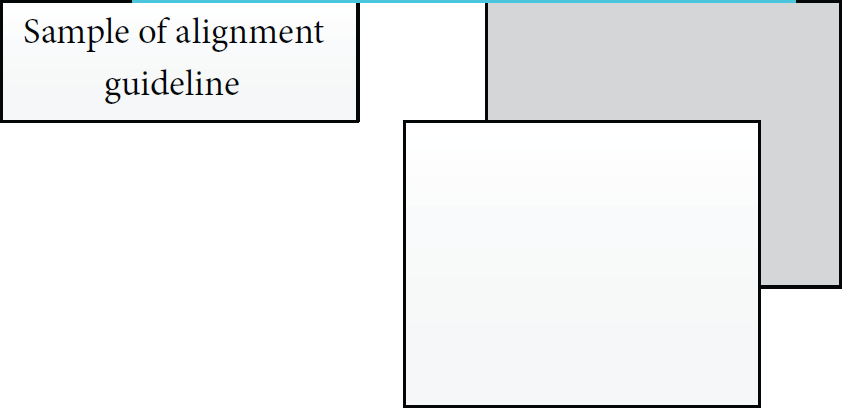
Sample of the alignment guideline.
(ii) Equidistance Guideline. As shown in Figure 7, when the rectangle of ShapeFrame is moved to the area of shadow, the guideline should be produced leveraging the spatial index for supporting this transferring.

Sample of the equal distance guideline.
(iii) Center Guideline. As shown in Figure 8, when the rectangle of ShapeFrame is moved to place where the center of the two rectangles is aligned, the center guide should be produced leveraging the spatial index. Beside a vertical center guideline generated and illustrated by Figure 8, there should be a horizontal center guide to be generated as well.
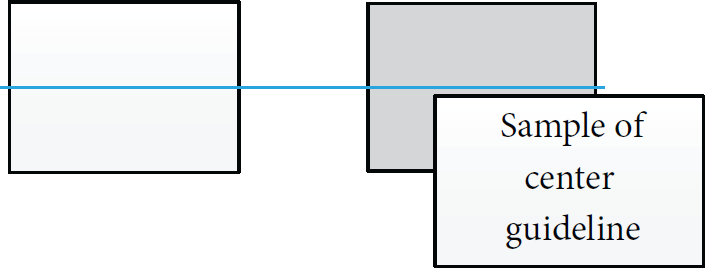
Sample of the center guideline.
The procedure of guideline generation is presented by Algorithm 3. Generally, the bounds of the rectangles for the ShapeFrame of original and target are compared leveraging the spatial index constructed in Section 2. If the bounds of original and target ShapeFrame are neighboring, the bounds of target ShapeFrame in the spatial index are used as the guideline and are being added into alignList. Specifically, given a mR, it is examined to check whether it is contained by iR (lines 1–5), and the relation between the original and target ShapeFrame is verified (lines 6–10). At last, mR is examined to check whether it is close to bottom or top of iR (lines 11–15). The guideline saved in alignList is returned finally (line 16). The THRESHOLD is a parameter set by the user, which specifies the size of blank between the rectangles.
(1) (2) add (3) (4) add (5) (6) (7) add (8) (9) add (10) ( ( ( ( ( (
4. Implementation and Evaluation
Figure 9 shows the class hierarchy for the implementation, which is programmed in Java. Generally, the Class RTree abstracts the TextPortion and the ShapeFrame into the Class rectangle, which has five parameters including minX, maxX, minY, maxY, and owner. Based on the Class Rectangle, a spatial object has been described as a rectangle with absolute coordinate value. This strategy changes the way of displaying the object by describing the object with the coordinates rather than the parameters such as width and height in the Class Textportion. Thus, spatial objects retrieving is simplified somehow, where the calculation based on the coordinates of spatial objects is unnecessary.

Class hierarchy for the implementation of indexing spatial objects in mobile PowerPoint pages.
The experiments have been conducted on the helpdesk (Lenovo 3000), the pad (ONDA v972), and the smart phone (Sony LT29i), where the operation system of Sony LT2i and ONDA v972 is the Android system. The experiment is conducted as follows. Some English words are generated in a PowerPoint page, and these words are classified into 9 zones as shown in Figure 10. For each operation, we conduct it in each zone 10 times, with or without applying our technique. The accuracy of the experiments for these operations is computed as follows.
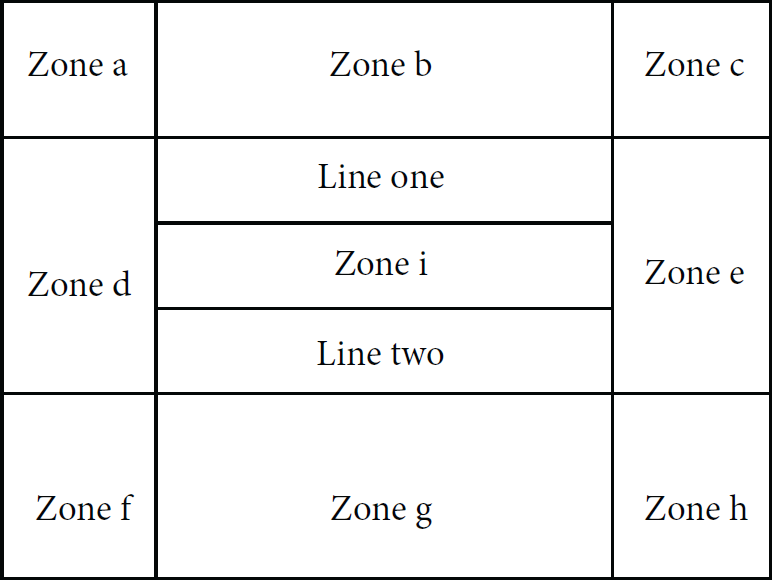
Classification of zones.
The comparison of locating the cursor is shown in Table 2. The accuracy for the case of noused spatial index is
Comparison of the accuracy for locating the cursor.

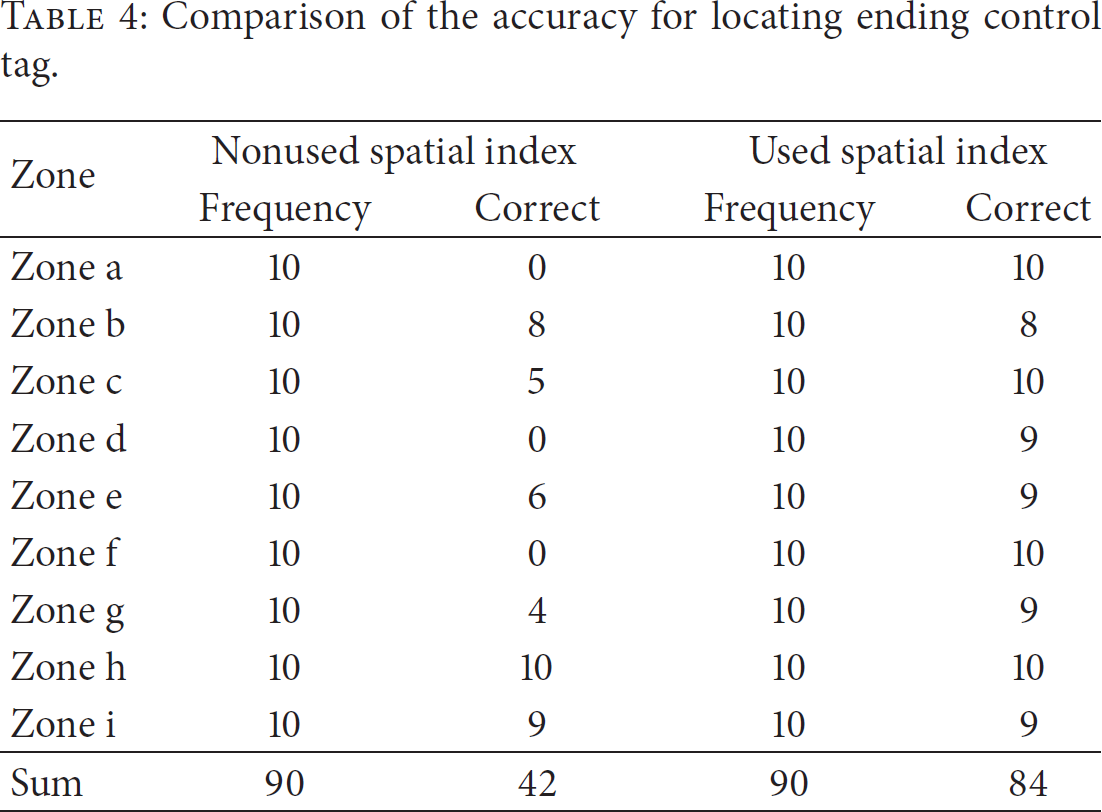
Tables 3 and 4 show the accuracy for locating the starting and ending control tags. The accuracy for the case of noused spatial index is
Comparison of the accuracy for locating starting control tag.

Comparison of the accuracy for locating ending control tag.
5. Related Work
With the rapid development and wide applicability of cloud computing and the mobile internet technologies, there is a trend that people can build vehicles, devices, goods, and everyday objects to become a part of the Internet of things [18–20]. Mobile devices are to be used more widely and ubiquitously, which leads the mobile office application to become a hot research and engineering topic. In the following, we review and discuss the related techniques in this domain.
With the cloud going into our life, there are many researchers trying to deploy applications on the cloud platform to settle the problem of low capabilities of mobile devices. Reference [21] built a mobile OA system based on 3G network, WAP, and J2EE. It was used to fill up the deficiency of traditional OA system and to create an application environment for extending the business to user's mobile phones. Thus, it refrains from the disadvantages that the traditional OA system can only be used in offices or other places connected to the Internet, which has limited the use of the OA system largely. This is actually a hint for us to expand our mobile office application to make use of the mobile network, such as using the cloud to save the documents of mobile applications. Reference [22] presents the motivation and preliminary design for a framework to create ad hoc cloud computing providers. By this, they create a cloud among the mobile in the vicinity devices to facilitate the application on these devices to execute jobs. They also show their perspective that the usage of mobility traces will be considered to create table communities and not only places. This work reminds us that we could deploy our office application on the platform to reduce the computing pressure of single device. Reference [23] presents an algorithm of location-based services (LBS) on the mobile devices to save the battery of these devices. By using the promoted quadtrees, the devices could save the number of requests to the LBS server when detecting the surrounding area of interest. Thus, the battery of the devices can be extended largely. Generally, they have the similar idea with us that using the spacial index to promote the capabilities of mobile devices. It happens that there is a similar case, [24] making an exploration on whether the cloud can save the energy of mobile devices. This work explores the impact of cloud-based applications on the battery life of mobile devices. Specifically, it tries to answer the following question. For some user defined application performance criteria, when is the usage of cloud-based applications more preferable in terms of energy consumption than non-cloud based applications that are executed locally on users device? Reference [25] aims to use the mobile cloud computing to help bridging the gap between the capabilities of mobile devices and the need of rich applications. Cloud computing can provide mobile applications with the capabilities of cloud servers and storage together with the benefits of mobile devices and mobile connectivity, possibly enabling a new generation of truly ubiquitous multimedia applications on mobile devices: Cloud Mobile Media (CMM) applications. The office application can be classified into CMM. So we can take the cloud computing into consideration to make a promotion from the performance perspective. In general, the cloud is used by people to promote the customer experience on extending the memory or extending the compute capacity, and it also can be used to save the energy of the devices. These instances inspire us to an extent, and we should exploit the potentialities of cloud to optimize the smart devices.
To response, the requirement of mobile office [26] has changed the traditional rich client to a browser-based thin client. So all the stuff operated on the client of the mobile devices can be deployed and executed at the server. Reference [27] argues that the mobile application has many advantages in different aspects. Thus, the browser-based thin client cannot replace the mobile application completely. Reference [13] has proposed a similar target to optimize the application with us. This work aims to implement web services for mobile devices limited by the physically constrained of mobile devices, such as, low processor speed, limited memory, limited memory, and slow wireless connection. The authors have evaluated the RESTful web service for mobile devices with respect to conventional SOAP web services. Experiments show that RESTful web services outperform conventional SOAP web services. Reference [28] indicates that a cloud mobile office system can satisfy the business enterprise personnel requirement, which is to access enterprise information resources anytime and anywhere and using any devices. The design of cloud mobile office system framework does not affect the original office system; it is very good for the stability of the primary system. It is a total solution for the enterprise office automation in the mobile Internet environment. Our research can be a promotion on the application of the mobile devices. Reference [29] presents some directions for mobile application software engineering. It can be a guide when developing the mobile office application. In general, these works indicate that there will be great changes in the programming work of the application on smart devices. It can be a thin-client or can be a node of a web service.
From the discussion above, we can see that the efficiency of the applications running on mobile devices is still a challenge to be addressed. Consequently, we have promoted the accuracy of some operations for the mobile PowerPoint software by using the spatial indexing mechanism. As [30] mentioned, an extensive research has been carried out on the multidimensional indexing, and we can treat spatial index as a kind of special multidimensional indexing mechanism for enabling efficient range queries. They have made the comparison between several kinds of spatial indexing methods to find the one that performs the best in high multidimensional indexing queries. It is the typical application of spatial index on the nonspatial field and happens when there is a similar case. Reference [31] proposes an approach through using the spatial index to handle the multidimensional range query. Different from [30], this work focuses on conducting the research on the GPU. Reference [32] has inspired us with applying the spatial index on the storage of the nonspatial data with coordinates, where R
To summarize, the mobile office applications need to be optimized to face the imperfection of current smart devices and satisfy the user friendliness of the application. We have used the spatial index to optimize the experience of some of the operations of mobile office.
6. Conclusion
Unlike the traditional office software, due to the limited storage and computational capability of mobile devices, how to support the page editing in a fast and energy-efficient manner is fundamental. Generally, an efficient spatial indexing mechanism can help mobile office software quickly locate spatial objects. Therefore, it promotes the speed of operations on the spatial object and satisfies the need of quick response of the user. In this paper, we have proposed an approach to address this challenge. Specifically, an MR
Footnotes
Conflict of Interests
The authors declare that there is no conflict of interests regarding the publication of this paper.
Acknowledgments
This work was supported partially by the National Natural Science Foundation of China (Grants nos. 61379126 and 61401107), by the Scientific Research Foundation for Returned Scholars, Ministry of Education of China, by the Guangdong University of Petrochemical Technology's Internal Project (Grant no. 2012RC0106), by the 2013 Top Level Talents Project in Sailing Plan of Guangdong Province, and by the Fundamental Research Funds for the Central Universities (China University of Geosciences at Beijing).