




Abstract
In common sense, virtualization technology is adopted to offer several isolated execution environments and make better use of computational resources in server environment. However, in embedded systems, the significance of virtualization does not come into the picture. The extensive utilization of mobile smart devices has led to a series of issues such as security, wasting of resources, and power consumption. In this paper, we discuss how mobile virtualization addresses these challenges and then present a detail analysis of four mainstream mobile virtualization solutions: containers, paravirtualization, hardware-assisted full virtualization, and microkernel. At last, we carry out a series of performance comparisons among these solutions and make some suggestions for further research.
1. Introduction
Virtualization is a relatively old technology and can date back more than 30 years. Throughout these years, the ideas behind virtualization evolved as different software and hardware techniques allowed it to be widely used, especially in the enterprise market [1]. The ability of virtualization brings immense benefits in terms of reliability, efficiency, and scalability. It enables the cloud data centers to flexibly provision resource which makes the “computing-as-a-service” vision of cloud computing possible [2]. A substantial amount of work has been carried out on traditional virtualization most of whose architecture is x86.
Nevertheless, ARM-based mobile smart devices are becoming more and more ubiquitous and the preferred platform for users’ daily computing needs is shifting from traditional desktop to mobile smart devices [3]. Undisputedly, as mobile computing advances, it brings several tough challenges, described as follows.
(1) Security. Mobile device, as a kind of intimate personal portable equipment, contains lots of user's sensitive data, such as SMS, contacts, and photos. People cannot pay much more attention on its security issues, especially in a poor secure condition nowadays.
(2) Performance Wasting. Multicore (4 even 8 cores) SOC is being increasingly adopted by hardware vendor along with 2 G RAM or more. It seems that these vendors participated in a hardware competition which led to a serious performance wasting. How to make better use of hardware resources is a new challenge.
(3) Power Consumption. Power is always the bottleneck of mobile devices. Modern device architecture especially is becoming more and more complicated to support various modem stacks (GSM, WCDMA, and LTE) simultaneously and many complex applications. People have to find a way to simplify the hardware architecture.
(4) Shorter Time to Market. For devices manufacturer, they wish to quick release their newest products to meet dynamic market requirements. They want to find a way to reduce dependencies among hardware and software components so as to reuse legacy software or legacy operating system on a new design chip/board and reduce development and integration time and effort.
To address these challenges, the role of virtualization within the mobile device architecture is being discussed among academia and industry [4]. Actually, mobile virtualization can deal well with these challenges. But this technology seems that it has not yet aroused people's attention until now. We cannot find a related work that systematically analyses the solutions of mobile virtualization.
In this paper, we comprehensively introduce the mobile virtualization technology. The most important contributions we make can be summarized as follows: (1) we deeply analyze the architecture of all mainstream solutions and present our opinions about their advantages and disadvantages, respectively; (2) we build an experiment platform and experiment a lot to compare their performance.
The rest of this paper is organized as follows: Section 2 describes the definition and the differences with traditional virtualization. Section 3 shows the benefits that mobile virtualization can bring and Section 4 discusses the architectures of four mainstream solutions in detail. Section 5 carries out performance comparison among those solutions. A summary and plan of our future work are described in Section 6.
2. Mobile Virtualization Overview
2.1. What Is It?
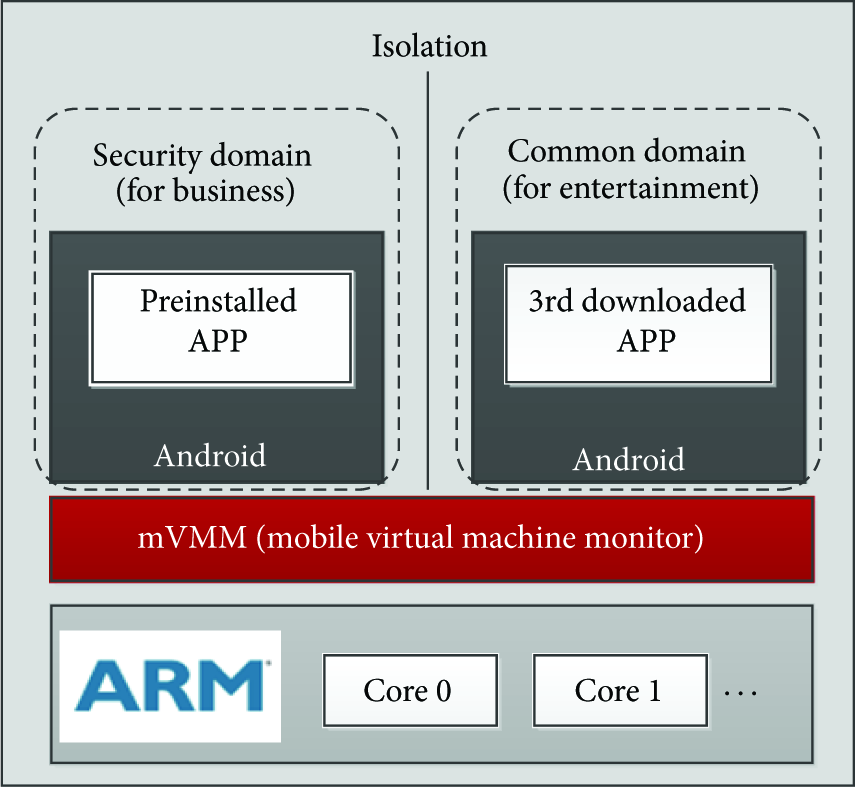
Virtualization has been a major topic in the enterprise space for quite some time but has become an important technology for mobile smart devices (also other embedded systems) only in the last few years. Mobile virtualization is a variant of system virtualization which is a technology that enables multiple isolated operating systems run simultaneously on a single physical machine. The hypervisor (also known as virtual machine monitor (VMM)), is responsible for creating and managing the VMs and, by providing the physical abstraction, allowing VM's instructions to be executed correctly on the real hardware [5]. Figure 1 shows the virtualization architecture of multicore ARM-based mobile smart devices.

A virtualization architecture of multicore ARM-based mobile smart device.
In 2008, the mobile industry became interested in using the benefits of virtualization technology for cell phones and other devices like tablets, netbooks, and machine-to-machine (M2M) modules. Mobile virtualization can support mobile devices using a single-core or a multicore processor and it uses a mobile virtual machine monitor (mVMM) to create secure separation between the underlying hardware and the software that runs on top of it.
2.2. What Are the Differences between Mobile and Traditional Desktop Virtualization?
The requirements of mobile hypervisor architecture are quite distinct from hypervisors aimed at traditional desktop applications, which have a fundamentally different set of requirements. Mobile smart device, a modern embedded system, is increasing taking on characteristics of general-purpose systems while traditional embedded systems used to be relatively simple and single purpose. Their functionality is growing, and so are the amount and complexity of their software [6]. This creates a demand that runs more and more high-level applications originally developed for the PC world, such as the virtualization.
However, they were dominated by hardware constraints, especially the power energy and screen size. Even though their CPU and memory are becoming more and more powerful even stronger than lots of PCs, they should exhibit low to moderate software complexity. In addition, mobile devices are subject to real-time constraints which means we should take resource constraint into fully account in mobile virtualization.
In case of x86 architecture, it supports four distinct privilege levels known as CPU ring [7]. The advantage of having different privilege is that all the components do not have same rights to access the resources. In a virtual environment VMM runs in ring 0, OS kernel runs in ring 1, and applications run in ring 3, while ARM is based on RISC architecture with total 7 rings out of which 6 are privileged modes and 1 is unprivileged mode. So there are a few new challenges in virtualizing a processor when we design mobile virtualization architecture.
In fact, mobile smart device is a personal communication device rather than a totally computing devices. This means that we should take communication channels virtualization into consideration. Memory protection mechanism is another big question in memory virtualization. We cannot deal with it like PC which is obviously not adequate to mobile virtualization [8]. The requirements of mobile virtualization are summarized below:
a small code size and light-weight hypervisor with support for multiple VMs; high-bandwidth, low-latency communication between system components; a strict system-wide security policy; minimal impact on system resources and real-time performance; be suitable for ARM architecture and make use of ARM features; strong interaction to enhance user experience.
3. Mobile Virtualization Benefits
As you probably already know, the cost reduction benefit is a clear driver when you virtualize your server infrastructure, but what is the driver for mobile virtualization? Mobile phones are not like PCs. They have a real-time operating system (RTOS) that performs critical tasks: voice compression, PIN access, base band radio, encryption, and so forth. The following 4 main benefits may be the driver for mobile virtualization.
3.1. Enhanced Security
The security issues of mobile smart devices are heavily exposed. Viruses, Trojan horses, and malwares from all kinds of external attackers have caused people's attention. Traditional information security technologies are always aimed at a specific type of attacks and always lag in the update of malicious software. For ensuring device security, users have to deploy all kinds of information security approaches, such as encryption, digital signature, safety audit, access control, and digital certification. Because of the lack of any security technology, the system may be invaded by a variant of malwares. However, deploying a security environment is very hard for common users. So they need an innovative solution which offers a secure execution environment model: people can be in a secure and trusted domain when they use some critical applications (mobile banking) or access to sensitive data (SMS, contacts) and yet people should not care whether current system is safety or not, actually!
Mobile virtualization is such kind of solution! As shown in Figure 2, a security domain contains preinstalled application for the basic functions of a mobile, such as a SMS and a mailer. The 3rd-party downloaded applications can never affect the base domain, which are only allowed executing in a common domain. The isolation offered by the mobile virtualization technology makes this possible. We can use security domain for telephony, business office, mobile banking, and so on. Also, we create several common domains for browsing, gaming, movie, music, and so forth.
OS isolation for enhanced security.
3.2. Simplify Hardware Structure
A typical mobile smart device generally includes four processing cores, as shown in Figure 3. Each core runs different operating system, carrying corresponding purpose. ARM-A runs general-purpose operating system (Android, iOS, et al.), up to interact with users. ARM-C runs a real-time operating system, mainly to complete high-level protocol stack processing of different communication format (GSM, WCDMA, and LTE). DSP-C has strict real-time requirements, mainly to process underlying protocol stack by interrupt trigger. DSP-M is always used to decode audio and video.

Typical mobile smart device solution architecture.
As mentioned above, current device architecture is very complicated and inevitably brings power consumption problem. Mobile virtualization breaks the tightly one-to-one relationship between operating systems and processors.
Current universal mobile telecommunications system (UMTS) devices generally need to support variety of communication networks, such as GSM, WCDMA, HSPA, and LTE. How to enable devices support multiple new protocol stacks and avoid compatibility problems between different protocol stacks is a challenge. Instead of using multiple dedicated real-time processors, mobile virtualization offers a new architecture as shown in Figure 4.

Mobile virtualization simplifies hardware architecture.
In this architecture, VMM supports multiple Android systems and RTOSs run concurrently on one ARM processor. And some underlying protocol processes can be scheduled to unique DSP by the VMM. This architecture offered by mobile virtualization can authentically simplify hardware structure.
3.3. Better Use of Multicore CPU
Multicore is now widely used in mobile smart devices, in order to meet users’ rising demand for mobile computing performance. However, different tasks have different requests for computing performance like idle and gaming. Mobile virtualization can offer a load balancing feature which helps devices a lot to make better use of multicore CPU. It contains a load balancing scheduler that can check utilization of each core, make a schedule scheme, and migrate virtual devices.
In Figure 5, a VMM with load balancing scheduler can schedule some tasks from a high workload core to the low workload one, so as to achieve load balancing and improve the QoS performance. Similarly, VMM will schedule all tasks together on some cores and free other low utilization cores, so as to reduce power consumption.

Mobile virtualization with load balancing scheduler.
3.4. Reuse Legacy Software
Mobile virtualization empowers mobile device manufacturers and semiconductor vendors to speed time to market and reduce costs by reusing legacy software assets while taking advantage of new designed chip. Maintaining a competitive edge is vital for mobile device manufacturers, who must integrate huge amounts of complex software on multiple chipsets and hardware platforms. It allows ready reuse of software components and applications, even a RTOS. Native or proprietary device drivers, protocol stacks, and system modules can be integrated with ease, and legacy applications can run unmodified in the new environment. This ensures minimum development cost and faster time to market for new products.
Mobile virtualization offers support for processors based on new designed architecture in single and multicore configurations. It is enabling device manufacturers to take advantage of this latest family of cores without the need to modify an existing high-level operating system. Customer benefits by not having to redesign, redevelop, and revalidate existing software to support new OS configurations.
4. Mainstream Solutions
In our research, we have found several existing solutions based on different technologies. In this section, we will discuss four mainstream solutions and analyze their advantages and disadvantages.
4.1. OS-Level Virtualization: Containers
OS-level virtualization partitions the OS namespace to form a number of separated virtual machines (VMs) [9]. VMs on the same OS share a single OS kernel and the host environment, and each VM only preserves state changes with its local environment. Programs in a VM run as normal applications that directly use the host OS's system call interface and do not need to run on top of an intermediate hypervisor.
Compared to system virtualization approaches, OS-level virtualization takes two crucial drawbacks into consideration. (1) Mobile devices are more resource constrained, and running an entire additional OS and user space environment in a VM imposes high overhead and limits the number of instances that can run. Slow system responsiveness is less acceptable on a mobile device than on a PC since the mobile device is often used for just a few minutes or even seconds at a time. (2) Mobile devices incorporate a plethora of devices that applications expect to be able to use, such as GPS, cameras, and GPUs. Existing system virtualization approaches provide no effective mechanism to enable applications to directly leverage these hardware device features from within VMs, severely limiting the overall system performance and making existing approaches unusable on a mobile device.
Containers. Containers are illusions of controlling system resources so as to provide lightweight virtualization that isolates processes and resources without the complexities of full virtualization. Containers are built on top of two technologies, control groups, and namespace [10].
Control Groups. Access to resources for a container can be controlled with control groups (cgroups). Cgroups associate a group of processes with a set of parameters for one or more “resource controllers.” There are 7 subsystems used to allocate varying levels of system resources to different control groups:
Namespaces. Namespaces provide resource isolation for implementing containers [12]. A container is essentially a group of processes, with access to a subset of system resources virtualized by cloning resource namespaces. Linux system resources such as process IDs, IPC keys, or network interface identifiers have traditionally been identified in global tables. The namespaces feature transforms these global resource identifier tables into tables (namespaces) specific to groups of processes. The ability to create multiple instances of a namespace enables multiple resources (processes, users, network interfaces, etc.) with the same identifier, within a single instance of the Linux kernel.
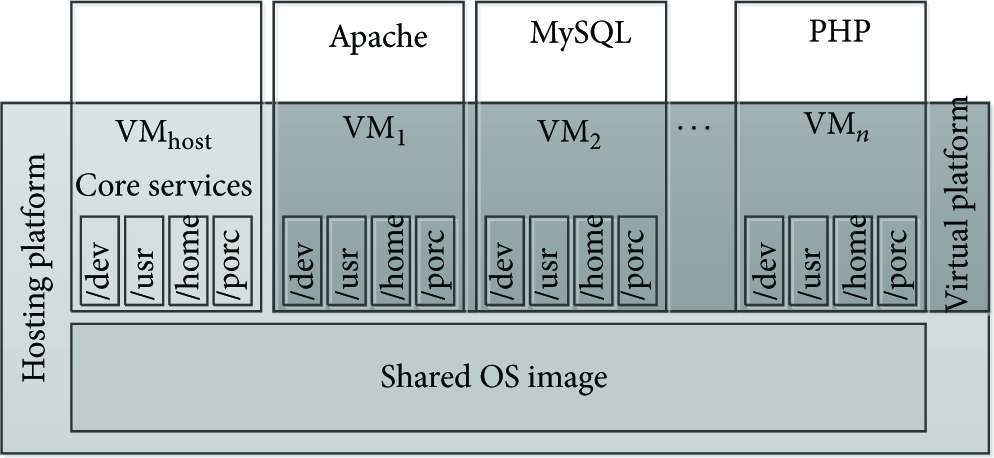
A container-based system provides a shared, virtualized OS image consisting of a root file system, a (safely shared) set of system libraries. Each VM can be booted, shut down, and rebooted just like a regular operating system. Resources such as disk space, CPU guarantees, and memory are assigned to each VM when it is created yet often can be dynamically varied at run time. To applications and the user of a container-based system, the VM appears just like a separate host [13]. Figure 6 schematically depicts the design.
OS-level virtualization overview.
As shown in Figure 6, there are several basic platform groupings. The hosting platform consists essentially of the shared OS image and a privileged host VM. This is the VM that a system administrator uses to manage other VMs. The virtual platform is the view of the system as seen by the guest VMs. Applications running in the guest VMs work just as they would on a corresponding noncontainer-based OS image.
Android Containers. Andrus et al. [3] presented a mobile container based on Android system, named Cells. Cells introduces a usage model of having one foreground virtual phone (VP) and multiple background virtual phones. This model enables a new device namespace mechanism and novel device proxies that integrate with lightweight operating system virtualization to multiplex phone hardware across multiple virtual phones while providing native hardware device performance. Cells virtual phone features include fully accelerated 3D graphics, complete power management features, and full telephony functionality with separately assignable telephone numbers and caller ID support. Cells does not require running multiple OS instances. It uses lightweight OS virtualization to provide virtual namespaces that can run multiple VPs on a single OS instance. Cells isolates VPs from one another and ensures that buggy or malicious applications running in one VP cannot adversely impact other VPs. Cells provide a novel file system layout to maximize sharing of common read-only code and data across VPs, minimizing memory consumption and enabling additional VPs to be instantiated without much overhead.
Cells use a VoIP service to provide individual telephone numbers for each VP without the need for multiple SIM cards. Incoming and outgoing calls use the cellular network, not VoIP, and are routed through the VoIP service as needed to provide both incoming and outgoing caller ID functionality for each VP. Cells uses this combination of a VoIP server and the cellular network to allow users to make and receive calls using their standard cell phone service, while maintaining per-VP phone number and caller ID features.
Actually, in Cells system architecture, each VP runs a stock Android user space environment. Each VP has its own private virtual namespace so that VPs can run concurrently and use the same OS resource names inside their respective namespaces, yet be isolated from and not conflict with each other. This is done by transparently remapping OS resource identifiers to virtual ones that are used by processes within each VP.
Advantages and Disadvantages. This solution offers several advantages.
(i) Reduced Overhead. Containers impose little overhead because they use the normal system call interface of the operating system and do not need emulation support from an intermediate-level VM.
(ii) Increased Density. More useful work can be done by applications because fewer resources are consumed by the complexity of full virtualization. Given the same machine, you can run more containers on it than virtual machines.
(iii) Reduced Sprawl. Because containers can share many resources with the host OS, upgrades and modifications to the underlying operating system propagate seamlessly to any containers sharing the underlying file system.
There are some drawbacks to containers.
(i) Reduced Flexibility. OS-level virtualization cannot host a guest OS different form the host, or a different guest kernel. For example, you cannot have a Windows container in a Linux host.
(ii) Decreased Isolation. Because the kernel of the underlying operating system is shared between containers, there is less isolation than with full virtualization.
4.2. Microkernel
The modern microkernel concept is captured in Liedtke's Minimality Principle: A concept is tolerated inside the microkernel only if moving it outside the kernel; that is, permitting competing implementations would prevent implementation of the system's required functionality [14]. The basic idea is to reduce the kernel code to fundamental mechanisms and implement actual system services in user-level servers. Microkernel features a minimum of functionality, typically scheduling, memory management, process synchronization, and IPC.
With virtual machine based on microkernel architecture, we can convert hardware resources to various real-time system services and deliver to client operating systems which run on virtual machine by mode of virtual devices. In this way, it can support real-time and non-real-time applications to run simultaneously and provide a universal and transparent interactive interface between non-real-time applications and real-time system functions. The microkernel approach leads to a system structure that differs significantly from that of classical operating system.
We have found lots of solutions are based on microkernel to virtualize a mobile device. Among them, Open Kernel Labs (OK-Labs) has been successfully and well known. It provides a microkernel derived from the L4 project with the ability of running multiple guest OSes, named OKL4 microvisor which has been deployed in more than 1.1 billion mobile devices.
OKL4 Microvisor. The OKL4 microvisor is a third-generation (3G) microkernel of L4 heritage (as indicated by the name). It grew out of our experience with large-scale commercial deployment of the OKL4 microkernel in mobile wireless devices and the growing demand for low-overhead platform virtualization in embedded systems [15]. In line with the goal of supporting virtualization with the lowest possible overhead, the microvisor's abstractions are designed to model hardware as closely as possible.
Specifically: (1) the microvisor's execution abstraction is that of a virtual machine with one or more virtual CPUs (vCPUs), on which the guest OS can schedule activities; (2) the memory abstraction is that of a virtual MMU (vMMU), which the guest OS uses to map virtual to (guest) physical memory; (3) the I/O abstraction consists of memory-mapped virtual device registers (vDRs) and virtual interrupts (vIRQs); (4) communication is abstracted as vIRQs (for synchronization) and channels. The latter are bidirectional FIFOs with a fixed (configurable per channel) buffer allocated in user space (you can run TCP/IP on a channel if you really want to).
The OKL4 microvisor is a clean, from-scratch design and implementation. It shares no code with the early commercially deployed version of the L4 microkernel (but shares code modules with the presently shipping OKL4 microkernel). It is less complex than earlier microkernels, which is one indication of an improved API.
In particular, the use of vIRQs as the communication primitive lead to dramatic simplifications compared to the synchronous IPC model traditionally used by L4 microkernels (even though that model had been significantly simplified over the years). As a consequence, it has no need for an “IPC fast path”—there is really only a single code path in the vIRQ implementation, and it is much shorter than that of any synchronous IPC primitive.
The microvisor has a total of 30 hypercalls. This is more than the typical number of system calls of L4 microkernels (between seven and twenty, depending on L4 version). However, L4 system calls tend to be heavily overloaded (the OKL4 microkernel version 3.0 system header files contain over 200 APIs) while the microvisor hypercalls are all simple.
Advantages and Disadvantages. This solution offers several advantages.
(i) Efficient Resource Sharing. Microkernel provides mechanisms for efficient sharing of resources. Arbitrary memory regions can be shared by setting up mappings between address spaces (providing high-bandwidth communication channels).
(ii) Flexible Scheduling. Microkernel allows the guest operating system to select the appropriate global scheduling priority which means it can run at a high priority when executing real-time threads and a lower priority when executing background tasks.
(iii) Enhanced Security. Microkernel mediates all resource access and communication in the system. A policy module controls who gets access to system resources and who can communicate with whom.
There are some drawbacks to microkernel.
(i) Device Emulation. Microkernel has to provide device support and emulation, an onerous requirement for mobile devices which provide increasingly diverse hardware devices. For example, we are not aware of any OKL4 implementations that run Android on any phones other than the dated HTC G1.
(ii) Poor IPC Performance. IPC is used to deliver interrupts to guest OS's interrupt handler and communicate with device drivers, and the IPC mechanism is used for communication and synchronization between any components of the system.
4.3. Hardware-Assisted Full Virtualization
ARM is now the dominant processor architecture for mobile devices and many other high-end embedded systems. Even the ARM architecture has evolved over the decades, ARM announced architectural support for virtualization to their Cortex-A15 processor in 2010.
The virtualization extensions to the ARM are superficially similar to those for x86, in that they provide a new processor mode and a number of features to improve performance [16]. The extensions only apply to nonsecure mode. They introduce a new processor mode, HYP mode, which is more privileged than the existing nonsecure kernel modes. This leaves the existing kernel and user modes for unmodified guest OSes and applications.
As shown in Figure 7, HYP mode is entered form other modes via a new instruction (hvc), and optionally on a configurable set of exceptions from user or kernel mode. It has banked registers, as well as additional hyp-only registers for system configuration and information on the event which caused entry of hyp mode. There is a hyp-only virtual machine identifier (VMID) register. TLB entries are tagged with the VMID, which supports coexistence of mappings from multiple guests and thus eliminates the need to flush the TLB on a world switch.

Modes of ARM with virtualization extensions.
Virtualization extensions offer instructions emulation. Load and store instructions are not inherently virtualization-sensitive but become sensitive when operating on privileged data (e.g., device registers). The hypervisor must decode such an instruction and emulate it. The overhead of emulation is not just the extra instructions executed (which include translating guest-physical to physical addresses) but also the D-cache miss generated when loading the offending instruction (despite the fact that it has already been fetched into the instruction register and the I-cache). ARM's emulation support in most cases eliminates both the load and the software decode, by keeping the relevant information in hypervisor registers (source or target registers, whether it was a load or a store, the size of the data item to be transferred, etc.).
Virtualization extensions also offer memory virtualization support, named second-stage translation. Similar to extended PTs on x86, ARM supports two-stage address translation: guest-virtual to guest-physical (called intermediate physical by ARM) followed by guest-physical to physical. On a TLB miss in non-hyp mode, the hardware page-table walker traverses first the guest and then the hypervisor PT and constructs a TLB entry representing the guest-virtual to physical translation. While this requires traversal of four levels of page tables, this can be reduced to three if the hypervisor uses 2 MiB superpages. Obviously, only a single translation stage is used when running in hyp mode.
KVM-on-ARM. KVM-on-ARM is the first hypervisor technology using the hardware virtualization extensions of ARM Cortex-A15 enabling multiple copies of operating systems and delivering near-native performance for server, consumer, and mobile market segments [17]. It was originally developed by Software Systems Lab, Columbia University. And now it is in collaboration with Virtual Open Systems, an innovative, agile, and dynamic start-up company.
The primary differentiating factor between KVM-on-ARM and other virtualization techniques is the rather simplistic implementation approach used by KVM-on-ARM. Most VMMs largely implement all major services like the scheduler, memory manager, and timers. This results in a fairly large and complicated code base. KVM-on-ARM, on the other hand, leverages the existing functionality in the Linux kernel and thus is comparatively smaller and much less complex. With the support of hardware-assisted, KVM-on-ARM does not carry the general performance overheads of the software virtualization techniques.
In the KVM-on-ARM-based approach, the host is not a hypervisor per say but happens to be a Linux kernel running directly on top of the hardware. The hypervisor is implemented as a kernel module and thus accesses the hardware through the Linux kernel interface. The guest operating system runs as a process on top of the host kernel. Different guest operating system instances are viewed as separate processes under the host kernel.
Advantages and Disadvantages. This solution offers several advantages.
(i) Hardware Support. This solution is the exclusive way that makes use of ARM hardware feature. This means it can reduce code size and increase reliability. Predictably, this solution will be the major way used in ARM-based machines, may be ARM server, not ARM mobile device.
There are some drawbacks.
(i) Poor Compatibility with Android. As we know, KVM is a module of Linux kernel and leverages most of kernel functionality. However, in user space, KVM must leverage QEMU to virtualize I/O device which is not compatible with Android system. We cannot image install a heavy-weight QEMU emulation in our mobile system.
4.4. Paravirtualization
Paravirtualization is a very mature technology used by Xen, a famous hypervisor in server field. It refers to a technique where the guest operating system is modified. Privileged instructions are replaced with calls to the hypervisor called hypercalls. The hypervisor layer provides a hypercall interface with services such as memory management and device usage and interrupts management to the guest. This ensures that all privileged mode activities are moved from the guest operating system to the hypervisor. Paravirtualization is usually faster than full virtualization. The performance gains are primarily achieved due to the lack of dynamic overheads associated with binary translation and trap and emulate. Since paravirtualization requires changes to the guest operating system code to avoid calls to privileged instructions, it obviates the need for trap and emulate and binary translation. Of course, this benefit comes with the additional cost of maintaining a modified guest operating system, but these costs are considered acceptable because paravirtualized systems are shown to deliver performance close to native systems.
One of the best features of the Xen implementation of virtualization is in the way I/O is handled: Xen proposes a concept of a privileged VM responsible for dealing with those operations, named as domain 0. This VM links the simplified interfaces that appear to the VMs as the real native drivers by requiring no emulation whatsoever. The concept proved to be so good that even VMware adopted it in newer versions of ESX server by implementing paravirtualized network drivers.
Xen on ARM. Xen on ARM is used to be one of leading paravirtualization solutions for ARM-based mobile devices. This project is led by Samsung company [18] to improve security and fine-grained access control by isolated multiple virtual machines under Xen hypervisor. However, we can see from its official source that this project has stopped updating since 2010. With ARM beginning to enter the high-performance server world, virtualization support is very critical and ARMv7 hardware has processor extensions for supporting hardware virtualization. Citrix has brought the Xen hypervisor to the ARM Cortex-A15, which uses the ARMv7 virtualization extensions. That means Xen has turned attention to hardware virtual machine (HVM) support, rather than paravirtual machine (PV).
EmbeddedXEN. EmbeddedXEN is an academic project of the XEN.org research group where the main targets are embedded real-time applications. EmbeddedXEN results from several years of research in the field of ARM-based CPUs and hypervisor technology based on XEN. The overall architecture has been revisited in order to support the hardware diversity of ARM CPUs platforms and provide an excellent framework to deal with a native OS and a third-party OS cross-compiled from a different ARM CPU. EmbeddedXEN provides a virtualized hardware interface to the third-party OS. EmbeddedXEN has been initiated and is under current development at the Reconfigurable Embedded Digital Systems (REDS) Institute of HEIG-VD, Switzerland [19].
In terms of architecture, EmbeddedXEN creates a page table for each guest OS when the guest domain is created to support virtual memory systems. Although some RTOSs do not use any virtual memory technique, using the physical memory itself, the hypervisor can map the physical memory allocated by a guest RTOS into the same virtual memory, statically. At run time, the guest OS is executed as if it was using a physical memory, being isolated one from another by the page table provided by the hypervisor. This is a very simple approach that enables to use unmodified OSs with the virtualization solution although it may cause paging failures.
Advantages and Disadvantages. This solution offers several advantages.
(i) Mature Technology. As we know, Xen is a very mature virtualization technology. So porting it to ARM platform seems not hard. It is easy to get a great help from the Xen community.
There are some drawbacks.
(i) Not Fit for Mobile Device. Actually, solutions based on paravirtualization especially the Xen project will be very mature. But we think it is not fit for mobile device. It has a complex configuration which is not easy for common user and it needs to modify the guest OS code which means it cannot support several closed-source systems, like iOS, windows phone, and so forth.
5. Performance Comparison
We have carried out a series of experiments to evaluate the performance of these different solutions described in Section 4. To make a comparison, we choose out their mutual features to test. We built three open source project platforms representing correspondingly those solutions: CodeZero [20] for microkernel solution, KVM-on-ARM for hardware-assisted full virtualization solution, and EmbeddedXEN for paravirtualization solution. However, Cells, the only existing solution based on container technology, is not compatible with our experiment platform until the time we carry out these experiments. So it is not able to obtain the experiment data of container solution.
5.1. Experiment Environment
All of our results are obtained using Urbetter S5PV210 board with ARM Quad-core CPU, 2 GB RAM, and 8 GB ROM. The experimental environment of our platform is as shown in Table 1.
Experiment environment.

5.2. Evaluation Results
All experiments to evaluate the performance have been done on end-user experience with no hard real-time constraints. Our approach to track progress toward this goal involves continuous benchmarking with workloads that include the following.
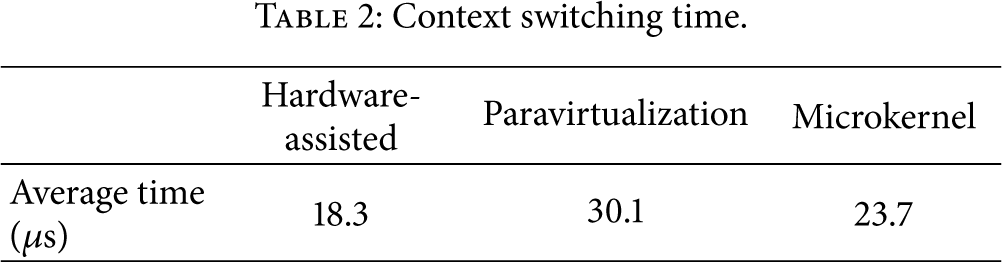
Context Switching. We measured context switching time between guest OSes and host OS. A context switch is the switching of the CPU from one process or thread to another. When the VMM receives a hardware interrupt, it generally suspends the progression of the current process and starts servicing the interrupt. This is an important feature for mobile software which means a good user experience.
As shown in Table 2, hardware-assisted solution has the fastest switch speed. The reason may be that new ARM hardware features help a lot in accelerating the store/read context process. Then the microkernel solution gets the second place which embodies the advantages of microkernel. Paravirtualization solution does not have superiority in context switching; so it has the lowest switch speed.
Context switching time.
Microbenchmarks. We used the benchmark programs, which are basically equivalent to the fork + exec, fork + exit, pipe, and syscall programs included in the LMbench benchmark suite. We show the result of comparing the execution speed in Table 3.
Preliminary performance.
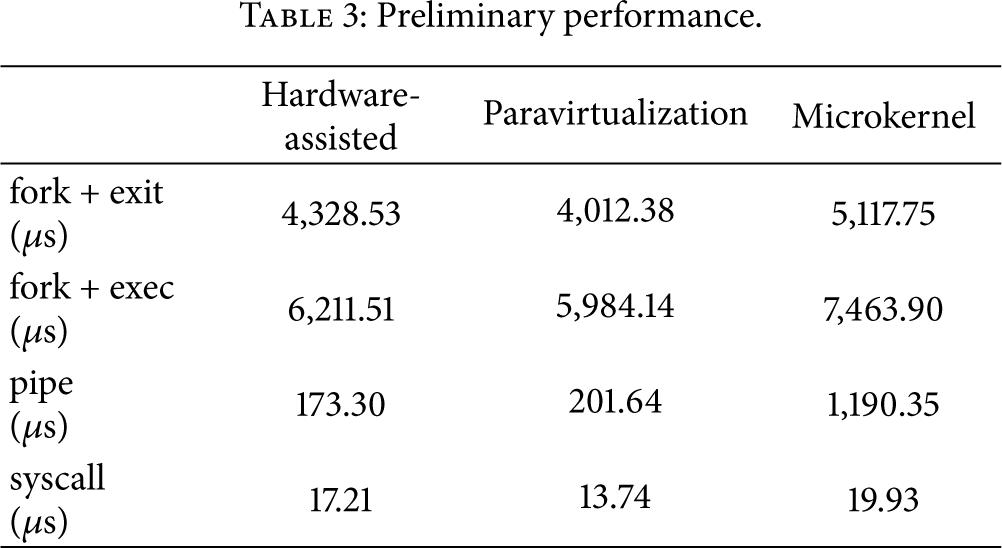
Table 3 shows that paravirtualization solution gets relatively good performance and microkernel solution gets relatively bad performance. This is because paravirtualization has the shortest execution path and microkernel has the longest. All benchmark programs are executed in the guest OS, and paravirtualization solution and microkernel solution need to run the modified guest OS while hardware-assisted full virtualization solution runs the stock guest OS.
Macrobenchmarks. To see the virtualization's performance impact on common operations in mobile phones, we compared UI loading time, codec performance, and image file saving time. For UI loading test, we used Qtopia installed at NOR flash memory. We prepare 100 files whose size are distributed from 10 KB to 5 MB to test image file saving and we measure the time taken to save all those image files from a NFS server to NAND flash memory. For codec tests, WMV stream encoder/decoder is used.
Table 4 tells us that microkernel solution has the best UI loading and image saving performance because of its shorter I/O handle logic. However, this solution has the worst encoding rate and decoding rate because of its complicated handle path in dealing with compute-intensive tasks.
UI performance evaluation.

Scalability Analysis. To analyze the scalability performance, we measure the CPU utilization, memory usage, and storage usage with the number of concurrent VMs (n) increasing. We test five cases:
(1) CPU Utilization Comparison. From Figure 8, we can see microkernel does not have a good scalability because when the number of VMs increases CPU utilization grows heavily. On the contrary, Paravirtualization gets a relatively good result.

The results of CPU utilization experiment.
(2) Memory Usage Comparison. See Figure 9.

The results of memory usage experiment.
From the results, we can know that microkernel gets the most outstanding performance in memory usage and then is the full virtualization solution. Paravirtualization is not the right choice when you only have limited RAM.
(3) Storage Usage Comparison. Figure 10 shows that microkernel uses the least storage while paravirtualization solution occupies the most. These three solutions grow stably while the number of VMs increases. So when it comes to storage usage, all these 3 solutions have linear scalability.

The results of storage usage experiment.
6. Conclusions and Future Work
Virtualization of mobile smart devices is becoming a more and hotter research point. In our research, we find many big IT companies such as VMware, OK Labs, Samsung, Citrix, Wind River, and Red Bend have changed attentions on this field. In this paper, we described what mobile virtualization is and the benefits it brings. We do this work more detailed than others. As far as we know that we are also the first to classify existing works as four kinds of solutions: containers, microkernel, hardware-assisted full virtualization, and paravirtualization. We introduced these solutions in detail and talked about their advantages and limitations. At last, we built an experiment platform and carried out a series of performance evaluation between three open source projects.
Our work is in progress and we research deeply on containers technology. We believe it will be a suitable solution for mobile devices because of its light-weight and configuration. We will continue this research and perform comprehensive evaluations. We plan to develop a well user experienced platform to support multiple isolated virtual domains running on an Android system.
Footnotes
Conflict of Interests
The authors declare that there is no conflict of interests regarding the publication of this paper.