




Abstract
This paper introduces a pressure-sensitive text input system that provides an easier and faster method for entering Korean in the rapidly expanding smartphone environment. In order to evaluate the effectiveness of the proposed system, a pressure-sensitive text input system is implemented and three Korean input experiments are conducted on mobile phones from the two largest manufacturers in South Korea (Samsung and LG). Whereas conventional Korean input methods used in Samsung and LG mobile phones require multiple touches for entering characters such as double consonants and diphthongs, the pressure-sensitive text input method allows the user to enter them with a single touch. Experimental results confirm that the proposed pressure-sensitive Korean input method was effective in reducing the number of touches required for entering consonants for Samsung's text input method (47% reduction) and for entering vowels for LG's text input method (20% reduction).
1. Introduction
As with conventional telephones, early mobile phones were primarily used as a means of communication. However, with rapid developments in electronics and telecommunication, mobile phones are evolving into cutting-edge smartphones that offer convergence of a wide range of digital technologies, including text messaging, games, digital camera, multimedia player, wireless Internet (Wi-Fi), and DMB. As mobile phones become more intelligent and smaller with sophisticated operation, factors for increasing user-friendliness and efficiency have become important research topics [1].
Advent of the Internet increased the use of email and online chatting. Similarly, one of the value-added services of the mobile phone that has been on constant rise is text messaging, which is based on the information input by users (characters).
With the rapid dissemination of smartphones, extensive research is being conducted on touchscreen-based text input methods. In addition to touch inputs, a touchscreen provides flexible user interface applications, such as continuous gesture inputs and a number of input methods have been proposed. These input methods can be categorized into handwriting recognition, gesture-based text input, and soft keyboard-based text input.
Handwriting recognition uses conventional pattern recognition algorithms to recognize handwriting and poses two major problems. The first problem is relating to identifying and associating significant groups among the continuous point inputs from the recognizer and the second one is recognizing specific characters using the identified groups. To resolve these issues, several methods have been proposed, including Unistrokes [2], Graffiti [3], MDTIM (minimal device-independent text-input method) [4], and EdgeWrite [5]. However, there are limitations in terms of input speed because several strokes are required to constitute a single character.
Gesture-based text input allows the user to freely input characters without being confined to a structure and proposed methods include Cirrin [6], Quikwriting [7], T-Cube [8], and Swype [9]. A major drawback of gesture-based text input is that characters must be input with reference to the key layout on the screen and the user must always focus on the input character, making it difficult to get accustomed to the input mechanism.
Also referred to as virtual keyboard-based text input, soft keyboard-based text input allows the user to type characters by touching parts of a virtual keyboard presented on the screen. Because most users are familiar with the QWERTY system used in desktop computers, popular smartphones such as Galaxy S [10] and iPhone [11] have implemented the QWERTY system on the touchscreen for the soft keyboard input system [12].
Although a number of studies are being conducted on inputting characters for touchscreen-based smartphones, most of today's smartphones have adopted input methods used in traditional feature phones. However, conventional text input methods cause frequent typing errors due to the small button areas in the touchscreen-based smartphone environment. Furthermore, the input error rate drastically increases when the user is trying to type characters while moving because unlike feature phones, there is no physical sense of pressing buttons in smartphones.
While there is extensive research being performed to resolve these issues on appropriate text input methods for smartphones, most deal with Latin alphabet and very little study has been carried out on Korean input systems.
Korean language has two distinct features: one is that it consists of 24 phonemes (14 consonants and 10 vowels) and the other is that a single syllable is structured as a combination of initial, medial, and final sounds [13]. These traits distinguish Korean from the two-part (consonant-vowel) combinations in Latin alphabet and from the graphic forms of Chinese and Japanese characters. Because there are numerous character possibilities as a result of combining initial, medial, and final sounds, inputting Korean is more complex than other character sets. Currently there are a variety of ways to input Korean on mobile devices including mobile phones. These various input ways have made users inconvenient because they need to learn the input method on different device (phone).
Moreover, device manufacturers are offering different layouts for inputting Korean, leading to further compromise in user-friendliness (a user has to become accustomed to new character layouts and input mechanisms when using mobile phones from different manufacturers).
Government-led standardization was introduced to resolve these issues. In 1998, Korean telecommunications technology association (TTA) held a public invitation and reviewed about 20 keypad layouts in an attempt to standardize Korean input. In 2003, Korean ministry of information and communication (MIC) announced a standard Korean input model, which has failed to take effect due to opposition from manufacturers, difficulty in execution, and insufficient means of objective evaluation [14, 15]. In turn, standardization of the Korean input system has been slow compared to other writing systems such as Latin alphabet and Japanese characters.
Two Korean input methods widely used in mobile phones available in Korea are Samsung's Korean input method called Cheonjiin [10] and LG's Korean input method called Naratgeul [16], which are different in terms of character layouts, input mechanisms, and the number of button touches or presses required to input a specific character [17].
This paper introduces a study that involves using pressure-sensitivity for improving user experience in the nonstandardized Korean input environment for smartphones explained above. Three Korean input experiments are conducted to examine how pressure-sensitivity affects inputting Korean into smartphones: a simple text input system based on pressure-sensitivity is implemented and applied to Korean input methods used by two major mobile phone manufacturers in South Korea (Samsung and LG) to evaluate the benefits of the proposed system. Experimental results are given and discussed.
2. Widely-Used Korean Input Methods
Two widely-used methods for entering Korean into mobile phones are Samsung's Korean input method called Cheonjiin (Method 1 hereunder) and LG's Korean input method called Naratgeul (Method 2 hereunder).
2.1. Method 1: Samsung's Korean Input Method for Samsung Mobile Phones
Method 1 allocates three types of strokes for forming vowels in Korean—“·”, “ ”, and “
 ”—to each key and the user presses them in the writing sequence to enter a Korean character. Figure 1 displays the keypad layout of Method 1 used in Samsung mobile phones.

Keypad layout of Method 1 on Samsung mobile phone.
Twenty-one vowels, consisting of simple vowels and diphthongs, are input by combining the three elements (“·”, “ ”, and “
 ”) allocated on 1~3 buttons. Consonants, consisting of common sounds (soft and tender sounds: “
 ”, “
”, “ ”, “
”, “ ”, “
”, “ ”, and “
 ”), aspirated consonants (coarse and powerful sounds: “
 ”, “
”, “ ”, “
”, “ ”, and “
 ”), and voiced sounds (sounds made by vibrating the vocal cords: “
 ”, “
”, “ ”, “
”, “ ”, “
”, “ ”, and + 21 vowels) are allocated on 4~0 buttons, two consonants on each button. The user can enter a specific character by toggling between the two consonants assigned to a button.
Method 1 uses time-out and time-kill for continuous text input. For consonants, 3 sounds are assigned to each key and the user presses the key several times to select a particular character. Vowels are entered by combining the three elements (“·”, “ ”, and “
 ”). Using this method, vowel “
 ” can be entered by pressing “
 ”→“·”→“·”→“
 ”→“
”→“ ”. Tense sounds can be entered by pressing simple consonant buttons (“
 ” “
” “ ” “
” “ ” “
” “ ” “
” “ ”) three times. For example, “
 ” can be entered by pressing the “
 ” button three times (“
 ”→“
”→“ ”→“
”→“ ”).
”).
The advantages of Method 1 are that it provides intuitive consonant inputs and easy vowel formations by combining “·”, “ ”, and “
 ”. However, vowels are entered using a multiple-tap approach, which increases the number of button presses. (e.g., inputting “
 ” requires 5 presses “3”→“2”→“2”→“1”→“1”). Moreover, when the final sound of a character is identical to the initial sound of the subsequent character or is assigned to the same key, consonant collision occurs, preventing continuous text input (e.g.:
  , etc.). To avoid this, the user has to press the direction key to insert an isolation signal or wait for 2 seconds (time-out), prolonging the input process.
2.2. Method 2: LG's Korean Input Method for LG Mobile Phones
One of the distinct characteristics of LG's Method 2 is that vowels and consonants are modified to form characters. Figure 2 displays the keypad layout of Method 2 used in LG mobile phones.
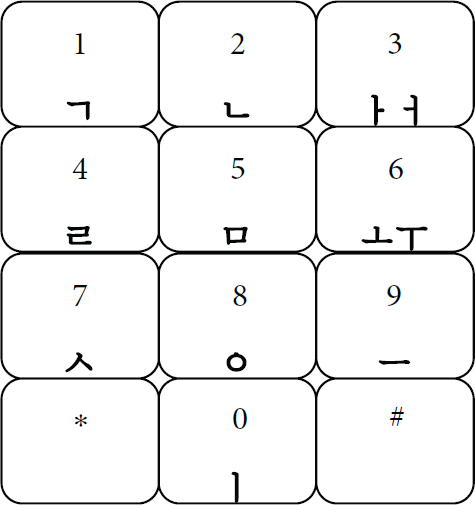
Keypad layout of Method 2 on LG mobile phone.
Inputting Korean with LG's Method 2 is based on forming combinations using “*” and “#” buttons.
Six basic vowels are assigned to the right column (3, 6, 9) and the 0 button in groups of 1 or 2 characters and all of the vowels are formed by combining one or more of the vowel buttons (e.g., “ ” + “
” + “ ” = “
” = “ ”) or by pressing the “*” button (e.g., “
 ” + “*” = “
 ”).
”).
Each of six basic consonants was assigned to keys 1, 2, 4, 5, 7, and 8. Other consonants are entered using the “*” and “#” buttons to form aspirated consonants (“ ”, “
”, “ ”, “
”, “ ”, and “
 ”) and tense consonants (“
 ”, “
”, “ ”, “
”, “ ”, “
”, “ ”, and “
 ”).
”).
Pressing the “*” button after “


 ” creates “


 ”. For example, “
 ” + “*” = “
 ” and in the case of “#”, “
 ” + “#” = “
 ”. Although Method 2 requires less button presses than Method 1, there are a number of consonants not shown on the keyboard, requiring more time to learn and become accustomed to the mechanism. Furthermore, the “*” and “#” buttons with long finger moving distances are frequently used, prolonging the input process. Table 1 summarizes the characteristics, pros, and cons of Method 1 and Method 2 Korean input methods.
Characteristics, pros, and cons of Method 1 and Method 2.

3. Proposed Pressure Sensing-Based Korean Input Method
This section describes the pressure-sensitive text input keypad system implemented to use pressure for inputting characters. Whereas conventional text input methods use coordinate values and touch duration detected on the touch panel as input data, the method proposed in this paper also uses pressure value as additional input data. The block diagram of the proposed pressure-sensitive text input keypad system is shown in Figure 3.

Block diagram of the proposed pressure-sensitive text input keypad system.
Strain gauges are used as sensors to measure pressure. Because a strain gauge measures minute variations in physical dimensions and strain on the surface, its drawback is that it is also sensitive to temperature. In order to measure pressure while addressing the drawback, the following three aspects were examined:
amplifier circuit, panel size, arrangement of strain gauges.
The structure of the amplifier circuit is very important because a strain gauge measures pressure variation based on minute changes in voltage. Using INA122 [18] and AD524 [19], performances such as amplification ratio, maximum amplification, offset adjustment, and noise elimination were examined for each constructed amplifier circuit. Although the amplification ratios and maximum amplifications of the two circuits were similar, the final amplification circuit was built with AD524 because it showed better performance in terms of offset adjustment and noise elimination than INA122.
In order to design a pressure-sensitive keypad, type of strain gauges, their arrangement, and the size of the panel need to be determined. To make the decisions, performance experiments were conducted with various strain gauges (120 Ω with 0.5 mm, 120 Ω with 5 mm, and 1000 Ω with 5 mm), arrangements (diagonal, cross, and right-left), and panel sizes (4, 7, and 9 inches), as shown in Figure 4. The experimental results are summarized in Table 2.
Experimental results obtained by various strain gauge setups for designing a pressure-sensitive keypad.

Highest: (90%)
Medium: (70%)
High: (50%)
Low: (30%)
Lowest: (10%)

Various strain gauge setups for designing a pressure-sensitive keypad.
As shown in Table 2, 1000 Ω strain gauge was inadequate, while both 120 Ω gauges were applicable. In terms of panel size, 7 and 9 inch panels were found to be inadequate for the proposed system because sensitivity decreased significantly toward the center of the panel (this result could have been caused by the fact that the poly carbonate material used for the experiment is very flexible, causing the center of the panel to sag. Using a sturdier panel in future research can potentially improve performance). Diagonal arrangement of strain gauges caused problems for every panel size and sensor type. Touching areas surrounding a strain gauge changed the curvature of the attached surface, decreasing the overall sensitivity. When the strain gauges were arranged in a cross shape, sensitivity and sensing patterns in the center of the arrangement were good, but as in the case of diagonal arrangement, the curvature of the sensor was deformed in corner areas and reversed the values, making the arrangement unstable. The right-left arrangement of strain gauges yielded positive measurements in all areas. However, inaccurate data were measured when the sensors (strain gauges) on either side were positioned too closely or too far apart. Experimental results indicated that attaching strain gauges 1/4 distance from the top or bottom of the panel was appropriate. In addition, sensitivity toward the center decreased in large panels, which was observed to be affected by the poly carbonate material, as explained earlier. From the above results, finally, the prototype of the proposed system was implemented using 120 Ω-0.5 mm strain gauges attached in a right-left arrangement on a 4 inch panel, as shown in Figure 5.
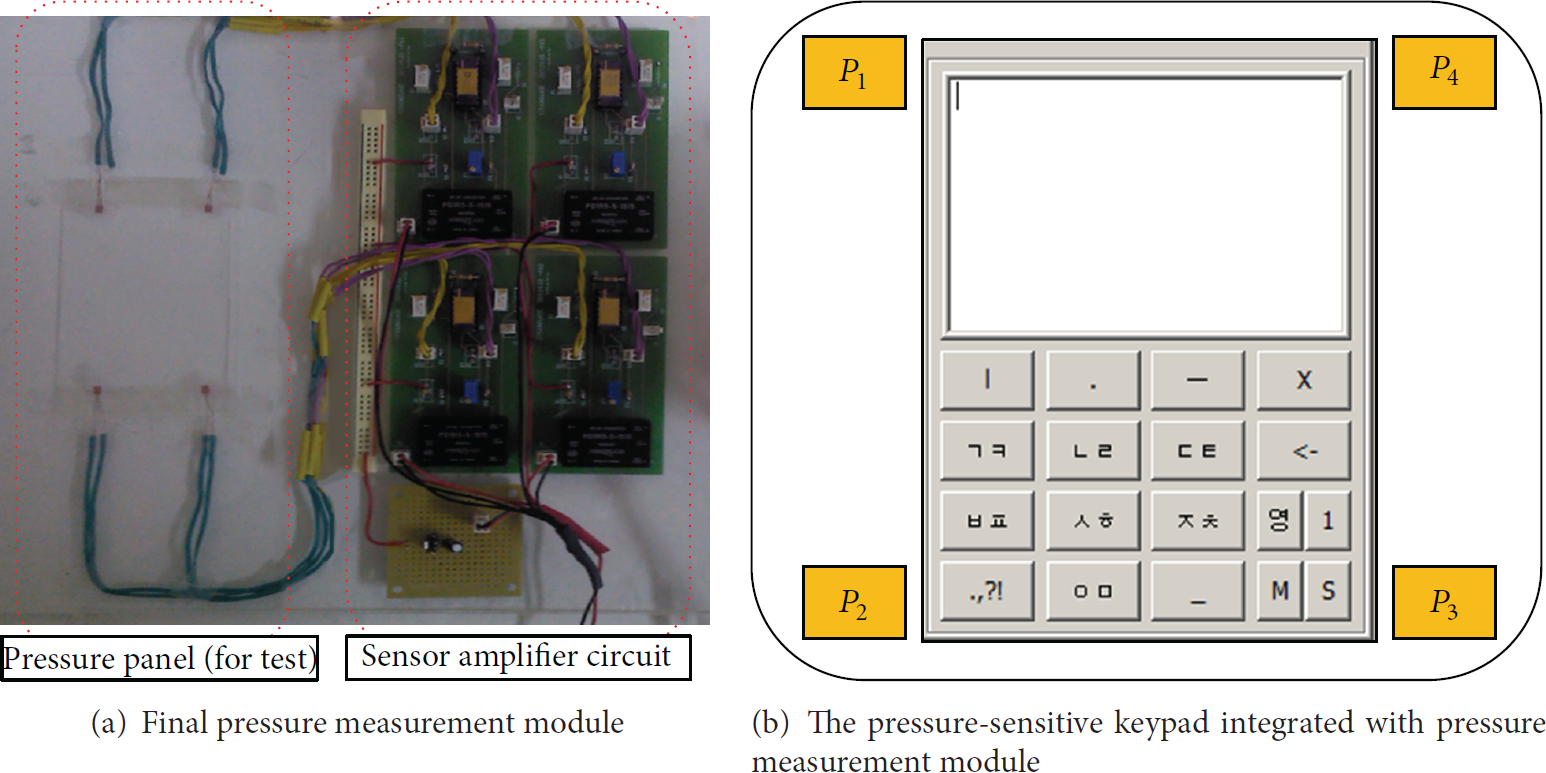
The prototype of the proposed system.
Prior to user experience evaluation, performance of the implemented system was analyzed for various pressure levels and points on the panel. The results are shown in Figure 6. Figure 6(a) displays the pressure levels detected by the strain gauges when the panel was pressed with low, medium, and high intensity for 500 ms. As shown in the graph, accurate pressure levels were measured according to intensity (low: 1 [V], medium: 2 [V], and high: 3 [V]), confirming that user's touch pressure levels can be used as input data. Figure 6(b) displays the results of a test conducted to examine whether pressure levels can be measured regardless of position on the panel. The graphs indicate the pressure levels detected when various points on the panel (four corners and the center) were touched in the order of (1) upper-left (P1) → (2) lower-left (P2) → (3) lower-right (P3) → (4) upper-right (P4). Test results confirm that touch pressure from every part of the panel can be used as input data. The final pressure level is determined by averaging the data sensed from the four sensors (P1, P2, P3, P4).

Pressure measurement test of the implemented pressure-sensitive keypad system.
The results of these tests confirmed that the pressure-sensitive keypad system implemented for this study can be used as a novel text input keypad that uses pressure level as additional data. The next section examines how adding pressure-sensitivity to text input methods used in Samsung and LG mobile phones affects the user experience of entering Korean.
4. Experiments for User Experience Evaluation
This section examines how pressure-sensitivity affects inputting Korean into smartphones. To do so, a simple pressure-sensitive keypad input system is implemented and applied to Korean input systems used by two major mobile phone manufacturers in Korea (Samsung and LG) for user experience evaluation.
4.1. Experimental Environment and Protocol
Subjects were asked to perform identical tasks using both text input system without using pressure (conventional methods: Method 1 and Method 2) and text input system applying pressure-sensitivity to the conventional methods (proposed methods), respectively. Evaluations were made on a number of touches for objective analysis (the number of touches is not affected by skill of user). In order to examine the effects of incorporating proposed pressure-sensitivity on the user experience of inputting Korean, three experiments were performed as follows.
(A) Experiment 1: Consonant Input. Nineteen consonants were input using both conventional method and proposed method and the number of touches required was recorded. Method 1 and Method 2 were used as conventional method. The conventional methods integrated with our proposed system were considered as the proposed methods. Method 1 with the proposed system was named as Method 3–1 and Method 2 with the one was as Method 3-2 for convenience, respectively.
(B) Experiment 2: Vowel Input. Twenty-one vowels were input using both conventional method and proposed method (four methods such as Method 1, Method 2, Method 3–1, and Method 3-2 were used) and the number of touches required was recorded.
(C) Experiment 3: Sentence Input. A sentence (National Anthem of Korea, 52 characters) was input using both conventional method and proposed method (four methods such as Method 1, Method 2, Method 3–1, and Method 3-2 were used) and the number of touches required was recorded.
4.2. Experimental Results and Discussion
(A) Results of Experiment 1 (Consonant Input). In the first experiment, numbers of touches were compared for inputting 19 consonants. Experimental results indicate that the proposed method (Method 3–1) using pressure-sensitivity to input consonants decreased the number of touches required by 47% (
Number of touches required for inputting consonants.


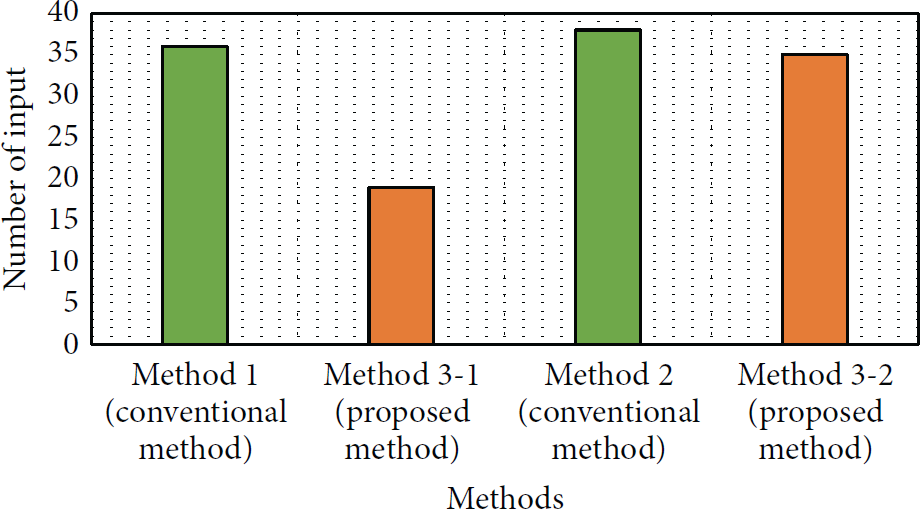
Comparison of numbers of touches required for inputting consonants.
(B) Results of Experiment 2 (Vowel Input). In the second experiment, numbers of touches were compared for inputting 21 vowels. Experimental results indicate that the proposed method (Method 3–1) using pressure-sensitivity to input vowels decreased the number of touches required by 10% (
Number of touches required for inputting vowels.


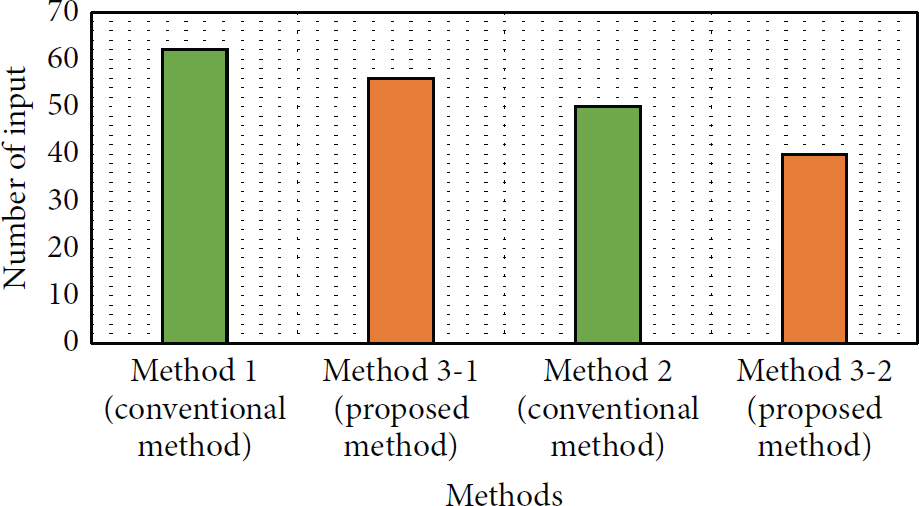
Comparison of numbers of touches required for inputting vowels.
(C) Results of Experiment 3 (Sentence Input). In the third experiment, numbers of touches were compared for inputting a sentence (National Anthem of Korea, consisting of 52 characters). Experimental results indicate that the proposed method (Method 3–1) using pressure-sensitivity to input a sentence decreased the number of touches required by 13% (
Number of touches required for inputting a sentence.


Comparison of number of touches required for inputting a sentence.
Whereas conventional text input methods (Methods 1 and 2) involve repeated touches to enter characters, the proposed system integrated with pressure sensing (Methods 3–1 and 3-2) uses three levels of pressure as data input. In Samsung mobile phones, a key must be touched twice to change the characters and in LG mobile phones, a button is selected and another key is touched to change the character. Both of these methods require additional keypad touches, which decrease the input speed and undermine user-friendliness. In comparison, the method proposed in this paper uses the pressure applied on the keypad as characters are entered.
In Experiment 1, there was a substantial decrease in the number of touches required when pressure-sensitivity was incorporated into Method 1 because conventional Method 1 requires that the user touch a key up to two more times to change the character. Whereas conventional Method 1 involves three-step touches (e.g., one, two, and three touches of the “ ” key allows the user to input “
 ”, “
”, “ ”, and “
 ”, resp.), using pressure-sensitivity requires only a single touch (“
 ” for low pressure, “
 ” for medium pressure, and “
 ” for high pressure), reducing the number of touches required by one or two. The reason why the reduction ratio by Method 3-2 compared to the one by Method 3–1 was relatively small was because Method 3-2 required additional buttons (or touch) for adding stroke (e.g., “
 ”→“
”→“ ”) and double consonant (e.g., “
 ”→“
”→“ ”).
”).
In Experiment 2, there was a substantial decrease in the number of touches required when pressure-sensitivity was incorporated into Method 2 because conventional Method 2 requires that the user touch a key up to twice to change the character. Whereas conventional Method 2 involves two-step touches (e.g., one and two touches of the “ ” key allows the user to input “
 ” and “
 ”, resp.), using pressure-sensitivity requires only a single touch (“
 ” for low or medium pressure and “
 ” for high pressure), reducing the number of touches required by one. The reason why the reduction ratio by Method 3–1 compared to the one by Method 3-2 was relatively small was because Method 3–1 required additional buttons (or touch) for inputting vowels (e.g., “
 ” + “·” = “
 ”).
”).
In Experiment 3, the number of touches was highly reduced when inputting a complete sentence including double consonants (Table 3) and diphthongs (Table 4). The average number of touches required to input double consonants using the proposed method (Method 3–1 and Method 3-2) was reduced by 36% compared to the one required to input double consonants using the conventional methods (Method 1 and Method 2): the average number of touches by the conventional methods was 2.8, whereas the average number of touches by the proposed method was 1.8. In addition, the average number of touches required to input diphthongs using the proposed method (Method 3–1 and Method 3-2) was reduced by 14% compared to the one required to input diphthongs using the conventional methods (Method 1 and Method 2): the average number of touches by the conventional methods was 3.6, whereas the average number of touches by the proposed method was 3.1.
Experimental results indicate that using pressure-sensitivity significantly decreases the number of touches required for consonant inputs in Samsung's Method 1 (47%) and all of the consonants can be entered with a single touch. As for LG's Method 2, the benefit was in the number of touches required for inputting vowels, which decreased by 20%. For inputting a complete sentence, using pressure-sensitivity reduced the number of touches by about 10%, demonstrating that the pressure-sensitive text input method is more efficient than conventional methods.
5. Conclusion
This paper proposed a pressure-sensitive text input system that provides an easier and faster method for entering Korean in the rapidly expanding smartphone environment. In order to evaluate the effectiveness of the proposed system, a pressure-sensitive text input system was implemented and three Korean input experiments were conducted on mobile phones from the two largest manufacturers in Korea (Samsung and LG). Whereas conventional Korean input methods used in Samsung and LG mobile phones require multiple touches for entering characters such as double consonants and diphthongs, our proposed pressure-sensitive text input method allows the user to enter them with a single touch. Experimental results confirmed that the proposed pressure-sensitive Korean input method was effective in reducing the number of touches required for entering consonants for Samsung's Method 1 (47% reduction) and for entering vowels for LG's Method 2 (20% reduction). In the case of entering a complete sentence, the number of touches required decreased by about 10%, demonstrating that the pressure-sensitive text input method is more efficient than conventional methods. However, the pressure-sensitive method can potentially cause inaccurate inputs because each user recognizes pressure levels (low/medium/high) differently. Therefore, further research is required to establish the reference for pressure levels (low/medium/high). Furthermore, feedback based on smartphone's vibration capability is likely to increase input speeds and enhance user-friendliness.
Footnotes
Conflict of Interests
The authors declare that there is no conflict of interests regarding the publication of this paper.