




Abstract
We realized a real space-based virtual aquarium equipped with a multiview function that provides images for users and audiences at the same time through motion tracking sensors. A virtual reality system needs more natural and intuitive interfaces so as to enhance users' immersion. We attach markers on users and camera devices in a real space designed in the one-to-one size as the virtual space to trace user and camera motions, which is reflected in real time to generate virtual world images. These images are transmitted to the user's immersing image devices. Also, the system allows audiences to share experiences by providing them with virtual synthetic images from a third-person perspective including a user after taking the user in the real space with a camcorder on which motion tracking markers are attached. For this, the system provides the functions of marker-based motion tracking with sensors, recognition of user's motions, real-time actual image rendering, and multiview to realize a system to simulate more intuitive and natural virtual space interactions, which can be used for the construction of motion-based realistic/experiencing systems, which increasingly attract interest.
1. Introduction
The computer graphics industry has provided images with amazing quality owing to rapid development of the graphic-exclusive hardware, the card only for graphics, since it was fully used in the entertainment field. In particular, in the field of computer games, SEGA created a surprising sensation with the opening of the first 3D fight action game, “Virtual Fighter,” in 1993. It gained enormous popularity with the setup of free perspectives from which users feel actually engaged in the game and realistic hitting senses beyond the simple 2D image and scenes from a fixed viewpoint. Users are satisfied with their achievements in virtual spaces as their characters freely walk around in virtual spaces to carry out their given missions owing to the combination of virtual reality, a computer graphic technology, with games.
In addition, user interfaces for interaction in virtual reality have evolved. Early virtual reality-based games enabled interactions by assigning functions to combinations of the direction stick and buttons of a joystick, but natural immersion was difficult to expect as it was an interface hardly related to virtual reality. Though interfaces using hardware to realize car drive controlling environments including an accelerator, a brake pedal, and a driving wheel in virtual reality like a racing game were introduced, they were limited to particular virtual reality. Users expected more natural reality.
According to such a trend, virtual reality-based contents experienced simply with eyes and hands have evolved into interfaces with bodily interactions using various sensor technologies. A game, which adopted an interface that allows users to step on sensors installed on the bottom while dancing to music, caught enormous popularity rapidly, and then games using motion sensing sensors like cameras or magnetic sensors were out to the market one after another.
Nintendo gave the world Wii, which adopted a remote-control type control interface called Wii remote control. It allowed users to control virtual environments with their motions taken from the remote control held on their hands actually escaping from a simple-form joystick. Microsoft's Kinect, different from existing interfaces, is equipped with a camera module to sense users' motions with a motion capture device, on the basis of which games run. However, as it has sensors on a fixed position, there are spatial limitations, and it is insufficient in realizing near-actual free motions.
Motion capture equipment began to be adopted to express precise and natural movements of characters in virtual reality. Motion capture equipment is classified into mechanical/gyro equipment and optical equipment. The former installs potential meters on a performer's joints to abstract the rotational motion values of the joints, while the latter attaches markers on a performer's joints and films them with 6~8 cameras to analyze, track, and capture the 3D motions. The optical motion capture equipment in turn is classified into active marker and passive marker equipment. The former has luminous sensors in its markers, while the latter uses infrared light reflecting markers. The early equipment price has greatly lowered along with the development of the technology, and it has been made easier to construct a system employing motion capture equipment.
We try to get information about the user and camera motions on the basis of marker-based optical motion tracking sensors. We provide images reflecting users' interactions based on that information with virtual spaces according to their eye movements and gestures. Also, in order to allow audiences to feel the interactions between users and the virtual reality, we realized a real space-based virtual reality system equipped with a multiview function that can provide images for users and audiences at the same time. Then, the paper is organized as follows. Section 2 introduces virtual reality techniques and an experiencing system based on them. Section 3 accounts for the composition of the whole proposed system and the method to realize it. Section 4 introduces the actual composed system. The study is concluded in Section 5.
2. Previous Studies
2.1. Virtual Reality (VR)
Virtual reality (VR), meaning the technology that uses computers to provide a specific environment similar to the real one, stimulates users' five senses to provide them with spatial and temporal experiences similar to the real ones [1]. Users not only are immersed in virtual reality, but also can interact with virtual reality through various interfaces. VR can be classified into three types, that is, monitor-based VR, projection-based VR, and head-based VR [1]. The monitor-based VR, the simplest form VR system, uses common monitors. Monitors that can be purchased in market are economical and easy to use while providing relatively high resolutions.
However, it is a less immersive VR than any other VR types. The projection-based VR provides great images for users in a way that allows users to be more immersed by increasing the field of view. The increased field of view (FOV) can provide reality experiences for users but has problems of limitations in spaces for image projection. This is because more ample spaces are needed if a user makes a move. In the head-based VR, users are supposed to wear equipment like head-mounted displays. Contrastively, in the monitor-based VR and projection-based VR, the screen is not fixed but moves in accordance with the movement of users' sights. They can provide high immersive VR for users as they put out images in accordance with users' sights. However, users are not greatly satisfied with them if they do not support real-time image generation based on detailed motion tracking and tracking information for taking information of users' sights.
VR is used diversely in various fields of the entertainment industry including games, virtual museums, galleries, theatres, and theme parks, and, in particular, its utility is prominent in the edutainment industry, which combines education and entertainment. Customers who would visit real aquariums will have greater feelings when they are located by themselves underwater to see a great number of fish and water plants of tens of kinds that surround them and when they see scenes moving in accordance with their own actions. For this reason, spaces like aquariums and undersea vehicles are often realized in virtual spaces [2–5].
What is important in VR is to allow users to interact with virtual spaces and objects therein by controlling their avatars naturally and effectively. Interactions with virtual spaces are classified into three types: manipulation, navigation, and communication [1]. Navigation refers to users looking around virtual spaces, and most virtual space systems use navigation control panels, but some systems began to provide users' gestures. Takala et al. [6] proposed a virtual aquarium system adopting a gesture sensing system. Users take a swimming motion to move forward in the virtual space. Virtual space experiences with such real actions are simpler, more intuitive, and more natural [7].
2.2. Gesture Sensing
A gesture is a kind of information about the expression of one's meaning and feeling by means of the movement of hands or body parts, and VR uses it as a method to interact with virtual spaces. Methods of analyzing and expressing motion information taken from motion tracking in gestures include directional feature vector, vector fields, and shape descriptor [8, 9].
There are two problems, segmentation ambiguity and spatiotemporal variability, in sensing precise gestures from collected motion information [9]. The problem of segmentation ambiguity is a problem of precise sensing of the starting and ending points of a gesture in a motion a man makes. In order to clarify this, some techniques use methods that add particular motions notifying this at the starting and ending points [10]. For example, if a user tries to make a hand gesture, user does not move user's hands at the starting and ending points for a certain period of time.
Another problem is spatiotemporal variability of gestures. If one is asked repetitively to make the same gesture, the shape or duration of the gesture varies every time even with the same person. Even, in such a situation, the user's gesture should not be influenced by the shape, size, and direction of the input gesture in order to precisely sense it [11].
3. The Proposed System
3.1. Operation of the System
We realized a virtual aquarium, a highly immersive virtual space system. The system we proposed has improved virtual space exploration, sharing of experiences with audiences, and natural interactions with the virtual space. The size of a real space and that of the virtual space are in one-to-one correspondence, and users' motions in experiencing the virtual aquarium are tracked by means of motion capture equipment.
Two cameras are installed in the actual studio in one-to-one correspondence with the virtual aquarium. One is an immersive image device providing scene from the first person perspective for experiencing persons and the other is a camcorder for generating images from the audience's viewpoint. The experiencing person in the studio space wears on his head the immersive image device to which motion tracking markers are attached to appreciate virtual space scenes. He also wears on his hands the bands attached motion markers. Tracking the markers which are attached to the immersive image device, camcorder, and the user's body parts, the motion capture equipment collects the motion information of the movements and directions of the user and camcorder. The system sets up the user and audience viewpoint cameras that compose the virtual space based on motion information, and then it generates images (Figure 1).

Real-acting virtual aquarium with motion sensors.
In other words, when the user makes motions, wearing the immersive image device, the system projects the motion information onto the virtual space in real time to allow the user to feel the immersive images as if user moves in a real space. The system senses the users' gestures by tracking the markers attached to users' both hands (Figure 2). The immersive image device is equipped with a wireless image transmission device to allow the user to move freely in the studio. Also, images are provided for audiences who do not engage in the experiencing service so that they can experience the same virtual aquarium that the user does.

User and camcorder configuration for motion tracking.
3.2. Gesture Tracking Sensors
For the sake of interactions with the virtual reality, we used motion sensing system to track user's gesture. The user wore the immersive image device on users' head and attached markers on user's hands so that we could extract 30 samples. The motions of the immersive image device were reflected in controlling the user's viewpoint in the virtual reality. The movements and sight rotations of the user were reflected in the system. The markers on the hands were used as interfaces for controlling virtual objects in the virtual reality space, and the motion information was expressed as a trajectory in a 3D space so as to sense it as a gesture.
First of all, in order to sense gestures made by the user, reference gestures were generated in the way that the user made already determined gestures, which were registered as reference gestures. The reference gestures were registered as those at three rates, slow, normal, and quick, so that we could prevent decline of sensing due to temporal changes by gesture rates.
For gesture sensing, the number of 3D samples from hands motion tracking taken successively from the user is compared with the length of the trajectory composing all the reference gestures. When the length corresponds to the number of samples, it is examined whether it corresponds to the relevant reference gestures. Here, Procrustes analysis is used as a method to compare current input gestures with reference gestures. In order to compare current input gestures and reference gestures, we should compare the two types of gestures to clarify how similar they are, but it is difficult to simply compare the two. This is because their 3D positions and directions do not correspond at all as the user does not look in a certain single direction but does freely move about in the virtual gesture space. Procrustes analysis makes input gestures optimally overlapped on reference gestures by appropriately conducting operations like translating, rotating, and scaling on the input gestures. In this system, a total of 10 reference gestures have been defined for the sake of interactions with the fish in the virtual aquarium (Figure 3).
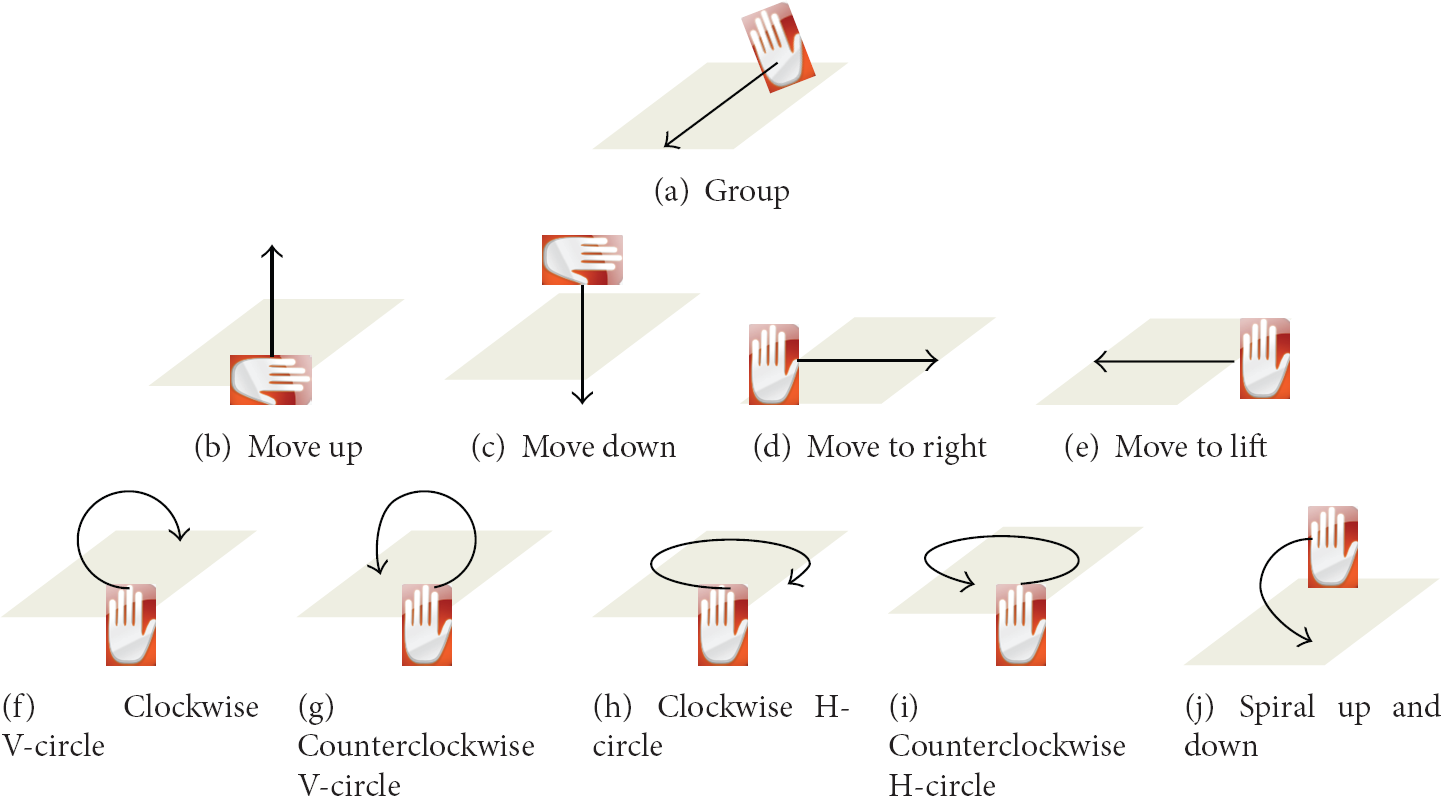
The gestures for interaction with fishes.
3.3. Multiviews for User and Audiences
The system provides multiple view images in order to allow not only users participating in the virtual reality but also audiences to share experiences in the virtual aquarium. As for images for the user, movement and rotation information taken from the tracking of markers attached to the HMD device worn on the user's head is transmitted to the virtual aquarium system in real time. The images are in turn generated from the information and then return to the user (Figure 4).
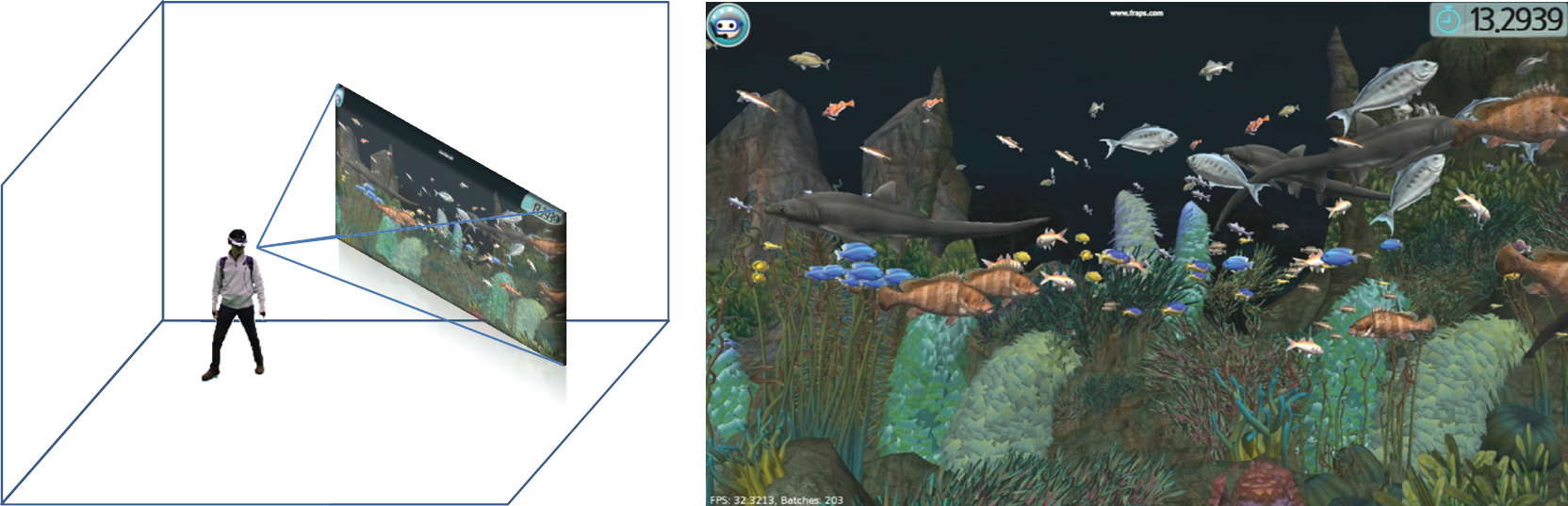
User's view through wireless immersive display.
Audiences who do not participate directly in the virtual aquarium system can see images in the virtual reality through the audience view. They do not simply see the same images as the user receives but are provided with the real-time synthesis of the images in the virtual space and the actual images taken from the filming of the user in order to show how the user interacts with the virtual space. As for images for the audiences, movement and rotation information taken from the tracking of markers which are attached to the camcorder.
In order to apply the technique of Chroma key for the sake of foreground extraction for real-time image composition, we painted the floor and walls of the studio green. Figure 5 shows the steps for generating the audience view. Figure 5(a) shows taking the actual images of the user and Figure 5(b) shows the images taken from the camcorder. Figure 5(c) shows how to generate images in the virtual reality reflecting the location information of the camcorder taken by tracking markers attached to it. Figure 3(d) is an image taken by reflecting the location information of the camcorder. Figure 5(e), an audience view, is finally generated by compositing Figure 5(b) and Figure 5(d) in real time.

Observers' view through real-time image composition.
4. Real-Acting Virtual Aquarium
4.1. Studio Configuration with Motion Sensors
In order to reflect user's actual motions, we set up a 7 m × 7 m space where motions can be tracked by motion tracking equipment and painted the floor and walls green for the sake of real-time image composition. Two computer servers for motion tracking and real-time image generation, respectively, are used for the virtual aquarium system. OptiTrack made by Natural Point was used as a motion sensor system for motion tracking. A total of 16 OptiTrack S250e cameras were connected through a network using two hubs and controlled with Tracking Tools produced by Natural Point Corporation [12]. The motion server analyzes images transmitted from the 16 sensor cameras and markers included in the relevant images to extract motion information. It changes relevant information into the information of the directions and positions of markers and transmits them to the render server through the network. The render server generates images of user and audience views based on the directions and positions of user and camcorder.
The user can walk about freely in the virtual aquarium space because the generated user view is transmitted to his HMD through a wireless HDMI transmission device. Also, as almost every HMD product supports stereo 3D images, the render server also provides more realistic images by generating stereo images in the side-by-side method. A Sony PMW-F3K camcorder is used to take actual 720 p images, and the taken images are transmitted to the capture board of the render server through BNC cables. Then, the foreground images extracted in real time are combined with the virtual reality images to generate audience view.
4.2. Generation of Scenes in the Virtual Aquarium
Figure 7 shows some scenes as seen by the user in the virtual aquarium. Ogre3D, an open game engine, is used for real-time scene generation [13]. A total of 30 species of fish and 10 species of seaweeds were produced, and normal and light maps were basically assigned to individual fish so as to enhance the quality (Figure 6). Also, in order to give undersea feelings in an aquarium, shader, an optical effect, is applied to add God Rays and wave effects and so as to show rich inner scenes of the aquarium; more than 300 objects are made to swim in the water. As objects composing such a scene are made in the one-to-one proportion with the actual space, the user can move to a position user wants to reach walking as user does in the actual space. If the user wants to take a more detailed look at the rock on the lower right side after user sees the scene in Figure 7(a), user can just walk toward it. Then, as in Figure 7(b), user can watch the rock in detail in the position that the user has reached. The user can be more immersed because users' actual behavior is reflected in the virtual aquarium in this way without modification.
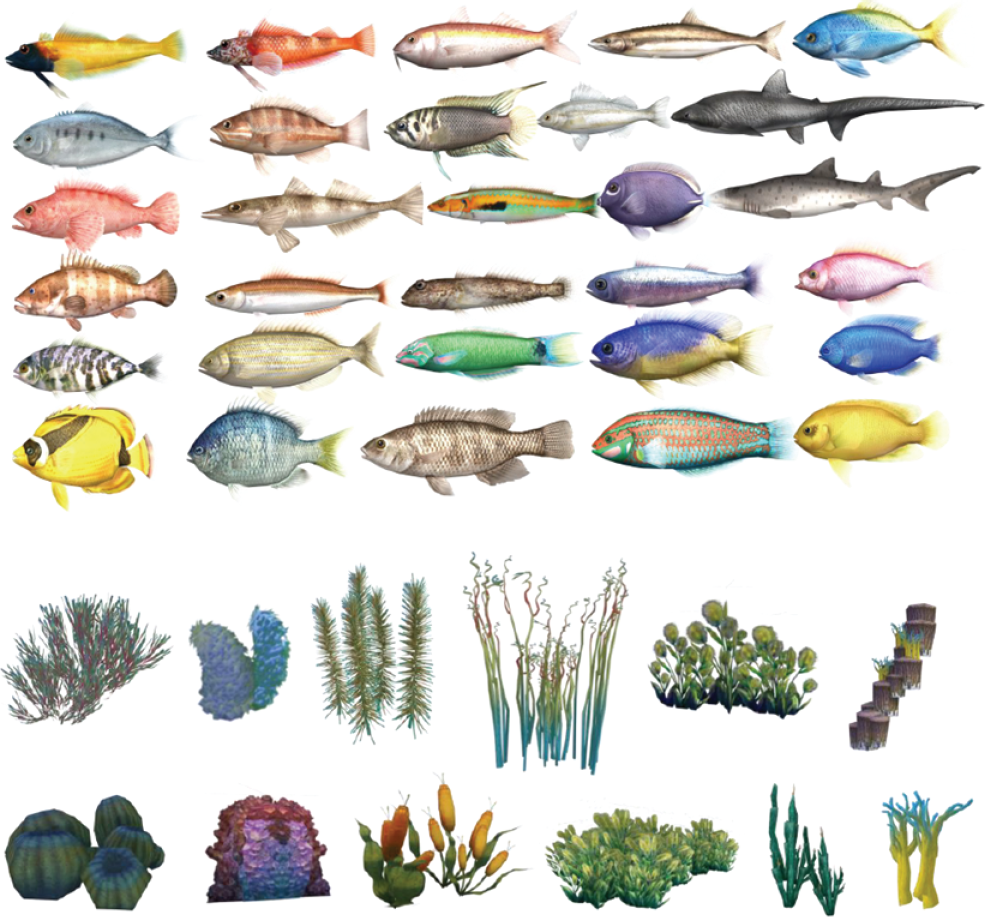
Virtual fish and seaweeds.

Scenes of the virtual aquarium from the user's view.
10 reference gestures were defined for interactions with fish in the virtual aquarium. When the user makes motions, corresponding to the relevant gestures with user's right or left hand, the fish make motions in accordance with the relevant gestures (Figure 8). Each gesture lasts for a duration determined by the system. The basic value is determined as 15 seconds.

Fish movement sequences according to each gesture.
5. Conclusion
We constructed an immersive virtual aquarium projecting motions in reality, which supports the following functions.
Natural Real-Acting Navigation with Motion Sensors. A user make moves as if the user moves in a real aquarium space. The system uses the motion tracking sensor to trace the user's movements of head and hands and projects the motion information to the virtual space without modification. Audience View Support. The system allows not only the user who participates in the virtual space but also audiences to experience the virtual space. This delivers the user's interaction with the objects in the virtual space to audiences in real time. Interaction by Gestures. Rather than using some special equipment for user's interaction with the objects in the virtual aquarium, the system supports user gesture sensing to help them experience natural virtual spaces. By using the method of Procrustes analysis to promote the rate of user gesture sensing, the system is designed not to be influenced by the spatial positions, sizes, and directions of the motions users make.
The system, equipped with such merits, provides an experiencing service in which users and audiences are more immersed and sympathized. The current system uses motion sensor equipment to track the motions of the user and camcorder. However, while it has excellent performances, this equipment is much more expensive than other products of motion sensor equipment like Kinect. In future, we will construct a motion sensor-based virtual reality system like the current one by using multiple sets of Kinect.
Footnotes
Conflict of Interests
The authors declare that there is no conflict of interests regarding the publication of this paper.
Acknowledgment
This work was supported by the IT R&D program of MSIP/KEIT (10047093, 3D Content Creation and Editing Technology Based on Real Objects for 3D Printing).