




Abstract
There are many different sensors such as gyroscope sensor, accelerometer sensor, and light sensor for smart devices. These sensors are applied in many fields such as health and medicine, education, augmented reality, and arts. This study aimed to create user-friendly artistic sensibility related to images in the sensitive areas needed for privacy protection by using a sensor in a smart phone and image processing techniques such as contour extraction, blurring, blending, and brightness adjustment. In many cases, the focus was placed on the matter that techniques such as blurring, pixelization, and low-resolution were used for images in the sensitive area needed for privacy protection so that the related area could not be recognized. The phenomenon of image transformation, which suddenly occurs in this way, can cause irritation to smart device users when they view it. In this context, this study showed the possibility of user-friendly image obfuscation through the reflection of artistic sensibility along with the purpose of privacy protection through the fusion of image obfuscation techniques for privacy protection and artistic sensibility.
1. Introduction
According to the development of digital devices and the release of many different smart phones and wearable devices including smart glass, the issue of protecting personal information has emerged as a much more important topic. Many studies and social interests have been concentrated on the protection of the images, such as facial images, where privacy protection is required. However, changes in the life environment caused by the rapid development of digital media techniques and communication media have changed users' emotional and sensual feelings. As a result, the study on human senses and sensibility has been carried out in earnest to satisfy user needs through the convergence of many different fields.
In this context, if the image currently playing on the screen is suddenly mosaicked or blurred at any moment for privacy protection, users can be irritated and have doubts about the use of the devices themselves.
Accordingly, it is required to develop image obfuscation techniques which can minimize the infringement of user sensibility and simultaneously protect private life. Therefore, it is necessary to develop image distortion techniques to minimize the infringement of user sensibility and protect their privacy. For this reason, this study suggests the method for the visualization of image distortion in the sensitive area through the refection of a smart sensor and artistic sensibility and shows an example of visual-perceptual realization through blur methods.
This is expected to be an important study in that it could be importantly connected to the immersion of smart device users who consider sensible and sensual things important, minimize users' stress, and relieve their fatigue.
2. Smart Device Sensors and Image Obfuscation Techniques for Privacy Protection
2.1. Smart Device Sensors and Application Field
There are many sensors for smart devices such as accelerometers, gyroscopes, magnetometers, microphones, pressure sensors, global positioning sensor (GPS), proximity sensors, and cameras in recent years. Table 1 shows sensors for smart devices and their main functions [1].
Types and functions of sensors for smart devices.
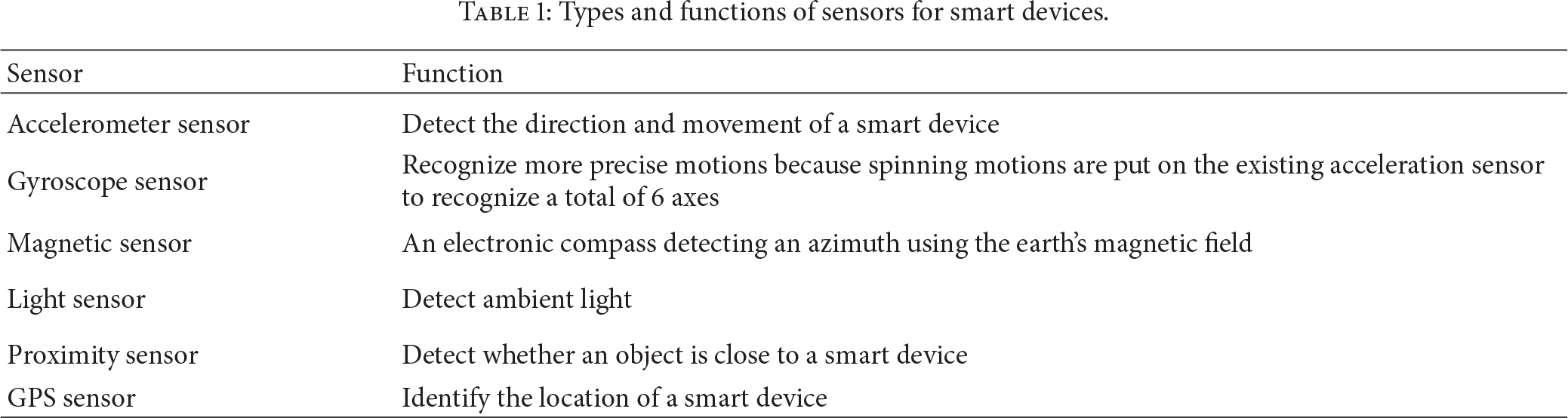
Smart device sensors have been studied and applied in many different fields. There are many studies on location-based services [2–4] using an accelerometer, a digital compass, Wi-Fi, and GPS, the collision detection and movement of a robot using a camera and GPS [5], and augmented reality using a GPS sensor and a geomagnetic sensor [6] and applied studies using a gyroscope sensor and an accelerometer center to check up physical activities [7].
Many games have also been produced using gyroscope sensors in the game field. Good examples are “HMS Destroyer,” “OSM Match,” and “Dead Raid.” A representative application is “Smart Tools” [8] which functions as variation measurement, digital compass, and flash light with a magnetic sensor, a GPS sensor, a light sensor, and “Run Keeper” which identifies momentum using a GPS sensor.
A variety of artworks using smart device sensors such as a gyroscope sensor or a light sensor have recently been shown [9–11].
2.2. Image Obfuscation Techniques for Privacy Protection
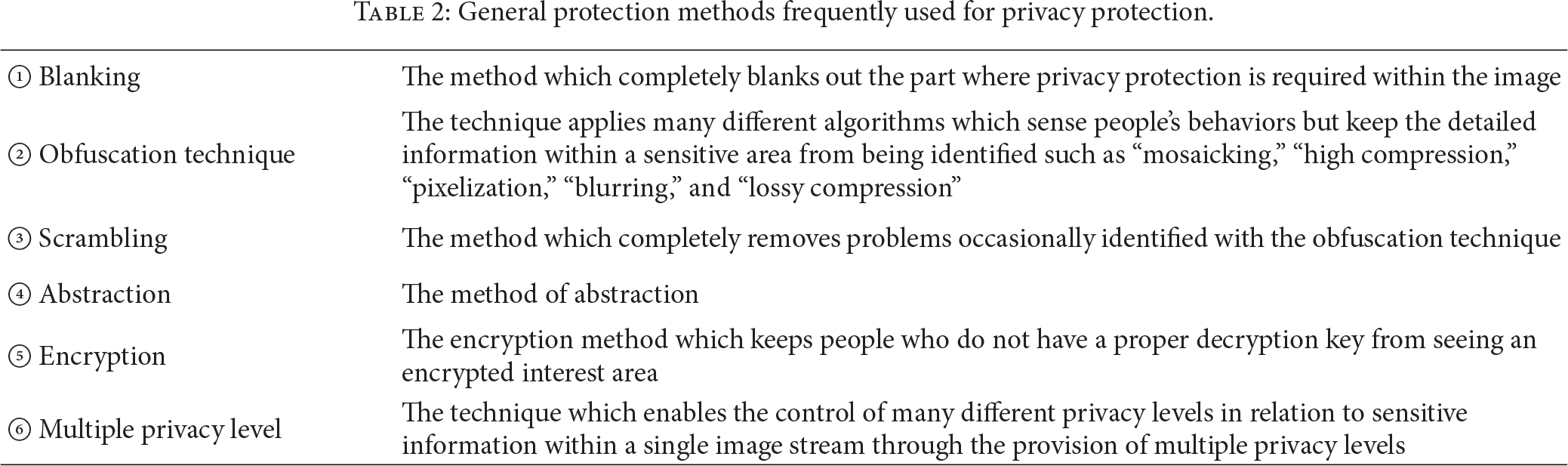
The protection methods frequently used for privacy protection are as follows: first, the method of extracting the sensitive area within the image to “blank” it out completely; second, the “obfuscation technique” by applying many different algorithms which sense people's behaviors but keep the detailed information within a sensitive area from being identified such as “mosaicking,” “high compression,” “pixelization,” “blurring,” and “lossy compression”; third, the “scrambling” technique, a method which completely removes even the image occasionally identified with the obfuscation technique; fourth, the method of abstraction; fifth, the “encryption method” [12] which keeps people who do not have a proper decryption key from seeing the encrypted interest area; and lastly, the “multiple privacy level” which enables the control of many different privacy levels in relation to sensitive information within a single image stream through the provision of multiple privacy levels [13]. The existing compression techniques such as M-JPEG, M-JPEG 2000, MPEG-4, or AVC/H.264 are mainly used as these privacy protection techniques.
This study is limited to the visualization method of “obfuscation techniques,” the second method.
As explained in Table 2, the emphasis is generally placed on the purposes such as livelihood security in the techniques set up to prevent privacy infringement. Accordingly, it should be considered that user sensibility is viewed as the most important area in the context of the entertainment industry along with the fact that smart devices perform specific purposes and functions. For this, the method through the convergence with artistic sensibility will be presented in Section 3.
General protection methods frequently used for privacy protection.
3. Suggestion of the Visualization Methods through a Convergence of Artistic Sensibility
3.1. Reflection of Artistic Sensibility through an Analysis on the Expression Methods of Artworks
As user sensibility and immersion become important, the study on human sensibility and the five senses has actively been conducted in the technology area.
Figure 1 shows “Khronos Projector” of Professor Alvaro Cassinelli in “Ishikawa Oku Laboratory” at the University of Tokyo, Japan. As a technique introduced in “Emerging Technology” of Siggraph in 2005, it is also a media artwork that constitutes the outcome of research in the field of convergence [14].

Alvaro Cassinelli's Khronos Projector, Siggraph Emerging Technology, 2005 [14].
In many of his studies [15], he analyzes works of modernist artists to use them as the concept of technological development.
For development of emotional skills, the methods of emotional expression in the work of Francis Bacon (Figure 2), a modernist artist, were analyzed and used as a concept of technology.
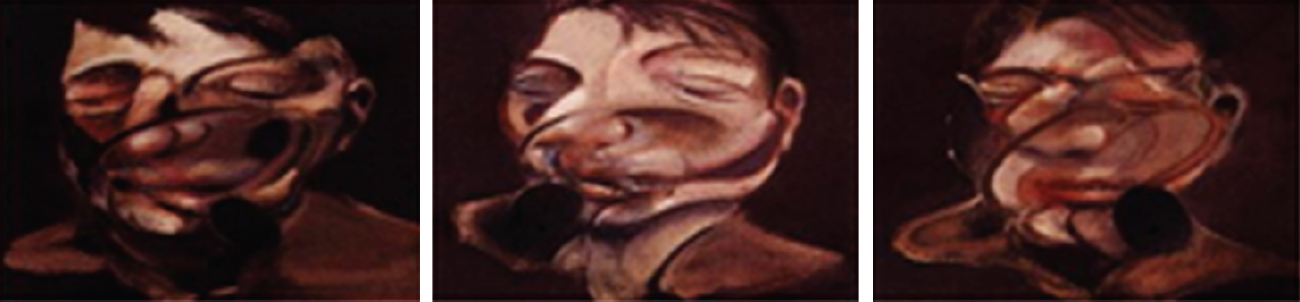
Francis Bacon's art painting used as the technical concept of sensibility expression [14].
An isolated person's inward mentality and facial image, a symbol of self-reflection, are divided into several pieces. The expressions distorted to be presented, namely, the methods of sensibility expression in the artwork which have already got public sympathy, were analyzed to be applied to technique development (development of flexible screens) [14, 15].
The example in Figure 2 shows the applicability to the method for image obfuscation to protect smart device-based privacy in the context that sensibility and techniques are converged to induce user satisfaction.
In other words, face that corresponds to sensitive region can be distorted by refraction on a concave or convex lens as shown in Figure 2, preventing recognition of contents in sensitive region. Also, face and forehead can be brightened to attract the attention of viewers to a specific region. Such principle of screen configuration which removes dullness of screen can be applied to image distortion of sensitive region on smart devices.
Figure 3 shows the example that “blurring” explained in Table 1 is applied among obfuscation techniques which focus on the nonidentifiability of a sensitive area within the image.
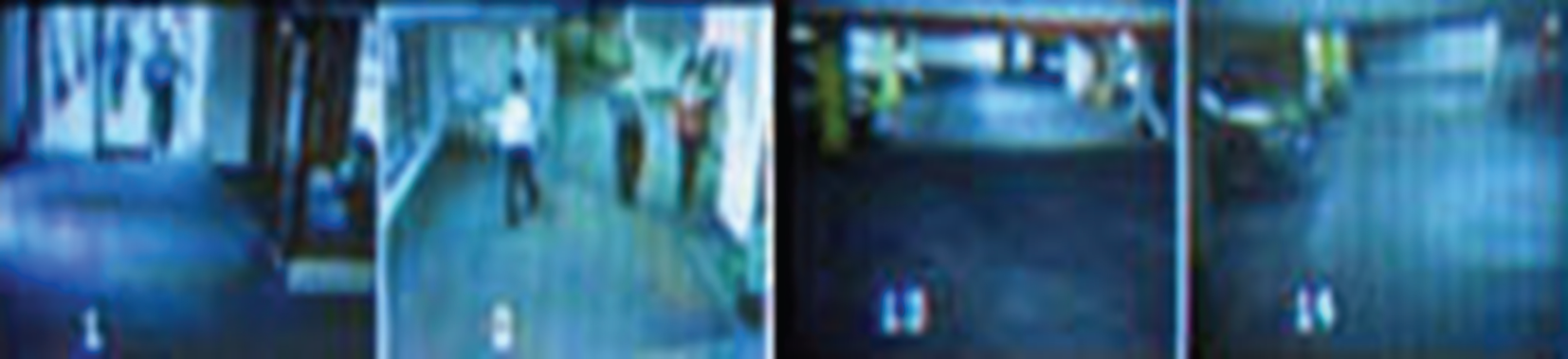
Privacy protection technique using an obfuscation technique (blurring), © Boannews [16].
The image contents in Figures 3 and 4 are not identified and protected. The induction of the user's eyes, the harmony of colors, and others are considered to be expressed through the screen density, gradient effects, emphasis, omission on the screen, and others in Figure 4 in contrast with simple and boring expression in Figure 3.

An example of the artwork which can be directed with blurring techniques, Paul Hellard's artwork, Siggraph 2011, © the Association for Computing Machinery, Inc. [17].
3.2. Image Obfuscation through the Reflection of the Formative Beauty on the Screen
Figure 5 displays an example in which the image in a sensitive area is kept from being identified through the “pixelization” method to protect privacy. In comparison, Figure 6 shows the direction similar to pixelization in artwork. The formative beauty can be identified in Figure 6 as compared with the sensitive area which just focuses on the nonidentifiability of the image in Figure 5. Also visual balance, the arrangement and the darkness of colors, the control of strength, and others are considered to be directed on the full screen in Figure 6. Even though the contents of detailed images are not distinguished in both Figures 5 and 6, the formative principles where people can have emotional satisfaction seeing the artwork are used to present beauty to viewers in contrast with Figure 5.

Privacy protection technique using an obfuscation technique (pixelization) [20], © EMITALL Surveillance SA.
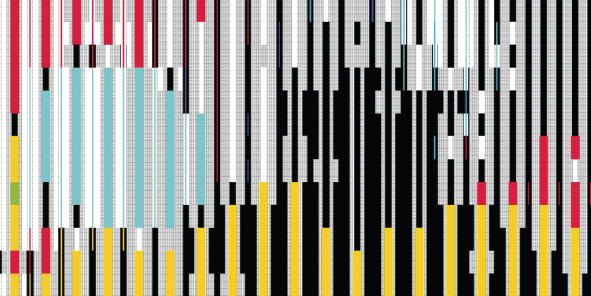
An example of the artwork which can be directed with pixelization, © Rainer Kohlberger [17].
The artwork (Figure 6) of Rainer Kohlberger is also utilized as an app in actual smart devices to transform real-time images using pixelation technique [18]. As such, many studies on smart devices are actively conducted about real time transformation of user images to styles of different artists and various emotional skills such as nonphotorealistic rendering (NPR) [19].
3.3. Reflection of Visual-Perceptual Principle of Arts
In the visual-perception theory of arts, it is explained that people do not see an object only with their eyes and the emotional response of the human brain to visual stimuli is accompanied when they see an object. According to Gestalt's theory of visual perception, people tend to make an object in the form of a meaningful system to perceive rather than perceive it as it appears to their eyes when they view it. In other words, when they perceive an object, people generally tend to unify various elements in an orderly form. They also have an attribute of interconnecting many different components on the screen such as shapes, colors, and texts [21]. In Gestalt's principle of equivalence, people who see an object can feel a sense of stability when the components, such as shapes, colors, and texts, are visually balanced. On the other hand, people feel uneasy visually when these are not balanced. Therefore, when a sensitive area is distorted on the screen, the main purpose should not only be to keep people from seeing the image in the related area. As visual-perceptual positions are considered at the same time, it is important to have users be able to see the image in a visually stable and comfortable state.
4. Implementation
Section 4 shows an example of a visual realization method through the “blur” method of obfuscation techniques to protect the privacy in the reflection of artistic sensibility.
It is explained that people feel a sense of stability when many screen components such as colors, shapes, and textures are visually balanced, but they have visual insecurity when they are not balanced [21, 22]. Accordingly, the principle of screen configuration [23] through “emphasis (formation of a subject area)” in a special part is applied in this study among the most commonly used principles of screen configuration in the visual art and design area. It is the method that a specific area is emphasized more than other parts on a screen and the rhythm and breath are created on the screen through dynamics to give stability to viewers.
As shown in images to the right side of Figures 7 and 8, the sensitive area is created not to recognize faces. However, as it is figuratively formed brighter and denser than other areas; the area acts as the subject on the screen.

(a) Covering the sensitive area through the application of general blurring and (b) the application of blurring reflecting the elements of artistic sensibility.

(a) Covering the sensitive area through the application of general blurring and (b) the application of blurring reflecting the elements of artistic sensibility.
While Android SDK 2.3 is used in the Android platform environment as the development environment, OpenCV 2.4.2 for Android and JAVA language are used as the language used. BlImageAPI [24] for Android is imported. This library is composed of blending effect functions. A gyro sensor and a light sensor are used. A gyroscope sensor is used to determine a blurring direction according the rotation value of a smart phone, and a light sensor is used to determine the brightness level according to the intensity of illumination. The colors related to RGB are, respectively, set up to be 8 bits.
Pseudocode 1 shows pseudocodes to recognize and visualize a facial area for the privacy of a facial area. Only codes needed for visualization jobs are recorded. A class declaration and object calls are skipped.
(1) When the onSensorChanged() callback function telling that a sensor value is changed is called, the type of a sensor is identified and the rotation rate values of the X and Y axis in the value of a gyroscope sensor are brought. The value of a light sensor is brought and changed into the level of color brightness. (2) Capture the frame with a camera and save this captured image on src_img and dest_img (3) Extract a facial area with the cvHaarDetectObjects() function in src_img and save it in face_img. (4) Extract the contour of the object with the cvFindContour() function in src_img and blur pixels around this contour. Copy only the blurred area into the corresponding area of dest_img. (5) Convert src_img to black and white and save it in gray_img. (6) Convert gray_img into the image with Level 4 brightness with cVGet2D() and cVSet2D(). (7) Extract only the highlighted part in gray_img and save it in highlight_img. (8) Randomly blur (to the left and right and horizontally) hightlight_img and face_img. Blend this result with dest_img. BlendSceen() is used as the blending function at this time. (9) Stage 8 is repeated except the use of the BlendColorDodge() blending function. (10) Search the most commonly used color in src_img with the cvGet2D () function and blend 35% (up_img) of this color and dest_img. BlendColorDodge(dest_img, up_img) is used as the blending function at this time. The resultant image is saved in dest_img. (11) Blur face_img again with the BlendLiearDodge(dest_img, face_img) function. At this time, the rotation rate of a gyroscope sensor value is referred to determine the direction of blur like Stage 9.
When the value of a smart device sensor is changed at Stage 1, the result value related to a gyro sensor is stored in the onSensorChanged() function automatically called. Z values are excluded because the camera screen frame processing is made in relation to the x- and y-axes.
The result value of a light sensor for smart devices is brought. 3000LUX is the maximum value in a smart device developed by S Electronics, used in this experiment. These illumination values are divided into 8 levels between 0 and 8.
The image is captured with a video camera and the sensitive area is extracted and saved at stages between 2 and 5. The process that the original image is copied and converted to black and white is made.
The black and white image created at Stage 4 is simplified at Stage 6. In relation to all pixels, cVGet2D() is used to bring pixel information. After the pixel value is divided by 64 to make the brightness level into four levels, this value is set up with cVSet2D(). As the pixel value is between 0 and 255 at this time, the black and white image is changed to have Level 4 brightness as shown later.
At Stage 7, only the area in which the pixel value is between 192 and 255 as a decimal number, namely, the part close to white, in gray_img, is extracted as the highlighted area.
Stages 6 and 7 are the stages in which the dynamics are controlled on a screen. The emphasized area on a screen is blurred for the nonidentifiability of image details because it applies to the sensitive area. Its resolution becomes comparatively lower than its surrounding area. However, it is necessary to lower the resolution around the subject area (sensitive area) and vitalize the emphasized area in order to achieve the purpose of nonidentifiability and an artistic visual screen at the same time. Therefore, the first purpose of extracting the highlighted area is to lower the resolution around the subject area. Another purpose is to help the emphasized area (sensitive area) to form the subject area through the effect of blending carried out later. As the emphasized area (sensitive area) and the highlighted area are combined to expand the subject area, concentration can increase through increases in the brightness, tone, contrast, and others of the screen. In other words, the highlight is selected to make concentration lower than the emphasized area (a facial area) and higher than the background area. In many cases, some areas around the emphasized area are extracted and expanded into the subject area based on an example that the subject area on the screen forms about 30% of the full screen.
BlendScreen() is used as the blending function used at Stage 8. As colors, contrast, tones, and others are increased through blurring effects as explained earlier, this function is used to increase concentration and give a sense of aesthetic changes with the emphasized area (face).
The reason why the process carried out at Stage 9 is repeated at Stage 8 is that the more the images are overlapped, the more the blending effects increase.
The reason why dest_img is filled with 35% of the most commonly used color at Stage 10 is that other areas are blurred with the background color to reduce resolution and concentration. Blurring effects are given to improve aesthetic effects through color changes between images. The reason why a face is blurred again at Stage 11 is to increase brightness, tones, contrast, and others through blending overlap in order to create the highest concentration and visual effects because a face is the most emphasized area of subject areas.
Pseudocode 1 repeatedly carries out the process between Stages 1 and 11 whenever a sensor value is changed.
5. Conclusion
In many cases of the security area such as CCTV, the method which distorts images is largely used through obfuscation techniques such as mosaic, blurring, pixelization, and low resolution to protect individual privacy. However, in most of these techniques, the emphasis is placed on preventing people from identifying the sensitive area related to privacy. Therefore, user sensibility is not considered in the smart device where many factors such as the abundance of individual life, entertainment, and user immersion are considered important. The blanking and the distortion phenomena which suddenly appear can be problems. They can cause irritation to users and exclude them from the related device.
However, smart devices have rapidly increased day by day and various wearable smart devices including smart glass have currently been released one after another. Accordingly, the complementary problem of smart devices becomes an important issue. Accordingly, this study was presented to resolve the sensitive area related to privacy through the convergence of artistic sensibility based on the user friendly sensibility features of the smart device. In other words, it was explained that the principles of visual-perceptual screen configuration could be reflected in image distortion in the sensitive l area. A realization example was shown to make the subject and background area through “emphasis” one of the most commonly used methods among actual visual design methods and create visual effects with the use of a smart device sensor.
That is, Figure 2 shows that the method of refracting an object using concave or convex lens can be applied to distortion of image in sensitive region.
In addition, Figure 4 explains the convergence of blurring method generally used for distortion of image in sensitive region with visual effects such as gradation effect, method of attracting attention of users to a specific region by emphasizing a part of screen, and reflection of color match.
Figure 6 proposes that pixelation technique widely used for distortion of image in sensitive region can be combined with the formative principles of visual arts like visual balance of the overall screen, coloring, and color saturation.
Also in Section 4, the composition principle of visual arts called “emphasis” was applied to blurring, the most widely used method of image distortion in sensitive region, to create thematic and background regions and to embody an actual user-friendly image distortion of sensitive region through application of diverse visual effects.
Accordingly, It is considered that this study can contribute to not only the study on the methods of protecting privacy based on the user-friendly features of smart devices but also the creation of other users' sensibility satisfaction with smart devices.
Footnotes
Conflict of Interests
The authors declare that there is no conflict of interests regarding the publication of this paper.
Acknowledgment
This work was supported by the National Research Foundation of Korea Grant funded by the Korean Government (NRF-13S1A5B6044042).