




Abstract
We propose a method of software-based transmission protocol simulation for the establishment of ubiquitous infrastructure as a method of securing reliability of a ubiquitous sensor network (USN), which is an important element of ubiquitous infrastructure establishment. For this, we designed a transmission protocol network performance measurement simulator. The network simulator was simplified and, thus, could be used for all types of protocol tests. It enabled transmission control protocol (TCP) and user datagram protocol (UDP) transmission and reception regardless of the number of times of transmission and reception. In addition, we implemented an independent network simulator on a platform that enabled transmission at predetermined intervals according to the number of times of transmission and provided the function of randomly transmitting a defined message.
1. Introduction
Recently, as networking description has been improved; implementing ubiquitous environment is being studied which makes easily obtain information anytime and anywhere you want. Especially, each heterogeneous device has sensor consisting of ubiquitous sensor network (USN) to collect information in ubiquitous environment. For this device, networking function is very important which is reliable between heterogeneous sensor devices.
For a reliable USN, the technology to measure and improve the networking performance between dissimilar sensor devices is very important [1, 2]. However, the network performance evaluation method using smart bits, although it renders a reliable performance evaluation to provide the information needed to improve the software and the hardware, may not be easily introduced to a company having a disadvantaged development environment because the technology requires expensive hardware for the special purpose. In addition, there is an urgent need for a transmission protocol simulator, which can be readily applied to actual work in order to improve the development speed and can be easily used [3].
The most software used in real work-site needs transmission control protocol (TCP) and user datagram protocol (UDP) necessarily performing network communication; so extra test program has been made for all cases to test developing program. Therefore, transfer protocol simulator is highly required to utilize easily and fastening development applying for field work.
The simulator should not be limited to a specific protocol such as session initiation protocol (SIP) but should be applicable to various protocols in which software development is required, such as simple network management protocol (SNMP) [4], in order to maximize its utilization [5].
In this study, a software-based transmission protocol simulator was designed and implemented. The network simulator was simplified and, thus, could be used for all types of protocol tests. It enabled TCP and UDP transmission and reception regardless of the number of times of transmission and reception. Further, an independent network simulator was realized on a platform that provided the function of randomly transmitting a defined message. The software-based network simulator can be generally used in a graphical user interface (GUI) mode without the need for expensive hardware.
2. Analysis of Requirements
As most of the conventional network simulators are specially designed for a particular protocol, they may be used only when the protocol has been accurately analyzed. Moreover, the use of conventional network simulators is limited because of their high price, which mostly runs into tens of thousands of US dollars [6–9].
Therefore, in this study, we analyzed the operating methods of various conventional simulators and designed a simulator that can be used for testing all the different protocols, allowing TCP and UDP transmission and reception regardless of the number of times of transmission and reception, enabling transmission at predetermined intervals according to the number of times of transmission, and providing the function of randomly transmitting a defined message. The designed network simulator has the following functions:
functioning independently on the platform, allowing for random transmission of a defined message, not being limited to a specific protocol, allowing for choosing either server or client.
3. Simulator Design
This section describes the design and realization of the proposed simulator. The basic block diagram of the simulator is shown in Figure 1. The SIP Tester module comprises three modules, namely, the TCP module, the UDP module, and the Test Msg module.
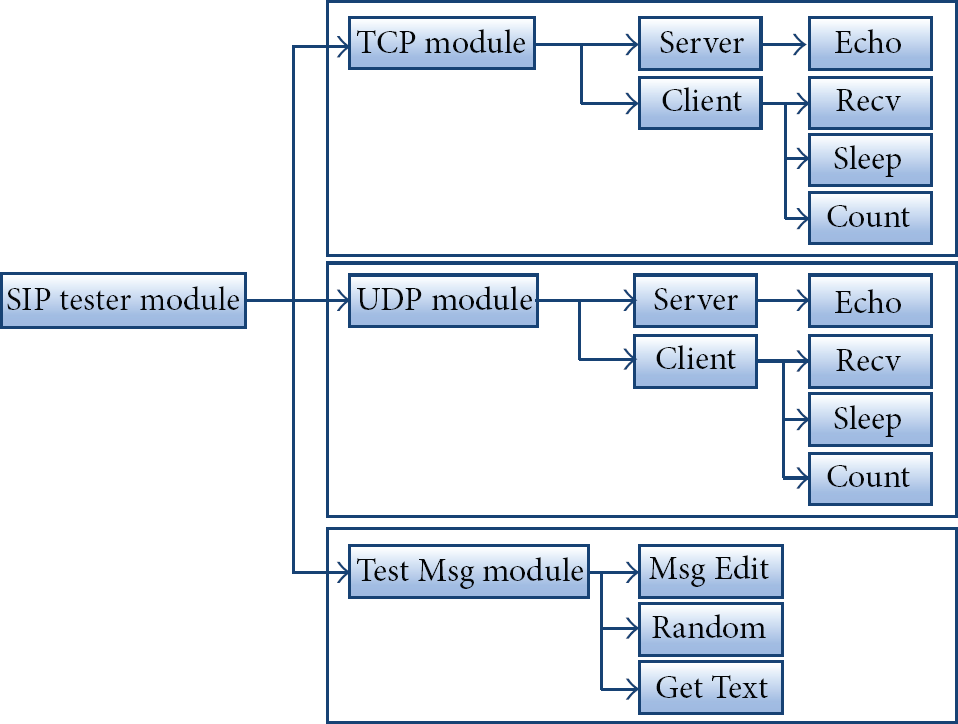
Simulator block diagram.
First, the SIP Tester module is the core module controlling the TCP module, the UDP module, and the Test Msg module. Second, the TCP module controls TCP transmission and reception, and the UDP module controls UDP transmission and reception. Third, the Test Msg module provides the text transmitted by the TCP module and the UDP module.
3.1. Simulator Environment Design
Table 1 shows the basic environment for the transmission protocol simulator.
Simulator design environment.

3.2. Simulator Default Setting
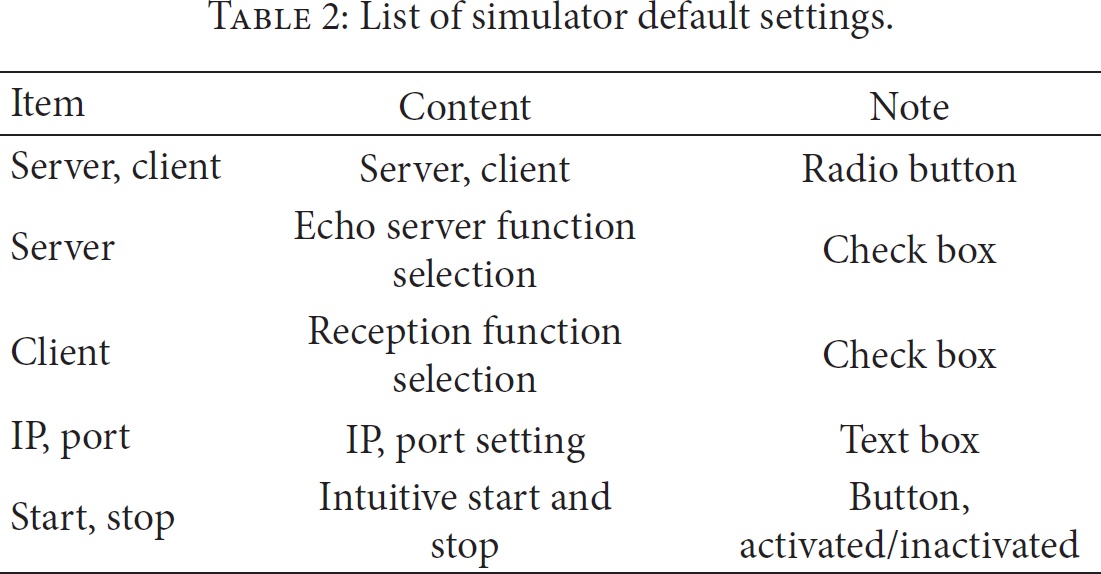
For the simulator to test network traffic, the CUI was designed to reflect the following requirements. In the default setting, a server or a client that plays the main function in the network can be set (Table 2). The records of the transmitted and the received data can be viewed in order for the simulator to use the data transmission and reception information. A message to be transmitted can be conveniently prepared and tested. With respect to the performance information, the transmission interval, the number of times of transmission, and the random message generation can be set.
List of simulator default settings.
4. Simulator Implementation
The implemented simulator largely comprises a UDP server, a UDP client, a TCP server, and a TCP client. Among them, the UDP server and the TCP server perform the echo server functions, while the UDP client and the TCP client perform reception functions.
4.1. UDP Server
Figure 2 shows the execution screen of the UDP server. The UDP server sets its own IP and port number and determines whether to function as an echo server by using a radio button. When the function is executed, the Start button is inactivated and data reception starts by using the IP and the port that have been set in advance. This implies that the UDP server functions as a UDP socket server by using the set values.
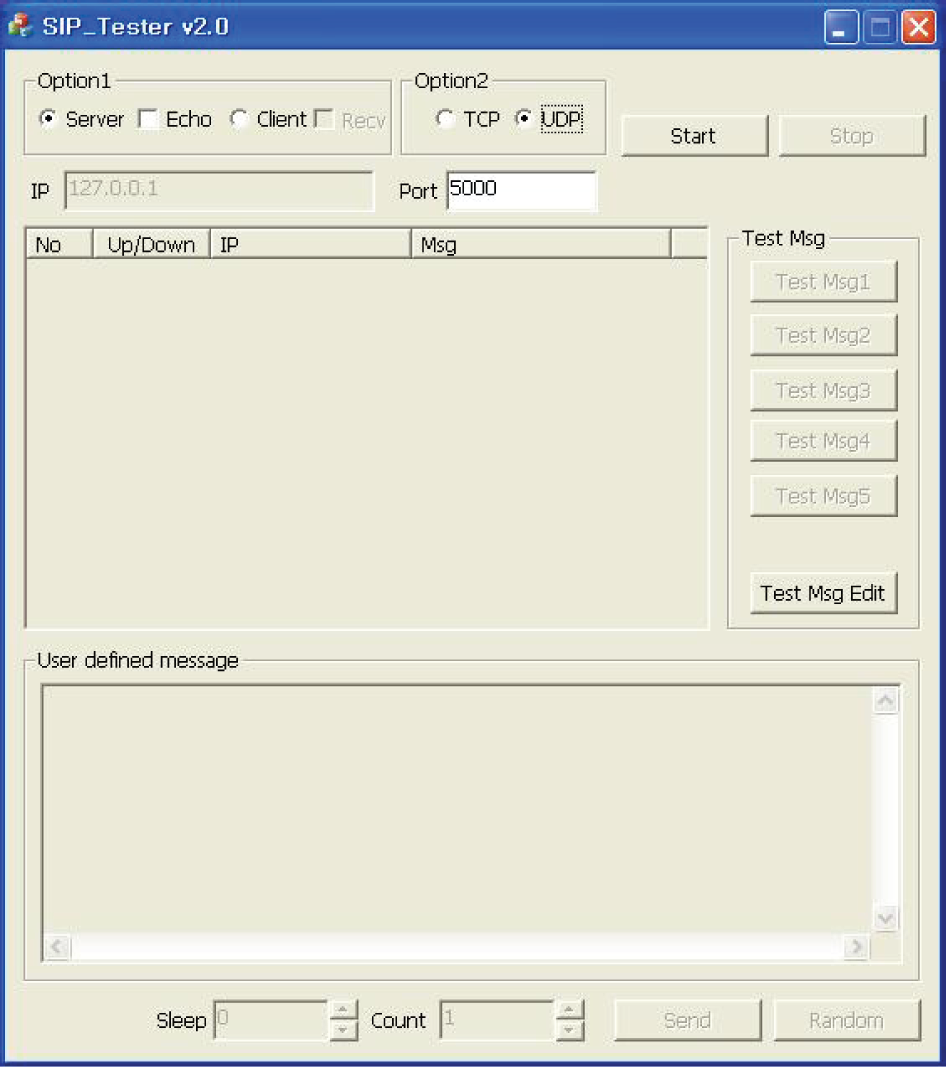
UDP server execution screen.
As the UDP server can intuitively recognize whether it is normally functioning, the log for data transmission and reception is managed as table-type record information at the center of the screen in order to inform the user regarding the normal function of the simulator. As the UDP server has the immediate processing function enabling the optimum reception, the UDP server has the immediate processing mechanism without an additional setting for the Sleep or Count Information.
4.2. UDP Client
The UDP client is a simulator function that is the opposite of the UDP server. The UDP client transmits a message to the server waiting for data reception. The UDP client execution screen includes a setting window in which the IP and the port of the server waiting for reception are set.
The UDP client provides a convenient interface to the user as it has a screen composition similar to that of the UDP server. However, different from the server execution screen, there are five message selection buttons on the right, and the “Test Msg Edit” button is additionally activated. These are necessary for the client to create the data to be transmitted to the server. Although the user can create and transmit the required message each time the user needs it by using the “User defined message,” the user may create a data file in advance and then test the data conveniently. An SIP message test is performed as follows.
4.2.1. Direct Input by User
When a user directly creates an SIP message and transmits the message, the user creates “User defined message” and transmits it, as shown in Figure 3. This method is useful when the transmission of a short message is tested, but the method is inefficient when the test needs to be performed repeatedly.

SIP INVITE message transmission.
4.2.2. Test Using File
It may not be efficient for a user to input an input message each time. To resolve the inconvenience, a test message can be prepared in advance. For this, the user has to click the “Test Msg Edit” button, and, then, a dialog box appears. Figure 4 shows the procedure for saving a message. The message to save is put into the text window. When the user clicks the “SAVE” button, the notification window “Save OK” appears.

Defining transmitted message in advance.
Figure 5 shows an example of generating a message 15 times by using a predefined file.

Mass transmission of message by using predefined file.
4.2.3. Random Transmission
The function to randomly transmit various types of messages is essential in a software development process. Figure 6 shows the screen after the data have been transmitted. A hundred messages are randomly generated from selected objects to enable the simulation of various types of data.

Random data transmission screen.
4.2.4. Transmission Speed
The simulator may transmit data in a millisecond-unit interval. To prevent another transmission while transmitting data at a predetermined interval, the “Send” button is inactivated and the data are transmitted at the defined interval.
4.2.5. Load Test Using Transmission Data Amount
For the load test, which is an essential test item for a network simulator, the amount of transmission data can be set. The number of amount of transmission data that may be selected is 232.
4.3. TCP Server
As TCP is a connection-oriented transmission protocol, a server needs a procedure for waiting for a socket connection, which includes a socket connection from a client or finishing off a socket connection when a client is finished. For this, it is necessary to express the connection status information of a client. As the TCP server was realized by using the same GUI as that of the UDP server, a user may intuitively understand the information. The method of using the TCP server is the same regardless of the TCP/UDP socket. As shown in Figure 7, the biggest difference between the TCP server and the UDP server is the method of expressing the connection information. The TCP server expresses the status information by means of the “notice” value in the Up/Down domain.

TCP server client connection screen.
4.4. TCP Client
In contrast to UDP, the TCP client firstly attempts the connection for the communication with a server, preferably with the TCP server. As in the case of the UDP client, the connection and the finish of the connection are performed simply by using the “Start” and “Stop” buttons, respectively. Figure 8 shows the normal data transmission by the TCP client without a problem in the connection between the servers.
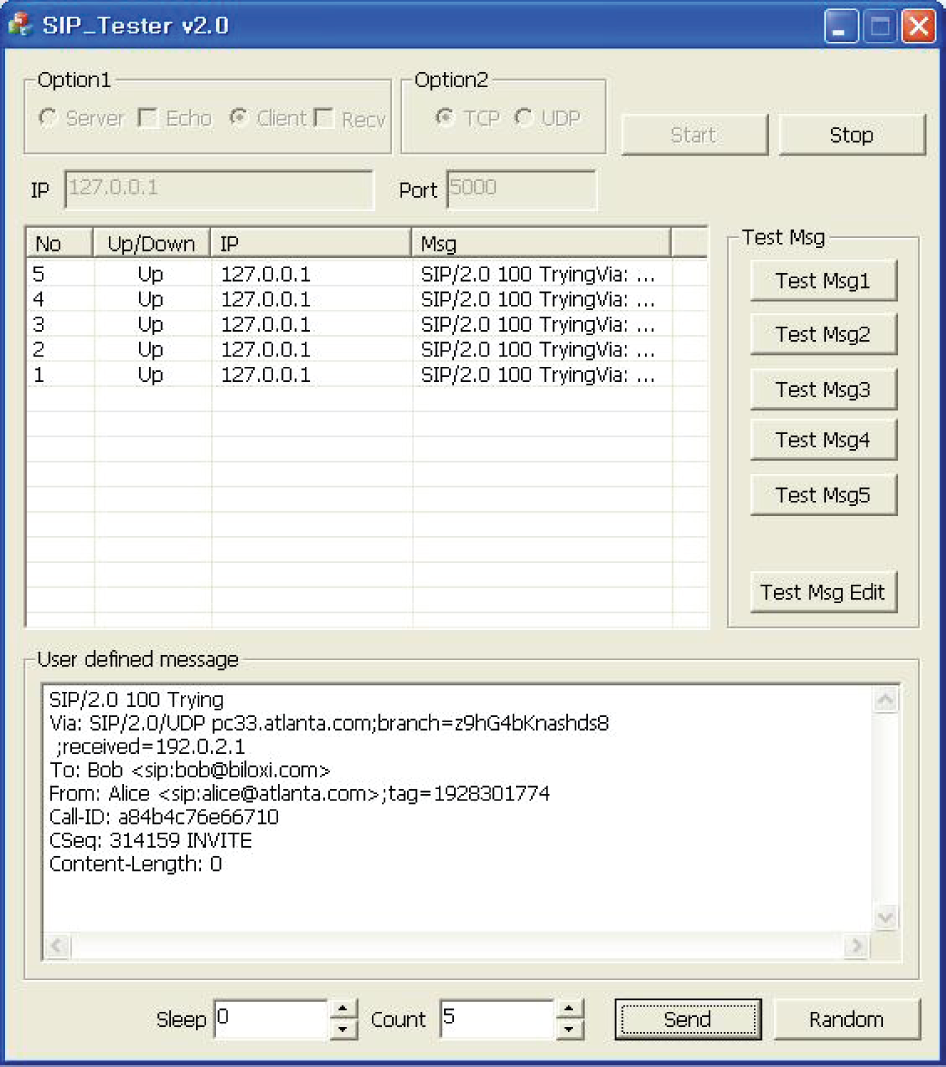
TCP client data transmission.
4.5. Verification between Dissimilar Platforms
Thus far, the simulator has been used as a server and a client, and the simulator functioning was verified by using the same system for convenience. However, for the actual functioning of a simulator, the data transmission between dissimilar platforms should be tested to check out whether the simulator can be used in an actual development process.
For this, a UDP server was created on Linux and the simulator suggested in this study was used for verifying the functioning. Each of the UDP and TCP transmission protocols was tested as a server and as a client. Herein, only the test performed with UDP is described.
To test the UDP server, the simulator suggested in this study was used as the client. Figure 9 shows the data transmission procedure using the simulator as a client in the process of testing the Linux-Windows network.

Simulator for the test of data transmission between dissimilar platforms (client).
4.6. Measurement of Network Performance
A software developer often confronts a situation where the network performance should be measured. In such a situation, data may be normally processed by adding a basic algorithm for performance measurement to the code under development.
Such a procedure was performed repeatedly with respect to the same data; the data were transmitted by the simulator for 1000, 10000, 50000, and 100000 times and processed by a Linux server. Figures 10 and 11 show the correlation between the number of times of the data transmission and the time taken for the transmission.

Measurement of time taken for transmitting the same data.

Measurement of time taken for transmitting random data.
The two figures given above indicate that the transmission of random data has a delay of approximately several percentage points in comparison with the transmission of the same data. The result is consistent with the fact that, during a network software development, the transmission performance is excellent when the same data are processed or the data of the same length are repeatedly processed. The delay can be attributed to the data processing delay by the simulator or by the Linux server. Irrespective of what the cause of the delay may be, the result indicates that the simulator functions normally. The verification of the simulator showed that the simulator can be used as a more convenient tool for a developer to develop the network software.
5. Discussion and Conclusions
In this study, a software-based network simulator was designed, realized, and verified. The transport layer simulator suggested in this paper supports both the TCP and the UDP protocols, functions as a server and a client for each of the protocols, and allows for the testing of the server and the client. Further, the simulator was designed and realized so that an echo server, which is the most basic element of socket communication, is built-in for the simulator to be generally used by a beginner who studies socket communication or even by a high-ranking engineer who develops advanced software.
Approximately 4 billion data may be transmitted for a test. Data transmission with a similar platform such as Linux was also verified. Further, the simulator proposed in this paper provides the advantage of convenient use as it is developed on the basis of GUI. The simulator also provides a functional advantage in the fact that a user can separately define an SIP message to measure the network performance. In particular, the performance of all text-based UDP and TCP protocols can be measured.
Functions to evaluate the performance of various protocols such as SCTP may need to be added to the simulator in future studies.
Footnotes
Conflict of Interests
The authors declare that there is no conflict of interests regarding the publication of this paper.