




Abstract
The purpose of this research was to see if Kinect sensor can recognize numeric and alphabetic characters written with the hand in the air. Kinect sensor can capture motion without the sensor device being attached to the user's body. The input screen has both modes of numerals and alphabet. The recognition rate was measured and the user wrote the numbers from zero to nine and the letters from A to Z twice. Alphabet recognition relied on Palm's Graffiti. The input numerals and alphabet were recognized by dynamic programming matching based on interstroke information. In addition, this system can perform the numeral operation, such as +, −, ×, and /. Most people are not used to writing in the air and are unfamiliar with Kinect sensor, and it takes some time to master them both. First, the user needs to become accustomed to using the sensor. Average recognition rates of 95.0% and 98.9%, respectively, were obtained for numerical and alphabetical characters.
1. Introduction
Hand gesture recognition is an important research issue in the field of human-computer interaction, because of its extensive applications in virtual reality, sign language recognition, and computer games. Despite much previous work, building a robust hand gesture recognition system that is applicable in real-life applications remains a challenging problem. Existing vision-based approaches are greatly limited by the quality of the input image from optical cameras [1, 2]. Consequently, these systems have not been able to provide satisfactory results for hand gesture recognition. Hand gesture recognition faces two challenging problems: hand detection and gesture recognition. Hand gesture implementation involves significant usability challenges, including fast response time, high recognition accuracy, speed of learning, and user satisfaction, helping to explain why few vision-based gesture systems have matured beyond prototypes or made it to the commercial market for human computer devices [3, 4]. There are some applications for the image, face, use of smartphone, and so forth for human-computer interaction [5–7].
As regards the input system for handwriting in the air, some researchers have suggested the use of a wearable video camera to recognize characters written in the air [8, 9]. Their research provides a letter input as it captures the operation of the operator's hand with a video camera and executes image analysis on a computer. However, it is assumed that the system continuously operates the hand-mounted video camera. The use of multiple cameras has also been proposed in order to recognize the silhouette of a person and cut it out and perform trajectory detection, character recognition, and fingertip detection [10]. This system can be realized by using multiple cameras to obtain a high recognition rate (96.6%) and to recognize handwriting in the air from all directions.
Our system has no equipment in the hand and body using Kinect sensor made by Microsoft (Figure 1) [11]. Kinect sensor provides a natural dialogue between users and electronic devices. Kinect can obtain the image data, voice data, and depth data from the sensor, which is connected to a PC [12]. This research mainly used image data and depth data to detect and estimate the joint position of the body of the user. Kinect can relatively and easy detect hand and gesture recognition using these data. In addition, Kinect can capture motion without the sensor device being attached to the user's body. When we write a letter, we usually use a pen and remove any mistakes with an eraser. With Kinect, we do not need them. Brushstrokes in the air are detected by the coordinates on the
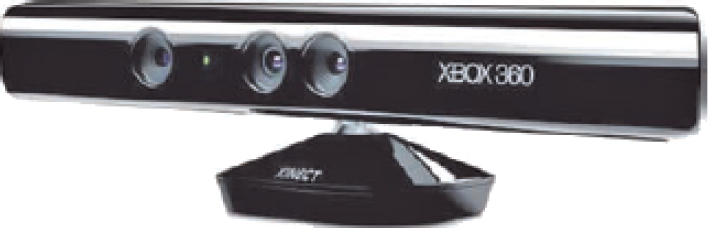
Kinect sensor from Microsoft.
2. Hand Gesture and Character Recognition with Kinect Sensor
2.1. Hand Gesture Recognition
We therefore use Kinect for Windows SDK as a development environment of Kinect sensor. It is possible to perform the detection and estimation of the joint positions of the user's body from depth data. As shown in Figure 2, Kinect sensor can track 20 places of joint. Kinect can carry out easily hand detected and gesture recognition from this data and detected gestures. As shown in Table 1, this research used the gestures “Click” and “Wave.” “Click” is used to start tracking the hand and “Wave” is used to stop tracking.
Kinect can recognize four gesture types.


Recognition of the human skeleton (from Microsoft Kinect for Windows SDK).
2.2. Hand Writing Detection by Kinect Sensor
We selected the method of writing numerals in the air with the hand. We described the recognized hand by using the function depicted in Section 2.1. The character can be written in the air by tracking the movement of the hand and recording the coordinates of it on the “Click” means start tracking and pen is “ON.” First puts point, “OFF” of pen is using the distance to the point from the Kinect Hand outside the screen means pen is “OFF.” “Wave” means end tracking and pen is “OFF.”
2.3. Numeral Recognition and Operation
If the left hand is between 500 and 1000 mm away from Kinect on the blue point, the pen is off and DP matching is performed simultaneously for the data of written numerals. The system can identify any numeral from zero to nine. The left yellow point is the sum of +, −, ×, and ÷, as shown in Figures 3(a) and 3(b). A wave of the hand deletes the previous numeral and the operation is performed by using the input second numeral.

(a) Writing the numeral by hand. (b) Simulation results of operation by Kinect sensor.
2.4. Alphabet Recognition
The alphabet can be recognized by using Graffiti. Graffiti is essentially a single-stroke shorthand handwriting recognition system used in PDA (personal digital assistant) and based on Palm OS. Graffiti was originally written by Palm Inc. as a recognition system for GEOS-based devices such as HP OmniGo 120 and Magic Cap-line. The software is based primarily on uppercase characters that can be drawn blindly with a stylus on a touch-sensitive panel. Since the user typically cannot see the character as it is being drawn, complexities have been removed from four of the most difficult letters: “A,” “F,” “K,” and “T” can be drawn without any need to match a cross-stroke [14, 15].
2.5. DP Matching and Interstroke Information
Features used to recognize characters are listed below:
DP (dynamic programming) distance, interstroke information.
This system starts the DP matching when the distance from Kinect to the blue point in Figures 3(a) and 4(a) becomes constant. DP matching is based on the degree of similarity between the elements of the pattern. DP matching finds the ordered correspondence between time series of two pattern elements with the aim of minimizing the distance. It is a matching method that takes into account the expansion and contraction of the pattern [16].
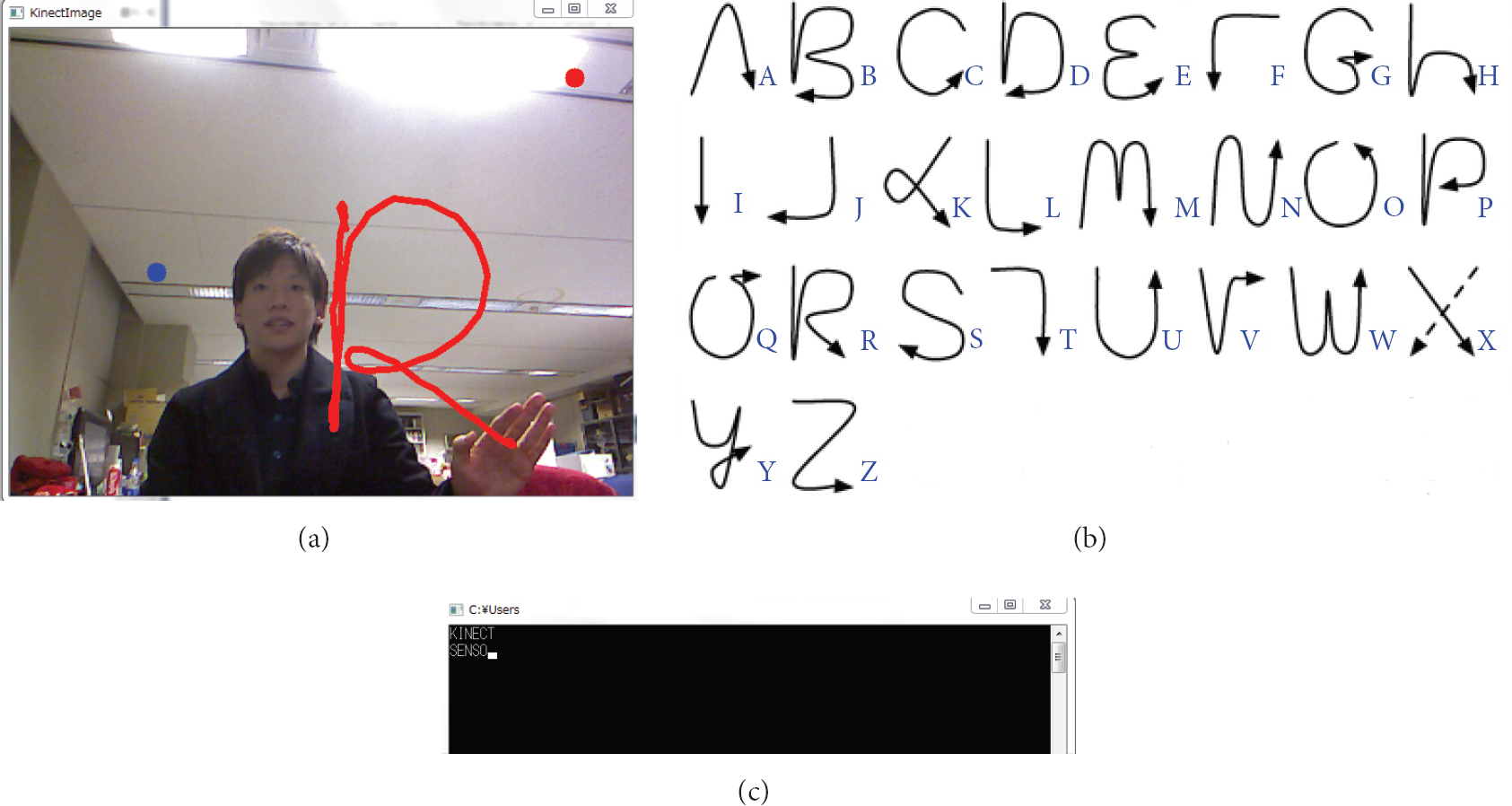
(a) Writing the alphabet by hand. (b) Graffiti of normal alphanumeric gestures. (c) Input results of alphabet using Kinect sensor.
The input and reference pattern are represented by the time series of features as follows:
initial condition (2) DP recursive expression where (3) pattern distance is calculated as follows: This research uses DP matching for both the 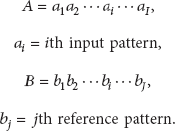

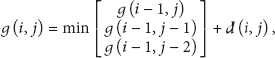
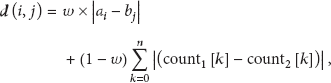

Interinformation between feature points, such as shape context [18], is introduced. In addition to using character intrastroke information such as the
In this study, we use other interstroke information, as shown in Figure 5. Following [17], we develop new interstroke information. For example, as shown in Figure 5, interstroke information is calculated by the hit count of eight direction lines from the start point. Each number of crossing points of (2) in Figure 5 is calculated and we obtain the result of counting number of (3). Using the counting number, the distance is calculated by comparison with interstroke information from the reference pattern. Further, we increase the recognition rate by combining the starting coordinates of matching.

Calculation of interstroke information.
3. Experimental Result
First, we perform the experiment to investigate the familiarity about Kinect for handwriting recognition.
We measure the total time of 5 times of handwriting by 5 writers where the subject is the numeral of 0–9. Each result of total time of 1st, 3rd, and 5th times is shown in Table 2.
Experiment by the 1st, 3rd, and 5th writing time of character.

Table 2 shows the experiment by the 1st, 3rd, and 5th writing time of character. It takes long time at 1st writing; however, at fifth time everyone is familiar with handwriting interaction based on Kinect sensor because recognition of hand, handwriting of writer in the air, and deleting character of mistake are smooth for function. From the result of familiarity, it takes 3–5 times for the user to be familiar with handwriting interaction using the Kinect. This is very short time for trial and error.
Second, we perform the experiment to investigate the recognition rate of character handwriting using Kinect sensor. For experiment, the user of 10 writers is used to write alphabet and numeral characters of two times.
Recognition rate of characters is 96.9%. This result is better than that of [10]. Figure 6 shows the recognition rates of each numeral. Average recognition rate is 95.0%. The character recognition rate of “4,” “6,” “8,” and “9” (below 100%) is “70%,” “95%,” “95%,” and “90%,” respectively. Recognition rate of most numerals is high, but only “4” was lower than other numerals. The reason for the lower recognition rate is that some numerals have similar shapes and similar one-stroke writing style. Figure 7 shows the recognition rate of each letter. Average recognition rate is 98.9%. Recognition rate of most letters is high, but for “D” and “P” it is slightly lower. The recognition rates of “D” and “P” are 90% and 80%, respectively. The reason for lower recognition rates is that some letters employ a similar style in the Graffiti of normal alphanumeric gestures.
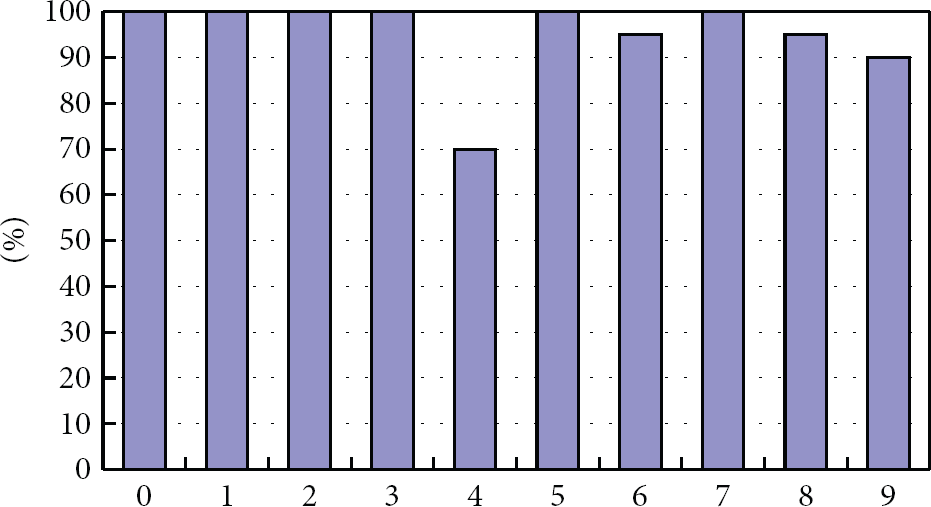
Recognition rate of each numeral.
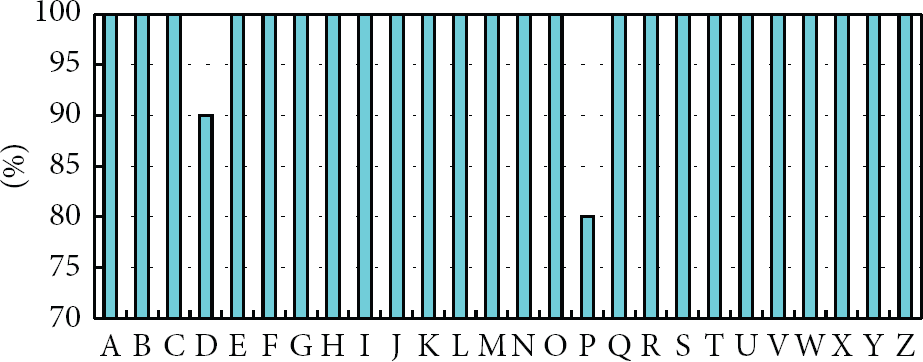
Recognition rate of each letter.
4. Discussion
4.1. Consideration of Recognition Rate
The recognition rate of numeral was 95.0%; however, the case of “4” was worst comparing with another numeral because this system permits some different writing pattern of numeral data according to the variety of human handwriting style. For example, despite the general pattern, the handwriting pattern will be various by different stroke order and shape by one- stroke writing. Therefore, the shapes of “4” and “9” became similar by one-stroke writing as shown in Figure 8.

Input numeral and recognition.
The recognition rate of alphabet character was 98.9%. This result of alphabet recognition rate is higher than numeral recognition rate since we used the Graffiti character with low ambiguity. If the method of writing style of numeral will be changed to Graffiti character, the improvement of recognition rate could be expected.
Detection performance of Kinect sensor is very high; however, it takes some time for user to perform the handwriting and detect hands because most people are not familiar with handwriting based on Kinect sensor in the air. Therefore, user needs to be familiar with handwriting interaction between Kinect and human for increasing recognition rate.
4.2. Misrecognition
There are two types of misrecognition as follows.
The numeral recognition rate of “4” was the lowest in this research because “4” and “9” have a similar shape, as shown in Figure 8. Alphabet recognition rate of “D” was lowest in this research because “D” and “P” are similar in shape and written style, as shown in Figure 9. Humans cannot distinguish between “4” and “9” and “D” and “P” so this is difficult to deal with. Methods of solving the other misrecognitions include postprocessing to recognize parts of letters and the special relationship between parts.

Input alphabet and recognition.
4.3. Recognition Rate of Numeral Character
As shown in Section 4.1, the result of numeral recognition rate was a little low comparing with alphabet using Graffiti. In the viewpoint of human-computer interaction, we can say that our system with natural writing style used in daily life is perfect and easy to use for any user. However, if you expect to improve the recognition rate, the scheme of writing style of numeral character could be changed to Graffiti style.
5. Conclusion
This paper considered the recognition by Kinect sensor of characters written in the air with the hand. Recognition rate was 96.9%, higher than that of studies using multiple cameras [10], even though our system uses only one camera. The researchers in [9] used DP matching and notation of their own alphanumerics; however, the recognition rate was 75.3%. We have obtained improved recognition rates by introducing interstroke information in DP matching. Kinect performs very well in terms of hand detection, but most people are unfamiliar with writing a character in the air or indeed with Kinect. Therefore, the user needs to become accustomed to using Kinect. To reduce the chances of misrecognition, we suggest a method which eliminates similarity in writing styles, such as developing one's own writing style, would be helpful.
For further study, the recognition of hand shape will be performed because users can communicate with a computer faster than drawing a shape by hand. The purpose of this research was to enable easy sign language. It is less difficult to remember than normal sign language. This research could enable people who do not know normal sign language to communicate with others via a computer.
Footnotes
Conflict of Interests
The authors declare that there is no conflict of interests regarding the publication of this paper.