




Abstract
As smart phones are becoming widely used, a variety of services to store and use important information such as photos and financial information are now provided. User authentication to protect this information is increasingly important. The commonly used 4-digit PIN, however, is vulnerable to the Brute Force Attack, Shoulder-Surfing Attack, and Recording Attack. Various authentication techniques are being developed in order to solve these problems. However, the technique that provides perfect protection, even from the Recording Attack, is not yet known, and in most cases, a password can be exposed by multiple Recording Attacks. This paper proposes a new user authentication method that protects against a Recording Attack from spyware on the user's smart phone. The proposed method prevents password exposure by multiple Recording Attacks, is implemented on a real Android phone, and has been evaluated for usability.
1. Introduction
A smart phone is different from feature phones in that it has a mobile OS that makes it possible to freely install and remove applications just as for personal computers. Because of this, a variety of services can be provided in addition to basic functions such as calling and messaging. However, malware also occurs in smart phones, just as for personal computers. This malware could expose information in the smart phone, and consequently invade privacy or cause financial damage.
Among these types of malware, spyware could exist which leaks the authentication screen and touch coordinates of the user. When the authentication screen and touch coordinates are exposed, it is effectively a Recording Attack [1]. The Recording Attack is a type of Shoulder-Surfing Attack [2] where the attacker records the entire user authentication process including ID and password input for a service. If a spyware records and sends this process to an attacker's server, the password of the user can be easily taken. Although many authentication methods have been developed in order to prevent Shoulder-Surfing Attacks, these are only for those attacks where an attacker simply views the authentication process over a shoulder and remembers the password. In order to resist such attacks, these methods only momentarily expose the screen information that is provided during the authentication process or increase the amount of data that has to be remembered by the attacker. However, these methods are limited because they cannot perfectly protect against a Recording Attack, which records the entire authentication screen.
Therefore, this paper proposes an authentication method devised such that the password cannot be easily taken even when the entire authentication screen is recorded and exposed. This method generates and authenticates a one-time password that is changed each time according to prior knowledge of the user without the need for separate hardware and includes wrong information in the inputted password, making it possible to prevent the exposure of the correct password to the attacker. The proposed method has been developed for the smart phone environment and ensures safety from the Shoulder-Surfing Attack, Brute Force Attack [3], Smudge Attack [4], and Recording Attack that threaten user authentication.
2. Related Work
Since a variety of attack methods such as the Brute Force Attack, Smudge Attack, and Shoulder-Surfing Attack have been known to threaten user authentication, many studies [5–10] have attempted to solve these problems. Among them, we briefly introduce some techniques that can be applied to mobile devices.
2.1. DAS (Dynamic Authentication System)
DAS [11] is a scheme for bank ATMs to prevent the Shoulder-Surfing Attack. This scheme uses a common PIN as the password, and during user authentication shows the digits of a number keypad that are randomly positioned only when the “view” button is pressed in order to reduce the exposure time to the attacker. After the user checks the position of digits by pressing the “view” button, the digits disappear when the finger is lifted and the user inputs the remembered positions of digits. After the input, the digits are repositioned randomly. This method is safe from the temporary Shoulder-Surfing Attack due to the short exposure time, but unsafe from multiple Shoulder-Surfing Attacks or a Recording Attack.
2.2. Passfaces
Passfaces [12] uses the image of a human face as the password instead of numbers or characters. It has been developed based on the theory that it is easier to use images than numbers or characters for memory and that human faces can be easily remembered. The user selects a face image to be used as the password among those provided by the system. Then the user familiarizes him/herself with the images by looking at each face image for a few seconds. During user authentication, nine images are shown, of which eight are dummies and one is the user-set password image. The user selects the password image that has been set by him/her and repeats the process for the length of the password. If all the images of the password are identical to the selected images, the authentication will be successful. This scheme prevents the Shoulder-Surfing Attack as human faces look similar from a distance. In addition, dummy images are shown which are similar in gender or appearance to the password face images in order to confuse the attacker. However, this method has a weakness in that the password images can be clearly seen at close range or by using devices such as a telescope and is vulnerable to the Recording Attack.
2.3. M.TransKey
M.TransKey [13] is a virtual keypad scheme for protecting the touch log in the smart phone environment. Random spaces are added to the QWERTY keyboard and keys are differently positioned for each use. As the user inputs different positions for each key input, the attacker cannot know the inputted key even when the coordinates are exposed through the touch log. It can also be applied to existing systems as it is able to input alphanumeric values. If the Shoulder-Surfing Attack is used to view the authentication screen, however, the password can be easily exposed, and the method is also unsafe from spyware that leaks the screen as well as the touch log.
2.4. Dementor-SGP
Dementor-SGP [14] is an authentication scheme using the relative path between images. The password consists of one hole image and three user images. The user images are inserted into the hole image for user authentication. Images are randomly positioned and the relative path is changed for each authentication. The security levels are organized according to security and usability, and the user can select the level. At the lowest level, the password image is easily exposed as user images are dragged and inserted into the hole image. From the second level upwards, however, user images are moved to the hole image by arrow keys instead of a mouse and inputted with the input button. The hole image and user images are not exposed as they are not directly selected, and it is safe even from the Shoulder-Surfing Attack as images are randomly positioned and consequently arrow keys are inputted differently for each authentication. In the case of the Recording Attack, it is possible to check which user image is inserted into each image, but it is not possible to know which one is the hole image among them. Nonetheless, multiple Recording Attacks can determine the image into which the same user image is inserted and steal the password.
3. Proposed Scheme
The existing password schemes were devised to protect from the Cognitive Shoulder-Surfing Attack, which depends upon human memory. They are, however, vulnerable to the Recording Attack, which records the entire authentication process by using a camera or other recording devices. In particular, the password is easily exposed to spyware, which leaks the touch information and screen. This paper proposes an authentication method to solve these problems.
The password of the proposed scheme consists of a sequential selection of grid cells and a number of errors to include. During user authentication, up, down, left, and right arrows are shown on each cell and the message “Start” is displayed on a random cell. The user moves from the “Start”-displayed position according to the arrow directions that are shown on the cells selected as the password by him/her. When moving according to arrow directions, the user intentionally inputs the indicated number of wrong authentication values by moving in a direction different from the arrow shown on the password cell. The number of included errors must be equal to the number set when setting up the password. The left image of Figure 1 indicates how to set the password.

Password setting (a), common user authentication (b), and an example where an authentication value is omitted during user authentication (c).
Using (
In the proposed scheme, arrow directions could go beyond the scope of the grid, as shown on the right of Figure 1, as the starting position is selected randomly. As shown, the directions to move to are “left,” “right,” “down,” “down,” and “down,” the starting position is (1, 4), and the password is (1, 1), (2, 1), (3, 1), (4, 1), and (5, 1). If the user moves according to the password, the coordinates should be (1, 4), (0, 4), (1, 4), (1, 5), (1, 6), and (1, 7). However, a value less than 0 on the x-axis of the grid cannot be inputted. In these cases, the arrow that goes out of the grid is omitted and the next password direction is inputted. In the above example, as the first “left” arrow cannot be inputted, it is omitted, which makes the coordinates (1, 4), (2, 4), (2, 5), (2, 6), and (2, 7). If the user moves “right” in order to make an error for the last authentication value, the actual moved coordinates become (1, 4), (2, 4), (2, 5), (2, 6), and (3, 6).
4. Security Analysis
The safety of the proposed scheme is analyzed in this section. The parameters used for safety analysis are as shown in Table 1.
Parameter description.

4.1. Brute Force Attacks
The Brute Force Attack is a method that finds the password by inputting possible password combinations one by one. The number of possible password combinations of the proposed scheme is influenced by the grid size and the password length. This can be expressed as
Number of possible password combinations according to the password length.

The number of possible password combinations is about 125 times more than the commonly used 4-digit PIN, which significantly increases safety.
4.2. Smudge Attacks
The Smudge Attack is a method that finds the password by using smudges left on the input interface by a user. As for the 4-digit PIN password, it is possible to conjecture the password by using the fingerprints left on the keypad to determine which buttons have been pressed. In the commonly used Android pattern lock, it is difficult to find out the password by Brute Force Attacks as more than 380,000 password combinations are possible. Smudge Attacks, however, can easily determine the path of the user. Besides the naked eye, a microscope or other fingerprinting tool can be also used to easily obtain the input smudges. For the proposed scheme, the information that could be obtained from the Smudge Attack is the starting position and movement directions. However, the starting position is changed randomly each time and as for the movement directions, the arrow shapes created on the password cells are changed for each authentication. Therefore, the Smudge Attack cannot find the password from the proposed scheme.
4.3. Spyware-Based Recording Attacks
The spyware-based Recording Attack is a much more threatening attack than existing Shoulder-Surfing Attacks and general Recording Attacks. Therefore, if safety can be confirmed from a spyware-based Recording Attack, it is also safe from the Shoulder-Surfing Attack or other types of Recording Attack. The spyware-based Recording Attack mentioned here is assumed to record and leak to the attacker all the authentication process.
The proposed scheme has three elements for protection against spyware-based Recording Attacks. The first element is arrows in the same direction, the second is the omission of authentication values, and the last is included errors.
4.3.1. Arrows in the Same Direction
Even if the attacker has recorded the entire authentication process to steal a password, it is not possible to determine password cells. The reason is that the attacker cannot know which cell is the password as a quarter of the total cells have the same arrow as the movement direction used for authentication. The attacker, however, could get a candidate password cell set, consisting of a quarter of the total cells, which indicate the same directions as the recorded directions moved for authentication. The attacker could get another candidate password cell set, also amounting to a quarter of the total cells using the same method in another authentication process, and conjecture the password cells from an intersection of the two sets. The following expression shows the average number of candidate password cell sets that could be conjectured from s recorded authentication processes:

4.3.2. Omission of Authentication Values
Some user authentication cases could occur where input is not possible as the starting point is located at an edge and the arrow goes beyond the grid. The arrow that cannot be inputted is omitted and the next authentication value is inputted in order to solve this problem. As a part of the inputted directions are omitted, the potentially exposed authentication values are decreased and safety becomes significantly enhanced. The probability that input values are not to be omitted in user authentication can be obtained by dividing the number of paths for which the authentication values are not omitted by the number of total paths which could be inputted for a password. The number of total paths is the number of movable directions for all (
Function VAR tot tot = 0 FOR FOR tot = tot + ENDFOR ENDFOR RETURN tot Function IF IF RETURN 1 ELSE RETURN 0 ENDIF ELSE VAR right, left, top, bottom right = 0 left = 0 top = 0 bottom = 0 IF right = left = top = bottom = ENDIF ENDIF RETURN right + left + top + bottom
The path can be moved by as much as N and the scope cannot go beyond (
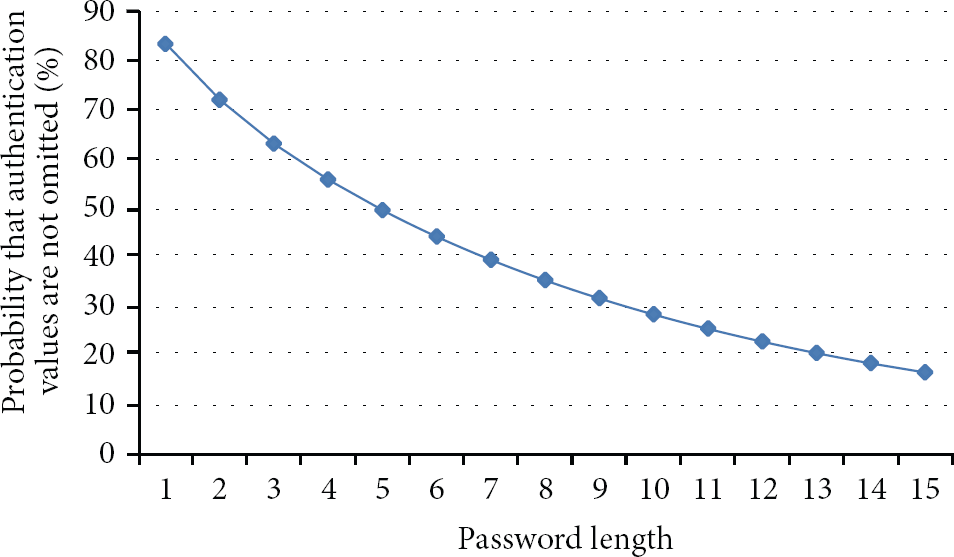
Probability that authentication values are not omitted according to the password length.
Therefore, multiple Recording Attacks are required to obtain an authentication process where authentication values are not omitted. Using Expression (1), the number of authentication processes required to determine the password is three for a grid size of
4.3.3. Errors Included in Authentication Values
It has been shown that it is possible to be safe from about seven Recording Attacks due to the inclusion of arrows in the same direction and the omission of authentication values. However, the authentication process can be continually leaked and the password eventually exposed if the Recording Attack is based upon spyware. Errors are intentionally included in authentication values to prevent the correct password cells from being exposed. The attacker has to make an intersection of many candidate password cell sets in order to determine the password. The attacker gets the wrong password if there are incorrect authentication values among them. Therefore, the attacker has to check if the password is correct. When errors are not included, it is possible to determine the password cell by using the same authentication processes and making an intersection of them for each password digit. However, the attacker has to use different authentication processes for making the intersection for each password digit, as one of the password digits includes an error. In addition, it is necessary to check if the password is correct, independently, for each password digit. The probability that one password digit has an error is e/N. Using this, the number of correct authentication values for each password digit among the total exposed authentication processes becomes the following:


The probability that the attacker gets the password has been obtained according to the number of exposed authentication processes for
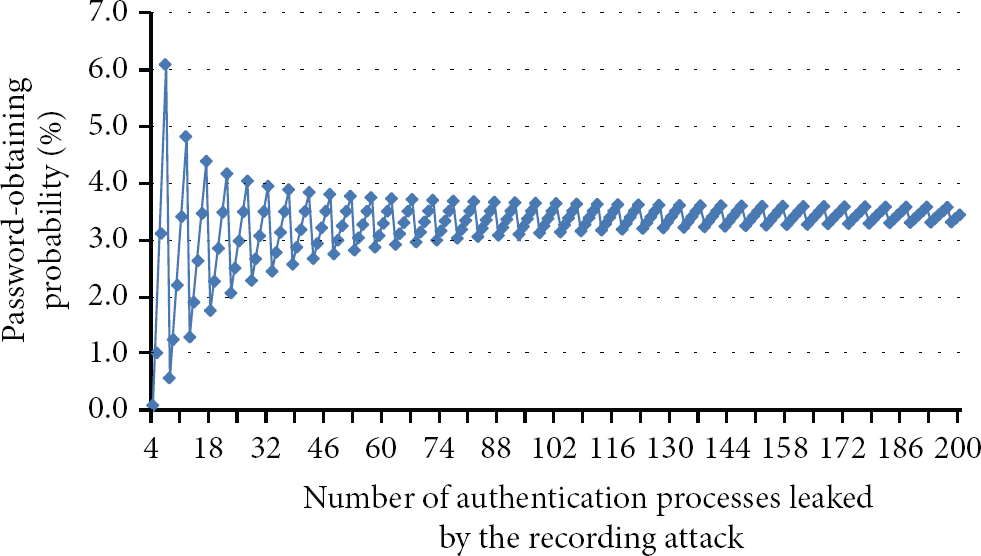
Probability that the password will be obtained according to the number of leaked authentication processes.
From Figure 3, we can see that the probability of obtaining the password converges to a certain value as the number of exposed authentication processes increases. It is possible to get the average password-exposure probability as the number of exposed authentication processes increases to infinity. The following expression shows the average password-exposure probability:

Success probability of the spyware-based Recording Attack.

The password is 100% exposed to a spyware-based Recording Attack for all methods other than the proposed scheme. DAS randomly positions the keypad and reduces the amount of exposure time. It is possible, however, to find out the password with one Recording Attack as it is possible to recheck the screen where the numbers have been exposed. The password is easily exposed to a Recording Attack as the password is directly touched and selected in Passfaces and M. TransKey. Dementor-SGP protects the password for one Recording Attack as input is executed with arrow keys instead of direct selection of the hole and user images. However, the single Recording Attack can see which user image is inserted into each image displayed on the screen, and two Recording Attacks make it possible to find out the password if the attacker can obtain the image into which the same user image is inserted. The proposed scheme is safe even from multiple Recording Attacks as errors are included in the values used for authentication, and consequently, the correct password is not exposed.
5. Experimental Results
In this section, the existing and proposed schemes were implemented and their usability was experimentally quantified. The development tools used for the implementations were Eclipse Indigo, Android SDK 2.3, and JAVA 1.7.0. The test equipment consisted of a smart phone SHW-M250S (1.2 GHz Dual-Core CPU, 1 GB RAM) running Android 2.3.
5.1. GOMS Model Test
The GOMS model [15] was used for the objective usability test. The GOMS model is one of the human information processor models used for observing the interaction between humans and computers and divides human behavior into four rules: Goals, Operators, Methods, and Selection, and analyzes them. Evaluation tools such as CogTool [16], GOMSED [17], and QGoms [18] are based upon this model, and this paper used CogTool 1.2.2 for evaluation. Table 4 shows the comparison of estimated authentication times of the existing and proposed schemes as measured by CogTool.
CogTool measurement results.

The test results show that the proposed scheme has a slightly faster authentication time than existing methods. The fastest scheme is Passfaces, as it is only necessary to select five user-set images to authenticate the password. M.TransKey showed a slow result as it has smaller buttons than Passfaces and the password length is at least six digits. DAS was slower than the proposed scheme even though it uses a 4-digit PIN as the password, because the user also has to press the “view” button to check numbers. Dementor-SGP was also slow as many inputs are necessary to move user images to the hole image using the up, down, left, and right buttons. The proposed scheme showed a comparatively fast result as the password is inputted with one drag from the starting position.
5.2. User Test
Authentication time and error rate were measured for ten test participants in order to check if the existing and proposed schemes are convenient to use. Test participants were given detailed explanations and exercise time to become familiar with each authentication method. The authentication time and error rate were measured after executing each authentication method five times. Table 5 shows the authentication time and error rate for each scheme.
User test results.

A test log was saved to collect the information about password authentication time and error rate. Test results show that DAS and M. TransKey have fast authentication times. The reason is that they use typical 4-digit PIN and alphanumeric symbols that facilitate easy use. The other methods use graphical passwords, and among these, the proposed scheme showed the fastest result. Unlike the other methods, the proposed scheme has a fast authentication as it uses one instance of drag for authentication. Passfaces took a long time for the user to remember the password, and Dementor-SGP also needed a long time to move user images to the hole image with just the arrow keys.
The error rate of the proposed scheme is 18.0%, which is not better than the existing methods, but it is at the same allowable level as in the commonly used M.TransKey. There were many cases where the user did not input errors as they should have and the authentication failed. As for these cases, the error rate can be reduced by classifying security levels and making authentication successful even when errors have not been inputted. As this increases usability but decreases security, it is possible to divide security levels so that the user selects the desired level. Further, the proposed scheme can enhance memorability by adding a background image to the grid or images to each cell because a user can remember images longer than simple cell positions.
6. Conclusion
This paper proposed a new authentication method that is safe from spyware-based Recording Attacks. The proposed scheme uses the grid cells and the number of errors as the password, moves according to arrow directions shown on the password cells, and also moves to incorrect positions according to a predefined number of errors for user authentication. The proposed scheme generates and authenticates the one-time password without the need to separate hardware and is safe from the Brute Force Attack, Smudge Attack, Shoulder-Surfing Attack, and Recording Attack. Usability test results also show that its error rate is an allowable level, though it is a little higher than existing methods, and that its authentication speed is slightly faster. Therefore, the proposed scheme is a practical new password authentication method that has similar usability to existing methods and also can protect from the spyware-based Recording Attacks that threaten the mobile environment.
Footnotes
Conflict of Interests
The authors declare that there is no conflict of interests regarding the publication of this paper.
Acknowledgments
This work was supported in part by the IT R&D program of MOTIE/KEIT (10039180, Intuitive, convenient, and secure HCI-based usable security technologies for mobile authentication and security enhancement in mobile computing environments) and in part by the National Research Foundation of Korea (NRF) Grant funded by the Ministry of Education (2013R1A1A2010382).